15 Best Intel Core i7 Mini PCs, Compared
As an Amazon Associate we earn from qualifying purchases. Links on this page are affiliate links.
Finding the right Intel Core i7 mini PC requires balancing processor capability, physical footprint, and expansion limits. We compared 15 models based strictly on the specifications published on their listings. The Dell Optiplex Micro Core i7 Desktop takes the top position because its 16-core processor and support for up to 64GB of RAM deliver heavy multi-threaded productivity inside a 2.41-pound chassis.
This guide helps you choose the right balance of solid-state storage, memory headroom, and display outputs for your everyday desktop workspace.
Quick picks
The best fit for you
- You need multi-threaded performance in a VESA mountable chassis Dell Optiplex Micro Core i7 Desktop Its 16-core Intel Core i7 processor and compact chassis support demanding workloads alongside up to 64GB of expandable memory.
- You need maximum memory for heavy multitasking workloads HP EliteDesk Mini Intel Core i7 It comes equipped with 32GB of RAM and a 1TB SSD for memory-heavy office workflows across dual monitors.
- You want a compact machine for casual gaming ACEMAGIC Intel Core i7 Gaming Mini PC A 16-core processor pairs with a 1TB SSD and integrated graphics in a compact five-inch chassis.
- You need modern DDR5 memory and WiFi 6E Lenovo ThinkCentre Tiny Core Ultra PC The configuration includes 16GB of DDR5 memory and WiFi 6E networking within a 2.91-pound desktop chassis.
Our 15 picks

Dell Optiplex Micro Core i7 Desktop
Best for: compact multi-threaded office productivity
- Processor
- Intel Core i7
- Installed RAM
- 16GB
- Storage Capacity
- 512GB SSD
- Memory Type
- DDR4-3200
- Ethernet Ports
- Gigabit Ethernet
- Operating System
- Windows 11 Pro
This compact desktop brings a 16-core Intel Core i7-13700T processor with 24 threads to your workspace. You get 16GB of DDR4 memory, expandable up to 64GB across two slots, and a 512GB PCIe solid-state drive. It fits standard VESA mounts and includes dual video outputs via DisplayPort 1.4a and HDMI 1.4b. This setup gives you strong multi-threaded productivity without occupying significant desk area.
Pros
- 16-core, 24-thread Intel Core i7-13700T processor
- Two SODIMM memory slots supporting up to 64GB RAM
- Dual monitor support via DisplayPort 1.4a and HDMI 1.4b
- Compact chassis measuring 7.17 by 7.01 by 1.42 inches
Cons
- No USB Type-C ports included
- HDMI output is limited to version 1.4b
- Uses DDR4 memory rather than newer DDR5
Good fit if
- You need a 16-core processor for multi-threaded productivity tasks.
- You plan to upgrade memory up to 64GB across two slots.
- You want a VESA-mountable chassis that weighs under 2.5 pounds.
Skip if
- You need native USB-C ports for modern peripherals.
- You require high-refresh 4K output over HDMI.
Verdict: Dell OptiPlex Micro Intel Core i7 Mini PC delivers 16-core processing power in a compact, VESA-mountable chassis with support for up to 64GB of RAM. It handles demanding office workloads efficiently, provided you do not require USB-C connectivity.

HP EliteDesk Mini Intel Core i7
Best for: memory-heavy office multitasking with dual monitors
- Processor
- Intel Core i7
- Installed RAM
- 32GB
- Storage Capacity
- 1TB
- Memory Type
- DDR4
- Operating System
- Windows 11 Pro
The HP EliteDesk Mini Intel Core i7 gives you a compact desktop setup powered by an eight-core Intel Core i7-9700T processor. With 32GB of DDR4 memory and 1TB of storage, you get ample capacity for heavy multitasking and large files. Pre-installed Windows 11 Pro and two DisplayPorts let you run multi-monitor productivity workflows right out of the box.
Pros
- Intel Core i7-9700T 8-core processor with boost up to 4.8GHz
- 32GB DDR4 memory for demanding multitasking
- Dual DisplayPort outputs alongside a legacy VGA port
- Pre-installed Windows 11 Pro operating system
- Includes keyboard and mouse in the box
Cons
- Renewed hardware rather than a brand-new unit
- No built-in HDMI port listed
- Eight-thread processor lacks hyperthreading
Good fit if
- You need 32GB of RAM for data-heavy productivity tasks.
- You use dual DisplayPort monitors for your workstation setup.
- You want a machine ready to deploy with Windows 11 Pro and input accessories.
Skip if
- You need a factory-new computer rather than a renewed system.
- You require direct HDMI connectivity without using display adapters.
Verdict: HP EliteDesk Mini Intel Core i7 delivers dependable eight-core processing and 32GB of memory in a space-saving chassis. It offers practical multi-monitor desktop performance for standard professional workstations.

ACEMAGIC Intel Core i7 Gaming Mini PC
Best for: compact multi-threaded productivity and casual gaming
- Processor
- Intel Core i7
- Installed RAM
- 16GB
- Storage Capacity
- 1TB NVMe PCIe 4.0 SSD
- Memory Type
- DDR4
- Graphics
- Intel UHD Graphics
- Ethernet Ports
- 1x Gigabit Ethernet
This compact desktop pairs a 16-core Intel Core i7-14650HX processor with 16GB of DDR4 memory and a 1TB PCIe 4.0 NVMe SSD. It delivers multi-threaded computing power alongside six USB 3.2 Gen 2 Type-A ports, triple 4K display connectivity, and Windows 11 Pro. It suits you if you need a high-wattage HX processor for casual gaming, content multitasking, or Linux development in a compact footprint.
Pros
- 16-core, 24-thread Intel Core i7-14650HX processor with up to 5.2GHz turbo
- Six USB 3.2 Gen 2 Type-A ports and one display-capable USB-C port
- Triple 4K display output via HDMI 2.0, DisplayPort 1.4b, and USB-C
- Expandable memory up to 64GB and storage expansion up to 4TB
Cons
- Relies on integrated Intel UHD Graphics instead of a discrete graphics card
- Uses DDR4 memory rather than DDR5
- Gigabit Ethernet port lacks 2.5Gbps transfer speeds
Good fit if
- You need a 16-core HX-series processor for heavy multi-threaded productivity.
- You want to run three 4K monitors simultaneously from one small desktop.
- You plan to upgrade memory up to 64GB or storage up to 4TB later.
Skip if
- You require a dedicated discrete GPU for modern AAA gaming.
- You need high-speed 2.5GbE wired network connectivity.
Verdict: ACEMAGIC Intel Core i7 Gaming Mini PC provides 16-core processing speed and expansive port selection for everyday computing and light gaming. Its reliance on integrated Intel UHD graphics makes it best suited for casual titles rather than demanding graphic workloads.

Lenovo ThinkCentre Tiny Core Ultra PC
Best for: modern enterprise office and multi-display setups
- Processor
- Intel Core i7
- Installed RAM
- 16GB
- Storage Capacity
- 512GB
- Memory Type
- DDR5
- Graphics
- Integrated Intel Graphics
- Ethernet Ports
- RJ-45 Gigabit Ethernet
This compact desktop pairs 16GB of DDR5 memory with a 512GB NVMe solid-state drive and Windows 11 Pro. You get modern connectivity including Wi-Fi 6E, Bluetooth, DisplayPort, HDMI, and USB-C across a chassis measuring 1.5 inches thin. It suits enterprise deployments, multi-display office multitasking, and professional workspaces needing fast networking and compact desktop placement.
Pros
- DDR5 system memory paired with a 512GB NVMe SSD
- Wi-Fi 6E, Gigabit Ethernet, and Bluetooth connectivity
- Dual display outputs via DisplayPort and HDMI
- Compact footprint at 1.5 inches wide and 2.91 pounds
Cons
- Integrated graphics rather than dedicated graphics hardware
- Base storage capacity limited to 512GB
Good fit if
- You want modern DDR5 memory and Wi-Fi 6E in a compact chassis.
- You need multi-monitor support using DisplayPort and HDMI.
- You require Windows 11 Pro for business applications.
Skip if
- You need dedicated graphics for heavy 3D rendering or gaming.
- You require more than 512GB of internal storage out of the box.
Verdict: Lenovo ThinkCentre Tiny DDR5 PC provides current memory and wireless standards in a sub-three-pound desktop frame. It delivers reliable office productivity, multi-screen setups, and enterprise networking in limited work areas.

Lenovo ThinkCentre Tiny i7 32GB Mini PC
Best for: memory-heavy everyday office multitasking
- Processor
- Intel Core i7
- Installed RAM
- 32GB
- Storage Capacity
- 1TB
- Memory Type
- DDR4
- Graphics
- Integrated Graphics
- Operating System
- Windows 11 Pro
This compact Lenovo desktop packs a quad-core Intel Core i7-6700T processor, 32GB of DDR4 memory, and a 1TB NVMe solid-state drive into an eight-inch chassis. It comes loaded with Windows 11 Pro and built-in Wi-Fi. If you need generous memory and ample local storage for multitasking, office applications, and general computing without crowding your desk, this small form factor machine gives you high capacity in a footprint that fits anywhere.
Pros
- 32GB DDR4 memory for multitasking
- 1TB NVMe M.2 SSD storage
- Compact chassis measuring 8 by 7 by 2 inches
- Pre-installed Windows 11 Pro operating system
Cons
- Relies on integrated graphics rather than a dedicated GPU
- Older quad-core processor design
Good fit if
- You need 32GB of RAM for handling multiple applications at once.
- You want 1TB of solid-state storage built in.
- You have limited workspace and prefer to mount your PC behind a display.
Skip if
- You need a dedicated graphics card for heavy 3D rendering or gaming.
- You require a modern processor with more than four cores.
Verdict: Lenovo ThinkCentre Tiny i7 32GB Mini PC pairs 32GB of memory and a 1TB SSD with a quad-core processor in a compact chassis. It provides substantial storage and multitasking room for everyday workplace setups.

Lenovo ThinkCentre Tiny Intel i7 32GB Desktop
Best for: multitasking across up to three 4K displays
- Processor
- Intel Core i7
- Installed RAM
- 32GB
- Storage Capacity
- 1TB
- Memory Type
- DDR4
- Operating System
- Windows 11 Pro
- Dimensions
- 7.05 × 7.2 × 1.36 inches
View on Amazon: Lenovo ThinkCentre Tiny Intel i7 32GB Desktop
The Lenovo ThinkCentre Tiny Intel i7 32GB Desktop is a compact small-form-factor computer built for multitasking and multi-screen productivity. Inside the chassis, you get an Intel Core i7-6700T processor, 32GB of DDR4 memory, and a 1TB solid-state drive running Windows 11 Pro. It supports up to three 4K monitors simultaneously across DisplayPort and HDMI connections, making it a capable work hub if you manage multiple spreadsheets, streams, or browser tabs.
Pros
- 32GB DDR4 memory for heavy multitasking
- 1TB SSD storage with Windows 11 Pro included
- Native support for up to three 4K displays via DisplayPort and HDMI
- Compact chassis measuring 1.36 inches high and weighing 4 pounds
Cons
- Uses external USB Wi-Fi and Bluetooth instead of integrated wireless
- Features an older 6th-generation Intel Core i7-6700T processor
Good fit if
- You need 32GB of RAM and 1TB of solid-state storage out of the box.
- You run a multi-display workstation with up to three 4K monitors.
- You require a compact desktop running Windows 11 Pro.
Skip if
- You require a current-generation Intel Core processor for heavy compute workloads.
- You prefer built-in internal Wi-Fi rather than external USB wireless adapters.
Verdict: Lenovo ThinkCentre Tiny Intel i7 32GB Desktop delivers generous memory and storage alongside triple-display 4K output for productivity. Its older processor generation and reliance on USB wireless adapters are the primary hardware trade-offs.

GMKtec Nucbox Core i7 Mini PC
Best for: triple-display office setups and fast local networking
- Processor
- Intel Core i7
- Installed RAM
- 16GB
- Storage Capacity
- 1TB
- Memory Type
- DDR4
- Graphics
- Intel Iris Xe Graphics G7 96EU
- Ethernet Ports
- 1x 2.5Gbps LAN
The GMKtec Core i7 Mini PC is a compact desktop powered by an 11th-generation Intel Core i7-1185G7 processor. It features 16GB of DDR4 memory and a 1TB NVMe solid-state drive, with room to expand both internal components. You can connect up to three 4K monitors using HDMI and USB-C ports, alongside 2.5Gbps Ethernet and Wi-Fi 6. This setup suits you if you need reliable multi-display productivity in a compact workspace.
Pros
- Triple 4K display support via dual HDMI and USB-C ports
- Fast 2.5Gbps Ethernet port with Wi-Fi 6 and Bluetooth 5.2
- Dual-channel memory expandable up to 64GB DDR4
- Secondary M.2 2242 SATA slot allows storage expansion up to 2TB
Cons
- Four-core processor design limits multi-threaded headroom
- Primary NVMe slot is limited to PCIe 3.0 transfer speeds
Good fit if
- You run a multi-monitor workstation with up to three 4K screens.
- You need high-speed wired networking through a 2.5Gbps LAN port.
- You want expandable internal storage using dual M.2 drive slots.
Skip if
- You need more than four physical processor cores for heavy multi-threaded tasks.
- You require high-speed DDR5 memory rather than DDR4 SODIMM RAM.
Verdict: GMKtec Core i7 Mini PC delivers capable everyday processing with extensive triple-display support in a small footprint. It provides practical memory and storage expandability alongside fast 2.5Gbps networking.
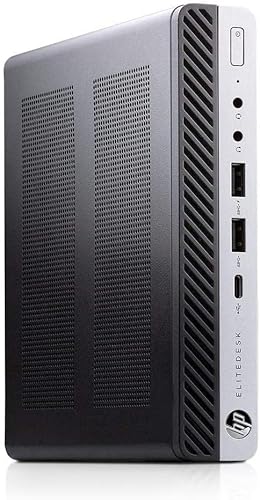
HP Mini Desktop Intel Core i7 32GB RAM
Best for: multitasking office work with ample memory
- Processor
- Intel Core i7
- Installed RAM
- 32GB
- Storage Capacity
- 1TB
- Memory Type
- DDR4
- Graphics
- Intel HD Graphics 530
- Ethernet Ports
- 1x Gigabit Ethernet
This HP compact desktop gives you a quad-core Intel Core i7-6700 processor paired with 32GB of DDR4 memory and a 1TB NVMe M.2 solid-state drive. You get dual DisplayPort video outputs, seven USB 3.1 ports, four USB 2.0 ports, and included wireless peripherals. It suits your workspace if you need substantial system memory and fast local storage for multitasking across everyday office workflows.
Pros
- 32GB DDR4 memory for heavy multitasking
- 1TB NVMe M.2 solid-state drive
- Dual DisplayPort outputs for multi-monitor setups
- Seven USB 3.1 ports and four USB 2.0 ports
- Bundled wireless keyboard and wireless mouse
Cons
- Uses an older 6th-generation processor platform
- Integrated Intel HD Graphics 530 lacks dedicated GPU power
- No native HDMI port listed
Good fit if
- You need 32GB of RAM and 1TB of NVMe storage for multitasking.
- You connect multiple displays via DisplayPort outputs.
- You use numerous external accessories via USB connections.
Skip if
- You require modern discrete graphics for 3D tasks or gaming.
- You need an onboard HDMI output without using adapters.
Verdict: HP Mini Desktop Intel Core i7 32GB RAM delivers ample memory, generous storage, and extensive port selection for standard business productivity. It provides dependable computing power if you do not require a modern processor architecture or dedicated graphics.

Dell OptiPlex Micro i7 Desktop
Best for: compact multi-monitor office setups
- Processor
- Intel Core i7
- Installed RAM
- 32GB
- Storage Capacity
- 1TB
- Memory Type
- DDR4 2933MHz
- Graphics
- Intel UHD Graphics 630
- Ethernet Ports
- 1x RJ45
This compact micro desktop runs on an eight-core Intel Core i7-10700T processor paired with 32GB of DDR4 memory and a 1TB PCIe solid-state drive. You get Windows 11 Pro, Wi-Fi 6, and five USB-A ports alongside a USB-C port in a 2.56-pound chassis. It suits you if you need a compact office workstation with dual DisplayPort outputs.
Pros
- Intel Core i7-10700T 8-core processor reaching speeds up to 4.50 GHz
- 32GB DDR4 2933MHz memory and 1TB PCIe solid-state drive
- Wi-Fi 6 AX201, Bluetooth 5.1, and USB 3.2 Gen 2x2 Type-C connectivity
- Two DisplayPort 1.4 outputs for multi-monitor setups
Cons
- Relies on integrated Intel UHD Graphics 630 without discrete GPU options
- No HDMI output ports built into the chassis
- Features a 10th Generation Intel Core processor
Good fit if
- You need 32GB of RAM and 1TB of SSD capacity for everyday office workflows.
- You plan to connect monitors via DisplayPort 1.4 connections.
- You want a small 2.56-pound system that includes a keyboard and mouse.
Skip if
- You require dedicated graphics hardware for intense 3D rendering or gaming.
- You need native HDMI ports without using video adapters.
- You want a newer generation Intel processor with higher core counts.
Verdict: Dell OptiPlex Micro i7 Desktop provides dependable office performance with 32GB of memory, fast solid-state storage, and flexible port selection. It serves well as a compact work computer for multi-screen business environments.

Lenovo ThinkCentre Tiny Intel i7 Desktop
Best for: high-memory multitasking in compact workspaces
- Processor
- Intel Core i7
- Installed RAM
- 32GB
- Storage Capacity
- 256GB
- Memory Type
- DDR4
- Operating System
- Windows 11 Pro
- Dimensions
- 7.05 × 7.2 × 1.36 inches
This Lenovo ThinkCentre Tiny desktop packs an Intel Core i7 processor and 32GB of DDR4 memory into a compact chassis measuring 7.2 by 7.05 by 1.36 inches. You get a 256GB NVMe M.2 SSD for storage alongside built-in Wi-Fi and Windows 11 Pro. It suits you if you need generous system memory for heavy multitasking while keeping your physical workspace free of large computer towers.
Pros
- 32GB DDR4 RAM for memory-heavy multitasking
- Compact chassis measuring 7.2 by 7.05 by 1.36 inches
- Fast 256GB NVMe M.2 solid-state drive
- Equipped with Wi-Fi and Windows 11 Pro
Cons
- 256GB storage capacity offers limited space for large media libraries
- Base processor clock speed sits at 2.4GHz
Good fit if
- You need 32GB of RAM to run multiple demanding programs at once.
- You want a slim desktop under 1.5 inches tall to save desk space.
- You prefer an out-of-the-box Windows 11 Pro setup.
Skip if
- You require 512GB or more of built-in storage out of the box.
- You need a higher base clock speed for single-threaded tasks.
Verdict: Lenovo ThinkCentre Tiny Intel i7 Desktop delivers high memory capacity and compact dimensions for space-conscious users. Its modest 256GB solid-state drive handles core workloads while prioritizing an ultra-slim footprint.

GMKtec Nucbox Intel Core i7 Mini PC
Best for: Triple-display setups needing 2.5G networking
- Processor
- Intel Core i7
- Installed RAM
- 16GB
- Storage Capacity
- 512GB NVMe SSD
- Memory Type
- DDR4
- Graphics
- Intel Iris Xe Graphics G7 96EU
- Ethernet Ports
- RJ45 2.5G
This GMKtec mini PC pairs an Intel Core i7-1185G7 processor with 16GB of DDR4 memory and a 512GB NVMe SSD. It features 2.5G Ethernet, USB4, and triple 4K display support through dual HDMI and USB-C ports. You can expand the memory to 64GB and add secondary storage via an M.2 SATA slot. It suits you if you need reliable multi-display productivity and fast networking in a compact desktop footprint.
Pros
- Intel Core i7-1185G7 with 4.8 GHz boost and 96EU Iris Xe graphics
- USB4 port and 2.5Gbps RJ45 Ethernet
- Triple 4K display output across dual HDMI and USB Type-C
- Dual-channel RAM expandable up to 64GB
Cons
- Four-core processor limits heavy multithreaded workloads
- Base storage limited to 512GB PCIe 3.0 SSD
- Secondary M.2 slot supports SATA speeds instead of NVMe
Good fit if
- You need 2.5Gbps Ethernet and USB4 connectivity on your desk.
- You plan to run up to three 4K monitors simultaneously.
- You want the ability to upgrade memory up to 64GB.
Skip if
- You require more than 4 CPU cores for heavy multithreaded tasks.
- You need more than 512GB of internal storage right out of the box.
Verdict: GMKtec Core i7 Mini PC with USB4 delivers balanced everyday computing with 2.5G networking and triple-monitor 4K support. Its expandable DDR4 memory and dual M.2 drive slots give you practical upgrade options.
Lenovo ThinkCentre Tiny Intel Core i7 Mini PC
Best for: office multitasking in limited desk spaces
- Processor
- Intel Core i7
- Installed RAM
- 32GB
- Storage Capacity
- 1TB
- Memory Type
- DDR4
- Operating System
- Windows 11 Pro
- Dimensions
- 7.05 × 7.2 × 1.36 inches
View on Amazon: Lenovo ThinkCentre Tiny Intel Core i7 Mini PC
This Lenovo ThinkCentre Tiny desktop delivers compact computing in a chassis measuring 7.2 by 7.05 by 1.36 inches. Inside, you get an 8th Generation Intel Core i7-8700T processor running at 2.4GHz, paired with 32GB of DDR4 RAM and a 1TB NVMe M.2 SSD. It comes with Windows 11 Pro preinstalled and includes built-in WiFi. This setup suits you if you need ample memory and solid storage for daily office multitasking in tight spaces.
Pros
- 32GB DDR4 RAM for smooth multitasking
- 1TB NVMe M.2 SSD storage
- Compact chassis measuring 1.36 inches thick
- Includes built-in WiFi and USB-C adapter
Cons
- Uses an older 8th Generation Intel processor
- Base processor frequency is 2.4GHz
Good fit if
- You need 32GB of memory to run multiple browser tabs and software tools at once.
- You want 1TB of NVMe solid-state storage in a low-profile desktop footprint.
- You require Windows 11 Pro out of the box.
Skip if
- You need a newer generation Intel processor for demanding compute workloads.
- You prefer higher base clock speeds than 2.4GHz.
Verdict: Lenovo ThinkCentre Tiny Intel Core i7 Mini PC pairs an 8th Generation processor with 32GB of DDR4 memory and a 1TB NVMe SSD. It provides a compact solution for space-conscious workspaces requiring Windows 11 Pro.

HP EliteDesk Mini Intel Core i7
Best for: Windows 11 multi-display office productivity
- Processor
- Intel Core i7
- Installed RAM
- 16GB
- Storage Capacity
- 256GB SSD
- Memory Type
- DDR4
- Operating System
- Windows 11
- Use
- Business
This compact business desktop provides an Intel Quad-Core i7-6700T processor with clock speeds reaching 3.6 GHz. You get 16 GB of DDR4 memory across two slots, upgradable to 32 GB, paired with a 256 GB solid-state drive. It includes a USB Type-C port, six USB 3.0 ports, VGA, and DisplayPort video outputs. This setup suits you if you need a functional workstation for daily office productivity and multi-display business tasks.
Pros
- Intel Quad-Core i7-6700T processor running up to 3.6 GHz
- Six USB 3.0 ports and one front USB Type-C port
- Two memory slots supporting up to 32 GB DDR4 RAM
- VGA and DisplayPort outputs for dual monitors
Cons
- 256 GB internal solid-state drive capacity
- Lacks an integrated HDMI video port
Good fit if
- You connect to monitors using DisplayPort or legacy VGA connections.
- You want six external USB 3.0 ports and a USB Type-C port.
- You plan on upgrading RAM to 32 GB using the two slots.
Skip if
- You need more than 256 GB of built-in storage right away.
- You require an HDMI port to connect your display.
Verdict: HP EliteDesk Mini Intel Core i7 provides reliable business desktop performance with flexible expansion up to 32 GB RAM. Its multiple USB connections and dual video ports make it a functional choice for productive workstations.
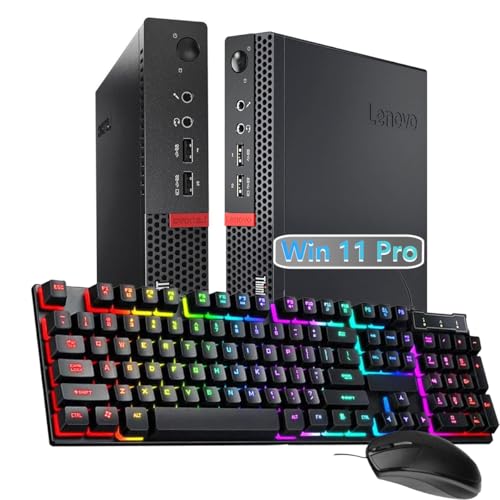
Lenovo ThinkCentre Tiny Intel i7 Desktop
Best for: compact office setups needing legacy VGA connectivity
- Processor
- Intel Core i7
- Installed RAM
- 16 GB
- Storage Capacity
- 256 GB
- Operating System
- Windows 11 Professional 64 Bit
The Lenovo ThinkCentre Tiny Intel i7 Desktop is a compact refurbished computer built for everyday office workloads. It pairs a quad-core Intel Core i7-6700T processor with 16 GB of memory and a 256 GB solid-state drive. You get preinstalled Windows 11 Pro, along with DisplayPort and VGA outputs for dual-display setups. This machine suits you if you need a dependable, space-saving desktop with legacy video support for basic multitasking.
Pros
- Quad-core Intel Core i7-6700T processor with up to 4.0 GHz boost
- 16 GB of system memory for multitasking
- DisplayPort and legacy VGA video outputs
- Preinstalled Windows 11 Pro operating system
Cons
- Refurbished unit ships in generic packaging with non-original power accessories
- Modest 256 GB internal solid-state drive
Good fit if
- You need a compact desktop that supports both DisplayPort and VGA monitors.
- You want 16 GB of memory paired with Windows 11 Pro for office productivity.
- You prefer a small-form-factor machine that saves desk space.
Skip if
- You need more than 256 GB of storage out of the box.
- You require brand-new equipment in original factory packaging.
Verdict: Lenovo ThinkCentre Tiny Intel i7 Desktop delivers dependable quad-core computing and versatile display outputs in an ultra-compact refurbished chassis.

GMKtec Core i7 WiFi 6 Mini PC
Best for: multi-monitor office setups needing fast networking
- Processor
- Intel Core i7
- Installed RAM
- 16GB
- Storage Capacity
- 512GB NVME SSD
- Memory Type
- DDR4
- Graphics
- Intel Iris Xe Graphics G7 96EU
- Ethernet Ports
- 2.5Gbps LAN
You get an Intel Core i7-1185G7 processor with 16GB of DDR4 RAM and a 512GB NVMe solid-state drive in a compact chassis. It supports three 4K displays at 60Hz across two HDMI ports and one USB Type-C port. With 2.5Gbps Ethernet and dual-band Wi-Fi 6 networking, this unit suits you if you need multi-monitor output and fast wired data transfers for daily office workloads.
Pros
- Triple 4K display output via two HDMI ports and one Type-C port
- Fast 2.5Gbps Ethernet port alongside Wi-Fi 6 and Bluetooth 5.2
- Dual storage slots supporting M.2 2280 NVMe and M.2 2242 SATA
- Internal memory expands up to 64GB DDR4
Cons
- Quad-core CPU has fewer cores than newer desktop alternatives
- Base internal storage capacity is limited to 512GB
- Primary M.2 slot runs at PCIe 3.0 rather than PCIe 4.0 speeds
Good fit if
- You require simultaneous video output across three 4K monitors.
- You need high-speed local data transfers over a 2.5Gbps LAN connection.
- You plan to expand memory or add a secondary SATA SSD.
Skip if
- You need more than four physical processor cores for heavy multi-threaded tasks.
- You want more than 512GB of factory-installed storage out of the box.
Verdict: GMKtec Core i7 Triple-Display Mini PC delivers 11th-generation Intel processing, 2.5Gbps networking, and triple-screen 4K output in a compact two-pound frame. It offers straightforward expandability for both memory and secondary storage.
Specifications side by side
| Spec | Dell Optiplex Micro Core i7 Desktop | HP EliteDesk Mini Intel Core i7 | ACEMAGIC Intel Core i7 Gaming Mini PC | Lenovo ThinkCentre Tiny Core Ultra PC | Lenovo ThinkCentre Tiny i7 32GB Mini PC | Lenovo ThinkCentre Tiny Intel i7 32GB Desktop | GMKtec Nucbox Core i7 Mini PC | HP Mini Desktop Intel Core i7 32GB RAM | Dell OptiPlex Micro i7 Desktop | Lenovo ThinkCentre Tiny Intel i7 Desktop | GMKtec Nucbox Intel Core i7 Mini PC | Lenovo ThinkCentre Tiny Intel Core i7 Mini PC | HP EliteDesk Mini Intel Core i7 | Lenovo ThinkCentre Tiny Intel i7 Desktop | GMKtec Core i7 WiFi 6 Mini PC |
|---|---|---|---|---|---|---|---|---|---|---|---|---|---|---|---|
| Processor | Intel Core i7-13700T | Intel Core i7-9700T | Intel Core i7-14650HX | Intel Core Ultra 3 205T | Intel Core i7-6700T | Intel Core i7-6700T | Intel Core i7-1185G7 | Intel Core i7-6700 | Intel Core i7-10700T | Intel i7 8700T | Intel Core i7-1185G7 | Intel Core i7-8700T | Intel Core i7-6700T | Intel Core i7-6700T | Intel Core i7-1185G7 |
| Installed RAM | 16GB | 32GB | 16GB | 16GB | 32GB | 32GB | 16GB | 32GB | 32GB | 32GB | 16GB | 32GB | 16GB | 16 GB | 16GB |
| Storage Capacity | 512GB SSD | 1TB | 1TB NVMe PCIe 4.0 SSD | 512GB | 1TB | 1TB | 1TB | 1TB | 1TB | 256GB | 512GB NVMe SSD | 1TB | 256GB SSD | 256 GB | 512GB NVME SSD |
| Memory Type | DDR4-3200 | DDR4 | DDR4 | DDR5 | DDR4 | DDR4 | DDR4 | DDR4 | DDR4 2933MHz | DDR4 | DDR4 | DDR4 | DDR4 | not specified | DDR4 |
| Graphics | not specified | not specified | Intel UHD Graphics | Integrated Intel Graphics | Integrated Graphics | not specified | Intel Iris Xe Graphics G7 96EU | Intel HD Graphics 530 | Intel UHD Graphics 630 | not specified | Intel Iris Xe Graphics G7 96EU | not specified | not specified | not specified | Intel Iris Xe Graphics G7 96EU |
| Ethernet Ports | Gigabit Ethernet | not specified | 1x Gigabit Ethernet | RJ-45 Gigabit Ethernet | not specified | not specified | 1x 2.5Gbps LAN | 1x Gigabit Ethernet | 1x RJ45 | not specified | RJ45 2.5G | not specified | not specified | not specified | 2.5Gbps LAN |
| High-Speed Expansion | not specified | not specified | not specified | not specified | not specified | not specified | not specified | not specified | not specified | not specified | USB4.0 | not specified | not specified | not specified | USB4.0 |
| Operating System | Windows 11 Pro | Windows 11 Pro | Windows 11 Pro | Windows 11 Pro | Windows 11 Pro | Windows 11 Pro | not specified | Windows 11 Pro | Windows 11 Pro | Windows 11 Pro | not specified | Windows 11 Pro | not specified | Windows 11 Professional 64 Bit | not specified |
| Memory | 16GB RAM | 32GB RAM | 16GB RAM | not specified | 32GB RAM | 32GB RAM | 16GB RAM | 32GB RAM | 32GB RAM | 32GB RAM | not specified | 32GB RAM | not specified | not specified | 16GB RAM |
| Storage | 512GB SSD | 1TB SSD | 1TB SSD | 512GB SSD | 1TB SSD | 1TB SSD | 1TB SSD | not specified | 1TB SSD | 256GB SSD | not specified | not specified | not specified | not specified | 512GB SSD |
| Use | not specified | not specified | Gaming | Business | not specified | not specified | not specified | not specified | not specified | not specified | not specified | not specified | Business | not specified | not specified |
| Networking | WiFi 6 | not specified | not specified | WiFi 6E | not specified | not specified | not specified | not specified | not specified | not specified | not specified | not specified | not specified | not specified | WiFi 6 |
| Dimensions | 7.17 × 7.01 × 1.42 inches | not specified | 5 × 1.6 × 5 inches | 7.05 × 1.5 × 7.2 inches | 8 × 2 × 7 inches | 7.05 × 7.2 × 1.36 inches | 4.47 × 4.17 × 1.67 inches | 19 × 16 × 7 inches | 7 × 1.4 × 7.2 inches | 7.05 × 7.2 × 1.36 inches | 5.2 × 4.92 × 2.28 inches | 7.05 × 7.2 × 1.36 inches | 19 × 16 × 7 inches | not specified | 5.2 × 4.92 × 2.28 inches |
| Weight | 2.41 pounds | not specified | 2.2 pounds | 2.91 pounds | not specified | 4 pounds | 2.86 pounds | not specified | 2.56 pounds | not specified | 3.22 pounds | not specified | not specified | not specified | 2 pounds |
| Size | Intel i7 | 16GB | 512GB | i7|32-1T win11 | 14650HX 16GB 1TB | 16GB DDR5 | 512GB NVMe | 32GB | New 1TB NVMe M.2 SSD | ThinkCentre M910Q | Intel Core i7-1185G7 16GB DDR4 + 1TB | 32GB RAM-1TB SSD | not specified | Small | Nucbox M2 Pro S 16GB + 512GB | Small | 16-256 | not specified | 16GB+512GB |
| Color | Black | not specified | Blue | Black | Black | Black | Black | Black | Black | not specified | Black | not specified | Black | not specified | Black |
| Model | Optiplex 7010 Micro | EliteDesk 800 G5 | M5 | ThinkCentre M70q Gen 6 | M910q | M910Q | M2 Pro | 800G3 MINI | Dell OptiPlex 7090 MFF | ThinkCentre M720Q | MINI PC-Mxilie | M720Q | 800 G3 | Lenovo | M2 Pro |
Is an Intel Core i7 Mini PC Worth It?
Published specs show Intel Core i7 mini PCs handle diverse workloads, from cloud tasks on Chrome OS to multi-threaded enterprise software. Across these 15 models, the processor tier enables configurations supporting up to 64GB of RAM and driving up to three 4K displays simultaneously. It delivers the compute power needed for running 16-core workloads and Windows 11 Pro desktop environments inside sub-three-pound enclosures. Integrated graphics like Intel UHD handle casual gaming and routine office graphics without requiring a bulky dedicated card.
Worth it if
- You run multi-threaded office applications and require expansion support up to 64GB of RAM.
- You need to output video across up to three 4K displays from a single compact desktop.
Skip it if
- You plan to run demanding visual workloads that exceed integrated Intel UHD graphics limits.
- You need front-facing USB-C ports on standard business models like the OptiPlex 7010 Micro.
If you need a dedicated graphics card with higher wattage limits, a gaming desktop with Core i7 provides more thermal headroom than a mini PC.
How We Picked These Mini PCs
You find systems here based strictly on an Intel Core i7 processor. Each mini PC qualifies when the listing title or specifications list an Intel Core i7 chip. Only one variant from each product family is included to prevent redundant options. All technical details come directly from manufacturer specifications without physical testing or product handling.
The 15 models are ordered with products in stock first, then by Amazon sales rank, placing better-selling products first. Secondary specifications such as system memory, storage capacity, and physical dimensions differentiate each machine. This approach lets you compare everyday processing setups using verifiable hardware data.
How to Choose an Intel Mini PC
-
Select the Right Memory
Look at the installed system memory before selecting a computer. If your daily routine involves running several standard office programs and browser tabs simultaneously, 16GB of RAM is sufficient. Heavy multitasking, large spreadsheets, and data-intensive workflows benefit directly from 32GB of RAM to prevent memory slowdowns. Some models also allow internal hardware upgrades later. For instance, the Dell Optiplex Micro Core i7 Desktop supports up to 64GB of RAM, giving you headroom for future expansion.
-
Evaluate Solid-State Storage Capacity
Examine the internal solid-state drive capacity to ensure it fits your file library. Configurations across these models range from 128GB up to 1TB NVMe SSDs. If you store documents primarily on network drives or in the cloud, a 256GB or 512GB SSD works well. However, if you keep high-resolution media, multiple local databases, or large software installations directly on the machine, opt for a higher capacity. The ACEMAGIC Intel Core i7 Gaming Mini PC comes equipped with a 1TB SSD, providing ample onboard space without requiring external drives.
-
Choose the Operating System
Identify which operating system matches your essential workplace software. Most models in this category run Windows 11 Pro, which supports professional productivity tools, specialized enterprise applications, and remote desktop protocols. If your daily workflow relies entirely on web tools, cloud services, and Android applications, Chrome OS offers a streamlined alternative. For instance, the ASUS Chromebox 3 Core i7 Mini PC operates on Chrome OS, pairing lightweight software management with Core i7 performance for web-centric environments rather than native Windows office programs.
-
Check Wireless Networking Capabilities
Evaluate the built-in wireless hardware if you plan to connect to office or home networks without an Ethernet cable. Standard wireless options vary significantly across mini PC models. Newer units incorporate WiFi 6 or WiFi 6E protocols, which manage busy local networks with reduced latency and improved throughput. Conversely, older configurations may rely on external USB wireless adapters. The Lenovo ThinkCentre Tiny Core Ultra PC includes integrated WiFi 6E connectivity, making it a reliable match for environments equipped with modern tri-band wireless access points.
-
Measure Chassis Dimensions Carefully
Check physical dimensions before buying to verify the computer fits your available work area. Mini PCs differ markedly in physical volume. Some desktop-style micro units measure around seven inches long and wide, making them suitable for vertical stands or behind-the-monitor mounting brackets. Meanwhile, compact cubes conserve even more surface area on crowded desks. For example, the GMKtec Nucbox Core i7 Mini PC measures just 4.17 inches wide, 4.47 inches long, and 1.67 inches high, providing a footprint that fits onto tight workstations where standard chassis cannot.
Frequently asked questions
Can an Intel Core i7 mini PC drive multiple monitors?
Yes, many Intel Core i7 mini PCs support dual or triple display outputs directly from their rear ports. For instance, the Lenovo ThinkCentre Tiny M910Q and GMKtec M2 Pro both provide video connections capable of running three 4K screens simultaneously. Other models, such as the HP EliteDesk 800 G5, include ports configured for dual-monitor office workstations straight out of the box.
Can you game on an Intel Core i7 mini PC?
You can run casual titles and light games on select models, but they are not designed for demanding AAA releases. While systems like the ACEMAGIC M5 feature high-performance processors such as the 16-core Intel Core i7-14650HX, they rely on integrated Intel UHD graphics rather than standalone graphics cards. This hardware configuration handles basic gaming smoothly while keeping heat output and chassis dimensions minimal.
What wireless and networking standards do Intel Core i7 mini PCs use?
Networking specifications vary across hardware generations and brands. Newer compact units feature integrated wireless chips like WiFi 6 on the Dell Optiplex 7010 Micro or WiFi 6E on the Lenovo ThinkCentre M70q Gen 6. Additionally, systems like the GMKtec Nucbox M2 Pro incorporate 2.5Gbps Ethernet ports for faster local data transfers, whereas older refurbished units may rely on external USB wireless adapters.
Which operating system comes pre-installed on an Intel Core i7 mini desktop?
Most Intel Core i7 mini desktops come configured with Windows 11 Pro pre-installed. Models such as the Dell Optiplex 7010 Micro, HP EliteDesk 800 G5, ACEMAGIC M5, and Lenovo ThinkCentre M70q Gen 6 list Windows 11 Pro as their standard operating system. Other units, like the HP EliteDesk 800 G3, include the standard edition of Windows 11 for professional desktop duties.
How much desk space does an Intel Core i7 mini PC take up?
These mini PCs occupy very little desk area, with many chassis measuring less than eight inches across and weighing under three pounds. For example, the ACEMAGIC M5 measures just 5 by 5 inches at 2.2 pounds, while the Dell Optiplex 7010 Micro measures 7.01 by 7.17 inches at 2.41 pounds. You can place them flat, stand them vertically, or mount them out of sight.
Do Intel Core i7 mini PCs support legacy monitors and older peripherals?
Yes, certain models preserve older display connections for legacy office equipment. For example, specific configurations of the Lenovo ThinkCentre Tiny provide native VGA video ports to connect older monitors or projectors without specialized adapters. However, port selections differ between generations. While some models maintain legacy outputs, others omit newer ports, such as the Dell Optiplex 7010 Micro, which does not include USB-C connectivity.
What internal solid-state drive storage sizes are standard on these PCs?
Factory storage capacities typically range from 256GB to 1TB using solid-state drives. The Lenovo ThinkCentre M720Q includes a compact 256GB SSD, while systems like the Dell Optiplex 7010 Micro provide 512GB of NVMe storage. If you require more local drive space, options like the HP EliteDesk 800 G5 and ACEMAGIC M5 come standard with a 1TB SSD, and select GMKtec models feature dual M.2 slots.