Best Mini PCs with 64GB eMMC: 7 Spec-Based Picks
As an Amazon Associate we earn from qualifying purchases. Links on this page are affiliate links.
Finding the best mini PCs with 64GB eMMC requires careful comparison of published specifications. We analyzed 7 models to identify the most suitable options for your specific needs. The HEIGAOLAPC Fanless Mini PC Stick leads this list because its Intel Celeron N4100 processor and silent fanless design handle lightweight tasks efficiently without generating noise. Each pick is based strictly on the specs listed by the manufacturers. This guide helps you decide which compact system matches your requirements for storage, connectivity, and form factor.
Quick picks
The best fit for you
- You need the absolute smallest footprint for mounting HEIGAOLAPC Fanless Mini PC Stick Its 1.93-inch width and 0.35-inch height make it the thinnest stick PC available.
- You require dual multi-gigabit Ethernet ports for networking Beelink ME NAS Mini PC It features dual 2.5G LAN ports for high-speed wired connectivity.
- You need fast wireless connectivity for your network Beelink Me Mini N150 NAS Mini PC It includes built-in WiFi 6 alongside dual 2.5G LAN ports.
- You want a modern processor with Windows 11 Pro Azulle Access Pro Fanless N100 PC Stick It uses the Intel N100 processor and ships with Windows 11 Pro.
Our 7 picks

HEIGAOLAPC Fanless Mini PC Stick
Best for: silent media streaming and digital signage setups
- Storage
- 64GB eMMC (what this guide is about)
- Processor
- Intel Celeron N4100
- Installed RAM
- 4 GB
- Storage Capacity
- 64 GB
- Memory Type
- LPDDR4
- Ethernet Ports
- Gigabit Ethernet
This pocket-sized stick PC plugs directly into your display and runs silently with fanless passive cooling. It combines an Intel Celeron N4100 quad-core processor with 4GB of LPDDR4 memory and 64GB of eMMC storage. You get Windows 11 Pro pre-installed alongside a physical Gigabit Ethernet port and dual-band WiFi. It suits you if you need a silent, low-power system for basic document editing, media playback, or dedicated digital signage.
Pros
- Fanless design provides silent 0dB passive cooling
- Built-in Gigabit Ethernet port alongside dual-band WiFi
- Micro SD card slot supports storage expansion up to 1TB
- Pre-installed with Windows 11 Pro
Cons
- Fixed 4GB memory capacity cannot be upgraded
- Internal storage is limited to 64GB eMMC
- Relies on older Bluetooth 4.2 connectivity
Good fit if
- You need a completely silent, zero-noise PC for media streaming or signage.
- You want a compact stick PC that includes a wired Gigabit Ethernet port.
- You plan to expand your local storage using a Micro SD card up to 1TB.
Skip if
- You need more than 4GB of RAM for intensive multitasking.
- You require fast internal NVMe SSD speeds rather than eMMC storage.
Verdict: HEIGAOLAPC Fanless Mini PC Stick delivers silent operation and wired Gigabit networking in an ultra-compact form factor. Its Intel Celeron N4100 processor and 64GB eMMC storage handle lightweight computing tasks without taking up desk space.

HiGOLE Fanless Mini PC Stick
Best for: silent digital signage and basic media streaming
- Storage
- 64GB eMMC (what this guide is about)
- Processor
- Intel Celeron J3455
- Installed RAM
- 4GB
- Storage Capacity
- 64GB
- Memory Type
- LPDDR4
- Graphics
- Intel UHD 600
The HiGOLE Fanless Mini PC Stick is an ultra-compact desktop built for silent daily operation. It combines an Intel Celeron J3455 processor with 4GB of LPDDR4 memory and 64GB of onboard eMMC storage. You get Gigabit Ethernet, dual USB 3.0 ports, and 4K output at 60Hz. It runs Windows 10 Pro out of the box, making it a reliable pick if you need a silent media streamer, display driver, or basic office workstation.
Pros
- Fanless design ensures completely silent operation
- Gigabit Ethernet port alongside two USB 3.0 ports
- Supports 4K video output at 60Hz via Intel UHD 600 Graphics
- Pre-installed with Windows 10 Pro and supports Ubuntu
Cons
- Fixed 4GB RAM cannot be upgraded
- Pre-installed with older Windows 10 Pro rather than Windows 11
- Limited to entry-level Intel Celeron J3455 processing power
Good fit if
- You need a silent, pocket-sized stick PC for continuous or noise-sensitive use.
- You want wired Gigabit Ethernet connectivity on a compact stick form factor.
- You plan to drive a single 4K display at 60Hz for digital signage or media playback.
Skip if
- You require more than 4GB of RAM or heavy multitasking capability.
- You need a modern operating system like Windows 11 pre-installed.
Verdict: HiGOLE Fanless Mini PC Stick balances silent operation, Gigabit networking, and 4K display output into a pocketable footprint. It serves as a dependable solution for basic office tasks, digital signage, and media streaming.

Beelink ME NAS Mini PC
Best for: compact home NAS and network routing setups
- Storage
- 64GB eMMC (what this guide is about)
- Processor
- Intel Twin Lake-N150
- Installed RAM
- 12GB
- Storage Capacity
- 2TB
- Memory Type
- LPDDR5
- Graphics
- Intel UHD Graphics 24EU
The Beelink ME is a compact home storage and networking mini PC. Along with its 64GB eMMC base storage, you get an installed 2TB PCIe 3.0 SSD, six M.2 slots for storage expansion up to 24TB, and 12GB of LPDDR5 memory. Driven by the four-core Intel Twin Lake-N150 processor with dual 2.5Gbps Ethernet, it suits you if you need a high-capacity personal NAS or dedicated soft router.
Pros
- Includes installed 2TB PCIe 3.0 SSD alongside 64GB eMMC
- Six M.2 PCIe 3.0 slots supporting up to 24TB storage
- Dual 2.5Gbps Ethernet ports for routing and link aggregation
- 12GB LPDDR5 memory and Intel Twin Lake-N150 processor
- Built-in internal power supply reduces cable clutter
Cons
- Uses entry-level 4-core, 4-thread processor architecture
- Storage slots limited to PCIe 3.0 transfer speeds
- Base 64GB eMMC is significantly slower than NVMe storage
Good fit if
- You need a dedicated home NAS or router with dual 2.5G LAN.
- You want large solid-state capacity using multiple M.2 NVMe drives.
- You prefer a tidy setup with an integrated power supply.
Skip if
- You only require a minimal 64GB eMMC machine for basic display output.
- You need heavy multi-core CPU computing power beyond four threads.
Verdict: Beelink ME Mini PC Intel N150 pairs baseline eMMC memory with massive NVMe expansion and dual multi-gigabit networking. It delivers an efficient, compact platform for local storage servers and lightweight network virtualization.

Beelink Me Mini N150 NAS Mini PC
Best for: DIY NAS setups needing fast WiFi 6
- Storage
- 64GB eMMC (what this guide is about)
- Processor
- Intel Twin Lake N150
- Installed RAM
- 12GB
- Storage Capacity
- 64GB eMMC
- Memory Type
- LPDDR5
- Graphics
- Intel UHD Graphics 24EU
The Beelink Me Mini is a compact desktop built for networking and home storage tasks. It pairs an Intel Twin Lake N150 processor with 12GB of LPDDR5 memory and 64GB of eMMC storage. For connectivity, you get WiFi 6 and dual 2.5G LAN ports. It also includes six M.2 PCIe 3.0 SSD expansion slots. This machine fits you if you want a dedicated platform for a home server, soft router, or lightweight media hub.
Pros
- Fast WiFi 6 and dual 2.5G Ethernet ports
- Six M.2 PCIe 3.0 NVMe slots supporting up to 24TB total storage
- 12GB of high-speed LPDDR5 memory
- Built-in 45W power supply requiring only a single AC cable
Cons
- Does not include a pre-installed operating system
- Base storage capacity is limited to 64GB eMMC
- Only one HDMI video output port provided
Good fit if
- You need WiFi 6 alongside dual 2.5G LAN ports for high-speed local networking.
- You plan to install your own operating system such as Linux or Windows.
- You want to add multiple M.2 NVMe drives for high-capacity NAS storage.
Skip if
- You want a computer that is ready to use immediately with an operating system pre-installed.
- You need multiple native HDMI ports to run dual monitors.
Verdict: Beelink Me Mini N150 WiFi 6 PC delivers standout wireless and dual 2.5G networking alongside massive M.2 drive expansion. It is an exceptional pick for DIY server builders who provide their own operating system.

AZULLE Access Pro Fanless PC Stick
Best for: silent digital signage and kiosk displays
- Storage
- 64GB eMMC (what this guide is about)
- Processor
- Intel N100
- Installed RAM
- 4GB
- Storage Capacity
- 64GB
- Memory Type
- LPDDR5
- Graphics
- Intel UHD Graphics
The AZULLE Access Pro Fanless Stick PC is an ultra-compact computer that plugs directly into a display via HDMI. It features an Intel N100 processor, 4GB of LPDDR5 RAM, and 64GB of eMMC storage. Running Windows 10 IoT Enterprise with passive, fanless cooling, this stick PC suits you if you need a silent, dedicated endpoint for digital signage, kiosks, or single-app business displays.
Pros
- Intel N100 processor with up to 3.4GHz clock speed
- Fanless design for completely silent operation
- Gigabit Ethernet, WiFi 6, and Bluetooth 5.2 connectivity
- Compact form factor measuring 5.1 by 2 by 0.8 inches
Cons
- 4GB LPDDR5 memory is fixed and non-upgradable
- 64GB eMMC storage limits local media capacity
Good fit if
- You need a silent, fanless device for digital signage or kiosks.
- You want a pocket-sized stick PC that includes a dedicated Gigabit Ethernet port.
Skip if
- You require more than 4GB of RAM for multi-application office work.
- You need a general-purpose Windows 11 Pro desktop operating system.
Verdict: AZULLE Access Pro Fanless Stick PC delivers capable Intel N100 processing and solid connectivity in a silent, pocket-sized stick format. It works best as a dedicated display driver or lightweight IoT endpoint.
Azulle Access Pro Fanless N100 PC Stick
Best for: silent 4K streaming and compact workstations
- Storage
- 64GB eMMC (what this guide is about)
- Processor
- Intel N100
- Installed RAM
- 4GB
- Storage Capacity
- 64GB
- Ethernet Ports
- Gigabit Ethernet
- Operating System
- Windows 11 Pro
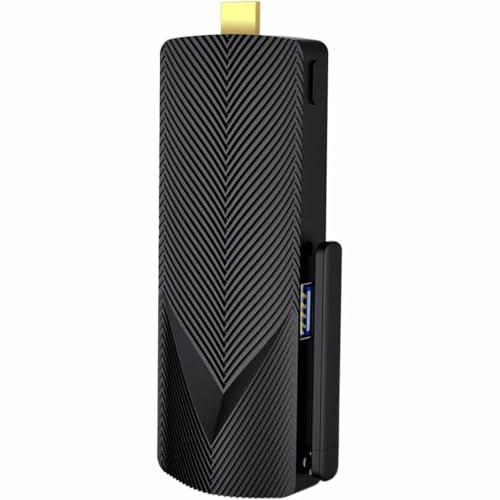
The Azulle Access Pro is a fanless stick PC powered by an Intel N100 quad-core processor. It pairs 64GB of eMMC storage with 4GB of RAM and comes with Windows 11 Pro pre-installed. Along with built-in WiFi 6 and Gigabit Ethernet, this pocket-sized unit suits you if you need a silent, space-saving system for basic office tasks, 4K streaming, or light multitasking.
Pros
- Intel N100 quad-core processor reaching up to 3.4GHz
- Built-in Gigabit Ethernet alongside WiFi 6 and Bluetooth 5.2
- Fanless design enables silent operation
- Comes with Windows 11 Pro pre-installed
Cons
- Limited to 4GB of system memory
- 64GB eMMC storage fills quickly with OS updates and local files
Good fit if
- You need a silent, ultra-compact PC stick for basic desktop work.
- You want Windows 11 Pro features like remote desktop management.
- You require wired Gigabit Ethernet connectivity on a stick PC.
Skip if
- You run heavy workloads that require more than 4GB of RAM.
- You need large local storage capacity without relying on external drives.
Verdict: Azulle Access Pro Fanless Mini PC Stick delivers modern Intel N100 processing and Windows 11 Pro in a palm-sized chassis. It offers quiet, dependable connectivity for media playback and essential computing.

Lenovo Fanless 1L Thin Client
Best for: silent office tasks and basic thin-client use
- Storage
- 64GB eMMC (what this guide is about)
- Installed RAM
- 4GB
- Storage Capacity
- 64GB
- Memory Type
- DDR4
- Graphics
- Radeon R4
- Ethernet Ports
- RJ-45
This Lenovo compact computer provides 64GB of eMMC storage paired with 4GB of DDR4 memory and Windows 11 Pro. It features a fan-free thermal design that runs silently in quiet workspaces. You also get a dedicated DisplayPort video output and a built-in RJ-45 Ethernet jack. It suits you if you need a silent, basic desktop for lightweight network tasks or web browsing without fan noise.
Pros
- Fan-free design for completely silent operation
- Preinstalled with Windows 11 Pro 64-bit
- Includes six USB ports (three USB 3.1 and three USB 2.0)
- Built-in Trusted Platform Module (TPM) hardware encryption
- Dedicated RJ-45 Ethernet port for wired networks
Cons
- Limited to 4GB of installed DDR4 memory
- Only 64GB of internal eMMC storage space
- DisplayPort output with no standard HDMI port listed
Good fit if
- You want a completely silent, fanless desktop setup.
- You require Windows 11 Pro and hardware TPM security.
- You need multiple USB ports and a wired Ethernet connection.
Skip if
- You need more than 4GB of RAM for intensive multitasking.
- You require a direct HDMI connection without using adapters.
- You store large media libraries directly on local storage.
Verdict: Lenovo Fanless Thin Client PC delivers quiet, silent performance with Windows 11 Pro and robust physical connectivity. Its 4GB RAM and 64GB eMMC configuration make it best suited for light office duties and dedicated thin-client workflows.
Specifications side by side
| Spec | HEIGAOLAPC Fanless Mini PC Stick | HiGOLE Fanless Mini PC Stick | Beelink ME NAS Mini PC | Beelink Me Mini N150 NAS Mini PC | AZULLE Access Pro Fanless PC Stick | Azulle Access Pro Fanless N100 PC Stick | Lenovo Fanless 1L Thin Client |
|---|---|---|---|---|---|---|---|
| Processor | Intel Celeron N4100 | Intel Celeron J3455 | Intel Twin Lake-N150 | Intel Twin Lake N150 | Intel N100 | Intel N100 | not specified |
| Installed RAM | 4 GB | 4GB | 12GB | 12GB | 4GB | 4GB | 4GB |
| Storage Capacity | 64 GB | 64GB | 2TB | 64GB eMMC | 64GB | 64GB | 64GB |
| Memory Type | LPDDR4 | LPDDR4 | LPDDR5 | LPDDR5 | LPDDR5 | not specified | DDR4 |
| Graphics | not specified | Intel UHD 600 | Intel UHD Graphics 24EU | Intel UHD Graphics 24EU | Intel UHD Graphics | not specified | Radeon R4 |
| Ethernet Ports | Gigabit Ethernet | Gigabit | Dual 2.5G | Dual 2.5G LAN | Gigabit Ethernet | Gigabit Ethernet | RJ-45 |
| Operating System | Windows 11 Pro | Windows 10 Pro | not specified | not specified | Windows 10 IoT Enterprise | Windows 11 Pro | Windows 11 Pro |
| Memory | 4GB RAM | 4GB RAM | not specified | not specified | 4GB RAM | 4GB RAM | 4GB RAM |
| Storage | 64GB eMMC | 64GB eMMC | 64GB eMMC | 64GB eMMC | 64GB eMMC | 64GB eMMC | 64GB eMMC |
| Use | not specified | Business, Office, Industrial, IoT | NAS | NAS | IoT | not specified | not specified |
| Cooling | not specified | Fanless | not specified | not specified | Fanless | not specified | not specified |
| Networking | not specified | Gigabit Ethernet | 2.5G LAN | WiFi 6, 2.5G LAN | Gigabit Ethernet | not specified | not specified |
| Form Factor | Stick PC | Stick PC | not specified | not specified | Stick PC | Stick PC | not specified |
| Dimensions | 5.5 × 1.93 × 0.35 inches | not specified | not specified | not specified | 5.1 × 2 × 0.8 inches | 5.1 × 2 × 0.8 inches | 12.9 × 8.8 × 0.7 inches |
| Weight | 2.8 pounds | 10.4 ounces | not specified | 2.49 pounds | not specified | not specified | 2.87 pounds |
| Size | N4100 4+64G | not specified | N150 12G+64G+2TB | N150 12G/64G | not specified | not specified | 4GB RAM|64GB SSD |
| Color | N4100 4+64G | J3455-4+64GB | White | Pearl White | Black | Black | Black |
| Model | N4100 4+64G | PC STICK | MINIS | Me Mini | A4P010332Z00 | A4P0AL102250 | 625 |
Is 64GB eMMC Storage Enough for You?
eMMC storage is built into the motherboard, offering compactness but limited capacity. With only 64GB, you must manage space carefully. Windows 11 Pro and system files take a significant portion, leaving less room for apps and documents. This setup suits dedicated roles like digital signage or thin clients where local files are minimal. For these tasks, the fixed storage simplifies maintenance. However, it restricts heavy software installations or large media libraries.
Worth it if
- You use the device for digital signage or thin-client workloads
- You prefer a silent, fanless design with minimal moving parts
- You store most data on a network drive or cloud service
Skip it if
- You need to install large professional applications locally
- You plan to store significant media files on the device
- You require expandable storage for growing personal data
How We Selected These Picks
We identified these mini PCs by scanning Amazon listings for the specific storage feature of 64GB eMMC. This solid-state storage type is common in compact, fanless designs. We only included models where this specification appeared clearly in the title or feature list. We selected just one size or variant for each product family to keep the list focused and simple for you to compare.
The products are ordered by availability first. Next, we sorted them by the listing’s overall rating, weighted by the number of ratings. Finally, we considered how many of the guide’s criteria each spec met. All details come strictly from the published specifications. We did not handle these units or test them personally. Prices and current stock levels are shown live on the page.
How to choose the right one
-
Check processor needs
Your workload dictates the required processing power. The Intel N100 and N150 chips in the Azulle and Beelink models offer stronger performance for network tasks or modern Windows 11 Pro features. The older Intel Celeron N4100 in the HEIGAOLAPC model is sufficient for basic media streaming. Match the chip to your specific tasks to avoid bottlenecks in your daily operations.
-
Verify memory capacity
Most models in this list provide 4GB of RAM. This amount is adequate for lightweight computing tasks and digital signage setups. If you plan to run multiple applications simultaneously, this limit may constrain your workflow. The Beelink ME NAS model pairs its 64GB storage with robust expansion options, but base RAM remains a critical factor for smooth multitasking performance.
-
Assess storage limits
The 64GB eMMC storage is built into the motherboard, offering compactness but limited capacity. Windows 11 Pro and system files take a significant portion, leaving less room for apps and documents. You must manage space carefully. Some models, like the Beelink ME NAS, offer massive NVMe expansion to compensate for the small internal drive size, allowing for greater flexibility.
-
Confirm operating system
Ensure the pre-installed OS matches your requirements. Several models ship with Windows 11 Pro, providing full desktop capabilities. Others, like the HiGOLE and older Azulle variants, come with Windows 10. If you need the latest features or specific software compatibility, verify the version before purchasing. Some units are sold as barebones solutions, requiring you to provide your own operating system.
-
Evaluate cooling method
Fanless designs ensure silent operation, which is ideal for bedrooms or offices. The HEIGAOLAPC and Azule Access Pro models use passive cooling to eliminate noise. This approach reduces moving parts, potentially increasing longevity. However, it may limit sustained high-performance bursts. Choose fanless if quiet operation is a priority, but verify that the thermal design suits your expected workload duration.
-
Review networking options
Connectivity varies significantly across these units. Standard Gigabit Ethernet is common in models like the HiGOLE and Azule Access Pro. For faster wired speeds, the Beelink ME NAS and Beelink Me Mini offer dual 2.5G LAN ports. If wireless is essential, the Beelink Me Mini includes WiFi 6. Check your local network capabilities to ensure the port speeds meet your data transfer needs.
-
Consider form factor
The physical size determines where you can place the device. Stick PCs, such as the HEIGAOLAPC and Azule Access Pro, are ultra-compact, measuring around 5.5 inches in length. They plug directly into displays. The Lenovo Thin Client is larger, measuring 12.9 inches in length, offering more robust physical connectivity. Choose the footprint that fits your available space and mounting requirements.
Frequently asked questions
Can I use a 64GB eMMC Mini PC as a home server?
Yes, but you must expand storage. Models like the Beelink ME NAS and Beelink Me Mini N150 support massive NVMe drive expansion. They also feature dual 2.5G LAN ports for fast wired networking. The base eMMC holds the operating system, while your data lives on the added drives. This setup works well for lightweight network virtualization.
Which Mini PC is best for silent digital signage?
The HEIGAOLAPC Fanless Mini PC Stick is ideal for this task. It features an Intel Celeron N4100 processor and offers completely silent operation due to its fanless design. It also includes wired Gigabit networking for stable connections. Its ultra-compact stick form factor allows it to mount directly behind displays without cluttering the space.
Do these Mini PCs come with Windows 11 Pro?
Several models include Windows 11 Pro. The HEIGAOLAPC Stick and the Lenovo Fanless Thin Client both ship with this operating system. The Azule Access Pro also offers a version with Windows 11 Pro. Other models like the HiGOLE and standard Azule versions come with Windows 10, so you must check the specific listing.
Is the Intel N100 processor faster than the N4100?
Yes, the Intel N100 is a modern chip with stronger performance. It appears in the Azule Access Pro models. The older Intel Celeron N4100 is found in the HEIGAOLAPC Stick. The N100 handles modern Windows 11 Pro features and media playback more efficiently. This makes it a better choice for current software requirements.
Can I connect multiple monitors to these stick PCs?
Most stick PCs support 4K display output. The HiGOLE Fanless Mini PC Stick explicitly supports 4K output. The Azule Access Pro models also handle modern display tasks. You can plug them directly into a monitor or TV. This makes them suitable for digital signage or secondary display setups without needing a full desktop tower.
Are these Mini PCs fanless for quiet operation?
Yes, most models on this list are fanless. The HEIGAOLAPC, HiGOLE, Azule Access Pro, and Lenovo Thin Client all use passive cooling. This design eliminates noise, making them perfect for bedrooms or offices. The Beelink NAS models also prioritize quiet operation. They rely on heat dissipation through their chassis rather than fans.
What is the weight of a typical Mini PC Stick?
Stick PCs are very lightweight. The HiGOLE model weighs only 10.4 ounces. The HEIGAOLAPC Stick weighs 2.8 pounds, likely due to its metal casing. The Beelink Me Mini weighs 2.49 pounds. These weights reflect their compact, portable nature. They are easy to mount behind displays or move between locations.