How to Choose Single Board Computers: A Complete Buying Guide for 2026
As an Amazon Associate we earn from qualifying purchases. Links on this page are affiliate links.
This single board computer buying guide helps you select the right hardware for your specific project needs. You will learn how to match processor architectures, memory limits, and storage types to your intended use case. We evaluate options based strictly on published specifications, ensuring you understand the technical trade-offs before purchasing. Our selection process focuses on clear performance metrics and compatibility details rather than marketing claims.
You will be able to decide between compact Linux devices, Windows-based x86 boards, or specialized AI accelerators. The guide walks you through key decisions such as choosing between ARM and Intel processors, determining necessary RAM capacities, and selecting appropriate operating systems. We have curated 8 recommended products from their published specifications to support various workflows. These selections range from basic starter kits for electronics projects to powerful units suitable for edge computing and local AI processing tasks.
Our top pick: Freenove Ultimate Starter Kit for Raspberry Pi.
Key Specs for Single Board Computers
Processor architecture and cores
Your project determines whether you need an ARM or x86 processor. ARM chips, like those in the Libre Computer Tritium or La Frite, offer high energy efficiency and are ideal for always-on IoT devices or lightweight Linux tasks. They typically consume very little power. x86 processors, such as the Intel Core i5 in the LattePanda Alpha, provide full desktop compatibility. This allows you to run standard Windows applications and complex software that ARM cannot support. If you require heavy computing power or specific Windows software, choose x86. For simple automation or media streaming, ARM is often sufficient and runs cooler.
- ARM vs x86 compatibility
- Core count for your workload
- Clock speed for performance needs
Memory (RAM) capacity
RAM limits how many applications you can run simultaneously. The Khadas VIM3 Pro and LattePanda Alpha offer higher memory options suitable for multitasking or running virtual machines. The Libre Computer Renegade provides 4GB, which handles lightweight servers well. Entry-level kits like the CanaKit Raspberry Pi 4 with 2GB are fine for basic tasks but may struggle with heavy multi-application workloads. Devices like the Libre Computer La Frite are capped at 1GB, restricting them to simple media or IoT functions. Ensure your chosen board has enough RAM to support your intended software stack without slowing down.
- Minimum RAM for your software
- Upgradability or fixed memory
- RAM type and speed
Storage type and speed
Storage affects boot times and system responsiveness. The Libre Computer Tritium and La Frite rely on external MicroSD cards, which are slower and less durable than internal storage. The Libre Computer 128GB eMMC Module provides fast, reliable embedded storage that replaces slower SD media. The LattePanda Alpha includes 64GB of eMMC storage, offering a quicker and more stable experience out of the box. If you plan to write frequently to the drive, prefer eMMC over SD cards to extend the lifespan of your storage medium and improve system stability.
- eMMC vs MicroSD speed
- Total storage capacity
- Read/write performance metrics
Operating system compatibility
The operating system dictates what software you can run. The LattePanda Alpha comes with Windows 11 Pro activated, allowing you to use standard Windows applications and IoT frameworks. Most ARM-based boards, like the Libre Computer Renegade and Tritium, run Linux variants. Some, like the Khadas VIM3 Pro, support Android. If you need Windows-specific drivers or software, an x86 board is necessary. For open-source projects, Linux provides extensive community support. Ensure your chosen board supports the OS you are most comfortable with or required by your project.
- Windows, Linux, or Android support
- Driver availability for your OS
- Pre-installed OS vs manual install
Networking capabilities
Connectivity options determine how your board connects to your network. The Libre Computer Renegade features Gigabit Ethernet, providing reliable wired connections ideal for network-attached storage or server duties. However, it lacks onboard wireless, meaning you must add external dongles for Wi-Fi. Many modern projects require both wired and wireless options. If your project involves robotics or mobile setups, wireless is essential. For stationary servers, a stable Gigabit Ethernet port is often preferred for consistent data transfer speeds and reduced latency.
- Gigabit Ethernet port presence
- Onboard Wi-Fi and Bluetooth
- USB-to-Ethernet adapter needs
Physical dimensions and form factor
Size constraints matter for integration into enclosures or existing setups. The Libre Computer La Frite is notably compact, measuring 3.5 inches by 2.5 inches, making it suitable for tight spaces. The LattePanda Alpha fits in a palm-sized footprint, balancing size with desktop-level performance. The Freenove Starter Kit components are designed for standard breadboards and prototyping areas. Measure your available space carefully. Ensure the board fits your enclosure and that the ports align with your case cutouts. Smaller boards often sacrifice expansion options for compactness.
- Board length, width, and height
- Mounting hole positions
- Port alignment with enclosure
Types of Single Board Computers
Development Kits
These kits bundle a single board computer with sensors, wires, and code examples. The Freenove Ultimate Starter Kit for Raspberry Pi includes 223 components and multi-language software projects. This approach is ideal for learning electronics and coding without sourcing parts individually. You get detailed guidance for building your first projects. The trade-off is that you must already own a compatible host board. These kits do not include the main computer itself, so they serve as supplements to existing hardware rather than standalone solutions.
Entry-Level SBCs
Starter kits like the CanaKit Raspberry Pi 4 2GB provide a complete setup with storage, cooling, and power hardware. The 2GB RAM handles basic computing tasks well. Heavier multi-application workloads require larger memory variants. These boards are perfect for turnkey entry-level setups where you want everything included. You avoid the hassle of buying separate components. The main limitation is the memory cap, which restricts complex multitasking. For lightweight Linux tasks and basic automation, these affordable options deliver reliable performance in a compact form factor.
Compact ARM Boards
Libre Computer boards like the Tritium and La Frite focus on low-power ARM architecture. The Tritium offers clean upstream open-source software support and familiar GPIO pinouts. The La Frite delivers efficient 2W performance with dedicated hardware video decoding. These boards suit lightweight Linux servers and IoT builds. The La Frite is strictly capped at 1GB RAM. You must supply external dongles for wireless networking on some models. These boards prioritize energy efficiency and open-source compatibility over raw processing power.
Windows x86 SBCs
The LattePanda Alpha Core i5 provides full x86 desktop capability in a palm-sized footprint. It includes 8GB RAM, integrated 4K graphics, and pre-activated Windows 11 Pro. This board delivers low-power dual-core computing for compact IoT, robotics, and edge installations. It suits users who need Windows-based applications on small hardware. The trade-off is a higher price point compared to ARM alternatives. You get familiar desktop environments and software compatibility. This option bridges the gap between single board computers and traditional mini PCs.
Common Mistakes In SBC Selection
Ignoring thermal limits in enclosed cases
Small form factors restrict airflow. A processor that runs cool in open air may throttle heavily inside a sealed enclosure. Check the thermal design power and junction temperature specs. Ensure your case includes vents or a dedicated heatsink to maintain stable performance under load.
Assuming all USB ports share bandwidth
Many boards route multiple ports through a single internal controller. Connecting high-speed peripherals to these shared lanes can cause data bottlenecks. Review the chipset datasheet to identify which ports offer true USB 3.0 speeds. Plan your cable layout to avoid congestion on limited bandwidth channels.
Overlooking GPIO voltage compatibility
Most single board computers operate at 3.3 volts. Connecting 5-volt sensors directly can damage the board permanently. Always verify the logic level of your peripherals. Use voltage converters or level shifters when interfacing with older hardware. This simple step protects your investment from electrical faults.
Choosing insufficient RAM for the workload
Embedded Linux distributions still require significant memory for smooth operation. Boards with one gigabyte may struggle with modern web browsing or multitasking. Aim for at least two gigabytes for general use. More memory ensures your system remains responsive when running background services or multiple applications simultaneously.
Quick picks
Our 8 picks

Freenove Ultimate Starter Kit for Raspberry Pi
Best for: Raspberry Pi electronics and multi-language coding projects
View on Amazon: Freenove Ultimate Starter Kit for Raspberry Pi
This component kit provides 223 electronic parts, sensors, and wires to expand a Raspberry Pi board. You get 128 documented projects with code across five languages: Python, C, Java, Scratch, and Processing. A 962-page digital tutorial provides wiring diagrams and schematics. The kit fits learners and builders who already own a compatible Raspberry Pi board and want hardware modules with step-by-step programming exercises.
Pros
- Includes 223 electronic components, modules, sensors, and wires
- Supports code in Python, C, Java, Scratch, and Processing
- Provides 128 step-by-step projects with schematics and wiring diagrams
- Includes a 962-page downloadable or online tutorial
- Compatible with Raspberry Pi models from Pi 1 up to Pi 5 and Zero
Cons
- Does not include a Raspberry Pi board
- No printed paper manual included in the box
Good fit if
- You already own a compatible Raspberry Pi board
- You want to program electronics using Python, C, Java, Scratch, or Processing
- You need structured projects with schematics and wiring diagrams
Skip if
- You need a standalone computer board in the package
- You require a physical printed instructional manual
Verdict: Freenove Starter Kit for Raspberry Pi provides a comprehensive collection of 223 components and multi-language software projects for your existing Raspberry Pi. It delivers detailed project guidance without supplying the host single-board computer.
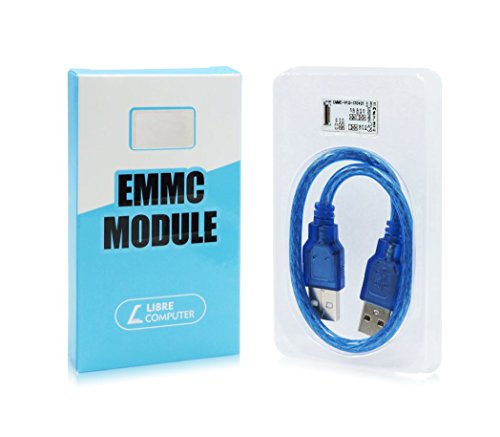
Libre Computer 128GB eMMC 5.x Module
Best for: Libre Computer board owners seeking fast storage
- Storage
- 128GB eMMC 5.x
- Operating System Support
- Linux, Android
You get a 128GB eMMC 5.x flash storage module designed specifically for compatible Libre Computer boards. It provides sequential speeds reaching 250MB/s read and 125MB/s write, alongside 10K random 4K block performance. This unit is not a standalone computer; it functions as a bootable drive supported by Linux, Android, and u-boot. It suits you if you need faster, higher-endurance storage than standard MicroSD cards for your compatible board.
Pros
- Up to 250MB/s read and 125MB/s write speeds
- 128GB flash storage capacity using eMMC 5.x standard
- Up to 10K random 4K block read and write performance
- Upstream software support for u-boot, Linux, and Android
Cons
- Not a standalone single board computer
- Requires a compatible Libre Computer host board to function
Good fit if
- You own a compatible Libre Computer board requiring faster storage than MicroSD.
- You need 128GB of high-endurance storage for Linux or Android projects.
Skip if
- You expect a complete, standalone single board computer.
- You use hardware from other brands lacking compatible eMMC 5.x slots.
Verdict: Libre Computer 128GB eMMC 5.x Storage Module delivers fast, reliable embedded storage for supported single board computers. It replaces slower MicroSD media but requires a host Libre Computer board to operate.
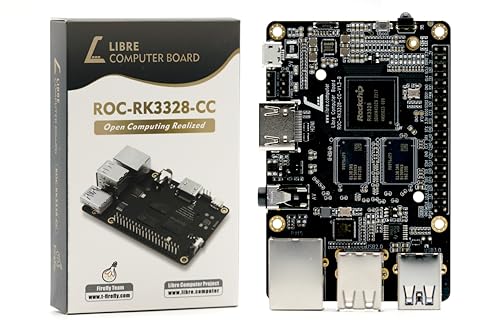
Libre Computer Renegade 4GB Single Board Computer
Best for: wired network storage and lightweight Linux servers
- Processor
- Quad 64-bit ARM Cortex-A53
- RAM Type
- DDR4
- Ethernet
- Gigabit Ethernet
- Video Resolution
- 4K 60FPS
- Operating System Support
- Ubuntu, Debian, Raspbian, Linux
View on Amazon: Libre Computer Renegade 4GB Single Board Computer
The Libre Computer Renegade is a single board computer built around a quad-core 1.4GHz ARM Cortex-A53 processor and Mali-450 graphics. You get 4GB of system memory, high-speed Gigabit Ethernet, and a dedicated 5Gbps USB 3.0 port for faster data transfers. Its 40-pin header supports standard hardware expansion. This board fits your needs if you plan to deploy lightweight servers, network storage, or containerized workloads using mainline Linux distributions.
Pros
- Gigabit Ethernet and 5Gbps USB 3.0 for fast local networking and I/O
- Quad-core 1.4GHz 64-bit ARM Cortex-A53 CPU with Mali-450 GPU
- 40-pin expansion header compatible with Raspberry Pi alternate pinouts
- Standardized UEFI support and upstream Linux kernel compatibility
Cons
- No onboard Wi-Fi or Bluetooth hardware
- Raspberry Pi software images require conversion tools and will not work out of the box
Good fit if
- You need Gigabit Ethernet and USB 3.0 for a local file server or NAS.
- You plan to run upstream Linux distributions such as Ubuntu or Debian with UEFI.
Skip if
- You need integrated Wi-Fi or Bluetooth out of the box without USB adapters.
- You rely on standard Raspberry Pi OS images without manual software migration.
Verdict: Libre Computer Renegade 4GB Single Board Computer delivers reliable wired network performance and standard Linux UEFI support for DIY server projects. Its lack of onboard wireless means you must supply external dongles if wireless networking is required.

Libre Computer Tritium 1GB Quad-Core Board
Best for: open-source IoT builds and lightweight Linux tasks
- RAM Capacity
- 1GB
- Operating System Support
- Ubuntu, Debian, Raspbian, Armbian
The Libre Computer Tritium is a quad-core single-board computer built around an H3 processor with 1GB of memory. It features upstream Linux and u-boot support, allowing you to run desktop Linux without proprietary boot blobs. The board also provides a standard Raspberry Pi-style GPIO interface for maker projects and IoT builds. You will find this board useful if you need an open-source development platform supported by Ubuntu, Debian, or Raspbian.
Pros
- Runs upstream Linux and u-boot without proprietary boot blobs
- Quad-core H3 processor with 1GB of memory
- Raspberry Pi-style GPIO interface for application porting
- Direct distribution support for Ubuntu, Debian, Raspbian, and Armbian
Cons
- Memory capacity is limited to 1GB
- Select chip features require optional proprietary binaries for peak performance
- Documented hardware availability specification was listed through 2023
Good fit if
- You want an open-source board that boots Linux without proprietary blobs.
- You plan to port projects that require a Raspberry Pi-compatible GPIO interface.
- You need ready-to-run images for Ubuntu, Debian, Raspbian, or Armbian.
Skip if
- You need more than 1GB of system memory.
- You require fully open-source firmware for every chip function without binary options.
Verdict: Libre Computer Tritium 1GB Quad-Core SBC delivers clean upstream open-source software support and familiar GPIO pinouts for lightweight development projects.
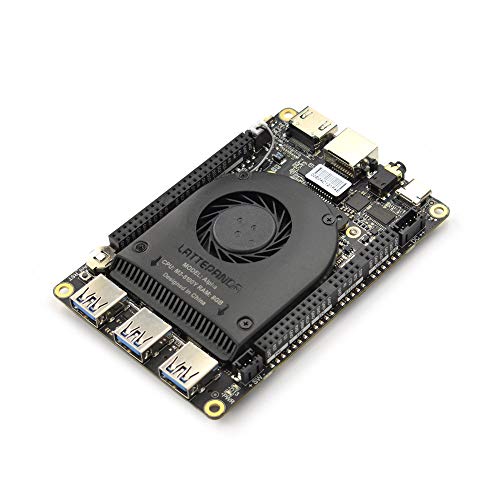
LattePanda 2 Alpha Intel Core i5 SBC
Best for: Windows-based IoT and compact edge computing
- Processor
- Intel Core i5 8200Y
- RAM Capacity
- 8GB
- Storage
- 64GB eMMC
- Video Resolution
- 4K Ultra HD
- Operating System Support
- Windows 11 Pro, Windows 10, Linux
- Memory
- 8GB RAM
This pocket-sized single board computer runs an Intel Core i5-8200Y dual-core processor paired with 8GB RAM and 64GB eMMC storage. You get integrated Intel UHD Graphics 615 supporting 4K video output alongside pre-installed, activated Windows 11 Pro. Designed for 8W power dissipation, it includes an active cooling fan and a 45W PD adapter. It fits you if you need full desktop x86 software execution in compact robotics or IoT projects.
Pros
- Intel Core i5-8200Y processor with burst speeds up to 3.9GHz
- Pre-activated Windows 11 Pro license with Linux support
- Integrated Intel UHD Graphics 615 with 4K UHD video capability
- Includes 45W PD power adapter and active cooling fan
Cons
- Internal storage limited to 64GB eMMC
- Processor limited to two physical CPU cores
- Requires active fan cooling for thermal dissipation
Good fit if
- You need a pre-activated Windows 11 Pro environment on an x86 board.
- You require 4K video playback powered by Intel UHD Graphics 615.
- You want an included 45W PD power supply and dedicated cooling fan.
Skip if
- You require more than 64GB of built-in eMMC storage.
- You need a multi-core processor with more than two physical cores.
Verdict: LattePanda Alpha Core i5 Windows SBC provides full x86 desktop capability with 8GB RAM, integrated 4K graphics, and pre-activated Windows 11 Pro in a palm-sized footprint. It delivers low-power dual-core computing for compact IoT, robotics, and edge installations.
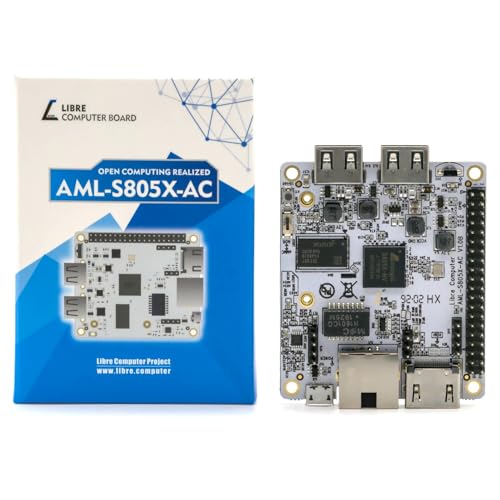
Libre Computer La Frite 1GB SBC
Best for: Low-power Linux media and IoT projects
- Processor
- Quad 64-bit ARM Cortex-A53
- RAM Capacity
- 1GB
- RAM Type
- DDR4
- Operating System Support
- Ubuntu, Debian, Raspbian
- Dimensions
- 3.5 × 2.5 × 0.75 inches
The Libre Computer La Frite is a compact single-board computer built for lightweight computing and media playback. It runs on a 1.2GHz quad-core ARM Cortex-A53 processor paired with 1GB of DDR4 memory. With typical power draw at just 2W, it suits low-power headless setups, basic Linux utilities, or media streaming using hardware decoding for H.265, H.264, and VP9. You also get a 40-pin expansion header for custom hardware.
Pros
- Low standard power consumption of 2W
- Hardware decoding for H.265, H.264, and VP9 video formats
- 40-pin header with Raspberry Pi compatible pin functions
- Dedicated eMMC module connector and UHS Micro SD support
Cons
- Limited to 1GB of system memory
- No onboard eMMC flash storage included
Good fit if
- You need an energy-efficient Linux board drawing around 2W.
- You plan to stream or decode H.265, H.264, or VP9 video.
- You want to connect add-on hardware via a 40-pin header.
Skip if
- You require more than 1GB of RAM for heavy workloads.
- You want built-in onboard flash storage out of the box.
Verdict: Libre Computer La Frite 1GB ARM SBC delivers efficient 2W performance with dedicated hardware video decoding for compact Linux projects. It offers practical GPIO expandability, though memory is strictly capped at 1GB.

CanaKit Raspberry Pi 4 2GB Starter Kit
Best for: Turnkey entry-level single board computer setups
- Processor
- 1.5GHz 64-bit quad-core CPU
- RAM Capacity
- 2GB
- Storage
- 32GB EVO+ Micro SD Card
- Video Resolution
- up to 4K 60p
- Memory
- 2GB RAM
This CanaKit bundle provides a Raspberry Pi 4 Model B single board computer configured with a 1.5GHz 64-bit quad-core processor and 2GB of RAM. The kit includes a pre-loaded 32GB Class 10 Micro SD card, a 3.5A USB-C power supply with an inline switch, active cooling, and a 4K 60p display cable. You get complete hardware out of the box, making it suitable if you want to deploy entry-level projects without sourcing parts individually.
Pros
- Includes 1.5GHz 64-bit quad-core Raspberry Pi 4 Model B
- Comes with pre-loaded 32GB Class 10 Micro SD card and USB reader
- Features 3.5A USB-C power supply with integrated on/off switch
- Includes case, cooling fan, and heat sink set
- Supplies a 6-foot display cable supporting 4K at 60p
Cons
- Limited to 2GB RAM compared to 4GB and 8GB configurations
- Requires manual assembly of board, heat sinks, and case
Good fit if
- You need an all-in-one starter bundle with power, storage, and cooling.
- You run basic tasks that fit within a 2GB memory capacity.
- You want an on/off power switch integrated into your setup.
Skip if
- You require 4GB or 8GB of RAM for heavier multitasking workloads.
- You already own a compatible USB-C power supply, micro SD card, and case.
Verdict: CanaKit Raspberry Pi 4 2GB Starter Kit delivers a complete single board computer setup with storage, cooling, and power hardware included. Its 2GB RAM handles basic computing tasks, while heavier multi-application workloads require larger memory variants.

Khadas VIM3 Pro Single Board Computer
Best for: developers needing local AI processing
- Processor
- Amlogic A311D
- RAM Type
- LPDDR4/X
- Ethernet
- Gigabit Ethernet
- Wireless Connectivity
- 2T2R AC Wi-Fi, Bluetooth 5.0
- Video Resolution
- 4Kx2K@60fps+1x1080P@60fps
- Operating System Support
- Khadas OOWOW, Android, LibreELEC, Ubuntu
The Khadas VIM3 Pro is a single board computer built around the Amlogic A311D processor. It pairs four high-speed cores with an NPU delivering 5.0 TOPS for local AI tasks. You get 4K video decoding and Wi-Fi 5 connectivity. This unit runs Android and Linux. It suits makers who need hardware acceleration and stackable design features for custom projects.
Pros
- Amlogic A311D processor with dedicated NPU
- 5.0 TOPS neural network acceleration
- Supports 4Kx2K@60fps video decoding
- Stackable design with programmable MCU
- Wi-Fi 5 and Bluetooth 5.0
Cons
- Only includes Wi-Fi 5, not Wi-Fi 6
- No external power adapter listed in specs
- Limited to two independent displays
Good fit if
- You need local AI processing for edge computing
- You want a stackable board for custom enclosures
- You require hardware video encoding for media servers
Skip if
- You need the latest Wi-Fi 6E standard
- You want a plug-and-play desktop computer
- You require multiple high-resolution displays
Verdict: The Khadas VIM3 Pro Mini PC offers strong neural network performance for developers. It fits users building custom AI or media devices who value hardware acceleration over convenience.
Specifications side by side
| Spec | Freenove Ultimate Starter Kit for Raspberry Pi | Libre Computer 128GB eMMC 5.x Module | Libre Computer Renegade 4GB Single Board Computer | Libre Computer Tritium 1GB Quad-Core Board | LattePanda 2 Alpha Intel Core i5 SBC | Libre Computer La Frite 1GB SBC | CanaKit Raspberry Pi 4 2GB Starter Kit | Khadas VIM3 Pro Single Board Computer |
|---|---|---|---|---|---|---|---|---|
| Processor | not specified | not specified | Quad 64-bit ARM Cortex-A53 | not specified | Intel Core i5 8200Y | Quad 64-bit ARM Cortex-A53 | 1.5GHz 64-bit quad-core CPU | Amlogic A311D |
| RAM Capacity | not specified | not specified | not specified | 1GB | 8GB | 1GB | 2GB | not specified |
| RAM Type | not specified | not specified | DDR4 | not specified | not specified | DDR4 | not specified | LPDDR4/X |
| Storage | not specified | 128GB eMMC 5.x | not specified | not specified | 64GB eMMC | not specified | 32GB EVO+ Micro SD Card | not specified |
| Ethernet | not specified | not specified | Gigabit Ethernet | not specified | not specified | not specified | not specified | Gigabit Ethernet |
| Wireless Connectivity | not specified | not specified | not specified | not specified | not specified | not specified | not specified | 2T2R AC Wi-Fi, Bluetooth 5.0 |
| Video Resolution | not specified | not specified | 4K 60FPS | not specified | 4K Ultra HD | not specified | up to 4K 60p | 4Kx2K@60fps+1x1080P@60fps |
| Operating System Support | not specified | Linux, Android | Ubuntu, Debian, Raspbian, Linux | Ubuntu, Debian, Raspbian, Armbian | Windows 11 Pro, Windows 10, Linux | Ubuntu, Debian, Raspbian | not specified | Khadas OOWOW, Android, LibreELEC, Ubuntu |
| Memory | not specified | not specified | not specified | not specified | 8GB RAM | not specified | 2GB RAM | not specified |
| Operating System | not specified | not specified | not specified | not specified | Windows 11 Pro | not specified | not specified | Android |
| Networking | not specified | not specified | Gigabit Ethernet | not specified | not specified | not specified | not specified | not specified |
| Architecture | not specified | not specified | not specified | not specified | not specified | ARM | not specified | not specified |
| Dimensions | not specified | not specified | not specified | not specified | not specified | 3.5 × 2.5 × 0.75 inches | not specified | not specified |
| Model | FNK0020 | LC-EMMC-5X-128GB | ROC-RK3328-CC-V1 | not specified | DFR0547 | LC-SBC-AML-S805X-AC | 99294 | VIM3 Pro |
| Size | not specified | 128GB | 4GB | H3 1GB | not specified | 1GB+No eMMC | 2GB RAM | Pro |
| Color | not specified | 5.x | Black | not specified | Alpha 864s (Win11 Pro Activated, 8GB RAM/64GB eMMC) | not specified | black | Blue |
If your project requires dedicated graphics or multi-threaded CPU power, the computer workstation buying guide covers larger desktop hardware.
Frequently asked questions
Can I use a single board computer as a desktop PC?
Yes, if you choose an x86 model with sufficient memory. The LattePanda Alpha features an Intel Core i5 processor, 8GB of RAM, and pre-activated Windows 11 Pro. This configuration allows you to run standard desktop applications and manage everyday computing tasks in a compact form factor.
Which single board computer is best for learning coding?
The Freenove Ultimate Starter Kit for Raspberry Pi is designed for this purpose. It includes 223 components and multi-language software projects to guide your learning. Note that this kit does not include the host computer itself, so you will need a compatible Raspberry Pi board to begin your electronics projects.
Do I need to buy a separate storage drive?
It depends on the model you select. Some boards, like the Libre Computer Tritium 1GB, do not include internal storage. Others, such as the LattePanda Alpha, come with 64GB of eMMC storage built-in. You can also add fast storage later using modules like the Libre Computer 128GB eMMC 5.x Module.
Can a single board computer run Windows?
Yes, but only models with x86 architecture support it. The LattePanda Alpha runs Windows 11 Pro out of the box. Most ARM-based boards, such as the Khadas VIM3 Pro or Libre Computer Renegade, are designed for Linux or Android operating systems and cannot run standard Windows desktop software.
Are single board computers good for home media servers?
Yes, provided they have adequate networking and processing power. The Libre Computer Renegade 4GB offers Gigabit Ethernet for reliable wired connections. For media playback, the Libre Computer La Frite provides dedicated hardware video decoding, making it efficient for lightweight Linux media projects despite its 1GB memory limit.
What is the difference between ARM and x86 architectures?
ARM chips prioritize energy efficiency, while x86 chips offer desktop-class performance. The Libre Computer La Frite uses an ARM architecture for low-power IoT tasks. In contrast, the LattePanda Alpha uses an Intel Core i5 x86 processor. Choose ARM for always-on efficiency and x86 for full desktop compatibility.
Do I need cooling for a single board computer?
Most models benefit from active or passive cooling to maintain performance. The CanaKit Raspberry Pi 4 2GB Starter Kit includes necessary cooling hardware. Without adequate heat dissipation, processors may throttle during heavy workloads. Always check the thermal specifications for your specific board to ensure stable operation in enclosed spaces.