Best Mini PCs with 256GB SSD in 2026: 15 Picks Ranked by Specs
As an Amazon Associate we earn from qualifying purchases. Links on this page are affiliate links.
Finding the right mini PC with 256GB SSD requires balancing processing power, system memory, and physical connectivity. Across 15 selections, these rankings rely strictly on specifications published on product listings to give you an objective look at available hardware.
The Apple Mac mini M6 Desktop takes the top spot by pairing 16GB of unified memory with Thunderbolt 4 connectivity and triple-monitor support in a chassis under five inches square. Reviewing these technical details helps you decide which processor architecture, chassis size, and expansion options fit your daily workspace.
Quick picks
The best fit for you
- You need a macOS desktop with triple-monitor support Apple Mac mini M6 Desktop It integrates native triple-monitor support, Wi-Fi 7, and Thunderbolt 4 connectivity.
- You need high-speed WiFi 6E networking for work Dell OptiPlex Micro WiFi 6E Mini PC It features integrated WiFi 6E connectivity paired with an Intel Core i5 processor.
- You want dual M.2 storage drive expansion slots KAMRUI Pinova Ryzen 7330U Mini PC It provides dual M.2 expansion slots alongside 16GB of system RAM.
- You need high-core processing power for intensive workloads ACEMAGIC Core i5-12600H Mini PC It is equipped with a 12-core Intel Core i5-12600H processor.
Our 15 picks

Apple Mac mini M6 Desktop
Best for: compact multi-display macOS workstations
- Storage
- 256GB SSD (what this guide is about)
- Processor
- Apple M6
- Installed RAM
- 16GB
- Storage Capacity
- 256GB SSD
- Memory Type
- Unified Memory
- Ethernet Ports
- 2.5Gb Ethernet
This Apple Mac mini pairs an Apple M6 chip with 16GB of unified memory and a 256GB SSD in a 5-by-5-inch chassis. You get three Thunderbolt 4 ports, front-facing USB-C, 2.5Gb Ethernet, and support for up to three external displays. It suits you if you need a compact macOS desktop for daily productivity, local AI tasks, and multi-display setups without consuming desk space.
Pros
- Apple M6 chip with Dual 16-core Neural Engine and 170GB/s memory bandwidth
- Three Thunderbolt 4 ports, two front USB-C ports, and HDMI
- Wi-Fi 7, Bluetooth 6, and 2.5Gb Ethernet networking
- Native support for up to three external displays
Cons
- No USB Type-A ports provided on chassis
- Internal storage limited to 256GB SSD in base configuration
Good fit if
- You need a compact macOS system with modern connectivity like Wi-Fi 7 and Thunderbolt 4.
- You plan to run multi-monitor workstations with up to three displays.
- You want on-device AI acceleration backed by 16GB of unified memory.
Skip if
- You rely on legacy USB-A peripherals without using adapters.
- You require more than 256GB of internal storage immediately.
Verdict: Apple Mac mini M6 delivers high-bandwidth memory and current-generation connectivity in a compact footprint under five inches square. It leads this category by integrating Thunderbolt 4, Wi-Fi 7, and triple-monitor support directly into its base design.

HP EliteDesk Mini Core i5 PC
Best for: compact office productivity and everyday multitasking
- Storage
- 256GB SSD (what this guide is about)
- Processor
- Intel Core i5-8500T
- Installed RAM
- 16GB
- Storage Capacity
- 256GB
- Memory Type
- DDR4
- Operating System
- Windows 11 Pro
This renewed HP mini desktop gives you an Intel Core i5-8500T hexa-core processor paired with 16GB of DDR4 memory and a 256GB NVMe solid-state drive. Measuring 7 by 7 inches and just 1.25 inches tall, it provides a compact footprint for tight workspaces. Pre-installed with Windows 11 Pro, it suits everyday business tasks, productivity work, and multitasking where you need dependable performance without a bulky tower chassis taking up room.
Pros
- Intel Core i5-8500T 6-core processor reaches up to 3.5GHz
- 16GB DDR4 RAM supports smooth multitasking
- High-speed 256GB NVMe solid-state storage
- Small 7 x 7 x 1.25-inch chassis weighing 2.93 pounds
Cons
- Renewed unit that may show minor cosmetic wear
- 256GB storage capacity limits large local file archives
Good fit if
- You need 16GB of system memory for business multitasking.
- You want a mini desktop chassis weighing under 3 pounds.
- You require Windows 11 Pro for professional use.
Skip if
- You prefer buying brand-new equipment without cosmetic blemishes.
- You need more than 256GB of factory internal storage.
Verdict: HP EliteDesk Mini Core i5 Desktop delivers 16GB RAM and a 256GB NVMe SSD inside an ultra-compact chassis for daily business use. It provides capable 6-core processing for office workflows if you do not mind renewed hardware.

Dell OptiPlex Micro WiFi 6E Mini PC
Best for: compact desks needing fast WiFi 6E connectivity
- Storage
- 256GB SSD (what this guide is about)
- Processor
- Intel Core i5-9500T
- Installed RAM
- 8GB
- Storage Capacity
- 256GB
- Operating System
- Windows 11 Pro
- Memory
- 8GB RAM
This Dell OptiPlex Micro desktop provides a compact workstation configuration for your desk. It pairs an Intel Core i5 processor with 8GB of RAM and a 256GB NVMe solid-state drive. You also get built-in AX210 WiFi 6E connectivity alongside Windows 11 Pro in a chassis measuring 7 by 7 inches. It suits you if you need modern high-speed wireless networking combined with essential solid-state storage for daily office productivity.
Pros
- Built-in AX210 WiFi 6E wireless connectivity
- Compact chassis measuring 7 by 7 by 1.5 inches
- Preinstalled Windows 11 Pro operating system
- Fast 256GB NVMe solid-state drive
Cons
- 8GB base memory limits demanding workloads
- Chassis weight reaches 6 pounds
Good fit if
- You need modern WiFi 6E high-speed wireless networking.
- You want a compact 7-inch mini PC running Windows 11 Pro.
- You require 256GB of responsive NVMe storage for everyday office tasks.
Skip if
- You require more than 8GB of system memory out of the box.
- You want an ultra-lightweight chassis that weighs less than 6 pounds.
Verdict: Dell OptiPlex Micro WiFi 6E PC delivers modern wireless connectivity and NVMe storage in a space-saving 7-inch chassis. It provides a solid baseline configuration for general workplace productivity.

Dell OptiPlex Micro Core i3 Desktop
Best for: Everyday office tasks and general productivity
- Storage
- 256GB SSD (what this guide is about)
- Processor
- Intel Core i3-9100T
- Installed RAM
- 8GB
- Storage Capacity
- 256GB
- Memory Type
- DDR4 2666MHz
- Operating System
- Windows 11
The Dell OptiPlex Micro Core i3 PC is a compact refurbished desktop designed for basic daily computing. Inside, you get a quad-core Intel Core i3-9100T processor, 8GB of DDR4 memory, and a 256GB PCIe SSD running Windows 11. It provides dual display outputs via HDMI 1.4 and DisplayPort 1.2, plus six USB ports. This setup fits you well if you need an entry-level workstation for standard office tasks and media browsing.
Pros
- Intel Core i3-9100T quad-core processor up to 3.70GHz turbo
- 256GB M.2 PCIe solid-state drive
- Six USB ports with four USB 3.1 connections
- Dual monitor support with HDMI 1.4 and DisplayPort 1.2
Cons
- Refurbished unit ships in generic packaging
- Included keyboard and mouse may not be original equipment
- Base configuration limited to 8GB RAM
Good fit if
- You need a compact workstation for basic office workflows and web browsing.
- You plan to run a dual-monitor setup using DisplayPort and HDMI.
Skip if
- You require more than 8GB RAM for memory-intensive applications.
- You want a brand-new device in original manufacturer packaging.
Verdict: Dell OptiPlex Micro Core i3 PC delivers reliable quad-core processing and responsive 256GB PCIe storage for general productivity. It serves as an efficient, compact desktop for basic workplace or school needs.

KAMRUI Pinova Ryzen 7330U Mini PC
Best for: triple-display multitasking with easy M.2 storage expansion
- Storage
- 256GB SSD (what this guide is about)
- Processor
- AMD Ryzen 7330U
- Installed RAM
- 16GB
- Storage Capacity
- 256GB
- Memory Type
- LPDDR4X
- Graphics
- Radeon Graphics
The KAMRUI Pinova Ryzen 7330U Mini PC gives you an AMD Ryzen 7330U quad-core processor paired with 16GB of LPDDR4X memory and a 256GB M.2 SSD. You can output video to three 4K monitors simultaneously using HDMI, DisplayPort, and USB Type-C. It also features two internal M.2 expansion slots for additional drives. This setup suits you if you need a compact workstation for multitasking, spreadsheets, and multi-display office productivity.
Pros
- AMD Ryzen 7330U processor with 4 cores, 8 threads, and boost clocks up to 4.3GHz
- Simultaneous triple 4K display output at 60Hz via HDMI, DisplayPort, and Type-C
- Two open M.2 2280 expansion slots supporting up to 4TB total storage
- Includes 16GB LPDDR4X memory and 10Gbps USB 3.2 Gen2 ports
Cons
- Included storage capacity is limited to 256GB out of the box
- Secondary internal M.2 slot only supports SATA drives rather than NVMe
- Wired networking tops out at standard Gigabit LAN
Good fit if
- You need to run up to three 4K monitors simultaneously at 60Hz.
- You want an 8-thread Zen 3 processor with 16GB of RAM for office workloads.
- You plan to add your own secondary M.2 SSD storage later.
Skip if
- You require more than 256GB of built-in storage without opening the case.
- You need faster than Gigabit Ethernet speeds for local network transfers.
Verdict: KAMRUI Pinova Ryzen 7330U Mini PC delivers capable 8-thread processing and versatile triple-display support in a compact chassis. It is a solid pick if you want 16GB of memory and dual M.2 expansion slots alongside a base 256GB SSD.

KAMRUI Pinova Intel Core 3 Mini PC
Best for: multi-monitor office setups needing storage expansion
- Storage
- 256GB SSD (what this guide is about)
- Processor
- Intel Core 3 304
- Installed RAM
- 12GB
- Storage Capacity
- 256GB
- Memory Type
- LPDDR5 5600MT/s
- Graphics
- Integrated graphics
This compact desktop gives you modern processing with an Intel Core 3 304 5-core chip and 12GB of high-speed LPDDR5 memory. Its 256GB NVMe SSD handles your operating system and essential applications, while a second M.2 slot allows future storage expansion up to 4TB. It suits you if you need fast wired 2.5GbE networking, triple-display output, and efficient performance for daily office workloads without buying bulky desktop hardware.
Pros
- Intel Core 3 304 5-core processor up to 4.3GHz
- Fast 12GB LPDDR5 5600MT/s memory
- Secondary M.2 2280 NVMe slot supports up to 4TB extra storage
- Triple 4K display output via HDMI, DisplayPort, and full-function USB-C
- Fast 2.5GbE Ethernet port and Wi-Fi 6 connectivity
Cons
- Integrated graphics instead of a dedicated GPU
- 256GB base storage capacity fills quickly without adding extra drives
Good fit if
- You need triple 4K monitor support from a compact desktop.
- You want fast 2.5GbE wired networking for large file transfers.
- You plan to add a second M.2 NVMe SSD for additional internal storage.
Skip if
- You require dedicated GPU graphics for heavy visual workloads.
- You need more than 256GB of out-of-the-box storage space.
Verdict: KAMRUI Pinova Core 3 Mini PC pairs efficient 5-core Intel computing with modern LPDDR5 memory and flexible triple-display connectivity. It provides reliable everyday performance and simple storage expandability in a compact form factor.

Dell OptiPlex Micro PC 10th Gen i5
Best for: compact office multitasking and general business productivity
- Storage
- 256GB SSD (what this guide is about)
- Processor
- Intel Core i5-10500T
- Installed RAM
- 8GB
- Storage Capacity
- 256GB
- Memory Type
- DDR4
- Operating System
- Windows 11 Pro
This renewed compact desktop packs a 10th Generation 6-core Intel Core i5 processor into a chassis measuring 7 by 7 by 1.4 inches. You get 8GB of DDR4 memory, a 256GB solid-state drive, built-in Wi-Fi, Bluetooth, and Windows 11 Pro preinstalled. It suits you if you need a space-saving business machine for routine office multitasking, web apps, and everyday productivity workloads without cluttering your desk.
Pros
- 10th Gen 6-core Intel Core i5-10500T processor
- Compact chassis measuring 7 x 7 x 1.4 inches
- Built-in Wi-Fi and Bluetooth connectivity
- Comes with Windows 11 Pro installed
Cons
- Base configuration includes only 8GB DDR4 RAM
- 256GB SSD limits internal local storage
Good fit if
- You need a compact 7-inch desktop for everyday office tasks.
- You want Windows 11 Pro with built-in Wi-Fi and Bluetooth.
- You run productivity software that benefits from a 6-core processor.
Skip if
- You require more than 8GB of memory out of the box.
- You need large local drive capacity beyond 256GB.
Verdict: Dell OptiPlex Micro Intel i5 Desktop delivers 6-core processing and Windows 11 Pro in an ultra-compact chassis. It handles standard productivity workloads effectively if 8GB of RAM and 256GB of storage match your requirements.
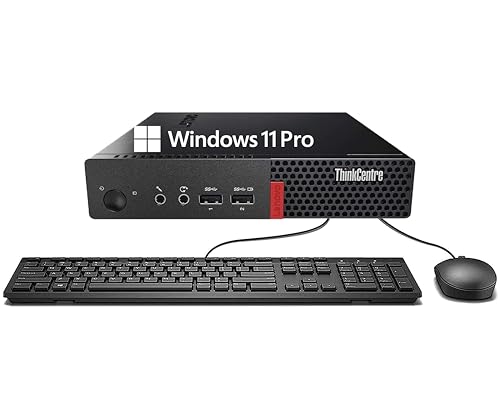
Lenovo ThinkCentre Tiny Core i3 Mini PC
Best for: basic office work and web browsing
- Storage
- 256GB SSD (what this guide is about)
- Processor
- Intel Core i3-6100T
- Installed RAM
- 8GB
- Storage Capacity
- 256GB
- Memory Type
- DDR4
- Operating System
- Windows 11 Pro
This Lenovo ThinkCentre Tiny desktop fits basic workspace needs using an Intel Core i3-6100T processor. It pairs 8GB of DDR4 memory with a 256GB solid-state drive for responsive boot times and standard file access. Wired connections include DisplayPort, USB Type-A, and RJ-45 Ethernet. It comes loaded with Windows 11 Pro, making it suitable if you need a straightforward micro desktop for daily office tasks, browsing, and standard document handling.
Pros
- 256GB solid-state drive for fast data access
- 8GB DDR4 RAM handles standard multitasking
- Includes DisplayPort, USB Type-A, and RJ-45 Ethernet ports
- Pre-installed with Windows 11 Pro
Cons
- Powered by an older 6th-generation Intel Core i3 processor
- No Wi-Fi or Bluetooth connectivity listed in specifications
- No USB-C or HDMI ports specified
Good fit if
- You need a compact desktop for basic office applications and web browsing.
- You connect your monitor primarily through DisplayPort.
- You require Windows 11 Pro for device management and security.
Skip if
- You need modern multi-core computing power for heavy workloads.
- You require integrated Wi-Fi or Bluetooth without external adapters.
- You rely on native HDMI or USB-C display outputs.
Verdict: Lenovo ThinkCentre Tiny Core i3 Desktop provides straightforward 256GB solid-state storage and 8GB RAM in an ultra-compact chassis for routine productivity. Its 6th Gen processor limits it to essential office workflows rather than intensive tasks.

Dell OptiPlex Micro PC 16GB RAM
Best for: compact workspaces needing expandable dual-drive storage
- Storage
- 256GB SSD (what this guide is about)
- Processor
- Intel Core i5-6500T
- Installed RAM
- 16GB
- Storage Capacity
- 256GB
- Memory Type
- DDR4
- Ethernet Ports
- RJ-45
This micro desktop delivers compact computing with an Intel Core i5-6500T quad-core processor and 16GB of DDR4 RAM. For storage, you get a 256GB NVMe SSD paired with internal expansion space for an additional 2.5-inch drive. It includes Windows 11 Pro, dual-display video outputs, and six USB 3.0 ports. It suits you if you need a dependable office computer that saves desk space.
Pros
- 256GB NVMe SSD with expansion support for an extra 2.5-inch drive
- 16GB DDR4 RAM for multitasking responsiveness
- Dual-display support up to 4K resolution using HDMI and DisplayPort
- Six USB 3.0 ports along with built-in Wi-Fi and Bluetooth
Cons
- Certified refurbished product backed by a 90-day warranty
- No USB-C ports listed among the available connections
Good fit if
- You need 16GB RAM and a responsive NVMe boot drive for daily tasks.
- You plan to add a secondary 2.5-inch storage drive down the road.
- You run a dual-monitor workstation setup using DisplayPort and HDMI.
Skip if
- You prefer brand-new hardware with standard factory coverage.
- You rely on USB-C accessories for your daily workflow.
Verdict: Dell OptiPlex Micro Core i5 Desktop provides solid everyday office performance with 16GB DDR4 memory, fast NVMe storage, and expansion flexibility in an ultra-compact chassis.

GMKtec Ryzen 5400U Mini PC
Best for: dual-LAN networking and multi-monitor office multitasking
- Storage
- 256GB SSD (what this guide is about)
- Processor
- AMD Ryzen 5400U
- Installed RAM
- 16GB
- Storage Capacity
- 256GB
- Memory Type
- DDR4 3200MT/s
- Graphics
- AMD Radeon Graphics
This compact desktop pairs an AMD Ryzen 5400U processor with 16GB of DDR4 memory and a 256GB PCIe 3.0 SSD. You get dual 2.5Gbps Ethernet ports and WiFi 6E for fast networking, alongside support for three displays via HDMI, DisplayPort, and USB-C. It suits you if you need a responsive daily work computer that handles multitasking, light creative projects, or home server duties in a tiny footprint.
Pros
- Dual 2.5Gbps Ethernet ports and WiFi 6E connectivity
- Triple display output via HDMI 2.0, DisplayPort 1.4, and USB-C
- Expandable storage with dual M.2 2280 SSD slots supporting up to 16TB
- Dual SO-DIMM slots supporting up to 64GB DDR4 memory
Cons
- Limited to PCIe 3.0 storage interface rather than faster PCIe generations
- Integrated Radeon graphics with 6 cores intended only for light graphical workloads
- Uses DDR4 memory instead of newer DDR5 platforms
Good fit if
- You need dual 2.5Gbps Ethernet ports for home servers, routing, or networked storage.
- You run up to three monitors using DisplayPort, HDMI, and USB-C connections.
- You want room to expand internal memory up to 64GB and storage up to 16TB.
Skip if
- You require dedicated GPU performance for demanding 3D gaming or rendering.
- You need the faster bandwidth of PCIe 4.0 storage and DDR5 memory.
Verdict: GMKtec NucBox Ryzen 5400U Mini PC delivers flexible networking and triple-monitor output in a compact 1.1-pound chassis. Its dual SO-DIMM and dual M.2 slots ensure straightforward future memory and storage expansion.

ACEMAGIC Core i5-12600H Mini PC
Best for: triple-display productivity and multi-threaded workloads
- Storage
- 256GB SSD (what this guide is about)
- Processor
- Intel i5-12600H
- Installed RAM
- 16GB
- Storage Capacity
- 256GB
- Memory Type
- DDR4
- Ethernet Ports
- 1.0Gbps LAN
This ACEMAGIC compact computer features an Intel Core i5-12600H processor with 12 cores and 16 threads, paired with 16GB of DDR4 memory and a 256GB PCIe SSD. It supports up to three 4K displays across its HDMI, DisplayPort, and Type-C outputs, and includes Windows 11 Pro pre-installed. It suits you if you need modern multi-core computing power and flexible display setups in a space measuring under two inches tall.
Pros
- 12-core, 16-thread Intel Core i5-12600H processor
- Triple 4K display output via HDMI, DisplayPort, and Type-C
- Dual-channel memory expandable up to 64GB DDR4
- Internal bay supports an optional 2.5-inch SSD up to 4TB
- Equipped with WiFi 6 and Bluetooth 5.2
Cons
- Uses DDR4 memory instead of DDR5
- Wired Ethernet maxes out at 1.0Gbps
- Base 256GB storage capacity fills quickly
Good fit if
- You need to drive three independent 4K monitors simultaneously.
- You want a 12-core CPU with expansion options for RAM and storage.
- You require Windows 11 Pro and modern WiFi 6 connectivity.
Skip if
- You require 2.5Gbps or faster wired network speeds.
- You want newer DDR5 system memory.
- You need more than 256GB of internal storage immediately without adding drives.
Verdict: ACEMAGIC Intel Core i5-12600H Mini PC delivers robust 12-core processing and triple-screen 4K output in a low-profile case. It gives you straightforward memory and storage upgrade paths alongside Windows 11 Pro.

ACEMAGIC Ryzen 3 PRO 7330U Mini PC
Best for: multi-monitor office setups and low-power multitasking
- Storage
- 256GB SSD (what this guide is about)
- Processor
- AMD Ryzen 3 PRO 7330U
- Installed RAM
- 8GB
- Storage Capacity
- 256GB
- Ethernet Ports
- Gigabit Ethernet
- Operating System
- Windows 11 Pro
This compact desktop features an AMD Ryzen 3 PRO 7330U processor paired with 8GB of RAM and a 256GB SSD. It supports up to three 4K displays simultaneously using HDMI 2.0, DisplayPort 1.4, and a full-featured USB-C port. You get dual drive expansion slots and Windows 11 Pro pre-installed. It suits your needs if you run office applications, manage multiple monitors, and want straightforward internal drive upgrades.
Pros
- Triple 4K display output via HDMI 2.0, DisplayPort 1.4, and USB-C
- Dual drive bays supporting M.2 SATA and NVMe PCIe 3.0 SSDs up to 4TB
- Energy-efficient AMD Ryzen 3 PRO 7330U processor with a 28W profile
- Includes wall mount bracket, screws, and HDMI cable in the box
Cons
- Installed system memory is limited to 8GB RAM
- Uses older WiFi 5 and Bluetooth 4.2 wireless standards
Good fit if
- You need a multi-screen workstation powering up to three 4K monitors.
- You plan to expand internal storage using dual M.2 drive slots.
- You want a low-power 28W desktop running Windows 11 Pro.
Skip if
- You require modern WiFi 6 or Bluetooth 5.0 wireless connectivity.
- You need more than 8GB of pre-installed RAM out of the box.
Verdict: ACEMAGIC Ryzen 3 PRO Mini PC provides capable quad-core processing, triple-display output, and flexible dual-slot drive expansion in a palm-sized chassis. It offers reliable daily productivity for multi-monitor office setups.

Lenovo ThinkCentre Tiny Core i5 PC
Best for: compact multi-display office productivity
- Storage
- 256GB SSD (what this guide is about)
- Processor
- Intel Core i5-8500T
- Installed RAM
- 16GB
- Storage Capacity
- 256GB
- Memory Type
- DDR4
- Graphics
- Intel UHD Graphics 630
This Lenovo ThinkCentre Tiny desktop packs a six-core Intel Core i5-8500T processor, 16GB of DDR4 memory, and a 256GB NVMe SSD into a chassis measuring under 1.4 inches tall. It gives you dual native video outputs through HDMI and DisplayPort, alongside six total USB 3.1 ports. It suits you if you need a compact Windows 11 workstation for everyday multitasking without taking up valuable desk space.
Pros
- Six-core Intel Core i5-8500T processor with up to 3.50 GHz boost
- 16GB DDR4 memory paired with a 256GB NVMe M.2 SSD
- Six USB 3.1 ports, including two Gen 2 ports
- Includes wireless keyboard, mouse, and USB Wi-Fi adapter
Cons
- Wi-Fi and Bluetooth require an external USB combo adapter
- Integrated Intel UHD Graphics 630 limits heavy graphics tasks
Good fit if
- You need 16GB of system memory for productivity workflows.
- You connect multiple peripherals via USB 3.1 Gen 1 and Gen 2 ports.
- You want dual display outputs using standard DisplayPort and HDMI.
Skip if
- You require built-in internal Wi-Fi rather than an external USB dongle.
- You need dedicated graphics processing power for heavy creative work.
Verdict: Lenovo ThinkCentre Tiny Intel i5 Desktop delivers solid six-core performance, 16GB of memory, and generous USB connectivity in an ultra-compact footprint. It provides a reliable setup for standard office tasks and multi-monitor productivity.

HP EliteDesk Mini PC Core i5 16GB
Best for: Wi-Fi 6 multi-monitor office setups
- Storage
- 256GB SSD (what this guide is about)
- Processor
- Intel Core i5-9500T
- Installed RAM
- 16GB
- Storage Capacity
- 256GB NVMe SSD
- Memory Type
- DDR4 2666MHz
- Graphics
- Intel UHD Graphics 630
This compact desktop gives you a 256GB NVMe SSD paired with 16GB of DDR4 memory and an Intel Core i5-9500T six-core processor. For networking and peripherals, you get Wi-Fi 6 connectivity, Bluetooth 5.0, and seven total USB ports including a Type-C connection. Three DisplayPort outputs allow you to run multiple external screens. It suits you if you need an office setup focused on daily productivity and fast local connections.
Pros
- Wi-Fi 6 wireless connectivity and Bluetooth 5.0
- 16GB DDR4 memory paired with 256GB NVMe storage
- Six-core Intel Core i5-9500T processor
- Three DisplayPort outputs (two DP 1.2 and one DP 1.4)
Cons
- No built-in HDMI video ports
- Uses integrated Intel UHD Graphics 630 instead of dedicated graphics
- Wi-Fi connectivity relies on an external USB adapter
Good fit if
- You need Wi-Fi 6 wireless networking and Bluetooth 5.0 support.
- You connect up to three displays via DisplayPort.
- You require 16GB of RAM for multi-application workflows.
Skip if
- You need native HDMI monitor outputs without using adapters.
- You require dedicated GPU hardware for intensive 3D rendering.
Verdict: HP EliteDesk Mini Core i5 PC provides capable six-core processing, generous USB connectivity, and triple-monitor output for desktop productivity. Its Wi-Fi 6 support and 16GB RAM deliver reliable responsiveness for multi-app office workloads.

Dell OptiPlex Micro Core i3 Desktop
Best for: basic office tasks with dual monitors
- Storage
- 256GB SSD (what this guide is about)
- Processor
- Intel Core i3-6100T
- Installed RAM
- 8 GB
- Storage Capacity
- 256 GB SSD
- Operating System
- Windows 11 Pro
- Memory
- 8GB RAM
This refurbished Dell OptiPlex micro desktop provides a compact workstation configuration for everyday computing. It features a 256GB SSD paired with 8GB of RAM and a dual-core Intel Core i3-6100T processor running at 3.2 GHz. You get Windows 11 Pro preinstalled, built-in Wi-Fi and Bluetooth, plus DisplayPort and HDMI outputs. It fits you if you need a basic, space-saving desktop with essential peripherals included.
Pros
- Includes 1 HDMI port and 1 DisplayPort for monitor connectivity
- Six USB ports with 4 USB 3.0 and 2 USB 2.0 connections
- Bundled with a wired keyboard and mouse
- Built-in Wi-Fi and Bluetooth wireless support
Cons
- Legacy dual-core CPU with only 2 cores and 4 threads
- Base configuration limited to 8GB of RAM
Good fit if
- You need dual video outputs with DisplayPort and HDMI.
- You want a setup that comes bundled with a wired keyboard and mouse.
- You run standard office applications under Windows 11 Pro.
Skip if
- You require more than two CPU cores for demanding workloads.
- You need more than 8GB of RAM for memory-intensive applications.
Verdict: Dell OptiPlex Micro Intel i3 Desktop delivers essential everyday performance with its 256GB SSD, dual display ports, and included wired accessories. It provides a straightforward compact setup for routine tasks that do not demand heavy multi-core processing.
Specifications side by side
| Spec | Apple Mac mini M6 Desktop | HP EliteDesk Mini Core i5 PC | Dell OptiPlex Micro WiFi 6E Mini PC | Dell OptiPlex Micro Core i3 Desktop | KAMRUI Pinova Ryzen 7330U Mini PC | KAMRUI Pinova Intel Core 3 Mini PC | Dell OptiPlex Micro PC 10th Gen i5 | Lenovo ThinkCentre Tiny Core i3 Mini PC | Dell OptiPlex Micro PC 16GB RAM | GMKtec Ryzen 5400U Mini PC | ACEMAGIC Core i5-12600H Mini PC | ACEMAGIC Ryzen 3 PRO 7330U Mini PC | Lenovo ThinkCentre Tiny Core i5 PC | HP EliteDesk Mini PC Core i5 16GB | Dell OptiPlex Micro Core i3 Desktop |
|---|---|---|---|---|---|---|---|---|---|---|---|---|---|---|---|
| Processor | Apple M6 | Intel Core i5-8500T | Intel Core i5-9500T | Intel Core i3-9100T | AMD Ryzen 7330U | Intel Core 3 304 | Intel Core i5-10500T | Intel Core i3-6100T | Intel Core i5-6500T | AMD Ryzen 5400U | Intel i5-12600H | AMD Ryzen 3 PRO 7330U | Intel Core i5-8500T | Intel Core i5-9500T | Intel Core i3-6100T |
| Installed RAM | 16GB | 16GB | 8GB | 8GB | 16GB | 12GB | 8GB | 8GB | 16GB | 16GB | 16GB | 8GB | 16GB | 16GB | 8 GB |
| Storage Capacity | 256GB SSD | 256GB | 256GB | 256GB | 256GB | 256GB | 256GB | 256GB | 256GB | 256GB | 256GB | 256GB | 256GB | 256GB NVMe SSD | 256 GB SSD |
| Memory Type | Unified Memory | DDR4 | not specified | DDR4 2666MHz | LPDDR4X | LPDDR5 5600MT/s | DDR4 | DDR4 | DDR4 | DDR4 3200MT/s | DDR4 | not specified | DDR4 | DDR4 2666MHz | not specified |
| Graphics | not specified | not specified | not specified | not specified | Radeon Graphics | Integrated graphics | not specified | not specified | not specified | AMD Radeon Graphics | not specified | not specified | Intel UHD Graphics 630 | Intel UHD Graphics 630 | not specified |
| Ethernet Ports | 2.5Gb Ethernet | not specified | not specified | not specified | Gigabit LAN | 2.5GbE | not specified | not specified | RJ-45 | Dual 2.5Gbps | 1.0Gbps LAN | Gigabit Ethernet | not specified | not specified | not specified |
| High-Speed Expansion | Thunderbolt 4 | not specified | not specified | not specified | not specified | not specified | not specified | not specified | not specified | not specified | not specified | not specified | not specified | not specified | not specified |
| Operating System | macOS | Windows 11 Pro | Windows 11 Pro | Windows 11 | not specified | not specified | Windows 11 Pro | Windows 11 Pro | Windows 11 Pro | not specified | Windows 11 Pro | Windows 11 Pro | Windows 11 | not specified | Windows 11 Pro |
| Memory | 16GB RAM | 16GB RAM | 8GB RAM | 8GB RAM | 16GB RAM | not specified | 8GB RAM | 8GB RAM | 16GB RAM | 16GB RAM | 16GB RAM | 8GB RAM | 16GB RAM | 16GB RAM | 8GB RAM |
| Storage | 256GB SSD | 256GB SSD | 256GB SSD | 256GB SSD | 256GB SSD | 256GB SSD | 256GB SSD | 256GB SSD | 256GB SSD | 256GB SSD | 256GB SSD | 256GB SSD | 256GB SSD | 256GB SSD | 256GB SSD |
| Use | not specified | Business | not specified | not specified | Home, Business | not specified | not specified | not specified | not specified | not specified | not specified | not specified | not specified | not specified | not specified |
| Networking | not specified | not specified | WiFi 6E | not specified | not specified | not specified | not specified | not specified | not specified | not specified | not specified | not specified | not specified | WiFi 6 | not specified |
| Connectivity | not specified | not specified | not specified | not specified | not specified | not specified | not specified | not specified | not specified | not specified | not specified | not specified | not specified | Bluetooth 5.0 | not specified |
| Dimensions | 5 × 5 × 1.97 inches | 7 × 7 × 1.25 inches | 7 × 7 × 1.5 inches | not specified | 5.04 × 5.04 × 1.63 inches | 5.04 × 5.04 × 1.63 inches | 7 × 7 × 1.4 inches | not specified | 7.2 × 7 × 1.4 inches | 4.5 × 4.9 × 2 inches | 4.87 × 5.03 × 1.59 inches | 3.9 × 1.3 × 3.9 inches | 7.2 × 7.05 × 1.36 inches | 3.94 × 3.94 × 1.97 inches | not specified |
| Weight | 1.48 pounds | 2.93 pounds | 6 pounds | not specified | 1.26 pounds | 1.26 pounds | not specified | 5.67 pounds | 4.1 pounds | 1.1 pounds | not specified | 1.61 pounds | 2.91 pounds | 2.2 pounds | not specified |
| Size | 16GB Unified Memory | 256GB SSD Storage | not specified | Mini | not specified | 16GB+256GB/AMD Ryzen 7330U | 12GB+256GB/Core 3 304 | not specified | Small | mini-i5-16GB-256GB SSD | 16GB+256GB I 5400U | 12600H 16GB 256GB | PRO 7330U+8GB+256GB | 16GB RAM | 256GB SSD | 800G5 | 16GB+256GB SSD | not specified |
| Color | Silver | Black | Black | not specified | Silver | Silver | Black | Black | Black | 16GB+256GB I 5400U | Silver | Sliver | Black | Black | Black |
| Model | MHQK4LL/A | 800G4 | Optiplex 7070 | Dell Optiplex 3070 | P2 | P2 | Dell OptiPlex 3080 Micro Desktop | Lenovo ThinkCentre M710q mini | Optiplex 7040 | M5S | K1 | K1 | Lenovo ThinkCentre M920x | HP 800 G5 EliteDesk Mini Desktop | Dell OptiPlex 3040 Mini PC |
Is a 256GB SSD worth it for your mini PC?
A 256GB SSD serves as a functional baseline for modern desktop operating systems, including Windows 11 Pro and macOS. The solid-state format provides fast boot times and responsive access for routine business software and office documents. However, operating system installations consume a portion of this capacity out of the box. This capacity suits straightforward productivity workflows, especially if you rely on network storage, web-based tools, or select a chassis featuring secondary M.2 expansion slots for future drive additions.
Worth it if
- You rely primarily on cloud services, local network servers, or browser-based tools for your daily workflow.
- You choose a mini PC with secondary M.2 expansion slots to install more storage later.
Skip it if
- You need to store massive local media libraries or extensive raw project archives directly on the boot drive.
- You select a compact model lacking secondary drive expansion and require high onboard storage on day one.
How We Picked These Mini PCs
To select the 15 systems for this 2026 guide, we examine published Amazon specifications for mini computers with a 256GB SSD. A machine qualifies when the listing title or technical feature bullet points explicitly confirm this solid-state drive capacity. We include only one variant per model family so you can compare distinct designs without duplicate hardware options.
We list products in stock first, then by Amazon sales rank, showing better-selling products first. We evaluate additional published specifications like processor tier, installed memory, and networking hardware to rank overall capability. All information comes directly from manufacturer spec sheets without physical testing, helping you find the right compact setup.
Choosing Your 256GB SSD Mini PC
-
Evaluating Processor Core Counts
When selecting a mini desktop, evaluate the processor model to match your daily workload. Entry-level units with Intel Core i3 chips handle essential clerical software and browsing. If your routine involves intensive data compilation or sustained multitasking, prioritize higher core counts. The ACEMAGIC Core i5-12600H Mini PC features a 12-core processor designed for multi-threaded demands. Checking the processor tier ensures you do not end up with inadequate processing headroom for complex office applications.
-
Checking Drive Expansion Options
Every unit in this guide starts with a base 256GB SSD, which can fill quickly with system files and standard programs. If you store media files or large software libraries locally, check whether the chassis includes secondary drive bays or spare slots. For example, the KAMRUI Pinova Ryzen 7330U Mini PC provides dual M.2 expansion slots to add extra solid-state drives later. Verifying slot availability allows you to expand capacity without replacing your primary boot drive.
-
Selecting Your Operating System
Your software ecosystem dictates which platform fits your desk. Most enterprise configurations arrive with Windows 11 Pro, which provides domain joining and corporate management tools suited for office fleets. Other models supply standard Windows 11 for home and office tasks. If your workflow relies on Apple software services or specific macOS creative tools, choose a macOS machine. The Apple Mac mini M6 Desktop delivers native macOS integration alongside high-bandwidth hardware, ensuring software compatibility across your existing ecosystem.
-
Verifying Display Output Capabilities
Check the physical display outputs on the back panel if you plan to connect several screens. Some compact computers provide dual display ports, which suffice for two desktop monitors. If your workstation requires broader screen coverage, look for hardware engineered for triple-screen setups. The GMKtec Ryzen 5400U Mini PC supports triple-monitor output directly from its rear panel ports. Checking the display specifications in advance prevents the need for supplemental external splitters or specialized docking adapters.
-
Assessing Network Connection Speeds
Network standards directly affect file transfer speeds and local connectivity stability. Standard gigabit ports work well for wired office environments, but wireless requirements vary across hardware generations. If you rely primarily on wireless routers, look for WiFi 6 or WiFi 6E specifications to access less congested 6GHz bands. The Dell OptiPlex Micro WiFi 6E Mini PC includes integrated WiFi 6E support for high-throughput wireless networks. Matching the Wi-Fi generation to your local router ensures consistent data throughput.
-
Measuring Desk Footprint Limits
Mini PCs vary noticeably in physical volume and weight, ranging from tiny palm-sized enclosures to larger corporate micro chassis. If your desk space is tight, check the dimensions before buying. Standard business models measure around 7 inches across and weigh between 3 and 6 pounds. The HP EliteDesk Mini Core i5 PC measures 7 by 7 by 1.25 inches with a weight of 2.93 pounds. Reviewing external dimensions helps you confirm placement on shallow desks or under monitors.
Frequently asked questions
How much usable storage space do you get on a 256GB SSD mini PC?
You typically get around 200GB to 220GB of actual formatted space on a 256GB SSD before installing applications. The operating system, such as Windows 11 Pro or macOS, takes up between 20GB and 40GB depending on system files. Pre-installed recovery partitions and system updates also consume extra storage, leaving the remaining volume available for your everyday programs, documents, and light local project files.
Can you connect three monitors to a 256GB SSD mini PC?
Yes, multiple mini PCs with a 256GB SSD support triple monitors straight out of the box. The Apple Mac mini M6 provides triple-monitor output through its integrated display connectivity and Thunderbolt 4 ports. Windows-based options like the KAMRUI Pinova, GMKtec Ryzen 5400U, and ACEMAGIC Core i5-12600H also feature display outputs configured to run three screens simultaneously for expansive desktop productivity.
Can you upgrade the internal storage on these mini computers?
Most Windows-based mini PCs allow storage upgrades, while others have fixed configurations. Models like the GMKtec Ryzen 5400U and KAMRUI Pinova include dual M.2 expansion slots so you can add secondary solid-state drives easily. In contrast, systems like the Apple Mac mini integrate storage directly, meaning you cannot upgrade internal drive capacity after purchase and must rely on external drives.
Which wireless standards do these 256GB SSD mini desktops support?
Wireless specifications vary by model, ranging from standard Wi-Fi up to Wi-Fi 7. The Apple Mac mini M6 features Wi-Fi 7 for ultra-high-bandwidth wireless networks. If you use Windows, the Dell OptiPlex 7070 provides WiFi 6E connectivity, while the Lenovo ThinkCentre M70q features WiFi 6. These protocols give you faster wireless network transfers and lower latency on compatible network routers.
Is 8GB RAM enough on a mini PC with a 256GB SSD?
An 8GB RAM configuration is sufficient if your daily routine involves single-tasking, web browsing, and basic document processing. Units like the Dell OptiPlex 3080 and Dell OptiPlex 3070 rely on 8GB to run basic business applications smoothly. However, if you regularly work with numerous active browser tabs, data sets, or complex productivity software, a 16GB configuration ensures smoother multitasking and prevents background slowdowns.
What operating systems come pre-installed on 256GB mini PCs?
These computers come equipped with either Windows or macOS depending on the manufacturer. The Apple Mac mini M6 runs macOS, offering integrated software ecosystems and services. Most Windows units in this class, including the HP EliteDesk 800 G6 and various Dell OptiPlex configurations, come with Windows 11 Pro pre-installed. Select units, such as the HP EliteDesk 800G4, feature standard Windows 11 for daily work.
How small are mini PCs with a 256GB SSD?
These computers are exceptionally compact, often measuring under seven inches across and weighing under three pounds. The GMKtec M5S measures 4.9 by 4.5 inches and weighs only 1.1 pounds. The Apple Mac mini measures under five inches on each side at 1.47 pounds. Even full-featured office desktops like the Dell OptiPlex micro models maintain compact 7-inch footprints that fit into tight desktop setups.