The Best AZULLE Mini PCs in 2026: 2 Picks
As an Amazon Associate we earn from qualifying purchases. Links on this page are affiliate links.
AZULLE focuses on compact, fanless stick PCs designed for silent operation in fixed installations. If you are looking for the best AZULLE mini PCs, you will find options that prioritize low power use and small footprints over raw speed. The list includes 2 models compared strictly by their published specifications. The top pick is the AZULLE Access Pro Fanless PC Stick, which leads because it fits digital signage and dedicated kiosks perfectly. This device offers an Intel N100 processor and a fanless design in a tiny stick form factor. It suits users who need reliable, quiet performance without the noise of traditional fans.
Quick picks
| # | Product | Best for | Price |
|---|---|---|---|
| 1 | AZULLE Access Pro Fanless PC Stick Best overall | digital signage and dedicated kiosks | Check price of AZULLE Access Pro Fanless PC Stick on Amazon |
| 2 | Azulle Access Pro Fanless N100 PC Stick Best windows 11 pro | Silent Windows 11 Pro stick PC | Check price of Azulle Access Pro Fanless N100 PC Stick on Amazon |
Our 2 picks

AZULLE Access Pro Fanless PC Stick
Best for: digital signage and dedicated kiosks
- Processor
- Intel N100
- Installed RAM
- 4GB
- Storage Capacity
- 64GB
- Memory Type
- LPDDR5
- Graphics
- Intel UHD Graphics
- Ethernet Ports
- Gigabit Ethernet
View on Amazon: AZULLE Access Pro Fanless PC Stick Affiliate link
The AZULLE Access Pro is a fanless stick PC powered by an Intel N100 processor running up to 3.4GHz. It includes 4GB of LPDDR5 RAM and 64GB of eMMC storage. The device runs Windows 10 IoT Enterprise and supports 4K video via HDMI. It features WiFi 6 and Gigabit Ethernet for connectivity. This compact unit suits users needing silent, reliable performance for kiosks or dedicated business tasks.
Pros
- Intel N100 processor with integrated UHD Graphics
- Fanless design ensures silent operation
- Supports 4K HDMI output
- Includes WiFi 6 and Bluetooth 5.2
Cons
- Only 4GB of RAM limits multitasking
- 64GB eMMC storage is small
- Windows 10 IoT Enterprise is not standard Windows
Good fit if
- You need a silent, fanless display solution
- You require a dedicated device for digital signage or kiosks
- You want a compact stick form factor for VESA mounting
Skip if
- You need to run multiple heavy applications simultaneously
- You require a large amount of local storage space
- You prefer the standard Windows 11 Home or Pro interface
Verdict: The AZULLE Access Pro Fanless Mini PC Stick is a specialized tool for fixed installations. It fits users who prioritize silent operation and compact size over raw processing power or large storage capacity.
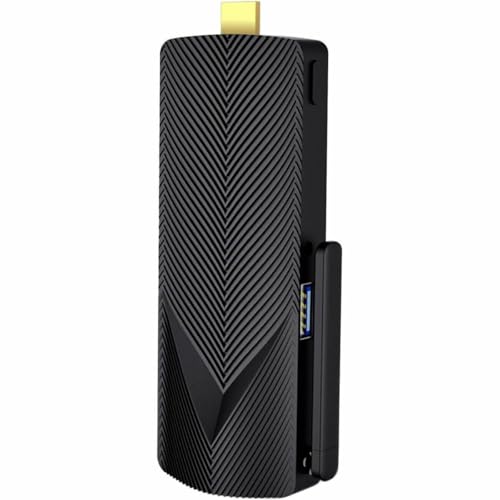
Azulle Access Pro Fanless N100 PC Stick
Best for: Silent Windows 11 Pro stick PC
- Processor
- Intel N100
- Installed RAM
- 4GB
- Storage Capacity
- 64GB
- Ethernet Ports
- Gigabit Ethernet
- Operating System
- Windows 11 Pro
- Memory
- 4GB RAM
View on Amazon: Azulle Access Pro Fanless N100 PC Stick Affiliate link
The AZULLE Access Pro is a fanless stick PC built around the Intel N100 processor. It includes 4GB of RAM and 64GB of eMMC storage. Windows 11 Pro comes pre-installed for business use. You get WiFi 6, Bluetooth 5.2, and Gigabit Ethernet. Its compact 0.8-inch height makes it easy to mount behind displays. This setup suits light office tasks and media streaming.
Pros
- Intel N100 quad-core processor up to 3.4GHz
- Pre-installed Windows 11 Pro for business features
- Fanless design for silent operation
- WiFi 6 and Bluetooth 5.2 connectivity
Cons
- Only 4GB of RAM limits multitasking
- 64GB eMMC storage fills up quickly
- No internal drive bays for expansion
Good fit if
- You need a simple Windows 11 Pro machine
- You want a fanless PC for silent environments
- You need WiFi 6 and Bluetooth 5.2
Skip if
- You require more than 4GB of RAM
- You need large internal storage capacity
- You plan to run heavy multitasking workloads
Verdict: AZULLE Access Pro Fanless Mini PC Stick provides a compact, fanless solution with Windows 11 Pro. It fits users who need basic office capabilities and silent operation in a small form factor.
Specifications side by side
| Spec | AZULLE Access Pro Fanless PC Stick | Azulle Access Pro Fanless N100 PC Stick |
|---|---|---|
| Processor | Intel N100 | Intel N100 |
| Installed RAM | 4GB | 4GB |
| Storage Capacity | 64GB | 64GB |
| Memory Type | LPDDR5 | not stated |
| Graphics | Intel UHD Graphics | not stated |
| Ethernet Ports | Gigabit Ethernet | Gigabit Ethernet |
| Operating System | Windows 10 IoT Enterprise | Windows 11 Pro |
| Memory | 4GB RAM | 4GB RAM |
| Storage | 64GB eMMC | 64GB eMMC |
| Use | IoT | not stated |
| Cooling | Fanless | not stated |
| Networking | Gigabit Ethernet | not stated |
| Form Factor | Stick PC | Stick PC |
| Dimensions | 5.1 × 2 × 0.8 inches | 5.1 × 2 × 0.8 inches |
| Color | Black | Black |
| Model | A4P010332Z00 | A4P0AL102250 |
AZULLE Mini PC Lineup Overview
The Access Pro Fanless PC Stick series offers two distinct configurations for silent, fixed installations. Both models feature the Intel N100 processor, 4GB RAM, and 64GB eMMC storage in a compact stick form factor. They share identical dimensions and fanless cooling for quiet operation. The primary difference lies in the operating system and connectivity options. The first option includes Gigabit Ethernet and runs Windows 10, making it suitable for IoT tasks. The second option provides Windows 11 Pro for basic office work. You should choose based on your software needs and network requirements. Digital signage users may prefer the Ethernet-equipped model, while general users might opt for the Pro version.
Who should buy AZULLE mini PCs
AZULLE targets users who need silent, fixed installations. Both listed models are identical stick PCs, measuring 5.1 by 2 by 0.8 inches. They offer no variation in shape or size. You get the Intel N100 processor, 4GB RAM, and 64GB eMMC storage. The range lacks tower or box-style options. You also will not find larger storage capacities or higher memory configurations here. These devices suit digital signage or dedicated kiosks. They prioritize low power and small footprints over raw processing power. If you need a portable desktop or high-performance workstation, this brand does not fit your needs.
Key Specs to Compare When Choosing
-
Check the Operating System
You must decide between Windows 10 and Windows 11 Pro. The Access Pro Fanless PC Stick ships with Windows 10, which suits basic IoT tasks. The Access Pro Fanless N100 PC Stick includes Windows 11 Pro for better office compatibility. Your choice depends on whether you need the latest security features or a simpler legacy environment. Verify the version before buying, as this affects software availability and long-term support for your specific application.
-
Evaluate Memory Requirements
Both models provide 4GB of RAM. This amount is sufficient for digital signage and light office work. It is not enough for heavy multitasking or modern gaming. You should stick with this configuration if your use case is limited to displaying content or running single applications. If you need more power, this brand may not meet your needs. The 4GB limit is fixed, so plan your workflow around these constraints to ensure smooth performance.
-
Assess Storage Capacity
Each unit comes with 64GB of eMMC storage. This is small by modern standards. It is designed for fixed installations where you do not need to store large files. You will likely rely on network storage or external drives for additional data. If you plan to install many applications, space will fill up quickly. Consider this limitation if you need a local repository for documents or media files. The storage type is not upgradeable in most stick configurations.
-
Confirm Cooling Method
Both products feature fanless cooling. This ensures silent operation, which is ideal for offices or homes. It also reduces mechanical failure risks in fixed installations. You get reliable performance without noise distractions. However, fanless designs may throttle under sustained heavy loads. Since these units use low-power processors, this is rarely an issue. You benefit from durability and quietness, but you must accept limited thermal headroom for extreme tasks.
-
Verify Networking Needs
The Access Pro Fanless PC Stick includes Gigabit Ethernet. This provides stable wired connectivity for kiosks. Wireless options are not mentioned in the primary attributes. You should ensure your location has accessible Ethernet ports. If you require Wi-Fi, check the detailed specifications for wireless adapters. Wired connections offer lower latency and higher stability for digital signage. Plan your cable routing carefully to maintain a clean setup in your installation environment.
Frequently asked questions
Which AZULLE mini PC is best for digital signage?
The AZULLE Access Pro Fanless PC Stick is the top choice for digital signage and dedicated kiosks. It features an Intel N100 processor, 4GB of RAM, and 64GB of eMMC storage. The device runs Windows 10 and uses a fanless design for silent operation. Its compact stick form factor makes it ideal for fixed installations where noise and space are concerns.
Can I get Windows 11 Pro on an AZULLE stick PC?
Yes, the AZULLE Access Pro Fanless N100 PC Stick includes Windows 11 Pro. It also provides an Intel N100 processor, 4GB of RAM, and 64GB of eMMC storage. This configuration is designed for users who need basic office capabilities with the benefits of a silent, fanless design. It maintains the same small footprint as the Windows 10 version.
How big is the AZULLE Access Pro stick PC?
Both AZULLE Access Pro models measure 5.1 inches in length, 2 inches in width, and 0.8 inches in height. These dimensions make them extremely compact stick PCs. You can mount them directly behind a monitor or in tight spaces. The small size supports their role in fixed installations where a minimal visual footprint is important for aesthetics and space saving.
Is the AZULLE mini PC fanless and silent?
Yes, all listed AZULLE Access Pro models are fanless. This design ensures completely silent operation, which is critical for environments like offices or homes where noise is disruptive. The lack of moving parts also reduces maintenance needs. This silent performance is a key feature for users prioritizing quiet operation in digital signage or dedicated kiosk setups.
What processor do AZULLE mini PCs use?
Both AZULLE models in this list use the Intel N100 processor. This chip is designed for low-power, efficient computing tasks. It handles basic office work and digital signage duties well. The N100 supports the fanless design by generating less heat, allowing for the compact, silent form factor without the need for active cooling systems or noisy fans.
What storage capacity is available on these AZULLE sticks?
Each AZULLE Access Pro stick comes with 64GB of eMMC storage. This type of storage is integrated directly into the motherboard, saving space and power. It provides sufficient capacity for the operating system and essential applications. While not large for extensive media libraries, it is adequate for fixed installations like kiosks or signage that rely on cloud or network resources.
Do AZULLE stick PCs have Ethernet connectivity?
The AZULLE Access Pro Fanless PC Stick includes Gigabit Ethernet for networking. This ensures stable and fast wired connections for digital signage or kiosks. Reliable wired connectivity is often preferred in fixed installations to avoid Wi-Fi interference. This feature supports consistent performance for streaming media or accessing network-based content in professional environments.