Best Sinbun Mini PCs: 2 Models Compared
As an Amazon Associate we earn from qualifying purchases. Links on this page are affiliate links.
Finding the best sinbun mini PCs requires looking at their specific hardware configurations. This guide compares 2 models based strictly on the specifications published on their listings. Sinbun offers compact, box-shaped units in pink and grey finishes, weighing 6.3 pounds and measuring roughly 10 by 11 inches. The Sinbun i7-8750H GTX 1050 Mini PC leads this list because it pairs a dedicated GTX 1050 graphics card with 16GB of RAM, making it ideal for light 1080P gaming and office multitasking. Each entry is ranked by how well its published specs match common small form factor needs.
Quick picks
| # | Product | Best for | Price |
|---|---|---|---|
| 1 | Sinbun i7-8750H GTX 1050 Mini PC Best overall | light 1080P gaming and office multitasking | Check price of Sinbun i7-8750H GTX 1050 Mini PC on Amazon |
| 2 | Sinbun X810 Mini Gaming PC Gray Best budget | light gaming and triple-display setups | Check price of Sinbun X810 Mini Gaming PC Gray on Amazon |
Our 2 picks

Sinbun i7-8750H GTX 1050 Mini PC
Best for: light 1080P gaming and office multitasking
- Processor
- Intel Core i7-8750H
- Installed RAM
- 16GB
- Storage Capacity
- 512GB
- Memory Type
- DDR4 2666MHz
- Graphics
- GeForce GTX 1050 3GB GDDR5
- Ethernet Ports
- 1x Gigabit Ethernet
View on Amazon: Sinbun i7-8750H GTX 1050 Mini PC Affiliate link
This Sinbun mini PC pairs an Intel Core i7-8750H processor with a dedicated GeForce GTX 1050 3GB graphics card. It includes 16GB of DDR4 RAM and a 512GB NVMe SSD for fast performance. The compact unit supports triple displays via HDMI and Type-C ports. It runs Windows 11 Pro and features WiFi 6E connectivity. This setup suits users needing light gaming and office multitasking in a small footprint.
Pros
- Intel Core i7-8750H processor with 6 cores
- Dedicated GeForce GTX 1050 3GB GDDR5 graphics
- 16GB DDR4 RAM and 512GB NVMe SSD
- Triple display support with 2x HDMI and 1x Type-C
- WiFi 6E connectivity for stable wireless connections
Cons
- GTX 1050 is not designed for AAA games like Cyberpunk 2077
- 2666MHz RAM speed is lower than modern standards
- Includes only one 2.5-inch SATA slot with no drive
Good fit if
- You need dedicated graphics for light 1080P gaming
- You want triple monitor support for productivity
- You prefer a compact PC with Windows 11 Pro
Skip if
- You require high-end AAA gaming performance
- You need more than one internal storage drive
- You prefer a standard black or silver color
Verdict: Sinbun Pink i7 GTX 1050 Mini PC delivers solid 1080P performance for casual gaming and office tasks. It fits users who value dedicated graphics and triple display support in a small, pink chassis.
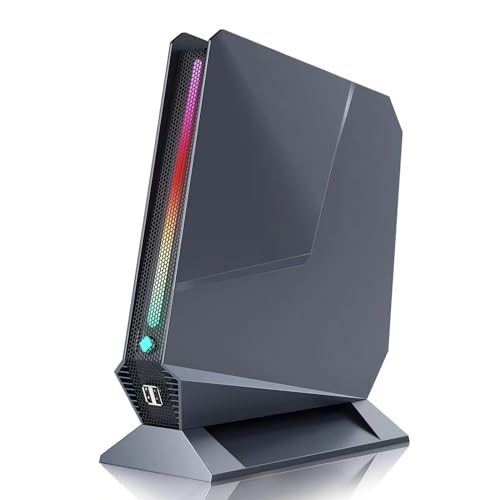
Sinbun X810 Mini Gaming PC Gray
Best for: light gaming and triple-display setups
- Processor
- Intel Core i9-9980HK
- Installed RAM
- 16GB
- Storage Capacity
- 512GB
- Memory Type
- DDR4 2666MHz
- Graphics
- GeForce GTX 1650 4GB
- Ethernet Ports
- 1G LAN
View on Amazon: Sinbun X810 Mini Gaming PC Gray Affiliate link
This Sinbun Mini Gaming PC pairs an Intel Core i9-9980HK processor with a dedicated GeForce GTX 1650 4GB graphics card. It includes 16GB of DDR4 RAM and a 512GB NVMe SSD for fast performance. The unit supports three displays and features WiFi 6E connectivity. It suits users needing light gaming and multitasking in a compact form factor without the bulk of a traditional desktop.
Pros
- Intel Core i9-9980HK with 8 cores and 16 threads
- GeForce GTX 1650 4GB dedicated graphics
- 16GB dual-channel DDR4 RAM
- 512GB NVMe SSD with expandable storage slots
- Triple display support via HDMI and Type-C
Cons
- GTX 1650 is not designed for AAA titles like Cyberpunk 2077
- 9th Gen Intel processor is older than current 13th or 14th Gen options
- 6.3 pounds weight is heavier than many modern mini PCs
Good fit if
- You need dedicated graphics for light gaming or creative work
- You want to connect three monitors simultaneously
- You require high CPU performance for multitasking
Skip if
- You need to play modern AAA games at high settings
- You prioritize the latest processor generations
- You need a very lightweight or ultra-compact portable device
Verdict: Sinbun i9-9980HK GTX 1650 Mini PC offers strong multi-core performance and dedicated graphics for light gaming. It fits users who need triple-display support and expandable storage in a capable but older-generation platform.
Specifications side by side
| Spec | Sinbun i7-8750H GTX 1050 Mini PC | Sinbun X810 Mini Gaming PC Gray |
|---|---|---|
| Processor | Intel Core i7-8750H | Intel Core i9-9980HK |
| Installed RAM | 16GB | 16GB |
| Storage Capacity | 512GB | 512GB |
| Memory Type | DDR4 2666MHz | DDR4 2666MHz |
| Graphics | GeForce GTX 1050 3GB GDDR5 | GeForce GTX 1650 4GB |
| Ethernet Ports | 1x Gigabit Ethernet | 1G LAN |
| Operating System | Windows 11 Pro | Windows 11 Pro |
| Memory | 16GB RAM | 16GB RAM |
| Storage | 512GB SSD | 512GB SSD |
| Use | Gaming | Gaming |
| Networking | WiFi 6E | WiFi 6E |
| Dimensions | 11 × 10 × 1.5 inches | 11 × 10 × 1.5 inches |
| Weight | 6.3 pounds | 6.3 pounds |
| Size | I7-8750H | GTX 1050 | I9-9980HK | GTX 1650 |
| Color | Pink | Grey |
| Model | X800 | X810 |
Sinbun Mini PC Lineup Overview
The Sinbun lineup centers on compact gaming and office units. The top pick, the i7-8750H GTX 1050 model, features 16GB RAM and a 512GB SSD. It runs Windows 11 Pro and supports WiFi 6E. This pink X800 chassis measures 10 by 11 inches. It suits users needing dedicated graphics for light 1080P gaming. The second option is the grey X810. It uses an i9-9980HK processor with the same GTX 1650 GPU. It also includes 16GB RAM and a 512GB SSD. This model targets triple-display setups. Both units share identical dimensions and weight. They differ mainly in processor generation and color. You can choose based on whether you prefer the i7 or i9 platform.
Who Should Buy Sinbun Mini PCs
Sinbun targets users who need compact systems with dedicated graphics. Both listed models share identical dimensions and weight, offering a consistent small form factor. They suit light gaming and triple-display office setups. You get Windows 11 Pro and WiFi 6E in each unit. There is no size variation in this range. All units are box-shaped and available in pink or grey. If you require a larger chassis for extensive storage expansion or a different color option, these specific models do not cover those needs. Stick to these if you prioritize portability and dedicated GPU performance in a fixed size.
How to Choose the Right Mini PC
-
Match CPU to Tasks
Start by identifying your primary workload. The top pick uses an Intel Core i7-8750H, which handles office multitasking and light gaming well. If you need stronger multi-core performance for heavier tasks, consider the i9-9980HK in the second model. Both processors are powerful enough for daily use, but the i9 offers a performance edge for more demanding applications. Check the processor generation and core count to ensure it meets your specific needs.
-
Check Graphics Needs
Dedicated graphics matter for gaming and video editing. The first model features a GTX 1050, suitable for casual 1080P gaming. The second model upgrades to a GTX 1650, providing better performance for slightly more intensive games. If you only do office work, integrated graphics might suffice, but Sinbun units here include discrete GPUs. Compare the GPU model to see if it handles your desired games or creative software smoothly without bottlenecks.
-
Verify RAM Capacity
Memory affects how many programs you can run at once. Both listed models come with 16GB of RAM, which is a solid baseline for modern Windows 11 Pro usage. This amount allows for smooth multitasking between web browsers, office apps, and light games. If you plan to keep dozens of tabs open or use memory-heavy software, 16GB is a good starting point. Ensure the system has enough RAM to prevent slowdowns during heavy workloads.
-
Assess Storage Speed
Storage type impacts boot times and file access speeds. Both units include a 512GB SSD, offering fast performance for the operating system and applications. This capacity is sufficient for most users storing documents, photos, and a moderate game library. If you need more space for large media files, check if the model supports additional storage expansion. An SSD is essential for a responsive experience, avoiding the lag of traditional hard drives.
-
Consider Display Setup
Check the supported display outputs if you use multiple monitors. Both models support triple-display setups, which is ideal for productivity or immersive gaming. This feature allows you to connect three screens simultaneously for expanded workspace. If you only need a single monitor, this capability still ensures compatibility with various setups. Verify that your monitors match the available ports to take full advantage of the multi-display support offered by these compact units.
Frequently asked questions
Does the Sinbun i7-8750H Mini PC support multiple monitors?
Yes, this model supports triple display output. It is designed for users who need to connect three screens simultaneously for office multitasking or light gaming. The dedicated NVIDIA GTX 1050 graphics card enables this multi-display capability within its compact pink chassis.
What operating system comes pre-installed on Sinbun Mini PCs?
Both listed Sinbun models ship with Windows 11 Pro. This provides a familiar desktop environment and professional features right out of the box. You do not need to purchase a separate license or install the OS manually to start using the machine.
How much storage space is included in these mini computers?
Each model includes a 512GB solid-state drive. This storage capacity allows for a full installation of Windows 11 Pro along with room for your applications and files. The SSD ensures fast boot times and quick access to your data compared to traditional hard drives.
Is WiFi 6E available on the Sinbun X800 and X810?
Yes, both the X800 and X810 models feature WiFi 6E connectivity. This modern wireless standard offers improved speed and reduced latency compared to older WiFi versions. It helps maintain a stable connection for gaming and streaming in your home or office environment.
Can the Sinbun i9-9980HK handle light gaming tasks?
Yes, the i9-9980HK model with a GTX 1650 is suitable for light gaming. The dedicated graphics card and strong multi-core processor work together to handle casual games effectively. It provides a capable platform for users who want gaming performance in a small form factor.
What are the physical dimensions of the Sinbun Mini PC?
Both the pink X800 and grey X810 measure 10 inches wide, 11 inches long, and 1.5 inches high. They weigh 6.3 pounds each. These consistent dimensions make them easy to mount under a desk or place on a small shelf without taking up much space.