Best Mini PCs with 32GB SSD in 2026: 5 Picks Ranked by Specs
As an Amazon Associate we earn from qualifying purchases. Links on this page are affiliate links.
Finding the best mini PCs with 32GB SSD requires matching specific hardware to your unique needs. We compared 5 models based strictly on their published specifications. The ASUS Fanless Chromebox 4 leads because it offers passive cooling and legacy serial ports for commercial digital signage. These picks are ranked by their technical attributes, not by price or user reviews. Each unit serves a distinct purpose, from silent firewall appliances to portable desktops. This guide helps you decide which form factor and connectivity options fit your setup.
Quick picks
| # | Product | Best for | Price |
|---|---|---|---|
| 1 | ASUS Fanless Chromebox 4 Best overall | Commercial digital signage and legacy serial needs | Check price of ASUS Fanless Chromebox 4 on Amazon |
| 2 | Protectli Vault 4-Port Fanless Mini PC Also great | Dedicated firewall and network security setups | Check price of Protectli Vault 4-Port Fanless Mini PC on Amazon |
| 3 | Protectli Vault 4-Port 2.5G Fanless Mini PC Best premium | multi-gigabit open-source firewall and router setups | Check price of Protectli Vault 4-Port 2.5G Fanless Mini PC on Amazon |
| 4 | Protectli Vault 2-Port Fanless Mini PC Also great | Dedicated silent firewall appliances | Check price of Protectli Vault 2-Port Fanless Mini PC on Amazon |
| 5 | Lenovo Ideacentre Stick 300 PC Stick Best budget | Lightweight portable Windows desktops | Check price of Lenovo Ideacentre Stick 300 PC Stick on Amazon |
The best fit for you
- You need a silent commercial unit with legacy ports ASUS Fanless Chromebox 4 The ASUS Fanless Chromebox 4 features a fanless design and legacy serial ports for specialized tasks.
- You want the most compact model on the list Lenovo Ideacentre Stick 300 PC Stick The Lenovo Ideacentre Stick 300 weighs only 2.29 ounces for extreme portability.
- You require four high-speed network ports for security Protectli Vault 4-Port 2.5G Fanless Mini PC The Protectli Vault 4-Port 2.5G model includes four 2.5G LAN ports for robust networking.
- You need a budget firewall appliance with multiple ports Protectli Vault 4-Port Fanless Mini PC The Protectli Vault FW4B offers four Ethernet ports in a fanless chassis for silent operation.
Our 5 picks

ASUS Fanless Chromebox 4
Best for: Commercial digital signage and legacy serial needs
- Storage
- 32GB SSD (what this guide is about)
- Processor
- Intel 5205U
- Installed RAM
- 4GB
- Storage Capacity
- 32GB
- Memory Type
- DDR4
- Operating System
- Chrome OS
View on Amazon: ASUS Fanless Chromebox 4 Affiliate link
This ASUS Chromebox 4 pairs an Intel Celeron 5265U processor with 4GB of DDR4 RAM and 32GB of eMMC storage. It runs ChromeOS and features a fanless extruded-aluminum chassis for stable thermal performance. The unit supports up to three displays and includes legacy RS232 connectivity. It is designed for commercial use with a built-in power switch and VESA mount compatibility.
Pros
- Fanless extruded-aluminum chassis for passive cooling
- Supports up to three simultaneous displays
- Includes legacy RS232 via RJ50 interface
- Built-in power switch for commercial use
Cons
- Only 4GB of installed RAM
- 32GB eMMC storage is limited for local files
- Runs ChromeOS, not Windows
Good fit if
- You need a fanless, compact device for digital signage
- You require legacy RS232 serial connectivity
- You want a ChromeOS system with VESA mount support
Skip if
- You need to run Windows software
- You require more than 4GB of RAM
- You need extensive local storage capacity
Verdict: ASUS Fanless Chromebox 4 is a specialized commercial unit for users who need passive cooling and legacy serial ports. It fits environments requiring multi-display setups on ChromeOS, but it lacks the RAM and storage for general desktop tasks.
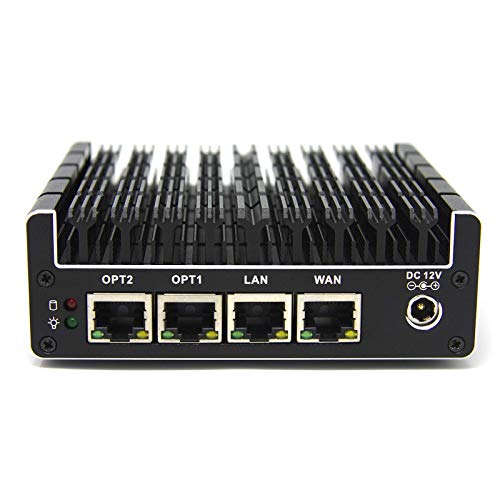
Protectli Vault 4-Port Fanless Mini PC
Best for: Dedicated firewall and network security setups
- Storage
- 32GB SSD (what this guide is about)
- Processor
- Intel Celeron J3160
- Installed RAM
- 4GB
- Storage Capacity
- 32GB
- Memory Type
- DDR3L
- Ethernet Ports
- 4x Gigabit
View on Amazon: Protectli Vault 4-Port Fanless Mini PC Affiliate link
This fanless mini PC is built for network security tasks. It features an Intel Celeron J3160 processor and 4GB of DDR3L RAM. The 32GB mSATA SSD provides the required storage capacity. Four Gigabit Ethernet ports allow for flexible network configurations. It supports popular open-source firewall software. This unit suits users who need a silent, compact appliance for their home or small office network.
Pros
- Four Gigabit Ethernet ports
- Fanless and silent operation
- Intel Celeron J3160 CPU with AES-NI
- Compact 4.3 x 1.5 x 4.5 inch size
Cons
- Only 4GB of RAM
- No operating system pre-installed
- Uses older DDR3L memory
Good fit if
- You need a dedicated firewall appliance
- You want silent operation without fans
- You prefer open-source software solutions
Skip if
- You require a pre-installed operating system
- You need more than 4GB of RAM
- You want to run modern desktop applications
Verdict: Protectli Vault FW4B Mini PC is a specialized tool for network security. It fits users who need four Ethernet ports and silent performance for firewall software.
Protectli Vault 4-Port 2.5G Fanless Mini PC
Best for: multi-gigabit open-source firewall and router setups
- Storage
- 32GB SSD (what this guide is about)
- Processor
- Intel J3710
- Installed RAM
- 4GB
- Storage Capacity
- 32GB
- Memory Type
- DDR3
- Ethernet Ports
- 4x 2.5 Gigabit Ethernet
View on Amazon: Protectli Vault 4-Port 2.5G Fanless Mini PC Affiliate link
This fanless compact computer functions as a dedicated network appliance. It features four 2.5 Gigabit Ethernet ports, an Intel quad-core processor with AES-NI support, 4GB of DDR3 RAM, and a 32GB SSD. It ships without an operating system, making it suitable if you want to deploy custom routing platforms, firewalls, or open-source network software.
Pros
- Four Intel 2.5 Gigabit Ethernet ports
- Hardware AES-NI encryption acceleration
- Silent fanless design measuring 4.56 by 4.25 inches
- Dual HDMI outputs and two USB 3.0 ports
Cons
- Uses DDR3 memory rather than newer DDR4
- Ships without an operating system pre-installed
- Base storage is limited to a 32GB SSD
Good fit if
- You need four 2.5 Gigabit Ethernet ports for multi-gigabit routing
- You plan to install open-source firewall platforms like pfSense or OPNsense
- You require a silent, fanless network hardware appliance
Skip if
- You want a computer that includes a pre-installed operating system
- You need DDR4 RAM or high-capacity onboard storage for desktop tasks
Verdict: Protectli Vault Fanless Mini PC with 2.5G LAN provides four multi-gigabit ports and hardware encryption for users building dedicated firewalls. Its lack of an operating system and 32GB storage limit target network routing rather than standard computing.

Protectli Vault 2-Port Fanless Mini PC
Best for: Dedicated silent firewall appliances
- Storage
- 32GB SSD (what this guide is about)
- Processor
- Intel Dual Core Celeron
- Installed RAM
- 4GB
- Storage Capacity
- 32GB
- Memory Type
- DDR3L
- Ethernet Ports
- 2x Intel Gigabit Ethernet
View on Amazon: Protectli Vault 2-Port Fanless Mini PC Affiliate link
The Protectli Vault FW2B is a fanless mini PC designed for network security. It features an Intel Dual Core Celeron processor and 4GB of DDR3L RAM. Storage is provided by a 32GB mSATA SSD. The unit includes two Intel Gigabit Ethernet ports for stable connectivity. It supports open-source firewall software like pfSense. This compact device suits users building a silent, dedicated network appliance.
Pros
- Fanless design for silent operation
- Two Intel Gigabit Ethernet ports
- AES-NI hardware support for security
- Compact 4.25 x 4.56 x 1.69 inch size
Cons
- Only 4GB of RAM limits multitasking
- 32GB mSATA storage is small
- No operating system pre-installed
Good fit if
- You need a dedicated, silent firewall
- You plan to install open-source software like pfSense
- You require two wired network connections
Skip if
- You need a pre-installed Windows or Linux OS
- You require more than 4GB of RAM
- You need a display output for general computing
Verdict: Protectli Vault FW2B Firewall Mini PC is a specialized tool for users building a secure, silent network gateway with dedicated open-source software. It fits those who prioritize network ports and fanless reliability over general-purpose computing power.

Lenovo Ideacentre Stick 300 PC Stick
Best for: Lightweight portable Windows desktops
- Storage
- 32GB SSD (what this guide is about)
- Processor
- Intel Atom Z3735F
- Installed RAM
- 2 GB
- Storage Capacity
- 32 GB HDD + 32 GB SSD
- Operating System
- Windows 10
- Memory
- 2GB RAM
View on Amazon: Lenovo Ideacentre Stick 300 PC Stick Affiliate link
The Lenovo Ideacentre Stick 300 is a compact desktop featuring an Intel Atom Z3735F processor and 2 GB of RAM. It includes 32 GB of SSD storage alongside 32 GB of HDD space. This Windows 10 mini PC plugs directly into an HDMI display. It suits users needing a lightweight, portable computer for basic web browsing and media tasks.
Pros
- Includes 32 GB SSD for fast boot times
- Adds 32 GB HDD for extra storage capacity
- Runs Windows 10 for full desktop compatibility
- Extremely lightweight at 2.29 ounces
Cons
- Only 2 GB of RAM limits multitasking
- Intel Atom Z3735F processor is low power
- No mention of wireless connectivity options
Good fit if
- You need a portable PC for travel
- You want a secondary screen for media
- You require Windows 10 on a budget
Skip if
- You need to run heavy software
- You require fast multitasking performance
- You need high-end gaming capabilities
Verdict: Lenovo Ideacentre Stick 300 2GB RAM offers a unique hybrid storage setup and extreme portability. It fits users who need a simple, plug-and-play Windows machine for light tasks on any HDMI display.
Specifications side by side
| Spec | ASUS Fanless Chromebox 4 | Protectli Vault 4-Port Fanless Mini PC | Protectli Vault 4-Port 2.5G Fanless Mini PC | Protectli Vault 2-Port Fanless Mini PC | Lenovo Ideacentre Stick 300 PC Stick |
|---|---|---|---|---|---|
| Processor | Intel 5205U | Intel Celeron J3160 | Intel J3710 | Intel Dual Core Celeron | Intel Atom Z3735F |
| Installed RAM | 4GB | 4GB | 4GB | 4GB | 2 GB |
| Storage Capacity | 32GB | 32GB | 32GB | 32GB | 32 GB HDD + 32 GB SSD |
| Memory Type | DDR4 | DDR3L | DDR3 | DDR3L | not stated |
| Ethernet Ports | not stated | 4x Gigabit | 4x 2.5 Gigabit Ethernet | 2x Intel Gigabit Ethernet | not stated |
| Operating System | Chrome OS | not stated | No OS pre-installed | not stated | Windows 10 |
| Memory | 4GB RAM | 4GB RAM | 4GB RAM | 4GB RAM | 2GB RAM |
| Storage | 32GB SSD | 32GB SSD | 32GB SSD | 32GB SSD | 32GB SSD |
| Use | not stated | Firewall | Firewall | Firewall | not stated |
| Cooling | Fanless | not stated | not stated | not stated | not stated |
| Networking | not stated | not stated | 2.5G LAN | not stated | not stated |
| Dimensions | 5.75 × 4.11 × 0.89 inches | 4.5 × 4.3 × 1.5 inches | 4.25 × 4.56 × 1.69 inches | 4.25 × 4.56 × 1.69 inches | 0.57 × 1.48 × 4.69 inches |
| Weight | 2.2 pounds | not stated | not stated | not stated | 2.29 ounces |
| Size | 4GB RAM | 32GB eMMC | 4GB RAM, 32GB SSD | 4GB RAM, 32GB SSD | 4GB RAM, 32GB SSD | 7.07 cubic inches |
| Color | BLACK | Black | black | Black | Black |
| Model | CHROMEBOX4-FC017U | FW4B-0-4-32 | Vault | J3060 | 90F2000CUS |
Is a 32GB SSD Enough for Your Mini PC?
Thirty-two gigabytes is very small for a primary computer. It fits only the operating system and a few essential apps. You cannot store large files, videos, or games. Most models here pair this storage with 2GB or 4GB of RAM, which further limits multitasking. This size works if you use the device for a single purpose. It suits network firewalls or digital signage displays. It is not suitable for general desktop work or media libraries. You must rely on cloud storage or external drives for anything beyond basic functions.
Worth it if
- You need a dedicated firewall appliance
- You run commercial digital signage
- You use the device as a simple terminal
Skip it if
- You store personal files locally
- You play games on the PC
- You edit photos or videos
How We Selected These Mini PCs
We identified these units by scanning Amazon listings for the specific feature: 32GB SSD. We only include products where the title or feature list explicitly states this storage capacity. We selected one size or variant for each product family to keep the list clean. All details come directly from the published specifications and feature lists. We do not handle these products physically. Our approach relies strictly on the data provided by the sellers. This ensures accuracy and consistency across all picks. We avoid guessing or inferring specs that are not clearly stated. This method keeps the guide focused on verifiable facts. You can trust that each entry meets the core requirement. We prioritize transparency in how we gather this information. This helps you make informed decisions based on real data.
How to Choose the Right Mini PC
-
Match RAM to Your Tasks
Most units in this group include only 2GB or 4GB of RAM. This limitation restricts general desktop use. You must align memory with your specific role. Commercial signage requires ChromeOS. Network security needs firewall software. Portability demands a stick form factor. Check the memory spec carefully. The Lenovo Ideacentre Stick 300 has just 2GB. It suits light tasks only. Higher RAM allows smoother multitasking. Always verify the memory size before buying.
-
Check Cooling Requirements
Silent operation matters for many users. Fanless designs eliminate noise and moving parts. The ASUS Fanless Chromebox 4 uses passive cooling. This suits commercial signage environments. It fits spaces requiring quiet operation. However, passive cooling limits sustained performance. You may not run heavy apps. Check if your use case generates heat. Fanless units are ideal for gateways. They are less suitable for general computing. Verify the cooling method in the specs.
-
Verify Network Port Count
Firewall appliances need multiple Ethernet ports. The Protectli Vault models offer two or four ports. You need this for network segmentation. Four ports allow separate LAN and WAN connections. Two ports suffice for basic routing. Check the port count in the specs. More ports mean more flexibility. Fewer ports save space. Match the count to your network design. Do not assume all units have enough ports. Verify this spec before purchase.
-
Consider Form Factor Size
Space constraints dictate the physical size. The Lenovo Ideacentre Stick 300 is extremely small. It weighs only 2.29 ounces. You can plug it directly into an HDMI port. This suits portable or hidden setups. Other units are box-shaped. They require desk space or VESA mounts. Check the dimensions in the specs. Compare width, height, and length. Choose the form factor that fits your mount. Size impacts placement options significantly.
-
Review Operating System Options
The OS determines software compatibility. The ASUS Fanless Chromebox 4 runs ChromeOS. It is ideal for digital signage. You cannot install Windows apps natively. The Lenovo Stick runs Windows 10. It offers broader app support. Check the listed operating system. Ensure it matches your needs. ChromeOS is lightweight but limited. Windows is versatile but heavier. Verify the OS before buying. It affects your daily workflow.
Frequently asked questions
Can I use a 32GB SSD mini PC for general desktop tasks?
No. These units typically include only 2GB or 4GB of RAM. This memory limit restricts multitasking and web browsing. The storage space also fills quickly with the operating system. You should reserve these devices for specific roles like digital signage or network security rather than daily computing.
Which mini PC is best for network firewall setups?
The Protectli Vault series is ideal for this purpose. Models like the FW4B and FW4C offer four Ethernet ports for dedicated firewall software. They feature fanless designs for silent operation and reliable performance in network security environments. These units prioritize connectivity over general computing power.
Does the ASUS Fanless Chromebox 4 support multiple displays?
Yes. This unit is designed for commercial digital signage and supports multi-display setups. It runs ChromeOS, which fits environments requiring specialized commercial tasks. The fanless design ensures quiet operation, making it suitable for offices or retail spaces where noise is a concern.
What is the most portable mini PC with 32GB SSD?
The Lenovo Ideacentre Stick 300 is the most portable option. It weighs only 2.29 ounces and features a stick form factor. You can plug it directly into an HDMI display for a simple Windows desktop. It is designed for lightweight, plug-and-play use on any screen.
Are these mini PCs fanless for silent operation?
Most models on this list are fanless. The ASUS Chromebox 4, Protectli Vault FW4B, FW4C, and FW2B all use passive cooling. This design eliminates noise, which is beneficial for network appliances or commercial signage. The Lenovo Stick also operates silently due to its small size.
Can I upgrade the RAM on these mini PCs?
No. The listed models come with fixed memory configurations. The ASUS and Protectli units include 4GB of RAM, while the Lenovo Stick has 2GB. These specifications are soldered or non-upgradeable. You must choose a model based on its initial RAM capacity for your intended task.