Dell Optiplex Micro Core i7 vs Dell Pro Micro Core Ultra 5 Mini PC (2026): Key Differences
As an Amazon Associate we earn from qualifying purchases. Links on this page are affiliate links.
This guide compares the dell optiplex micro core i7 vs pro micro core ultra 5 mini PC. Both systems offer 16GB of RAM and a 512GB SSD for solid daily performance. They share the same compact Micro form factor and run Windows 11 Pro. The main difference lies in the processor generation and memory type. You will see how the older i7-13700T compares to the newer Core Ultra 5 235T in practical terms.
Key differences
| Aspect | Dell Optiplex Micro Core i7 Desktop | Dell Pro Micro Core Ultra 5 Mini PC |
|---|---|---|
| Processor | Intel Core i7-13700T (13th Gen) | Intel Core Ultra 5 235T |
| Memory Type | DDR4-3200 | DDR5 |
| Networking | WiFi 6 | WiFi 6E |
Which one should you choose?
Choose Dell Optiplex Micro Core i7 Desktop if
- You need the higher core count of a 16-core processor for heavy multitasking.
- You prefer the proven stability of DDR4 memory and WiFi 6.
Choose Dell Pro Micro Core Ultra 5 Mini PC if
- You want the latest architecture with faster DDR5 memory speeds.
- You benefit from the improved wireless performance of WiFi 6E in crowded areas.
Verdict: The Optiplex Micro Core i7 offers more physical cores for raw processing power. The Pro Micro Core Ultra 5 provides newer technology with faster memory and wireless standards. Choose the i7 for multi-threaded workloads, or the Ultra 5 for modern efficiency.
OptiPlex Micro i7 vs Pro Micro Ultra 5
processor performance
The Dell Optiplex Micro Core i7 uses the Intel Core i7-13700T, a 13th Gen chip with 16 cores and 24 threads. It boosts up to 4.90 GHz. The Dell Pro Micro Core Ultra 5 relies on the Intel Core Ultra 5 235T. This newer architecture targets business efficiency. The i7 offers higher raw clock speeds for heavy multitasking. The Ultra 5 focuses on modern power management. You get strong single-core speed from the i7. The Ultra 5 provides updated instruction sets for newer tasks. Both handle complex spreadsheets with ease. Choose the i7 for maximum clock speed. Pick the Ultra 5 for architectural modernity.
memory technology
Memory speed affects how quickly applications switch and load. The Dell Optiplex Micro Core i7 uses DDR4-3200 RAM. It has two SODIMM slots and supports up to 64GB. The Dell Pro Micro Core Ultra 5 uses next-generation DDR5 RAM. DDR5 offers higher bandwidth than DDR4. This allows faster data transfer between the CPU and memory. Both systems come with 16GB installed. The DDR5 in the Pro Micro provides a tangible speed advantage. It helps with intensive multitasking and large datasets. The Optiplex allows easier future upgrades via its slots. The Pro Micro prioritizes current performance over expandability. DDR5 is the clear winner for speed.
storage capacity
Storage holds your files and operating system. Both mini PCs include a 512GB SSD. The Dell Optiplex Micro Core i7 features a PCIe SSD. The Dell Pro Micro Core Ultra 5 uses a PCIe NVMe SSD. Both provide fast boot times and quick file transfers. The capacity is identical at 512GB. This is sufficient for most business users and daily tasks. Neither system offers a significant advantage in raw storage space. You will need to manage space similarly on both. The speed difference between PCIe and PCIe NVMe is minimal in this class. Storage is a tie for capacity and basic utility.
networking
Connectivity determines how you link to the internet and peripherals. The Dell Optiplex Micro Core i7 includes Intel WiFi 6 AX211. It supports 2x2 connections and Bluetooth. The Dell Pro Micro Core Ultra 5 features Intel WiFi 6E. WiFi 6E operates on the 6 GHz band. This reduces congestion and improves reliability in busy areas. Both have Gigabit Ethernet ports. Both support dual monitors via DisplayPort and HDMI. The WiFi 6E in the Pro Micro is superior for crowded offices. It offers a cleaner signal. The Optiplex WiFi 6 is excellent but slightly older. WiFi 6E wins for modern environments.
physical dimensions
Size matters for desk space and mounting. The Dell Optiplex Micro Core i7 measures 7.17 x 7.01 x 1.42 inches. It weighs 2.41 pounds. It is VESA mountable. The Dell Pro Micro Core Ultra 5 is described as ultra-compact, about the size of a paperback book. It is also VESA mountable. The Optiplex provides exact measurements for precise planning. The Pro Micro emphasizes its small footprint. Both fit discreetly behind monitors or on desks. The Optiplex has verified weight and dimensions. The Pro Micro’s exact dimensions are not listed in the data. The Optiplex offers more precise sizing data for your setup.
Which Mini PC Fits Your Work
Users needing high single-core speed
Choose the Dell Optiplex Micro Core i7 if you prioritize raw processing power for demanding applications. The Intel Core i7-13700T features 16 cores and 24 threads, boosting up to 4.90 GHz. This higher clock speed benefits tasks like complex calculations or heavy multitasking where peak performance matters most.
Those wanting modern memory technology
Select the Dell Pro Micro Core Ultra 5 for its newer DDR5 RAM architecture. While both have 16GB, DDR5 offers higher bandwidth and efficiency compared to the Optiplex's DDR4. The Intel Core Ultra 5 235T processor also represents the latest generation, providing improved power efficiency and modern integrated graphics capabilities.
Business users needing Wi-Fi 6E
The Pro Micro Core Ultra 5 includes Intel Wi-Fi 6E, offering a faster and more reliable wireless connection in congested environments. If you frequently connect to crowded networks or require lower latency for video calls, this upgrade over the standard Wi-Fi 6 in the Optiplex provides better connectivity stability.
The products compared

Dell Optiplex Micro Core i7 Desktop
Best for: Office multitasking and VESA mounting
- Processor
- Intel Core i7-13700T
- Installed RAM
- 16GB
- Storage Capacity
- 512GB SSD
- Memory Type
- DDR4-3200
- Ethernet Ports
- Gigabit Ethernet
- Operating System
- Windows 11 Pro
View on Amazon: Dell Optiplex Micro Core i7 Desktop Affiliate link
This Dell OptiPlex 7010 Micro features an Intel Core i7-13700T processor with 16 cores and 24 threads. It includes 16GB of DDR4-3200 RAM and a 512GB PCIe SSD. The system runs Windows 11 Pro and supports dual monitors via DisplayPort and HDMI. It connects via WiFi 6 and Bluetooth. You get a compact unit that mounts easily to a VESA arm or behind a display.
Pros
- Intel Core i7-13700T with 16 cores and 24 threads
- 16GB DDR4-3200 RAM with two SODIMM slots
- 512GB PCIe SSD for storage
- WiFi 6 AX211 and Bluetooth connectivity
- Windows 11 Pro operating system
Cons
- HDMI port is version 1.4b, limiting higher refresh rates
- DDR4 memory is older than DDR5 options
- Certified Refurbished condition may vary
Good fit if
- You need strong multi-threaded performance for office tasks
- You want to mount the PC behind a monitor via VESA
- You require Windows 11 Pro for business features
Skip if
- You need DDR5 RAM for maximum bandwidth
- You require HDMI 2.1 for 4K at high refresh rates
- You prefer a brand new unit with original warranty
Verdict: Dell OptiPlex 7010 Micro i7-13700T is a solid choice for users who need reliable multi-core performance in a small footprint. It suits office workers who value VESA mounting and Windows 11 Pro features over the latest memory standards.
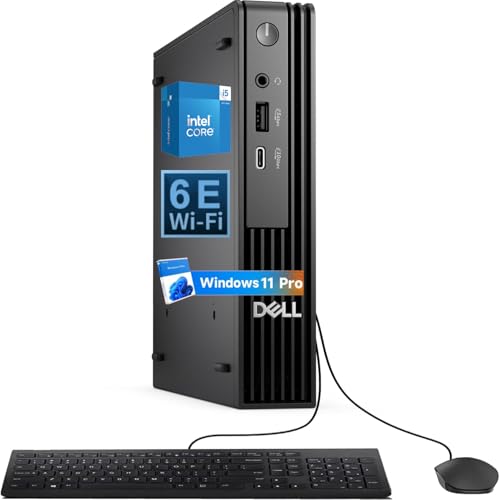
Dell Pro Micro Core Ultra 5 Mini PC
Best for: Business users needing compact modern specs
- Processor
- Intel Core Ultra5 235T
- Installed RAM
- 16GB
- Storage Capacity
- 512GB
- Memory Type
- DDR5
- Operating System
- Windows 11 Pro
- Use
- Business
View on Amazon: Dell Pro Micro Core Ultra 5 Mini PC Affiliate link
This Dell Pro Micro replaces the OptiPlex line with the Intel Core Ultra 5 235T processor and 16GB of DDR5 RAM. The 512GB PCIe NVMe SSD ensures fast boot times and application loading. It includes Windows 11 Pro for business features like BitLocker. The compact chassis saves desk space and supports VESA mounting. You get reliable connectivity via WiFi 6E and dual monitor outputs through HDMI and DisplayPort.
Pros
- Intel Core Ultra 5 235T processor for demanding business tasks
- 16GB DDR5 RAM for seamless multitasking
- 512GB PCIe NVMe SSD for quick file transfers
- Windows 11 Pro with BitLocker encryption
- WiFi 6E for reliable wireless connections
Cons
- 512GB storage capacity is modest for large media libraries
- DDR5 RAM is soldered and cannot be upgraded later
- No mention of Thunderbolt support for high-speed peripherals
Good fit if
- You need a compact PC for business applications
- You want the latest Intel Core Ultra architecture
- You require Windows 11 Pro security features
Skip if
- You need to upgrade RAM after purchase
- You require more than 512GB of internal storage
- You prefer the previous generation OptiPlex 7010 model
Verdict: Dell Pro Micro Core Ultra 5 delivers modern performance in a tiny package, making it ideal for professionals who need business-grade features and a small footprint.
Specifications side by side
| Spec | Dell Optiplex Micro Core i7 Desktop | Dell Pro Micro Core Ultra 5 Mini PC |
|---|---|---|
| Processor | Intel Core i7-13700T | Intel Core Ultra5 235T |
| Installed RAM | 16GB | 16GB |
| Storage Capacity | 512GB SSD | 512GB |
| Memory Type | DDR4-3200 | DDR5 |
| Ethernet Ports | Gigabit Ethernet | not stated |
| Operating System | Windows 11 Pro | Windows 11 Pro |
| Memory | 16GB RAM | not stated |
| Storage | 512GB SSD | 512GB SSD |
| Use | not stated | Business |
| Networking | WiFi 6 | WiFi 6E |
| Dimensions | 7.17 × 7.01 × 1.42 inches | not stated |
| Weight | 2.41 pounds | not stated |
| Size | Intel i7 | 16GB | 512GB | not stated |
| Color | Black | not stated |
| Model | Optiplex 7010 Micro | QCM1250 |
Frequently asked questions
Does the Dell OptiPlex Micro Core i7 support VESA mounting?
Yes, this model supports VESA mounting. The compact design allows you to attach it to a monitor or arm, saving desk space. This feature is highlighted as a key benefit for office multitasking. It helps keep your workspace tidy while maintaining access to all ports and connectivity options.
What operating system comes with the Dell Pro Micro Core Ultra 5?
The Dell Pro Micro Core Ultra 5 runs Windows 11 Pro. This operating system provides enhanced security features and management tools suitable for business users. It ensures a professional environment with robust capabilities for daily tasks and enterprise-level needs without requiring additional software installations.
Is the Dell OptiPlex Micro Core i7 suitable for office work?
Yes, it is a solid choice for office multitasking. The Intel Core i7-13700T processor offers reliable multi-core performance in a small footprint. With 16GB of RAM and a 512GB SSD, it handles everyday applications efficiently. This makes it ideal for users who need consistent performance for productivity tasks.
How does the Dell Pro Micro compare in size to the OptiPlex?
Both devices belong to the Micro form factor, ensuring a compact footprint. The OptiPlex Micro measures 7.01 inches in width, 1.42 inches in height, and 7.17 inches in length. This small size allows for flexible placement. The Pro Micro shares this space-saving design philosophy for business environments.
Does the OptiPlex Micro use WiFi 6 connectivity?
Yes, the Dell OptiPlex Micro Core i7 includes WiFi 6 networking. This standard provides faster wireless speeds and better performance in congested areas. It ensures stable connections for online meetings and data transfers. This feature supports modern network requirements without needing additional adapters or complex setup procedures.
What is the primary use case for the Dell Pro Micro?
The Dell Pro Micro Core Ultra 5 is best for business users. It delivers modern performance in a tiny package. This makes it ideal for professionals who need business-grade features. The compact design fits well in corporate environments where space is limited but reliability and performance are essential for daily operations.
Can I upgrade the RAM in the Dell OptiPlex Micro?
The device comes with 16GB of RAM installed. While the data confirms this baseline configuration, upgrade paths depend on the specific motherboard layout. You should check the technical specifications for your exact model number to determine if additional slots are available for memory expansion in the future.