Lenovo vs AZULLE: Mini PCs Compared by Specs
As an Amazon Associate we earn from qualifying purchases. Links on this page are affiliate links.
When you compare a lenovo vs AZULLE mini PC, you are looking at two very different approaches to compact computing. Both brands offer small devices for business or home use. The main difference lies in their target audience and hardware power. The Lenovo ThinkCentre M720Q is a traditional micro desktop with a strong Intel Core i5 processor and ample memory. In contrast, the AZULLE Access Pro is a fanless stick PC built for specific IoT tasks with a lower-power Intel N100 chip.
Key differences
| Aspect | Lenovo ThinkCentre Mini PC Intel i5 | AZULLE Access Pro Fanless PC Stick |
|---|---|---|
| Processor | Intel Core i5-8400T | Intel N100 |
| Memory | 16GB DDR4 | 4GB LPDDR5 |
| Storage | 500GB NVMe SSD | 64GB eMMC |
| Operating System | Windows 11 Pro | Windows 10 IoT Enterprise |
| Cooling | Active (implied by model) | Fanless |
| Form Factor | Micro Desktop | Stick PC |
Which one should you choose?
Choose Lenovo ThinkCentre Mini PC Intel i5 if
- You need a full desktop experience with Windows 11 Pro and high multitasking performance for office work.
- You require ample storage and memory for running multiple applications simultaneously without slowdowns.
- You prefer a traditional micro desktop form factor that can be mounted behind a monitor or placed on a desk.
Choose AZULLE Access Pro Fanless PC Stick if
- You need a silent, fanless device for digital signage, kiosks, or dedicated IoT applications.
- You want a compact stick PC that plugs directly into an HDMI port to save space.
- You require Windows 10 IoT Enterprise for stable, long-term operation in controlled business environments.
Verdict: The Lenovo ThinkCentre M720Q is the better choice for general computing, office work, and users who need a powerful, versatile desktop replacement. The AZULLE Access Pro is ideal for specialized, low-power tasks like digital signage or kiosks where silence and compactness are more important than raw performance.
Lenovo vs AZULLE Spec Comparison
Processor Power
The Lenovo ThinkCentre M720Q uses an Intel Core i5-8400T processor. This is an 8th Gen hexa-core chip designed for multitasking and business productivity. It offers strong processing power for everyday office tasks and web browsing. In contrast, the AZULLE Access Pro features an Intel N100 processor. This chip runs up to 3.4GHz and is built for efficiency in dedicated environments like kiosks or digital signage. While the i5 provides more raw computing strength for general use, the N100 is optimized for low-power, consistent operation in specialized roles. You will notice a difference in performance depth between these two chips.
Memory Capacity
Memory determines how many applications you can run simultaneously. The Lenovo M720Q comes with 16GB of DDR4 RAM. This amount allows for smooth multitasking and responsive performance when switching between programs. The AZULLE Access Pro is equipped with only 4GB of LPDDR5 RAM. While LPDDR5 is a modern memory type, the lower capacity limits the system to lighter workloads. You will find the Lenovo much better suited for heavy multitasking, whereas the AZULLE is designed for single-task focused environments like digital displays or dedicated terminals.
Storage Options
Storage holds your files and operating system. The Lenovo ThinkCentre includes a 500GB NVMe M.2 SSD. This drive type offers fast load times and ample space for applications and documents. The AZULLE Access Pro provides 64GB of eMMC storage. This is significantly less space and is typically used for the operating system and essential apps. You will need external storage for the AZULLE if you plan to save large files. The Lenovo offers a much more practical storage solution for general computing needs without requiring immediate upgrades.
Operating System
The software environment defines how you interact with the hardware. The Lenovo M720Q ships with Windows 11 Pro. This is a full consumer and business operating system with advanced security features and broad application compatibility. The AZULLE Access Pro runs Windows 10 IoT Enterprise. This version is designed for secure, stable, and controlled operation in specialized settings like kiosks or Zoom rooms. You will find Windows 11 Pro more versatile for general home or office use, while the IoT version is tailored for dedicated, single-purpose deployments.
Form Factor
Physical size affects where you can place the device. The Lenovo ThinkCentre M720Q is a micro desktop with a footprint of roughly 1140 cubic inches. It is designed for desks or mounting behind monitors in standard office setups. The AZULLE Access Pro is a fanless mini PC stick. It measures 5.1 inches in length and is extremely compact. This stick form factor allows it to plug directly into a display or fit into tight spaces. You will prefer the Lenovo for a traditional desktop experience, but the AZULLE offers superior flexibility for space-constrained or VESA-mounted installations.
Choose your mini PC by specs
Users needing strong multitasking and storage
The Lenovo ThinkCentre M720Q features an Intel Core i5-8400T processor with 16GB of DDR4 RAM. This configuration handles multiple applications smoothly. It includes a 500GB NVMe drive for ample file storage. You get Windows 11 Pro for enhanced security features. This setup is ideal for busy home offices where speed matters.
Those wanting silent operation and portability
The AZULLE Access Pro uses a fanless design with an Intel N100 processor. This ensures completely silent operation in any environment. Its stick form factor makes it highly portable and easy to mount. You receive Windows 10 IoT Enterprise for stable, controlled performance. This is perfect for digital signage or dedicated display setups.
Buyers seeking modern connectivity standards
The AZULLE Access Pro includes WiFi 6 and Bluetooth 5.2 for fast wireless connections. It offers Gigabit Ethernet and USB-C 3.1 ports for reliable wired links. The Intel N100 chip supports 4K video output via HDMI. This modern connectivity suite suits users who need seamless integration with current peripherals and networks.
The products compared
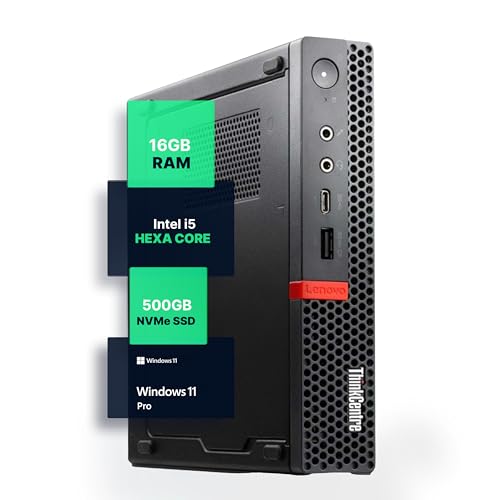
Lenovo ThinkCentre Mini PC Intel i5
Best for: Office productivity and home desktop use
- Processor
- Intel i5-8400T
- Installed RAM
- 16GB
- Storage Capacity
- 500GB NVMe
- Memory Type
- DDR4
- Operating System
- Windows 11 Pro
- Use
- Home, Office
View on Amazon: Lenovo ThinkCentre Mini PC Intel i5 Affiliate link
The Lenovo M720Q is a compact Windows 11 Pro mini PC built for office and home use. It features an Intel Core i5-8400T processor, 16GB of DDR4 RAM, and a 500GB NVMe SSD. This configuration supports smooth multitasking and fast load times. The system includes 5G WiFi and Bluetooth connectivity. Its small footprint fits well on desks with limited space. It suits users who need reliable performance in a quiet, energy-efficient package.
Pros
- Intel Core i5-8400T hexa-core processor
- 16GB DDR4 RAM for responsive multitasking
- 500GB NVMe M.2 SSD for fast storage
- Pre-installed Windows 11 Pro operating system
- 5G WiFi and Bluetooth wireless connectivity
Cons
- Older 8th generation Intel processor may limit future software compatibility
- No mention of Thunderbolt or USB-C ports in specifications
- Base model lacks the higher RAM or storage options available in variations
Good fit if
- You need a compact desktop for office productivity tasks
- You prefer Windows 11 Pro for business features
- You want a quiet, energy-efficient system for a home desk
Skip if
- You require the latest generation Intel processors for heavy workloads
- You need extensive high-speed port options like Thunderbolt
- You prefer fanless designs for silent operation in tight spaces
Verdict: Lenovo M720Q i5 Mini PC offers solid specs for general office tasks. It fits users who prioritize Windows 11 Pro and reliable daily performance in a small form factor.

AZULLE Access Pro Fanless PC Stick
Best for: silent digital signage and kiosk displays
- Processor
- Intel N100
- Installed RAM
- 4GB
- Storage Capacity
- 64GB
- Memory Type
- LPDDR5
- Graphics
- Intel UHD Graphics
- Ethernet Ports
- Gigabit Ethernet
View on Amazon: AZULLE Access Pro Fanless PC Stick Affiliate link
This AZULLE Access Pro is a fanless stick PC built for dedicated tasks. It uses an Intel N100 processor with 4GB of LPDDR5 RAM and 64GB of eMMC storage. The device runs Windows 10 IoT Enterprise, which prioritizes stability over general consumer features. It includes WiFi 6 and Gigabit Ethernet for reliable networking. This compact unit suits digital signage or kiosk applications where silent operation and consistent performance are required.
Pros
- Fanless design ensures silent operation
- Intel N100 processor up to 3.4GHz
- LPDDR5 RAM for efficient multitasking
- WiFi 6 and Gigabit Ethernet connectivity
- 4K HDMI output support
Cons
- Only 4GB of installed RAM
- 64GB eMMC storage is limited
- Runs Windows 10 IoT Enterprise, not standard Windows 11
Good fit if
- You need a silent, fanless display solution
- You require stable IoT software for kiosks
- You want a compact stick form factor
Skip if
- You need to run modern Windows 11
- You require large storage for media
- You need high-performance gaming capabilities
Verdict: AZULLE Access Pro Fanless Stick is a specialized tool for digital signage or kiosks. It fits buyers who prioritize silent, stable IoT operation over general computing power.
Specifications side by side
| Spec | Lenovo ThinkCentre Mini PC Intel i5 | AZULLE Access Pro Fanless PC Stick |
|---|---|---|
| Processor | Intel i5-8400T | Intel N100 |
| Installed RAM | 16GB | 4GB |
| Storage Capacity | 500GB NVMe | 64GB |
| Memory Type | DDR4 | LPDDR5 |
| Graphics | not stated | Intel UHD Graphics |
| Ethernet Ports | not stated | Gigabit Ethernet |
| Operating System | Windows 11 Pro | Windows 10 IoT Enterprise |
| Memory | 16GB RAM | 4GB RAM |
| Storage | 500GB SSD | 64GB eMMC |
| Use | Home, Office | IoT |
| Cooling | not stated | Fanless |
| Networking | not stated | Gigabit Ethernet |
| Form Factor | not stated | Stick PC |
| Dimensions | 19 × 15 × 4 inches | 5.1 × 2 × 0.8 inches |
| Weight | 2.91 pounds | not stated |
| Size | 1140 cubic inches | not stated |
| Color | Black | Black |
| Model | M720Q | A4P010332Z00 |
Frequently asked questions
Which mini PC is better for general office work?
The Lenovo ThinkCentre M720Q is the better choice for office productivity. It features an Intel Core i5 processor and 16GB of RAM. This setup handles multitasking and daily desktop tasks efficiently. The AZULLE Access Pro has only 4GB of RAM and an Intel N100 chip, which limits its ability to run multiple applications smoothly.
Is the AZULLE Access Pro suitable for a home desktop?
No, the AZULLE Access Pro is not ideal for a home desktop. It is designed as a fanless stick PC for digital signage and kiosks. Its 64GB eMMC storage and 4GB RAM are minimal for general use. The Lenovo ThinkCentre M720Q offers more storage and memory, making it more versatile for home and office environments.
How do the sizes of these two mini PCs compare?
The Lenovo ThinkCentre M720Q is a small box, while the AZULLE Access Pro is a tiny stick. The Lenovo measures 15 by 4 by 19 inches. The AZULLE stick is much smaller at 2 by 0.8 by 5.1 inches. The Lenovo weighs 2.91 pounds, whereas the AZULLE is lighter due to its compact form factor.
Does the Lenovo ThinkCentre come with Windows 11 Pro?
Yes, the Lenovo ThinkCentre M720Q includes Windows 11 Pro. This operating system is well-suited for business and home use. In contrast, the AZULLE Access Pro runs Windows 10. The Lenovo system provides a more modern interface and security features for daily computing tasks.
Which device offers more storage capacity?
The Lenovo ThinkCentre M720Q offers significantly more storage. It includes a 500GB SSD for fast file access and ample space. The AZULLE Access Pro has only 64GB of eMMC storage. This limited capacity on the AZULLE is sufficient for signage but not for storing many personal files or applications.
Is the AZULLE Access Pro fanless for silent operation?
Yes, the AZULLE Access Pro is a fanless PC stick. This design ensures silent operation, which is ideal for digital signage or kiosk displays. The Lenovo ThinkCentre M720Q does not specify fanless cooling, so it may produce some noise. The AZULLE approach prioritizes stability and silence over raw computing power.
What is the primary use case for the AZULLE Access Pro?
The AZULLE Access Pro is best for silent digital signage and kiosk displays. It is a specialized tool for IoT operations. It is not designed for general computing. If you need a device for running specific software on a screen without noise, this stick PC fits that niche perfectly.