Best Mini PCs Under $2500 in 2026: 11 Picks Ranked by Specs
As an Amazon Associate we earn from qualifying purchases. Links on this page are affiliate links.
Finding the best mini PCs under $2500 requires careful attention to specifications. We compared 11 models ranked strictly by their published data. The GEEKOM A9 Mega Mini PC leads because it offers large unified memory for local AI workloads. This balanced spec set supports creative multitasking in a small form factor. Each pick here is based solely on the specs listed on the product pages. No external testing influenced these rankings. Use this guide to decide which compact system matches your memory, connectivity, and processing needs.
Quick picks
The best fit for you
- You need large unified memory for local AI workloads GEEKOM A9 Mega Mini PC The GEEKOM A9 Mega Mini PC prioritizes large unified memory for reliable local AI performance.
- You want dedicated RTX graphics in a compact chassis ASUS ROG NUC 16 RTX 5060 Mini PC The ASUS ROG NUC 16 features a dedicated RTX 5060 GPU inside a versatile 3-liter form factor.
- You require high-speed networking for home labs Beelink GTi15 Core Ultra 9 Mini PC The Beelink GTi15 includes dual 10GbE connectivity for intensive local processing and home networking.
- You plan to install your own discrete graphics card WEELIAO Intel NUC 13 Extreme Core i7 Mini PC The WEELIAO Intel NUC 13 Extreme provides a base for adding your own powerful PCIe 5.0 GPU.
- You prefer a barebone system for custom upgrades ASUS NUC 15 Performance Barebone The ASUS NUC 15 Performance Barebone lets you install your own components for dedicated GPU power.
Our 11 picks

GEEKOM A9 Mega Mini PC
Best for: Local AI workloads and creative multitasking
- Processor
- AMD Ryzen AI Max+ 388
- Installed RAM
- 64GB
- Storage Capacity
- 1TB
- Memory Type
- LPDDR5X
- Graphics
- Radeon 8060S
- Ethernet Ports
- Dual 2.5GbE
View on Amazon: GEEKOM A9 Mega Mini PC Affiliate link
The GEEKOM A9 Mega Mini PC uses the AMD Ryzen AI Max+ 388 processor with 64GB of LPDDR5X unified memory. This large memory pool allows the system to run large local AI models and handle heavy multitasking efficiently. It includes a Radeon 8060S GPU for gaming and a 1TB SSD for storage. The compact design supports four displays and includes robust cooling to maintain performance during intensive tasks.
Pros
- 64GB LPDDR5X unified memory for large AI models
- AMD Ryzen AI Max+ 388 CPU with 154W performance mode
- Radeon 8060S graphics with 40 compute units
- 1TB PCIe SSD with RAID 0 and 1 support
- 3-year limited warranty from the manufacturer
Cons
- 16 threads on the CPU compared to 32 threads on the GMKtec AI Mini PC
- 40 compute units on the GPU compared to the RTX 5060 in the ROG NUC
- 154W maximum system power compared to the higher power limits of some competitors
Good fit if
- You need to run large local AI models with significant memory requirements
- You want a compact system that supports four displays simultaneously
- You prefer a longer manufacturer warranty for peace of mind
Skip if
- You require maximum CPU thread counts for heavy compilation tasks
- You need a dedicated discrete GPU with more compute units for gaming
- You prioritize the highest possible system power limits for extreme workloads
Verdict: The GEEKOM A9 Mega Mini PC fits users who prioritize large unified memory for local AI workloads and reliable long-term support. Its balanced specs make it a strong option for creative professionals and AI enthusiasts who value privacy and performance in a small form factor.

GMKtec Ryzen AI Max+ 395 Mini PC
Best for: Local AI workloads and multi-display productivity
- Processor
- AMD Ryzen AI Max+ 395
- Installed RAM
- 64GB
- Storage Capacity
- 2TB
- Memory Type
- LPDDR5X 8000MHz
- Graphics
- AMD Radeon 8090S
- Ethernet Ports
- 2.5GbE
View on Amazon: GMKtec Ryzen AI Max+ 395 Mini PC Affiliate link
The GMKtec EVO-X2 uses the AMD Ryzen AI Max+ 395 processor with 16 cores and a massive 64GB of on-board LPDDR5X memory. This configuration supports up to 2TB of storage and features an integrated AMD Radeon 8090S GPU. It delivers high-speed connectivity with Wi-Fi 7 and dual USB 4 ports. This mini PC is designed for users who need substantial local AI computing power and high-resolution multi-display output for demanding workflows.
Pros
- AMD Ryzen AI Max+ 395 processor with 16 Zen 5 cores and 50+ TOPS NPU
- 64GB on-board LPDDR5X memory running at 8000MT/s for high bandwidth
- Integrated AMD Radeon 8090S GPU with 40 CUs for strong integrated graphics performance
- Supports quad 8K displays via HDMI 2.1 and dual USB 4 ports
- Includes Wi-Fi 7 and 2.5GbE Ethernet for fast network connectivity
Cons
- LPDDR5X memory is soldered to the motherboard, so you cannot upgrade the RAM later
- Weighs 7.14 pounds, making it heavier than many standard mini PCs
- Uses an integrated GPU rather than a discrete graphics card for maximum gaming flexibility
Good fit if
- You need to run large local language models that require significant RAM capacity
- You want to connect four high-resolution displays for extensive multitasking
- You prioritize the latest Wi-Fi 7 connectivity and fast data transfer speeds
Skip if
- You plan to upgrade the RAM or storage with standard SODIMM slots later
- You require a discrete graphics card for professional 3D rendering or heavy gaming
- You need a very lightweight device that is easy to move frequently
Verdict: The GMKtec EVO-X2 Ryzen AI Max+ 395 is a powerful workstation for users who need 64GB of fast memory for local AI tasks and multi-display setups. It suits professionals who value high-bandwidth integrated graphics and modern connectivity over upgradeable components.

GMKtec Intel Core Ultra 7 64GB Mini PC
Best for: high-speed networking and local AI workflows
- Processor
- Intel Core Ultra X7 Processor 358H
- Installed RAM
- 64GB
- Storage Capacity
- 1TB
- Memory Type
- LPDDR5X 8533MT/s
- Graphics
- Intel Arc B390
- Ethernet Ports
- 1x 10GbE, 1x 2.5GbE
View on Amazon: GMKtec Intel Core Ultra 7 64GB Mini PC Affiliate link
The GMKtec Intel Core Ultra 7 64GB Mini PC delivers high-bandwidth computing in a compact desktop form factor. It pairs a 16-core Intel Core Ultra X7 358H processor with 64GB of fast LPDDR5X 8533 MT/s onboard memory and integrated Intel Arc B390 graphics. With a 10G Ethernet port, OCuLink expansion, and PCIe 5.0 storage support, it suits technical users who need rapid local data processing and multi-gigabit networking.
Pros
- Dual LAN with dedicated 10G and 2.5G Ethernet ports
- 64GB LPDDR5X memory running at 8533 MT/s
- OCuLink PCIe Gen4 x4 port for external GPU docking
- PCIe 5.0 x4 primary M.2 slot for high-speed storage
- Quad display output via HDMI 2.1, DisplayPort 1.4, and dual USB4
Cons
- LPDDR5X memory is installed on-board and cannot be upgraded
- Secondary M.2 storage slot operates at PCIe 4.0 x1 speed
Good fit if
- You need 10GbE wired networking alongside WiFi 7.
- You want high-bandwidth onboard memory and OCuLink expansion.
- You run multi-monitor setups across up to four displays.
Skip if
- You plan to replace or expand the system RAM in the future.
- You require full PCIe x4 bandwidth across both internal M.2 SSD drives.
Verdict: GMKtec Intel Core Ultra 7 64GB Mini PC provides fast memory, 10G networking, and PCIe 5.0 storage expansion in a compact footprint. It serves well if you need dense workstation connectivity without a full desktop tower.
GMKtec Ryzen AI Max+ 395 Mini PC
Best for: Local AI workloads and high-bandwidth multitasking
- Processor
- AMD Ryzen AI Max+ 395
- Installed RAM
- 64GB
- Storage Capacity
- 1TB PCIe 4.0 SSD
- Memory Type
- LPDDR5X 8000MHz
- Graphics
- AMD Radeon 8090S
- Ethernet Ports
- 2.5GbE
View on Amazon: GMKtec Ryzen AI Max+ 395 Mini PC Affiliate link
This compact desktop features AMD's 16-core, 32-thread Ryzen AI Max+ 395 processor paired with 64GB of eight-channel LPDDR5X memory. Integrated RDNA 3.5 graphics with 40 compute units and a 50+ TOPS NPU handle heavy graphics and local AI tasks. You get dual USB4 ports, Wi-Fi 7, and quad-display outputs up to 8K. It suits you if you run local language models or demanding creative workflows without a discrete GPU.
Pros
- 16-core, 32-thread Ryzen AI Max+ 395 processor with 50+ TOPS NPU
- Integrated 40-CU RDNA 3.5 graphics with up to 96GB allocatable VRAM
- 64GB of eight-channel 8000MT/s LPDDR5X onboard memory
- Quad-display support including 8K HDMI 2.1 and dual 40Gbps USB4 ports
- Triple-fan thermal design with 54W, 85W, and 140W hardware power profiles
Cons
- Soldered onboard LPDDR5X memory prevents physical RAM upgrades
- Single 2.5GbE LAN port limits multi-network wired routing setups
Good fit if
- You need unified high-speed memory and dedicated NPU hardware for local AI models.
- You run multi-monitor workstations requiring up to four simultaneous displays.
- You want switchable performance modes ranging from 54W quiet operation up to 140W.
Skip if
- You require replaceable standard SODIMM memory modules for future capacity upgrades.
- You need a dedicated PCIe desktop graphics card rather than an integrated APU.
Verdict: GMKtec Ryzen AI Max+ 395 Mini PC delivers workstation-grade processing and integrated graphics capabilities for intensive AI and multi-monitor productivity.

ASUS ROG NUC 16 RTX 5060 Mini PC
Best for: compact gaming with dedicated RTX graphics
- Processor
- Intel ARL-HX Refresh U7 270HX Plus
- Installed RAM
- 16GB
- Storage Capacity
- 1TB SSD
- Memory Type
- DDR5-5600
- Graphics
- NVIDIA GeForce RTX 5060
- Operating System
- Win 11
View on Amazon: ASUS ROG NUC 16 RTX 5060 Mini PC Affiliate link
The ASUS ROG NUC 16 is a 3-liter gaming desktop pairing an Intel Ultra 7 270HX Plus processor with an NVIDIA GeForce RTX 5060 mobile graphics chip. It features 16GB RAM, a 1TB SSD, and Intel Killer Wi-Fi 7 networking. Tool-free thumb screws allow you easy access for storage and memory upgrades. This setup suits you if you prioritize dedicated graphics, fast wireless connectivity, and flexible horizontal or vertical desk placement.
Pros
- NVIDIA GeForce RTX 5060 mobile GPU with DLSS support
- Intel Killer Wi-Fi 7 and Bluetooth 5.4 connectivity
- Tool-free thumb screw chassis access for memory and storage
- Dual vapor chamber cooling with three fans rated under 4.5 BA
- Flexible horizontal or vertical positioning with included stand
Cons
- Weighs 7.05 pounds, which is heavier than many mini PCs
- Comes with 16GB RAM instead of 32GB or 64GB
- Uses a mobile-class GPU rather than a full desktop card
Good fit if
- You need dedicated NVIDIA RTX 5060 graphics in a 3-liter footprint.
- You plan to upgrade memory or storage without using screwdrivers.
- You require fast Wi-Fi 7 and Bluetooth 5.4 wireless connections.
Skip if
- You need 32GB or 64GB of system memory out of the box.
- You want an ultra-lightweight mini PC under 7 pounds.
Verdict: ASUS ROG NUC 16 RTX 5060 Mini PC delivers dedicated graphics and modern Wi-Fi 7 connectivity inside a versatile 3-liter chassis. Its tool-free access simplifies internal upgrades, making it a capable compact gaming option.

Beelink GTi15 Core Ultra 9 Mini PC
Best for: high-memory home labs and local AI workloads
- Processor
- Intel Core Ultra 9 285H
- Installed RAM
- 96GB
- Storage Capacity
- 2TB
- Memory Type
- DDR5 6400MHz
- Graphics
- Intel Arc 140T
- Ethernet Ports
- Dual 10GbE
View on Amazon: Beelink GTi15 Core Ultra 9 Mini PC Affiliate link
This compact desktop features an Intel Core Ultra 9 285H processor, 96GB of DDR5 memory, and a 2TB NVMe SSD. It includes dual 10GbE network ports and an integrated 145W internal power supply that removes external power bricks. You also get Wi-Fi 7 connectivity and triple-display outputs. It suits your home workspace if you run local AI models, host high-speed network storage, or manage memory-heavy multitasking setups.
Pros
- Intel Core Ultra 9 285H CPU paired with 96GB DDR5 memory
- Dual 10 Gigabit Ethernet ports for high-speed networking
- Built-in 145W power supply eliminates external power bricks
- Wi-Fi 7 and Bluetooth 5.4 support
- Dual M.2 PCIe 4.0 slots supporting up to 8TB storage
Cons
- Requires a separate EX Pro docking station for dedicated desktop GPUs
- No dedicated discrete graphics card included inside the chassis
Good fit if
- You need 96GB of system RAM out of the box for virtual machines or local AI tasks.
- You want high-speed networking via dual 10GbE LAN ports without add-in cards.
- You prefer a clean desk setup powered by an internal 145W supply without an external brick.
Skip if
- You require a built-in dedicated desktop graphics card without external docks.
- You need a simple low-power machine strictly for basic web browsing.
Verdict: Beelink GTi15 Core Ultra 9 Mini PC delivers substantial memory, dual 10GbE connectivity, and an integrated power supply in a compact form factor. It provides a robust, cable-simplified foundation for intensive local processing and home networking.

ASUS NUC 15 Pro Plus Core Ultra 9 Mini PC
Best for: Professional multitasking and enterprise security
- Processor
- Intel Core Ultra 9 285H
- Installed RAM
- 32GB
- Storage Capacity
- 2TB
- Memory Type
- DDR5
- Graphics
- Intel Arc 140T
- High-Speed Expansion
- Dual Thunderbolt 4
View on Amazon: ASUS NUC 15 Pro Plus Core Ultra 9 Mini PC Affiliate link
The ASUS NUC 15 Pro Plus packs an Intel Core Ultra 9 285H processor and 32GB of DDR5 RAM into a compact 0.7L aluminum chassis. It includes a 2TB PCIe SSD and runs Windows 11 Pro. This model features dual Thunderbolt 4 ports and Wi-Fi 7 connectivity. It suits users who need strong AI performance and enterprise security features like Intel vPro in a small footprint.
Pros
- Intel Core Ultra 9 285H processor with up to 5.4GHz speed
- 32GB DDR5 RAM and 2TB PCIe SSD for fast multitasking
- Dual Thunderbolt 4 and Wi-Fi 7 for high-speed connectivity
- Intel vPro support for enterprise-grade security and management
Cons
- 32GB RAM is lower than the 64GB found in several competing models
- 0.7L chassis is slightly larger than the 0.5L space of some competitors
- Includes only a wireless keyboard and mouse, lacking a monitor
Good fit if
- You require Windows 11 Pro for business or development work
- You need Thunderbolt 4 connectivity for high-bandwidth peripherals
- You want a tool-free design for easy memory upgrades
Skip if
- You need 64GB of RAM for heavy virtualization tasks
- You prefer a smaller chassis under 0.5L in volume
- You are looking for a dedicated discrete graphics card
Verdict: The ASUS NUC 15 Pro Plus Core Ultra 9 Mini PC delivers robust performance for professionals who value enterprise features and expandability. It fits developers and creators who need reliable multitasking and secure connectivity in a compact form factor.

WEELIAO Intel NUC 13 Extreme Core i7 Mini PC
Best for: custom discrete GPU additions and high-speed networking
- Processor
- Intel Core i7-13700K
- Installed RAM
- 32GB
- Storage Capacity
- 4TB
- Memory Type
- DDR5
- Graphics
- Intel UHD Graphics 770
- Ethernet Ports
- 2.5GbE / 10GbE
View on Amazon: WEELIAO Intel NUC 13 Extreme Core i7 Mini PC Affiliate link
This mini PC runs an unlocked 16-core Intel Core i7-13700K processor paired with 32GB of DDR5 memory and a 4TB SSD. It features 10GbE and 2.5GbE Ethernet alongside dual Thunderbolt 4 ports. An open triple-slot PCIe 5.0 x16 slot supports full-length graphics cards up to 450W. It suits you if you want desktop-grade processor performance and room to install your own high-power dedicated graphics card.
Pros
- Intel Core i7-13700K with 16 cores and up to 5.4 GHz boost
- Triple-slot PCIe 5.0 x16 slot supports graphics cards up to 450W
- Dual wired LAN with both 10GbE and 2.5GbE ports
- Dual Thunderbolt 4 ports and three M.2 NVMe slots
Cons
- Relies on integrated Intel UHD Graphics 770 without a pre-installed discrete card
- Maximum memory is capped at 64GB DDR5
Good fit if
- You plan to add your own full-size desktop graphics card.
- You need 10GbE networking for fast local network transfers.
- You want a large 4TB SSD pre-installed alongside Thunderbolt 4 ports.
Skip if
- You need a mini PC that comes with a dedicated graphics card out of the box.
- You need more than 64GB of system memory for your workload.
Verdict: WEELIAO Intel NUC 13 Extreme Core i7 Mini PC delivers desktop-grade processor speeds and high-speed 10GbE networking in a compact chassis. It provides the ideal base if you plan to install your own powerful PCIe 5.0 graphics card.

Kinupute i9-14900F RTX 5060 Mini PC
Best for: High-core gaming and multi-monitor 8K setups
- Processor
- Core i9-14900F
- Installed RAM
- 64GB
- Storage Capacity
- 2TB
- Memory Type
- DDR5
- Graphics
- GeForce RTX 5060 8GB GDDR7
- Ethernet Ports
- 2x Gigabit LAN
View on Amazon: Kinupute i9-14900F RTX 5060 Mini PC Affiliate link
This Kinupute desktop packs a Core i9-14900F processor with 24 cores and 32 threads, reaching 5.8GHz turbo. It includes 64GB of DDR5 RAM and a 2TB PCIe 4.0 SSD. The system features an RTX 5060 8GB GPU with ray tracing and AI cores. It supports four 8K displays and offers extensive connectivity, including Wi-Fi 7 and Bluetooth 5.4. This setup suits users needing high core counts and dedicated graphics for gaming or creative work.
Pros
- Core i9-14900F processor with 24 cores and 5.8GHz max turbo
- 64GB dual-channel DDR5 RAM and 2TB PCIe 4.0 SSD
- GeForce RTX 5060 8GB GPU with ray tracing support
- Four display outputs supporting 8K@60Hz resolution
- Wi-Fi 7 and Bluetooth 5.4 for fast wireless connections
Cons
- Heavier build at 5.5lb compared to lighter mini PCs
- Larger chassis dimensions of 8.6 x 6.6 x 4.5 inches
- Only one M.2 slot despite high storage capacity
Good fit if
- You need high core counts for rendering or multitasking
- You want 8K display support for multiple monitors
- You require dedicated graphics for gaming or AI tasks
Skip if
- You prioritize a compact form factor under 5 inches
- You need more than one M.2 SSD slot
- You want a lighter device for easy transport
Verdict: Kinupute i9-14900F RTX 5060 Mini PC delivers strong CPU and GPU performance for demanding tasks. It fits users who value core count and 8K display support over a small footprint.
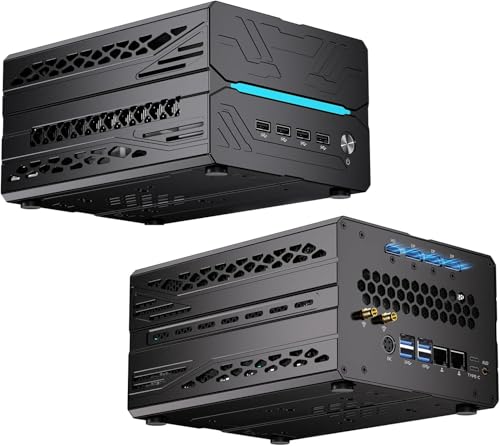
Kinupute Ryzen 9 RTX 5060 Ti Mini PC
Best for: Six-screen productivity setups and compact gaming
- Processor
- AMD Ryzen 9 9900X
- Installed RAM
- 32G
- Storage Capacity
- 1T
- Memory Type
- DDR5-5600
- Graphics
- GeForce RTX 5060 Ti 16GB GDDR7
- Ethernet Ports
- Dual 2.5G LAN
View on Amazon: Kinupute Ryzen 9 RTX 5060 Ti Mini PC Affiliate link
The Kinupute Mini PC combines a 12-core AMD Ryzen 9 9900X desktop processor with a dedicated GeForce RTX 5060 Ti 16GB GDDR7 graphics card inside an 8.6 by 6.6 by 4.5-inch chassis. It includes 32GB of DDR5-5600 RAM, dual 2.5GbE networking, and support for up to six simultaneous displays. This system suits you if you require high-end multi-monitor output, local AI compute, or demanding 3D performance.
Pros
- GeForce RTX 5060 Ti 16GB GDDR7 discrete graphics card
- AMD Ryzen 9 9900X 12-core processor with Ryzen AI NPU
- Native support for up to six 4K or 8K displays
- Dual 2.5GbE LAN ports supporting link aggregation
- Dual-channel DDR5-5600 memory expandable up to 128GB
Cons
- Chassis space limits installation to two drives despite three physical bays
- Heavier 5.5-pound chassis compared to sub-compact mini PCs
- Half of the USB Type-A ports use older USB 2.0 standard
Good fit if
- You run up to six independent monitors for trading, content creation, or panoramic gaming.
- You need dedicated 16GB GDDR7 graphics memory and hardware ray tracing.
- You want high-speed networking with dual 2.5GbE ports and Wi-Fi 7.
Skip if
- You need to install two M.2 NVMe drives and a 2.5-inch SATA drive simultaneously.
- You want a pocket-sized or ultra-lightweight mini PC for frequent travel.
Verdict: Kinupute Ryzen 9 RTX 5060 Ti Mini PC packs desktop-grade Zen 5 processing and discrete RTX graphics into a compact chassis. It gives you six-display support, dual 2.5GbE LAN, and 128GB RAM capacity for heavy workloads.

ASUS NUC 15 Performance Barebone
Best for: users wanting dedicated GPU power in a compact chassis
- Processor
- Intel Core Ultra 7 255HX
- Installed RAM
- Barebone
- Storage Capacity
- Barebone
- Memory Type
- DDR5
- Graphics
- NVIDIA RTX 5060 Mobile
- High-Speed Expansion
- Thunderbolt 4
View on Amazon: ASUS NUC 15 Performance Barebone Affiliate link
This barebone kit pairs an Intel Core Ultra 7 255HX with an NVIDIA RTX 5060 Mobile GPU. It includes Killer Wi-Fi 7 and Bluetooth 5.4 for reliable connectivity. The design uses a three-fan cooling system with dual vapor chambers. You add your own memory and storage. This setup suits users who want high-end AI and graphics performance in a compact form factor.
Pros
- Intel Core Ultra 7 255HX CPU
- NVIDIA RTX 5060 Mobile GPU
- Killer Wi-Fi 7 connectivity
- Bluetooth 5.4 support
- Dual vapor chamber cooling
Cons
- Heavy at 6.88 pounds
- Barebone kit requires separate RAM and SSD installation
- Smaller CPU core count than Ryzen AI Max+ 395 competitors
Good fit if
- You need dedicated NVIDIA graphics for gaming or creation
- You prefer Intel processors for specific workflow compatibility
- You want to customize your own memory and storage capacity
Skip if
- You want a pre-built system with RAM and storage included
- You prioritize maximum multi-core CPU performance over GPU power
- You need a lighter portable device under 5 pounds
Verdict: ASUS NUC 15 Performance Barebone fits users who prioritize strong NVIDIA graphics and efficient cooling in a compact chassis. You should buy this if you value dedicated GPU power and are comfortable installing your own components.
Specifications side by side
| Spec | GEEKOM A9 Mega Mini PC | GMKtec Ryzen AI Max+ 395 Mini PC | GMKtec Intel Core Ultra 7 64GB Mini PC | GMKtec Ryzen AI Max+ 395 Mini PC | ASUS ROG NUC 16 RTX 5060 Mini PC | Beelink GTi15 Core Ultra 9 Mini PC | ASUS NUC 15 Pro Plus Core Ultra 9 Mini PC | WEELIAO Intel NUC 13 Extreme Core i7 Mini PC | Kinupute i9-14900F RTX 5060 Mini PC | Kinupute Ryzen 9 RTX 5060 Ti Mini PC | ASUS NUC 15 Performance Barebone |
|---|---|---|---|---|---|---|---|---|---|---|---|
| Processor | AMD Ryzen AI Max+ 388 | AMD Ryzen AI Max+ 395 | Intel Core Ultra X7 Processor 358H | AMD Ryzen AI Max+ 395 | Intel ARL-HX Refresh U7 270HX Plus | Intel Core Ultra 9 285H | Intel Core Ultra 9 285H | Intel Core i7-13700K | Core i9-14900F | AMD Ryzen 9 9900X | Intel Core Ultra 7 255HX |
| Installed RAM | 64GB | 64GB | 64GB | 64GB | 16GB | 96GB | 32GB | 32GB | 64GB | 32G | Barebone |
| Storage Capacity | 1TB | 2TB | 1TB | 1TB PCIe 4.0 SSD | 1TB SSD | 2TB | 2TB | 4TB | 2TB | 1T | Barebone |
| Memory Type | LPDDR5X | LPDDR5X 8000MHz | LPDDR5X 8533MT/s | LPDDR5X 8000MHz | DDR5-5600 | DDR5 6400MHz | DDR5 | DDR5 | DDR5 | DDR5-5600 | DDR5 |
| Graphics | Radeon 8060S | AMD Radeon 8090S | Intel Arc B390 | AMD Radeon 8090S | NVIDIA GeForce RTX 5060 | Intel Arc 140T | Intel Arc 140T | Intel UHD Graphics 770 | GeForce RTX 5060 8GB GDDR7 | GeForce RTX 5060 Ti 16GB GDDR7 | NVIDIA RTX 5060 Mobile |
| Ethernet Ports | Dual 2.5GbE | 2.5GbE | 1x 10GbE, 1x 2.5GbE | 2.5GbE | not stated | Dual 10GbE | not stated | 2.5GbE / 10GbE | 2x Gigabit LAN | Dual 2.5G LAN | not stated |
| High-Speed Expansion | Dual USB4 | Dual USB4 | Dual USB4, OCuLink | Dual USB4 | not stated | USB4 | Dual Thunderbolt 4 | Thunderbolt 4 | not stated | not stated | Thunderbolt 4 |
| Operating System | Windows | not stated | not stated | not stated | Win 11 | not stated | Windows 11 Pro | Windows 11 | Windows 11 Pro | Win-11 Pro | No OS (Barebone) |
| Memory | not stated | not stated | not stated | not stated | 16GB RAM | not stated | 32GB RAM | 32GB RAM | not stated | not stated | not stated |
| Storage | 1TB SSD | not stated | not stated | not stated | 1TB SSD | not stated | not stated | not stated | not stated | not stated | not stated |
| Use | Gaming | not stated | not stated | Gaming | Gaming | Home, Office | not stated | not stated | Gaming | Gaming | not stated |
| Networking | 2.5G LAN | not stated | not stated | not stated | not stated | not stated | not stated | WiFi 6 | not stated | 2.5G LAN | not stated |
| Form Factor | not stated | not stated | not stated | not stated | not stated | not stated | not stated | not stated | not stated | not stated | Barebone |
| Weight | not stated | 7.14 pounds | not stated | not stated | 7.05 pounds | not stated | not stated | not stated | not stated | not stated | 6.88 pounds |
| Dimensions | not stated | not stated | not stated | not stated | 11.1 × 7.46 × 2.22 inches | not stated | 5.67 × 4.41 × 1.65 inches | not stated | not stated | not stated | 7.39 × 2.22 × 11.1 inches |
| Size | mini pc | 64GB+2TB I EVO X2 | EVO T2S 64+1TB | EVO-X2 64+1TB | RTX 5060|16GB RAM|1TB SSD | GTi15 285H 96+2TB | 32GB RAM | 2TB SSD | RNUC13RNGi7.32+4T | 64G DDR5+2T SSD | not stated | Ultra Small |
| Color | Space Silver | Black | EVO T2S 64+1TB | EVO-X2 64+1TB | Black | not stated | silver | black | RTX5060 8G | Ryzen 9 9900X | Black |
| Model | GEEKOM A Series | EVO X2 | EVO-T2S | X2 | RNUC16JNK7X569AU | GTI15 | RNUC15SU9 | RNUC13RNGi7 | MV10 | MV10 | RNUC15JNK7X5000U |
Hardware trade-offs in Under $2500 mini PCs
Systems Under $2500 prioritize multi-core processor performance and high memory capacities up to 96GB. To fit compact form factors, designs make clear hardware compromises. Most units rely on integrated graphics rather than discrete GPUs. Models featuring dedicated graphics cards like the RTX 5060 cap standard memory at 16GB. Chassis weights also increase, reaching over 7 pounds for expandable enclosures. Base storage options rarely exceed 2TB out of the box, requiring you to add secondary drives for larger local archives.
- Integrated graphics: Many multi-core units omit dedicated GPU hardware.
- System memory: Discrete graphics configurations drop memory capacity to 16GB RAM.
- Chassis weight: High-performance workstation enclosures weigh up to 7.14 pounds.
- Storage ceilings: Most pre-configured models provide 1TB or 2TB SSD capacity.
How We Picked These Mini PCs
We select computers from Amazon listings that qualify Under $2500 for this 2026 guide. You see only one variant per product family to keep your options clear. We do not physically handle the hardware. All details come directly from specifications and feature lists published on the listings.
We order these 11 picks with products in stock first, then by Amazon sales rank so better-selling products appear first. Stock details refresh live on the page at least daily. A mini PC belongs in this guide when it remains Under $2500. Computers move in or out of the list as availability shifts and catalog listings update.
Key Specs to Check Before Buying
-
Assess Your Ethernet Bandwidth
Examine the wired Ethernet ports if you plan to transfer massive files across a local network or build a home server. Standard mini PCs provide 2.5G LAN ports, which suit high-speed home internet and common office tasks. High-throughput homelabs, virtualization setups, and network-attached storage require dual 10G interfaces to avoid transmission bottlenecks. The MINISFORUM Intel Core Ultra 9 Workstation Mini PC includes dual 10G SFP+ ports alongside 2.5G LAN. Verify your switch hardware matches the port standards before finalizing your pick.
-
Count Display Output Channels
Check the external display specifications if your day-to-day workflow relies on multi-monitor configurations. Standard compact systems often top out at two or three display outs, which limits advanced workstation desks and financial charting setups. Advanced discrete graphics configurations expand these options significantly. For example, the Kinupute Ryzen 9 RTX 5060 Ti Mini PC supports up to six independent screens for extensive visual workspaces. Review your monitor resolution needs and cable connections to ensure the mini PC has enough physical ports to drive every screen simultaneously.
-
Compare Memory Type and Bandwidth
Look closely at memory generation and technology to match your processing demands. Standard DDR5 memory provides high capacity for virtual machines and heavy multitasking. If you run local language models or heavy neural network tasks, memory bandwidth matters as much as total gigabytes. Fast unified memory architectures, such as the 64GB LPDDR5X found in the GMKtec Ryzen AI Max+ 395 Mini PC, provide the necessary throughput for integrated AI accelerators. Balance your need for maximum memory capacity against the throughput advantages of fast low-power soldered alternatives.
-
Check Storage Generation Support
Evaluate the internal storage bus generation to ensure fast read and write speeds. While standard solid-state drives handle normal desktop workloads easily, massive dataset processing and video caching benefit from modern PCIe standards. The GMKtec Intel Core Ultra 7 64GB Mini PC offers PCIe 5.0 storage expansion for ultra-fast drive installations. If your workflow involves transferring raw video files, compiling codebases, or processing uncompressed databases, verify whether the system supports PCIe 5.0 drives. Confirm also whether the chassis provides secondary M.2 slots for storage expansion later.
-
Inspect Chassis Volume and Access
Consider the chassis dimensions and ease of maintenance when planning your desk layout. Ultra-compact units save desk space, but tightly sealed enclosures can make hardware maintenance difficult. If you plan to add storage or swap memory components down the road, look for designs that offer quick internal access. The ASUS ROG NUC 16 RTX 5060 Mini PC uses a 3-liter chassis with tool-free access that simplifies component upgrades. Measure your available space to confirm the chassis fits comfortably while leaving open clearance around all intake and exhaust vents.
-
Review Power Supply Integration
Examine how the computer draws electrical power before deciding on a model. Many compact desktops rely on hefty external power bricks that clutter your workspace and complicate cable management under your desk. A computer with an integrated power supply routes power directly through an ordinary AC cable. The Beelink GTi15 Core Ultra 9 Mini PC incorporates an internal power supply directly into its compact frame. If you frequently move your system between locations or want a clean desk setup with minimal wiring, choose a chassis that houses the power components internally.
Frequently asked questions
Which mini PC has the most RAM for local AI?
The Beelink GTi15 Core Ultra 9 Mini PC supports up to 96GB of RAM. This high memory capacity allows for intensive local AI workloads and home lab virtualization. The compact form factor includes dual 10GbE connectivity for robust networking. It provides a cable-simplified foundation for heavy processing tasks without requiring a full desktop tower.
What is the best mini PC for dedicated graphics gaming?
The ASUS ROG NUC 16 RTX 5060 Mini PC delivers dedicated RTX 5060 graphics in a 3-liter chassis. It includes 16GB of RAM and a 1TB SSD. The design allows tool-free access for internal upgrades. This setup supports compact gaming with modern Wi-Fi 7 connectivity and reliable performance for demanding titles.
Can I connect six monitors to a mini PC?
Yes, the Kinupute Ryzen 9 RTX 5060 Ti Mini PC supports six-screen productivity setups. It combines desktop-grade Zen 5 processing with discrete RTX graphics. The unit features dual 2.5GbE LAN ports and supports up to 128GB of RAM. This makes it suitable for heavy multi-monitor workloads and compact gaming scenarios.
Which mini PC offers 10G networking for fast transfers?
The GMKtec Intel Core Ultra 7 64GB Mini PC provides 10G networking capabilities. It pairs this fast connectivity with 64GB of DDR5 memory and PCIe 5.0 storage expansion. The compact footprint serves users needing dense workstation connectivity. It is ideal for high-speed networking and local AI workflows without a full desktop tower.
Is there a barebone option with NVIDIA graphics?
The ASUS NUC 15 Performance Barebone fits users who prioritize strong NVIDIA graphics. It is designed for those comfortable installing their own components. The unit features efficient cooling in a compact chassis. You get dedicated GPU power without pre-installed memory or storage, allowing for customized hardware configurations.
Which mini PC is best for enterprise security features?
The ASUS NUC 15 Pro Plus Core Ultra 9 Mini PC delivers robust performance with enterprise security features. It includes 32GB of RAM and a 2TB SSD. The compact form factor fits developers and creators who need reliable multitasking. It provides secure connectivity and professional-grade specifications in a small footprint.
See also
- best mini PCs under 4000
- best mini PCs with 2GB RAM
- best mini PCs under 3000
- best mini PCs under 150
- best mini PCs under 200
- Best Mini PCs Under $300: 15 Spec-Based Picks
- 15 Best Mini PCs Under $500, Compared
- Best Mini PCs Under $1000 in 2026: 15 Picks Ranked by Specs
- best generators under 2500
- best graphics cards under 2500