The Best ASUS Mini PCs in 2026: 14 Picks
As an Amazon Associate we earn from qualifying purchases. Links on this page are affiliate links.
Finding the best ASUS mini PCs requires reviewing diverse form factors designed for varied computing tasks. ASUS offers tall barebones, low-profile slim units, fanless aluminum enclosures, and dedicated gaming systems in black and silver finishes. The ASUS Fanless Chromebox 4 takes the top spot by providing silent operation for cloud productivity and digital signage.
To help you choose, this guide compares 14 models based strictly on the specifications published on their product listings. You can evaluate hardware options ranging from compact Celeron desktop units to Core Ultra systems.
Our top pick: ASUS NUC 15 Pro Core 7 Tall Barebone.
Quick picks
Our 14 picks

ASUS NUC 15 Pro Core 7 Tall Barebone
Best for: DIY users building a custom multi-display workstation
- Processor
- Intel Core 7 240H
- Installed RAM
- Barebone
- Storage Capacity
- Barebone
- Graphics
- Intel Graphics
- High-Speed Expansion
- Thunderbolt 4
- Dimensions
- 4.61 × 4.41 × 2.13 inches
The ASUS NUC 15 Pro Tall Barebone PC gives you an Intel Core 7 240H processor inside a compact 2.13-inch-tall chassis with a tool-less design. Because this is a barebone kit, you provide your own memory, storage, and operating system. It provides Intel Wi-Fi 7, Thunderbolt 4 expansion, and video output for up to four 4K displays. This setup suits you if you want custom components on a modern Intel platform.
Pros
- Intel Core 7 240H processor with integrated Intel Graphics
- Supports up to four 4K displays via HDMI 2.1 and Thunderbolt 4
- Intel Wi-Fi 7 wireless connectivity and certified Bluetooth
- Tool-less 2.0 chassis for straightforward hardware installation
- MIL-STD-810H durability testing and 3-year warranty
Cons
- Barebone unit ships without system memory or storage installed
- No operating system included
Good fit if
- You want to supply your own RAM, SSD, and operating system.
- You need multi-monitor support across up to four 4K displays.
- You require high-speed wireless networking with Intel Wi-Fi 7.
Skip if
- You want a turn-key mini PC ready to boot out of the box.
- You require dedicated discrete graphics for heavy gaming workloads.
Verdict: ASUS NUC 15 Pro Tall Barebone PC delivers modern Intel Core 7 processing and Wi-Fi 7 in an expandable, tool-less chassis. It is an efficient foundation if you prefer selecting your own storage, memory, and operating system.

ASUS ROG NUC 16 AI Gaming Mini PC
Best for: High-end gaming in a 3L chassis
- Processor
- Intel Core Ultra 9 290HX Plus
- Installed RAM
- 32GB
- Storage Capacity
- 1TB
- Graphics
- NVIDIA RTX 5080
- Memory
- 32GB RAM
- Dimensions
- 11.1 × 7.46 × 2.22 inches
The ROG NUC 16 is a 3L gaming mini PC built for high performance. It features an Intel Core Ultra 9 290HX Plus processor and an NVIDIA GeForce RTX 5080 GPU. You get 32GB of RAM and a 1TB SSD for storage. The system uses a dual vapor chamber and three fans for cooling. It supports Wi-Fi 7 and Bluetooth 5.4 for connectivity.
Pros
- Intel Core Ultra 9 290HX Plus processor
- NVIDIA GeForce RTX 5080 mobile GPU
- 32GB RAM and 1TB SSD
- Dual vapor chamber cooling system
- Wi-Fi 7 and Bluetooth 5.4
Cons
- 7.05 pounds weight is heavy for a mini PC
- 7.46 x 11.1 inches footprint is larger than standard NUCs
- No mention of included operating system
Good fit if
- You need desktop-class gaming performance in a small form factor
- You want the latest Wi-Fi 7 connectivity
- You prefer tool-free access for memory and storage upgrades
Skip if
- You need a fanless design for silent operation
- You require a very lightweight portable device
- You want a pre-installed Windows license included
Verdict: ASUS ROG NUC 16 Ultra 9 Gaming PC delivers serious gaming power with its RTX 5080 GPU and Ultra 9 chip. It fits users who prioritize raw performance and modern connectivity over ultra-compact portability.

ASUS NUC 13 Pro Intel i5 Mini PC
Best for: multi-monitor office setups and everyday business productivity
- Processor
- Intel Core i5-13420H
- Installed RAM
- 16GB
- Storage Capacity
- 512GB PCIe SSD
- Memory Type
- DDR4
- High-Speed Expansion
- 2x Thunderbolt
- Operating System
- Windows 11 Pro
The ASUS NUC 13 Pro Core i5 Mini PC gives you an Intel Core i5-13420H processor, 16GB of DDR4 RAM, and a 512GB PCIe SSD in a compact 7-inch chassis. It features two Thunderbolt ports alongside two HDMI 2.1 connectors for multi-display setups. With preinstalled Windows 11 Pro and Wi-Fi 6E, this setup suits office multitaskers needing flexible display outputs and easy future expansion.
Pros
- Dual Thunderbolt ports and dual HDMI 2.1 outputs
- Expandable memory up to 64GB DDR4
- Storage upgradable up to 8TB PCIe NVMe SSD
- Preinstalled Windows 11 Pro operating system
Cons
- Uses DDR4 memory instead of faster DDR5
- Baseline internal storage is limited to 512GB
Good fit if
- You need to drive multiple external screens using HDMI and Thunderbolt.
- You want a system with Windows 11 Pro ready out of the box.
- You plan to upgrade RAM or internal drive capacity over time.
Skip if
- You need modern DDR5 memory bandwidth for heavy processing tasks.
- You require large factory storage without installing a bigger drive.
Verdict: ASUS NUC 13 Pro Core i5 Mini PC balances reliable everyday computing power with extensive display output options. It delivers four high-resolution video outputs and expandable internals in a compact footprint.

ASUS NUC 14 Pro+ Barebone Mini PC
Best for: high-performance DIY mini PC builds
- Processor
- Intel Core Ultra 9 185H
- Installed RAM
- Barebone
- Storage Capacity
- Barebone
- Graphics
- Intel Arc Graphics
- Dimensions
- 5.67 × 4.41 × 1.61 inches
- Weight
- 1.3 pounds
The ASUS NUC 14 Pro+ is a compact barebone mini PC built inside a 5 by 4-inch anodized aluminum chassis. It features an Intel Core Ultra 9 185H processor and integrated Intel Arc graphics, ready to run local AI workloads. Because it ships without RAM or storage, you provide and install your own components. It suits you if you want high processing power with toolless access to customize memory up to 96GB and dual storage.
Pros
- Intel Core Ultra 9 185H processor with Intel Arc Graphics
- Toolless chassis design for easy internal hardware access
- Supports up to 96GB RAM and dual storage drives
- Compact 5.67 x 4.41 x 1.61-inch anodized aluminum enclosure
Cons
- Requires separate purchase and installation of RAM and storage
- Relies on integrated Intel Arc graphics rather than a dedicated GPU
Good fit if
- You want to configure your own memory and dual storage drives.
- You need the compute power of an Intel Core Ultra 9 185H processor.
- You prefer an aluminum chassis with toolless internal access.
Skip if
- You want a turnkey system with memory and storage pre-installed.
- You need a dedicated graphics card for your workload.
Verdict: ASUS NUC 14 Pro+ Core Ultra 9 Barebone delivers top-tier processing performance in a compact aluminum body for users who want to supply their own memory and storage.

ASUS Fanless Chromebox 4
Best for: silent cloud productivity and digital signage
- Installed RAM
- 4GB
- Storage Capacity
- 32GB eMMC
- Memory Type
- DDR4
- Operating System
- ChromeOS
- Processor
- Intel Celeron
- Cooling
- Fanless
The ASUS Fanless Chromebox 4 is a compact desktop running ChromeOS. It features an Intel Celeron processor, 4GB of DDR4 memory, and 32GB of eMMC storage inside a silent, extruded-aluminum chassis. You can connect up to three displays simultaneously using the dual HDMI 2.0 and USB-C ports. Built-in Wi-Fi 6 and an RS232 serial interface provide versatile connectivity. It suits you if you need a quiet, low-maintenance system for cloud workflows.
Pros
- Silent fanless cooling with an extruded-aluminum chassis
- Triple-display support via two HDMI 2.0 and USB-C ports
- Equipped with Wi-Fi 6 and a legacy RS232 serial interface
- Includes VESA mount support
Cons
- Limited 32GB eMMC onboard storage
- Base configuration includes only 4GB RAM
- Runs ChromeOS rather than Windows
Good fit if
- You need completely silent operation without moving cooling fans.
- You want to power up to three displays from a single compact unit.
- You rely primarily on cloud tools and web-based applications.
Skip if
- You require a Windows operating system for legacy desktop programs.
- You need substantial onboard local storage for large files.
- You run heavy workloads requiring more than 4GB of memory.
Verdict: ASUS Fanless Chromebox 4 delivers silent operation and three-screen video output for cloud-focused setups. Its extruded-aluminum build and serial port also make it practical for commercial deployment.

ASUS NUC 16 Pro Core Ultra Mini PC
Best for: edge computing and dual-LAN business environments
- Installed RAM
- 16GB
- Storage Capacity
- 512GB SSD
- Ethernet Ports
- Dual 2.5G LAN
- Memory
- 16GB RAM
- Dimensions
- 5.67 × 4.61 × 1.65 inches
- Weight
- 1.51 pounds
The ASUS NUC 16 Pro Mini PC provides a compact desktop platform configured with 16GB of RAM, a 512GB SSD, and dual 2.5G Ethernet ports. Inside the 1.65-inch-tall chassis, it supports dual Gen5 and Gen4 M.2 storage drives alongside Wi-Fi 7 and Bluetooth 6.0 connectivity. If you require modern network redundancy, edge computing capabilities, and tool-less internal expansion for industrial or commercial office tasks, this system offers the necessary hardware foundation.
Pros
- Dual 2.5G LAN ports for high-throughput wired networking
- Wi-Fi 7 and Bluetooth 6.0 wireless connectivity
- Tool-less chassis with dual Gen5 and Gen4 M.2 SSD slots
- Internal expansion support for RS-232 and PCIe x1
Cons
- Base configuration limited to 512GB of internal storage
- No discrete graphics card included
Good fit if
- You need dual 2.5G LAN ports for redundant wired networking.
- You want tool-less access to install Gen5 or Gen4 M.2 solid-state drives.
- You deploy systems requiring internal RS-232 or PCIe x1 expansion.
Skip if
- You need more than 512GB of storage out of the box without manual upgrades.
- You require discrete desktop GPU performance for dedicated graphics workloads.
Verdict: ASUS NUC 16 Pro Mini PC delivers high-speed dual 2.5G networking, Wi-Fi 7, and flexible M.2 expansion in a compact footprint. It serves enterprise and industrial environments that need modern connectivity and easy serviceability.

ASUS NUC 14 Pro Tall Core Ultra 5 Mini PC
Best for: Out-of-the-box productivity with easy hardware access
- Processor
- Intel Core Ultra 5 125H
- Installed RAM
- 16GB
- Storage Capacity
- 512GB
- Memory Type
- DDR5
- Graphics
- Intel Arc Graphics
- High-Speed Expansion
- Thunderbolt 4
You get a fully configured mini desktop built inside a 2.13-inch tall chassis. It runs an Intel Core Ultra 5 125H processor with Intel Arc graphics, paired with 16GB of DDR5 RAM and a 512GB NVMe SSD. Windows 11 Pro comes pre-installed, and the toolless chassis design lets you access internal components easily. It fits your workspace if you need everyday productivity with built-in Thunderbolt 4 connectivity.
Pros
- Intel Core Ultra 5 125H processor with Intel Arc Graphics
- Thunderbolt 4 port for high-speed expansion
- Toolless chassis access for easy hardware maintenance
- Comes fully configured with 16GB DDR5 RAM and Windows 11 Pro
Cons
- 512GB base storage capacity fills up fast
- Taller 2.13-inch chassis compared to 1.45-inch slim alternatives
Good fit if
- You want a fully assembled system ready to use with Windows 11 Pro.
- You need Thunderbolt 4 expansion alongside toolless internal access.
- You run productivity workloads that use Intel Core Ultra AI acceleration.
Skip if
- You require more than 512GB of internal storage immediately.
- You prefer the lowest-profile mini PC build using a 1.45-inch slim chassis.
Verdict: ASUS NUC 14 Pro Tall Core Ultra 5 Mini PC delivers balanced daily performance with DDR5 memory, Arc graphics, and Thunderbolt 4. It is a practical, fully assembled workstation that avoids the setup effort of a barebone kit.

ASUS NUC 15 Pro AI Core Ultra 5 Mini PC
Best for: local AI workflows and expandable 1TB storage
- Processor
- Intel Core Ultra 5 225H
- Installed RAM
- 16GB
- Storage Capacity
- 1TB
- Memory Type
- DDR5
- Graphics
- Intel Arc 130T
- High-Speed Expansion
- Thunderbolt 4
This ASUS mini PC delivers modern desktop capabilities in a 4.6 by 4.4-inch chassis. Powered by an Intel Core Ultra 5 225H processor, 16GB of DDR5 memory, and a 1TB PCIe Gen4 SSD, it handles complex workflows and local artificial intelligence tasks without requiring cloud connections. You also get high-bandwidth Thunderbolt 4 connectivity, WiFi 7 wireless support, and a tool-free enclosure that lets you expand storage and memory.
Pros
- Intel Core Ultra 5 225H 14-core processor with integrated NPU
- 1TB PCIe Gen4 SSD with 2.5-inch SATA expansion bay
- Modern connectivity including Thunderbolt 4 and WiFi 7
- Tool-free chassis supporting up to 96GB DDR5 RAM
Cons
- Ships with 16GB RAM rather than the platform maximum 96GB
- Taller 2.1-inch chassis profile compared to slim form factor units
Good fit if
- You need 1TB of out-of-the-box solid-state storage with tool-less internal access.
- You run local AI models or multi-monitor setups up to quad 4K resolution.
- You want high-speed networking via WiFi 7 alongside Thunderbolt 4 connectivity.
Skip if
- You prefer an ultra-slim chassis under two inches in height.
- You require 32GB or more memory preinstalled without upgrading it yourself.
Verdict: ASUS NUC 15 Pro AI Core Ultra 5 Mini PC combines capable Intel Series 2 processing, 1TB of fast internal storage, and tool-free upgradeability for modern office or development setups. It provides an efficient, expandable workstation without taking up valuable desk space.

ASUS NUC 13 Pro Core i5 Mini PC
Best for: multi-monitor office setups needing high-capacity storage
- Processor
- Intel Core i5-13420H
- Installed RAM
- 12GB
- Storage Capacity
- 1TB HDD, 128GB SSD
- Memory Type
- DDR4
- High-Speed Expansion
- 2x Thunderbolt
- Operating System
- Windows 11 Pro
The ASUS NUC 13 Pro Tall Core i5 Mini PC delivers solid desktop capability in a compact frame. You get an Intel Core i5-13420H processor paired with 12GB of DDR4 memory and dual storage featuring a 128GB SSD and a 1TB HDD. With two HDMI 2.1 ports and two Thunderbolt connections, it suits you if you need multi-display productivity and Windows 11 Pro out of the box.
Pros
- Four display outputs via two HDMI 2.1 and two Thunderbolt ports
- Dual storage configuration with a 128GB SSD and 1TB HDD
- Supports DDR4 memory expansion up to 64GB
- Equipped with modern Wi-Fi 6E and Bluetooth 5.3
Cons
- Primary solid-state drive is limited to 128GB
- Utilizes older DDR4 memory rather than DDR5
- Base configuration ships with an uneven 12GB RAM allotment
Good fit if
- You need multiple monitor outputs via Thunderbolt and HDMI 2.1
- You require bulk local capacity from a built-in 1TB hard drive
- You want Windows 11 Pro preinstalled for business software
Skip if
- You want standard high-speed DDR5 system memory
- You need a large primary SSD rather than a hybrid hard drive setup
Verdict: ASUS NUC 13 Pro Tall Core i5 Mini PC provides dependable daily multitasking and flexible display outputs for office environments. Its dual-drive layout offers generous mass storage, though the primary solid-state drive is small.

ASUS NUC 13 Pro Slim Core i5
Best for: quad-display office setups needing low-profile desktops
- Processor
- Intel Core i5-13420H
- Installed RAM
- 16GB
- Storage Capacity
- 256GB SSD
- Memory Type
- DDR4
- High-Speed Expansion
- Thunderbolt
- Operating System
- Win11 Pro
The ASUS NUC 13 Pro Slim is a compact desktop running an Intel Core i5-13420H processor with 16GB of DDR4 RAM and a 256GB SSD. It measures 1.36 inches tall and includes two HDMI 2.1 ports alongside two Thunderbolt connections for quad-display productivity. You get Windows 11 Pro, Wi-Fi 6E, and Bluetooth 5.3 preconfigured. It suits your everyday office workflows if you need multi-monitor support in a low-profile case.
Pros
- Intel Core i5-13420H processor with boost speeds up to 4.6GHz
- Two Thunderbolt ports and two HDMI 2.1 ports supporting quad displays
- Built-in Wi-Fi 6E and Bluetooth 5.3 wireless connectivity
- Slim 1.36-inch chassis with internal storage expansion up to 8TB
Cons
- Base 256GB SSD capacity provides limited local storage out of the box
- Uses DDR4 memory instead of faster DDR5
Good fit if
- You need to run up to four displays using HDMI 2.1 and Thunderbolt ports.
- You want a slim 1.36-inch desktop with Windows 11 Pro preinstalled.
- You plan to upgrade system memory up to 64GB or storage up to 8TB over time.
Skip if
- You need more than 256GB of storage without adding extra drives.
- You require the newer DDR5 memory standard for your workloads.
Verdict: ASUS NUC 13 Pro Slim Core i5 Mini PC provides capable multi-display productivity and modern connectivity inside a low-profile design. It delivers reliable office processing if you are comfortable working with a 256GB starting drive.

ASUS NUC 13 Pro Tall Barebone PC
Best for: DIY multi-monitor workstations
- Processor
- Intel Core i5-1340P
- Installed RAM
- Barebone
- Storage Capacity
- Barebone
- Memory Type
- DDR4
- Graphics
- Intel Iris Xe Graphics
- High-Speed Expansion
- Thunderbolt 4
This barebone mini PC uses a 13th Gen Intel Core i5-1340P processor and supports up to 64GB of DDR4 RAM. Its compact 4x4 form factor allows for wall mounting or placement behind displays. You get triple storage options and Thunderbolt 4 connectivity. It is built for 24/7 operation and includes VESA mounting hardware. This system suits users who want to build a reliable, multi-monitor workstation.
Pros
- 13th Gen Intel Core i5-1340P processor
- Supports up to 64GB DDR4 RAM
- Triple storage expansion bay
- Thunderbolt 4 and dual HDMI ports
- Compact 4.41 x 4.61 x 2.13 inch size
Cons
- Barebone kit requires separate RAM and storage purchase
- Only supports DDR4 memory instead of DDR5
- Intel Iris Xe graphics limits heavy gaming
Good fit if
- You need a compact PC for digital signage
- You want to customize your own RAM and storage
- You require support for up to four 4K displays
Skip if
- You need a fully assembled system with pre-installed components
- You require high-end discrete graphics for gaming
- You want the latest DDR5 memory speed
Verdict: ASUS NUC 13 Pro Tall i5-1340P provides a flexible foundation for users who prioritize expandability and multi-monitor setups in a small footprint. It is ideal for office environments or digital displays where you can select your own memory and drives.

ASUS NUC 14 Pro Ultra 7 Mini PC
Best for: quad-display home office productivity setups
- Processor
- Intel Core Ultra 7 155H
- Installed RAM
- 16GB
- Storage Capacity
- 512GB SSD
- Memory Type
- DDR5
- Ethernet Ports
- 1x RJ45
- High-Speed Expansion
- 2x Thunderbolt 4
The ASUS NUC 14 Pro Core Ultra 7 is a compact desktop built into a 1.46-inch slim chassis. It pairs a 16-core Intel Core Ultra 7 155H processor with 16GB of DDR5 RAM and a 512GB SSD. You get two Thunderbolt 4 ports, two HDMI 2.1 outputs, and Wi-Fi 6E. It suits you if you want a small home office workstation capable of driving up to four 4K displays.
Pros
- 16-core Intel Core Ultra 7 155H processor with 22 threads
- Dual Thunderbolt 4 ports and dual HDMI 2.1 outputs
- Compact 4.41 by 4.61 by 1.46 inch chassis
- Comes configured with Windows 11 Pro
Cons
- Only one RJ45 Ethernet port
- 512GB base solid-state drive capacity
- Warranty is split between the manufacturer and the upgrade seller
Good fit if
- You need to drive up to four 4K monitors simultaneously.
- You want a slim mini desktop powered by Intel Core Ultra 7 hardware.
- You require Windows 11 Pro features out of the box.
Skip if
- You need dual LAN ports for dedicated networking tasks.
- You require more than 512GB of internal storage right away.
- You prefer an unopened factory seal with unified manufacturer warranty terms.
Verdict: ASUS NUC 14 Pro Core Ultra 7 delivers dependable multi-display productivity and Intel Core Ultra 7 processing in an ultra-compact chassis. It is a capable space-saving choice for home setups requiring up to four 4K outputs.

ASUS NUC 15 Pro+ Intel Core Ultra 7 Mini PC
Best for: custom DIY multi-display workstations
- Processor
- Intel Core Ultra 7 255H
- Installed RAM
- Barebone
- Storage Capacity
- Barebone
- Memory Type
- DDR5
- Graphics
- Intel Arc 140T
- High-Speed Expansion
- Thunderbolt 4
This barebone kit packs an Intel Series 2 Core Ultra 7 255H processor and integrated Intel Arc 140T graphics into a compact 0.7-liter chassis. You supply your own DDR5 memory and storage across two drive slots. With dual HDMI 2.1 ports, Thunderbolt 4, and Intel Wi-Fi 7, it handles up to four 4K displays simultaneously. It suits you if you want a customizable, modern desktop for multi-monitor productivity.
Pros
- Intel Core Ultra 7 255H processor with Intel Arc 140T graphics
- Supports up to four 4K displays via dual HDMI 2.1 and Thunderbolt 4
- Intel Wi-Fi 7, Wi-Fi Proximity Sensing, and Bluetooth 5.4 built in
- Compact 0.7-liter chassis features a toolless upgrade design
Cons
- Ships without system memory, internal storage, or an operating system
- Requires you to source and install your own DDR5 RAM and SSDs
Good fit if
- You want to choose and install your own DDR5 RAM and dual storage drives.
- You need to run up to four 4K displays via HDMI 2.1 and Thunderbolt 4.
- You want high-speed wireless connectivity with Wi-Fi 7 and Bluetooth 5.4.
Skip if
- You prefer a pre-configured mini PC with memory and storage already installed.
- You do not want to install internal hardware components yourself.
Verdict: ASUS NUC 15 Pro+ Core Ultra 7 Barebone offers modern processing power and Wi-Fi 7 in a 0.7-liter chassis that lets you choose your own memory and dual-drive storage setup.
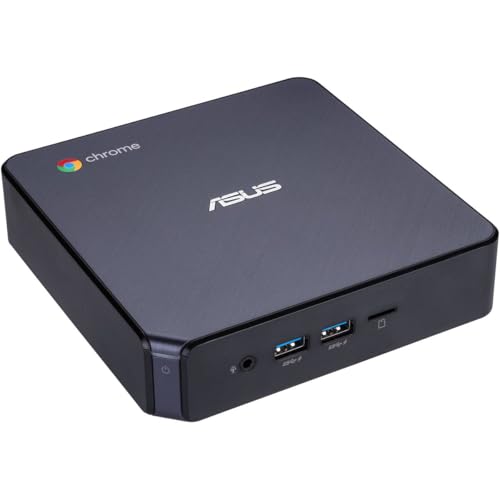
ASUS Chromebox 3 Core i7 Mini PC
Best for: dual-display Chrome OS setups and web multitasking
- Processor
- Intel Core i7-8550U
- Installed RAM
- 8GB
- Storage Capacity
- 128GB
- Memory Type
- DDR4
- Graphics
- Intel 4K UHD Graphics
- Ethernet Ports
- Gigabit LAN
This compact desktop pairs an 8th Generation Intel Core i7-8550U processor with Chrome OS. You get 8GB of DDR4 memory, a 128GB M.2 SATA SSD, and dual-monitor support via HDMI and USB Type-C. Five USB 3.1 Gen 1 Type-A ports give you ample room for wired peripherals. It suits you if you want a dedicated Chrome OS system for web workflows and Android apps from Google Play.
Pros
- Five USB 3.1 Gen 1 Type-A ports and one USB Type-C port
- Dual-display output via HDMI and DisplayPort over Type-C
- Runs Chrome OS with Google Play Android app support
- Compact chassis measuring 5.75 by 5.5 by 1.8 inches
Cons
- Uses an older 8th Generation Intel Core i7 processor
- Limited to 128GB of M.2 SATA storage
- Relies on older 802.11ac Wi-Fi and Bluetooth 4.2
Good fit if
- You rely on Chrome OS and use Android applications from Google Play.
- You need dual-monitor connectivity via HDMI and USB Type-C.
- You connect multiple wired peripherals across five USB Type-A ports.
Skip if
- You require Windows or Linux instead of Chrome OS.
- You need modern Wi-Fi 6 speeds or large onboard storage capacity.
Verdict: ASUS Chromebox 3 Core i7 Mini PC delivers reliable Chrome OS performance and versatile USB connectivity in a compact chassis. It handles dual-screen cloud tasks and Android applications cleanly without excess desktop footprint.
Specifications side by side
| Spec | ASUS NUC 15 Pro Core 7 Tall Barebone | ASUS ROG NUC 16 AI Gaming Mini PC | ASUS NUC 13 Pro Intel i5 Mini PC | ASUS NUC 14 Pro+ Barebone Mini PC | ASUS Fanless Chromebox 4 | ASUS NUC 16 Pro Core Ultra Mini PC | ASUS NUC 14 Pro Tall Core Ultra 5 Mini PC | ASUS NUC 15 Pro AI Core Ultra 5 Mini PC | ASUS NUC 13 Pro Core i5 Mini PC | ASUS NUC 13 Pro Slim Core i5 | ASUS NUC 13 Pro Tall Barebone PC | ASUS NUC 14 Pro Ultra 7 Mini PC | ASUS NUC 15 Pro+ Intel Core Ultra 7 Mini PC | ASUS Chromebox 3 Core i7 Mini PC |
|---|---|---|---|---|---|---|---|---|---|---|---|---|---|---|
| Processor | Intel Core 7 240H | Intel Core Ultra 9 290HX Plus | Intel Core i5-13420H | Intel Core Ultra 9 185H | not specified | not specified | Intel Core Ultra 5 125H | Intel Core Ultra 5 225H | Intel Core i5-13420H | Intel Core i5-13420H | Intel Core i5-1340P | Intel Core Ultra 7 155H | Intel Core Ultra 7 255H | Intel Core i7-8550U |
| Installed RAM | Barebone | 32GB | 16GB | Barebone | 4GB | 16GB | 16GB | 16GB | 12GB | 16GB | Barebone | 16GB | Barebone | 8GB |
| Storage Capacity | Barebone | 1TB | 512GB PCIe SSD | Barebone | 32GB eMMC | 512GB SSD | 512GB | 1TB | 1TB HDD, 128GB SSD | 256GB SSD | Barebone | 512GB SSD | Barebone | 128GB |
| Memory Type | not specified | not specified | DDR4 | not specified | DDR4 | not specified | DDR5 | DDR5 | DDR4 | DDR4 | DDR4 | DDR5 | DDR5 | DDR4 |
| Graphics | Intel Graphics | NVIDIA RTX 5080 | not specified | Intel Arc Graphics | not specified | not specified | Intel Arc Graphics | Intel Arc 130T | not specified | not specified | Intel Iris Xe Graphics | not specified | Intel Arc 140T | Intel 4K UHD Graphics |
| Ethernet Ports | not specified | not specified | not specified | not specified | not specified | Dual 2.5G LAN | not specified | not specified | not specified | not specified | not specified | 1x RJ45 | not specified | Gigabit LAN |
| High-Speed Expansion | Thunderbolt 4 | not specified | 2x Thunderbolt | not specified | not specified | not specified | Thunderbolt 4 | Thunderbolt 4 | 2x Thunderbolt | Thunderbolt | Thunderbolt 4 | 2x Thunderbolt 4 | Thunderbolt 4 | not specified |
| Operating System | not specified | not specified | Windows 11 Pro | not specified | ChromeOS | not specified | Win 11 Pro | Windows 11 Pro | Windows 11 Pro | Win11 Pro | not specified | Windows 11 Pro | not specified | Chrome OS |
| Memory | not specified | 32GB RAM | 16GB RAM | not specified | 4GB RAM | 16GB RAM | 16GB RAM | 16GB RAM | not specified | 16GB RAM | not specified | 16GB RAM | not specified | not specified |
| Storage | not specified | 1TB SSD | 512GB SSD | not specified | 32GB SSD | 512GB SSD | 512GB SSD | 1TB SSD | 128GB SSD | 256GB SSD | not specified | 512GB SSD | not specified | 128GB SSD |
| Use | not specified | not specified | not specified | not specified | not specified | not specified | not specified | not specified | not specified | Office | not specified | Home, Business, Gaming | not specified | not specified |
| Cooling | not specified | not specified | not specified | not specified | Fanless | not specified | not specified | not specified | not specified | not specified | not specified | not specified | not specified | not specified |
| Networking | not specified | not specified | WiFi 6E | not specified | not specified | not specified | not specified | not specified | WiFi 6E | WiFi 6E | WiFi 6E | WiFi 6E | not specified | not specified |
| Form Factor | Barebone | not specified | not specified | Barebone | not specified | not specified | not specified | not specified | not specified | not specified | Barebone | not specified | not specified | not specified |
| Dimensions | 4.61 × 4.41 × 2.13 inches | 11.1 × 7.46 × 2.22 inches | 7 × 7 × 1.36 inches | 5.67 × 4.41 × 1.61 inches | 5.75 × 4.11 × 0.89 inches | 5.67 × 4.61 × 1.65 inches | 4.61 × 4.41 × 2.13 inches | 4.6 × 4.4 × 2.1 inches | 7 × 7 × 1.36 inches | 7 × 7 × 1.36 inches | 4.61 × 4.41 × 2.13 inches | 4.61 × 4.41 × 1.46 inches | 5.67 × 4.41 × 1.65 inches | 5.5 × 5.75 × 1.8 inches |
| Weight | 12.8 ounces | 7.05 pounds | not specified | 1.3 pounds | 2.2 pounds | 1.51 pounds | 1.36 pounds | not specified | not specified | not specified | 1.3 pounds | not specified | 1.52 pounds | not specified |
| Size | Barebones|Tall | RTX 5080|32GB RAM|1TB SSD | 16GB RAM & 512GB SSD | Up to 96GB RAM|Dual Storage | 4GB RAM|32GB SSD | 16GB RAM|512GB SSD | Tall|16GB RAM|512GB SSD | 16GB RAM | 1TB SSD | 12GB RAM & 1.1TB Storage | 16GB RAM & 256GB SSD | Up to 64GB RAM|Triple Storage | 16GB RAM |512GB SSD | Up to 96GB RAM|Dual Storage | not specified |
| Color | Black | Black | Black | Silver | BLACK | Black | Black | black | Black | Black | Black | Black | Silver | Black |
| Model | RNUC15CRHC70000U | RNUC16JNK9X289AU | NUC 13 Pro | RNUC14RVSU90000UI | CHROMEBOX4-FC017U | RNUC16GDKU7663NU | RNUC14RVHU5068CUI | RNUC15U5 | NUC 13 Pro | NUC 13 Pro | RNUC13ANHI50000UI | NUC 14 Pro | RNUC15CRSU70000U | CHROMEBOX3-N7290U |
The ASUS Mini PC Lineup Explained
The catalog divides into complete systems and barebone platforms. Fully configured machines like the ASUS NUC 14 Pro Tall Core Ultra 5 Mini PC serve daily office work directly, packaging Windows 11 Pro, 16GB RAM, and a 512GB SSD. Barebones such as the ASUS NUC 14 Pro+ Barebone Mini PC suit you if you prefer installing your own memory, storage, and operating system.
Workload demands separate the remaining hardware. If you handle graphics-heavy workloads or gaming, the ASUS ROG NUC RTX 5070 Mini PC delivers 32GB RAM alongside dedicated RTX 5070 graphics. For silent cloud terminals or digital signage, the ASUS Fanless Chromebox 4 provides you with fanless cooling, an Intel Celeron processor, and Chrome OS.
Who the ASUS Range Suits
You can choose designs ranging from a 0.89-inch thin fanless chassis up to an 11.1-inch tall, 3-liter gaming tower weighing 6.88 pounds. Footprints include compact 4.4-inch square enclosures alongside wider 7-inch rectangular slabs, available in slim or 2.13-inch tall chassis.
This catalog suits you if you need compact Intel computing, but hardware gaps exist. Every listed model runs Intel silicon, from Celeron chips to Core Ultra 9 processors. You will not find AMD processors here. Internal graphics expansion is also absent; systems rely on integrated GPUs or a single mobile RTX 5070 build.
You can also compare the best ASUS motherboards by their specifications.
How to Choose the Right ASUS Mini PC
-
Evaluating Processor Performance
Processor choices directly determine your system throughput. Basic Intel Celeron chips handle single-purpose cloud applications, while Intel Core i5 and i7 processors deliver the parallel execution required for daily office multitasking. If you run heavy creative workloads, consider Intel Core Ultra processors featuring neural processing units. The ASUS NUC 14 Pro+ Barebone Mini PC uses a Core Ultra 9 processor for high-demand workflows. Match the CPU tier to your active workloads, as integrated processors are soldered to the motherboard and cannot be upgraded later.
-
Sizing System Memory Accurately
Your memory capacity controls how smoothly the computer manages multiple applications simultaneously. Entry-level 4GB configurations restrict you to lightweight browsing, whereas 16GB RAM supports sustained business productivity with dozens of open browser tabs and office files. For intense datasets or high-capacity builds, barebone models support extensive ceilings. The ASUS NUC 15 Pro+ Intel Core Ultra 7 Mini PC accommodates up to 96GB RAM. Check whether the specifications list pre-installed system memory or barebone support so that your chosen hardware matches your multitasking demands.
-
Selecting Internal Storage Layouts
Internal drive capacity determines how much local data you can store without attaching external drives. Modest 32GB or 128GB solid-state drives suffice for thin clients and web terminals. Mainstream office computers require at least 512GB SSD storage to accommodate modern operating systems, local documents, and productivity suites. The ASUS NUC 15 Pro AI Core Ultra 5 Mini PC provides a built-in 1TB SSD for local storage needs. Check whether the chassis supports dual storage drives if you need to separate your operating system from archived project files.
-
Assessing Graphics Hardware Capabilities
Most compact computers rely on integrated graphics chips like Intel Arc, which capably drive office documents, web video, and quad-display productivity setups. However, complex 3D rendering and gaming require a dedicated graphics processing unit. The ASUS ROG NUC RTX 5070 Mini PC includes a mobile RTX 5070 GPU paired with 32GB RAM for accelerated graphics performance. Review your software requirements before choosing integrated graphics, because dedicated mobile GPUs require larger chassis cooling layouts and consume more power than standard desktop productivity hardware.
-
Matching Network Connection Standards
Network specifications dictate file transfer speeds and latency across local networks and internet connections. Standard office setups benefit from Wi-Fi 6E, which reduces wireless interference across crowded bands. If you require higher throughput or physical network segmentation for edge servers, seek hardware supporting Wi-Fi 7 and multi-gigabit Ethernet connections. The ASUS NUC 16 Pro Core Ultra Mini PC provides dual 2.5G LAN ports alongside Wi-Fi 7. Compare the networking ports against your local network infrastructure to avoid bottlenecks when transferring large files over local shared networks.
-
Choosing the Operating System
Operating system compatibility determines which business software and tools you can run. Windows 11 Pro delivers broad compatibility for legacy corporate tools and domain environments. Chrome OS provides a streamlined, cloud-first platform ideal for shared workstations and web browsing. The ASUS Chromebox 3 Core i7 Mini PC operates on Chrome OS with native support for web workflows and Android applications. Barebone units arrive without an operating system, allowing you to install Linux or custom distributions, but requiring you to manage system licensing and driver installation yourself.
Frequently asked questions
Which ASUS mini PC is best for DIY users who want to customize their build?
The ASUS NUC 15 Pro Core 7 Tall Barebone is the top choice for builders. It provides a tool-less chassis where you select your own memory, storage, and operating system. This barebone design supports modern Intel Core 7 processing and Wi-Fi 7, giving you full control over components while maintaining an efficient foundation for a multi-display workstation.
What is the most powerful ASUS mini PC for gaming?
The ASUS ROG NUC 16 AI Gaming Mini PC delivers serious gaming power. It features an RTX 5080 GPU paired with an Ultra 9 chip for high-end performance. This 3L chassis includes 32GB RAM and a 1TB SSD, prioritizing raw speed and modern connectivity over ultra-compact portability for demanding users.
Does ASUS offer a silent mini PC for office or digital signage use?
Yes, the ASUS Fanless Chromebox 4 provides completely silent operation. It uses a fanless cooling design with an Intel Celeron processor, 4GB RAM, and a 32GB SSD. The extruded-aluminum build and support for three-screen video output make it practical for commercial deployment, cloud productivity, and digital signage environments that require quiet performance.
Which ASUS mini PC supports dual 2.5G networking for business environments?
The ASUS NUC 16 Pro Core Ultra Mini PC serves enterprise needs with high-speed dual 2.5G networking. It also includes Wi-Fi 7 and flexible M.2 expansion in a compact footprint. With 16GB RAM and a 512GB SSD, it is designed for industrial environments that require modern connectivity and easy serviceability for edge computing tasks.
Can I find an ASUS mini PC with a low-profile design for desk setups?
The ASUS NUC 13 Pro Slim Core i5 offers a low-profile design suitable for space-constrained desks. It measures 7 inches wide by 1.36 inches tall and includes 16GB RAM with a 256GB SSD. This model provides capable multi-display productivity and modern connectivity inside a slim chassis, running Windows 11 Pro for reliable office work.
Which ASUS model is best for local AI workflows and large storage needs?
The ASUS NUC 15 Pro AI Core Ultra 5 Mini PC combines capable Intel Series 2 processing with 1TB of fast internal storage. It includes 16GB RAM and offers tool-free upgradeability. This fully assembled workstation runs Windows 11 Pro and provides an efficient, expandable solution for modern office or development setups requiring local AI capabilities.
Is there an ASUS mini PC that supports up to four displays for office work?
The ASUS NUC 13 Pro Intel i5 Mini PC delivers four high-resolution video outputs for multi-monitor setups. It balances reliable computing power with extensive display options in a compact 7-inch footprint. With 16GB RAM and a 512GB SSD, it supports everyday business productivity and can drive multiple screens simultaneously for enhanced workflow efficiency.