Best MINISFORUM Mini PCs: 15 Models Compared
As an Amazon Associate we earn from qualifying purchases. Links on this page are affiliate links.
Finding the best MINISFORUM mini PCs depends on whether you need a compact desktop or a network workstation. MINISFORUM offers hardware configurations ranging from slim DeskMini enclosures and five-inch desktops to multi-drive workstation chassis in black, silver, and white finishes. The MINISFORUM Slim Ryzen 7 Mini PC leads the lineup by combining an 8-core processor, 32GB of RAM, and triple-display outputs for versatile productivity.
We compared 15 models using strictly their published hardware specifications to help you find the right system for your setup.
Quick picks
Our 15 picks

MINISFORUM Slim Ryzen 7 Mini PC
Best for: all-around productivity and multi-monitor setups
- Processor
- AMD Ryzen 7 8745H
- Installed RAM
- 32GB
- Storage Capacity
- 1TB SSD
- Memory Type
- DDR5
- Graphics
- AMD Radeon 780M
- Ethernet Ports
- 1x 2.5Gbps LAN
The MINISFORUM UM870 Slim Ryzen 7 Mini PC is a compact desktop built for heavy multitasking and everyday workloads. You get an 8-core AMD Ryzen 7 8745H processor paired with integrated AMD Radeon 780M graphics, 32GB of DDR5 memory, and a 1TB PCIe 4.0 SSD. It suits you if you need triple-display output up to 8K resolution and 40Gbps USB4 connectivity in a compact, desk-friendly setup.
Pros
- AMD Ryzen 7 8745H 8-core processor with up to 65W TDP
- Supports triple displays via HDMI 2.1, DisplayPort 1.4, and USB4
- 40Gbps USB4 port supports 8K display and 65W to 100W PD input
- Dual M.2 PCIe 4.0 slots expandable up to 4TB total storage
- Dual DDR5 SO-DIMM slots support memory expansion up to 96GB
Cons
- Single 2.5Gbps LAN port rather than dual Ethernet interfaces
- Includes two legacy USB 2.0 ports among its rear connectivity
- Relies on integrated Radeon 780M graphics without a discrete GPU
Good fit if
- You run up to three monitors using HDMI, DisplayPort, and USB4 simultaneously.
- You need expandable DDR5 memory up to 96GB and dual PCIe 4.0 SSD slots.
- You want 40Gbps USB4 connectivity with power delivery support.
Skip if
- You require dual Ethernet ports for dedicated network routing or homelab clustering.
- You need a dedicated graphics card for high-end rendering or compute workloads.
Verdict: MINISFORUM UM870 Slim Ryzen 7 Mini PC delivers strong 8-core processing, versatile triple-display outputs, and broad memory expandability in a compact chassis. It provides a balanced set of modern connectivity standards for productive everyday computing.

MINISFORUM Venus Ryzen 9 Mini PC
Best for: quad-display productivity and high-speed USB4 expansion
- Processor
- AMD Ryzen 9 7940HS
- Installed RAM
- 32 GB
- Storage Capacity
- 1TB
- Memory Type
- DDR5 5600MHz
- Graphics
- AMD Radeon 780M
- Ethernet Ports
- 1x RJ45 2.5G
This compact desktop features an AMD Ryzen 9 7940HS processor with integrated Radeon 780M graphics. You get 32 GB of high-speed DDR5 memory, a 1 TB PCIe 4.0 solid-state drive, and dual 40 Gbps USB4 ports that support video output and power delivery. It suits you if you need workstation-grade computing power for multitasking, productivity, or multi-monitor setups without taking up dedicated desk space.
Pros
- AMD Ryzen 9 7940HS 8-core processor with integrated Radeon 780M graphics
- Dual 40 Gbps USB4 ports supporting power delivery and video output
- Quad 4K display support across two HDMI 2.1 and two USB4 ports
- Dual M.2 2280 PCIe 4.0 storage slots supporting RAID0 and RAID1
Cons
- Memory capacity caps at 64 GB across two SODIMM slots
- Single 2.5G Ethernet port limits multi-network hardware setups
Good fit if
- You need to run up to four 4K displays simultaneously.
- You want high-speed external connectivity via two 40 Gbps USB4 ports.
- You plan to configure RAID0 or RAID1 across dual PCIe 4.0 SSDs.
Skip if
- You require dual Ethernet ports for advanced network routing.
- You need more than 64 GB of RAM for memory-heavy virtualization.
Verdict: MINISFORUM Venus Ryzen 9 Mini PC delivers strong processing performance and versatile quad-display connectivity in a compact form factor. It is an excellent choice if you require dual USB4 ports and expandable PCIe 4.0 storage.

MINISFORUM MS-01 Core i9 Barebone PC
Best for: Custom high-speed networking and virtualization labs
- Processor
- Intel Core i9-13900H
- Installed RAM
- Barebone
- Storage Capacity
- Barebone
- Memory Type
- DDR5
- Graphics
- Intel Iris Xe Graphics
- Ethernet Ports
- 2x 10Gbps SFP+, 2x 2.5G RJ45
This barebone workstation mini PC combines a 14-core Intel Core i9-13900H processor with high-speed expansion. You get dual 10Gbps SFP+ ports, two 2.5Gbps Ethernet jacks, a PCIe 4.0 x16 expansion slot, and support for up to 96GB of DDR5 memory. Because it ships without memory, internal storage, or an operating system, you supply your own components. It suits network setups, virtualization, and homelab builds needing custom hardware.
Pros
- Dual 10Gbps SFP+ and dual 2.5Gbps Ethernet ports
- Intel Core i9-13900H processor with 14 cores and 20 threads
- PCIe 4.0 x16 expansion slot for add-in cards
- Supports up to 96GB DDR5 memory and three NVMe drives
Cons
- Includes no installed RAM, storage drive, or operating system
- Integrated Intel Iris Xe graphics limits native 3D rendering power
Good fit if
- You want to configure your own DDR5 memory and NVMe or U.2 storage
- You need high-bandwidth 10Gbps SFP+ fiber networking or multi-port routing
- You plan to add a specialized add-in card via the PCIe 4.0 slot
Skip if
- You want a plug-and-play machine with pre-installed RAM, SSD, and OS
- You need powerful discrete 3D graphics straight out of the box
Verdict: MINISFORUM Core i9 Barebone Mini PC delivers workstation-grade 10Gbps networking and PCIe expansion for users who want to supply their own memory, storage, and software.

MINISFORUM Core i9 Mini Workstation
Best for: high-speed 10G networking and homelab storage expansion
- Processor
- Intel Core i9-13900H
- Installed RAM
- 32GB
- Storage Capacity
- 1TB
- Memory Type
- DDR5
- Graphics
- Intel Iris Xe Graphics
- Ethernet Ports
- 2x 10G SFP+, 2x 2.5G RJ45
The MINISFORUM MS-01 Core i9 Mini Workstation pairs a 14-core Intel Core i9-13900H processor with 32GB of DDR5 memory and a 1TB PCIe 4.0 SSD. It provides dual 10G SFP+ ports alongside dual 2.5G Ethernet jacks, offering extensive network bandwidth for high-speed local data transfers. You get three M.2 storage slots with U.2 and RAID support plus a PCIe 4.0 expansion slot. This system suits you if you need compact server-grade networking.
Pros
- Dual 10G SFP+ ports and dual 2.5G RJ45 Ethernet ports
- Intel Core i9-13900H processor with 14 cores and 20 threads
- PCIe 4.0 x16 expansion slot with x8 wiring
- Storage expandability with U.2 drive support and RAID0/RAID1
- Dual USB4 ports supporting 8K video output
Cons
- Uses integrated Intel Iris Xe Graphics out of the box
- HDMI output is limited to 4K at 60Hz
Good fit if
- You need high-bandwidth 10G SFP+ networking for network storage or home lab routing
- You plan to expand storage using enterprise U.2 drives or RAID arrays
- You want a compact 14-core Intel processor with PCIe expansion card capability
Skip if
- You need dedicated graphics out of the box for heavy rendering workloads
- You prefer multiple standard HDMI ports rather than USB4 monitor connections
Verdict: MINISFORUM MS-01 Core i9 Mini Workstation delivers rare 10G SFP+ networking and enterprise storage options in a compact desktop chassis. It is built for demanding homelab or workstation network tasks that need high-speed throughput and multi-drive expandability.

Minisforum Mini Workstation Core i9
Best for: homelab servers and high-speed network storage
- Processor
- Intel Core i9-13900H
- Installed RAM
- 32GB
- Storage Capacity
- 1TB
- Memory Type
- DDR5
- Graphics
- Intel Iris Xe Graphics
- Ethernet Ports
- 2x 10Gbps SFP+, 2x 2.5G RJ45
This compact workstation pairs a 14-core Intel Core i9-13900H processor with 32GB of DDR5 memory and a 1TB SSD. You get enterprise networking with dual 10Gbps SFP+ ports, dual 2.5Gbps Ethernet jacks, and two 40Gbps USB4 ports. It also includes an internal PCIe 4.0 x16 slot and room for multiple NVMe drives. It suits you if you run network storage, virtual labs, or home server workloads requiring massive bandwidth.
Pros
- Dual 10Gbps SFP+ and dual 2.5Gbps Ethernet ports
- Internal PCIe 4.0 x16 expansion slot
- Storage support for up to three M.2 NVMe SSDs or one U.2 SSD
- Two 40Gbps USB4 Type-C ports
Cons
- Relies on integrated Intel Iris Xe Graphics out of the box
- HDMI port limited to version 2.0 at 4K 60Hz
Good fit if
- You need high-speed 10Gbps SFP+ and 2.5Gbps wired networking.
- You want PCIe 4.0 x16 expansion and multi-drive NVMe or U.2 storage.
- You run virtualization, homelabs, or local network servers.
Skip if
- You need dedicated graphics preinstalled for heavy 3D gaming.
- You only need standard gigabit networking for basic office tasks.
Verdict: MINISFORUM MS-01 Core i9 Workstation delivers exceptional networking throughput and storage expansion for demanding server and homelab tasks. Its PCIe 4.0 x16 slot and 14-core Intel processor offer rare flexibility in a small desktop.

MINISFORUM Slim Ryzen 7 Mini PC
Best for: compact multi-monitor productivity and everyday multitasking
- Processor
- AMD Ryzen 7 8745H
- Installed RAM
- 32GB
- Storage Capacity
- 1TB
- Memory Type
- DDR5
- Graphics
- AMD Radeon 780M
- Ethernet Ports
- 2.5G
The MINISFORUM Ryzen 7 Slim Mini PC is a compact desktop built for daily productivity and multimedia. It features an eight-core AMD Ryzen 7 8745H processor, 32GB of DDR5 memory, and a 1TB PCIe 4.0 SSD. With integrated Radeon 780M graphics and a fast USB4 port, it drives high-resolution monitors easily. It suits you if you need a quiet, responsive workstation that handles demanding tasks without occupying valuable desk space.
Pros
- AMD Ryzen 7 8745H processor with 8 cores and 16 threads up to 5.0 GHz
- Radeon 780M graphics supporting display output via HDMI 2.1, DP 1.4, and USB4
- Two M.2 2280 PCIe 4.0 SSD slots supporting up to 4TB total storage
- High-speed networking with a 2.5G Ethernet port and Wi-Fi 6E
- Active cooling system designed to operate below 35dB at 60W
Cons
- Includes two older USB 2.0 ports alongside the USB 3.2 connections
- Offers only a single USB4 port for high-speed expansion
- Relies on integrated graphics rather than a dedicated GPU
Good fit if
- You want an 8-core processor paired with 32GB of DDR5 RAM out of the box.
- You run high-resolution monitors via HDMI, DisplayPort, or USB4.
- You need a wired 2.5G network connection for fast data transfers.
Skip if
- You require dedicated GPU hardware for heavy 3D rendering workloads.
- You need more than one high-bandwidth USB4 connection.
Verdict: MINISFORUM Ryzen 7 Slim Mini PC pairs an 8-core AMD processor with 32GB of DDR5 memory and versatile display connectivity. It delivers quiet, responsive performance for daily productivity in a space-saving chassis.
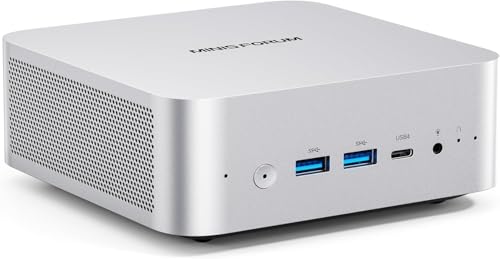
MINISFORUM AI X1 Ryzen 7 Mini PC
Best for: budget-friendly external GPU and multi-display setups
- Processor
- AMD Ryzen 7 255
- Installed RAM
- 16GB
- Storage Capacity
- 512GB
- Memory Type
- DDR5 5600 MT/s
- Graphics
- Radeon 780M
- Ethernet Ports
- 2.5G LAN
This compact desktop pairs an 8-core AMD Ryzen 7 255 processor with integrated Radeon 780M graphics. You get 16GB of DDR5 memory, a 512GB solid-state drive, dual USB4 ports, and a 2.5G Ethernet connection. It supports quad displays up to 8K resolution and connects to external graphics docks through OCuLink. This system suits you if you need a flexible productivity workstation that handles office multitasking, light gaming, and external GPU expansion.
Pros
- AMD Ryzen 7 255 processor with 8 cores and Radeon 780M graphics
- Dual 40Gbps USB4 ports supporting power delivery input
- OCuLink port for external graphics dock connectivity
- Wi-Fi 7 and 2.5G Ethernet networking
- Supports up to four displays at up to 8K resolution
Cons
- OCuLink port uses one of the two M.2 2280 SSD slots
- OCuLink connection does not support hot swapping
- Base storage capacity is limited to 512GB
Good fit if
- You want an external GPU connection via OCuLink or dual USB4.
- You need multi-monitor output across up to four displays.
- You want modern Wi-Fi 7 and 2.5G wired networking.
Skip if
- You need two internal M.2 SSDs while using an OCuLink dock.
- You require hot-swappable external graphics connections.
Verdict: MINISFORUM Ryzen 7 Mini PC provides strong multitasking power and rare OCuLink expansion in an accessible package. It delivers flexible multi-monitor display options and fast networking without requiring a full desktop footprint.

MINISFORUM Venus Ryzen 9 7940HS Mini PC
Best for: quad-display setups and high-speed compact computing
- Processor
- AMD Ryzen 9 7940HS
- Installed RAM
- 32GB
- Storage Capacity
- 1TB
- Memory Type
- DDR5
- Graphics
- AMD Radeon 780M
- Ethernet Ports
- 2.5Gbps
This compact desktop features an AMD Ryzen 9 7940HS processor with 8 cores, 16 threads, and integrated AMD Radeon 780M graphics. You get 32GB of DDR5 memory alongside a 1TB PCIe 4.0 SSD, with room to add a second M.2 drive. It supports up to four external displays across dual HDMI and dual USB4 ports. It suits you if you need fast computing, multi-monitor connectivity, and high-speed 2.5Gbps networking.
Pros
- AMD Ryzen 9 7940HS with 8 cores and up to 5.2GHz boost
- Dual USB4 ports supporting 8K output and 15W power delivery
- 32GB DDR5 RAM expandable up to 64GB
- Extra M.2 2280 PCIe 4.0 slot for storage expansion
- 2.5Gbps Ethernet port for fast wired networking
Cons
- RAM expansion tops out at 64GB
- No bay for 2.5-inch SATA drives
Good fit if
- You need to drive up to four monitors using dual HDMI and dual USB4 ports.
- You want integrated AMD Radeon 780M graphics paired with an 8-core CPU.
- You plan to add a second M.2 PCIe 4.0 SSD.
Skip if
- You require more than 64GB of RAM for your workload.
- You need space for internal 2.5-inch storage drives.
Verdict: MINISFORUM Venus Ryzen 9 Mini PC delivers fast 8-core processing, flexible quad-display outputs, and dual PCIe 4.0 storage slots in a compact 2.2-pound chassis.

MINISFORUM NAB6 Lite Core i5 Mini PC
Best for: multi-display productivity and dual-LAN networking
- Processor
- Core i5-12600H
- Installed RAM
- 16GB
- Storage Capacity
- 1TB
- Memory Type
- DDR4
- Graphics
- Intel Iris Xe Graphics
- Ethernet Ports
- Dual 2.5Gbps
The MINISFORUM NAB6 Lite Intel i5 Mini PC is a compact desktop built around an Intel Core i5-12600H processor with 12 cores and 16 threads. It includes 16GB of DDR4 RAM, a 1TB PCIe 4.0 SSD, and dual 2.5Gbps Ethernet ports. You also get support for up to four 4K displays at 60Hz using HDMI and USB-C. This setup suits you if you need reliable multi-monitor office productivity or dedicated home network routing.
Pros
- Intel Core i5-12600H processor with 12 cores and 16 threads
- Dual 2.5Gbps RJ45 Ethernet ports for advanced networking
- Quad 4K display support across two HDMI and two USB-C ports
- Expandable storage with an included 2.5-inch SATA drive bay
Cons
- Uses DDR4 memory rather than newer DDR5
- Graphics limited to integrated Intel Iris Xe
Good fit if
- You need dual 2.5Gbps LAN ports for firewalls, routing, or network isolation.
- You run up to four 4K monitors simultaneously for work.
- You want to install a secondary 2.5-inch SATA drive alongside PCIe 4.0 storage.
Skip if
- You require a discrete graphics card for heavy 3D workloads.
- You want a system that uses DDR5 memory.
Verdict: MINISFORUM NAB6 Lite Intel i5 Mini PC provides capable multitasking power alongside versatile network connectivity with its dual 2.5Gbps LAN ports and quad-display outputs. It functions smoothly as a multi-screen workstation or a dedicated network server.
MINISFORUM Core i9 Mini PC
Best for: high-speed networking and home server labs
- Processor
- Intel Core i9-12900H
- Installed RAM
- 32GB
- Storage Capacity
- 1TB
- Memory Type
- DDR5-4800
- Graphics
- Intel Iris Xe Graphics
- Ethernet Ports
- 2x 10G SFP+, 2x 2.5G RJ45
This compact desktop workstation features an Intel Core i9-12900H processor with 14 cores, 32GB of DDR5 memory, and 1TB of PCIe 4.0 solid-state storage. Its network connectivity stands out with two 10G SFP+ ports and two 2.5G Ethernet jacks. It suits you if you need dense local storage expansion, multi-monitor outputs up to 8K, and high-bandwidth wired throughput for home servers, virtual labs, or intensive networked production environments.
Pros
- Dual 10G SFP+ and dual 2.5G RJ45 network connections
- Intel Core i9-12900H 14-core processor with 32GB DDR5 RAM
- Extensive storage expansion supporting U.2 drives and RAID
- Includes a PCIe 4.0 expansion slot and two USB4 ports
Cons
- Relies on integrated Intel Iris Xe graphics out of the box
- Weighs 6.02 pounds, making it heavier than standard mini PCs
Good fit if
- You need 10G SFP+ ports for high-bandwidth local networking and NAS connections.
- You configure enterprise storage using U.2 drives or RAID arrays.
- You run multithreaded tasks using a 14-core Intel processor and 32GB DDR5 RAM.
Skip if
- You require dedicated workstation graphics without installing an add-in card.
- You want a featherweight mini PC designed for frequent travel.
Verdict: MINISFORUM Core i9 Mini Workstation delivers specialized 10G SFP+ networking and flexible storage configurations inside a compact chassis. It provides strong multithreaded compute power for dense server workloads and multi-display productivity.
MINISFORUM MS-01 Core i5 Workstation
Best for: high-speed networking and home lab virtualization
- Processor
- Intel Core i5-12600H
- Installed RAM
- 32GB
- Storage Capacity
- 1TB
- Memory Type
- DDR5
- Graphics
- Intel Iris Xe Graphics
- Ethernet Ports
- 2x 10G SFP+, 2x 2.5G RJ45
This compact workstation pairs an Intel Core i5-12600H processor with 32GB of DDR5 memory and a 1TB SSD. You get enterprise-grade networking through dual 10G SFP+ ports alongside two 2.5G Ethernet connections. Inside, you can expand storage with U.2 or M.2 drives and add a card using the PCIe 4.0 x16 slot. It suits you if you need a high-throughput home server, lab node, or compact multi-monitor desktop.
Pros
- Dual 10G SFP+ and dual 2.5G RJ45 Ethernet ports
- Internal PCIe 4.0 x16 expansion slot
- Storage support for M.2 PCIe 4.0 and U.2 enterprise SSDs
- Triple video output via two USB4 ports and one HDMI port
Cons
- Relies on integrated Intel Iris Xe graphics out of the box
- Uses an older 12th Gen Intel Core processor
Good fit if
- You need 10Gbps SFP+ ports for high-bandwidth local networking.
- You plan to expand storage using enterprise U.2 drives or extra M.2 slots.
- You want an internal PCIe slot to add expansion cards.
Skip if
- You need a pre-installed discrete graphics card for heavy 3D workloads.
- You require the higher CPU speeds of a Core i9 processor.
Verdict: MINISFORUM MS-01 Core i5 Workstation provides rare workstation-level expansion with dual 10G SFP+ networking, PCIe card support, and U.2 drive compatibility. It offers balanced multi-core performance for home labs and multi-display setups.

MINISFORUM Ryzen AI 9 Mini PC
Best for: AI workloads and external GPU expansion
- Processor
- AMD Ryzen AI 9 HX 470
- Installed RAM
- 32GB
- Storage Capacity
- 1TB
- Memory Type
- DDR5-5600MHz
- Graphics
- Radeon 890M
- High-Speed Expansion
- USB4, OCulink
The MINISFORUM Ryzen AI 9 Mini PC provides high-performance computing in a compact 7.68-inch square chassis. It features an AMD Ryzen AI 9 HX 470 processor with 55 NPU TOPS, 32GB of DDR5 memory, and integrated Radeon 890M graphics. You also get a dedicated OCulink port for external GPU expansion and three M.2 storage slots. It suits you if you need modern AI processing, multi-monitor setups, and high-speed connectivity.
Pros
- Dedicated OCulink port supports external desktop GPUs without using an SSD slot
- Three M.2 2280 PCIe 4.0 SSD slots supporting up to 2TB each
- Quad display output via HDMI 2.1, DisplayPort 1.4, and two USB4 ports
- High-speed networking with Wi-Fi 7, Bluetooth 5.4, and a 2.5G Ethernet port
Cons
- Integrated Radeon 890M graphics require external GPU hardware for heavier 3D workloads
- Internal drive capacity specified up to 2TB per M.2 slot
Good fit if
- You want native Wi-Fi 7 connectivity and up to four display outputs.
- You plan to attach an external graphics card using high-bandwidth OCulink.
- You need three internal M.2 NVMe slots for expanding your storage.
Skip if
- You require dedicated internal discrete graphics inside the chassis.
- You need drive sizes larger than 2TB per internal slot.
Verdict: MINISFORUM Ryzen AI 9 Mini PC combines Zen 5 processing, triple M.2 expansion, and an OCulink interface for versatile performance. It gives you flexible connectivity and modern AI acceleration in a sub-two-inch profile.

MINISFORUM NAB6 Lite Core i5 Mini PC
Best for: multi-display workspaces and high-speed Wi-Fi 6 networking
- Processor
- Intel Core i5-12600H
- Installed RAM
- 16GB
- Storage Capacity
- 1TB
- Memory Type
- DDR4
- Graphics
- Intel Iris Xe Graphics 80
- Ethernet Ports
- 2x 2.5GbE
The MINISFORUM NAB6 Lite Intel Core i5 Mini PC is a compact desktop built around a 12-core Intel Core i5-12600H processor. It features dual-band Wi-Fi 6, dual 2.5 Gigabit Ethernet ports, and 16GB of DDR4 memory paired with a 1TB PCIe 4.0 SSD. Quad 4K video outputs via two HDMI and two USB-C ports make this unit a practical match if you need multi-monitor productivity.
Pros
- Intel Core i5-12600H processor with 12 cores and 16 threads
- Dual 2.5GbE LAN ports alongside dual-band Wi-Fi 6
- Quad 4K display output via two HDMI and two USB-C ports
- Tool-accessible pop-up chassis for memory and SSD upgrades
Cons
- Uses DDR4 memory instead of DDR5
- Secondary 2.5-inch storage drive is not included
Good fit if
- You need Wi-Fi 6 connectivity alongside dual 2.5GbE network ports.
- You run up to four 4K displays simultaneously for your setup.
- You want an easily accessible chassis for upgrading RAM and storage.
Skip if
- You require high-bandwidth DDR5 system memory.
- You need a dedicated graphics card instead of integrated graphics.
Verdict: MINISFORUM NAB6 Lite Intel Core i5 Mini PC combines Wi-Fi 6 networking with dual 2.5GbE ports and a 12-core processor. It offers dependable multi-display desktop capability in a tool-accessible chassis.
MINISFORUM NAB6 Lite i5 Mini PC
Best for: Quad-display productivity and dual-LAN networking
- Processor
- Core i5-12600H
- Installed RAM
- 16GB
- Storage Capacity
- 1TB
- Memory Type
- DDR4
- Graphics
- Iris Xe Graphics
- Ethernet Ports
- Dual 2.5Gbps
This compact desktop features an Intel Core i5-12600H processor with 12 cores and 16 threads, paired with 16GB of DDR4 memory and a 1TB PCIe 4.0 SSD. You get dual 2.5Gbps Ethernet ports alongside four 4K video outputs across two HDMI and two USB-C ports. It suits you if you need a multi-display office workstation or a dedicated network appliance with expandable SATA and M.2 storage.
Pros
- Dual 2.5Gbps RJ45 Ethernet ports
- Quad 4K display output via two HDMI and two USB-C ports
- Intel Core i5-12600H with 12 cores and 16 threads
- Internal bay for an additional 2.5-inch SATA drive
Cons
- Uses DDR4 memory rather than DDR5
- Integrated Iris Xe graphics without dedicated GPU hardware
Good fit if
- You need quad-display 4K output across HDMI and USB-C.
- You run dual-network setups like firewalls or routing software with dual 2.5G LAN.
- You plan to add a 2.5-inch SATA hard drive for secondary storage.
Skip if
- You require a discrete graphics card for heavy 3D rendering.
- You want high-speed DDR5 memory architecture.
Verdict: MINISFORUM NAB6 Lite Core i5 Mini PC provides versatile quad-screen 4K support and dual 2.5Gbps networking in a compact 5-inch chassis. It delivers capable 12-core multitasking and flexible storage expansion for home or office setups.

MINISFORUM MS-S1 Max AI Workstation
Best for: local AI inference and heavy workstation tasks
- Processor
- AMD Ryzen AI Max+ 395
- Installed RAM
- 128GB
- Storage Capacity
- 2TB
- Memory Type
- LPDDR5x-8000MT/s
- Graphics
- RDNA 3.5 GPU
- Ethernet Ports
- Dual 10GbE
This compact workstation features an AMD Ryzen AI Max+ 395 processor with 16 cores and 32 threads, paired with 128GB of LPDDR5x unified memory and a 2TB SSD. It provides dual 10GbE network ports, an 80Gbps USB4 V2 port, and a full-length PCIe x16 slot. If you run local AI inference, heavy 3D rendering, or multi-stream video editing, this system delivers enterprise-grade expansion and memory bandwidth on your desk.
Pros
- 128GB LPDDR5x-8000 unified memory shared across CPU and GPU
- Dual 10GbE LAN ports and Wi-Fi 7 wireless connectivity
- USB4 V2 interface offering data speeds up to 80Gbps
- Full-length PCIe x16 slot and dual M.2 slots supporting RAID 0/1
Cons
- Draws up to 160W peak power via an integrated 320W power supply
- Offers only one dedicated HDMI 2.1 display output port
Good fit if
- You need massive unified memory bandwidth for running local AI models.
- You require dual 10GbE wired networking for high-speed infrastructure.
- You plan to add an expansion card via a full-length PCIe x16 slot.
Skip if
- You only require a simple mini desktop for everyday office applications.
- You prefer an ultra-low-wattage system designed for minimal power consumption.
Verdict: MINISFORUM MS-S1 Max AI Workstation delivers massive computing throughput with its 16-core APU, 128GB unified memory pool, and dual 10GbE networking. It is an exceptional desktop engine for intensive AI inference and workstation-tier data workflows.
Specifications side by side
| Spec | MINISFORUM Slim Ryzen 7 Mini PC | MINISFORUM Venus Ryzen 9 Mini PC | MINISFORUM MS-01 Core i9 Barebone PC | MINISFORUM Core i9 Mini Workstation | Minisforum Mini Workstation Core i9 | MINISFORUM Slim Ryzen 7 Mini PC | MINISFORUM AI X1 Ryzen 7 Mini PC | MINISFORUM Venus Ryzen 9 7940HS Mini PC | MINISFORUM NAB6 Lite Core i5 Mini PC | MINISFORUM Core i9 Mini PC | MINISFORUM MS-01 Core i5 Workstation | MINISFORUM Ryzen AI 9 Mini PC | MINISFORUM NAB6 Lite Core i5 Mini PC | MINISFORUM NAB6 Lite i5 Mini PC | MINISFORUM MS-S1 Max AI Workstation |
|---|---|---|---|---|---|---|---|---|---|---|---|---|---|---|---|
| Processor | AMD Ryzen 7 8745H | AMD Ryzen 9 7940HS | Intel Core i9-13900H | Intel Core i9-13900H | Intel Core i9-13900H | AMD Ryzen 7 8745H | AMD Ryzen 7 255 | AMD Ryzen 9 7940HS | Core i5-12600H | Intel Core i9-12900H | Intel Core i5-12600H | AMD Ryzen AI 9 HX 470 | Intel Core i5-12600H | Core i5-12600H | AMD Ryzen AI Max+ 395 |
| Installed RAM | 32GB | 32 GB | Barebone | 32GB | 32GB | 32GB | 16GB | 32GB | 16GB | 32GB | 32GB | 32GB | 16GB | 16GB | 128GB |
| Storage Capacity | 1TB SSD | 1TB | Barebone | 1TB | 1TB | 1TB | 512GB | 1TB | 1TB | 1TB | 1TB | 1TB | 1TB | 1TB | 2TB |
| Memory Type | DDR5 | DDR5 5600MHz | DDR5 | DDR5 | DDR5 | DDR5 | DDR5 5600 MT/s | DDR5 | DDR4 | DDR5-4800 | DDR5 | DDR5-5600MHz | DDR4 | DDR4 | LPDDR5x-8000MT/s |
| Graphics | AMD Radeon 780M | AMD Radeon 780M | Intel Iris Xe Graphics | Intel Iris Xe Graphics | Intel Iris Xe Graphics | AMD Radeon 780M | Radeon 780M | AMD Radeon 780M | Intel Iris Xe Graphics | Intel Iris Xe Graphics | Intel Iris Xe Graphics | Radeon 890M | Intel Iris Xe Graphics 80 | Iris Xe Graphics | RDNA 3.5 GPU |
| Ethernet Ports | 1x 2.5Gbps LAN | 1x RJ45 2.5G | 2x 10Gbps SFP+, 2x 2.5G RJ45 | 2x 10G SFP+, 2x 2.5G RJ45 | 2x 10Gbps SFP+, 2x 2.5G RJ45 | 2.5G | 2.5G LAN | 2.5Gbps | Dual 2.5Gbps | 2x 10G SFP+, 2x 2.5G RJ45 | 2x 10G SFP+, 2x 2.5G RJ45 | not specified | 2x 2.5GbE | Dual 2.5Gbps | Dual 10GbE |
| High-Speed Expansion | USB4 | 2x USB4 | USB4 | 2x USB4 | 2x USB4 | USB4 | Dual USB4, OCuLink | USB4 | not specified | 2x USB4 | 2x USB4 | USB4, OCulink | not specified | not specified | USB4 V2 |
| Operating System | not specified | not specified | No OS (Barebone) | not specified | not specified | not specified | not specified | not specified | not specified | not specified | not specified | not specified | not specified | not specified | not specified |
| Memory | 32GB RAM | 32GB RAM | not specified | 32GB RAM | 32GB RAM | 32GB RAM | 16GB RAM | 32GB RAM | 16GB RAM | 32GB RAM | 32GB RAM | 32GB RAM | 16GB RAM | 16GB RAM | not specified |
| Storage | 1TB SSD | 1TB SSD | not specified | not specified | not specified | not specified | 512GB SSD | not specified | 1TB SSD | not specified | 1TB SSD | 1TB SSD | not specified | 1TB SSD | not specified |
| Networking | 2.5G LAN, WiFi 6E | WiFi 6E | not specified | not specified | not specified | WiFi 6E | 2.5G LAN | not specified | not specified | not specified | WiFi 6E | not specified | WiFi 6 | not specified | not specified |
| Form Factor | not specified | not specified | Barebone | not specified | not specified | not specified | not specified | not specified | not specified | not specified | not specified | not specified | not specified | not specified | not specified |
| Weight | 2.73 pounds | not specified | 3.13 pounds | not specified | 3.13 pounds | not specified | not specified | 2.2 pounds | not specified | 6.02 pounds | not specified | not specified | not specified | 2.2 pounds | not specified |
| Dimensions | not specified | not specified | not specified | not specified | not specified | not specified | not specified | 0.39 × 0.39 × 0.39 inches | not specified | not specified | not specified | 7.68 × 7.68 × 1.67 inches | not specified | 5 × 5 × 2.13 inches | 0.79 × 0.79 × 0.79 inches |
| Size | UM870 Slim 32+1T | UM790 Pro-32GB/1TB | MS-01-S1390-Barebone | MS01-13900H(32+1T) | MS-01-S1390(32+1TB) | UM870 Slim-32/1TB | X1-255-16/512GB | UM790 Pro(32+1T) | NAB6Lite(16+1T) | MS-02-S1290(32+1T) | i5-12600H | 32+1T | X1 Pro-470(32+1T) | NAB6 Lite-16GB+1TB | not specified | MS-S1 Max(128+2TB) |
| Color | Silver | multi-color | Black | Black | Black | White | not specified | Black | Silver | Black | Black | Silver | Black | Silver | not specified |
| Model | DeskMini | UM790 Pro | DeskMini | DeskMini | MS01-S1390 | UM870 Slim | X1-255 | DeskMini | DeskMini | DeskMini | DeskMini | DeskMini | NAB6 Lite | DeskMini | AMD Ryzen AI Max+ 395 |
Understanding the MINISFORUM Lineup
MINISFORUM models divide between compact multi-display machines and specialized network hardware. For daily multitasking and multi-screen workflows, systems like the MINISFORUM Slim Ryzen 7 Mini PC and MINISFORUM Venus Ryzen 9 Mini PC provide eight-core processing, 32GB RAM, and triple or quad video outputs. Units like the MINISFORUM NAB6 Lite Core i5 Mini PC include 16GB RAM and dual 2.5Gbps Ethernet ports for routine office environments.
If you build homelabs or run virtualization clusters, the MS series emphasizes high-speed throughput and expansion. Units like the MINISFORUM MS-01 Core i9 Barebone PC provide 10Gbps networking along with PCIe expansion slots for adding your own memory, storage, and cards. This category suits you if you require enterprise connectivity and flexible component choices rather than fixed desktop specifications.
Where MINISFORUM Fits Your Workspace
MINISFORUM fits you if you need compact multi-display computing or high-throughput network hardware. Enclosure weights range from 2.2 pounds up to 6.02 pounds, with chassis formats extending from slim profiles and 5-inch footprints to larger multi-slot DeskMini workstations. Color choices include black, silver, white, and multi-color.
Gaps remain in the lineup. None of the listed systems offer built-in RGB or case lighting options. The catalog includes no battery-powered portable form factors or all-in-one monitor designs. You also will not find factory-installed discrete graphics cards; visual tasks rely on integrated processors, external GPU setups via OCuLink, or user-supplied cards in open PCIe slots.
How to Choose a MINISFORUM Mini PC
-
Evaluating Processor Architecture
When selecting a unit, evaluate your processing workload before choosing between Intel Core and AMD Ryzen options. A mid-tier processor like an Intel Core i5 handles standard office multitasking and media playback smoothly. Higher workloads such as data compilation, heavy multitasking, or code building benefit from eight-core options like the MINISFORUM Slim Ryzen 7 Mini PC. Review the published core counts and processor series in the specifications. Selecting the appropriate chip tier ensures your daily computing needs are met without excess heat generation.
-
Assessing Network Speed Requirements
Examine the integrated network ports to match your local network setup. Basic home and office tasks function properly on standard 2.5Gbps Ethernet or modern Wi-Fi connectivity. However, dedicated server tasks, network attached storage transfers, and virtualization labs require significantly higher bandwidth. Hardware like the MINISFORUM Core i9 Mini Workstation integrates specialized 10G SFP+ ports alongside standard ports to handle sustained enterprise data transfers. Review your switches and cabling to determine whether your workflow requires standard 2.5G LAN or high-throughput 10G networking interfaces.
-
Selecting Installed Memory Capacity
Check the installed RAM specification against your software demands. A configuration with 16GB of memory accommodates typical office software, browser tabs, and light photo editing. Demanding environments involving virtual machines, 4K video rendering, or local machine learning models require substantially larger memory capacities. Systems such as the MINISFORUM MS-S1 Max AI Workstation provide an expansive 128GB unified memory allocation for memory-heavy computing. Verify whether the memory comes pre-installed or soldered, ensuring the capacity matches your current application requirements before deploying the system on your desk.
-
Choosing External Expansion Interfaces
Consider your expansion needs if you plan to connect external graphic cards or dedicated high-speed peripherals. Standard mini PCs rely purely on standard USB ports, which can limit external throughput. Units offering specialized ports, such as the MINISFORUM AI X1 Ryzen 7 Mini PC with its OCuLink connection, provide direct PCIe lanes to support external graphics docks and fast external storage arrays. If you intend to run GPU-accelerated computing or modular hardware add-ons, confirm the presence of high-bandwidth bus interfaces like OCuLink or dual USB4 connections on the spec sheet.
-
Deciding on Barebone Configurations
Decide whether you prefer a pre-built computer or a barebone foundation before purchasing. Ready-to-use computers include the processor, internal storage drive, system memory, and an operating system right out of the box. In contrast, barebone options like the MINISFORUM MS-01 Core i9 Barebone PC omit storage drives, RAM modules, and software, allowing you to install enterprise-grade memory or custom operating systems yourself. If you already possess spare components or manage a specialized server environment, a barebone model offers customized component selection. Otherwise, select fully populated configurations for immediate setup.
-
Checking Display Output Limits
Review the display interface count to match your multi-monitor desktop configuration. While standard mini PCs support two external monitors, multi-window financial workstations and dashboard monitoring setups require higher simultaneous display connectivity. For example, the MINISFORUM Venus Ryzen 9 Mini PC supports up to quad-display output using combined HDMI and USB4 display pathways. Verify the physical video ports against your screen setup to confirm whether you can run triple or quad 4K monitors directly from the chassis without buying external multi-display hubs or adapters.
Frequently asked questions
Which MINISFORUM mini PC is best for homelab networking?
The MINISFORUM MS-01 series is built specifically for homelab network environments. Models like the MS-01 Core i5 and Core i9 workstations include high-speed 10G SFP+ networking interfaces alongside PCIe expansion slots. These systems also support U.2 enterprise storage drives, giving you high-throughput data transfer and flexible virtualization potential inside a compact chassis.
Can MINISFORUM mini PCs connect to an external GPU?
Yes, select MINISFORUM models feature high-speed expansion interfaces designed for external graphics connections. The MINISFORUM AI X1 and the Ryzen AI 9 mini PCs include dedicated OCuLink ports for direct high-bandwidth expansion. In addition, systems like the Venus UM790 Pro feature dual USB4 ports, allowing you to connect compatible external enclosures and high-speed peripherals.
What comes included with a MINISFORUM barebone model?
A barebone system like the MINISFORUM MS-01 Core i9 Barebone PC includes the chassis, processor, and cooling assembly, but omits internal storage and system RAM. You need to supply your own compatible memory modules, solid-state storage drives, and operating system software. This setup gives you total freedom to configure drive capacities and component specifications for your build.
Which MINISFORUM models support quad-monitor displays?
Several models natively support up to four simultaneous displays for multi-monitor workstations. The MINISFORUM Venus UM790 Pro uses its dual USB4 ports and display outputs to power four separate screens. Similarly, the Intel-based NAB6 Lite configurations offer quad-display 4K video output, making them practical options for multi-screen document tracking, trading desks, and office multitasking.
How much RAM do MINISFORUM mini PCs come with?
Factory hardware configurations range from 16GB up to 128GB of memory. Everyday computing options like the NAB6 Lite and AI X1 include 16GB of RAM, while higher-tier configurations like the UM870 Slim and Venus UM790 Pro step up to 32GB DDR5. For intensive data processing and virtualization, the MS-S1 Max features an expansive 128GB unified memory pool.
Do MINISFORUM mini PCs have dual Ethernet ports?
Yes, several MINISFORUM computers feature dual wired networking ports for router setups, firewalls, and network isolation. The compact NAB6 Lite lineup integrates dual 2.5Gbps LAN ports for fast local wired transfers. If your workload demands even higher throughput, workstation options such as the MS-01 and MS-S1 Max provide dual 10Gbps connectivity via SFP+ or 10GbE interfaces.