7 Best ARM Single Board Computers, Compared
As an Amazon Associate we earn from qualifying purchases. Links on this page are affiliate links.
Choosing the best ARM single board computers comes down to balancing processing efficiency, energy consumption, and physical connectivity. The Libre Computer La Frite 1GB SBC earns the top pick because it provides 64-bit quad-core computing at an efficient 2W power draw alongside a standard 40-pin expansion header.
This guide compares 7 products using only the technical specifications published on their official product listings. It helps you decide which hardware configuration provides the right memory capacity, board dimensions, and operating system support for your specific deployment.
Quick picks
The best fit for you
- You need low-power Linux computing for basic prototyping Libre Computer La Frite 1GB SBC It operates at a 2W power draw with a 40-pin expansion header.
- You want an integrated screen for handheld IoT projects DFRobot UNIHIKER ARM Single Board Computer It features an integrated touchscreen and onboard sensors for standalone operation.
- You need an efficient board for 4K media playback Libre Computer Sweet Potato 2GB SBC It delivers 1W idle operation and hardware decoding for 4K media.
- You require high memory capacity for complex embedded builds Raspberry Pi Compute Module 5 16GB RAM 16GB eMMC It provides 16GB of RAM alongside 16GB of onboard eMMC storage.
Our 7 picks
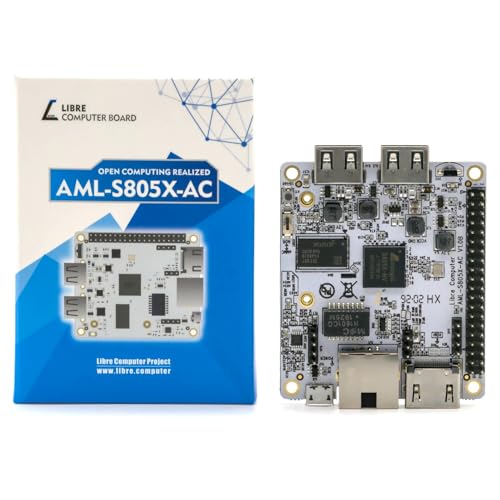
Libre Computer La Frite 1GB SBC
Best for: low-power Linux projects and basic hardware prototyping
- Architecture
- ARM (what this guide is about)
- Processor
- Quad 64-bit ARM Cortex-A53
- RAM Capacity
- 1GB
- RAM Type
- DDR4
- Operating System Support
- Ubuntu, Debian, Raspbian
- Dimensions
- 3.5 × 2.5 × 0.75 inches
The Libre Computer La Frite is an ultra-compact single board computer measuring 3.5 by 2.5 inches. It features a quad-core 64-bit ARM Cortex-A53 processor running at 1.2GHz, 1GB of DDR4 memory, and an ARM Mali-450 GPU with hardware video decoding. Consuming just 2W under standard workloads, it suits you if you need an energy-efficient Linux platform for Debian or Ubuntu projects requiring standard 40-pin header connectivity.
Pros
- Low 2W power consumption in standard scenarios
- Quad-core 64-bit ARM Cortex-A53 processor with Mali-450 GPU
- Hardware decoding for H.265 HEVC, H.264 AVC, and VP9
- 40-pin header with Raspberry Pi-compatible alternate pin functions
- Support for Ubuntu 23.04/22.04 LTS and Debian 12
Cons
- Limited to 1GB DDR4 RAM without onboard eMMC storage included
- Maximum CPU clock speed capped at 1.2GHz
Good fit if
- You need an energy-efficient ARM board consuming roughly 2W.
- You want 40-pin expansion headers compatible with standard alternate pin functions.
- You plan to run standard Ubuntu, Debian, or Raspbian Linux distributions.
Skip if
- You require more than 1GB of system RAM for your workloads.
- You need integrated onboard flash storage right out of the box.
Verdict: Libre Computer La Frite 1GB ARM SBC delivers efficient 64-bit quad-core computing at a low 2W power draw. It works well if you need standard Linux support and basic 40-pin header expansion.

DFRobot UNIHIKER ARM Single Board Computer
Best for: Handheld IoT prototyping and Python education
- Architecture
- ARM (what this guide is about)
- Processor
- Quad-Core ARM
- Storage
- 16GB Flash
- Wireless Connectivity
- Wi-Fi, Bluetooth
- Operating System Support
- Debian Linux
- Use
- IoT
The DFRobot UNIHIKER is an ARM single board computer designed for interactive IoT projects and coding education. You get a quad-core ARM processor, 16GB of onboard flash storage, and an integrated 2.8-inch color touchscreen. It comes with pre-installed Debian Linux, onboard Wi-Fi, Bluetooth, and built-in sensors like an accelerometer and light sensor. It suits you if you want an all-in-one Python development board without dealing with separate displays or initial OS flashing.
Pros
- Integrated 2.8-inch color touchscreen for data visualization and interaction
- Pre-installed Debian Linux with a pre-configured Python environment
- Built-in microphone, gyroscope, accelerometer, light sensor, and buzzer
- Onboard Wi-Fi and Bluetooth wireless connectivity
Cons
- Storage is limited to 16GB flash onboard
- System RAM capacity is not specified in the specifications
Good fit if
- You want an integrated display and onboard sensors without wiring extra modules.
- You prefer a pre-configured Debian Linux setup ready for immediate Python programming.
- You need a compact handheld SBC measuring under 3.5 inches in length.
Skip if
- You need more than 16GB of built-in storage for your local applications.
- You require verified, high-capacity system RAM for intensive computational tasks.
Verdict: DFRobot UNIHIKER ARM SBC with Touchscreen delivers a quad-core ARM platform complete with an integrated display and onboard sensors. It provides a self-contained setup for direct Python programming without external monitors.

Libre Computer Sweet Potato 2GB SBC
Best for: Low-power 24/7 servers and media playback
- Architecture
- ARM (what this guide is about)
- RAM Capacity
- 2GB
- Video Resolution
- 4K 60 FPS
- Operating System Support
- Fedora 42, Debian 13, Ubuntu 24.04 LTS
- Dimensions
- 4.75 × 3 × 1 inches
The Libre Computer Sweet Potato is an ARM single board computer featuring 2GB of RAM and native 4K 60 FPS video decoding for H.264, H.265, and VP9. It draws 1W at idle and boots via UEFI BIOS from MicroSD, eMMC, or USB storage. Powered by USB Type-C, it suits you if you run lightweight Linux distributions, media centers, or 24/7 low-power services.
Pros
- Low 1W idle power consumption for continuous operation
- Hardware-accelerated 4K 60 FPS decoding for H.264, H.265, and VP9
- UEFI BIOS supporting boot from eMMC, MicroSD, and USB storage
- Standard USB Type-C power input drawing up to 3A
Cons
- Wi-Fi and Bluetooth connectivity sold separately
- PoE functionality requires a separate mezzanine board
- Memory limited to 2GB RAM
Good fit if
- You need a low-power 1W ARM board for continuous network or server tasks.
- You want native 4K 60 FPS media decoding using CoreELEC or Linux.
- You prefer standard UEFI boot management across USB, eMMC, or MicroSD.
Skip if
- You need built-in wireless networking out of the box.
- You run memory-heavy workloads requiring more than 2GB of RAM.
Verdict: Libre Computer Sweet Potato 2GB ARM SBC delivers efficient 1W idle operation and 4K media decoding for lightweight setups. It provides flexible UEFI storage booting, though wireless connectivity requires separate hardware.

Banana Pi Allwinner H618 SBC
Best for: compact 4K IoT and Linux projects
- Architecture
- ARM (what this guide is about)
- Processor
- Allwinner H618
- RAM Capacity
- 2GB
- RAM Type
- LPDDR4
- Storage
- 8GB eMMC
- Ethernet
- 100Mbps Ethernet
This compact single-board computer packs an Allwinner H618 quad-core Cortex-A53 processor and 2GB of LPDDR4 memory into a Raspberry Pi Zero form factor. It gives you 8GB of onboard eMMC storage, dual-band WiFi 4, and mini HDMI output supporting 4K video at 60Hz. It suits your embedded projects, media setups, and IoT applications if you need a tiny Linux board with built-in flash storage and high-resolution display output.
Pros
- Includes 8GB onboard eMMC storage plus a microSD card slot
- Mini HDMI 2.0a output supports 4K resolution at 60Hz
- Dual-band 2.4GHz and 5GHz WiFi 4 with Bluetooth 4.2
- Raspberry Pi Zero W footprint with 40-pin header compatibility
Cons
- Ethernet speed maxes out at 100Mbps
- Uses older WiFi 4 wireless standard instead of newer protocols
Good fit if
- You want a Raspberry Pi Zero form factor with built-in eMMC storage.
- You need 4K 60Hz video output from a compact development board.
- You build IoT or Linux projects using Ubuntu or Debian.
Skip if
- You require gigabit Ethernet speeds for high-bandwidth networking.
- You need modern WiFi 5 or WiFi 6 connectivity.
Verdict: WayPonDEV Banana Pi M4 Zero ARM SBC delivers quad-core processing, 8GB eMMC storage, and 4K display output in a pocket-sized footprint. It provides a capable, space-efficient platform for compact Linux and IoT builds.

KLAYERS Luckfox Lyra Ultra Linux Board
Best for: embedded Linux development and hardware control
- Architecture
- ARM (what this guide is about)
- Processor
- RK3506B Cortex-A7 & Cortex-M0
- Storage
- 8GB eMMC
- Operating System Support
- Linux
The KLAYERS Luckfox Lyra Ultra SBC is an embedded ARM single board computer designed for standalone Linux development. It features a Rockchip RK3506B processor pairing a triple-core Cortex-A7 CPU with an integrated Cortex-M0 microcontroller, alongside 8GB of onboard eMMC storage. You get integrated audio and video codecs with Matrix IO pin multiplexing for custom hardware integration. This compact board suits developers needing dedicated low-power Linux hardware for specialized embedded control and signal projects.
Pros
- Triple-core ARM Cortex-A7 paired with Cortex-M0 MCU
- Onboard 8GB eMMC storage
- Rockchip Matrix IO pin multiplexing design
- Built-in hardware audio and video codecs
- DDR2, DDR3, and DDR3L memory interface expansion support
Cons
- Development board only with no included accessories
- 32-bit Cortex-A7 core lacks 64-bit ARM execution support
Good fit if
- You need a Linux micro development board with onboard eMMC storage.
- You build embedded applications combining Cortex-A7 processing with Cortex-M0 real-time control.
- You require hardware audio and video decoding on a low-power platform.
Skip if
- You need a full ready-to-use kit with power cables or an enclosure.
- You require 64-bit ARM architecture for heavy computational workloads.
Verdict: KLAYERS Luckfox Lyra Ultra SBC provides a compact Linux development base combining heterogeneous CPU cores with onboard eMMC storage. It delivers practical functionality for embedded engineers who do not require 64-bit performance.

Raspberry Pi Compute Module 5 16GB RAM 16GB eMMC
Best for: high-memory embedded systems and carrier boards
- Architecture
- ARM (what this guide is about)
- Processor
- Broadcom BCM2712
- RAM Capacity
- 16GB
- Storage
- 16GB eMMC
- Wireless Connectivity
- 802.11 b/g/n/ac Wi-Fi, Bluetooth 5.0 BLE
- Video Resolution
- Dual 4K at 60Hz
View on Amazon: Raspberry Pi Compute Module 5 16GB RAM 16GB eMMC
This ARM single board computer pairs a Broadcom BCM2712 quad-core Cortex-A76 processor with 16GB of RAM and 16GB of eMMC storage. You get integrated dual-band Wi-Fi, Bluetooth 5.0, dual 4Kp60 HDMI support, and two 4-lane MIPI interfaces for displays and cameras. Measuring 2.17 by 1.58 inches, it suits you if you need maximum memory density and dual-display output for custom carrier boards or demanding edge workloads.
Pros
- 16GB RAM for memory-intensive applications
- Broadcom BCM2712 quad-core 2.4GHz Cortex-A76 processor
- Dual 4Kp60 HDMI outputs and two 4-lane MIPI ports
- Integrated dual-band Wi-Fi and Bluetooth 5.0 BLE
Cons
- Limited to 16GB of onboard eMMC storage
- Lacks full-sized standard ports directly on the board
Good fit if
- You need 16GB of system memory for high-capacity ARM workloads.
- You require dual 4Kp60 HDMI display capabilities.
- You plan to integrate wireless connectivity into a custom embedded setup.
Skip if
- You need more than 16GB of onboard flash storage out of the box.
- You want plug-and-play full-size USB ports without adding a baseboard.
Verdict: Raspberry Pi Compute Module 5 Wireless 16GB RAM delivers high-tier memory capacity and dual 4K video support on a compact footprint. It is ideal when you need serious processing power and memory for custom embedded systems.

Raspberry Pi Compute Module 5 8GB RAM 64GB eMMC
Best for: embedded projects needing 64GB onboard eMMC storage
- Architecture
- ARM (what this guide is about)
- Processor
- Broadcom BCM2712
- RAM Capacity
- 8GB
- RAM Type
- LPDDR4
- Storage
- 64GB eMMC
- Ethernet
- Gigabit Ethernet
View on Amazon: Raspberry Pi Compute Module 5 8GB RAM 64GB eMMC
The Raspberry Pi Compute Module 5 is an ARM single board computer designed for embedded systems and compact builds. You get a quad-core Broadcom BCM2712 Cortex-A76 processor clocking at 2.4GHz, 8GB of LPDDR4 memory, and 64GB of onboard eMMC storage. Built-in dual-band Wi-Fi and Bluetooth 5.0 provide wireless connectivity directly on the board. This board fits your needs if you build custom hardware requiring compact dimensions, fast processing, and generous internal flash storage.
Pros
- Quad-core Broadcom BCM2712 Cortex-A76 processor running at 2.4GHz
- 64GB of integrated onboard eMMC storage
- 8GB of LPDDR4 system memory
- Wide operating temperature range from -20°C to 85°C
Cons
- Wi-Fi is limited to 802.11ac rather than newer Wi-Fi standards
- PCIe interface is Gen 2 rated for 5Gbps rather than faster generations
Good fit if
- You need 64GB of onboard eMMC storage for your operating system and data.
- You require an ARM Cortex-A76 quad-core CPU paired with 8GB of LPDDR4 RAM.
- You need a compact 2.17-by-1.57-inch board that functions up to 85°C.
Skip if
- You need faster wireless networking than 802.11ac Wi-Fi.
- You need more than 8GB of system RAM for your workload.
Verdict: Raspberry Pi Compute Module 5 8GB RAM 64GB eMMC delivers strong quad-core Cortex-A76 performance and built-in storage in a small footprint. It provides a solid foundation for embedded systems needing reliable flash memory and wireless networking.
Specifications side by side
| Spec | Libre Computer La Frite 1GB SBC | DFRobot UNIHIKER ARM Single Board Computer | Libre Computer Sweet Potato 2GB SBC | Banana Pi Allwinner H618 SBC | KLAYERS Luckfox Lyra Ultra Linux Board | Raspberry Pi Compute Module 5 16GB RAM 16GB eMMC | Raspberry Pi Compute Module 5 8GB RAM 64GB eMMC |
|---|---|---|---|---|---|---|---|
| Processor | Quad 64-bit ARM Cortex-A53 | Quad-Core ARM | not specified | Allwinner H618 | RK3506B Cortex-A7 & Cortex-M0 | Broadcom BCM2712 | Broadcom BCM2712 |
| RAM Capacity | 1GB | not specified | 2GB | 2GB | not specified | 16GB | 8GB |
| RAM Type | DDR4 | not specified | not specified | LPDDR4 | not specified | not specified | LPDDR4 |
| Storage | not specified | 16GB Flash | not specified | 8GB eMMC | 8GB eMMC | 16GB eMMC | 64GB eMMC |
| Ethernet | not specified | not specified | not specified | 100Mbps Ethernet | not specified | not specified | Gigabit Ethernet |
| Wireless Connectivity | not specified | Wi-Fi, Bluetooth | not specified | WiFi 4, Bluetooth 4.2 | not specified | 802.11 b/g/n/ac Wi-Fi, Bluetooth 5.0 BLE | 802.11 b/g/n/ac Wi-Fi, Bluetooth 5.0 BLE |
| Video Resolution | not specified | not specified | 4K 60 FPS | 4K@60Hz | not specified | Dual 4K at 60Hz | not specified |
| Operating System Support | Ubuntu, Debian, Raspbian | Debian Linux | Fedora 42, Debian 13, Ubuntu 24.04 LTS | Debian, Ubuntu | Linux | not specified | not specified |
| Memory | not specified | not specified | not specified | 2GB RAM | not specified | 16GB RAM | not specified |
| Operating System | not specified | not specified | not specified | Ubuntu | Linux | not specified | not specified |
| Use | not specified | IoT | not specified | IoT | not specified | not specified | not specified |
| Architecture | ARM | ARM | ARM | ARM | ARM | ARM | ARM |
| Connectivity | not specified | not specified | not specified | not specified | not specified | not specified | Bluetooth 5.0 |
| Dimensions | 3.5 × 2.5 × 0.75 inches | 3.27 × 2.03 × 0.51 inches | 4.75 × 3 × 1 inches | 2.56 × 1.18 × 0.2 inches | not specified | 2.17 × 1.58 × 0.19 inches | 2.17 × 1.57 × 0.18 inches |
| Weight | not specified | not specified | not specified | not specified | not specified | not specified | 0.56 ounces |
| Size | 1GB+No eMMC | not specified | 2GB | 2GB LPDDR4 RAM 8GB eMMC | not specified | not specified | not specified |
| Model | LC-SBC-AML-S805X-AC | DFR0706-EN | LC-SBC-AML-S905X-CC-V2-2GB-UPC | BPI M4 Zero Allwinner H618 SBC | not specified | not specified | 23246 |
| Color | not specified | Black | Board | Bundle2 | not specified | not specified | not specified |
How to Choose an ARM Single Board Computer
-
Form Factor and Carrier Boards
Decide whether you need an all-in-one standalone board or a modular compute card. Standard single board computers feature full-sized USB, Ethernet, and video ports soldered directly to the PCB. In contrast, compute modules omit standard external connectors. The Raspberry Pi Compute Module 5 16GB RAM 16GB eMMC requires a separate carrier board to break out interfaces and power. If you design custom industrial hardware or specialized enclosures, compute modules offer compact integration. For straightforward desktop testing, choose a board with standard connectors.
-
Integrated Displays and Sensors
Determine if your build requires built-in peripherals or external peripherals. Most ARM boards require you to connect a separate monitor, keyboard, and sensor modules through GPIO pins or USB ports. However, all-in-one designs simplify portable and educational deployments. The DFRobot UNIHIKER ARM Single Board Computer includes an integrated touchscreen and onboard sensors directly on the board. This configuration allows you to program and monitor the system without external display hardware. If you need a compact handheld interface, prioritize boards with onboard displays.
-
Firmware and Boot Flexibility
Check how the board initializes and loads operating systems from storage. Many ARM platforms rely on proprietary bootloaders that complicate operating system setup across different drives. Boards supporting standard UEFI firmware simplify deployment by allowing standard operating system installers to run seamlessly from external media. The Libre Computer Sweet Potato 2GB SBC provides flexible UEFI storage booting for reliable system initialization. If you run persistent servers requiring clean operating system installs, look for boards with standardized UEFI support.
-
Architecture and Word Size
Examine whether the ARM processor uses a 32-bit or 64-bit architecture. While 64-bit ARM processors handle modern software distributions and large datasets effectively, specialized embedded systems often prioritize low-overhead microarchitectures. The KLAYERS Luckfox Lyra Ultra Linux Board uses heterogeneous CPU cores tailored for embedded Linux development without 64-bit execution. If your workload involves compiling complex applications, select a 64-bit ARM processor. For dedicated microcontroller replacement or targeted embedded logic, compact heterogeneous designs provide sufficient computing power.
-
Operating System Distribution Support
Verify which operating system images the board supports out of the box. Single board computers depend on specific kernel builds and device tree files for hardware initialization. Certain models arrive with pre-configured Linux distributions like Ubuntu, while others demand custom kernel compilation. The Banana Pi Allwinner H618 SBC supports Ubuntu, providing access to familiar package managers and precompiled binaries. If you want a fast setup without building board-support packages, choose boards with official distribution support.
Frequently asked questions
Which ARM single board computers support 4K video output?
You can get 4K display output from several models on this list. The Libre Computer Sweet Potato 2GB SBC provides hardware 4K media decoding, while the Banana Pi Allwinner H618 outputs 4K in a small footprint. For multi-display setups, the Raspberry Pi Compute Module 5 supports dual 4K video output via compatible carrier hardware.
Can you program an ARM single board computer without an external monitor?
Yes, you can run ARM boards headlessly or select a board with an integrated screen. The DFRobot UNIHIKER includes an onboard touchscreen and built-in sensors, allowing standalone Python development directly on the device. Other boards can be accessed headlessly across a local network using standard remote terminal protocols over Ethernet or wireless.
What onboard storage options are available on ARM single board computers?
Storage configurations range from boards without integrated flash to large flash capacities. The Libre Computer La Frite includes no onboard eMMC storage. In contrast, the Banana Pi Allwinner H618 provides 8GB of eMMC flash, while the Raspberry Pi Compute Module 5 offers onboard configurations featuring either 16GB or 64GB of eMMC storage.
Which ARM single board computer has the lowest power consumption?
The Libre Computer Sweet Potato 2GB SBC offers the lowest power profile, idling at approximately 1W. The Libre Computer La Frite is also built for low-draw applications, operating at an active 2W power draw. These low thermal and electrical requirements make them suitable for continuous 24/7 background tasks.
What operating systems run on these ARM single board computers?
Most ARM single board computers run specialized or mainstream Linux distributions. The Banana Pi Allwinner H618 lists explicit compatibility with Ubuntu, while the KLAYERS Luckfox Lyra Ultra is tailored for embedded Linux development. Additionally, the Libre Computer Sweet Potato features standard UEFI storage booting, simplifying standard OS installation workflows.
Which ARM board provides the highest system memory capacity?
The Raspberry Pi Compute Module 5 offers up to 16GB of onboard RAM. While entry-level and compact boards such as the Libre Computer La Frite provide 1GB or 2GB of RAM, jumping to a 16GB memory footprint gives you substantial capacity for heavy multitasking and data-intensive embedded applications.
When should you choose a non-64-bit ARM single board computer?
You should choose a non-64-bit board when you need dedicated hardware control rather than high-throughput computing. The KLAYERS Luckfox Lyra Ultra uses heterogeneous cores for targeted embedded development without 64-bit overhead. If your software requires standard 64-bit computing, boards like the Libre Computer La Frite provide a quad-core 64-bit architecture.