Mini PCs Buying Guide (2026): What Matters and 8 Picks
As an Amazon Associate we earn from qualifying purchases. Links on this page are affiliate links.
This mini PC buying guide helps you choose a small form factor computer that fits your workspace and workflow. You will learn how to evaluate processor cores, RAM capacity, and storage speed. These specs determine how many applications you can run simultaneously and how quickly files load. Understanding these details lets you match hardware to your actual daily tasks rather than guessing.
We selected 8 recommended products based strictly on their published specifications. The list includes options for macOS workstations, Windows business setups, and specialized networking units. Each pick is ranked by its ability to deliver reliable performance in a compact chassis. You can compare dimensions, memory configurations, and operating systems to find the right fit. This approach ensures you make a decision based on measurable data and practical utility.
Our top pick: Apple Mac mini M6 Desktop.
Key Mini PC Specs to Check
Processor cores and speed
The processor determines how well your machine handles multitasking and demanding applications. More cores allow you to run several programs without slowdowns. Entry-level tasks like web browsing require fewer cores, while video editing or virtual machines need high counts. Intel Core i5 models, like those in the HP EliteDesk Mini, offer solid six-core performance for office work. For heavier loads, the Dell OptiPlex Micro with a Core i7 provides 16-core speed for multi-threaded work. Check the specific model number, as older generations may lack efficiency. Higher core counts increase power draw and heat, so ensure your workspace has adequate airflow to maintain consistent performance during long sessions.
- Core count matching your workload
- Processor generation for efficiency
- Thermal design power rating
RAM capacity and type
Random Access Memory holds data for active applications. Insufficient RAM causes system lag when you switch between tabs or programs. Most modern mini PCs include 16GB, which is the sweet spot for comfortable multitasking on Windows 11. The Apple Mac mini M6 uses 16GB of unified memory for fast data access. Some budget or legacy models, like the Dell OptiPlex 3050 Micro, may only have 8GB, which limits your ability to run heavy software. DDR5 memory is faster than DDR4 but may be non-upgradeable in some compact designs. Verify if the RAM is soldered or slot-based, as this affects future upgradability and long-term value for your specific needs.
- Minimum 16GB for modern use
- DDR4 vs DDR5 speed
- Upgradeable slots vs soldered
Storage capacity and interface
Storage holds your operating system, files, and applications. Solid State Drives (SSDs) are essential for fast boot times and quick file access. NVMe SSDs offer superior speed compared to older SATA options. Capacity varies widely, from 240GB to 512GB or more. The HP EliteDesk often includes 256GB, while the Mac mini M6 provides 512GB. Larger capacities prevent you from managing cloud storage for every file. Consider the interface type; NVMe drives connect directly to the motherboard for higher throughput. If you store large media libraries, prioritize higher TBW ratings or external expansion options. Check if the drive is replaceable, as storage fills up quickly over time.
- NVMe interface for speed
- At least 256GB capacity
- Replaceable drive slot availability
Operating system and license
The operating system defines the software ecosystem you can use. Windows 11 Pro is common in business-oriented mini PCs like the Lenovo ThinkCentre and Dell OptiPlex models, offering remote desktop features and enhanced security. macOS runs exclusively on Apple hardware, providing a different workflow suited for creative professionals. Some units come with no operating system installed, requiring you to purchase and install a license separately. Verify the edition, as Home versions lack certain business management tools. The OS also impacts driver compatibility and peripheral support. Ensure the pre-installed version matches your software requirements to avoid additional setup costs and configuration headaches.
- Windows 11 Pro vs Home
- Pre-installed or bare metal
- macOS exclusivity for Apple
Networking capabilities
Networking specs determine how quickly your PC connects to the internet and local devices. Standard Wi-Fi 6 is common in newer models like the Dell OptiPlex Micro i7, offering stable wireless connections. For specialized tasks like home labs or control rooms, look for dual 2.5GbE ports, as seen in the GMKtec G11. These ports allow for faster local file transfers and dedicated network isolation. Ethernet ports are more reliable than Wi-Fi for stationary setups. Check the port speeds; 1GbE is standard, but 2.5GbE is becoming the new baseline for high-performance mini PCs. Consider your router capabilities to ensure you can utilize the full speed of the wired connections provided.
- Wi-Fi 6 or newer
- Dual 2.5GbE ports
- Gigabit Ethernet stability
Form factor and dimensions
Physical size dictates where you can place the device. Mini PCs range from tiny cubes to slightly larger micro towers. The Apple Mac mini M6 measures 5x5x1.97 inches, fitting easily behind monitors. The HP EliteDesk Mini is 7x7x1.25 inches, offering a low profile. Larger models, like the Lenovo ThinkCentre M720Q, occupy more desk space but may offer better cooling or expansion. VESA mounting compatibility allows you to attach the PC to the back of a monitor or a wall mount, saving valuable desk area. Measure your available space carefully, including clearance for ventilation. Weight also matters if you plan to move the unit frequently, with lighter models being easier to transport.
- VESA mount compatibility
- Dimensions under 7 inches
- Clearance for ventilation
Display output options
The number and type of video outputs determine how many monitors you can connect. Modern mini PCs often support dual or triple 4K displays. The Apple Mac mini M6 provides multi-display outputs for productivity. The GMKtec G11 supports three 4K screens for specialized control room setups. Check the port types; HDMI and DisplayPort are standard. Some older or budget models may lack modern USB-C video output. Ensure the ports match your monitor inputs. If you need high refresh rates for gaming or smooth scrolling, verify the maximum resolution and refresh rate supported by each port. Single-display setups are easier to manage but limit your workspace efficiency.
- Dual or triple display support
- HDMI and DisplayPort presence
- 4K resolution compatibility
Types of Mini PCs
Ultra-Compact Workstations
These ultra-compact units prioritize minimal footprint and modern connectivity. The Apple Mac mini M6 measures just 5 by 5 inches with 16GB of unified memory. It delivers high processing throughput in a silver chassis that weighs 1.48 pounds. This form factor suits users needing multi-display outputs and fast networking without taking up desk space. The trade-off is limited upgradeability and a macOS-only environment. You get a capable workstation for creative or professional tasks in a tiny box.
Business Mini PCs
Business mini PCs offer six-core or eight-core Intel processors with 16GB of RAM and Windows 11 Pro. The HP EliteDesk 800G4 and Dell OptiPlex Micro models provide solid multitasking capabilities for office work. They occupy minimal desk space while running essential business software reliably. These units often support VESA mounting for clean setups. The main trade-off is higher cost compared to consumer models. You get dependable performance and enterprise-grade security features in a compact chassis designed for daily productivity.
Specialized Networking Units
Specialized mini PCs focus on unique connectivity needs like dual 2.5GbE ports or triple 4K display support. The GMKtec G11 fits home labs or control rooms with its compact 3.42-inch square design. It runs on an Intel N150 processor with 12GB of DDR5 RAM. This form factor suits users needing specific networking or multi-monitor setups. The trade-off is less common hardware that may lack standard consumer features. You get a targeted tool for technical tasks rather than a general-purpose desktop replacement.
Five Common Mini PC Mistakes
Ignoring RAM limitations in soldered models
Many compact units feature soldered memory that cannot be upgraded later. You must verify the total capacity before purchase. If you plan to run multiple heavy applications, ensure the base configuration meets your peak needs. Upgrading later is often impossible for these small form factor designs.
Overlooking thermal constraints in tiny chassis
Small cases restrict airflow, which can cause processors to throttle during sustained loads. Check the thermal design power and cooling solution details. Passive cooling models may struggle with video editing or gaming. Active fans provide better performance consistency but add noise to your quiet workspace environment.
Assuming all ports match your needs
Mini PCs often use USB-C or DisplayPort for video output. Verify that your monitor supports these connections or requires an adapter. Some models lack dedicated HDMI ports. Checking the specific port types and versions prevents connectivity issues when connecting your existing display peripherals to the new small computer.
Neglecting storage expansion options
Internal storage space fills up quickly with modern operating systems and applications. Many mini PCs offer only one M.2 slot. Check if the device includes an additional SATA bay or dual M.2 slots. This ensures you can add secondary drives for data storage without replacing your main system drive.
Forgetting about peripheral power limits
USB ports on mini PCs often have lower power output limits. High-draw devices like external hard drives may not receive enough power. Check the amperage ratings for each port. You might need a powered USB hub to support multiple peripherals without causing connection drops or device instability on the bus.
Quick picks
Our 8 picks

Apple Mac mini M6 Desktop
Best for: compact macOS workstations needing fast connectivity
- Processor
- Apple M6
- Installed RAM
- 16GB
- Storage Capacity
- 512GB SSD
- Memory Type
- Unified Memory
- Ethernet Ports
- 2.5Gb Ethernet
- High-Speed Expansion
- Thunderbolt 4
The Apple Mac mini features the Apple M6 processor, 16GB of unified memory, and a 512GB SSD inside a compact 5-inch by 5-inch chassis. It provides three Thunderbolt 4 ports, two front USB-C ports, and 2.5Gb Ethernet. This desktop suits you if you need macOS performance, multi-display support for up to three monitors, and fast networking in a small footprint.
Pros
- Apple M6 chip with Dual 16-core Neural Engine and 170GB/s memory bandwidth
- Three Thunderbolt 4 ports, one HDMI port, and two front USB-C ports
- Support for up to three external displays
- High-speed 2.5Gb Ethernet, Wi-Fi 7, and Bluetooth 6 support
- Compact 5-by-5-inch footprint weighing 1.48 pounds
Cons
- No USB Type-A ports included
- Unified memory is fixed at 16GB on this configuration
Good fit if
- You run macOS and need a compact desktop that fits small desk spaces.
- You use high-bandwidth peripherals via Thunderbolt 4 and 2.5Gb Ethernet.
- You connect up to three external monitors to a single machine.
Skip if
- You rely on native USB Type-A accessories without dongles.
- You require a Windows environment for your specific software.
Verdict: Apple Mac mini M6 delivers modern connectivity and high processing throughput in an ultracompact footprint. It is a capable macOS desktop for users needing multi-display outputs and fast networking.

HP EliteDesk Mini Core i5 PC
Best for: compact business setups needing six-core performance
- Processor
- Intel Core i5-8500T
- Installed RAM
- 16GB
- Storage Capacity
- 256GB
- Memory Type
- DDR4
- Operating System
- Windows 11 Pro
- Use
- Business
This renewed mini PC packs a six-core Intel Core i5-8500T processor, 16GB of DDR4 memory, and a 256GB NVMe solid-state drive into a chassis measuring 7 by 7 by 1.25 inches. Running Windows 11 Pro, it gives you responsive performance for daily business multitasking and productivity. It suits you if you need a compact, low-profile desktop that fits into tight workspaces without sacrificing standard desktop operating system features.
Pros
- Hexa-core Intel Core i5-8500T processor reaching up to 3.5GHz
- 16GB DDR4 RAM for multitasking
- Compact footprint measuring 7 by 7 by 1.25 inches and weighing 2.93 pounds
- Pre-installed Windows 11 Pro operating system
Cons
- 256GB storage capacity provides limited space for large local files
- Renewed unit condition may show minor cosmetic wear
Good fit if
- You need a compact 7-inch desktop for a space-constrained workspace.
- You want a six-core processor paired with 16GB RAM for productivity.
- You require Windows 11 Pro for business tools and management.
Skip if
- You need more than 256GB of internal storage out of the box.
- You prefer a brand-new factory-sealed machine over a renewed unit.
Verdict: HP EliteDesk Mini Core i5 Desktop delivers solid six-core performance and 16GB RAM inside an ultra-compact chassis for everyday office work. It provides essential business multitasking capabilities while occupying minimal desk space.

Lenovo ThinkCentre Mini PC Intel i5
Best for: everyday office multitasking and space-limited workstations
- Processor
- Intel i5-8400T
- Installed RAM
- 16GB
- Storage Capacity
- 500GB NVMe
- Memory Type
- DDR4
- Operating System
- Windows 11 Pro
- Use
- Home, Office
This Lenovo ThinkCentre desktop gives you a compact setup for everyday office tasks. It features an Intel Core i5 processor paired with 16GB of DDR4 memory and a 500GB NVMe solid-state drive. Pre-installed with Windows 11 Pro, it handles multi-tab browsing and document editing right out of the box. Its 2.91-pound chassis fits neatly into crowded workstations if you need a dependable, space-saving business machine.
Pros
- 16GB DDR4 RAM supports responsive multitasking
- 500GB NVMe M.2 solid-state drive
- Pre-installed with Windows 11 Pro
- Compact 2.91-pound chassis fits small desks
Cons
- Uses an 8th Gen Intel processor
- Requires a separate adapter for WiFi and Bluetooth
Good fit if
- You need a 2.91-pound desktop running Windows 11 Pro.
- You want 16GB RAM and fast NVMe storage for office work.
Skip if
- You need a processor newer than Intel 8th Gen.
- You want native internal wireless rather than an adapter.
Verdict: Lenovo ThinkCentre Core i5 Mini PC delivers capable everyday productivity with 16GB of RAM and NVMe storage in a small footprint. It provides a straightforward workstation setup for general office duties under Windows 11 Pro.

Dell OptiPlex Micro Core i5 Desktop
Best for: Compact office desks needing multi-core productivity
- Processor
- Intel Core i5-9500
- Installed RAM
- 16GB
- Storage Capacity
- 500GB
- Memory Type
- DDR4
- Operating System
- Windows 11 Pro
- Dimensions
- 12.1 × 13.3 × 4 inches
This Dell OptiPlex micro desktop provides a compact workspace solution featuring a 9th-generation Intel Core i5-9500 hexa-core processor. It includes 16GB of DDR4 RAM and a 500GB solid-state drive, running Windows 11 Pro directly out of the box. You get integrated wireless connectivity with an included Wi-Fi and Bluetooth adapter. It suits home offices or business workstations needing reliable multi-core processing without taking up valuable desk space.
Pros
- Intel Core i5-9500 6-core processor
- 16GB DDR4 memory and 500GB SSD
- Pre-installed Windows 11 Pro operating system
- Includes Wi-Fi and Bluetooth adapter
Cons
- Uses older 9th-generation Intel architecture
- Base internal storage limited to 500GB
Good fit if
- You need 16GB of memory for office multitasking.
- You require Windows 11 Pro features for work environments.
- You want a space-saving chassis for a clean desk setup.
Skip if
- You require more than 500GB of pre-installed storage.
- You need modern multi-generation processor architectures.
Verdict: Dell OptiPlex Micro Intel i5 PC delivers dependable six-core performance and 16GB RAM for everyday business tasks. Its compact footprint and Windows 11 Pro configuration make it a practical fit for space-limited workstations.

Dell Optiplex Micro Core i7 Desktop
Best for: heavy multi-threaded work in compact spaces
- Processor
- Intel Core i7-13700T
- Installed RAM
- 16GB
- Storage Capacity
- 512GB SSD
- Memory Type
- DDR4-3200
- Ethernet Ports
- Gigabit Ethernet
- Operating System
- Windows 11 Pro
This Dell OptiPlex Micro PC brings modern desktop processing power into a compact chassis measuring under 1.5 inches tall. You get an Intel Core i7-13700T 16-core processor, 16GB of DDR4 RAM, and a 512GB PCIe SSD with Windows 11 Pro preinstalled. It fits small workspaces where you need dual-display support via DisplayPort and HDMI. It suits you if you require multi-threaded computing speed without accommodating a standard desktop tower.
Pros
- Intel Core i7-13700T processor with 16 cores and 24 threads
- Expandable memory up to 64GB DDR4 across two SODIMM slots
- Intel WiFi 6 AX211 and Bluetooth connectivity built in
- Compact VESA-mountable chassis measuring 1.42 inches thin
Cons
- No USB Type-C ports included on front or rear
- HDMI output is limited to standard 1.4b
- Uses DDR4 memory instead of newer DDR5
Good fit if
- You need a high-core-count processor for demanding multi-threaded tasks.
- You plan to expand memory up to 64GB in the future.
- You want a compact, VESA-mountable workstation running Windows 11 Pro.
Skip if
- You require native USB-C or Thunderbolt connections for your accessories.
- You need high-bandwidth displays that exceed HDMI 1.4b capabilities.
Verdict: Dell OptiPlex Micro PC Intel Core i7 delivers 16-core processing speed and dual-display output in a tiny, VESA-mountable chassis. It is a capable compact workstation if you do not require modern USB-C ports.

GMKtec Mini PC Dual 2.5GbE
Best for: Dual 2.5GbE networking and triple 4K displays
- Processor
- AMD Ryzen Embedded R2514
- Installed RAM
- 16GB
- Storage Capacity
- 256GB
- Memory Type
- DDR4
- Graphics
- AMD Radeon GPU
- Ethernet Ports
- Dual 2.5GbE
The GMKtec G11 uses an AMD Ryzen Embedded R2514 processor and 16GB of dual-channel DDR4 RAM. It includes dual 2.5GbE Ethernet ports and supports three 4K displays. This compact unit measures 3.42 by 3.42 by 1.55 inches. It suits users needing reliable networking, home labs, or multi-display setups for professional work.
Pros
- AMD Ryzen Embedded R2514 processor for continuous operation
- Dual 2.5GbE Ethernet ports for networking flexibility
- 16GB dual-channel DDR4 RAM
- Supports three independent 4K displays
- WiFi 6E and Bluetooth 5.2 connectivity
Cons
- Uses DDR4 RAM instead of DDR5
- 1-year limited warranty is shorter than competitors
- No mention of included storage capacity in main specs
Good fit if
- You need dual 2.5GbE ports for a home lab or firewall
- You require three simultaneous 4K displays
- You want a compact PC for commercial or industrial environments
Skip if
- You need DDR5 memory for maximum bandwidth
- You prefer a longer warranty period than one year
- You require a pre-installed large storage drive
Verdict: The GMKtec G11 Mini PC is a specialized tool for networking and multi-display tasks. It fits users who need dual 2.5GbE ports and three 4K screens for home labs or professional control rooms.
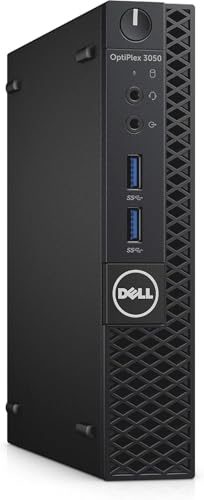
Dell OptiPlex Micro Intel i5 Desktop
Best for: basic office tasks in tight spaces
- Processor
- Intel Core i5-7500T
- Installed RAM
- 8GB
- Storage Capacity
- 256GB
- Memory Type
- DDR4
- Ethernet Ports
- Ethernet
- Operating System
- Windows 11 Pro
This Dell OptiPlex 3050 Micro is a compact desktop built for reliable daily tasks. It uses an Intel Core i5-7500T quad-core processor running at 2.7GHz. The system includes 8GB of DDR4 RAM and a 256GB SSD for fast boot times. It runs Windows 11 Pro and offers USB 3.0, DisplayPort, WiFi, and Ethernet connectivity. It fits discreetly in any workspace while delivering dependable performance.
Pros
- Intel Core i5-7500T quad-core processor
- 8GB DDR4 RAM for multitasking
- 256GB SSD for fast storage
- Preinstalled Windows 11 Pro
- Compact Micro Form Factor design
Cons
- Only 8GB of RAM limits heavy multitasking
- 256GB SSD offers limited storage space
- 7th Gen Intel processor is older than newer models
Good fit if
- You need a small PC for basic office work
- You want Windows 11 Pro out of the box
- You have limited desk space
Skip if
- You require high-end gaming performance
- You need more than 8GB of RAM
- You want the latest processor generation
Verdict: Dell OptiPlex 3050 Micro i5-7500T is a sensible choice for users who prioritize a compact footprint and reliable everyday computing over raw power. It suits home offices or light business tasks where space is tight.

HP EliteDesk Desktop Mini i5 16GB RAM
Best for: everyday office tasks and legacy monitor setups
- Processor
- Intel Core i5-6500T
- Installed RAM
- 16GB
- Storage Capacity
- 240GB
- Memory Type
- DDR4
- Operating System
- Windows 11 Pro
- Use
- Business
This HP mini desktop measures 7.2 by 7.2 by 1.9 inches. It features a quad-core Intel Core i5-6500T processor, 16GB of DDR4 RAM, and a 240GB SSD. You get six USB 3.0 ports, a USB Type-C port, DisplayPort, and a VGA connection for legacy displays. It includes an external keyboard and mouse. It fits your desk if you need a compact computer for general office tasks and web browsing.
Pros
- 16GB DDR4 memory upgradable to 32GB across two slots
- Six USB 3.0 ports and one front USB Type-C port
- Compact chassis measuring 7.2 by 7.2 by 1.9 inches
- Includes bundled USB keyboard and mouse
Cons
- Internal storage limited to a 240GB SSD
- Uses an older sixth-generation quad-core processor
- Ships as certified refurbished hardware
Good fit if
- You need both VGA and DisplayPort outputs for your monitors.
- You want 16GB RAM preinstalled with the option to expand to 32GB.
- You prefer an included keyboard and mouse in the box.
Skip if
- You require large internal drive capacity beyond 240GB.
- You need modern high-core-count processing power for heavy workloads.
Verdict: HP EliteDesk Mini PC with Core i5 and 16GB RAM delivers versatile connectivity and expandable memory in a compact chassis. It handles standard office software and browsing reliably without claiming desk space.
Specifications side by side
| Spec | Apple Mac mini M6 Desktop | HP EliteDesk Mini Core i5 PC | Lenovo ThinkCentre Mini PC Intel i5 | Dell OptiPlex Micro Core i5 Desktop | Dell Optiplex Micro Core i7 Desktop | GMKtec Mini PC Dual 2.5GbE | Dell OptiPlex Micro Intel i5 Desktop | HP EliteDesk Desktop Mini i5 16GB RAM |
|---|---|---|---|---|---|---|---|---|
| Processor | Apple M6 | Intel Core i5-8500T | Intel i5-8400T | Intel Core i5-9500 | Intel Core i7-13700T | AMD Ryzen Embedded R2514 | Intel Core i5-7500T | Intel Core i5-6500T |
| Installed RAM | 16GB | 16GB | 16GB | 16GB | 16GB | 16GB | 8GB | 16GB |
| Storage Capacity | 512GB SSD | 256GB | 500GB NVMe | 500GB | 512GB SSD | 256GB | 256GB | 240GB |
| Memory Type | Unified Memory | DDR4 | DDR4 | DDR4 | DDR4-3200 | DDR4 | DDR4 | DDR4 |
| Graphics | not specified | not specified | not specified | not specified | not specified | AMD Radeon GPU | not specified | not specified |
| Ethernet Ports | 2.5Gb Ethernet | not specified | not specified | not specified | Gigabit Ethernet | Dual 2.5GbE | Ethernet | not specified |
| High-Speed Expansion | Thunderbolt 4 | not specified | not specified | not specified | not specified | not specified | not specified | not specified |
| Operating System | macOS | Windows 11 Pro | Windows 11 Pro | Windows 11 Pro | Windows 11 Pro | not specified | Windows 11 Pro | not specified |
| Memory | 16GB RAM | 16GB RAM | 16GB RAM | 16GB RAM | 16GB RAM | not specified | 8GB RAM | 16GB RAM |
| Storage | 512GB SSD | 256GB SSD | 500GB SSD | 500GB SSD | 512GB SSD | 256GB SSD | not specified | 240GB SSD |
| Use | not specified | Business | Home, Office | not specified | not specified | not specified | not specified | Business |
| Networking | not specified | not specified | not specified | not specified | WiFi 6 | WiFi 6E | not specified | not specified |
| Dimensions | 5 × 5 × 1.97 inches | 7 × 7 × 1.25 inches | 19 × 15 × 4 inches | 12.1 × 13.3 × 4 inches | 7.17 × 7.01 × 1.42 inches | 3.42 × 3.42 × 1.55 inches | 7.1 × 1.3 × 7 inches | 7.2 × 7.2 × 1.9 inches |
| Weight | 1.48 pounds | 2.93 pounds | 2.91 pounds | not specified | 2.41 pounds | 1.65 pounds | 4.1 pounds | not specified |
| Size | 16GB Unified Memory | 512GB SSD Storage | not specified | 1140 cubic inches | not specified | Intel i7 | 16GB | 512GB | 16GB+256GB R2514 | Micro Form Factor | 16 GB DDR4 RAM, 240 GB SSD |
| Color | Silver | Black | Black | i7/GT 1030 | Black | Black Steel | Black | Core I5 6500T/240G SSD |
| Model | MHQL4LL/A | 800G4 | M720Q | 3070 5070 7070 | Optiplex 7010 Micro | G11 | 3050 | 16GB RAM |
If you want to assemble your own compact desktop, you can compare enclosure dimensions in the PC case buying guide.
Frequently asked questions
What is the smallest mini PC footprint available?
The GMKtec G11 offers a highly compact design measuring 3.42 by 3.42 inches. It weighs only 1.65 pounds and features an Intel N150 processor with 12GB of DDR5 memory. This form factor suits users needing dual 2.5GbE networking and triple 4K display support in minimal space.
Which mini PC is best for macOS workflows?
The Apple Mac mini M6 is the top choice for macOS users. It features 16GB of unified memory and a 512GB SSD in a 5-inch square chassis. The silver unit weighs 1.48 pounds and provides high processing throughput with modern connectivity options for multi-display setups.
Do mini PCs come with Windows pre-installed?
Most business-oriented mini PCs include Windows 11 Pro. Models like the HP EliteDesk 800G4, Lenovo ThinkCentre M720Q, and Dell OptiPlex 3070 ship with this operating system. This ensures immediate productivity for office tasks without requiring manual OS installation after purchase.
How much RAM is needed for office multitasking?
16GB of RAM is the standard for smooth multitasking in mini PCs. The HP EliteDesk 800G4, Lenovo ThinkCentre M720Q, and Dell OptiPlex 7010 Micro all feature this capacity. This amount allows you to run several applications simultaneously without significant slowdowns during everyday business duties.
Can mini PCs be mounted behind monitors?
Many mini PCs support VESA mounting to save desk space. The Dell OptiPlex 7010 Micro has a tiny chassis measuring 7.01 by 7.17 inches and weighs 2.41 pounds. Its compact dimensions make it suitable for mounting behind displays or in tight workstation environments.
What processor options are available in compact desktops?
You can find Intel Core i5, i7, and specialized chips like the Intel N150. The HP EliteDesk uses a six-core i5, while the Dell OptiPlex 7010 Micro features a 16-core i7. The GMKtec G11 utilizes an Intel N150 for specific networking tasks.
Are there mini PCs with dual 2.5GbE ports?
Yes, the GMKtec G11 is designed for specialized networking needs. It includes dual 2.5GbE Ethernet ports and supports three 4K displays. This makes it ideal for home labs or professional control rooms where high-speed data transfer and multiple monitors are required.
Which mini PC is best for legacy monitor setups?
The HP EliteDesk Mini PC with Core i5-6500T is suitable for legacy setups. It includes 16GB of DDR4 RAM and a 240GB SSD. The compact chassis measures 7.2 by 7.2 inches and provides versatile connectivity for standard office software and older monitor configurations.