32GB RAM or 4GB RAM Mini PCs? Compared by Specs
As an Amazon Associate we earn from qualifying purchases. Links on this page are affiliate links.
This guide compares two Lenovo ThinkCentre mini PCs with vastly different memory configurations. We examine the 32GB RAM vs 4GB RAM mini PC options to help you decide which fits your workflow. Both units run Windows 11 Pro and offer business-grade reliability. The primary difference lies in their capacity: one provides ample space for heavy multitasking, while the other serves basic tasks. We analyze how these specs impact your daily computing experience.
Key differences
| Aspect | Lenovo ThinkCentre Intel i5 32GB Mini PC | Lenovo ThinkCentre Tiny AMD Dual-Core Mini PC |
|---|---|---|
| Processor | Intel Core i5-8400T (Hexa-Core) | AMD A9-9420e (Dual-Core) |
| Installed RAM | 32GB DDR4 | 4GB |
| Storage | 1TB NVMe SSD | 500GB HDD |
| Graphics | Intel UHD Graphics (integrated) | AMD Radeon R5 |
| Form Factor | Micro (13.5 x 2.5 x 19 inches) | Tiny (7.05 x 1.44 x 7.2 inches) |
Which one should you choose?
Choose Lenovo ThinkCentre Intel i5 32GB Mini PC if
- You need to run many applications or browser tabs simultaneously without slowdowns.
- You require fast file access and large storage for documents or media.
- You prefer a system with a more powerful six-core processor for heavier workloads.
Choose Lenovo ThinkCentre Tiny AMD Dual-Core Mini PC if
- You need a compact device for light office tasks like email and web browsing.
- You want a smaller footprint that fits easily into tight spaces.
- Your budget or use case only requires basic computing capabilities.
Verdict: The Lenovo M720Q is the better choice for users who need serious multitasking power and fast storage. The M625q Tiny suits those with minimal space and only light computing needs. Your decision depends entirely on how many programs you run at once.
32GB vs 4GB RAM Mini PC Specs
Memory capacity
The Lenovo ThinkCentre Intel i5 32GB Mini PC comes equipped with 32GB of DDR4 RAM. This large amount of memory allows you to run many applications simultaneously without slowing down the system. It supports heavy multitasking and keeps your workflow smooth even when switching between demanding programs. In contrast, the Lenovo ThinkCentre Tiny AMD Dual-Core Mini PC includes only 4GB of RAM. While this is sufficient for basic tasks like web browsing and simple office work, it will struggle if you open multiple browser tabs or run several programs at once. The 32GB model offers significantly more headroom for future software demands.
Processor performance
Product A features an Intel Core i5 8th Gen Hexa-Core processor, specifically the i5-8400T. This six-core chip provides strong processing power for everyday multitasking, web browsing, and business productivity. It is designed to handle complex tasks efficiently. Product B uses an AMD A9-9420e Dual-Core Processor with only two cores and a max turbo frequency of 2.60 GHz. This processor is less powerful and is better suited for light duties. The Intel hexa-core option delivers noticeably faster performance for demanding workloads compared to the dual-core AMD chip.
Storage speed and size
Storage differences are significant between these two units. Product A includes a 1TB NVMe M.2 SSD. NVMe drives are much faster than traditional hard drives, providing quick load times for the operating system and applications. It also offers ample space for files. Product B relies on a 500GB HDD. While it allows for fast bootup and data transfer compared to older drives, it is slower than an SSD and holds less than half the data. The 1TB NVMe SSD in Product A provides both greater capacity and superior speed for your files.
Form factor size
Size varies greatly depending on the specific ThinkCentre model. Product B is a Tiny form factor, measuring 7.05 inches in width, 7.2 inches in length, and 1.44 inches in height. It is extremely compact and easy to mount behind a monitor. Product A is a Micro form factor, measuring 13.5 inches in width, 19 inches in length, and 2.5 inches in height. This is a larger footprint that requires more desk space. If you have limited desk area or need to mount the PC behind a screen, the Tiny model is the better choice for space saving.
Connectivity options
Both PCs offer essential connectivity, but Product A highlights wireless capabilities. It includes a 5G WiFi and Bluetooth adapter, allowing for convenient wireless connectivity without needing extra dongles. Product B lists specific port details, including USB 3.0, USB 2.0, DisplayPort, and an RJ-45 Ethernet port, along with headphone and microphone jacks. It does not explicitly mention built-in WiFi or Bluetooth in its key features. If you prefer wireless peripherals and network connections, Product A provides that convenience out of the box.
Choose Your Mini PC Based on RAM Needs
Heavy multitaskers and virtualization users
The 32GB DDR4 RAM in this Lenovo ThinkCentre allows you to run multiple demanding applications and virtual machines simultaneously without slowdowns. Paired with a 1TB NVMe drive and an Intel Core i5 processor, this configuration ensures fast load times and responsive performance for complex workflows.
Users needing minimal desktop footprint
This Lenovo ThinkCentre M625q Tiny is significantly smaller, measuring just 1.44 inches in height. Its compact form factor fits easily in tight spaces. The AMD A9 dual-core processor and 4GB RAM handle basic tasks like web browsing and document editing efficiently for simple daily use.
Basic office and light home users
If your needs are limited to email, web browsing, and light office apps, the 4GB RAM and 500GB HDD provide sufficient performance. The AMD Radeon R5 graphics handle standard display output well. This setup runs Windows 11 Pro smoothly for standard productivity tasks without excess power.
Quick picks
| # | Product | Best for | Price |
|---|---|---|---|
| 1 | Lenovo ThinkCentre Intel i5 32GB Mini PC | High-memory multitasking and storage | Check price of Lenovo ThinkCentre Intel i5 32GB Mini PC on Amazon |
| 2 | Lenovo ThinkCentre Tiny AMD Dual-Core Mini PC | Basic office tasks and tight spaces | Check price of Lenovo ThinkCentre Tiny AMD Dual-Core Mini PC on Amazon |
The products compared
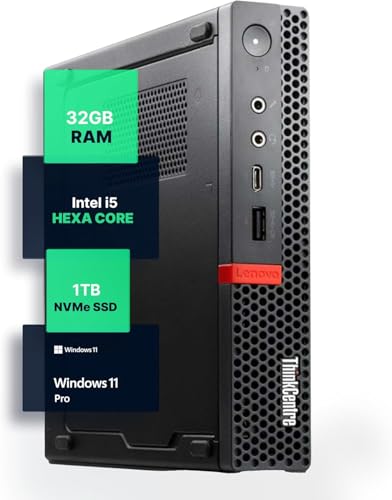
Lenovo ThinkCentre Intel i5 32GB Mini PC
Best for: High-memory multitasking and storage
- Memory
- 32GB RAM (what this guide is about)
- Processor
- Intel i5-8400T
- Installed RAM
- 32GB
- Storage Capacity
- 1TB NVMe
- Memory Type
- DDR4
- Operating System
- Windows 11 Pro
View on Amazon: Lenovo ThinkCentre Intel i5 32GB Mini PC Affiliate link
This Lenovo ThinkCentre M720Q Mini PC offers 32GB of DDR4 RAM and a 1TB NVMe SSD. It runs Windows 11 Pro on an Intel Core i5 processor. The compact design saves desk space. This configuration suits users who need high memory for multitasking. It fits well in home or office environments where storage capacity and speed matter.
Pros
- 32GB DDR4 RAM for heavy multitasking
- 1TB NVMe SSD for fast storage
- Windows 11 Pro pre-installed
- Compact micro form factor
Cons
- 8th Gen Intel processor is older
- No dedicated graphics card listed
- Limited to 5G WiFi connectivity
Good fit if
- You need large RAM for virtual machines
- You require ample local storage
- You prefer Windows 11 Pro
Skip if
- You need the latest CPU generation
- You require dedicated gaming graphics
- You want 4K display output
Verdict: Lenovo M720Q 32GB RAM Mini PC provides strong memory and storage for productivity. It fits users who prioritize multitasking capacity over cutting-edge processor speed.

Lenovo ThinkCentre Tiny AMD Dual-Core Mini PC
Best for: Basic office tasks and tight spaces
- Memory
- 4GB RAM (what this guide is about)
- Processor
- AMD A9-9420e
- Installed RAM
- 4GB
- Storage Capacity
- 500GB HDD
- Graphics
- AMD Radeon R5
- Ethernet Ports
- 1 x RJ-45
View on Amazon: Lenovo ThinkCentre Tiny AMD Dual-Core Mini PC Affiliate link
This Lenovo ThinkCentre M625q Tiny is a compact business desktop with 4GB of RAM and a 500GB HDD. It uses an AMD A9-9420e dual-core processor and includes Windows 11 Pro. The small form factor fits tight spaces. It suits users who need basic multitasking for office work or light browsing without heavy resource demands.
Pros
- Compact dimensions of 7.05 x 7.2 x 1.44 inches
- Includes 4GB high-bandwidth RAM for multiple tabs
- Runs Windows 11 Pro for productivity features
- Features 500GB HDD for storage capacity
Cons
- Only 4GB RAM limits heavy multitasking
- Dual-core AMD A9 processor is entry-level
- Uses older HDD instead of faster SSD
Good fit if
- You need a small footprint for tight desks
- You primarily run basic office applications
- You want Windows 11 Pro pre-installed
Skip if
- You require 32GB RAM for demanding tasks
- You need fast SSD storage speeds
- You plan to run modern games
Verdict: Lenovo M625q Tiny 4GB RAM Mini PC fits users who need a small, basic PC for light office tasks. It is not suitable for those requiring high performance or large memory capacity.
Specifications side by side
| Spec | Lenovo ThinkCentre Intel i5 32GB Mini PC | Lenovo ThinkCentre Tiny AMD Dual-Core Mini PC |
|---|---|---|
| Processor | Intel i5-8400T | AMD A9-9420e |
| Installed RAM | 32GB | 4GB |
| Storage Capacity | 1TB NVMe | 500GB HDD |
| Memory Type | DDR4 | not stated |
| Graphics | not stated | AMD Radeon R5 |
| Ethernet Ports | not stated | 1 x RJ-45 |
| Operating System | Windows 11 Pro | Windows 11 Pro |
| Memory | 32GB RAM | 4GB RAM |
| Storage | 1TB SSD | not stated |
| Use | Home, Office | Business |
| Dimensions | 19 × 13.5 × 2.5 inches | 7.2 × 7.05 × 1.44 inches |
| Weight | not stated | 2.9 pounds |
| Size | 328.125 cubic inches | not stated |
| Color | Black | Black |
| Model | M720Q | ThinkCentre M625q |
Frequently asked questions
Can I run virtual machines on a 4GB RAM mini PC?
It is not recommended. The Lenovo ThinkCentre M625q with 4GB RAM is designed for basic office tasks. Virtualization requires significant memory overhead. Attempting to run VMs on this unit will likely cause severe slowdowns or crashes. You should choose a model with 32GB RAM for virtualization workloads instead.
Is the 32GB model larger than the 4GB option?
Yes. The Lenovo ThinkCentre Intel i5 32GB Mini PC measures 19 inches in length. The 4GB Lenovo ThinkCentre Tiny AMD model is much smaller at 7.2 inches long. The 32GB unit has a volume of 328.125 cubic inches. The 4GB unit is compact enough for tight spaces.
Do both mini PCs come with Windows 11 Pro?
Yes. Both listed units ship with Windows 11 Pro pre-installed. This ensures you get business-grade features and security updates right out of the box. The operating system choice is identical for both the high-memory and low-memory configurations in this comparison.
Which mini PC is better for home office use?
The 32GB RAM Lenovo ThinkCentre Intel i5 Mini PC is better for home offices. It supports home and office use with strong multitasking capacity. The 4GB model is labeled for business use only and lacks the memory for heavy productivity tasks. The 32GB option offers more versatility for mixed workloads.
Does the 32GB mini PC include a solid state drive?
Yes. The Lenovo ThinkCentre Intel i5 32GB Mini PC includes a 1TB SSD. This provides ample storage for large files and applications. The 4GB model listing does not specify storage capacity, so you cannot assume it has similar storage. The 32GB unit offers a complete high-performance package.
Can I upgrade the RAM on these Lenovo ThinkCentre units?
The provided data does not specify if the RAM is user-upgradable. The 4GB model is described as having 4GB RAM without mentioning expansion slots. The 32GB model lists 32GB RAM as a fixed attribute. You should check the specific service manual for each model to confirm upgradeability before purchasing.
Is the 4GB mini PC suitable for video editing?
No. The Lenovo ThinkCentre Tiny AMD Dual-Core Mini PC is not suitable for video editing. It is designed for basic office tasks. Video editing requires substantial memory and processing power. The 4GB configuration will struggle with even simple editing projects. Use the 32GB model for such demanding creative work.