8GB RAM vs 2GB RAM Single Board Computers: Which Should You Buy?
As an Amazon Associate we earn from qualifying purchases. Links on this page are affiliate links.
You are comparing an 8GB RAM vs 2GB RAM single board computer to decide which fits your project. Both units offer compact form factors and support for high-resolution video output. The primary difference lies in their memory capacity and processing architecture. One device provides significantly more RAM and a dedicated processor, while the other relies on a quad-core ARM chip with less memory. Your choice depends on whether you need heavy multitasking or basic system control.
Key differences
| Aspect | LattePanda 2 Alpha Intel Core i5 SBC | CanaKit Raspberry Pi 4 2GB Starter Kit |
|---|---|---|
| Processor | Intel Core i5 8200Y, dual-core | 1.5GHz 64-bit quad-core CPU |
| Memory | 8GB RAM | 2GB RAM |
| Storage | 64GB eMMC | 32GB EVO+ Micro SD Card |
| Operating System | Windows 11 Pro, Windows 10, Linux | Linux (Raspberry Pi OS) |
| Cooling | Active cooling fan included | Low noise bearing system fan included |
Which one should you choose?
Choose LattePanda 2 Alpha Intel Core i5 SBC if
- You need to run Windows 11 Pro or heavy desktop applications.
- You require 8GB of RAM for multitasking or complex edge computing tasks.
- You want built-in 64GB eMMC storage without relying on a microSD card.
Choose CanaKit Raspberry Pi 4 2GB Starter Kit if
- You are building a basic Linux project or home automation hub.
- You prefer the Raspberry Pi ecosystem and its extensive community support.
- You need a lower power consumption system for simple IoT applications.
Verdict: Choose the LattePanda 2 Alpha if you need Windows compatibility and substantial memory for demanding tasks. Select the CanaKit Raspberry Pi 4 if you are working on standard Linux projects and value the widespread Raspberry Pi software library.
8GB RAM vs 2GB RAM SBC Comparison
Memory capacity
The LattePanda 2 Alpha Intel Core i5 SBC comes with 8GB of RAM. This larger memory pool allows you to run more demanding applications simultaneously without significant slowdowns. It supports multitasking across Windows 11 Pro or Linux environments effectively. In contrast, the CanaKit Raspberry Pi 4 2GB Starter Kit offers only 2GB of RAM. While sufficient for basic tasks and lightweight Linux distributions, this limit restricts heavy multitasking. You will notice the difference when running multiple browser tabs or background services. The 8GB option provides a much wider margin for complex projects and resource-intensive workflows compared to the 2GB configuration.
Processor performance
Processing power differs significantly between these two single board computers. The LattePanda features an Intel Core i5 8200Y dual-core processor. It starts at 1.3GHz and can burst up to 3.9GHz. This architecture delivers strong performance for desktop-like tasks and media conversion. The CanaKit Raspberry Pi 4 uses a 1.5GHz 64-bit quad-core CPU. While it has four cores, the individual core speed is lower than the LattePanda's burst speed. The Intel chip generally handles complex desktop applications better. The Raspberry Pi excels in efficiency for specific embedded tasks. For raw computational throughput in general computing, the LattePanda holds the advantage.
Storage type
Storage solutions vary in speed and convenience. The LattePanda 2 Alpha includes 64GB of eMMC storage. This internal flash memory is soldered to the board, offering faster read/write speeds than standard SD cards. It also means you do not need to manage removable media for your operating system. The CanaKit Raspberry Pi 4 Starter Kit includes a 32GB EVO+ Micro SD Card. SD cards are slower and less durable than eMMC. They are also prone to failure if removed frequently. The LattePanda provides double the storage capacity with a more robust internal format. This makes it a more reliable choice for always-on applications.
Operating system
Software flexibility is a key consideration for your project. The LattePanda 2 Alpha runs full Windows 11 Pro, which is pre-activated. It also supports Linux. This allows you to use standard Windows desktop applications and software. The CanaKit Raspberry Pi 4 typically runs Linux-based operating systems like Raspberry Pi OS. It does not support full Windows 10 or 11 natively. If you need compatibility with specific Windows-only software or drivers, the LattePanda is the clear choice. The Raspberry Pi is ideal for open-source projects and educational coding. Your choice depends entirely on whether you require the Windows ecosystem.
Cooling and power
Thermal management and power delivery are handled differently. The LattePanda 2 Alpha dissipates only 8W of power. It includes an active cooling fan in the shipping list to maintain optimal temperatures during sustained loads. The CanaKit Raspberry Pi 4 includes a low-noise bearing system fan and a case with fan mounts. It also provides heat sinks. Both systems use active cooling to prevent throttling. The LattePanda’s 45W PD power adapter suggests it can handle higher transient power spikes. The Raspberry Pi uses a 3.5A USB-C power supply. Both are efficient, but the LattePanda’s design supports higher performance bursts with its robust cooling solution.
Which Single Board Computer Fits Your Needs
Windows developers needing multitasking
The LattePanda 2 Alpha offers 8GB of RAM and an Intel Core i5 processor. This configuration supports Windows 11 Pro and allows you to run multiple applications smoothly. The larger memory pool ensures efficient multitasking for complex development tasks without performance bottlenecks.
Linux hobbyists on a budget
The CanaKit Raspberry Pi 4 provides a quad-core CPU and 2GB of RAM. It includes a pre-loaded 32GB SD card and essential accessories like a case and fan. This complete starter kit is ideal for learning Linux and running lightweight projects cost-effectively.
Users requiring full OS compatibility
This device comes with Windows 11 Pro activated and supports Linux. Its 8GB RAM and 64GB eMMC storage provide ample space for operating systems and data. You get a ready-to-use environment for industrial or edge computing applications without additional setup complexity.
Quick picks
| # | Product | Best for | Price |
|---|---|---|---|
| 1 | LattePanda 2 Alpha Intel Core i5 SBC | Compact Windows 11 Pro projects | Check price of LattePanda 2 Alpha Intel Core i5 SBC on Amazon |
| 2 | CanaKit Raspberry Pi 4 2GB Starter Kit | Beginners needing 2GB RAM and 4K output | Check price of CanaKit Raspberry Pi 4 2GB Starter Kit on Amazon |
The products compared
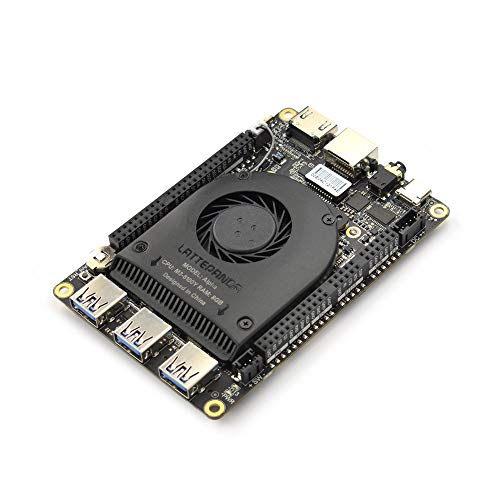
LattePanda 2 Alpha Intel Core i5 SBC
Best for: Compact Windows 11 Pro projects
- Memory
- 8GB RAM (what this guide is about)
- Processor
- Intel Core i5 8200Y
- RAM Capacity
- 8GB
- Storage
- 64GB eMMC
- Video Resolution
- 4K Ultra HD
- Operating System Support
- Windows 11 Pro, Windows 10, Linux
View on Amazon: LattePanda 2 Alpha Intel Core i5 SBC Affiliate link
This pocket-sized single board computer uses an Intel Core i5 8200Y processor and 8GB of RAM. It runs Windows 11 Pro or Linux and includes 64GB of eMMC storage. The 8W power draw supports 4K video output. You get a complete kit with an active cooling fan and a 45W PD power adapter. This setup suits developers needing a small Windows machine for edge computing or IoT projects.
Pros
- 8GB RAM for multitasking
- Intel Core i5 8200Y CPU
- Pre-activated Windows 11 Pro
- Includes active cooling fan
- 4K Ultra HD video support
Cons
- Only 64GB eMMC storage
- Dual-core processor limits heavy workloads
- Requires separate mounting hardware
Good fit if
- You need a small Windows SBC
- You are building an IoT edge device
- You want pre-installed Windows 11 Pro
Skip if
- You require large internal storage
- You need high-end gaming performance
- You prefer a fanless passive design
Verdict: LattePanda 2 Alpha 864s 8GB RAM SBC fits makers who need a compact Windows 11 Pro system for IoT or edge computing tasks.

CanaKit Raspberry Pi 4 2GB Starter Kit
Best for: Beginners needing 2GB RAM and 4K output
- Memory
- 2GB RAM (what this guide is about)
- Processor
- 1.5GHz 64-bit quad-core CPU
- RAM Capacity
- 2GB
- Storage
- 32GB EVO+ Micro SD Card
- Video Resolution
- up to 4K 60p
View on Amazon: CanaKit Raspberry Pi 4 2GB Starter Kit Affiliate link
This CanaKit Raspberry Pi 4 Starter Kit features 2GB of RAM and a 1.5GHz 64-bit quad-core CPU. It includes a 32GB EVO+ Micro SD card for storage and supports video output up to 4K 60p. The package comes with a case, fan, power supply, and heat sinks. It suits you if you need a compact computer for basic tasks or learning.
Pros
- Includes 2GB RAM for multitasking
- 1.5GHz 64-bit quad-core CPU
- 32GB EVO+ Micro SD Card included
- Supports up to 4K 60p video
- Comes with case, fan, and power supply
Cons
- 2GB RAM limits heavy multitasking
- Uses slower Micro SD storage
- No Bluetooth mentioned in data
Good fit if
- You want a complete starter kit
- You need 4K video support
- You are learning Linux basics
Skip if
- You need more than 2GB RAM
- You require fast SSD storage
- You need Bluetooth connectivity
Verdict: CanaKit Raspberry Pi 4 2GB RAM Starter Kit fits beginners who need a ready-to-use system with 2GB RAM and 4K output. It is not for users needing high performance or fast storage.
Specifications side by side
| Spec | LattePanda 2 Alpha Intel Core i5 SBC | CanaKit Raspberry Pi 4 2GB Starter Kit |
|---|---|---|
| Processor | Intel Core i5 8200Y | 1.5GHz 64-bit quad-core CPU |
| RAM Capacity | 8GB | 2GB |
| Storage | 64GB eMMC | 32GB EVO+ Micro SD Card |
| Video Resolution | 4K Ultra HD | up to 4K 60p |
| Operating System Support | Windows 11 Pro, Windows 10, Linux | not stated |
| Memory | 8GB RAM | 2GB RAM |
| Operating System | Windows 11 Pro | not stated |
| Color | Alpha 864s (Win11 Pro Activated, 8GB RAM/64GB eMMC) | black |
| Model | DFR0547 | 99294 |
| Size | not stated | 2GB RAM |
Frequently asked questions
Can I run Windows 11 on a 2GB RAM single board computer?
No, you cannot. The LattePanda 2 Alpha requires 8GB of RAM to operate Windows 11 Pro effectively. A 2GB system, such as the CanaKit Raspberry Pi 4, is designed for lighter operating systems like Linux. Attempting to run heavy Windows applications on limited memory will result in severe performance issues and instability.
Is 8GB of RAM necessary for IoT edge computing tasks?
It is highly recommended for complex projects. The LattePanda 2 Alpha includes 8GB of RAM and an Intel Core i5 processor, making it suitable for edge computing. This memory capacity allows you to handle data processing and multiple services simultaneously without significant slowdowns, ensuring reliable performance for your IoT deployments.
Does the 2GB RAM model support 4K video output?
Yes, it does. The CanaKit Raspberry Pi 4 Starter Kit with 2GB of RAM supports high-resolution video output. This feature makes it a practical choice for beginners who need to connect to 4K displays. It provides a ready-to-use system for media playback or simple desktop environments without requiring expensive hardware upgrades.
What is the main difference between these two single board computers?
The primary difference is memory capacity and operating system support. The LattePanda 2 Alpha offers 8GB of RAM and runs Windows 11 Pro, ideal for multitasking. The CanaKit Raspberry Pi 4 provides only 2GB of RAM, targeting beginners and simpler tasks. Your choice depends on whether you need a full Windows environment or a lightweight Linux setup.
Is the LattePanda 2 Alpha good for compact Windows projects?
Yes, it is an excellent fit. This model comes with 8GB of RAM and 64GB of eMMC storage, pre-activated with Windows 11 Pro. Its compact design and sufficient memory allow you to run Windows-based applications efficiently. It is particularly well-suited for makers who need a small form factor for their development or automation projects.
Will 2GB of RAM be enough for beginners?
It is sufficient for basic learning and simple tasks. The CanaKit Raspberry Pi 4 with 2GB of RAM is designed for beginners. It provides a stable environment for learning programming or running lightweight applications. However, it is not intended for users who require high performance or need to run resource-intensive software simultaneously.
Can I upgrade the RAM on these single board computers?
No, the RAM is soldered onto the board. Both the LattePanda 2 Alpha and the CanaKit Raspberry Pi 4 have fixed memory configurations. You must select the model with the appropriate RAM size at the time of purchase. The LattePanda offers 8GB, while the CanaKit provides 2GB, with no option to increase it later.
Which board is better for multitasking with multiple applications?
The LattePanda 2 Alpha is the better choice. With 8GB of RAM, it can handle multiple applications running simultaneously without significant slowdowns. The 2GB model lacks the memory buffer needed for smooth multitasking. If you plan to run several programs at once, the larger memory capacity of the LattePanda ensures a smoother user experience.