ACEMAGIC Ryzen 7330U Mini PC Review: Specs, Pros and Cons
As an Amazon Associate we earn from qualifying purchases. Links on this page are affiliate links.
In this acemagic ryzen 7330u mini PC review, we look at the ACEMAGIC K1, a compact desktop built for efficient daily computing. It features the AMD Ryzen 3 Pro 7330U processor and 16GB of LPDDR4 RAM. This combination offers solid multitasking for office tasks and media consumption. The unit runs Windows 11 Pro and includes a 256GB SSD for storage. Its small footprint and integrated graphics make it a practical choice for space-constrained environments. You get a complete system with pre-installed software and essential ports for immediate use.
What stands out
- AMD Ryzen 3 Pro 7330U with up to 4.3GHz boost speed
- 16GB LPDDR4 3200MT/s RAM for responsive multitasking
- Triple display support via HDMI, DP, and Type-C
- Pre-installed Windows 11 Pro operating system
- Compact 5x5x1.6 inch chassis with VESA mount capability
Who it fits
Good fit for
This mini PC suits home office users and students who need a reliable machine for web browsing, document editing, and video calls. The 16GB of RAM handles multiple browser tabs and applications smoothly. If you need a secondary monitor setup for work, the triple display output is useful. It also fits well in small spaces like dorm rooms or tight desks. The quiet operation ensures it does not distract during long work sessions or study periods.
Who should skip it
You should look elsewhere if you require expandable memory, as the 16GB LPDDR4 RAM is soldered and cannot be upgraded. Gamers will find the integrated Radeon graphics insufficient for modern titles. Professionals needing high storage capacity might want to check larger SSD options, as the base 256GB fills up quickly. Heavy video editors or 3D artists will need more powerful dedicated graphics. This unit is not designed for intensive creative workloads.
Verdict: The ACEMAGIC K1 is a practical, compact solution for everyday computing tasks. It delivers solid performance for office and media use within its size constraints.
Key specs explained for ACEMAGIC K1
Processor: AMD Ryzen 3 Pro 7330U
This four-core, eight-thread chip runs at a base of 2.3GHz and boosts up to 4.3GHz. The 28W thermal design power keeps energy use low while delivering strong single-thread performance. You will notice faster app launches and smoother web browsing compared to older Celeron or Pentium models. This processor is well-suited for office work, video calls, and light data processing tasks without overheating your workspace.
Memory: 16GB LPDDR4 3200MT/s
The system includes 16GB of soldered RAM, which ensures sufficient capacity for running multiple browser tabs and productivity applications simultaneously. The 3200MT/s speed facilitates quick data access, reducing lag when switching between programs. Since this memory is non-expandable, the 16GB configuration is essential for long-term usability. You benefit from a stable multitasking environment without the need to upgrade components later.
Storage: 256GB M.2 2280 SSD
An M.2 solid-state drive provides fast boot times and rapid file transfers compared to traditional hard drives. The 256GB capacity is adequate for your operating system and core applications. The listing notes that you can expand storage by adding an M.2 NVMe or SATA SSD up to 2TB. This flexibility allows you to keep the system lean initially while retaining the option to store more media or documents later.
Graphics: AMD Radeon Graphics
Integrated graphics with 1400MHz clock speed handle everyday visual tasks and 4K video playback efficiently. This chip supports triple displays via HDMI, USB-C, and DisplayPort, making it ideal for multi-monitor office setups. You can connect two external monitors for expanded workspace while using the primary display. This configuration suits users who need clear visuals for spreadsheets, documents, and streaming media without requiring a discrete graphics card.
Connectivity: Wi-Fi 5 and Bluetooth 4.2
Built-in Wi-Fi 5 offers stable wireless internet for streaming and web browsing, while Bluetooth 4.2 allows connection to peripherals like mice and keyboards. These standards ensure reliable communication with your existing accessories. Although newer versions exist, this setup supports most current wireless devices. You can maintain a clutter-free desk by using wireless input devices and enjoying consistent network performance for daily online activities.
Design and build of the ACEMAGIC K1
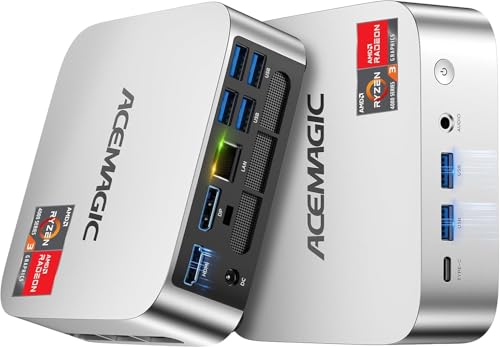
The listing describes the ACEMAGIC K1 chassis as silver-toned metal. The dimensions are 5.04 by 5.04 by 1.61 inches, with a weight of 1.1 pounds. This compact footprint allows it to fit easily into tight spaces or bags. You can mount it to a monitor or wall using the included VESA bracket. The design prioritizes space-saving over internal expansion options, as the 16GB of LPDDR4 RAM is soldered and cannot be upgraded.
Connectivity is handled by a single Gigabit Ethernet port, six USB 3.2 Type-A ports, and one USB Type-C port that supports data and display output. It also includes HDMI 2.0 and DisplayPort 1.4 outputs for triple display setups. The power supply is built into the unit, requiring only a single DC cable. This reduces desktop clutter compared to systems with external brick adapters. The layout places ports on the sides and rear, keeping the front clean.
The internal cooling uses an axial fan. According to the listing, the system remains quiet during light loads and fairly quiet under pressure. This thermal design supports the 28W processor without generating excessive noise. The compact, lightweight build makes it suitable for travel or fixed installations in small offices. You can carry it for business trips or secure it behind a screen for a clean workspace.
Setup and everyday use
The ACEMAGIC K1 arrives with Windows 11 Pro pre-installed, so you can begin using it immediately after connecting power and a display. The listing notes that the unit includes an internal power supply, meaning you only need one cable to power the device. This keeps your desktop area clean and reduces clutter. For connectivity, you have access to six USB 3.2 Type-A ports, one USB 3.2 Gen2 Type-C port, and an HDMI 2.0 output. The Type-C port supports DisplayPort 1.4 and 10Gbps data transfer. You can also connect via the Gigabit Ethernet port for a stable wired network or use the built-in Wi-Fi 5 and Bluetooth 4.2 for wireless peripherals like mice and keyboards.
In daily use, the 16GB of non-expandable LPDDR4 RAM at 3200MT/s helps keep the system responsive during multitasking. The 256GB M.2 SSD provides fast boot times and application loading. If you need more space, the listing mentions you can add an M.2 NVMe PCIe 3.0 or SATA SSD up to 2TB. The AMD Radeon Graphics support 4K UHD playback and allows for triple displays using the HDMI, Type-C, and DP 1.4 outputs. This setup is ideal for office work, media consumption, or light research. The cooling system remains quiet under light loads, ensuring minimal distraction during work. You can also configure BIOS settings for features like auto power-on or Wake on LAN.
Before you buy this mini PC
This unit ships with an internal power supply, so you only need one cable for power. You must provide your own display, keyboard, and mouse. The listing confirms it includes an HDMI cable and mounting bracket, but you will need to verify your monitor has the right input for triple-screen setups using HDMI, DisplayPort, and USB-C. Memory is soldered LPDDR4, so you cannot upgrade RAM later. Storage is expandable via an empty M.2 slot, allowing you to add up to 2TB. Check that your existing peripherals use Bluetooth 4.2 or have a USB receiver, as this model does not support newer Bluetooth standards. WiFi 5 may be slower than modern WiFi 6E options. Consider if this fits your workflow alongside other 1 models on the page, especially if you need higher wireless speeds or more RAM.
Check before you buy
- Verify your monitor supports triple displays via HDMI, DP, and USB-C.
- Check if your peripherals are compatible with Bluetooth 4.2.
- Confirm you have a display and input devices ready.
- Ensure your network supports WiFi 5 for optimal performance.
- Plan for future storage expansion using an M.2 SSD.
The product at a glance
ACEMAGIC Ryzen 7330U Mini PC
Best for: compact office setups with multiple monitors
- Processor
- AMD Ryzen 3 Pro 7330U
- Installed RAM
- 16GB
- Storage Capacity
- 256GB
- Memory Type
- LPDDR4 3200MT/s
- Graphics
- AMD Radeon Graphics
- Ethernet Ports
- 1x Gigabit Ethernet
View on Amazon: ACEMAGIC Ryzen 7330U Mini PC Affiliate link
This ACEMAGIC K1 mini PC uses an AMD Ryzen 3 Pro 7330U processor with 16GB of LPDDR4 RAM. It includes a 256GB SSD and runs Windows 11 Pro. The compact silver chassis measures 5.04 by 5.04 by 1.61 inches. It supports triple displays via HDMI, DisplayPort, and USB-C. This unit suits users needing reliable office performance and basic multitasking in a small footprint.
Pros
- AMD Ryzen 3 Pro 7330U processor with up to 4.3GHz boost
- 16GB LPDDR4 3200MT/s RAM for responsive multitasking
- Triple display support via HDMI, DP, and USB-C
- Built-in power supply reduces desktop cable clutter
Cons
- Memory is non-expandable LPDDR4 soldered to the board
- Wi-Fi 5 and Bluetooth 4.2 are older standards
- 256GB storage capacity is limited for large media libraries
Good fit if
- You need a compact PC for office tasks and web browsing
- You want to connect multiple monitors for increased productivity
- You prefer a tidy desk setup with an internal power supply
Skip if
- You require upgradeable RAM for future performance needs
- You need the latest Wi-Fi 6 or Bluetooth 5.0 connectivity
- You plan to store large video files or extensive game libraries
Verdict: ACEMAGIC K1 Ryzen 7330U Mini PC fits users who prioritize a compact form factor and solid multitasking for office work. It is ideal for those who need triple display support without managing external power bricks.
Specifications side by side
| Spec | ACEMAGIC Ryzen 7330U Mini PC |
|---|---|
| Processor | AMD Ryzen 3 Pro 7330U |
| Installed RAM | 16GB |
| Storage Capacity | 256GB |
| Memory Type | LPDDR4 3200MT/s |
| Graphics | AMD Radeon Graphics |
| Ethernet Ports | 1x Gigabit Ethernet |
| Operating System | Windows 11 Pro |
| Use | Home, Business, Office |
| Dimensions | 5.04 × 5.04 × 1.61 inches |
| Weight | 1.1 pounds |
| Size | Ryzen 7330U+16GB+256GB |
| Color | Ryzen 7330U+16GB+256GB |
| Model | V1 |
Frequently asked questions
Does the ACEMAGIC Ryzen 7330U Mini PC support multiple monitors?
Yes, this model is designed for users who need triple display support. It allows you to connect up to three screens simultaneously without requiring external power bricks. This makes it a practical choice for compact office setups where desk space is limited but productivity requires multiple views.
How small is the ACEMAGIC K1 chassis?
The chassis measures 5.04 inches in width, 5.04 inches in length, and 1.61 inches in height. It weighs just 1.1 pounds. This compact footprint allows it to fit easily into tight spaces or bags, making it suitable for users who prioritize a small form factor.
What is the processor in the ACEMAGIC Ryzen 7330U?
It features the AMD Ryzen 3 Pro 7330U processor. This four-core, eight-thread chip runs at a base of 2.3GHz and boosts up to 4.3GHz. The 28W thermal design power keeps energy use low while delivering strong single-thread performance for efficient daily computing tasks.
Does this mini PC come with an external power brick?
No, the unit includes an internal power supply. You only need one cable to power the device. This design simplifies your setup and reduces cable clutter on your desk, which is helpful for maintaining a clean and organized workspace.
What operating system is pre-installed on this device?
The ACEMAGIC K1 arrives with Windows 11 Pro pre-installed. You can begin using it immediately after connecting power and a display. This saves you time on initial configuration and ensures you have access to professional features right out of the box.
What is the RAM configuration for this model?
This specific listing includes 16GB of LPDDR4 RAM. This memory amount offers solid multitasking capabilities for office tasks. It allows you to run multiple applications smoothly without significant slowdowns, supporting efficient daily computing workflows.
Is the ACEMAGIC K1 suitable for mounting to a monitor?
Yes, the listing confirms it includes a mounting bracket. You can attach the unit directly to the back of a compatible monitor. This helps save desk space and keeps your workspace tidy while maintaining easy access to the computer's ports.