Beelink vs Msi: Mini PCs Compared by Specs
As an Amazon Associate we earn from qualifying purchases. Links on this page are affiliate links.
When you compare a beelink vs msi mini PC, you are looking at two distinct approaches to small form factor computing. Both units offer 16GB of RAM and compact footprints suitable for desk use. The primary difference lies in their processors and connectivity. Beelink uses an AMD Ryzen 5 with integrated graphics, while MSI provides an Intel Core 3 with Thunderbolt 4 ports. Your choice depends on whether you prioritize multimedia performance or expansion capabilities.
Key differences
| Aspect | Beelink SER5 Ryzen 5 Mini PC | MSI Cubi NUC Mini PC |
|---|---|---|
| Processor | AMD Ryzen 5 5500U (6-core/12-thread, up to 4.0GHz) | Intel Core 3 100U (6-core/8-thread, up to 4.7GHz) |
| Storage | 480GB M.2 2280 NVMe SSD | 256GB M.2 SSD |
| Networking | 1x 2.5G LAN | 2x RJ45 |
| Expansion | USB 3.2, USB 2.0, USB Type-C | 4x USB 10Gbps Type A, 2x Thunderbolt 4 |
| Operating System | Not listed | Windows 11 Pro |
Which one should you choose?
Choose Beelink SER5 Ryzen 5 Mini PC if
- You need more storage space for files and applications without immediate upgrades.
- You want faster wired network speeds for local file transfers or media streaming.
- You plan to use the integrated AMD Radeon Graphics for light video editing or gaming.
Choose MSI Cubi NUC Mini PC if
- You require Thunderbolt 4 connectivity for high-speed external displays or docks.
- You need Windows 11 Pro for business features and enhanced security controls.
- You want multiple Ethernet ports for network redundancy or virtualization setups.
Verdict: The Beelink SER5 is better for users who want more storage and faster LAN speeds out of the box. The MSI Cubi NUC suits those who need Thunderbolt 4 expansion and Windows 11 Pro. Choose based on your specific port and storage requirements.
Beelink vs MSI Mini PC Specs
Processor performance
The Beelink SER5 features the AMD Ryzen 5 5500U, a six-core, twelve-thread processor with a base frequency of 2.1GHz and a max turbo of 4.0GHz. This chip is built on a 7nm process, which typically aids in energy efficiency during sustained tasks. In contrast, the MSI Cubi NUC uses the 13th Gen Intel Core 3 100U. This is also a six-core chip but offers eight threads. Its base clock is lower at 1.2GHz, yet it can boost up to 4.7GHz. The higher peak frequency on the Intel chip suggests better burst performance for quick tasks, while the AMD unit provides more threads for smoother multitasking.
Memory capacity
Both mini PCs come equipped with 16GB of RAM, which is sufficient for general office work, web browsing, and media consumption. The Beelink SER5 uses DDR4 memory, which is a standard, cost-effective option. It notes that this memory can be upgraded to 64GB via two slots. The MSI Cubi NUC lists its memory simply as high-bandwidth RAM without specifying the generation in the key specs, though it emphasizes smooth running of multiple applications. Since both offer the same starting capacity for your daily workflow, neither has a clear advantage here.
Storage speed
Storage is where the two machines diverge significantly in their base configurations. The Beelink SER5 includes a 480GB M.2 2280 NVMe SSD. NVMe drives generally offer faster data transfer rates compared to standard SATA drives, making this a strong choice for loading large files or operating systems quickly. The MSI Cubi NUC provides a 256GB SSD. While it supports fast boot times and data transfers, the capacity is notably smaller. If you need to store more media or documents locally without external drives, the Beelink offers nearly double the space.
Networking options
Connectivity varies between the two brands. The Beelink SER5 is equipped with a 2.5G LAN port, which supports speeds faster than standard Gigabit Ethernet, ideal for local file transfers or high-speed internet connections. It also includes dual-band WiFi 5 (802.11ac) and Bluetooth. The MSI Cubi NUC takes a different approach with dual RJ45 ports, allowing for link aggregation or separate network connections for business stability. It also features WiFi 6 and Bluetooth. For home users needing faster wired speeds, Beelink wins. For enterprise setups needing dual ports, MSI is better.
Expansion ports
Port selection is crucial for connecting peripherals. The MSI Cubi NUC offers a robust array with four USB 10Gbps Type-A ports and two Thunderbolt 4 ports. Thunderbolt 4 provides high-speed data, video output, and power delivery, making it highly versatile for modern docks and monitors. The Beelink SER5 provides three USB 3.2 ports, one USB 2.0 port, one HDMI, and one Type-C port that supports both data and video. While the Beelink covers basic needs, the MSI’s inclusion of Thunderbolt 4 and more high-speed USB ports gives it the edge for users with high-bandwidth peripherals.
Operating system
The software environment differs between the two units. The MSI Cubi NUC ships with Windows 11 Pro. This edition includes additional business features, enhanced security controls, and better management tools compared to the standard Home version. The Beelink SER5 data does not explicitly list the pre-installed operating system in the key specs or features. If it includes Windows 11 Home, you may need to upgrade for certain professional features. For users requiring the full Pro feature set out of the box, the MSI is the clear choice.
Which Mini PC Fits Your Workflow
Users needing high-speed wired networking
The MSI Cubi NUC includes two RJ45 Ethernet ports, offering flexible dual-network setups for home labs or office environments. This dual-port advantage supports simultaneous connections, allowing you to separate traffic or maintain redundancy without requiring external adapters or switches.
Creators requiring fast external storage expansion
Thunderbolt 4 connectivity on the MSI model enables high-bandwidth external storage and docking solutions. This interface supports faster data transfers for large video files or backups compared to standard USB ports, making it ideal for professionals who move large datasets frequently.
Budget-conscious users wanting more storage
The Beelink SER5 provides a 480GB NVMe SSD compared to the MSI's 256GB. This extra capacity allows you to store more applications, media files, and system updates locally. The larger drive reduces the immediate need for external storage solutions or cloud subscriptions.
The products compared

Beelink SER5 Ryzen 5 Mini PC
Best for: Users needing 2.5G LAN and 64GB RAM support
- Processor
- AMD Ryzen 5 5500U
- Installed RAM
- 16GB
- Storage Capacity
- 480GB NVMe SSD
- Memory Type
- DDR4
- Graphics
- AMD Radeon Graphics
- Ethernet Ports
- 2.5G LAN
View on Amazon: Beelink SER5 Ryzen 5 Mini PC Affiliate link
The Beelink SER5 uses an AMD Ryzen 5 5500U processor with six cores and twelve threads. It includes 16GB of DDR4 memory and a 480GB NVMe SSD. The system supports dual displays and features a 2.5G LAN port. This configuration handles multitasking and light creative work. It suits users who need reliable performance in a compact form factor without requiring high-end gaming specs.
Pros
- AMD Ryzen 5 5500U with up to 4.0GHz turbo speed
- 16GB DDR4 RAM expandable to 64GB
- 2.5G LAN port for faster wired networking
- Dual display support via HDMI and USB-C
Cons
- 480GB SSD is smaller than the 256GB+ baseline of competitors
- Only one HDMI port limits multi-monitor setups to two displays
- DDR4 memory is an older standard compared to newer DDR5 options
Good fit if
- You need a wired 2.5G network connection
- You want expandable RAM up to 64GB
- You require dual monitor support for productivity
Skip if
- You need DDR5 memory for maximum bandwidth
- You require more than 480GB of storage
- You want a processor newer than the Ryzen 5000 series
Verdict: The Beelink SER5 Ryzen 5 Mini PC offers solid multitasking power and a fast 2.5G LAN port. It fits users who prioritize wired network speed and RAM expandability over the latest memory standards.
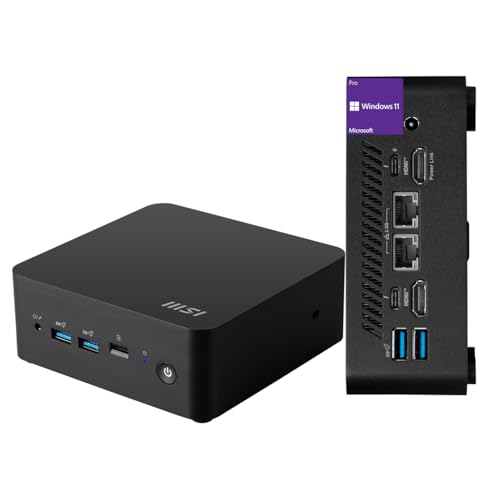
MSI Cubi NUC Mini PC
Best for: Office work and media streaming in small spaces
- Processor
- Intel Core 3 100U
- Installed RAM
- 16GB
- Storage Capacity
- 256GB
- Ethernet Ports
- 2 x RJ45
- High-Speed Expansion
- Thunderbolt 4
- Operating System
- Windows 11 Pro
View on Amazon: MSI Cubi NUC Mini PC Affiliate link
The MSI Cubi NUC is an ultra-compact mini PC powered by a 13th Gen Intel Core 3 100U processor. It includes 16GB of RAM and a 256GB SSD for daily tasks. You get Windows 11 Pro and two Thunderbolt 4 ports for high-speed expansion. Its small footprint saves desk space while offering solid performance for office work and media streaming.
Pros
- 16GB high-bandwidth RAM for multitasking
- 2 Thunderbolt 4 ports for fast data transfer
- Windows 11 Pro operating system included
- Ultra-compact form factor measures 5.22 x 5.34 x 1.97 inches
Cons
- 256GB storage capacity is limited for large files
- 6-pound weight is heavy for a mini PC
- No dedicated graphics card for heavy gaming
Good fit if
- You need Thunderbolt 4 connectivity for peripherals
- You want Windows 11 Pro for business features
- You require a small footprint for tight spaces
Skip if
- You need more than 256GB of built-in storage
- You want to run demanding 3D games
- You prefer a lighter device for frequent transport
Verdict: MSI Cubi NUC Mini PC is a practical choice for users who value Thunderbolt 4 speed and a compact design for office or home use. It fits buyers who need Windows 11 Pro and do not require high-end gaming performance.
Specifications side by side
| Spec | Beelink SER5 Ryzen 5 Mini PC | MSI Cubi NUC Mini PC |
|---|---|---|
| Processor | AMD Ryzen 5 5500U | Intel Core 3 100U |
| Installed RAM | 16GB | 16GB |
| Storage Capacity | 480GB NVMe SSD | 256GB |
| Memory Type | DDR4 | not stated |
| Graphics | AMD Radeon Graphics | not stated |
| Ethernet Ports | 2.5G LAN | 2 x RJ45 |
| High-Speed Expansion | not stated | Thunderbolt 4 |
| Operating System | not stated | Windows 11 Pro |
| Memory | 16GB RAM | 16GB RAM |
| Storage | 480GB SSD | 256GB SSD |
| Networking | WiFi 6 | not stated |
| Dimensions | 6.6 × 5.1 × 1.5 inches | 5.34 × 5.22 × 1.9 inches |
| Weight | not stated | 6 pounds |
| Size | SER5 16G/480G/5500U | 16GB RAM | 256GB SSD |
| Color | Grey | Black |
| Model | GTR7 | MSI Cubi Mini |
Frequently asked questions
Which mini PC has a faster Ethernet port?
The Beelink SER5 Ryzen 5 Mini PC includes a 2.5G LAN port. This provides higher wired network speeds compared to standard Gigabit connections. The MSI Cubi NUC relies on traditional RJ45 ports. You should choose the Beelink unit if maximizing local network throughput is a priority for your workflow.
How do the physical dimensions compare between these two units?
The Beelink SER5 measures 6.6 inches in length, 5.1 inches in width, and 1.5 inches in height. The MSI Cubi NUC is slightly wider at 5.22 inches but shorter in length at 5.34 inches. It also stands taller at 1.9 inches. Both designs fit well under monitors or on shelves.
Does the MSI Cubi NUC support Thunderbolt 4?
Yes, the MSI Cubi NUC Mini PC supports Thunderbolt 4 connectivity. This feature allows for high-speed data transfer and video output capabilities. The Beelink SER5 does not list Thunderbolt support in its specifications. If you need Thunderbolt 4 for external docks or drives, the MSI model is the correct choice.
What is the maximum RAM capacity for the Beelink SER5?
The Beelink SER5 Ryzen 5 Mini PC supports up to 64GB of RAM. This high expandability makes it suitable for heavy multitasking or virtualization tasks. The MSI Cubi NUC comes with 16GB of RAM. You should verify the specific upgrade paths for the MSI unit, as the Beelink clearly offers greater memory flexibility.
Which mini PC is better for office work and streaming?
The MSI Cubi NUC Mini PC is designed for office work and media streaming in small spaces. It includes Windows 11 Pro and a compact black design. The Beelink SER5 focuses more on wired networking speed and RAM support. For general productivity and media consumption, the MSI unit is the practical option.
Is the MSI Cubi NUC heavier than the Beelink SER5?
The MSI Cubi NUC weighs 6 pounds. The provided data for the Beelink SER5 does not list a weight. Therefore, a direct weight comparison cannot be confirmed from the specifications alone. You should check the manual for the Beelink unit if weight is a critical factor for your mounting setup.