Best Bmax Mini PCs Under $300 in 2026: 3 Picks
As an Amazon Associate we earn from qualifying purchases. Links on this page are affiliate links.
Finding the best bmax mini PCs under $300 requires looking closely at published specifications. We compared 3 models to help you choose. Our top pick is the Bmax Core i5 16GB Mini PC. It leads because it includes 16GB of RAM, which supports office multitasking and dual monitor setups efficiently. These selections are based strictly on the specs provided in the listings. This guide helps you decide which unit fits your specific workflow needs.
Quick picks
| # | Product | Best for | Price |
|---|---|---|---|
| 1 | Bmax Core i5 16GB Mini PC Best overall | office multitasking and dual monitor setups | Check price of Bmax Core i5 16GB Mini PC on Amazon |
| 2 | Bmax Intel N95 Mini PC Best budget | Dual 4K display office setups | Check price of Bmax Intel N95 Mini PC on Amazon |
| 3 | Bmax B4 Ultra N150 Mini PC Best intel n150 | dual 4K displays and VESA mounting | Check price of Bmax B4 Ultra N150 Mini PC on Amazon |
The best fit for you
- You need office multitasking with dual monitor support Bmax Core i5 16GB Mini PC The Intel Core i5 and 16GB RAM handle office workloads effectively.
- You want the best budget option for 4K displays Bmax Intel N95 Mini PC This model offers solid 4K dual-display support with LPDDR5 RAM.
- You require a quiet system for dual 4K screens Bmax B4 Ultra N150 Mini PC The Intel N150 processor fits users needing compact, quiet performance.
Our 3 picks

Bmax Core i5 16GB Mini PC
Best for: office multitasking and dual monitor setups
- Processor
- Intel Core i5-8257U
- Installed RAM
- 16GB
- Storage Capacity
- 512GB
- Memory Type
- DDR4
- Graphics
- Intel Iris Plus Graphics 655
- Ethernet Ports
- 1x Gigabit Ethernet
View on Amazon: Bmax Core i5 16GB Mini PC Affiliate link
This Bmax B6 Turbo mini PC uses an Intel Core i5-8257U processor with 16GB of DDR4 RAM and a 512GB SSD. It runs Windows 11 Pro and supports dual 4K displays via HDMI and DisplayPort. The compact 300g chassis includes WiFi 6 and Gigabit Ethernet. It suits users who need reliable multitasking performance and expandable storage in a small form factor.
Pros
- Intel Core i5-8257U processor with up to 3.90 GHz burst speed
- 16GB DDR4 RAM and 512GB M.2 SSD for fast multitasking
- Dual 4K display support via HDMI and DisplayPort 1.2
- Dual M.2 slots for storage expansion and dual SO-DIMM slots for RAM upgrades
- Includes Windows 11 Pro and WiFi 6 connectivity
Cons
- Uses DDR4 RAM instead of the newer DDR5 found in some competitors
- Graphics are integrated Intel Iris Plus 655, not suitable for heavy gaming
- Only one Gigabit Ethernet port available
Good fit if
- You need a compact PC for office work and multitasking
- You want to expand storage or RAM later
- You require dual monitor support for productivity
Skip if
- You need dedicated graphics for gaming
- You prefer DDR5 memory for maximum bandwidth
- You require Thunderbolt connectivity
Verdict: Bmax B6 Turbo i5-8257U Mini PC delivers solid multitasking performance for office tasks and dual-screen setups. It fits users who value expandability and a small footprint over the latest memory standards.
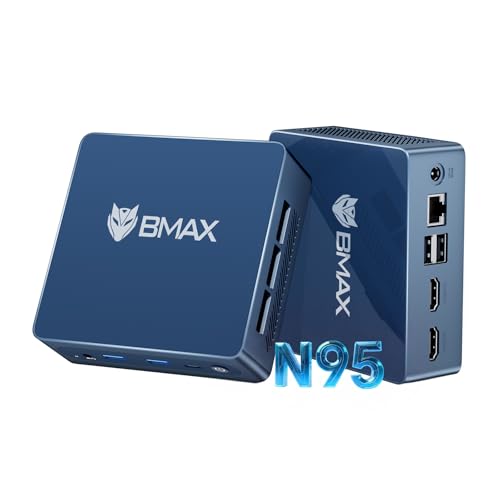
Bmax Intel N95 Mini PC
Best for: Dual 4K display office setups
- Processor
- Intel N95
- Installed RAM
- 12GB
- Storage Capacity
- 512GB
- Memory Type
- LPDDR5
- Graphics
- Intel UHD Graphics
- Ethernet Ports
- Gigabit Ethernet (RJ45 1000MbE)
View on Amazon: Bmax Intel N95 Mini PC Affiliate link
The Bmax B4 Plus packs a 12th Gen Intel N95 processor with 12GB of LPDDR5 RAM and a 512GB SSD into a compact chassis. It supports dual 4K displays via HDMI 2.1 and includes WiFi 5 connectivity. This setup handles office tasks and home entertainment efficiently. It suits users who need reliable multitasking without a large footprint. The unit includes VESA mount support for flexible placement.
Pros
- 12th Gen Intel N95 processor with 3.4GHz burst frequency
- 12GB LPDDR5 RAM for smooth multitasking
- 512GB M.2 SSD for fast storage
- Dual HDMI 2.1 ports supporting 4K@60Hz displays
Cons
- WiFi 5 connectivity instead of newer WiFi 6 standards
- No mention of USB-C ports in the interface list
- 1-year limited warranty coverage period
Good fit if
- You need dual 4K monitor support for productivity
- You want a VESA-mountable unit for clean setups
- You prioritize LPDDR5 memory speed for office work
Skip if
- You require WiFi 6 or WiFi 6E for faster wireless speeds
- You need USB-C connectivity for modern peripherals
- You want a processor with more than 4 cores
Verdict: The Bmax B4 Plus N95 Mini PC offers solid 4K dual-display support and ample LPDDR5 RAM for office tasks. It fits users who value display versatility and compact mounting options over the latest wireless standards.

Bmax B4 Ultra N150 Mini PC
Best for: dual 4K displays and VESA mounting
- Processor
- Intel N150
- Installed RAM
- 12GB
- Storage Capacity
- 512GB
- Memory Type
- LPDDR5 4400MHz
- Graphics
- Intel UHD Graphics
- Operating System
- Windows 11
View on Amazon: Bmax B4 Ultra N150 Mini PC Affiliate link
This Bmax B4 Ultra uses an Intel N150 processor with 12GB of LPDDR5 RAM and a 512GB SSD. It runs Windows 11 and supports dual 4K displays via HDMI 2.1. The compact 243g chassis mounts behind VESA-compatible monitors. It includes WiFi 5, Gigabit Ethernet, and Bluetooth 5.0. This setup suits users needing a quiet, always-on machine for media or light office tasks.
Pros
- Intel N150 processor up to 3.6GHz
- 12GB LPDDR5 4400MHz RAM
- Dual 4K@60Hz HDMI 2.1 outputs
- 512GB SSD with NVMe expansion slot
- 243g weight with VESA mount support
Cons
- WiFi 5 lacks Wi-Fi 6E speeds
- USB-C port supports data only, no video
- Only one-year limited warranty included
Good fit if
- You need a silent PC for 24/7 operation
- You want to mount the device behind a monitor
- You require dual 4K display support
Skip if
- You need Wi-Fi 6E connectivity
- You require video output from the USB-C port
- You want a longer than one-year warranty
Verdict: Bmax B4 Ultra Intel N150 Mini PC fits users who need a compact, quiet system for dual 4K displays or 24/7 media serving.
Specifications side by side
| Spec | Bmax Core i5 16GB Mini PC | Bmax Intel N95 Mini PC | Bmax B4 Ultra N150 Mini PC |
|---|---|---|---|
| Processor | Intel Core i5-8257U | Intel N95 | Intel N150 |
| Installed RAM | 16GB | 12GB | 12GB |
| Storage Capacity | 512GB | 512GB | 512GB |
| Memory Type | DDR4 | LPDDR5 | LPDDR5 4400MHz |
| Graphics | Intel Iris Plus Graphics 655 | Intel UHD Graphics | Intel UHD Graphics |
| Ethernet Ports | 1x Gigabit Ethernet | Gigabit Ethernet (RJ45 1000MbE) | not stated |
| Operating System | Win 11 Pro | not stated | Windows 11 |
| Memory | 16GB RAM | not stated | not stated |
| Storage | not stated | not stated | 512GB SSD |
| Use | not stated | Home, Business, Office | not stated |
| Networking | WiFi 6 | not stated | not stated |
| Connectivity | not stated | WiFi 5 | WiFi 5 |
| Dimensions | not stated | 4.25 × 4.13 × 1.42 inches | not stated |
| Color | Green-3 | Sky Blue | Blue |
| Model | B6 Turbo | B4 Plus | B4 Ultra |
| Size | not stated | B4 PLUS N95 16G RAM+512G | B4 Ultra-12GB+512GB-N150 |
How to choose the right one
-
Match RAM to multitasking
Check the memory capacity before buying. The top pick includes 16GB of RAM, which supports office multitasking effectively. Budget options like the Intel N95 model use LPDDR5 memory. This type of RAM is efficient but may limit future upgrades. You should verify the exact gigabyte count in the specifications. More RAM allows you to run more applications simultaneously without slowing down. Ensure the listed amount meets your daily workflow requirements.
-
Verify operating system needs
Look at the pre-installed operating system. The best overall model comes with Windows 11 Pro. This version offers features useful for business environments and advanced security settings. Some budget units may ship with a different OS or require installation. Confirm the OS version matches your software compatibility needs. Windows 11 Pro supports remote desktop and domain joining. If you need these features, ensure the spec sheet lists the Pro edition explicitly.
-
Check storage capacity
Review the internal storage size. The Intel N150 model includes a 512GB SSD. This capacity is sufficient for the operating system and many applications. Smaller drives may fill up quickly with large files. Solid-state drives provide faster boot times and application loading. Verify the storage type is SSD, not HDD, for better performance. Ensure the listed gigabytes meet your file storage needs without requiring external drives.
-
Assess networking standards
Compare the wireless networking capabilities. The top pick features WiFi 6 for faster and more stable connections. The budget Intel N95 and N150 models use WiFi 5. WiFi 6 handles more devices with less latency. If you live in a crowded area, the newer standard is beneficial. Check the spec sheet for the exact WiFi generation. This detail affects your internet speed and connection reliability during heavy use.
-
Confirm display output support
Ensure the unit supports your monitor setup. The Intel N95 model offers solid 4K dual-display support. This is ideal for office setups requiring two screens. The N150 model also supports dual 4K displays. Verify the number of video outputs on the back panel. You need enough ports to connect all your monitors. Check the specifications for HDMI or DisplayPort counts to ensure compatibility with your desk setup.
Frequently asked questions
Which Bmax mini PC is best for office multitasking?
The Bmax Core i5 16GB Mini PC is the top choice for office multitasking. It features an Intel Core i5 processor and 16GB of RAM. This combination handles multiple applications smoothly. It also runs Windows 11 Pro for professional features. The model supports dual monitor setups, making it ideal for productivity.
Does the Bmax N95 model support dual 4K displays?
Yes, the Bmax Intel N95 Mini PC supports dual 4K displays. This makes it suitable for office setups requiring high-resolution screens. It includes LPDDR5 RAM for efficient performance. The compact design allows for flexible mounting options. This model is a strong budget option for visual tasks.
What is the difference between WiFi 5 and WiFi 6?
WiFi 6 offers faster speeds and better performance in crowded networks compared to WiFi 5. The Bmax Core i5 model includes WiFi 6 for modern connectivity. Most other models in this list use WiFi 5. Both standards provide reliable wireless internet for office and home use. Choose WiFi 6 if you need the latest standard.
Is the Bmax N150 model suitable for media serving?
The Bmax B4 Ultra Intel N150 Mini PC is suitable for media serving. It is designed to be compact and quiet for 24/7 operation. It supports dual 4K displays for local media viewing. The 512GB SSD provides ample storage for files. This model fits users who need a reliable, low-profile system.
Can I mount these mini PCs on a wall?
Wall mounting is possible for many mini PCs, including Bmax models. The Bmax Intel N95 model specifically highlights compact mounting options. The Bmax B4 Ultra also supports VESA mounting for flexible placement. Check the back of each unit for VESA holes. This feature helps save desk space in office environments.
Which Bmax model has the most RAM?
The Bmax Core i5 16GB Mini PC has the most RAM at 16GB. This capacity supports heavy office multitasking and dual-screen setups. The Bmax Intel N95 model also offers ample memory, though it uses LPDDR5 type. The Bmax N150 model includes less RAM in its standard configuration. More RAM improves performance for multiple open applications.