Best Intel Mini PCs: 6 Models Compared
As an Amazon Associate we earn from qualifying purchases. Links on this page are affiliate links.
You need reliable hardware for your workspace. This guide covers the best intel mini PCs, focusing on compact form factors like the tall NUC 8 and the slim NUC 13 Pro. We compared 6 models strictly by their published specifications. The Intel NUC 8 Core i3 Tall Mini PC Kit leads as the best overall choice for office tasks and expandable storage needs. Each pick balances size, processor type, and connectivity options to fit your specific requirements without guessing.
Quick picks
| # | Product | Best for | Price |
|---|---|---|---|
| 1 | Intel NUC 8 Core i3 Tall Mini PC Kit Best overall | Office tasks and expandable storage needs | Check price of Intel NUC 8 Core i3 Tall Mini PC Kit on Amazon |
| 2 | Intel NUC 13 Pro i5-1340P Mini PC Also great | users needing compact i5 performance | Check price of Intel NUC 13 Pro i5-1340P Mini PC on Amazon |
| 3 | Intel NUC 13 Pro Core i5 Mini PC Also great | Business multi-monitor setups | Check price of Intel NUC 13 Pro Core i5 Mini PC on Amazon |
| 4 | Intel NUC 11 Extreme i9 Gaming Mini PC Best premium | Gamers building a high-performance mini PC | Check price of Intel NUC 11 Extreme i9 Gaming Mini PC on Amazon |
| 5 | Intel NUC 13 Pro Barebone Also great | Compact office setups with wired networking | Check price of Intel NUC 13 Pro Barebone on Amazon |
| 6 | Intel NUC6CAYH Celeron J3455 Mini PC Best budget | budget-focused builders needing legacy monitor support | Check price of Intel NUC6CAYH Celeron J3455 Mini PC on Amazon |
Our 6 picks
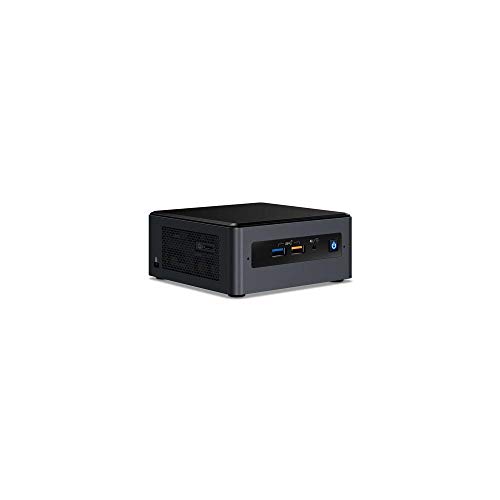
Intel NUC 8 Core i3 Tall Mini PC Kit
Best for: Office tasks and expandable storage needs
- Processor
- Intel Core i3 8109U
- Memory Type
- DDR4 2400 SODIMM
- Graphics
- Intel Iris Plus Graphics 655
- Operating System
- Windows 10
- Dimensions
- 6.1 × 5 × 4.6 inches
- Weight
- 2.7 pounds
View on Amazon: Intel NUC 8 Core i3 Tall Mini PC Kit Affiliate link
This Intel NUC 8 Mainstream Kit uses an 8th Gen Core i3 8109U processor with Iris Plus Graphics 655. It supports up to 32GB of DDR4 2400 memory and includes slots for both M.2 NVMe/SATA SSDs and a 2.5-inch drive. It runs Windows 10. The tall chassis measures 6.1 by 5 by 4.6 inches. It suits users who need expandable storage in a compact form factor.
Pros
- 8th Gen Intel Core i3 8109U processor
- Intel Iris Plus Graphics 655
- Supports up to 32GB DDR4 2400 RAM
- Dual storage options with M.2 and 2.5-inch bays
Cons
- Base model includes only Core i3, lacking higher-tier CPU options
- No dedicated discrete GPU for heavy gaming
- Limited to Windows 10 without upgrade path specified
Good fit if
- You need flexible storage for both fast SSDs and larger HDDs
- You want a compact desktop for office tasks
- You prefer Intel integrated graphics for light media use
Skip if
- You require the latest generation processor for maximum performance
- You need dedicated graphics for gaming or video editing
- You want a pre-installed modern operating system
Verdict: Intel NUC 8i3BEH Tall Mini PC offers reliable performance for basic computing with versatile storage options. It fits users who prioritize expandability over raw processing power.

Intel NUC 13 Pro i5-1340P Mini PC
Best for: users needing compact i5 performance
- Processor
- Intel Core i5-1340P
- Installed RAM
- Barebone
- Storage Capacity
- Barebone
- Memory Type
- DDR4 SDRAM
- Ethernet Ports
- 2.5 Gigabit Ethernet
- Dimensions
- 4.6 × 4.4 × 2.1 inches
View on Amazon: Intel NUC 13 Pro i5-1340P Mini PC Affiliate link
The Intel NUC 13 Pro uses a Core i5-1340P processor for solid performance in a compact chassis. It supports DDR4 memory and includes a 2.5 Gigabit Ethernet port for fast wired connections. You get seven USB ports and SATA storage options. This barebone system lets you choose your own RAM and storage to fit your needs.
Pros
- Intel Core i5-1340P processor
- 2.5 Gigabit Ethernet connectivity
- Seven USB ports
- Supports DDR4 memory
Cons
- Sold as a barebone system without RAM or storage
- Uses DDR4 memory instead of newer DDR5
- No wireless Wi-Fi or Bluetooth listed
Good fit if
- You want a compact PC with a modern i5 processor
- You prefer to select your own RAM and storage
- You need reliable wired networking with 2.5 Gigabit Ethernet
Skip if
- You need a complete system with pre-installed memory
- You require wireless connectivity for peripherals
- You are looking for a gaming-focused high-end GPU
Verdict: Intel NUC 13 Pro Core i5 Mini PC offers a balanced mix of power and size for users who value wired speed and component flexibility.

Intel NUC 13 Pro Core i5 Mini PC
Best for: Business multi-monitor setups
- Processor
- Intel Core i5-1340P
- Installed RAM
- 16GB
- Storage Capacity
- 512GB SSD
- Memory Type
- DDR4
- Graphics
- Intel Iris Xe Graphics
- High-Speed Expansion
- Thunderbolt 4
View on Amazon: Intel NUC 13 Pro Core i5 Mini PC Affiliate link
The Intel NUC 13 Pro Kit pairs a 13th Gen Core i5-1340P processor with 16GB of DDR4 RAM and a 512GB SSD. It targets business users needing reliable performance in a small footprint. You get Windows 11 Pro and Thunderbolt 4 connectivity for fast data transfers. The system supports up to four 4K displays, making it suitable for multi-monitor office setups.
Pros
- 13th Gen Intel Core i5-1340P processor with 12 cores
- Thunderbolt 4 ports for high-speed expansion
- Supports up to four 4K displays via Intel Iris Xe Graphics
- Includes Windows 11 Professional operating system
Cons
- Limited to 16GB of DDR4 RAM
- 512GB SSD storage capacity may fill quickly
- Uses DDR4 memory instead of newer DDR5
Good fit if
- You need Thunderbolt 4 connectivity for peripherals
- You require a multi-monitor business setup
- You prefer Windows 11 Pro for enterprise features
Skip if
- You need more than 16GB of RAM
- You require DDR5 memory for maximum speed
- You need more than 512GB of built-in storage
Verdict: Intel NUC 13 Pro i5 Business Mini PC delivers solid business performance with Thunderbolt 4 and multi-display support. It fits users who need reliable specs without gaming hardware.

Intel NUC 11 Extreme i9 Gaming Mini PC
Best for: Gamers building a high-performance mini PC
- Processor
- Intel Core i9-11900KB
- Installed RAM
- Barebone
- Storage Capacity
- Barebone
- Memory Type
- DDR4 SDRAM
- Use
- Gaming
- Weight
- 5 pounds
View on Amazon: Intel NUC 11 Extreme i9 Gaming Mini PC Affiliate link
The Intel NUC 11 Extreme Kit uses a Core i9-11900KB processor for high performance. It is a barebone system, meaning you install your own DDR4 RAM and storage. The small black chassis weighs 5 pounds. It offers 12 USB ports for connecting devices. This setup suits gamers who want powerful specs in a compact form.
Pros
- Intel Core i9-11900KB octa-core processor
- Supports DDR4 SDRAM for memory expansion
- 12 USB ports for device connectivity
- Compact 5-pound small form factor
Cons
- Sold as a barebone system without RAM or storage
- Uses older DDR4 memory instead of DDR5
- Requires separate purchase of internal components
Good fit if
- You want a powerful i9 processor in a small box
- You already have DDR4 RAM and SSDs to install
- You need many USB ports for peripherals
Skip if
- You need a complete system with RAM and storage included
- You prefer the latest DDR5 memory technology
- You want a pre-installed operating system
Verdict: Intel NUC 11 Extreme i9 Gaming Mini PC delivers strong processing power for gamers willing to assemble their own memory and storage. It fits users who prioritize CPU performance and connectivity in a compact chassis.

Intel NUC 13 Pro Barebone
Best for: Compact office setups with wired networking
- Processor
- Intel Core i3-1315U
- Installed RAM
- Barebone
- Storage Capacity
- Barebone
- Memory Type
- DDR4 SDRAM
- Ethernet Ports
- 2.5 Gigabit Ethernet
- Dimensions
- 4.6 × 4.4 × 2.1 inches
View on Amazon: Intel NUC 13 Pro Barebone Affiliate link
The Intel NUC 13 Pro NUC13ANHi3 is a barebone system powered by a 13th Gen Core i3-1315U processor. It measures 2.1 by 4.4 by 4.6 inches and supports DDR4 memory. You get a 2.5 Gigabit Ethernet port and SATA storage options. This compact unit suits users who need reliable networking and efficient processing for office tasks.
Pros
- 13th Gen Intel Core i3-1315U processor
- 2.5 Gigabit Ethernet connectivity
- Supports DDR4 SDRAM memory
- Compact 2.1-inch height design
Cons
- Barebone system requires separate RAM and storage
- Core i3 limits heavy multitasking performance
- No Wi-Fi or Bluetooth mentioned in specs
Good fit if
- You need a small desktop for basic office work
- You prefer wired 2.5 Gigabit Ethernet connections
- You already own DDR4 RAM and SATA drives
Skip if
- You want a pre-built system with installed components
- You require high-end gaming performance
- You need wireless connectivity out of the box
Verdict: Intel NUC 13 Pro i3 Mini PC offers solid networking and efficient processing for light duties. It fits users who value compact size and wired speed over wireless convenience.

Intel NUC6CAYH Celeron J3455 Mini PC
Best for: budget-focused builders needing legacy monitor support
- Processor
- Intel Celeron J3455
- Graphics
- Intel HD Graphics 500
- Dimensions
- 4.92 × 3.46 × 5.39 inches
- Weight
- 1.2 pounds
View on Amazon: Intel NUC6CAYH Celeron J3455 Mini PC Affiliate link
This barebone Intel NUC mini PC kit features an Intel Celeron J3455 processor and Intel HD Graphics 500. It includes both HDMI 2.0 with 4K output at 60 Hz and a legacy VGA port. You get an internal bay for a 2.5-inch drive, making it a functional option if you want a basic desktop setup.
Pros
- HDMI 2.0 output supports 4K resolution at 60 Hz
- Dedicated VGA port provides legacy display compatibility
- Drive bay accommodates a 2.5-inch SATA SSD or HDD
- Compact chassis weighs 1.2 pounds
Cons
- Does not include system memory, storage, or an operating system
- Intel Celeron J3455 provides lower processing capability than Core series alternatives
Good fit if
- You have spare memory, a 2.5-inch storage drive, and an operating system ready to install.
- You need a compact system with native VGA and HDMI display connections.
Skip if
- You want a fully configured computer that runs out of the box.
- You require the higher computing speeds of an Intel Core processor.
Verdict: Intel NUC Celeron Mini PC Kit provides an entry-level computing foundation with dual HDMI and VGA outputs for users who supply their own storage, RAM, and OS.
Specifications side by side
| Spec | Intel NUC 8 Core i3 Tall Mini PC Kit | Intel NUC 13 Pro i5-1340P Mini PC | Intel NUC 13 Pro Core i5 Mini PC | Intel NUC 11 Extreme i9 Gaming Mini PC | Intel NUC 13 Pro Barebone | Intel NUC6CAYH Celeron J3455 Mini PC |
|---|---|---|---|---|---|---|
| Processor | Intel Core i3 8109U | Intel Core i5-1340P | Intel Core i5-1340P | Intel Core i9-11900KB | Intel Core i3-1315U | Intel Celeron J3455 |
| Installed RAM | not stated | Barebone | 16GB | Barebone | Barebone | not stated |
| Storage Capacity | not stated | Barebone | 512GB SSD | Barebone | Barebone | not stated |
| Memory Type | DDR4 2400 SODIMM | DDR4 SDRAM | DDR4 | DDR4 SDRAM | DDR4 SDRAM | not stated |
| Graphics | Intel Iris Plus Graphics 655 | not stated | Intel Iris Xe Graphics | not stated | not stated | Intel HD Graphics 500 |
| Ethernet Ports | not stated | 2.5 Gigabit Ethernet | not stated | not stated | 2.5 Gigabit Ethernet | not stated |
| High-Speed Expansion | not stated | not stated | Thunderbolt 4 | not stated | not stated | not stated |
| Operating System | Windows 10 | not stated | Windows 11 Pro | not stated | not stated | not stated |
| Memory | not stated | not stated | 16GB RAM | not stated | not stated | not stated |
| Storage | not stated | not stated | 512GB SSD | not stated | not stated | not stated |
| Use | not stated | not stated | Business | Gaming | not stated | not stated |
| Networking | not stated | not stated | WiFi 6 | not stated | not stated | not stated |
| Form Factor | not stated | Barebone | not stated | Barebone | Barebone | not stated |
| Dimensions | 6.1 × 5 × 4.6 inches | 4.6 × 4.4 × 2.1 inches | 4.57 × 4.21 × 1.36 inches | not stated | 4.6 × 4.4 × 2.1 inches | 4.92 × 3.46 × 5.39 inches |
| Weight | 2.7 pounds | 3.51 pounds | not stated | 5 pounds | not stated | 1.2 pounds |
| Color | Black | Black | Black | Black | Black | Black |
| Model | NUC8i3BEH | NUC13ANHi5 | 13 | NUC11BTMi9 | NUC13ANHi3 | BOXNUC6CAYH |
| Size | not stated | 2.1" x 4.4" x 4.6" | 16GB DDR4 RAM, 512GB PCIe SSD | Small | 2.1" x 4.4" x 4.6" | not stated |
Intel Mini PC Specs Overview
The Intel lineup spans distinct categories based on processor and form factor. The NUC 8 Core i3 Tall and NUC 13 Pro i3 Barebone offer entry-level performance for office tasks. These models prioritize compact dimensions and wired networking over raw speed. You get reliable processing for light duties without needing high-end components. The NUC 13 Pro i5 models serve business users who require Windows 11 Pro and Thunderbolt 4 connectivity. These units deliver solid multi-monitor support for professional environments. They fit users who value stability and expandable storage options. The NUC 11 Extreme i9 targets gamers needing strong CPU performance. This barebone kit allows you to assemble your own memory and storage. It suits builders who prioritize processing power in a small chassis. The NUC6CAYH Celeron serves as a budget-friendly legacy option with dual HDMI outputs.
Who Intel Mini PCs Suit
Intel covers a wide size range. You can choose from the compact 2.1-inch tall NUC 13 Pro to the larger NUC 8. The NUC 11 Extreme handles gaming, while the NUC 6 Celeron offers entry-level utility. Most models focus on office or business use. You will not find options for heavy video editing or high-end gaming in this specific list. The range suits users who need reliable connectivity and expandable storage. You pick based on your space and processing needs. There are no all-in-one displays included.
How to Choose the Right Mini PC
-
Check the processor tier
Your daily tasks dictate the necessary CPU power. The Intel NUC 11 Extreme i9 suits gamers needing high processing speeds. For standard office work, the Core i3 models in the NUC 8 and NUC 13 Pro are sufficient. The Core i5 in the NUC 13 Pro offers a balanced middle ground for business users. Match the processor to your software requirements to avoid paying for unused performance.
-
Consider form factor size
Physical dimensions determine where you can place the device. The NUC 13 Pro models are extremely slim, measuring just 2.1 inches in height. This allows for discreet placement behind monitors. The NUC 8 Core i3 is taller at 4.6 inches, providing more internal space for storage upgrades. The NUC 11 Extreme is larger to accommodate gaming components. Measure your available desk or mount space before purchasing.
-
Decide on barebone kits
Many Intel NUCs are sold as barebone kits. This means you must supply your own RAM, storage drive, and operating system. The NUC 11 Extreme and NUC 13 Pro barebone options offer this flexibility. You can choose specific components to match your budget and performance needs. If you prefer a ready-to-use device, look for models that include pre-installed memory and storage, like the premium NUC 13 Pro i5.
-
Verify networking requirements
Wired connections often provide more stability than wireless ones. Several NUC 13 Pro models emphasize wired networking speeds for reliable office use. If you require wireless convenience, check for WiFi 6 support, as seen in the premium business model. The older NUC 6 Celeron may lack modern wireless standards. Ensure the network interface matches your home or office infrastructure for optimal connectivity.
-
Assess display connectivity
Multi-monitor setups require specific video outputs. The NUC 6 Celeron includes dual HDMI and VGA ports, supporting legacy displays. Newer models like the NUC 13 Pro often feature Thunderbolt 4 or modern HDMI versions. Verify the number of available ports if you plan to use multiple screens. This ensures your workflow remains uninterrupted without needing additional adapters or docking stations.
Frequently asked questions
Which Intel mini PC is best for office tasks and storage expansion?
The Intel NUC 8 Core i3 Tall Mini PC Kit is the top choice. It offers reliable performance for basic computing. The tall form factor provides versatile storage options. This makes it ideal for users who prioritize expandability over raw processing power.
What is the most compact Intel mini PC available?
The Intel NUC 13 Pro Core i5 Business Mini PC is the most compact. It measures 4.21 inches in width and 1.36 inches in height. This slim design fits users who need reliable specs without gaming hardware. It supports multi-display setups for business use.
Which Intel mini PC is suitable for gaming?
The Intel NUC 11 Extreme i9 Gaming Mini PC is designed for gamers. It delivers strong processing power for high-performance tasks. You must assemble your own memory and storage. It fits users who prioritize CPU performance and connectivity in a compact chassis.
Is there a budget-friendly Intel mini PC with an i5 processor?
The Intel NUC 13 Pro i5-1340P Mini PC is the best budget option. It offers a balanced mix of power and size. You get wired speed and component flexibility. It is ideal for users needing compact i5 performance without premium features.
Which Intel mini PC supports legacy monitor connections?
The Intel NUC6CAYH Celeron J3455 Mini PC supports legacy monitors. It features dual HDMI and VGA outputs. This entry-level foundation is for users who supply their own storage, RAM, and OS. It is best for budget-focused builders needing older display compatibility.
Does the Intel NUC 13 Pro come with an operating system?
The Intel NUC 13 Pro Core i5 Business Mini PC includes Windows 11 Pro. Other models, like the NUC 13 Pro Barebone, do not. You must install your own OS on barebone kits. Check the attributes to see if it is a complete system or a kit.
Which Intel mini PC has WiFi 6 connectivity?
The Intel NUC 13 Pro Core i5 Business Mini PC features WiFi 6. It also includes 16GB DDR4 RAM and a 512GB PCIe SSD. This model delivers solid business performance. It fits users who need reliable specs and modern networking standards.