Msi Mini PCs: 5 Picks Ranked by Specs
As an Amazon Associate we earn from qualifying purchases. Links on this page are affiliate links.
Msi offers a range of compact desktops, from the tiny Cubi NUC series to larger units like the Cubi N. This guide ranks the best msi mini PCs by their published specifications. You can find options with varying RAM, storage, and connectivity ports. The top pick is the MSI Cubi NUC Mini PC, which leads due to its dual Ethernet and Thunderbolt 4 capabilities. We compared 5 models to help you choose based on size, weight, and internal specs.
Quick picks
| # | Product | Best for | Price |
|---|---|---|---|
| 1 | MSI Cubi NUC Mini PC Best overall | Dual Ethernet and Thunderbolt 4 needs | Check price of MSI Cubi NUC Mini PC on Amazon |
| 2 | MSI Cubi 5 Pro i5-1235U Also great | Dual Ethernet and Thunderbolt 4 connectivity | Check price of MSI Cubi 5 Pro i5-1235U on Amazon |
| 3 | MSI Cubi NUC AI+ Mini PC Best premium | Digital signage and office deployments | Check price of MSI Cubi NUC AI+ Mini PC on Amazon |
| 4 | MSI Cubi 5 Mini PC Best budget | light office work and multi-monitor setups | Check price of MSI Cubi 5 Mini PC on Amazon |
| 5 | MSI Cubi N Pentium N200 Mini PC Best 128gb ssd | Light office work and dual monitors | Check price of MSI Cubi N Pentium N200 Mini PC on Amazon |
Our 5 picks
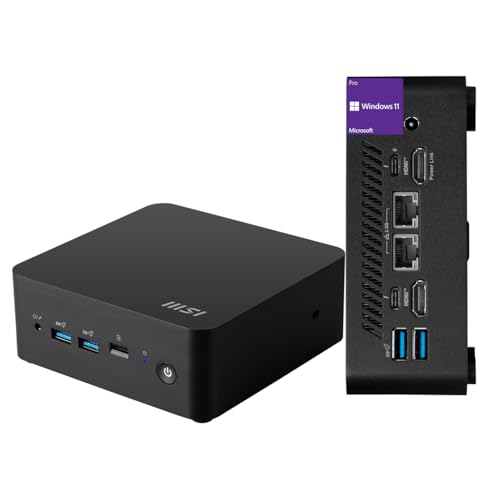
MSI Cubi NUC Mini PC
Best for: Dual Ethernet and Thunderbolt 4 needs
- Processor
- Intel Core 3 100U
- Installed RAM
- 16GB
- Storage Capacity
- 256GB
- Ethernet Ports
- 2 x RJ45
- High-Speed Expansion
- Thunderbolt 4
- Operating System
- Windows 11 Pro
View on Amazon: MSI Cubi NUC Mini PC Affiliate link
This ultra-compact mini PC features a 13th Gen Intel Core 3 100U processor with 16GB of RAM and a 256GB SSD. It measures just 5.22 by 5.34 by 1.97 inches, saving desk space. The system includes Windows 11 Pro and offers robust connectivity with two Thunderbolt 4 ports and dual Ethernet jacks. It suits users needing reliable daily performance in a small footprint.
Pros
- 16GB RAM for smooth multitasking
- Two Thunderbolt 4 ports for high-speed expansion
- Dual RJ45 Ethernet ports
- Windows 11 Pro operating system
- Ultra-compact 1.9-inch height
Cons
- 256GB SSD storage is limited compared to other models
- Intel Core 3 processor is lower tier than Core i5 or Core 7 options
- No mention of pre-installed productivity software suite
Good fit if
- You need dual Ethernet connections for network setups
- You require Thunderbolt 4 connectivity for peripherals
- You want Windows 11 Pro for business features
Skip if
- You need more than 256GB of internal storage
- You require higher-end Core i5 or Core 7 processing power
- You prefer a larger chassis for easier upgrades
Verdict: MSI Cubi NUC Core 3 Mini PC offers solid daily performance with 16GB RAM and dual Ethernet ports. It fits users who prioritize connectivity and compact size over raw processing power or large storage capacity.

MSI Cubi 5 Pro i5-1235U
Best for: Dual Ethernet and Thunderbolt 4 connectivity
- Processor
- Intel i5-1235U
- Installed RAM
- 16GB
- Storage Capacity
- 512GB
- Graphics
- Intel Graphics
- Ethernet Ports
- 2 x RJ-45
- High-Speed Expansion
- Thunderbolt 4
View on Amazon: MSI Cubi 5 Pro i5-1235U Affiliate link
The MSI Cubi 5 Professional packs a 12th Gen Intel Core i5-1235U processor with 16GB of RAM and a 512GB SSD. It includes Thunderbolt 4 and dual Ethernet ports for robust connectivity. This Windows 11 Pro mini PC suits users needing strong multitasking performance in a compact, VESA-mountable form factor.
Pros
- 12th Gen Intel Core i5-1235U processor with 10 cores
- 16GB RAM and 512GB PCIe NVMe SSD
- Thunderbolt 4 port for high-speed data transfer
- Dual RJ-45 Ethernet ports for stable networking
- Windows 11 Pro pre-installed
Cons
- Wi-Fi 6 is slower than the Wi-Fi 7 found in the Cubi NUC AI+
- Only 512GB storage compared to the 1TB option in the Cubi NUC AI+
- No dedicated graphics card for heavy gaming
Good fit if
- You need Thunderbolt 4 for fast external drives
- You require dual Ethernet ports for network flexibility
- You want Windows 11 Pro for business features
Skip if
- You need Wi-Fi 7 for maximum wireless speed
- You require more than 512GB of built-in storage
- You want a dedicated GPU for gaming
Verdict: MSI Cubi 5 i5-1235U 16GB RAM offers a balanced mix of processing power and connectivity for professionals who value Thunderbolt 4 and dual LAN ports over the latest wireless standards.

MSI Cubi NUC AI+ Mini PC
Best for: Digital signage and office deployments
- Processor
- Intel Core Ultra 7 355
- Installed RAM
- 16GB
- Storage Capacity
- 1TB
- Memory Type
- DDR5
- Ethernet Ports
- Dual 2.5G
- High-Speed Expansion
- Thunderbolt 4
View on Amazon: MSI Cubi NUC AI+ Mini PC Affiliate link
This ultra-compact 0.51L Mini PC features an Intel Core Ultra 7 355 processor and 16GB of DDR5 memory. It includes a 1TB NVMe SSD and Wi-Fi 7 connectivity. The design supports VESA mounting and offers Thunderbolt 4 ports for high-speed data transfer. It runs Windows 11 Pro, making it suitable for office environments or digital signage deployments where space is limited.
Pros
- 1TB NVMe SSD storage capacity
- Intel Core Ultra 7 355 processor
- Thunderbolt 4 connectivity
- Wi-Fi 7 support
- Dual 2.5G LAN ports
Cons
- Only 16GB of RAM installed
- No dedicated graphics card
- Limited to integrated graphics performance
Good fit if
- You need a VESA-mountable PC for digital signage
- You require fast Wi-Fi 7 connectivity
- You want a 1TB SSD for storage
Skip if
- You need more than 16GB of RAM
- You require a dedicated GPU for gaming
- You prefer a larger chassis for easier upgrades
Verdict: Msi Cubi NUC Core Ultra 7 Mini PC is a compact, high-speed option for users who need Thunderbolt 4 and Wi-Fi 7 in a small footprint. It fits well in office or signage setups where space is tight.

MSI Cubi 5 Mini PC
Best for: light office work and multi-monitor setups
- Processor
- Intel Core 3-100U
- Installed RAM
- 8GB
- Storage Capacity
- 500GB
- Memory Type
- DDR4
- Graphics
- Intel Graphics
- High-Speed Expansion
- Thunderbolt 4
View on Amazon: MSI Cubi 5 Mini PC Affiliate link
The MSI Cubi 5 packs an Intel Core 3-100U processor with 8GB of DDR4 RAM and a 500GB SSD into a compact chassis. It supports up to four displays and includes Thunderbolt 4 for high-speed data and power delivery. Wi-Fi 6E and Bluetooth 5.3 provide modern wireless connectivity. This setup handles everyday tasks and light creative work efficiently. It is a practical option for users who need a reliable, space-saving desktop with solid port selection.
Pros
- Intel Core 3-100U processor with 6 cores
- Thunderbolt 4 port supports 100W power delivery
- Supports up to four simultaneous displays
- Wi-Fi 6E for fast wireless networking
- 500GB SSD provides ample storage space
Cons
- Only 8GB of RAM limits heavy multitasking
- DDR4 memory is slower than newer DDR5 options
- 1-year warranty is shorter than industry standards
Good fit if
- You need a small PC for office work
- You want to connect multiple monitors
- You require Thunderbolt 4 for fast peripherals
Skip if
- You need more than 8GB of RAM
- You want the latest DDR5 memory speed
- You require a longer warranty period
Verdict: MSI Cubi 5 Core 3 Mini PC is a solid choice for users who need multi-monitor support and Thunderbolt 4 connectivity in a small form factor. It suits light productivity tasks well but may struggle with heavy multitasking due to limited RAM.

MSI Cubi N Pentium N200 Mini PC
Best for: Light office work and dual monitors
- Processor
- Intel Pentium N200
- Installed RAM
- 4GB
- Storage Capacity
- 128GB
- Memory Type
- DDR4 3200 MHz
- Graphics
- Intel UHD
- Operating System
- Windows 11 PRO Entry
View on Amazon: MSI Cubi N Pentium N200 Mini PC Affiliate link
The MSI Cubi N packs an Intel Pentium N200 processor and 4GB of DDR4 RAM into a small chassis. It includes a 128GB M.2 SATA SSD and runs Windows 11 Pro. This model supports dual displays via Intel UHD graphics. It suits users needing basic productivity tasks, media playback, or a lightweight secondary monitor setup without high power demands.
Pros
- Intel Pentium N200 4-core processor
- 128GB M.2 SATA SSD storage
- Windows 11 Pro operating system
- Dual display output support
Cons
- Only 4GB of installed RAM
- 128GB storage capacity is limited
- No dedicated graphics card
Good fit if
- You need a basic office PC for web browsing
- You want Windows 11 Pro included
- You require dual monitor support
Skip if
- You need to run heavy video editing software
- You require 16GB or more RAM
- You want fast NVMe SSD speeds
Verdict: MSI Cubi N Pentium N200 Mini PC is a functional entry-level device for light tasks. It fits users who prioritize a low-cost, small footprint for basic computing over performance.
Specifications side by side
| Spec | MSI Cubi NUC Mini PC | MSI Cubi 5 Pro i5-1235U | MSI Cubi NUC AI+ Mini PC | MSI Cubi 5 Mini PC | MSI Cubi N Pentium N200 Mini PC |
|---|---|---|---|---|---|
| Processor | Intel Core 3 100U | Intel i5-1235U | Intel Core Ultra 7 355 | Intel Core 3-100U | Intel Pentium N200 |
| Installed RAM | 16GB | 16GB | 16GB | 8GB | 4GB |
| Storage Capacity | 256GB | 512GB | 1TB | 500GB | 128GB |
| Memory Type | not stated | not stated | DDR5 | DDR4 | DDR4 3200 MHz |
| Graphics | not stated | Intel Graphics | not stated | Intel Graphics | Intel UHD |
| Ethernet Ports | 2 x RJ45 | 2 x RJ-45 | Dual 2.5G | not stated | not stated |
| High-Speed Expansion | Thunderbolt 4 | Thunderbolt 4 | Thunderbolt 4 | Thunderbolt 4 | not stated |
| Operating System | Windows 11 Pro | Windows 11 Pro | Windows 11 Pro | Windows 11 Home | Windows 11 PRO Entry |
| Memory | 16GB RAM | 16GB RAM | not stated | 8GB RAM | not stated |
| Storage | 256GB SSD | 512GB SSD | 1TB SSD | 500GB SSD | 128GB SSD |
| Use | not stated | Gaming | not stated | Home | not stated |
| Networking | not stated | not stated | not stated | WiFi 6E | not stated |
| Dimensions | 5.34 × 5.22 × 1.9 inches | 4.6 × 4.4 × 1.8 inches | 4.71 × 4.54 × 1.48 inches | 4.88 × 4.88 × 2.11 inches | 8.7 × 19.9 × 18.5 inches |
| Weight | 6 pounds | 2.95 pounds | 1.1 pounds | 1.3 pounds | not stated |
| Size | 16GB RAM | 256GB SSD | 16GB RAM | 512GB SSD | not stated | 8GB | 500GB | 3507.52 cubic inches |
| Color | Black | i5-1235U | Black | Black | Black |
| Model | MSI Cubi Mini | Cubi 5 12M | CuNUCAI3MG018 | Cubi51MA668US | CubNADL005 |
Msi Mini PC Selection Guide
The top-ranked MSI Cubi NUC and Cubi 5 Pro models prioritize robust connectivity. Both units feature dual Ethernet ports and Thunderbolt 4, making them ideal for users who need reliable wired networking. The Cubi NUC includes 16GB of RAM, while the Cubi 5 Pro pairs an i5 processor with 512GB of storage for balanced performance.
For lighter tasks, the Cubi 5 with 8GB RAM suits basic office work. The Cubi NUC AI+ offers premium specs like Wi-Fi 7 and a Core Ultra 7 processor for demanding deployments. Entry-level shoppers might consider the Cubi N with its 128GB SSD, though its larger footprint is a notable trade-off for its compact price point.
Who Msi Mini PCs Suit
Msi’s current lineup spans a wide range of form factors. The Cubi NUC AI+ is the lightest option at just 1.1 pounds, while the Cubi N is significantly larger and heavier. Most models, including the Cubi 5 Pro and Cubi 5, share a similar compact, boxy design. You will find options with 8GB to 16GB of RAM and storage from 128GB to 1TB. However, none of these units include dedicated graphics cards or high-end gaming processors. They are designed for office work, signage, and basic computing rather than intensive visual tasks.
How to choose the right msi mini pc
-
Check processor speed needs
Your daily tasks determine the right CPU tier. The MSI Cubi 5 Pro uses an Intel Core i5-1235U, which handles professional multitasking and light gaming well. If you only need basic web browsing and document editing, the Pentium N200 in the Cubi N model is sufficient. Higher core counts improve performance in complex applications. Match the processor to your heaviest workload to avoid unnecessary costs or performance bottlenecks during intensive use.
-
Match memory to multitasking
RAM capacity affects how many programs you can run simultaneously. The MSI Cubi NUC and Cubi 5 Pro both include 16GB of RAM, supporting smooth operation for office suites and media playback. The Cubi 5 with 8GB RAM is suitable for light office work but may slow down with many open tabs. More memory allows for better future-proofing. Ensure the system meets your minimum requirements for smooth, lag-free performance during daily use.
-
Select storage capacity wisely
SSD size dictates how many files and applications you can store locally. The MSI Cubi NUC AI+ offers 1TB of storage, ideal for large media libraries or extensive software installations. The entry-level Cubi N provides 128GB, which is tight for modern operating systems and updates. The Cubi 5 Pro includes 512GB, a balanced middle ground. Consider your archive needs and whether you will rely on cloud storage to supplement local disk space effectively.
-
Verify networking port types
Connectivity options are critical for stable internet and peripheral connections. The top-ranked Cubi NUC and Cubi 5 Pro feature dual Ethernet ports and Thunderbolt 4. This setup supports robust wired networking and high-speed data transfer for compatible devices. If you prioritize wireless convenience, check for Wi-Fi 7 support, as seen in the Cubi NUC AI+. Wired connections generally offer lower latency and greater reliability for professional or gaming environments.
-
Assess physical dimensions carefully
Size constraints dictate where the Mini PC can fit. The Cubi NUC AI+ is remarkably light at 1.1 pounds and compact, fitting tight spaces like digital signage mounts. The Cubi N model is significantly larger, measuring nearly 20 inches in width, which limits placement options. Most other models, like the Cubi 5 Pro, stay under 5 inches in width. Measure your desk or VESA mount space before purchasing to ensure the unit fits your specific physical environment.
Frequently asked questions
Which MSI mini PC has the most RAM?
The top-ranked MSI Cubi NUC and the second-place Cubi 5 Pro both feature 16GB of RAM. This capacity supports solid daily performance and better multitasking compared to the 8GB option found in the Cubi 5. If you need more memory for heavy workflows, these two models are your best choices in this lineup.
Does any model include Thunderbolt 4?
Yes, several models support Thunderbolt 4 connectivity. The MSI Cubi NUC, Cubi 5 Pro, and Cubi 5 all include this high-speed port. This feature allows for fast data transfer and connection to external displays or docks. It is a key specification for users who need reliable wired networking and expansion capabilities.
What is the lightest MSI mini PC on the list?
The MSI Cubi NUC AI+ is the lightest option, weighing just 1.1 pounds. Its compact dimensions make it ideal for tight spaces like digital signage or office desks. In contrast, the larger Cubi N model weighs significantly more, offering a different form factor for users who prioritize size over portability.
Which model is best for light office work?
The MSI Cubi 5 with 8GB RAM is a solid choice for light productivity tasks. It supports multi-monitor setups and includes Thunderbolt 4. However, it may struggle with heavy multitasking due to its limited memory. For users who only need basic computing, this model fits well into a home or small office environment.
How much storage does the premium model have?
The top-tier MSI Cubi NUC AI+ includes a 1TB SSD. This provides ample space for operating system files and applications. It runs Windows 11 Pro, which is suitable for professional deployments. This storage capacity is higher than the entry-level Cubi N, which only offers 128GB of solid-state storage.
Are dual Ethernet ports available on these mini PCs?
Yes, dual Ethernet ports are a key feature of the top two models. The MSI Cubi NUC and the Cubi 5 Pro both include this connectivity option. This setup is ideal for users who require robust wired networking or need to separate network traffic. It is a primary reason these models rank highly for professional use.