Binxarn Mini PC AMD Ryzen Review (2026): A Spec-Based Look
As an Amazon Associate we earn from qualifying purchases. Links on this page are affiliate links.
This binxarn mini PC amd ryzen review focuses on the Binxarn MN74, a compact computer built for efficient daily tasks. It is defined by two key specifications: the AMD Ryzen 5 7430U processor and 16GB of DDR4 RAM. The processor uses Zen3 architecture to handle multitasking and media playback smoothly. The memory ensures quick responsiveness when running multiple applications. Combined with a 512GB NVMe SSD, this system offers reliable performance for office work and light entertainment. Its small metal chassis saves desk space while providing sturdy construction. You get a practical solution that balances power and size without unnecessary bulk or complexity.
What stands out
- AMD Ryzen 5 7430U 6-core processor with up to 4.3GHz turbo
- 16GB dual-channel DDR4 RAM expandable to 64GB
- 4K@60Hz triple display support via two HDMI 2.0 and one Type-C port
- Dual M.2 slots allowing storage expansion up to 8TB
- Ultra-compact 0.52L metal chassis with VESA mount compatibility
Who it fits
Good fit for
This mini PC suits users who need multiple monitors for productivity, such as stock traders or data analysts. The triple display output and ample RAM handle heavy multitasking well. It is also ideal for home offices where desk space is limited, thanks to its tiny 0.52L footprint. Users who require fast boot times and quick file access will appreciate the NVMe SSD. If you need a sturdy, quiet machine for web browsing, document editing, and 4K video playback, this spec-focused setup delivers reliable performance without taking up much room.
Who should skip it
You should look elsewhere if you plan to play demanding 3D games. This unit relies on integrated AMD Radeon graphics, which lack the power for high-end gaming. It also lacks dedicated graphics cards. If you need extensive wireless connectivity, note it only includes WiFi 6 and Bluetooth 5.2. Users requiring Thunderbolt ports or USB4 will find this model lacking. Additionally, if you need more than 64GB of RAM, this system cannot support that upgrade. It is not designed for heavy video rendering or specialized professional workloads.
Verdict: The Binxarn MN74 offers solid multi-monitor productivity and compact design for office tasks. It is a practical choice for users prioritizing screen real estate and space savings over gaming performance.
Key specs explained
AMD Ryzen 5 7430U
This six-core, twelve-thread processor uses 7nm Zen3 architecture with a max turbo frequency of 4.3GHz. It offers stronger single-core performance than the R5 5500U, ensuring smooth operation for web browsing, document editing, and 4K video playback. You benefit from stable performance under heavy loads, making it suitable for home offices and light gaming tasks without stuttering.
16GB DDR4 RAM
The system includes dual-channel 16GB of high-speed RAM, which is expandable up to 64GB via dual M.2 slots. This configuration allows for ultra-quick system responsiveness and seamless multitasking. You can run numerous applications and browser tabs simultaneously without lag. This makes it ideal for users who need to switch between heavy workloads efficiently.
512GB NVMe SSD
The device comes with a 512GB high-speed solid-state drive for fast system boot times and application loading. Storage is expandable up to 8TB through dual M.2 slots (2242 and 2280). This capacity is sufficient for operating systems, essential software, and a moderate amount of office files, videos, and media, ensuring you have ample space for daily data.
4K Triple Display
This mini PC supports 4K@60Hz output across three screens using two HDMI 2.0 ports and one Type-C port. Driving three monitors simultaneously expands your visual workspace significantly. You benefit from enhanced productivity for stock trading, multi-window office work, content creation, and video editing. This setup improves efficiency by allowing you to view more information at once.
0.52L Metal Chassis
The unit measures 4.2 x 1.7 x 4.5 inches and weighs 0.4kg, with a metal middle frame for durability and heat dissipation. Its ultra-compact volume saves valuable desk space and supports VESA mounting behind monitors or on walls. This sturdy, space-saving design ensures a longer lifespan for home, office, and commercial use, keeping your workspace organized and tidy.
Design and build details
The Binxarn MN74 features an ultra-compact metal chassis that measures 4.2 by 1.7 by 4.5 inches. According to the listing, this design results in a volume of just 0.52 liters and a weight of 0.4 kilograms. The metal middle frame is highlighted as being more durable and resistant to drops than plastic alternatives. This material choice also aids in heat dissipation, which supports stable performance during long work sessions. The small footprint allows you to save valuable desk space in both home and office environments.
You can mount the unit using VESA standards, which lets you hide the PC behind a monitor or on a wall. This flexibility makes the device suitable for setups where surface area is limited. The layout includes a rich array of ports to support various peripherals. You get two USB 3.0 ports, two USB 2.0 ports, and a Type-C port that supports DisplayPort and data transfer. Connectivity is handled by Gigabit Ethernet, WiFi 6, and Bluetooth 5.2, ensuring stable connections for video calls and streaming.
Audio output is provided via a 3.5mm jack, allowing you to connect headsets or speakers directly. The inclusion of dual HDMI 2.0 ports complements the Type-C output, enabling triple-screen displays at 4K resolution. This port selection supports plug-and-play functionality for external drives, printers, and monitors. The sturdy build and compact dimensions make it a practical choice for users who need a reliable, space-saving computer for daily tasks.
Setup and everyday use details
Setting up the Binxarn MN74 involves connecting the necessary peripherals to its rear panel. You will use the two HDMI 2.0 ports and the single Type-C port to drive up to three displays. Each output supports 4K resolution at 60Hz. This configuration allows you to expand your visual workspace significantly for tasks like stock trading or multi-window office work. The Type-C port also handles data transfer, adding flexibility to your setup.
For storage, the unit includes a 512GB NVMe SSD. The listing notes dual M.2 slots, allowing you to expand capacity up to 8TB if needed. This provides ample space for office files, videos, and applications. The 16GB of dual-channel DDR4 RAM ensures the system remains responsive. You can run numerous browser tabs and apps simultaneously without stuttering. If your workload increases, the RAM is expandable up to 64GB.
Connectivity relies on WiFi 6 and Bluetooth 5.2 for wireless stability. You also have access to a Gigabit Ethernet port for wired connections. The rear panel includes two USB 3.0 ports, two USB 2.0 ports, and a 3.5mm audio jack. These ports allow you to plug in external drives, printers, and headsets directly. The metal chassis aids in heat dissipation, keeping the device stable during long sessions. The compact 0.52-liter size lets you mount it behind a monitor using VESA, saving desk space for your workflow.
Before You Buy This Mini PC
You need a display, keyboard, and mouse to use this unit. The listing does not include an operating system, so you must install Windows yourself. Check your monitor ports for HDMI 2.0 or DisplayPort compatibility. The Type-C port supports DP output, but verify your cable supports video. You should also ensure your desk or wall space accommodates the VESA mount. The metal chassis helps with heat dissipation, so keep vents clear. Dust buildup can affect performance, so clean the exterior occasionally with a dry cloth. This model fits well if you need triple-screen productivity or light gaming. It is smaller than standard towers but larger than some pocket-sized PCs. Compare it to other Ryzen options if you need more raw power. If you only need basic web browsing, a cheaper barebone might suffice. This unit balances performance and size for office work and media consumption.
Check before you buy
- Verify monitor supports HDMI 2.0 or DisplayPort for triple-screen setup.
- Install your own Windows operating system before first use.
- Check if your desk space allows for VESA mounting.
- Ensure you have HDMI and USB peripherals ready for setup.
The product at a glance
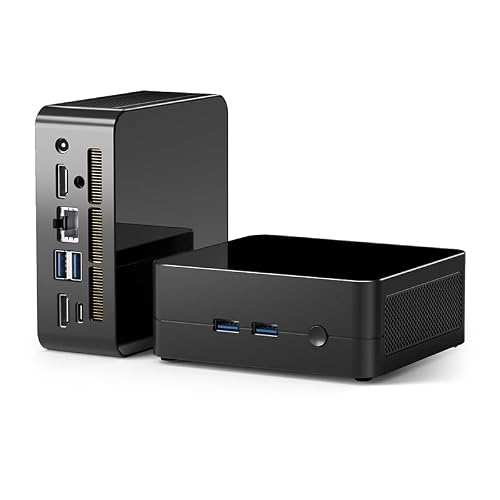
Binxarn MN74 Mini PC Ryzen 5
Best for: Triple-monitor office setups and compact workspaces
- Processor
- AMD Ryzen 5 7430U
- Installed RAM
- 16GB
- Storage Capacity
- 512GB
- Memory Type
- DDR4
- Ethernet Ports
- Gigabit Ethernet
- Use
- Home, Office, Gaming
View on Amazon: Binxarn MN74 Mini PC Ryzen 5 Affiliate link
The Binxarn MN74 is a compact mini PC powered by an AMD Ryzen 5 7430U processor. It includes 16GB of DDR4 RAM and a 512GB NVMe SSD for responsive multitasking. The device supports triple 4K displays and features a metal chassis that is only 0.52 liters in volume. It is designed for users who need reliable office performance and multiple monitor support in a small footprint.
Pros
- AMD Ryzen 5 7430U 6-core processor with up to 4.3GHz turbo
- 16GB dual-channel DDR4 RAM expandable to 64GB
- Triple display output via 2x HDMI and 1x Type-C
- Compact 0.52L metal chassis with VESA mount support
- Dual M.2 slots for storage expansion up to 8TB
Cons
- Only includes one 16GB RAM stick, limiting dual-channel performance until a second stick is added
- Base storage is 512GB, which may require upgrades for large media libraries
- Uses older DDR4 memory instead of the newer DDR5 standard
Good fit if
- You need to connect three monitors for trading or multi-window workflows
- You want a small form factor that fits behind a monitor via VESA mount
- You require a quiet, efficient system for office tasks and 4K video playback
Skip if
- You need a pre-installed operating system or software
- You require DDR5 memory for maximum future-proofing
- You want a larger internal storage capacity without adding extra drives
Verdict: Binxarn MN74 Mini PC Ryzen 5 is a practical solution for users who need triple-monitor support and a compact metal build for office or home use. It suits those who value expandable storage and a small footprint over high-end gaming performance.
Specifications side by side
| Spec | Binxarn MN74 Mini PC Ryzen 5 |
|---|---|
| Processor | AMD Ryzen 5 7430U |
| Installed RAM | 16GB |
| Storage Capacity | 512GB |
| Memory Type | DDR4 |
| Ethernet Ports | Gigabit Ethernet |
| Memory | 16GB RAM |
| Storage | 512GB SSD |
| Use | Home, Office, Gaming |
| Networking | WiFi 6 |
| Dimensions | 4.5 × 4.2 × 1.7 inches |
| Size | mini |
| Color | R5 7430U/16G+512G |
| Model | MN74 |
Frequently asked questions
Can this mini PC run three monitors at once?
Yes, the Binxarn MN74 supports triple-monitor setups. It features two HDMI 2.0 ports and one Type-C port to drive up to three displays. Each output handles 4K resolution at 60Hz, making it suitable for office environments that require multiple screens for productivity.
What processor does the Binxarn MN74 use?
It uses the AMD Ryzen 5 7430U processor. This six-core, twelve-thread chip is built on 7nm Zen3 architecture. It offers a max turbo frequency of 4.3GHz, providing stronger single-core performance than older models like the R5 5500U for smooth daily tasks.
How much RAM comes with this model?
The Binxarn MN74 includes 16GB of DDR4 RAM. This memory capacity helps ensure smooth operation during web browsing and document editing. It provides enough headroom for multitasking without requiring immediate upgrades for typical office or home use scenarios.
Is there storage included for the operating system?
Yes, it comes with a 512GB SSD. This solid-state drive offers fast boot times and quick file access. It is also expandable, allowing you to add more storage later if you need to save large files or install additional applications.
What are the physical dimensions of the Binxarn MN74?
The unit measures 4.2 inches in width, 1.7 inches in height, and 4.5 inches in length. This compact design results in a small footprint of just 0.52 liters. The metal chassis weighs 0.4 kilograms, making it easy to place in tight spaces.
Does the package include an operating system?
No, the listing does not include an operating system. You must install Windows yourself. Ensure you have a compatible license key ready before connecting your display, keyboard, and mouse to begin setting up the machine for daily use.
What video outputs are available on the back?
You get two HDMI 2.0 ports and a single Type-C port. These connections allow you to drive up to three displays simultaneously. Each port supports 4K resolution at 60Hz, which is ideal for clear text and sharp images on modern monitors.