Connectivity Explained: What It Means for Mini PCs
As an Amazon Associate we earn from qualifying purchases. Links on this page are affiliate links.
Understanding WiFi and Bluetooth Specs
When you look at mini PC specifications, connectivity explained reveals how your device talks to the outside world. Two common standards define this experience: WiFi 5 and Bluetooth 5.0. These numbers are not just marketing labels. They represent specific technical capabilities that affect your daily workflow.
WiFi 5, also known as 802.11ac, operates primarily on the 5 GHz band. This band offers faster data rates and less interference than older 2.4 GHz networks. You will notice this in smoother video streaming and quicker file transfers. The standard supports multiple input and multiple output (MIMO) technology. This allows the mini PC to handle several data streams at once. If you work in a crowded office with many wireless networks, this spec provides a more stable connection. It reduces lag during video calls and online gaming.
Bluetooth 5.0 brings significant improvements over previous versions. The most noticeable change is the range. You can connect peripherals from up to four times farther away than with older standards. The data rate is also twice as fast. This matters when you use wireless keyboards, mice, or audio devices. You will experience fewer dropouts and faster pairing times. The standard also improves reliability in environments with many wireless signals.
Why do these specs matter for small form factor computers? These devices often lack the internal shielding of larger towers. They rely heavily on efficient wireless connections. A robust WiFi 5 adapter ensures your compact machine does not feel limited by slow internet speeds. Similarly, Bluetooth 5.0 allows you to maintain a clean desk setup without tangled wires. You can place your mini PC in a tight space, behind a monitor, or in a media cabinet. The wireless range ensures your peripherals still work reliably.
Check the product listing for these exact terms. Avoid listings that only say "wireless" or "Bluetooth" without a version number. Specific versions guarantee a baseline level of performance. You deserve a connection that matches your modern needs. These two standards form the foundation of a responsive digital workspace.
WiFi 5 and Bluetooth 5.0 Options
WiFi 5
WiFi 5, also known as 802.11ac, operates primarily on the 5GHz band. This standard offers faster data rates than older WiFi 4, making it suitable for streaming video and general web browsing. It provides reliable connectivity for most home and office tasks. However, it lacks the efficiency and speed of newer WiFi 6 standards. You will find this spec in models like the ACEMAGIC Ryzen R2544 Mini PC. It is a practical choice if you prioritize display flexibility and stable wired connections over the latest wireless speeds. The trade-off is potential congestion in dense wireless environments compared to newer protocols.
Bluetooth 5.0
Bluetooth 5.0 improves range and speed over previous versions. It allows for more stable connections with peripherals like keyboards, mice, and headsets. This version supports better data transfer rates, reducing lag in audio and input devices. It is commonly paired with WiFi 5 in compact systems. For example, the HP EliteDesk Mini PC Core i5 16GB includes this connectivity option. It suits users who need reliable wireless peripherals without the bulk of cables. While not the latest Bluetooth 5.3 or 5.4, it remains robust for standard office and home use. The main benefit is consistent performance for everyday accessories.
Is This Connectivity Worth It
Who needs it
You should prioritize this configuration if you rely on stable wireless connections for daily tasks. WiFi 5 provides sufficient speed for streaming video and browsing the web. It operates on the 5GHz band, which reduces interference from other devices. This makes it a solid choice for home offices or small workspaces where you need consistent performance. Bluetooth 5.0 allows you to connect peripherals like keyboards and mice with better range and stability than older versions. If your workflow involves moderate data transfer and general internet use, these specs meet your needs without overcomplicating your setup. You get reliable connectivity for standard applications without paying for unused features.
Who can skip it
You can skip this option if you require the absolute highest speeds or latest standards. WiFi 5 lacks the speed and efficiency of newer WiFi 6 or WiFi 6E models. If you live in a dense apartment complex with many networks, the 5GHz band might still face congestion issues despite its advantages. Similarly, if you need to connect many high-bandwidth peripherals simultaneously, Bluetooth 5.0 may feel limiting compared to Bluetooth 5.3 or newer. In those cases, look for mini PCs with updated wireless standards. Prioritize devices with WiFi 6 for faster data rates and better handling of multiple connections. This ensures your device remains future-proof for demanding tasks and heavy usage scenarios.
Mini PC Connectivity Terms
Wi-Fi 5
Also called 802.11ac, this standard uses the 5GHz band for faster data rates. It supports streaming and browsing with less interference than older bands.
Bluetooth 5.0
This version offers improved range and speed over Bluetooth 4.2. It provides a more stable connection for peripherals like keyboards and mice.
5GHz Band
A frequency range that reduces interference from other household devices. It delivers faster speeds for streaming video and general web browsing tasks.
802.11ac
The technical name for Wi-Fi 5. This protocol ensures reliable wireless connectivity for daily tasks by optimizing data transmission on compatible routers.
Data Rates
The speed at which information transfers over your connection. Higher rates mean faster downloads and smoother video streaming on your mini PC.
Wireless Peripherals
Devices like mice and keyboards that connect via Bluetooth. Bluetooth 5.0 ensures these items stay connected with minimal lag or dropouts.
Quick picks
| # | Product | Best for | Price |
|---|---|---|---|
| 1 | ACEMAGIC Ryzen R2544 Mini PC | multi-screen office and home setups | Check price of ACEMAGIC Ryzen R2544 Mini PC on Amazon |
| 2 | HP EliteDesk Mini PC Core i5 16GB | Users needing fast Wi-Fi 6 connectivity | Check price of HP EliteDesk Mini PC Core i5 16GB on Amazon |
| 3 | Bmax Pocket Celeron Mini PC | Dual-screen office setups with limited space | Check price of Bmax Pocket Celeron Mini PC on Amazon |
| 4 | Beelink SER3 Ryzen 3 Mini PC | Dual 4K display setups | Check price of Beelink SER3 Ryzen 3 Mini PC on Amazon |
| 5 | Beelink Mini S12 Intel N95 Mini PC | Dual-monitor office setups with wired LAN needs | Check price of Beelink Mini S12 Intel N95 Mini PC on Amazon |
| 6 | HiGOLE Fanless Celeron PC Stick | Silent office tasks and digital signage | Check price of HiGOLE Fanless Celeron PC Stick on Amazon |
Our 6 picks
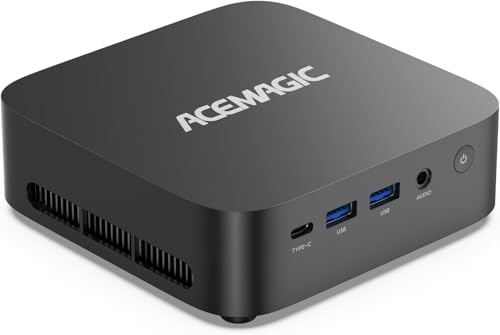
ACEMAGIC Ryzen R2544 Mini PC
Best for: multi-screen office and home setups
- Processor
- AMD Ryzen 3 PRO 7330U
- Installed RAM
- 16GB
- Storage Capacity
- 256GB
- Ethernet Ports
- 1x Gigabit Ethernet
- Operating System
- Windows 11 Pro
- Memory
- 16GB RAM
View on Amazon: ACEMAGIC Ryzen R2544 Mini PC Affiliate link
This ACEMAGIC mini PC uses an AMD Ryzen Embedded R2544 processor with a base clock of 3.35GHz. It includes 16GB of DDR4 RAM and a 512GB SSD. The system supports WiFi 5 and Bluetooth 4.2 for connectivity. You get three display outputs for triple-screen 4K setups. It runs Windows 11 Pro. This unit suits office tasks and home media use.
Pros
- AMD Ryzen Embedded R2544 quad-core processor
- 16GB DDR4 RAM with dual slots
- WiFi 5 and Bluetooth 4.2 connectivity
- Triple-screen 4K display support via USB-C, HDMI, and DP
Cons
- WiFi 5 is slower than newer WiFi 6 standards
- Bluetooth 4.2 lacks the speed of newer versions
- Only one USB 3.2 Gen1 Type-C port available
Good fit if
- You need triple-screen 4K display output
- You require stable WiFi 5 connectivity
- You want upgradable RAM and storage
Skip if
- You need WiFi 6 or WiFi 6E
- You require Bluetooth 5.0 or higher
- You want a fanless cooling design
Verdict: ACEMAGIC R2544 Mini PC 16GB RAM offers solid multi-screen support and upgradable internals. It fits users who prioritize display flexibility over the latest wireless standards.

HP EliteDesk Mini PC Core i5 16GB
Best for: Users needing fast Wi-Fi 6 connectivity
- Connectivity
- Bluetooth 5.0 (what this guide is about)
- Processor
- Intel Core i5-9500T
- Installed RAM
- 16GB
- Storage Capacity
- 256GB NVMe SSD
- Memory Type
- DDR4 2666MHz
- Graphics
- Intel UHD Graphics 630
View on Amazon: HP EliteDesk Mini PC Core i5 16GB Affiliate link
This HP Mini PC uses a 9th Gen Intel Core i5-9500T processor with 16GB of DDR4 RAM and a 256GB NVMe SSD. It stands out for its Wi-Fi 6 connectivity, offering faster wireless speeds than the Wi-Fi 5 options on this list. Bluetooth 5.0 is also included. The compact chassis measures 3.94 x 3.94 x 1.97 inches, making it easy to mount behind a monitor for a clean desktop setup.
Pros
- Wi-Fi 6 (802.11ax) for faster wireless connections
- 6-core Intel Core i5-9500T processor
- 16GB DDR4 RAM for smooth multitasking
- Bluetooth 5.0 for reliable peripheral pairing
Cons
- Only 256GB of storage capacity
- Includes a USB Wi-Fi adapter despite built-in Wi-Fi 6
- Integrated Intel UHD Graphics 630 limits gaming
Good fit if
- You need faster Wi-Fi 6 speeds
- You require a 6-core processor for heavy tasks
- You want a compact form factor for mounting
Skip if
- You need more than 256GB of storage
- You want a dedicated graphics card for gaming
- You prefer the latest 12th Gen Intel processors
Verdict: HP EliteDesk 800 G5 Mini i5-9500T is a practical office machine for users who prioritize fast Wi-Fi 6 and strong multi-core performance over high-end graphics.

Bmax Pocket Celeron Mini PC
Best for: Dual-screen office setups with limited space
- Connectivity
- WiFi 5 (what this guide is about)
- Processor
- Intel Celeron J3355
- Installed RAM
- 6GB
- Storage Capacity
- 128GB
- Memory Type
- LPDDR3
- Graphics
- Intel HD Graphics 500
View on Amazon: Bmax Pocket Celeron Mini PC Affiliate link
The Bmax B1 Plus uses an Intel Celeron J3355 processor and 6GB of LPDDR3 RAM. It connects via WiFi 5 and Bluetooth 5.0. Dual HDMI ports support 4K displays. This unit includes 128GB of storage with dual M.2 slots for expansion. It suits users needing basic office tasks and dual-screen setups in a small form factor.
Pros
- WiFi 5 and Bluetooth 5.0 connectivity
- Dual HDMI ports for 4K dual displays
- Dual M.2 SSD slots for expansion
- Compact 4.2x4.1x1.4 inch size
Cons
- Intel Celeron J3355 has lower performance than modern CPUs
- Only 6GB of LPDDR3 RAM
- 128GB storage capacity is limited
Good fit if
- You need dual monitors for productivity
- You want to expand storage via M.2 slots
- You require a small footprint for mounting
Skip if
- You need high-performance gaming or video editing
- You require more than 16GB of RAM
- You want the latest WiFi 6 standards
Verdict: Bmax B1 Plus Mini PC offers dual-display support and expandable storage for light office work. It fits users who prioritize screen real estate and compact mounting over raw processing power.

Beelink SER3 Ryzen 3 Mini PC
Best for: Dual 4K display setups
- Connectivity
- WiFi 5, Bluetooth 5.0 (what this guide is about)
- Processor
- AMD Ryzen 3 3200U
- Installed RAM
- 8GB
- Storage Capacity
- 256GB
- Memory Type
- DDR4
- Graphics
- Radeon Vega 3 Graphics
View on Amazon: Beelink SER3 Ryzen 3 Mini PC Affiliate link
The Beelink SER3 uses an AMD Ryzen 3 3200U processor for everyday tasks. It includes WiFi 5 and Bluetooth 5.0 for wireless connectivity. You get 8GB of DDR4 RAM and a 256GB NVMe SSD for storage. Dual HDMI 2.0 ports support two 4K displays at 60Hz. This compact unit fits well in home or office settings where reliable performance matters.
Pros
- WiFi 5 and Bluetooth 5.0 support
- Dual HDMI 2.0 ports for 4K@60Hz
- Expandable RAM up to 32GB
- VESA mountable design
Cons
- WiFi 5 is slower than WiFi 6
- Bluetooth 5.0 lacks latest LE Audio features
- Only 8GB RAM installed
Good fit if
- You need dual 4K displays
- You want a VESA mountable PC
- You use WiFi 5 networks
Skip if
- You require WiFi 6 speeds
- You need more than 8GB RAM
- You want Bluetooth 5.3
Verdict: Beelink SER3 Ryzen 3 Mini PC fits users who need dual 4K displays and VESA mounting. It suits those comfortable with WiFi 5 speeds.
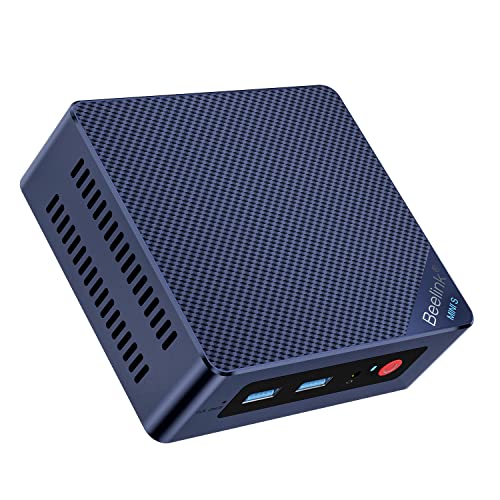
Beelink Mini S12 Intel N95 Mini PC
Best for: Dual-monitor office setups with wired LAN needs
- Connectivity
- WiFi 5 (what this guide is about)
- Processor
- Intel Alder Lake-N95
- Installed RAM
- 8GB
- Storage Capacity
- 480GB SATA3 SSD
- Memory Type
- DDR4
- Graphics
- Intel UHD Graphics
View on Amazon: Beelink Mini S12 Intel N95 Mini PC Affiliate link
The Beelink Mini S12 N95 uses an Intel Alder Lake-N95 processor running up to 3.4GHz. It includes 8GB DDR4 RAM and a 480GB SATA3 SSD. Connectivity relies on WiFi 5 and Bluetooth 4.2, alongside a 2.5G LAN port. This compact unit supports dual 4K displays via HDMI. It suits users needing basic multitasking and reliable wired or wireless internet for daily office tasks.
Pros
- Intel N95 processor up to 3.4GHz
- 8GB DDR4 RAM for quick system response
- WiFi 5 and Bluetooth 4.2 support
- 2.5G LAN for stable wired connections
Cons
- Bluetooth 4.2 is older than the 5.0 standard found in other list items
- WiFi 5 offers lower speeds than WiFi 6
- Single-channel RAM support limits maximum memory upgrade
Good fit if
- You need a wired 2.5G LAN connection
- You require dual monitor support for productivity
- You prioritize a compact form factor for desk space
Skip if
- You require the latest Bluetooth 5.0 or higher
- You need high-speed WiFi 6 connectivity
- You plan to upgrade RAM beyond 8GB significantly
Verdict: The Beelink Mini S12 N95 Mini PC provides solid entry-level performance with a 2.5G LAN port. It fits users who value wired stability and dual displays over cutting-edge wireless specs.

HiGOLE Fanless Celeron PC Stick
Best for: Silent office tasks and digital signage
- Connectivity
- WiFi 5 (what this guide is about)
- Processor
- Celeron J4105
- Installed RAM
- 8GB
- Storage Capacity
- 128GB
- Memory Type
- LPDDR4
- Graphics
- UHD 600
View on Amazon: HiGOLE Fanless Celeron PC Stick Affiliate link
This HiGOLE stick PC uses an Intel Celeron J4105 processor with 8GB LPDDR4 RAM and 128GB eMMC storage. It runs Windows 11 Pro and supports Linux. Connectivity includes dual-band WiFi 5 and Bluetooth 5.0 for wireless peripherals. The device features a fanless design for quiet operation and outputs 4K video via HDMI 2.0. It is a compact solution for basic desktop tasks and digital signage.
Pros
- Built-in WiFi 5 and Bluetooth 5.0 for wireless connections
- Fanless design ensures silent operation
- HDMI 2.0 port supports 4K output at 60Hz
- Supports both Windows 11 Pro and Linux operating systems
Cons
- 128GB eMMC storage is limited for large file libraries
- 8GB RAM is non-upgradeable LPDDR4
- No USB-C data port; only supports charging
Good fit if
- You need a silent, space-saving PC for office work
- You require dual-band WiFi 5 connectivity
- You want a device that supports Linux
Skip if
- You need high-performance processing for heavy applications
- You require expandable storage or RAM
- You need USB-C data transfer capabilities
Verdict: HiGOLE Fanless Stick PC Celeron J4105 is a compact, quiet option for users who prioritize wireless connectivity and silent operation over raw power or storage capacity.
Specifications side by side
| Spec | ACEMAGIC Ryzen R2544 Mini PC | HP EliteDesk Mini PC Core i5 16GB | Bmax Pocket Celeron Mini PC | Beelink SER3 Ryzen 3 Mini PC | Beelink Mini S12 Intel N95 Mini PC | HiGOLE Fanless Celeron PC Stick |
|---|---|---|---|---|---|---|
| Processor | AMD Ryzen 3 PRO 7330U | Intel Core i5-9500T | Intel Celeron J3355 | AMD Ryzen 3 3200U | Intel Alder Lake-N95 | Celeron J4105 |
| Installed RAM | 16GB | 16GB | 6GB | 8GB | 8GB | 8GB |
| Storage Capacity | 256GB | 256GB NVMe SSD | 128GB | 256GB | 480GB SATA3 SSD | 128GB |
| Memory Type | not stated | DDR4 2666MHz | LPDDR3 | DDR4 | DDR4 | LPDDR4 |
| Graphics | not stated | Intel UHD Graphics 630 | Intel HD Graphics 500 | Radeon Vega 3 Graphics | Intel UHD Graphics | UHD 600 |
| Ethernet Ports | 1x Gigabit Ethernet | not stated | 1x GbE | Gigabit Ethernet | 2.5G LAN | 1x Gigabit LAN |
| Operating System | Windows 11 Pro | not stated | Windows 11 Home | not stated | not stated | Windows 11 Pro |
| Memory | 16GB RAM | 16GB RAM | not stated | 8GB RAM | 8GB RAM | 8GB RAM |
| Storage | 256GB SSD | 256GB SSD | not stated | not stated | not stated | not stated |
| Use | Home, Business, Office | not stated | Home, Office | Home, Office | not stated | Business, Office, IoT |
| Networking | not stated | WiFi 6 | not stated | not stated | 2.5G LAN | Gigabit Ethernet |
| Form Factor | not stated | not stated | not stated | not stated | not stated | Stick PC |
| Connectivity | not stated | Bluetooth 5.0 | WiFi 5 | WiFi 5, Bluetooth 5.0 | WiFi 5 | WiFi 5 |
| Dimensions | not stated | 3.94 × 3.94 × 1.97 inches | not stated | not stated | not stated | not stated |
| Weight | not stated | 2.2 pounds | not stated | not stated | not stated | 1.5 pounds |
| Size | Pro 7330U+16GB+256GB | 800G5 | 16GB+256GB SSD | not stated | AMD-R3-8G+256GB-3200U | MINI S12 N95/8G+480G | Mini |
| Model | K1 | HP 800 G5 EliteDesk Mini Desktop | B1 Plus | SER3 | MINIS | J4105-8+128 |
| Color | not stated | Black | Blue-1 | not stated | Black | J4105-8+128 |
Frequently asked questions
Can I connect wireless peripherals to these mini PCs?
Yes, models with Bluetooth 5.0 support wireless mice and keyboards. The HP EliteDesk and Beelink SER3 include this feature. This allows you to reduce cable clutter on your desk. You can pair devices directly without a USB receiver for a cleaner workspace setup.
Is WiFi 5 fast enough for streaming video?
WiFi 5 provides sufficient speed for most streaming tasks. It operates on the 5GHz band to reduce interference. Several listed models, including the ACEMAGIC and Bmax units, use this standard. You can stream video and browse the web without issues on these connections.
Which mini PC offers the best wireless speed?
The HP EliteDesk 800 G5 Mini features WiFi 6 connectivity. This is faster than the WiFi 5 found in other options on the list. It is ideal if you prioritize rapid data transfers and strong multi-core performance. This model stands out for users needing the latest wireless standard.
Do I need a wired connection for stability?
Wired connections offer more stability than wireless options. The Beelink Mini S12 includes a 2.5G LAN port for this purpose. It suits users who value reliable performance over cutting-edge wireless specs. You can plug directly into your router for consistent data flow during heavy tasks.
Can I use Bluetooth devices with the ACEMAGIC R2544?
The data for the ACEMAGIC R2544 does not list Bluetooth capabilities. It focuses on WiFi 5 connectivity and display flexibility. You should verify specific peripheral support before buying. This model prioritizes multi-screen setups and upgradable internals over wireless input device integration.
What is the benefit of Bluetooth 5.0 over older versions?
Bluetooth 5.0 offers improved range and speed compared to earlier versions. It provides a more stable connection for peripherals. The HP EliteDesk and Beelink SER3 utilize this standard. You get better performance when connecting wireless accessories without significant signal loss over short distances.
Are all listed mini PCs compatible with dual monitors?
Most listed models support dual-screen configurations for office use. The Bmax B1 Plus and Beelink SER3 are noted for this capability. This allows you to expand your workspace efficiently. It fits users who prioritize screen real estate and compact mounting options for their home or office setup.