Dell OptiPlex Micro Core i7 Mini PC Review (2026): A Spec-Based Look
As an Amazon Associate we earn from qualifying purchases. Links on this page are affiliate links.
This dell optiplex 5090 micro desktop review covers a compact workstation built for steady performance. The listing features a 10th Generation Intel Core i7-10700T processor with 32GB of DDR4 memory. This combination handles multitasking with ease, while the 512GB NVMe SSD provides fast storage access. You get a small form factor that fits easily on a desk or behind a monitor. The system runs Windows 11 Professional out of the box, offering full enterprise features. It includes essential connectivity options like USB-C and DisplayPort 1.4 outputs. This setup is designed for users who need reliable computing power in a minimal footprint.
What stands out
- 10th Gen Intel Core i7-10700T processor with up to 4.50 GHz Turbo Boost
- 32GB DDR4 RAM for robust multitasking capabilities
- 512GB PCIe NVMe SSD for quick boot and load times
- Windows 11 Professional operating system included
Who it fits
Good fit for
This mini PC suits office workers, remote professionals, and home users who need a reliable daily driver. The 32GB of RAM and i7 processor handle multiple browser tabs, spreadsheets, and video calls without slowing down. If you need a quiet, small computer for a dual-monitor setup, the DisplayPort and USB-C ports are useful. It is also ideal for light content creation or coding tasks that benefit from extra memory. The compact size makes it perfect for tight workspaces.
Who should skip it
You should look elsewhere if you plan to play modern 3D games. The Intel UHD Graphics 630 is integrated and not designed for heavy gaming or 3D rendering. It lacks a dedicated graphics card. Also, if you need the latest CPU architecture, this 10th Gen chip is older. While still capable, it may not match the speed of newer 12th or 13th Gen models. Users requiring high-end video editing or 4K gaming will find the graphics limitations restrictive.
Verdict: This mini PC offers strong multitasking performance and ample memory in a small package. It is a solid choice for productivity-focused users who do not need high-end graphics.
Key specs explained for this Mini PC
Intel Core i7-10700T
This eight-core processor runs at a base speed of 2.00 GHz. It can boost up to 4.50 GHz when you need extra power for demanding tasks. The T-series design focuses on efficiency, which helps keep the small case cool. You benefit from strong multitasking ability without excessive heat. This level of performance suits users who run multiple applications or professional software simultaneously.
32GB DDR4 RAM
This amount of memory allows you to keep many programs open at once. You can switch between heavy spreadsheets, video editing tools, and web browsers without slowdowns. The DDR4 type is a standard, reliable memory format for this class of computer. Having 32GB ensures you will not run out of resources during complex workflows. This capacity is ideal for power users who need smooth performance under load.
512GB NVMe SSD
This solid state drive stores your operating system and files. The NVMe interface connects directly to the motherboard, offering much faster read and write speeds than older storage types. You will see quicker boot times and faster loading of large files. The 512GB capacity provides ample space for documents and applications. This storage type ensures the system feels responsive during daily use and heavy data transfers.
Windows 11 Pro
This operating system provides a modern interface and advanced business features. You get access to remote desktop capabilities and enhanced security tools like BitLocker encryption. The Pro version supports domain joining, which is useful for office environments. You benefit from a stable platform that receives regular updates and compatibility with professional software. This OS is suitable for both home users and small business setups requiring enterprise-grade management.
Design and Build Analysis
The Dell OptiPlex 5090 Micro presents a compact, black chassis according to the listing. This small form factor design allows you to mount the unit behind a monitor or place it discreetly on a desk. The minimal footprint is ideal for users who need to save space without sacrificing processing power. The black finish helps the device blend into professional office environments or home setups where visual clutter is minimized.
Port placement and connectivity define its practical layout. You get two DisplayPort 1.4 outputs, one RJ45 Ethernet port, and four USB 3.2 Gen 1 ports. There is also one USB 3.2 Gen 2x1 Type-C port and a universal audio jack. This variety supports multiple displays and peripheral connections without requiring additional hubs. The inclusion of a Kensington Lock Slot and TPM 2.0 indicates a focus on physical security and data protection, which is essential for business or sensitive personal use.
The listing notes that a USB keyboard and mouse are included. This adds convenience for immediate setup. The overall build suggests a durable, no-frills approach. You get a reliable machine designed for steady operation rather than flashy aesthetics. The compact size and robust port selection make it suitable for tight spaces where performance and connectivity are priorities.
Setup and Everyday Use Guide
Setting up this Dell OptiPlex Micro is straightforward thanks to the included peripherals. The listing provides a USB keyboard and mouse, so you can connect them to the four USB 3.2 Gen 1 ports or the single USB 3.2 Gen 2 Type-C port immediately. You will also need a display. The unit features two DisplayPort 1.4 outputs, allowing you to drive dual monitors for a productive workspace. For internet access, you have two clear options. The built-in WiFi and Bluetooth module handles wireless connections, while the RJ45 Ethernet port offers a stable wired link for heavy data transfers or low-latency tasks. Once powered on, the system boots directly into Windows 11 Professional. This operating system is designed for business environments and includes enhanced security features like TPM 2.0 support. Daily use feels efficient due to the 32GB of DDR4 RAM. This large memory capacity allows you to keep many applications open simultaneously without slowing down the system. The 512GB NVMe SSD ensures that programs launch quickly and files load with minimal delay. The Intel UHD Graphics 630 handles standard desktop tasks, video playback, and light photo editing without issue. It is not intended for high-end gaming, but it manages everyday visual needs well. The compact size lets you mount the unit behind your monitor using a Kensington Lock Slot for security. This setup keeps your desk clutter-free while providing robust performance for office work, web browsing, and document creation.
Before you buy this mini PC
You already have the core hardware, but you must verify your display setup. This unit relies on two DisplayPort 1.4 outputs for video. If your monitor uses HDMI or DisplayPort, you will need a compatible adapter or cable. The listing includes a USB keyboard and mouse, but you should check if your preferred input devices fit the available USB 3.2 Gen 1 and Gen 2x1 Type-C ports.
Upkeep is minimal. The T-series processor generates less heat than standard chips, so ensure your workspace has adequate airflow to maintain that efficiency. Keep the 512GB SSD free of clutter to preserve its fast access speeds. This OptiPlex Micro fits into the broader category of small form factor computers by offering enterprise-grade reliability in a tiny footprint. It sits alongside other compact options by prioritizing steady multitasking over raw graphical power. You should confirm that your software requirements align with Windows 11 Pro before finalizing your choice among the 1 alternatives.
Check before you buy
- Verify your monitor has DisplayPort 1.4 inputs or buy adapters.
- Check if your peripherals fit the available USB 3.2 ports.
- Ensure your workspace has enough airflow for the chassis.
- Confirm your software is compatible with Windows 11 Pro.
The product at a glance
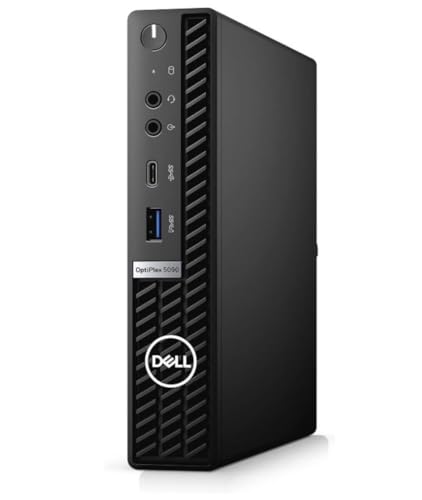
Dell OptiPlex Micro Core i7 Mini PC
Best for: Office multitasking and business productivity
- Processor
- Intel Core i7-10700T
- Installed RAM
- 32GB
- Storage Capacity
- 512GB
- Memory Type
- DDR4
- Graphics
- Intel UHD Graphics 630
- Ethernet Ports
- 1x RJ45
View on Amazon: Dell OptiPlex Micro Core i7 Mini PC Affiliate link
This Dell OptiPlex 5090 Micro is a compact desktop powered by a 10th Gen Intel Core i7-10700T processor. It includes 32GB of DDR4 RAM and a 512GB NVMe SSD. The system runs Windows 11 Pro and features Intel UHD Graphics 630. It offers multiple connectivity options, including USB-C and DisplayPort. This setup suits users who need reliable performance for office tasks and multitasking in a small footprint.
Pros
- 8-core Intel Core i7-10700T processor with Turbo Boost up to 4.50 GHz
- 32GB DDR4 installed memory for efficient multitasking
- 512GB PCIe NVMe SSD for fast storage access
- Windows 11 Professional operating system included
Cons
- Uses older 10th generation Intel processor architecture
- Integrated Intel UHD Graphics 630 limits gaming performance
- No dedicated graphics card for heavy visual workloads
Good fit if
- You require high RAM capacity for professional applications
- You need a reliable Windows 11 Pro business machine
- You prioritize CPU performance over graphical capabilities
Skip if
- You require modern 12th or 13th generation Intel processors
- You need dedicated graphics for gaming or 3D rendering
- You want the latest connectivity standards like USB4
Verdict: Dell OptiPlex 5090 Micro i7 is a solid choice for office professionals who need strong processing power and ample RAM. It fits users who prioritize system stability and multitasking speed over modern graphics features.
Specifications side by side
| Spec | Dell OptiPlex Micro Core i7 Mini PC |
|---|---|
| Processor | Intel Core i7-10700T |
| Installed RAM | 32GB |
| Storage Capacity | 512GB |
| Memory Type | DDR4 |
| Graphics | Intel UHD Graphics 630 |
| Ethernet Ports | 1x RJ45 |
| Operating System | Windows 11 Pro |
| Memory | 32GB RAM |
| Storage | 512GB SSD |
| Color | Black |
| Model | OptiPlex 5090 Micro Desktop |
Frequently asked questions
Is this Dell OptiPlex Micro suitable for heavy video editing?
No, it is not designed for heavy video editing. The listing highlights the Intel Core i7 processor and 32GB of RAM for office multitasking and business productivity. It lacks dedicated graphics features, prioritizing system stability and steady performance for professional tasks over modern graphics capabilities.
What operating system comes pre-installed on this mini PC?
This unit comes with Windows 11 Pro pre-installed. This operating system provides enhanced security features and productivity tools suitable for business environments. You get a familiar interface that supports enterprise-level management and seamless integration with other corporate software and cloud services.
How much RAM does the Dell OptiPlex 5090 Micro have?
The Dell OptiPlex 5090 Micro includes 32GB of RAM. This ample memory allows you to run multiple applications simultaneously without significant slowdowns. It supports efficient multitasking, making it ideal for users who need to keep many browser tabs, documents, and programs open at once.
Does this mini PC include a hard drive or SSD?
Yes, it features a 512GB SSD for storage. This solid-state drive ensures fast boot times and quick access to your files and applications. The NVMe technology provides rapid data transfer speeds, enhancing overall system responsiveness compared to traditional mechanical hard drives.
What is the primary use case for this Dell model?
The primary use case is office multitasking and business productivity. It is built for professionals who require reliable processing power and ample memory for daily tasks. The configuration supports steady performance for spreadsheets, email, video conferencing, and other standard business applications.
Is the Dell OptiPlex Micro compact enough for small desks?
Yes, it is a compact micro desktop designed for small spaces. Its small form factor allows you to mount it behind a monitor or place it discreetly on a desk. This minimal footprint helps save valuable desk space while maintaining a professional appearance.