Looking Beyond the Dell OptiPlex Next-Generation? 6 Alternatives Worth a Look
As an Amazon Associate we earn from qualifying purchases. Links on this page are affiliate links.
If you are exploring dell optiplex next generation alternatives, you likely want to compare the Dell Pro Micro Core Ultra 5 Mini PC against other compact business systems. This desktop handles demanding multitasking with its Intel Core Ultra 5 processor, 16GB of DDR5 RAM, and 512GB PCIe NVMe SSD. It also includes Windows 11 Pro and WiFi 6E for reliable connectivity. Its ultra-compact chassis saves significant desk space and supports VESA mounting.
You might choose a different model if you need a larger chassis, a different processor tier, or a barebone configuration to customize your own memory and storage. The alternatives in this list were selected because their specifications overlap with the original. Each option offers similar compact dimensions and business-grade features. You can find systems with Core Ultra 7 chips, dual Thunderbolt 4 ports, or legacy VGA outputs. These options provide varied paths for space-conscious workspaces without sacrificing essential performance.
How alternatives compare to Dell Pro Micro
Lenovo ThinkCentre Tiny Core Ultra PC
The Lenovo ThinkCentre Tiny uses an Intel Core i7 processor, offering more processing power than the Dell’s Core Ultra 5. It also includes 16GB of DDR5 memory and a 512GB SSD, matching the Dell’s storage and speed. The Lenovo runs Windows 11 Pro, providing the same enterprise features like BitLocker encryption. It supports WiFi 6E for reliable wireless connectivity. The Lenovo is slightly wider at 7.2 inches but maintains a similar compact footprint. You should choose this if you need stronger multi-core performance for complex spreadsheets or intensive multitasking while keeping the same professional OS and memory configuration.
ASUS NUC 14 Pro Ultra 7 Mini PC
The ASUS NUC 14 Pro steps up to a Core Ultra 7 processor with 16 cores, significantly boosting performance over the Dell’s Core Ultra 5. It retains the 16GB RAM and 512GB SSD capacity. The ASUS model is much smaller, measuring 4.61 inches in length compared to the Dell’s book-sized chassis. It adds Thunderbolt 4 ports for high-speed data transfer and display output, which the Dell lacks. It also supports WiFi 6E. Pick this option if you need a smaller footprint with higher processing power and faster connectivity options for demanding business or light gaming tasks.
NENCHIN Intel NUC 13 Pro Core i7 Barebone
The NENCHIN Intel NUC 13 Pro is a barebone system, meaning it does not include RAM, storage, or an operating system. You must provide these components yourself, unlike the Dell which arrives ready to use with Windows 11 Pro and 16GB DDR5 RAM. It features a Core i7 processor and supports up to four displays. The NENCHIN is compact at 4.6 inches long. Choose this if you want to customize your memory and storage specs or already have compatible components. It is ideal for users who prefer to build their own setup rather than buying a pre-configured business desktop.
Dell OptiPlex Micro Intel i5 14-Core PC
The Dell OptiPlex Micro uses a 14-core Intel Core i5 processor, which offers a different performance profile than the Core Ultra 5. It includes 16GB of DDR5 RAM and a 512GB SSD, matching the original’s memory and storage. It runs Windows 11 Pro and supports WiFi 6E. A key difference is the inclusion of legacy VGA support, which the newer Pro Micro lacks. The dimensions are nearly identical. Select this model if your workspace requires older VGA monitors or if you prefer the specific architecture of the 14-core i5 for standard office applications.
Geekplus Core i7 Barebone Mini PC
The Geekplus Core i7 Barebone is another barebone option, lacking pre-installed RAM, storage, and OS. It uses a Core i7 processor for strong performance. You must source your own components, unlike the Dell’s out-of-the-box readiness. The Geekplus is compact at 4.6 inches long. It is designed for users who want to customize their hardware specifications. Pick this if you need a barebone chassis for a specific custom build rather than a fully configured system. It offers processing power but requires additional purchases to become a functional desktop.
Apple Mac mini M6 Desktop
The Apple Mac mini M6 runs macOS, not Windows 11 Pro. It uses an M6 chip with 16GB of unified memory and a 512GB SSD. The Mac mini is significantly smaller and lighter than the Dell, measuring 5 inches square and weighing just 1.48 pounds. It features Thunderbolt 4 for fast connectivity. Choose this if you prefer the macOS ecosystem and need a tiny form factor with strong AI performance. It is not suitable if you require Windows-specific business features like BitLocker or Remote Desktop Protocol.
Quick picks
Our 7 picks
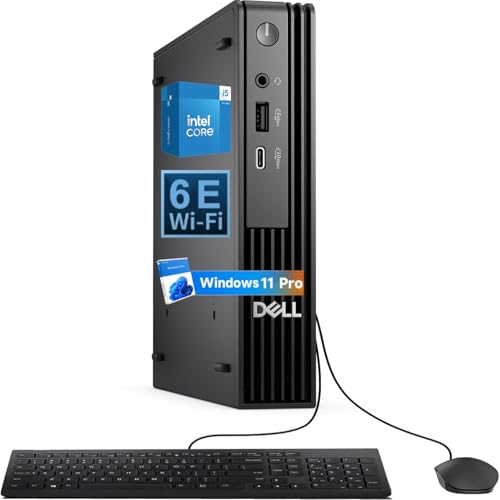
Dell Pro Micro Core Ultra 5 Mini PC
Best for: compact office setups needing Windows 11 Pro
- Processor
- Intel Core Ultra5 235T
- Installed RAM
- 16GB
- Storage Capacity
- 512GB
- Memory Type
- DDR5
- Operating System
- Windows 11 Pro
- Use
- Business
You get an ultra-compact business desktop powered by the Intel Core Ultra 5 235T processor, 16GB of DDR5 RAM, and a 512GB PCIe NVMe SSD. It features dual video outputs with HDMI and DisplayPort, alongside Intel WiFi 6E and Bluetooth connectivity. Running Windows 11 Pro 64-bit, this paperback-sized chassis fits behind a monitor via VESA mounting. It suits you if you need modern enterprise performance in a minimal desk footprint.
Pros
- Intel Core Ultra 5 235T processor
- 16GB DDR5 RAM with 512GB PCIe NVMe SSD
- Dual monitor support via HDMI and DisplayPort
- Intel WiFi 6E and Bluetooth built in
- Pre-installed Windows 11 Pro 64-bit license
Cons
- Limited to two native display outputs
- Factory storage capacity limited to 512GB
Good fit if
- You need a compact enterprise system with Windows 11 Pro.
- You want modern Intel Core Ultra processing with DDR5 memory.
- You plan to mount your desktop behind a monitor using VESA.
Skip if
- You require more than two native display connections.
- You need more than 512GB of internal storage from the start.
Verdict: Dell Pro Micro Core Ultra 5 Mini PC delivers capable everyday business computing in a paperback-sized footprint. It balances modern Core Ultra 5 processing, DDR5 memory, and enterprise OS features for space-conscious desks.

Lenovo ThinkCentre Tiny Core Ultra PC
Best for: compact office workspaces needing multi-display support
- Processor
- Intel Core Ultra 3 205T
- Installed RAM
- 16GB
- Storage Capacity
- 512GB
- Memory Type
- DDR5
- Graphics
- Integrated Intel Graphics
- Ethernet Ports
- RJ-45 Gigabit Ethernet
This compact desktop brings Intel Core Ultra 3 processing to a 1.5-inch thin chassis. You get 16GB of DDR5 memory paired with a 512GB NVMe SSD and Windows 11 Pro preinstalled. Integrated Intel Graphics power multi-display setups via DisplayPort and HDMI ports. It suits you if you need reliable enterprise connectivity, Wi-Fi 6E, and Gigabit Ethernet in an ultra-small profile designed for tight desk spaces.
Pros
- Intel Core Ultra 3 205T processor with 16GB DDR5 RAM
- Dual monitor support via HDMI and DisplayPort
- Wi-Fi 6E, Bluetooth, and RJ-45 Gigabit Ethernet
- Compact 2.91-pound chassis measuring 1.5 inches thin
Cons
- Relies on integrated graphics rather than discrete GPU
- Base storage capacity limited to 512GB NVMe SSD
Good fit if
- You need a space-saving business desktop with Wi-Fi 6E and Gigabit Ethernet.
- You want Windows 11 Pro and DDR5 memory out of the box.
- You run multi-monitor office setups using HDMI and DisplayPort.
Skip if
- You require dedicated graphics hardware for heavy 3D workloads.
- You need more than 512GB of factory storage capacity.
Verdict: Lenovo ThinkCentre Tiny Core Ultra Mini PC delivers efficient Core Ultra performance and fast DDR5 memory in a compact form factor. It provides dependable business connectivity with dual video outputs and Windows 11 Pro.

ASUS NUC 14 Pro Ultra 7 Mini PC
Best for: compact multi-display productivity and light gaming
- Processor
- Intel Core Ultra 7 155H
- Installed RAM
- 16GB
- Storage Capacity
- 512GB SSD
- Memory Type
- DDR5
- Ethernet Ports
- 1x RJ45
- High-Speed Expansion
- 2x Thunderbolt 4
The ASUS NUC 14 Pro is a compact desktop powered by the 16-core Intel Core Ultra 7 155H processor with 16GB of DDR5 memory. You get dual Thunderbolt 4 ports, two HDMI 2.1 outputs, and Wi-Fi 6E connectivity in a chassis measuring 1.46 inches tall. This setup suits you if you need a compact system for multi-monitor productivity and gaming workloads alongside standard business tasks.
Pros
- Intel Core Ultra 7 155H processor with 16 cores and 22 threads
- Dual Thunderbolt 4 ports and two HDMI 2.1 ports for up to four 4K displays
- High-speed 16GB DDR5 memory paired with a 512GB SSD
- Fast external connectivity via USB 3.2 Gen 2x2 Type-C and Wi-Fi 6E
Cons
- Internal storage capacity is limited to 512GB out of the box
- Provides only one RJ45 Ethernet port
- Factory seal is opened prior to delivery for hardware configuration
Good fit if
- You need to drive up to four 4K displays simultaneously via HDMI and Thunderbolt 4.
- You want a 16-core Intel Core Ultra 7 processor inside a chassis under 1.5 inches tall.
- You require Windows 11 Pro management and security features.
Skip if
- You require more than 512GB of base storage without adding drives.
- You need dual LAN ports for complex network routing.
Verdict: ASUS NUC 14 Pro Core Ultra 7 Mini PC pairs a 16-core processor with dual Thunderbolt 4 ports for dense computing and multi-display outputs. It delivers high-bandwidth expansion in an ultra-small form factor for business and gaming use.

NENCHIN Intel NUC 13 Pro Core i7 Barebone
Best for: custom barebone office setups needing multi-display connectivity
- Processor
- Intel Core i7-1360P
- Installed RAM
- 0GB
- Storage Capacity
- 0GB
- Memory Type
- DDR4
- Graphics
- Intel Iris Xe Graphics
- Ethernet Ports
- 2.5Gbps
This barebone mini PC runs on a 12-core Intel Core i7-1360P processor with Intel Iris Xe Graphics, measuring 4.6 by 4.4 by 2.1 inches. Because it ships without RAM, storage, or an operating system, you supply and configure your own DDR4 memory and M.2 or 2.5-inch solid-state drives. Dual Thunderbolt 4 ports, dual HDMI 2.1 outputs, and 2.5Gbps Ethernet make it well suited for customized multi-display office setups.
Pros
- Intel Core i7-1360P 12-core processor reaching up to 5.0GHz
- Dual Thunderbolt 4 and dual HDMI 2.1 ports driving up to four displays
- High-speed networking with 2.5Gbps Ethernet and Wi-Fi 6E
- Internal expansion room for both M.2 and 2.5-inch drives
Cons
- Requires you to purchase and install RAM, storage, and an operating system
- Supports DDR4 memory rather than DDR5
Good fit if
- You want to configure your own memory, storage drive, and operating system.
- You run a multi-monitor office workspace requiring up to four displays.
- You need 2.5Gbps wired networking paired with Thunderbolt 4 expansion.
Skip if
- You want a fully assembled desktop that works straight out of the box.
- You prefer a platform built for newer DDR5 memory modules.
Verdict: Intel NUC 13 Pro Barebone Mini PC delivers fast 13th Gen processing and four-display output for workspaces where you prefer bringing your own memory, storage, and operating system.
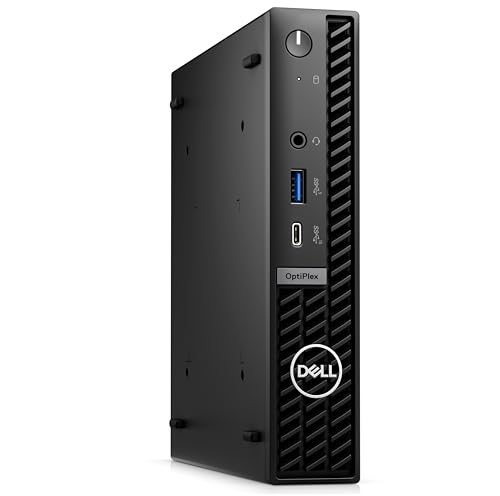
Dell OptiPlex Micro Intel i5 14-Core PC
Best for: multi-display office setups requiring legacy video ports
- Processor
- Intel Core i5-14500
- Installed RAM
- 16GB
- Storage Capacity
- 512GB
- Graphics
- Intel HD Graphics 770
- Ethernet Ports
- Gigabit Ethernet
- Operating System
- Windows 11 Pro
This Dell micro desktop equips your workspace with a 14-core Intel Core i5-14500 processor, 16GB RAM, and a 512GB solid-state drive. It gives you flexible monitor compatibility through onboard HDMI, DisplayPort, and legacy VGA outputs without requiring extra adapters. Windows 11 Pro comes standard. It suits you if you need reliable day-to-day productivity, broad peripheral connectivity via multiple USB 3.2 ports, and compact multi-display management in a space-saving business chassis.
Pros
- 14-core Intel Core i5-14500 processor
- Triple video output via DisplayPort, HDMI, and VGA
- USB Type-C and high-speed USB 3.2 Gen 2 ports
- Includes Windows 11 Pro license
Cons
- Integrated Intel graphics only without dedicated GPU option
- Wired networking limited to standard Gigabit Ethernet
Good fit if
- You need native VGA alongside modern HDMI and DisplayPort connections.
- You run multithreaded office workflows that benefit from a 14-core CPU.
- You require Windows 11 Pro for domain networking out of the box.
Skip if
- You require dedicated graphics performance for heavy 3D tasks.
- You need 2.5GbE or faster wired networking speeds.
Verdict: Dell OptiPlex Micro Intel Core i5 Desktop delivers strong 14-core processing and legacy VGA support in a compact footprint for business workstations.

Geekplus Core i7 Barebone Mini PC
Best for: custom hardware builds needing multi-display output
- Processor
- Intel Core i7-1360P
- Installed RAM
- Barebone
- Storage Capacity
- Barebone
- Graphics
- Intel Iris Xe Graphics
- Ethernet Ports
- 1x 2500 Mbps RJ45
- High-Speed Expansion
- Thunderbolt 4
This mini PC brings desktop-level power into a compact chassis measuring 4.4 by 4.6 inches. It comes equipped with a 12-core Intel Core i7-1360P processor and Intel Iris Xe Graphics. Because this is a barebone kit, you supply and install your own memory, storage drive, and operating system. It suits you if you want fast 2.5 Gbps Ethernet, Thunderbolt 4 expansion, and support for up to four 4K displays.
Pros
- Intel Core i7-1360P processor with 12 cores and 16 threads
- Thunderbolt 4 and HDMI 2.1 ports support up to four 4K displays
- High-speed networking with 2.5 Gbps Ethernet and Wi-Fi 6E
- Compact chassis measuring 4.4 by 4.6 inches
Cons
- Requires separate purchase and installation of RAM, storage, and OS
- Relies on integrated graphics rather than a dedicated GPU
Good fit if
- You want to choose and install your own memory and solid-state drive.
- You need 2.5 Gbps wired networking and Thunderbolt 4 connectivity.
- You plan to run multiple high-resolution displays from one compact unit.
Skip if
- You want a fully assembled system with an operating system pre-installed.
- You need dedicated graphics hardware for heavy 3D rendering tasks.
Verdict: Geekplus Intel NUC 13 Pro Barebone delivers strong processing and connectivity specs for users who want to configure their own memory and storage.

Apple Mac mini M6 Desktop
Best for: macOS users needing compact AI power
- Processor
- M6
- Installed RAM
- 16GB
- Storage Capacity
- 512GB SSD
- Memory Type
- Unified Memory
- Graphics
- 12-core GPU
- Ethernet Ports
- 2.5Gb Ethernet
The Apple M6 Mac mini packs a powerful chip into a five-by-five-inch chassis. It includes 16GB of unified memory and a 512GB SSD. You get three Thunderbolt 4 ports and 2.5Gb Ethernet for fast connections. This small desktop runs macOS and supports up to three external displays. It suits users who want a compact, high-performance machine for AI workflows and daily tasks.
Pros
- Apple M6 chip with dual 16-core Neural Engine
- 16GB unified memory with 170GB/s bandwidth
- Three Thunderbolt 4 ports for high-speed expansion
- 2.5Gb Ethernet and Wi-Fi 7 support
- Supports up to three external displays
Cons
- Runs macOS, limiting Windows software compatibility
- No internal optical drive for disc playback
- Base model lacks Pro chip performance options
Good fit if
- You need a compact desktop for macOS apps
- You require fast Thunderbolt 4 connectivity
- You want strong AI processing power
Skip if
- You need a Windows operating system
- You require an internal DVD drive
- You prefer a larger chassis for easy upgrades
Verdict: Apple M6 Mac mini 5-inch Desktop delivers strong AI performance in a tiny frame. It fits users who value macOS efficiency and Thunderbolt 4 speed over expandability.
Specifications side by side
| Spec | Dell Pro Micro Core Ultra 5 Mini PC | Lenovo ThinkCentre Tiny Core Ultra PC | ASUS NUC 14 Pro Ultra 7 Mini PC | NENCHIN Intel NUC 13 Pro Core i7 Barebone | Dell OptiPlex Micro Intel i5 14-Core PC | Geekplus Core i7 Barebone Mini PC | Apple Mac mini M6 Desktop |
|---|---|---|---|---|---|---|---|
| Processor | Intel Core Ultra5 235T | Intel Core Ultra 3 205T | Intel Core Ultra 7 155H | Intel Core i7-1360P | Intel Core i5-14500 | Intel Core i7-1360P | M6 |
| Installed RAM | 16GB | 16GB | 16GB | 0GB | 16GB | Barebone | 16GB |
| Storage Capacity | 512GB | 512GB | 512GB SSD | 0GB | 512GB | Barebone | 512GB SSD |
| Memory Type | DDR5 | DDR5 | DDR5 | DDR4 | not specified | not specified | Unified Memory |
| Graphics | not specified | Integrated Intel Graphics | not specified | Intel Iris Xe Graphics | Intel HD Graphics 770 | Intel Iris Xe Graphics | 12-core GPU |
| Ethernet Ports | not specified | RJ-45 Gigabit Ethernet | 1x RJ45 | 2.5Gbps | Gigabit Ethernet | 1x 2500 Mbps RJ45 | 2.5Gb Ethernet |
| High-Speed Expansion | not specified | not specified | 2x Thunderbolt 4 | Thunderbolt 4 | not specified | Thunderbolt 4 | Thunderbolt 4 |
| Operating System | Windows 11 Pro | Windows 11 Pro | Windows 11 Pro | not specified | Windows 11 Pro | not specified | macOS |
| Memory | not specified | not specified | 16GB RAM | not specified | not specified | not specified | 16GB RAM |
| Storage | 512GB SSD | 512GB SSD | 512GB SSD | not specified | 512GB SSD | not specified | 512GB SSD |
| Use | Business | Business | Home, Business, Gaming | Home, Business, Office | Business | Home, Business | not specified |
| Networking | WiFi 6E | WiFi 6E | WiFi 6E | WiFi 6, Gigabit Ethernet | WiFi 6E | not specified | not specified |
| Form Factor | not specified | not specified | not specified | Barebone | not specified | Barebone | not specified |
| Dimensions | not specified | 7.05 × 1.5 × 7.2 inches | 4.61 × 4.41 × 1.46 inches | 4.6 × 4.4 × 2.1 inches | 7.01 × 1.42 × 7.17 inches | 4.6 × 4.4 × 2.1 inches | 5 × 5 × 1.97 inches |
| Weight | not specified | 2.91 pounds | not specified | not specified | 2.95 pounds | not specified | 1.48 pounds |
| Model | QCM1250 | ThinkCentre M70q Gen 6 | NUC 14 Pro | NUC13ANK | 7020 MFF | NUC13ANHi7 Barebon | MHQL4LL/A |
| Size | not specified | 16GB DDR5 | 512GB NVMe | 16GB RAM |512GB SSD | NUC13 i7 0GB+0GB | 16GB DDR5 RAM, 512GB PCIe SSD | NUC13ANHi7 Barebone | 16GB Unified Memory | 512GB SSD Storage |
| Color | not specified | Black | Black | black | Black | NUC13ANHi7 Barebone | Silver |
If you specifically need a Core i7-9700 processor, review dell optiplex 7070 sff desktop alternatives with comparable ports.
Frequently asked questions
Which mini PC is best for a compact office needing Windows 11 Pro?
The Dell Pro Micro Core Ultra 5 Mini PC is the top choice for this need. It features a Core Ultra 5 processor and DDR5 memory in a paperback-sized footprint. The system runs Windows 11 Pro, providing enterprise-grade security and management features for business environments.
Does the Lenovo ThinkCentre Tiny support multiple displays?
Yes, the Lenovo ThinkCentre Tiny Core Ultra PC supports multi-display setups. It includes dual video outputs to connect external monitors. This makes it suitable for compact office workspaces where screen real estate is limited but productivity demands are high.
What are the dimensions of the ASUS NUC 14 Pro?
The ASUS NUC 14 Pro Ultra 7 Mini PC measures 4.41 inches in width, 1.46 inches in height, and 4.61 inches in length. Its ultra-small form factor allows it to fit easily behind monitors or in tight desk spaces.
Can I upgrade the RAM and storage on the NENCHIN Intel NUC 13 Pro?
Yes, the NENCHIN Intel NUC 13 Pro Core i7 is sold as a barebone system. This means it does not include pre-installed memory or storage. You can bring your own RAM and SSD to customize the configuration to your specific performance needs.
Does the Dell OptiPlex Micro have legacy video ports?
Yes, the Dell OptiPlex Micro Intel i5 14-Core PC includes legacy VGA support. This is useful for connecting to older projectors or monitors that lack HDMI inputs. It also features a 14-core processor and 16GB of DDR5 RAM for business tasks.
Is the Apple Mac mini M6 good for AI tasks?
The Apple Mac mini M6 Desktop delivers strong AI performance. It uses 16GB of unified memory and a 512GB SSD. The system is designed for users who prioritize macOS efficiency and Thunderbolt 4 speed over Windows-based expandability.
What networking options does the Lenovo ThinkCentre Tiny offer?
The Lenovo ThinkCentre Tiny Core Ultra PC includes WiFi 6E for fast wireless connectivity. It provides dependable business connectivity alongside its dual video outputs and Windows 11 Pro operating system, ensuring stable connections for office environments.
Which model is best for light gaming and productivity?
The ASUS NUC 14 Pro Ultra 7 is best for light gaming and productivity. It pairs a 16-core processor with dual Thunderbolt 4 ports. This setup allows for high-bandwidth expansion and multi-display outputs in a compact form factor.