Dell Wyse Thin Client Celeron Alternatives: 6 Similar Picks Compared
As an Amazon Associate we earn from qualifying purchases. Links on this page are affiliate links.
The Dell Wyse 5070 Thin Client Celeron J4105 delivers reliable performance for dedicated virtual desktop environments. Its 10W Intel Celeron processor and ThinOS setup provide a stable foundation for enterprise users. If you are searching for dell wyse 5070 thin client alternatives, you may need different specifications. Some buyers prefer larger RAM, different operating systems, or unique form factors. This list includes 6 similar picks compared based on overlapping specs.
The alternatives here share key traits with the original unit. Most feature Intel Celeron processors and compact designs. However, they offer variations in storage, connectivity, and cooling methods. You might choose a fanless stick for silent operation or a unit with more RAM for heavier workloads. Each option serves specific needs, from basic thin-client tasks to dedicated firewall setups. Review the detailed specifications to find the right fit for your workflow.
Our top pick: Dell Wyse Thin Client Celeron J4105.
How alternatives compare to Dell Wyse
HiGOLE Fanless Mini PC Stick
The HiGOLE Fanless Mini PC Stick replaces the Dell Wyse 5070’s bulk with a pocket-sized stick form factor. It shares the Intel Celeron processor and 4GB RAM but adds 64GB of eMMC storage, which is four times the Dell’s 16GB flash drive. You gain a Windows 10 environment instead of ThinOS, offering broader app compatibility for basic office work. The fanless design ensures silent operation, ideal for digital signage. You lose the dedicated enterprise management features of ThinOS, but you gain a smaller footprint that hangs directly behind a display. This pick suits users who prioritize space savings and quiet performance over specialized thin-client management.
ASUS Fanless Chromebox 4
The ASUS Fanless Chromebox 4 matches the Dell Wyse 5070’s 4GB RAM and Celeron processor but swaps the operating system for ChromeOS. It provides 32GB of SSD storage, double the Dell’s capacity, and supports triple displays for expanded workspace. The fanless design mirrors the quiet operation expected in office environments. You trade ThinOS for a cloud-centric workflow, which is better if your tasks rely entirely on web applications. The Chromebox is slightly larger and heavier than the Dell, but it offers more versatile display connectivity. This alternative is best for commercial environments that manage devices through ChromeOS management consoles rather than PCoIP or ThinOS frameworks.
WOWPC Dell Thin Client 32GB RAM
The WOWPC Dell Thin Client dramatically increases memory and storage compared to the standard Wyse 5070. It offers 32GB of RAM and a 1TB SSD, compared to the Dell’s 4GB RAM and 16GB eMMC. This configuration allows for heavier local processing or running multiple virtual desktops simultaneously. It retains the same slim enterprise chassis dimensions and uses Windows 11 Pro instead of ThinOS. You gain significant local resources for demanding tasks but lose the specialized low-power efficiency and remote management simplicity of the original ThinOS setup. This pick is for users who need the physical form factor of a Dell thin client but require desktop-class resources for complex local workloads.
UDPTCP Fanless Dual LAN Firewall Mini PC
The UDPTCP Fanless Dual LAN Mini PC differs significantly by focusing on networking rather than general computing. It features two Ethernet ports and a dual-core Intel Celeron processor, which is less powerful than the Dell’s quad-core J4105. It includes 4GB of RAM and 64GB of SSD storage. The dual LAN ports allow for dedicated routing or firewall configurations, a capability the single-port Dell Wyse lacks. You sacrifice general desktop performance for specialized network appliance functionality. This alternative is strictly for users building soft routers or hardware firewalls who need passive cooling and multiple network interfaces, rather than a traditional thin client for end-user workstations.
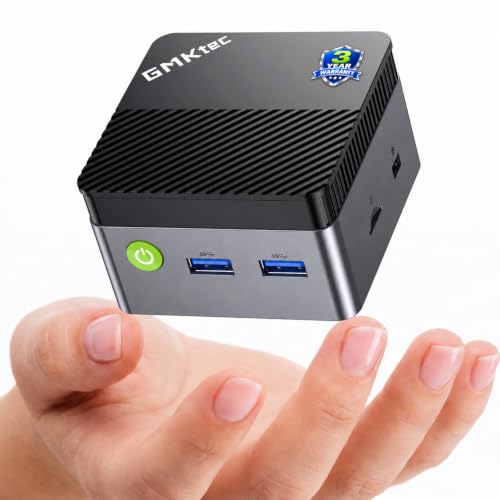
GMKtec Mini PC Intel Celeron
The GMKtec Mini PC offers a quad-core Intel Celeron processor and 8GB of RAM, doubling the memory of the Dell Wyse 5070. It includes 128GB of SSD storage, eight times the Dell’s capacity. The ultra-compact chassis is slightly larger than the Dell’s VESA-mountable design but still fits behind most monitors. It supports dual 4K displays, matching the Dell’s video output capabilities. You gain more processing power and storage for local applications but lose the dedicated ThinOS environment. This pick is for users who want a more powerful, energy-efficient alternative to the Dell Wyse for basic desktop tasks, prioritizing performance and storage over specialized thin-client management software.
Lenovo ThinkCentre Tiny AMD Dual-Core Mini PC
The Lenovo ThinkCentre Tiny AMD Mini PC switches from Intel to an AMD dual-core processor while maintaining 4GB of RAM. It runs Windows 11 Pro, similar to some alternatives, but offers a different hardware architecture. The chassis dimensions are comparable to the Dell Wyse, fitting standard VESA mounts. It includes a mechanical hard drive, which is slower and less durable than the Dell’s solid-state eMMC storage. You gain a full Windows environment with AMD processing but lose the speed and reliability of flash storage. This alternative suits users who prefer AMD hardware for basic business tasks and do not require the high-speed local storage found in the Dell Wyse 5070.
Quick picks
Our 7 picks

Dell Wyse Thin Client Celeron J4105
Best for: dedicated ThinOS virtual desktop environments
- Processor
- Intel Celeron J4105
- Installed RAM
- 4GB
- Storage Capacity
- 16GB Flash EMMC
- Graphics
- Discrete Graphics
- Ethernet Ports
- RJ45 Ethernet
- Operating System
- Thin OS
View on Amazon: Dell Wyse Thin Client Celeron J4105 Affiliate link
The Dell Wyse 5070 is a dedicated thin client built for lightweight enterprise or network tasks. You get a quad-core Intel Celeron J4105 processor, 4GB of RAM, and 16GB of eMMC flash storage running ThinOS. Its compact 1.4-inch chassis includes an RJ45 Ethernet port, a USB-C port, and multiple USB connections. This machine suits you if you need a low-power, standardized desktop terminal for remote desktop or terminal-based workloads.
Pros
- Intel Celeron J4105 quad-core processor with 10W power design
- Includes USB-C, USB 3.0, and USB 2.0 ports
- Compact footprint measuring 1.4 by 7.2 by 7.2 inches
- Built-in RJ45 Ethernet port
Cons
- 16GB eMMC storage limits local file capacity
- 4GB installed RAM restricts multitasking
- Comes with ThinOS rather than a standard desktop operating system
Good fit if
- You need a dedicated ThinOS terminal for network environments.
- You want a low-power desktop with a slim 1.4-inch chassis.
- You rely on wired networking via an RJ45 Ethernet port.
Skip if
- You require large local file storage beyond 16GB eMMC.
- You need a general-purpose operating system out of the box.
Verdict: Dell Wyse 5070 Thin Client Celeron delivers standard thin-client performance with its 10W Celeron J4105 processor and ThinOS setup. It offers dependable connectivity for dedicated virtual desktop environments.

HiGOLE Fanless Mini PC Stick
Best for: silent digital signage and basic thin-client use
- Processor
- Intel Celeron J3455
- Installed RAM
- 4GB
- Storage Capacity
- 64GB
- Memory Type
- LPDDR4
- Graphics
- Intel UHD 600
- Ethernet Ports
- Gigabit
View on Amazon: HiGOLE Fanless Mini PC Stick Affiliate link
The HiGOLE Fanless Mini PC Stick is an ultra-compact pocket-sized desktop alternative designed for basic thin client tasks. You get an Intel Celeron processor, 4GB of LPDDR4 memory, and 64GB of eMMC storage running Windows 10 Pro. With a fanless cooling design, Gigabit Ethernet, and support for 4K at 60Hz displays, it gives you wired networking for office tasks, digital signage, or media streaming without desk clutter.
Pros
- Completely silent fanless cooling design
- Compact stick form factor weighing 10.4 ounces
- Built-in Gigabit Ethernet port
- Pre-installed Windows 10 Pro operating system
- Supports 4K video output at 60Hz
Cons
- Limited to 4GB RAM with no upgrade slots listed
- Small 64GB eMMC internal storage capacity
- Offers only two USB 3.0 ports for peripherals
Good fit if
- You need a silent, fanless device for digital signage or basic office duties.
- You want an ultra-portable stick PC that fits in your pocket.
- You require wired Gigabit Ethernet in a minimal footprint.
Skip if
- You require more than 4GB of RAM for heavy multitasking.
- You need large local storage capacity beyond 64GB eMMC.
Verdict: HiGOLE Fanless Mini PC Stick delivers quiet, pocket-sized computing with wired Gigabit networking for basic thin client workloads. It provides essential ports and 4K display output without taking up desktop space.

ASUS Fanless Chromebox 4
Best for: cloud-focused triple-monitor commercial thin workstations
- Processor
- Intel 5205U
- Installed RAM
- 4GB
- Storage Capacity
- 32GB
- Memory Type
- DDR4
- Operating System
- Chrome OS
- Cooling
- Fanless
View on Amazon: ASUS Fanless Chromebox 4 Affiliate link
This ASUS Fanless Chromebox 4 gives you a silent, solid-state alternative to standard Celeron thin clients. It packs an Intel Celeron processor, 4GB of DDR4 memory, and 32GB of eMMC storage inside an extruded-aluminum fanless chassis. You get support for up to three displays using two HDMI 2.0 ports and a USB-C connection, plus built-in WiFi 6 and an RS232 port. It suits cloud-first commercial setups running ChromeOS.
Pros
- Fanless extruded-aluminum chassis for silent cooling
- Triple-display output via dual HDMI 2.0 and USB-C ports
- Built-in WiFi 6 and legacy RS232 via RJ50 interface
- Compact 0.89-inch profile with included VESA mount
Cons
- Limited base storage with 32GB eMMC capacity
- Runs ChromeOS instead of Windows or standard thin-client OS
Good fit if
- You need a fanless machine that drives up to three displays.
- You run web- or cloud-based workflows native to ChromeOS.
- You connect commercial hardware via legacy RS232 serial ports.
Skip if
- You require a native Windows desktop environment.
- You need large local onboard storage out of the box.
Verdict: ASUS Fanless Chromebox 4 Mini PC delivers durable, silent operation with triple-display connectivity for cloud-managed environments. It serves as a dependable terminal if your workflow relies strictly on ChromeOS.

WOWPC Dell Thin Client 32GB RAM
Best for: thin client setups needing 32GB RAM
- Processor
- Intel Celeron N5105
- Installed RAM
- 8GB/ 16GB/ 32GB
- Storage Capacity
- 256GB/ 512GB/ 1TB PCIe SSD
- Memory Type
- DDR4
- Ethernet Ports
- RJ45
- Operating System
- Windows 11 Pro
View on Amazon: WOWPC Dell Thin Client 32GB RAM Affiliate link
This compact desktop is an Intel Celeron N5105 thin client paired with 32GB of DDR4 memory and a 1TB PCIe SSD. Running Windows 11 Pro, it gives you full operating system support alongside DisplayPort, Ethernet, Wi-Fi, and Bluetooth connectivity. If you need a low-power small form factor machine with significantly more memory and local storage than standard base thin clients, this configuration fits your workspace.
Pros
- 32GB DDR4 memory for heavy multitasking
- 1TB PCIe SSD local storage capacity
- 4-core Intel Celeron N5105 processor up to 2.9GHz
- Ships with Windows 11 Pro installed
Cons
- Celeron N5105 processor is limited to entry-level compute tasks
- DisplayPort output requires adapters for HDMI-only displays
Good fit if
- You need 32GB of memory inside an ultra-small desktop footprint.
- You want a 1TB PCIe SSD alongside preinstalled Windows 11 Pro.
- You require DisplayPort, Ethernet, Wi-Fi, and Bluetooth connectivity.
Skip if
- You need high-performance Core or Ryzen processing for heavy workloads.
- You want an ultra-portable PC stick form factor.
Verdict: WOWPC Dell Thin Client 32GB RAM delivers high memory and storage capacity inside a slim enterprise chassis. It works well for users needing low power consumption paired with ample local memory and solid-state storage.

UDPTCP Fanless Dual LAN Firewall Mini PC
Best for: dedicated soft routing and hardware firewall setups
- Processor
- Celeron N2840
- Installed RAM
- 4GB
- Storage Capacity
- 64GB
- Memory Type
- DDR3L 1333/1600MHz
- Graphics
- UHD Graphics
- Ethernet Ports
- 2 x 1000M
View on Amazon: UDPTCP Fanless Dual LAN Firewall Mini PC Affiliate link
This UDPTCP micro appliance is a fanless mini PC built around an Intel Celeron N2840 dual-core processor and dual Gigabit Ethernet ports. It includes 4GB of DDR3L memory, 64GB of storage, and support for routing software such as OPNsense and OpenWrt. If you need a dedicated low-power hardware firewall or network gateway instead of a traditional office desktop, this system fits network monitoring and routing tasks well.
Pros
- Dual Realtek RTL8111H Gigabit Ethernet ports
- Fanless cooling with a 7.5W TDP processor
- Expansion support for both mSATA and 2.5-inch SATA drives
- Six USB ports including two USB 3.0
Cons
- Uses older dual-core Celeron N2840 processor
- Limited to older DDR3L memory generation
- Chassis weight is relatively heavy at 4.5 pounds
Good fit if
- You need dual Gigabit ports for hardware firewall or soft routing operating systems.
- You want a completely silent, fanless computer for low-power continuous operation.
- You intend to add internal 2.5-inch or mSATA storage drives.
Skip if
- You need a quad-core processor for general desktop multitasking.
- You require modern DDR4 or DDR5 system memory.
Verdict: UDPTCP Fanless Dual LAN Mini PC delivers essential two-port networking and passive cooling for network appliances. Its dual-core processor limits standard computing tasks, but the hardware fits dedicated routing and firewall use.
GMKtec Mini PC Intel Celeron
Best for: ultra-compact dual-display thin client setups
- Processor
- Intel Celeron N5095
- Installed RAM
- 8GB
- Storage Capacity
- 128GB
- Memory Type
- LPDDR4 2400MT/s
- Graphics
- Intel UHD Graphics
- Ethernet Ports
- Gigabit Ethernet
View on Amazon: GMKtec Mini PC Intel Celeron Affiliate link
This micro desktop serves as a compact alternative to standard thin clients. You get an Intel Celeron N5095 quad-core processor, 8GB of onboard LPDDR4 memory, and a 128GB SATA solid-state drive. It measures 2.83 by 2.83 by 1.75 inches and draws up to 10W peak power. Two HDMI ports output dual 4K video. It suits you if you need basic desktop productivity, media streaming, or digital signage in tight workspaces.
Pros
- Dual HDMI 2.0 ports supporting two 4K displays at 60Hz
- Intel Celeron N5095 quad-core processor reaching 2.9GHz
- WiFi 6, Bluetooth 5.2, and Gigabit Ethernet connectivity
- Low 10W peak power draw with USB-C power delivery
Cons
- 8GB LPDDR4 memory is soldered and non-replaceable
- Active cooling fan instead of a fanless design
Good fit if
- You need a palm-sized desktop measuring under 3 inches square.
- You want dual 4K display outputs from dual HDMI ports.
- You require low energy usage under 10W peak.
Skip if
- You need more than 8GB of memory for heavier software.
- You want a completely silent, fanless thin client.
Verdict: GMKtec Pocket Celeron Mini PC delivers quad-core processing, dual 4K display outputs, and a 128GB SSD within an ultra-compact chassis. It functions as an energy-efficient alternative to bulkier thin clients for basic desktop tasks.

Lenovo ThinkCentre Tiny AMD Dual-Core Mini PC
Best for: basic dual-display Windows 11 business tasks
- Processor
- AMD A9-9420e
- Installed RAM
- 4GB
- Storage Capacity
- 500GB HDD
- Graphics
- AMD Radeon R5
- Ethernet Ports
- 1 x RJ-45
- Operating System
- Windows 11 Pro
View on Amazon: Lenovo ThinkCentre Tiny AMD Dual-Core Mini PC Affiliate link
This Lenovo compact desktop gives you an alternative to traditional Celeron thin clients. It features an AMD A9-9420e dual-core processor, 4GB of RAM, and a 500GB mechanical hard drive. Running Windows 11 Pro, it includes dual DisplayPort outputs and six USB ports in a chassis measuring 1.44 inches tall. It suits your workspace if you require standard desktop operating system support and local magnetic storage instead of flash memory.
Pros
- Windows 11 Pro operating system pre-installed
- Two DisplayPort video outputs for dual displays
- Six USB ports including three USB 3.0 connections
- 500GB HDD offers larger local capacity than typical thin-client flash modules
Cons
- Uses a mechanical hard drive instead of solid-state storage
- Dual-core AMD processor with 4GB RAM limits heavy multitasking
- No integrated Wi-Fi listed in specifications
Good fit if
- You need dual DisplayPort outputs for two monitors.
- You want Windows 11 Pro rather than ChromeOS or light client operating systems.
- You prefer larger 500GB local storage over smaller 16GB or 32GB flash memory.
Skip if
- You require fast solid-state drive read and write speeds.
- You need out-of-the-box wireless networking without adding an adapter.
Verdict: Lenovo ThinkCentre Tiny AMD Mini PC provides a full Windows 11 Pro environment and dual DisplayPort connections in a sub-three-pound chassis. Its mechanical hard drive and dual-core AMD processor deliver basic desktop functionality for low-demand workstations.
Specifications side by side
| Spec | Dell Wyse Thin Client Celeron J4105 | HiGOLE Fanless Mini PC Stick | ASUS Fanless Chromebox 4 | WOWPC Dell Thin Client 32GB RAM | UDPTCP Fanless Dual LAN Firewall Mini PC | GMKtec Mini PC Intel Celeron | Lenovo ThinkCentre Tiny AMD Dual-Core Mini PC |
|---|---|---|---|---|---|---|---|
| Processor | Intel Celeron J4105 | Intel Celeron J3455 | Intel 5205U | Intel Celeron N5105 | Celeron N2840 | Intel Celeron N5095 | AMD A9-9420e |
| Installed RAM | 4GB | 4GB | 4GB | 8GB/ 16GB/ 32GB | 4GB | 8GB | 4GB |
| Storage Capacity | 16GB Flash EMMC | 64GB | 32GB | 256GB/ 512GB/ 1TB PCIe SSD | 64GB | 128GB | 500GB HDD |
| Memory Type | not stated | LPDDR4 | DDR4 | DDR4 | DDR3L 1333/1600MHz | LPDDR4 2400MT/s | not stated |
| Graphics | Discrete Graphics | Intel UHD 600 | not stated | not stated | UHD Graphics | Intel UHD Graphics | AMD Radeon R5 |
| Ethernet Ports | RJ45 Ethernet | Gigabit | not stated | RJ45 | 2 x 1000M | Gigabit Ethernet | 1 x RJ-45 |
| Operating System | Thin OS | Windows 10 Pro | Chrome OS | Windows 11 Pro | not stated | not stated | Windows 11 Pro |
| Memory | 4GB RAM | 4GB RAM | 4GB RAM | 32GB RAM | 4GB RAM | not stated | 4GB RAM |
| Storage | not stated | 64GB eMMC | 32GB SSD | 1TB SSD | not stated | not stated | not stated |
| Use | not stated | Business, Office, Industrial, IoT | not stated | Business | Firewall | Home, Office | Business |
| Cooling | not stated | Fanless | Fanless | not stated | not stated | not stated | not stated |
| Networking | not stated | Gigabit Ethernet | not stated | not stated | not stated | WiFi 6 | not stated |
| Form Factor | Thin Client | Stick PC | not stated | Thin Client | not stated | not stated | not stated |
| Dimensions | 7.2 × 1.4 × 7.2 inches | not stated | 5.75 × 4.11 × 0.89 inches | 7 × 1.42 × 7.17 inches | not stated | 6 × 4.5 × 2.5 inches | 7.2 × 7.05 × 1.44 inches |
| Weight | not stated | 10.4 ounces | 2.2 pounds | 2.07 pounds | 4.5 pounds | not stated | 2.9 pounds |
| Size | Thin OS | 4GB RAM | not stated | 4GB RAM | 32GB eMMC | not stated | 4GB RAM 64GB SSD | G5S i-N5095 8GB+128GB Black | not stated |
| Color | Black | J3455-4+64GB | BLACK | not stated | not stated | G5S N5095 8+128 | Black |
| Model | YWFHX | PC STICK | CHROMEBOX4-FC017U | 3000 | G30-N2840-2L | G5S | ThinkCentre M625q |
If you need a compatible display, review dell s2722dc monitor alternatives for matching video outputs.
Frequently asked questions
Can these alternatives run ThinOS like the Dell Wyse 5070?
Only the Dell Wyse 5070 ships with ThinOS, which is designed for dedicated virtual desktop environments. Other options use Windows 10, Windows 11 Pro, or ChromeOS. You must choose a device based on your preferred operating system. The HiGOLE stick runs Windows 10, while the ASUS Chromebox 4 is limited to ChromeOS. The WOWPC and Lenovo models use Windows 11 Pro.
Which thin client alternative offers the most RAM for multitasking?
The WOWPC Dell Thin Client provides 32GB of RAM, which is significantly higher than the 4GB found in most other options. This makes it the best choice if you need ample local memory for complex tasks. Other devices like the HiGOLE, ASUS, and UDPTCP models stick to 4GB. The GMKtec offers 8GB, which is a middle ground for moderate workloads.
Are there fanless options for silent office environments?
Yes, several alternatives use passive cooling for silent operation. The HiGOLE Fanless Mini PC Stick, ASUS Fanless Chromebox 4, and UDPTCP Fanless Dual LAN Firewall Mini PC all lack internal fans. This design reduces noise and dust accumulation. The Dell Wyse 5070 and WOWPC models do not specify fanless cooling, so they may generate audible noise under load.
Which device supports the most displays for a multi-monitor setup?
The ASUS Fanless Chromebox 4 supports triple-display connectivity, making it ideal for commercial workstations requiring multiple screens. The GMKtec Mini PC and Lenovo ThinkCentre Tiny both offer dual 4K display outputs. The Dell Wyse 5070 and HiGOLE stick do not specify multi-monitor capabilities in their data. Check your specific model’s port list for video output options.
What is the smallest form factor among these alternatives?
The HiGOLE Fanless Mini PC Stick is the most compact, weighing only 10.4 ounces and designed as a stick PC. It plugs directly into a monitor or TV. The GMKtec is also ultra-compact, measuring 4.5 by 2.5 inches. The Dell Wyse 5070 and WOWPC are larger thin client chassis. The Lenovo ThinkCentre Tiny is small but heavier at 2.9 pounds.
Do any alternatives include dedicated networking ports for firewall use?
The UDPTCP Fanless Dual LAN Firewall Mini PC features two network ports, making it suitable for soft routing and hardware firewall setups. It uses a dual-core processor for these specific network tasks. Other devices like the HiGOLE and ASUS models typically offer single Gigabit Ethernet ports. They are better suited for standard computing rather than dedicated network appliance roles.
Which option provides the largest internal storage capacity?
The WOWPC Dell Thin Client includes a 1TB SSD, offering the highest storage capacity for local files and applications. The GMKtec Mini PC provides 128GB, and the ASUS Chromebox 4 offers 32GB. The HiGOLE stick has 64GB of eMMC storage. The Dell Wyse 5070 does not specify its storage size in the provided data. Choose based on your local storage needs.
Is there an AMD processor option among these thin client alternatives?
Yes, the Lenovo ThinkCentre Tiny AMD Dual-Core Mini PC uses an AMD processor instead of Intel Celeron. It runs Windows 11 Pro and includes dual DisplayPort connections. All other listed devices, including the Dell Wyse 5070, HiGOLE, and ASUS models, use Intel Celeron processors. This makes the Lenovo the only AMD-based option in this specific comparison list.