GEEKOM A5 Ryzen 7 Mini PC vs GEEKOM AX8 Max Ryzen 7 Mini PC: Spec Comparison
As an Amazon Associate we earn from qualifying purchases. Links on this page are affiliate links.
This comparison of the geekom a5 edition mini PC vs ax8 max silent mini PC highlights two compact options for different needs. Both systems feature a Ryzen 7 processor and 16GB of RAM, offering a solid baseline for daily tasks. The main difference lies in their architecture and target use. The A5 focuses on energy efficiency and business reliability, while the AX8 Max prioritizes raw performance and high-speed connectivity. You can choose based on whether you value low power draw or maximum processing speed.
Key differences
| Aspect | GEEKOM A5 Ryzen 7 Mini PC | GEEKOM AX8 Max Ryzen 7 Mini PC |
|---|---|---|
| Processor | AMD Ryzen 7 7730U (15W) | AMD Ryzen 7 8745HS (4nm, up to 4.9GHz) |
| Memory Type | DDR4 (upgradable to 64GB) | DDR5 (upgradable to 128GB) |
| Storage | 500GB NVMe SSD | 1TB NVMe Gen 4 SSD |
| Graphics | AMD Radeon Vega 8 | AMD Radeon 780M |
| Networking | not listed | Dual 2.5GbE LAN |
| Dimensions | 4.4 x 1.9 x 4.6 inches | 5.1 x 1.7 x 5.4 inches |
Which one should you choose?
Choose GEEKOM A5 Ryzen 7 Mini PC if
- You prioritize a lower power consumption and a 15W processor for continuous operation.
- You need a compact form factor that fits behind monitors with minimal footprint.
- You prefer a system with a 3-year warranty and business-focused reliability features.
Choose GEEKOM AX8 Max Ryzen 7 Mini PC if
- You require faster DDR5 memory and a larger 1TB Gen 4 SSD for heavy workloads.
- You need high-speed networking with dual 2.5GbE ports for home server or NAS setups.
- You want stronger integrated graphics via the Radeon 780M for light gaming or creative editing.
Verdict: The GEEKOM A5 is the better choice for users seeking energy efficiency, a smaller footprint, and business-oriented stability. The GEEKOM AX8 Max suits those who need higher performance, faster DDR5 memory, and advanced networking for demanding tasks. Your decision should depend on whether you value raw speed or compact efficiency.
Geekom A5 vs AX8 Max Specs
Processor Performance
The Geekom AX8 Max uses the Ryzen 7 8745HS, a 4nm chip with up to 4.9GHz speeds. This newer architecture delivers stronger single-core and multi-core performance than the A5. The Geekom A5 relies on the Ryzen 7 7730U, a 15W low-power design focused on efficiency. While the A5 handles office tasks well, the 8745HS in the AX8 Max offers significantly more raw power for demanding workloads, heavy multitasking, and creative editing. The AX8 Max processor is better suited for users needing higher computational throughput.
Memory Speed
Both systems ship with 16GB of RAM, but the type differs significantly. The Geekom AX8 Max uses DDR5 memory, which provides higher bandwidth and faster data transfer rates than the DDR4 found in the Geekom A5. DDR5 helps applications load quicker and improves overall system responsiveness during intensive tasks. The A5 uses DDR4, which is reliable but slower. For users running memory-heavy applications or multitasking with many browser tabs, the AX8 Max offers a tangible speed advantage through its newer memory technology.
Storage Capacity
Storage differences are clear between these two models. The Geekom AX8 Max includes a 1TB NVMe Gen 4 SSD, providing double the space of the A5. The Geekom A5 comes with a 500GB M.2 NVMe SSD. Both drives are upgradable, with the A5 supporting up to 4TB and the AX8 Max up to 8TB. However, starting with 1TB means you have more room for files, games, and applications right out of the box without needing immediate upgrades. The AX8 Max offers better initial value for storage.
Graphics Capability
Integrated graphics performance varies between the two units. The AX8 Max features the AMD Radeon 780M, which is significantly more powerful than the Vega 8 graphics in the A5. The 780M can handle light gaming, 4K video editing, and creative design tasks more smoothly. The A5’s Vega 8 is adequate for basic display output and light office work but struggles with more demanding visual tasks. If you plan to do any photo editing, light video work, or casual gaming, the AX8 Max provides superior graphical performance.
Networking Options
Connectivity options differ notably, especially for wired connections. The Geekom AX8 Max includes dual 2.5GbE LAN ports, allowing for link aggregation, isolated networks, or NAS setups. This is useful for users needing high-speed internal network transfers or specialized network configurations. The Geekom A5 does not list dual Ethernet ports in its specifications. Both models support USB4 and HDMI for display output, but the AX8 Max offers more robust wired networking capabilities for professional or home server environments.
Which GEEKOM Mini PC Suits You Best
Users needing maximum storage expandability
The GEEKOM A5 offers a 2.5-inch HDD bay for up to 10TB of total storage, plus an extra M.2 2242 slot. This provides greater flexibility than the AX8 Max for users who require massive local storage capacity for large files, backups, or media libraries without relying solely on network drives.
Professionals requiring high-speed connectivity
The AX8 Max features dual 2.5GbE LAN ports for link aggregation or isolated networks, plus two USB4 ports supporting 40Gbps transfers. This setup is ideal for traders, programmers, or content creators who need fast data movement, external GPU connections, and reliable wired network performance for demanding workflows.
Buyers prioritizing raw processing power
Powered by the Ryzen 7 8745HS, the AX8 Max delivers stronger single-core and multi-core performance than the A5. Its DDR5 RAM expands to 128GB, and the Radeon 780M graphics rival entry-level discrete cards. This makes it better suited for heavy multitasking, 4K video editing, and demanding creative applications.
Users valuing long-term warranty coverage
The GEEKOM A5 includes an official 3-year limited warranty, reflecting confidence in its build quality and reliability. It also features a 90-day return policy and 24/7 technical support. This comprehensive coverage provides peace of mind for home office and business deployments where consistent, uninterrupted performance is critical for daily operations.
The products compared
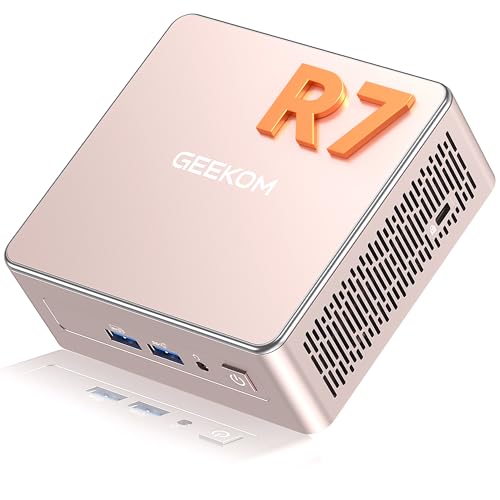
GEEKOM A5 Ryzen 7 Mini PC
Best for: Office multitasking and multi-display setups
- Processor
- AMD Ryzen 7 7730U
- Installed RAM
- 16GB
- Storage Capacity
- 500GB
- Memory Type
- DDR4
- Graphics
- AMD Radeon Vega 8
- Dimensions
- 4.6 × 4.4 × 1.9 inches
View on Amazon: GEEKOM A5 Ryzen 7 Mini PC Affiliate link
The GEEKOM A5 is a compact mini PC powered by an AMD Ryzen 7 7730U processor and 16GB of DDR4 RAM. It includes a 500GB NVMe SSD and supports up to four displays via HDMI and USB-C ports. This model offers expandable storage and memory, making it suitable for office tasks and light creative work. It features a 3-year warranty and a durable metal chassis for reliable daily use.
Pros
- AMD Ryzen 7 7730U processor for efficient office productivity
- Expandable 16GB DDR4 RAM and 500GB NVMe SSD
- Supports up to four 4K displays via dual HDMI and USB-C
- Includes a 3-year limited warranty and 24/7 technical support
- Durable metal mid-frame and base for heat dissipation
Cons
- Uses DDR4 RAM instead of faster DDR5 found in newer models
- 500GB SSD storage is smaller than the 1TB in competing options
- Integrated AMD Radeon Vega 8 graphics limit heavy gaming performance
Good fit if
- You need a reliable machine for office multitasking and document work
- You require support for multiple monitors for complex workflows
- You want expandable memory and storage options for future upgrades
Skip if
- You require the latest DDR5 memory for maximum speed
- You need more than 500GB of storage without adding drives
- You plan to run demanding 3D games or heavy video editing
Verdict: The GEEKOM A5 Ryzen 7 Mini PC is a practical choice for users who prioritize expandability and display flexibility over raw processing speed. It fits well in office environments where multiple screens and long-term warranty coverage are essential.

GEEKOM AX8 Max Ryzen 7 Mini PC
Best for: quiet office work and network flexibility
- Processor
- AMD Ryzen 7 8745HS
- Installed RAM
- 16GB
- Storage Capacity
- 1TB NVMe Gen 4 SSD
- Memory Type
- DDR5
- Graphics
- AMD Radeon 780M
- Ethernet Ports
- Dual 2.5GbE
View on Amazon: GEEKOM AX8 Max Ryzen 7 Mini PC Affiliate link
The GEEKOM AX8 Max uses an AMD Ryzen 7 8745HS processor paired with 16GB of DDR5 RAM and a 1TB NVMe SSD. It features dual 2.5GbE LAN ports and USB4 connectivity for high-speed data and display output. The aluminum chassis supports silent operation via IceBlast 2.0 cooling. This model suits users who need reliable performance for office work, light creative tasks, and quiet environments.
Pros
- AMD Ryzen 7 8745HS processor with Radeon 780M graphics
- 16GB DDR5 RAM expandable to 128GB
- 1TB NVMe Gen 4 SSD upgradeable to 8TB
- Dual 2.5GbE LAN ports for network flexibility
- IceBlast 2.0 cooling for silent operation
Cons
- No dedicated discrete GPU included
- Only two USB4 ports available
- Integrated graphics limit heavy 3D rendering
Good fit if
- You need silent operation for office or study environments
- You require dual Ethernet ports for network setups
- You want expandable storage and RAM capacity
Skip if
- You require a dedicated graphics card for gaming
- You need more than two high-speed USB connections
- You prefer a smaller form factor than 5.1 inches wide
Verdict: The GEEKOM AX8 Max Silent Mini PC fits users who prioritize quiet performance and network flexibility over dedicated graphics power. It is a solid choice for office work and light creative tasks.
Specifications side by side
| Spec | GEEKOM A5 Ryzen 7 Mini PC | GEEKOM AX8 Max Ryzen 7 Mini PC |
|---|---|---|
| Processor | AMD Ryzen 7 7730U | AMD Ryzen 7 8745HS |
| Installed RAM | 16GB | 16GB |
| Storage Capacity | 500GB | 1TB NVMe Gen 4 SSD |
| Memory Type | DDR4 | DDR5 |
| Graphics | AMD Radeon Vega 8 | AMD Radeon 780M |
| Ethernet Ports | not stated | Dual 2.5GbE |
| High-Speed Expansion | not stated | 2x USB4 |
| Memory | 16GB RAM | not stated |
| Storage | not stated | 1TB SSD |
| Dimensions | 4.6 × 4.4 × 1.9 inches | 5.4 × 5.1 × 1.7 inches |
| Weight | 1.44 pounds | not stated |
| Size | R7 7730U, 16+500GB | 16GB+1TB/ ASeries |
| Color | Rose Gold | Purple |
| Model | GEEKOM A5 | AX8 Max |
Frequently asked questions
Which GEEKOM model is better for office multitasking?
The GEEKOM A5 Ryzen 7 Mini PC is the better choice for office multitasking. It is specifically designed for users who prioritize expandability and display flexibility. This makes it well-suited for environments requiring multiple screens and robust connectivity for daily business operations.
What is the main difference in size between the two units?
The GEEKOM AX8 Max is physically larger than the A5 model. The AX8 Max measures 5.1 inches in width and 5.4 inches in length. In contrast, the A5 is more compact, measuring 4.4 inches in width and 4.6 inches in length. This size difference affects desk footprint significantly.
Does the AX8 Max offer more storage than the A5?
Yes, the GEEKOM AX8 Max includes a 1TB SSD for storage. The GEEKOM A5 comes with a 500GB configuration. While the A5 may offer expansion bays, the AX8 Max provides double the base internal storage capacity out of the box for your files and applications.
Which Mini PC is quieter for a home office?
The GEEKOM AX8 Max Silent Mini PC is designed for quiet performance. It is ideal for users who need silent operation during work. The A5 focuses more on raw expandability rather than acoustic comfort, making the AX8 Max the preferred option for noise-sensitive environments.
What color options are available for these GEEKOM models?
The GEEKOM A5 Ryzen 7 Mini PC is available in Rose Gold. The GEEKOM AX8 Max model comes in Purple. These distinct color choices allow you to match the device to your existing desk setup or personal aesthetic preferences without compromising on performance specifications.
Are both models equipped with the same amount of RAM?
Yes, both the GEEKOM A5 and the AX8 Max feature 16GB of RAM. This shared memory capacity ensures that both units can handle similar multitasking loads. You get consistent performance for everyday applications regardless of which specific model you choose for your setup.