GEEKOM A8 Ryzen 7 Mini PC Review: Specs, Pros and Cons
As an Amazon Associate we earn from qualifying purchases. Links on this page are affiliate links.
This geekom a8 ryzen 7 mini PC review covers a compact workstation built for heavy tasks. It pairs the AMD Ryzen 7 8745HS processor with 16GB of upgradeable DDR5 RAM. The 0.5-liter aluminum chassis fits behind monitors via VESA. You get fast boot times and smooth multitasking. This setup handles 4K video editing and cloud AI workflows without needing a dedicated graphics card. It is designed for professionals who need reliable performance in a small footprint.
What stands out
- AMD Ryzen 7 8745HS processor with up to 4.9GHz clock speed
- Upgradeable 16GB DDR5 RAM supporting up to 128GB total
- AMD Radeon 780M integrated graphics for 4K video editing
- 1TB PCIe 4.0 NVMe SSD for fast storage access
- 0.5L aluminum chassis with VESA mount compatibility
Who it fits
Good fit for
This mini PC suits creative professionals, engineers, and business users who need workstation-class productivity. It is ideal for those editing 4K video, creating digital artwork, or running virtual machines. The upgradeable RAM and storage make it perfect for large projects. Users who want a clean desk setup will appreciate the VESA mount option. It also works well for cloud AI tasks and automated office workflows.
Who should skip it
You should look elsewhere if you need a dedicated graphics card for high-end gaming. This unit relies on integrated Radeon 780M graphics. It may not handle the latest AAA titles at high settings. If you require massive local AI model training, the 16GB base RAM might limit you before upgrades. Users needing more than four monitors may find the port selection restrictive compared to full towers.
Verdict: The GEEKOM A8 delivers strong performance in a tiny chassis, making it a solid choice for productivity and creative work. Its upgradeable components ensure it remains relevant as your needs grow.
Key specs explained for GEEKOM A8
Processor: AMD Ryzen 7 8745HS
This eight-core, sixteen-thread chip reaches up to 4.9GHz. You get strong multi-core performance for video editing, coding, and multitasking. It handles demanding workloads without slowing down. Compare this to lower-tier Ryzen 5 models if you need raw speed for heavy applications or compiling large codebases.
Installed RAM: 16GB DDR5
DDR5 memory offers faster data transfer speeds than older DDR4 standards. You benefit from smoother multitasking and quicker application loading. This system allows upgrades up to 128GB, so you can expand later. Check if competitors use soldered memory, which limits your ability to add more RAM over time.
Storage Capacity: 1TB PCIe 4.0 NVMe SSD
A one-terabyte drive provides ample space for files, videos, and programs. PCIe 4.0 technology ensures rapid boot times and fast file transfers. You can store large creative projects without constantly managing space. Compare this capacity and speed against models with smaller 512GB drives or slower SATA-based storage options.
Graphics: AMD Radeon 780M
This integrated GPU uses RDNA 3 architecture for visual tasks. You can edit 4K video and run multiple displays without a separate graphics card. It supports light gaming and creative workloads effectively. Compare this to older integrated graphics if you need higher frame rates or better performance for digital artwork.
Ethernet Ports: 2.5GbE LAN
This port offers faster wired network speeds than standard Gigabit connections. You get reliable, low-latency connectivity for large file transfers and stable cloud connections. It supports business environments and high-bandwidth tasks. Compare this to older Gigabit ports if you frequently move large datasets across your local network.
Compact aluminum design details
The listing describes the GEEKOM A8 as an ultra-compact unit with a 0.5-liter volume. You receive a sleek aluminum chassis that measures 4.4 inches in width and length, with a height of just 1.5 inches. This small footprint allows you to place the system in tight spaces without cluttering your desk. The silver finish provides a professional look suitable for home offices or business environments.
Weighing 3.04 pounds, the unit remains lightweight yet sturdy. According to the listing, it includes a VESA bracket for mounting directly behind your monitor. This feature helps you free up valuable desk space while maintaining a clean, organized workspace. The compact design fits neatly into creative studios or small workstations where space is at a premium.
The aluminum construction aids in heat dissipation, supporting the advanced cooling system mentioned in the specs. This ensures consistent performance during extended workloads. You benefit from a durable build that resists wear over time. The minimalist design prioritizes function, allowing you to focus on productivity rather than managing bulky hardware. This practical approach makes the GEEKOM A8 a versatile choice for users who value both performance and spatial efficiency in their setup.
Setup and everyday use
Setting up this mini PC is straightforward if you follow the included instructions. The unit arrives with Windows 11 pre-installed, so you can begin using it immediately after connecting power and a display. You can mount it behind your monitor using the included VESA bracket, which helps keep your desk clear. The 0.5-liter aluminum chassis is small enough to fit in tight spaces, measuring 4.4 inches wide and 1.5 inches high.
For daily use, the system relies on the AMD Ryzen 7 8745HS processor and 16GB of DDR5 RAM. This combination allows for smooth multitasking and quick boot times thanks to the 1TB PCIe 4.0 NVMe SSD. You can upgrade the memory up to 128GB or storage to 4TB later if needed, which is useful for large projects or virtual machines. The integrated AMD Radeon 780M graphics handle 4K video editing and digital artwork without needing a separate graphics card.
Connectivity includes Wi-Fi 6E and a 2.5GbE LAN port, ensuring reliable network speeds for office work or cloud tasks. The cooling system uses dual heat pipes and a high-efficiency fan to manage heat during extended workloads. This design allows the PC to run quietly while handling heavy coding, video exporting, or unattended cloud AI-agent tasks. You can also install Linux or Ubuntu for development environments. The system is built for stability, supporting 24/7 operation for business or creative workflows.
What you need to know
You will need to provide your own display, keyboard, and mouse, as the listing does not include them. Ensure your monitor supports VESA mounting if you plan to use the included bracket, since the chassis is designed for behind-screen placement. Check your local power outlet type and cable length requirements before ordering. The unit runs Windows 11, so verify that your essential software is compatible with this operating system. You should also confirm that your Wi-Fi 6E router is nearby for optimal network speeds, as the 2.5GbE LAN port may require an Ethernet cable. Keep the ventilation areas clear of dust to maintain the efficient cooling performance described. This model sits alongside other small form factor computers by offering workstation-class specs in a tiny volume. Unlike larger desktops, it saves desk space but relies on integrated graphics. Consider if the AMD Radeon 780M meets your visual needs before choosing this over a system with a dedicated GPU. Regularly update your drivers to keep the system stable.
Check before you buy
- Verify your monitor has VESA holes for the included bracket.
- Confirm your software works with Windows 11.
- Ensure you have a display, keyboard, and mouse ready.
- Check that your Wi-Fi router supports Wi-Fi 6E.
- Leave space around vents for proper airflow.
The product at a glance
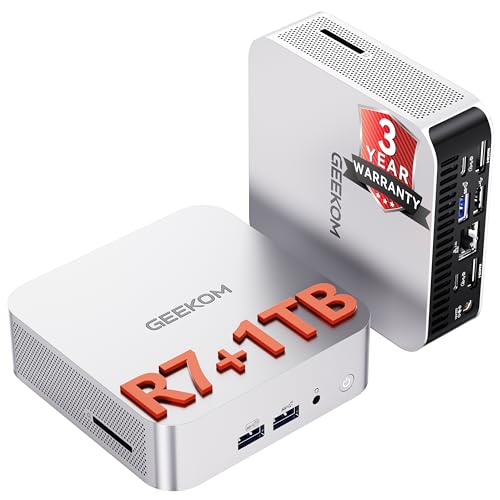
GEEKOM A8 Ryzen 7 Mini PC
Best for: compact workstation tasks and coding
- Processor
- AMD Ryzen 7 8745HS
- Installed RAM
- 16GB
- Storage Capacity
- 1TB
- Memory Type
- DDR5
- Graphics
- AMD Radeon 780M
- Ethernet Ports
- 2.5GbE
View on Amazon: GEEKOM A8 Ryzen 7 Mini PC Affiliate link
The GEEKOM A8 is a 0.5L mini PC powered by the AMD Ryzen 7 8745HS processor with 16GB of upgradeable DDR5 RAM and a 1TB PCIe 4.0 SSD. It features integrated Radeon 780M graphics and Wi-Fi 6E networking. This compact aluminum chassis suits professionals who need workstation performance for video editing or coding in a small footprint.
Pros
- AMD Ryzen 7 8745HS processor with up to 4.9GHz boost
- Upgradeable DDR5 memory supporting up to 128GB
- 1TB PCIe 4.0 NVMe SSD for fast storage
- Radeon 780M integrated graphics for visual tasks
Cons
- Integrated graphics only, no dedicated GPU slot
- 16GB base RAM may limit heavy virtualization
- No mention of Thunderbolt 4 connectivity
Good fit if
- You need a compact workstation for 4K video editing
- You want upgradeable RAM and storage capacity
- You prefer a VESA-mountable aluminum chassis
Skip if
- You require a dedicated graphics card for gaming
- You need Thunderbolt 4 peripheral support
- You prefer a larger chassis for easier DIY upgrades
Verdict: The GEEKOM A8 Ryzen 7 Mini PC offers strong CPU performance and upgradeable memory in a tiny 0.5L frame, making it ideal for creators and developers who prioritize processing power over dedicated graphics.
Specifications side by side
| Spec | GEEKOM A8 Ryzen 7 Mini PC |
|---|---|
| Processor | AMD Ryzen 7 8745HS |
| Installed RAM | 16GB |
| Storage Capacity | 1TB |
| Memory Type | DDR5 |
| Graphics | AMD Radeon 780M |
| Ethernet Ports | 2.5GbE |
| High-Speed Expansion | USB4 |
| Storage | 1TB SSD |
| Use | Business, Office |
| Networking | WiFi 6E |
| Dimensions | 4.4 × 4.4 × 1.5 inches |
| Weight | 3.04 pounds |
| Size | R7-8745HS, 16GB+1TB |
| Color | Sliver (R7) |
| Model | GEEKOM A8 |
Frequently asked questions
Is the GEEKOM A8 Ryzen 7 Mini PC good for coding?
Yes, it is well-suited for coding and development tasks. The AMD Ryzen 7 8745HS processor provides strong multi-core performance, which helps with compiling code and running virtual machines. The 16GB of RAM supports multitasking, allowing you to keep several development environments open simultaneously without significant slowdowns.
Does the GEEKOM A8 have upgradeable RAM?
Yes, the system features upgradeable DDR5 memory. The listing specifies a configuration with 16GB of RAM, but the design allows you to add or replace modules later. This flexibility lets you increase memory capacity as your workload demands grow, ensuring the machine remains useful for heavier tasks over time.
What is the exact size of the GEEKOM A8?
The chassis measures 4.4 inches in width and length, with a height of 1.5 inches. This results in a 0.5-liter volume, making it one of the smallest options available. You can easily place it on a desk or mount it behind a monitor using the VESA bracket.
How much storage does the GEEKOM A8 Ryzen 7 include?
The unit comes with a 1TB SSD. This storage capacity provides ample space for your operating system, applications, and large files like video projects or code repositories. The solid-state drive ensures fast boot times and quick access to your data compared to traditional hard drives.
Can I mount the GEEKOM A8 behind my monitor?
Yes, the aluminum chassis is designed for behind-monitor placement. It includes a VESA bracket that allows you to attach the unit to compatible displays. This setup saves desk space and keeps your workspace tidy, which is ideal for creators who want a clean, minimalist environment.
Is the GEEKOM A8 suitable for video editing?
It offers strong CPU performance that handles video editing reasonably well. The eight-core Ryzen 7 8745HS chip processes demanding workloads efficiently. While it lacks dedicated graphics, the integrated capabilities are sufficient for many editing tasks, especially if you prioritize processing power over heavy 3D rendering.
What color is the GEEKOM A8 Ryzen 7 Mini PC?
The listing describes the color as Silver. The unit features a sleek aluminum chassis that gives it a professional and modern appearance. This finish helps it blend well with most office or home studio setups, maintaining a clean aesthetic whether placed on a desk or mounted behind a screen.