GEEKOM AX8 Max Ryzen 7 Mini PC vs GEEKOM A8 Ryzen 7 Mini PC: Spec Comparison
As an Amazon Associate we earn from qualifying purchases. Links on this page are affiliate links.
This geekom a8 ryzen 7 mini PC vs ax8 max ryzen 7 mini PC comparison highlights two compact machines built around the same AMD Ryzen 7 8745HS processor. Both units offer 16GB of DDR5 RAM and a 1TB SSD, ensuring fast boot times and smooth multitasking for everyday tasks. They share identical integrated Radeon 780M graphics for light gaming and video editing. The main difference lies in their physical design and connectivity options. You will need to choose based on whether you prioritize a smaller footprint or advanced networking features.
Key differences
| Aspect | GEEKOM AX8 Max Ryzen 7 Mini PC | GEEKOM A8 Ryzen 7 Mini PC |
|---|---|---|
| Dimensions | 5.1 x 1.7 x 5.4 inches | 4.4 x 1.5 x 4.4 inches |
| Network Ports | Dual 2.5GbE LAN | Single 2.5GbE LAN |
| USB Connectivity | 2x USB4 (40Gbps) | Not listed |
| Mounting Options | Not listed | VESA mount compatible |
| Storage Upgrade Limit | Up to 8TB SSD | Up to 4TB SSD |
Which one should you choose?
Choose GEEKOM AX8 Max Ryzen 7 Mini PC if
- You need dual Ethernet ports for link aggregation or isolated networks.
- You want to connect external GPUs or high-speed displays via USB4.
- You prefer a larger chassis that may offer slightly more internal space for upgrades.
Choose GEEKOM A8 Ryzen 7 Mini PC if
- You want the smallest possible footprint to save desk space.
- You plan to mount the PC behind your monitor using a VESA bracket.
- You prioritize a standard single Ethernet setup with Wi-Fi 6E support.
Verdict: Choose the AX8 Max if you require advanced networking capabilities like dual Ethernet ports or high-speed USB4 connectivity for external devices. The A8 is the better fit if your priority is a compact, VESA-mountable design that fits neatly behind a display. Both models provide identical processing power for your daily tasks.
AX8 Max vs A8: Spec Comparison
form factor
The GEEKOM A8 is the more compact option, measuring 4.4 by 4.4 by 1.5 inches. It weighs 3.04 pounds and includes a VESA mount bracket for easy attachment behind a monitor. This 0.5-liter chassis frees up significant desk space. The AX8 Max is slightly larger at 5.4 by 5.1 by 1.7 inches. While both use aluminum frames, the A8’s smaller footprint makes it better for tight workspaces or minimalist setups where monitor mounting is a priority. The AX8 Max offers a bit more internal volume but requires more surface area.
networking
Connectivity differs notably between the two models. The AX8 Max features dual 2.5 Gigabit Ethernet ports. This allows for link aggregation, isolated network segments, or lightweight NAS setups. It also includes two USB4 ports supporting 40Gbps data transfers and eGPU connections. The A8 provides a single 2.5GbE LAN port and Wi-Fi 6E. While the A8 covers standard business needs with Wi-Fi 6E, the AX8 Max offers superior wired redundancy and higher-speed USB4 capabilities for future-proofing and heavy data movement.
cooling
Both units aim for quiet operation, but they use different approaches. The AX8 Max utilizes GEEKOM’s IceBlast 2.0 cooling system, claiming up to 50% less noise compared to traditional mini PCs. It offers three distinct modes: Quiet, Normal, and Performance. The A8 uses an advanced cooling system with dual heat pipes, a high-efficiency fan, and optimized airflow. It is designed for consistent performance during 24/7 cloud AI hosting and heavy workloads. While both target silence, the AX8 Max explicitly highlights its noise reduction technology and mode flexibility.
storage expansion
Both systems start with a 1TB NVMe PCIe 4.0 SSD and 16GB of DDR5 RAM. However, the AX8 Max allows expansion up to an 8TB SSD, whereas the A8 supports upgrades to 4TB. Both machines feature upgradeable RAM, supporting up to 128GB of DDR5 memory. The AX8 Max’s higher storage ceiling makes it more suitable for users planning to store large media libraries or extensive datasets over time. The A8’s 4TB limit is sufficient for most professionals but offers less headroom for massive local storage needs.
build quality
Both mini PCs feature aluminum chassis construction. The AX8 Max is described as being crafted from aircraft-grade aluminum alloy with precision CNC machining. This design emphasizes robust strength, lightweight properties, and exceptional heat dissipation. The A8 also uses a sleek aluminum chassis but focuses on its compact 0.5-liter volume and VESA mounting capability. The AX8 Max’s description highlights the premium texture and detailed machining of its frame, suggesting a slightly more refined exterior finish compared to the A8’s focus on spatial efficiency.
Which GEEKOM Mini PC Fits You
Users needing dual Ethernet ports
The AX8 Max includes dual 2.5GbE LAN ports. This allows for link aggregation, isolated networks, or building a lightweight NAS. The A8 offers only a single 2.5GbE LAN connection. If your workflow requires multiple network interfaces or specialized routing, the AX8 Max provides the necessary hardware flexibility that the single-port A8 cannot match.
Buyers wanting silent operation
The AX8 Max features IceBlast 2.0 cooling, delivering silent operation with up to 50% less noise than traditional mini PCs. This is ideal for quiet environments like home offices or late-night editing. The A8 uses an advanced cooling system with dual heat pipes, but does not advertise specific noise reduction metrics, making the AX8 Max the better choice for noise sensitivity.
Those prioritizing compact size
The A8 measures 4.4 by 4.4 by 1.5 inches, making it smaller than the AX8 Max. It weighs 3.04 pounds and includes a VESA mount bracket for attaching behind a monitor. This 0.5-liter chassis frees up desk space effectively. If your priority is a minimal footprint and easy monitor mounting, the A8 offers superior physical compactness.
The products compared

GEEKOM AX8 Max Ryzen 7 Mini PC
Best for: quiet home office work and cloud AI tasks
- Processor
- AMD Ryzen 7 8745HS
- Installed RAM
- 16GB
- Storage Capacity
- 1TB NVMe Gen 4 SSD
- Memory Type
- DDR5
- Graphics
- AMD Radeon 780M
- Ethernet Ports
- Dual 2.5GbE
View on Amazon: GEEKOM AX8 Max Ryzen 7 Mini PC Affiliate link
The GEEKOM AX8 Max uses the AMD Ryzen 7 8745HS processor with integrated Radeon 780M graphics. It includes 16GB of DDR5 RAM and a 1TB NVMe Gen 4 SSD. You get dual 2.5GbE LAN ports and two USB4 connections for high-speed data. The aluminum chassis supports silent operation. This setup suits users who need reliable cloud AI support and quiet performance for daily tasks.
Pros
- AMD Ryzen 7 8745HS processor with Radeon 780M graphics
- 16GB DDR5 RAM expandable to 128GB
- Dual 2.5GbE Ethernet ports
- Silent IceBlast 2.0 cooling system
- 1TB NVMe Gen 4 SSD
Cons
- No dedicated NPU for local AI tasks
- Integrated graphics only, no discrete GPU
- Limited to three display outputs despite USB4 ports
Good fit if
- You need silent operation for a home office
- You want expandable DDR5 RAM up to 128GB
- You require dual Ethernet ports for network isolation
Skip if
- You need a dedicated graphics card for heavy rendering
- You require local NPU processing for AI
- You need more than three simultaneous displays
Verdict: The GEEKOM AX8 Max Ryzen 7 Mini PC fits users who prioritize quiet cooling and flexible networking over local AI processing power.
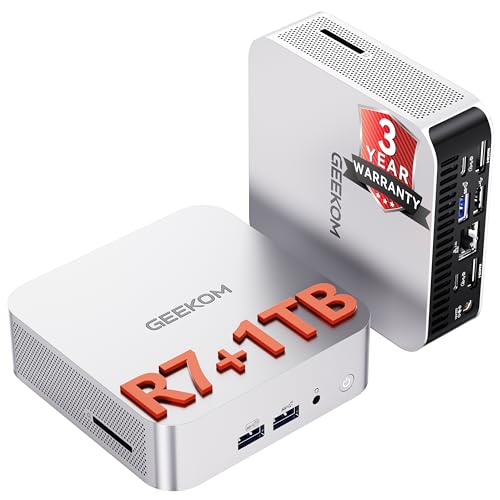
GEEKOM A8 Ryzen 7 Mini PC
Best for: upgradeable memory and compact aluminum build
- Processor
- AMD Ryzen 7 8745HS
- Installed RAM
- 16GB
- Storage Capacity
- 1TB
- Memory Type
- DDR5
- Graphics
- AMD Radeon 780M
- Ethernet Ports
- 2.5GbE
View on Amazon: GEEKOM A8 Ryzen 7 Mini PC Affiliate link
The GEEKOM A8 is a 0.5-liter mini PC powered by an AMD Ryzen 7 8745HS processor with 16GB of upgradeable DDR5 RAM and a 1TB PCIe 4.0 SSD. It features Radeon 780M graphics for visual tasks and includes Wi-Fi 6E and 2.5GbE LAN for connectivity. This compact aluminum unit suits professionals needing workstation performance in a small footprint.
Pros
- AMD Ryzen 7 8745HS processor with up to 4.9GHz boost
- Upgradeable DDR5 RAM supporting up to 128GB
- 1TB PCIe 4.0 NVMe SSD storage
- AMD Radeon 780M integrated graphics
Cons
- 3.04-pound weight is heavier than typical sub-1kg mini PCs
- No dedicated discrete graphics card included
- No mention of Thunderbolt or USB4 connectivity
Good fit if
- You need upgradeable RAM for future-proofing
- You want a VESA-mountable aluminum chassis
- You require 2.5GbE LAN for fast networking
Skip if
- You need a discrete GPU for gaming
- You prefer a lighter weight under 2 pounds
- You require Thunderbolt 4 connectivity
Verdict: GEEKOM A8 Ryzen 7 Mini PC fits users who prioritize upgradeable memory and a compact 0.5L aluminum build for professional workflows.
Specifications side by side
| Spec | GEEKOM AX8 Max Ryzen 7 Mini PC | GEEKOM A8 Ryzen 7 Mini PC |
|---|---|---|
| Processor | AMD Ryzen 7 8745HS | AMD Ryzen 7 8745HS |
| Installed RAM | 16GB | 16GB |
| Storage Capacity | 1TB NVMe Gen 4 SSD | 1TB |
| Memory Type | DDR5 | DDR5 |
| Graphics | AMD Radeon 780M | AMD Radeon 780M |
| Ethernet Ports | Dual 2.5GbE | 2.5GbE |
| High-Speed Expansion | 2x USB4 | USB4 |
| Storage | 1TB SSD | 1TB SSD |
| Use | not stated | Business, Office |
| Networking | not stated | WiFi 6E |
| Dimensions | 5.4 × 5.1 × 1.7 inches | 4.4 × 4.4 × 1.5 inches |
| Weight | not stated | 3.04 pounds |
| Size | 16GB+1TB/ ASeries | R7-8745HS, 16GB+1TB |
| Color | Purple | Sliver (R7) |
| Model | AX8 Max | GEEKOM A8 |
Frequently asked questions
Which GEEKOM Ryzen 7 Mini PC is physically smaller?
The GEEKOM A8 is the more compact device. It measures 4.4 by 4.4 by 1.5 inches, creating a 0.5-liter chassis. The AX8 Max is larger, with dimensions of 5.1 by 5.4 by 1.7 inches. You should choose the A8 if desk space is limited or you plan to mount the unit behind a monitor using its included bracket.
Does the GEEKOM A8 support memory upgrades?
Yes, the GEEKOM A8 is designed for upgradeable memory. The product data highlights this as a key feature for professional workflows. While both units currently ship with 16GB of DDR5 RAM, the A8’s build allows you to expand this later. This flexibility is useful if your tasks require more than the base 16GB over time.
What colors are available for these Mini PCs?
The GEEKOM AX8 Max is available in a purple color option. The GEEKOM A8 comes in a silver finish. Both units use the same Ryzen 7 8745HS processor and include 1TB of SSD storage. Your choice may depend on which aesthetic better matches your existing desk setup or monitor color scheme.
Which model is better for quiet home office work?
The GEEKOM AX8 Max is the better choice for quiet environments. It is specifically noted as fitting users who prioritize quiet cooling. This makes it suitable for cloud AI tasks and general office work where noise levels matter. The A8 focuses more on compact aluminum build and memory upgradability rather than acoustic performance.
Are both Mini PCs equipped with the same storage?
Yes, both models include a 1TB SSD. This ensures fast boot times and ample space for files on either device. The storage capacity is identical, so your decision should rely on other factors like physical size, cooling needs, or network port availability rather than storage space differences.
Which GEEKOM Mini PC is heavier?
The GEEKOM A8 weighs 3.04 pounds. The AX8 Max does not have a listed weight in the provided data, but its larger dimensions suggest it may be heavier. If portability is a primary concern, the A8’s specific weight rating helps you gauge how much it will add to your bag or setup.
Can I use the A8 for professional workflows?
Yes, the GEEKOM A8 is well-suited for professional workflows. Its compact aluminum build and upgradeable memory support demanding tasks. The Ryzen 7 8745HS processor provides consistent performance. If you need a small, durable machine that you can customize with more RAM later, the A8 is the logical choice for your office environment.
Does the AX8 Max support cloud AI tasks?
Yes, the GEEKOM AX8 Max is optimized for cloud AI tasks. It fits users who need flexible networking and quiet operation. While it shares the same Ryzen 7 processor as the A8, its design prioritizes cooling and connectivity. This makes it ideal if your work relies on remote AI processing rather than local hardware acceleration.