GEEKOM IT11 Core i7 Mini PC Alternatives: 6 Similar Picks Compared
As an Amazon Associate we earn from qualifying purchases. Links on this page are affiliate links.
The GEEKOM IT11 Core i7 Mini PC delivers stable daily performance with its Intel Core i7-11390H processor and 16GB of DDR4 RAM. It supports up to four displays via USB4.0 and HDMI, making it ideal for multi-monitor setups. You might seek geekom mini PC mini it11 alternatives if you need a smaller footprint, a different processor generation, or dedicated graphics for light gaming. Some users may also prefer AMD Ryzen options for better efficiency or specific connectivity features.
This list includes 6 similar picks that overlap with the original’s key specifications. Each alternative matches the IT11 in areas like RAM capacity, storage type, or wireless networking standards. You will find options with newer Intel chips, different AMD processors, or varied physical sizes. These selections help you find a machine that fits your exact workspace and performance needs without compromising on essential connectivity or multitasking capabilities.
How these alternatives compare
Sinbun Core i7 GTX 1050 Mini PC
The Sinbun X800 distinguishes itself with a dedicated NVIDIA GTX 1050 graphics card, whereas the GEEKOM IT11 relies on integrated Intel graphics. This makes the Sinbun better for light 1080p gaming or GPU-accelerated tasks. However, it uses an older 8th Gen i7-8750H processor, which is less powerful than the IT11’s 11th Gen i7-11390H. The Sinbun is also significantly larger and heavier, measuring 11 by 10 inches, compared to the IT11’s compact 4.6 by 4.4-inch footprint. You should choose the Sinbun if you need discrete graphics performance and can accommodate a larger chassis. The IT11 remains the better choice for users who prioritize a smaller size and newer processor architecture for general productivity and multi-monitor office work.
Dell Optiplex Micro Core i7 Desktop
The Dell Optiplex 7010 Micro offers a major generational leap with its 13th Gen Intel Core i7-13700T processor, significantly outperforming the IT11’s 11th Gen i7-11390H in multi-core tasks. This makes the Dell ideal for demanding productivity workloads. However, it lacks the IT11’s USB4.0 connectivity, relying on older standards that may limit high-speed peripheral options. The Dell is also slightly larger at 7.17 by 7.01 inches, though still compact. You should pick the Dell if raw processing power and business-grade reliability are your top priorities. The IT11 is preferable if you need modern USB4.0 ports for fast data transfer and high-resolution display outputs without upgrading to a newer processor generation.
Glorlin Ryzen 5 3501U Mini PC
The Glorlin GT101 uses an AMD Ryzen 5 3501U processor, which is less powerful than the GEEKOM IT11’s i7-11390H. This makes the Glorlin a budget-friendly option for basic office tasks and media consumption rather than intensive computing. It shares the same 16GB RAM and 512GB SSD configuration as the IT11. The Glorlin is likely quieter and more energy-efficient for light use, but it lacks the processing headroom for multitasking heavy applications. You should choose the Glorlin if your needs are limited to web browsing, document editing, and video streaming on a budget. The IT11 is better suited for users who require stronger performance for multitasking or future-proofing their system with a more capable CPU.
Getorli Ryzen 5 3500U Mini PC
The Getorli GT101 features an AMD Ryzen 5 3500U, similar in class to the Glorlin, but is highlighted for its dual 4K display support. While the IT11 supports up to four displays, the Getorli focuses on high-resolution output for dual monitors. It also includes 16GB of RAM and a 512GB SSD, matching the IT11’s memory and storage specs. The Getorli’s Ryzen processor is generally less powerful than the IT11’s i7-11390H, making it less ideal for CPU-intensive tasks. You should consider the Getorli if you specifically need reliable dual 4K output for office or home use and prioritize quiet operation. The IT11 remains the stronger choice for users who need more processing power or support for more than two high-resolution displays.
KAMRUI Ryzen 7 7730U Mini PC
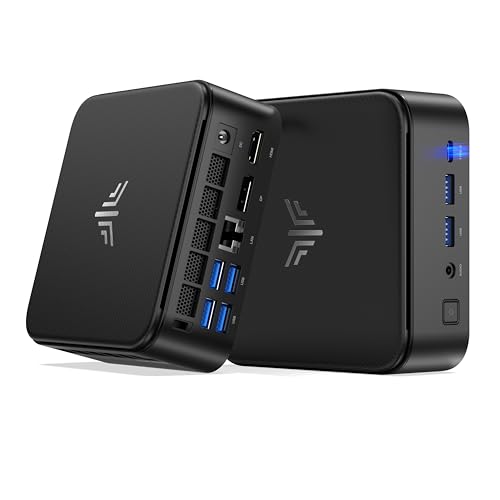
The KAMRUI E3B upgrades to an AMD Ryzen 7 7730U, providing significantly more multi-threaded performance than the IT11’s i7-11390H. It also includes 1TB of SSD storage, double the capacity of the IT11’s 512GB drive. This makes the KAMRUI better for users who need more storage space and stronger multitasking capabilities. However, it may lack the IT11’s USB4.0 connectivity, which offers faster data transfer speeds. The KAMRUI is ideal for office multitasking and triple-monitor setups. You should pick the KAMRUI if you value higher storage capacity and stronger AMD processing power. The IT11 is preferable if you require USB4.0 for high-speed peripherals and prefer Intel’s ecosystem for specific software compatibility.
Beelink Ryzen 3 7330U Mini PC
The Beelink EQR5 uses an AMD Ryzen 3 7330U, which is less powerful than the IT11’s i7-11390H. It is designed for basic home and office tasks, prioritizing stable wired networking with dual LAN ports over raw processing power. The Beelink lacks the IT11’s USB4.0 and high-end display outputs, focusing instead on a tidy, stable setup. It includes 16GB of RAM, matching the IT11’s memory. You should choose the Beelink if you need reliable dual Ethernet connections for network stability and do not require high-performance computing. The IT11 is better for users who need faster data transfer via USB4.0, more powerful processing for multitasking, and support for up to four displays.
Quick picks
Our 7 picks

GEEKOM IT11 Core i7 Mini PC
Best for: Multi-monitor setups and stable daily computing
- Processor
- Intel Core i7-11390H
- Installed RAM
- 16GB
- Storage Capacity
- 512GB
- Memory Type
- DDR4 3200MT/s
- High-Speed Expansion
- 2x USB 4.0
- Operating System
- Windows
View on Amazon: GEEKOM IT11 Core i7 Mini PC Affiliate link
The GEEKOM IT11 uses an Intel Core i7-11390H processor with 16GB of DDR4 RAM and a 512GB M.2 SSD. It runs Windows 11 Pro and supports up to four displays via USB4.0 and HDMI. This compact unit is built for stable 24/7 operation. It includes Wi-Fi 6 and Bluetooth 5.2. The design suits users who need reliable daily computing with solid connectivity options.
Pros
- Intel Core i7-11390H processor up to 5.0 GHz
- USB4.0 ports with 20Gbps transfer rates
- Supports up to four simultaneous displays
- Wi-Fi 6 and Bluetooth 5.2 connectivity
- Includes 2.5-inch SATA bay for extra storage
Cons
- 11th Gen Intel processor is older than 13th Gen competitors
- DDR4 RAM is slower than DDR5 options
- 512GB SSD is smaller than 1TB drives in this category
Good fit if
- You need reliable 24/7 operation for home use
- You want to connect multiple monitors to one PC
- You require USB4.0 for high-speed data transfer
Skip if
- You need the latest 13th Gen Intel performance
- You require DDR5 memory for maximum speed
- You want a 1TB SSD pre-installed
Verdict: GEEKOM IT11 Mini PC offers stable performance and strong display support for users who prioritize connectivity and reliability over the newest processor generations.

Sinbun Core i7 GTX 1050 Mini PC
Best for: Light 1080p gaming and multi-monitor office use
- Processor
- Intel Core i7-8750H
- Installed RAM
- 16GB
- Storage Capacity
- 512GB
- Memory Type
- DDR4 2666MHz
- Graphics
- GeForce GTX 1050 3GB GDDR5
- Ethernet Ports
- 1x Gigabit Ethernet
View on Amazon: Sinbun Core i7 GTX 1050 Mini PC Affiliate link
The Sinbun X800 packs an Intel Core i7-8750H processor and a dedicated GeForce GTX 1050 3GB graphics card into a compact chassis. It includes 16GB of DDR4 RAM and a 512GB NVMe SSD. This setup supports light 1080p gaming and multitasking. You get triple display output and WiFi 6e connectivity. It suits users who need dedicated graphics in a small form factor without the bulk of a tower.
Pros
- Dedicated GeForce GTX 1050 3GB GDDR5 graphics for 1080p gaming
- Intel Core i7-8750H processor with up to 4.1GHz turbo
- Triple display support via two HDMI 2.0 ports and one Type-C
- 16GB DDR4 RAM upgradeable to 64GB
- WiFi 6e connectivity for stable wireless connections
Cons
- Older 8th Gen processor compared to 11th Gen and newer alternatives
- No mention of Thunderbolt support for high-speed peripheral connectivity
- Heavier at 6.3 pounds due to the dedicated GPU component
Good fit if
- You need dedicated graphics for light gaming like Fortnite or The Sims 4
- You require triple monitor setups for productivity
- You want a compact PC with upgradeable RAM and storage slots
Skip if
- You need to run modern AAA titles at high settings
- You prefer the latest 13th Gen Intel processors for maximum performance
- You prioritize the lightest possible portable weight for travel
Verdict: The Sinbun i7-8750H GTX 1050 Mini PC fits buyers who need dedicated graphics in a small footprint for light gaming and multi-monitor workflows. It offers solid value for casual gamers who do not require top-tier processing power.

Dell Optiplex Micro Core i7 Desktop
Best for: Productivity tasks requiring strong multi-core performance
- Processor
- Intel Core i7-13700T
- Installed RAM
- 16GB
- Storage Capacity
- 512GB SSD
- Memory Type
- DDR4-3200
- Ethernet Ports
- Gigabit Ethernet
- Operating System
- Windows 11 Pro
View on Amazon: Dell Optiplex Micro Core i7 Desktop Affiliate link
The Dell Optiplex 7010 Micro packs a 13th Gen Intel Core i7-13700T processor with 16 cores and 24 threads into a compact chassis. You get 16GB of DDR4 RAM and a 512GB PCIe SSD for reliable performance. It includes WiFi 6 and runs Windows 11 Pro. This mini PC suits users who need strong multi-threaded power in a small, VESA-mountable form factor for office or home use.
Pros
- 13th Gen Intel Core i7-13700T with 16 cores and up to 4.90 GHz
- 16GB DDR4-3200 RAM with two SODIMM slots for upgrades up to 64GB
- 512GB PCIe SSD for fast storage access
- Built-in WiFi 6 AX211 and Bluetooth connectivity
Cons
- Base HDMI port is version 1.4b, limiting high-resolution display support
- Only one DisplayPort 1.4a output available for multi-monitor setups
- Certified Refurbished condition rather than brand new
Good fit if
- You need a powerful 13th Gen Intel processor in a tiny Micro form factor
- You want to upgrade RAM later using the two available SODIMM slots
- You prefer a business-grade PC with Windows 11 Pro included
Skip if
- You require native HDMI 2.0 or newer for 4K 60Hz video output
- You need a brand new unit instead of a refurbished one
- You want a gaming PC with a dedicated graphics card
Verdict: The Dell Optiplex 7010 Micro i7-13700T delivers strong multi-core performance for productivity tasks in a space-saving design. It fits professionals who value upgradeable RAM and reliable business features over modern display ports.

Glorlin Ryzen 5 3501U Mini PC
Best for: Quiet home office setups with multiple monitors
- Processor
- AMD Ryzen 5 3501U
- Installed RAM
- 16GB
- Storage Capacity
- 512GB
- Memory Type
- DDR4
- Operating System
- OS 11 Pro
- Use
- Home, Office
View on Amazon: Glorlin Ryzen 5 3501U Mini PC Affiliate link
The Glorlin Mini PC features an AMD Ryzen 5 3501U processor with 16GB of DDR4 RAM and a 512GB SSD. It supports three 4K displays via HDMI and Type-C ports. WiFi 6 and Bluetooth 5.3 provide modern connectivity. Windows 11 Pro is pre-installed. This compact desktop suits home office tasks, web browsing, and media streaming. It offers a quiet operation and ample storage for everyday computing needs.
Pros
- AMD Ryzen 5 3501U processor for daily tasks
- 16GB DDR4 RAM for multitasking
- 512GB SSD for fast boot-ups
- Three 4K display outputs
Cons
- Older Ryzen 5 3501U CPU limits heavy workloads
- No dedicated graphics card for gaming
- WiFi 6 lacks the speed of newer standards
Good fit if
- You need a quiet desktop for office work
- You want three monitors for productivity
- You prefer Windows 11 Pro pre-installed
Skip if
- You require high-end gaming performance
- You need the latest CPU generation
- You want a larger storage capacity than 512GB
Verdict: Glorlin Mini PC AMD Ryzen 5 3501U is a practical choice for users who need a quiet, multi-display setup for standard office tasks and media consumption without the need for intensive processing power.

Getorli Ryzen 5 3500U Mini PC
Best for: quiet home office tasks and dual 4K displays
- Processor
- AMD Ryzen 5 3500U
- Installed RAM
- 16GB
- Storage Capacity
- 512GB
- Memory Type
- DDR4
- Use
- Home, Office, Gaming
- Networking
- WiFi 6
View on Amazon: Getorli Ryzen 5 3500U Mini PC Affiliate link
The Getorli GT101 uses an AMD Ryzen 5 3500U processor with 16GB of DDR4 RAM and a 512GB NVMe SSD. It supports dual 4K displays via HDMI and includes WiFi 6 for stable networking. This compact desktop handles office tasks and media streaming efficiently. It suits users who need a quiet, space-saving computer for daily computing and light multitasking without requiring high-end gaming performance.
Pros
- AMD Ryzen 5 3500U CPU provides solid daily performance
- 16GB DDR4 RAM supports smooth multitasking
- 512GB NVMe SSD offers fast boot and load times
- Dual HDMI ports enable dual 4K monitor setups
Cons
- Ryzen 5 3500U is an older architecture compared to newer alternatives
- No dedicated graphics card for heavy gaming
- Base storage is 512GB, smaller than some competitors
Good fit if
- You need a quiet computer for home office work
- You want to connect two 4K monitors
- You prioritize WiFi 6 connectivity
Skip if
- You require high-end gaming performance
- You need the latest generation CPU
- You require a dedicated GPU
Verdict: The Getorli GT101 Ryzen 5 Mini PC is a practical option for users who need reliable office performance and dual 4K display support. It fits buyers who value quiet operation and modern connectivity over raw processing power.
KAMRUI Ryzen 7 7730U Mini PC
Best for: Office multitasking and triple-monitor setups
- Processor
- AMD Ryzen 7 7730U
- Installed RAM
- 16GB
- Storage Capacity
- 1TB
- Memory Type
- LPDDR4X 3733 MT/s
- Graphics
- AMD Radeon Graphics
- Operating System
- Windows 11 Pro
View on Amazon: KAMRUI Ryzen 7 7730U Mini PC Affiliate link
The KAMRUI E3B uses an AMD Ryzen 7 7730U processor with 8 cores and 16 threads. It includes 16GB of LPDDR4X memory and a 1TB NVMe SSD. The AMD Radeon RX Vega 8 graphics support triple displays at 4K resolution. You get WiFi 6 and Bluetooth 5.2 for connectivity. This compact unit suits office work, media streaming, and light gaming tasks.
Pros
- Ryzen 7 7730U processor with 8 cores and 16 threads
- 1TB NVMe PCIe SSD for ample storage
- Triple display support via HDMI, DisplayPort, and USB-C
- WiFi 6 and Bluetooth 5.2 connectivity
Cons
- Integrated AMD Radeon RX Vega 8 graphics limit heavy gaming
- LPDDR4X memory is soldered and not user-upgradable
- 15W TDP base may throttle performance under sustained load
Good fit if
- You need a compact PC for office multitasking
- You want to connect three monitors for productivity
- You require fast WiFi 6 for streaming and files
Skip if
- You need dedicated graphics for high-end gaming
- You want to upgrade RAM or storage later
- You require a processor with higher turbo speeds
Verdict: The KAMRUI E3B Ryzen 7 7730U Mini PC delivers solid multi-threaded performance and ample storage for users who value compact size and triple-display setups. It fits buyers who prioritize connectivity and office efficiency over raw graphical power.

Beelink Ryzen 3 7330U Mini PC
Best for: Dual LAN networking and tidy setups
- Processor
- AMD Ryzen 3 7330U
- Installed RAM
- 16GB
- Storage Capacity
- 500GB
- Memory Type
- DDR4
- Graphics
- AMD Radeon Graphics
- Ethernet Ports
- Dual LAN
View on Amazon: Beelink Ryzen 3 7330U Mini PC Affiliate link
The Beelink EQR5 uses an AMD Ryzen 3 7330U processor with 16GB of DDR4 RAM and a 500GB NVMe SSD. It supports dual 4K displays via HDMI and includes dual LAN ports for stable networking. WiFi 6 and Bluetooth 5.2 are built in. This compact desktop suits home and office tasks like web browsing and streaming. It offers a tidy setup with a single-cable power design.
Pros
- AMD Ryzen 3 7330U processor with up to 4.3GHz boost
- 16GB DDR4 RAM expandable to 64GB
- Dual LAN ports for network separation
- Built-in WiFi 6 and Bluetooth 5.2
- Single-cable power supply design
Cons
- Ryzen 3 class limits heavy multitasking compared to Ryzen 5 or 7 models
- 500GB SSD capacity is smaller than 1TB options
- DDR4 RAM is older generation compared to DDR5 in newer competitors
Good fit if
- You need dual wired network connections for home or office
- You want a tidy single-cable power setup
- You require dual monitor support for productivity
Skip if
- You need high-end gaming performance with a dedicated GPU
- You require DDR5 memory for maximum speed
- You need more than 500GB of storage without adding drives
Verdict: Beelink EQR5 AMD Ryzen 3 Mini PC is a practical choice for users who prioritize stable wired networking and a clean desk setup over raw processing power. It fits home office environments well.
Specifications side by side
| Spec | GEEKOM IT11 Core i7 Mini PC | Sinbun Core i7 GTX 1050 Mini PC | Dell Optiplex Micro Core i7 Desktop | Glorlin Ryzen 5 3501U Mini PC | Getorli Ryzen 5 3500U Mini PC | KAMRUI Ryzen 7 7730U Mini PC | Beelink Ryzen 3 7330U Mini PC |
|---|---|---|---|---|---|---|---|
| Processor | Intel Core i7-11390H | Intel Core i7-8750H | Intel Core i7-13700T | AMD Ryzen 5 3501U | AMD Ryzen 5 3500U | AMD Ryzen 7 7730U | AMD Ryzen 3 7330U |
| Installed RAM | 16GB | 16GB | 16GB | 16GB | 16GB | 16GB | 16GB |
| Storage Capacity | 512GB | 512GB | 512GB SSD | 512GB | 512GB | 1TB | 500GB |
| Memory Type | DDR4 3200MT/s | DDR4 2666MHz | DDR4-3200 | DDR4 | DDR4 | LPDDR4X 3733 MT/s | DDR4 |
| Graphics | not stated | GeForce GTX 1050 3GB GDDR5 | not stated | not stated | not stated | AMD Radeon Graphics | AMD Radeon Graphics |
| Ethernet Ports | not stated | 1x Gigabit Ethernet | Gigabit Ethernet | not stated | not stated | not stated | Dual LAN |
| High-Speed Expansion | 2x USB 4.0 | not stated | not stated | not stated | not stated | not stated | not stated |
| Operating System | Windows | Windows 11 Pro | Windows 11 Pro | OS 11 Pro | not stated | Windows 11 Pro | not stated |
| Memory | 16GB RAM | 16GB RAM | 16GB RAM | 16GB RAM | 16GB RAM | 16GB RAM | 16GB RAM |
| Storage | 512GB SSD | 512GB SSD | 512GB SSD | 512GB SSD | 512GB SSD | 1TB SSD | not stated |
| Use | not stated | Home, Business, Office, Gaming | not stated | Home, Office | Home, Office, Gaming | Home, Business, Office, Gaming | Home, Office |
| Networking | not stated | WiFi 6 | WiFi 6 | WiFi 6 | WiFi 6 | WiFi 6 | WiFi 6 |
| Dimensions | 4.6 × 4.4 × 1.8 inches | 11 × 10 × 1.5 inches | 7.17 × 7.01 × 1.42 inches | not stated | not stated | not stated | not stated |
| Weight | not stated | 6.3 pounds | 2.41 pounds | not stated | not stated | not stated | not stated |
| Size | i7-11390H, 16+512GB | I7-8750H | GTX 1050 | Intel i7 | 16GB | 512GB | not stated | R5 3500U+16GB+512GB | Ryzen 7 7730U/16GB+1TB | AMD R3-7330U-16G+500GB |
| Color | Light Black | Black | Black | R5 3501U+16GB+512GB | Silver | not stated | not stated |
| Model | GEEKOM Mini IT11 | X800 | Optiplex 7010 Micro | GT101 | GT101 | E3B | EQR5 |
If you need higher processing specifications, you can compare geekom it13 mini PC alternatives for newer Core i9 configurations.
Frequently asked questions
Which mini PC is best for multi-monitor setups?
The GEEKOM IT11 is the top choice for stable multi-monitor performance. It supports up to four displays via USB4.0 and HDMI ports. This connectivity makes it ideal for users who need reliable screen expansion for daily computing tasks without requiring the newest processor generations.
Do any alternatives include dedicated graphics cards?
Yes, the Sinbun X800 includes a dedicated NVIDIA GTX 1050 graphics card. This distinguishes it from the GEEKOM IT11, which relies on integrated Intel graphics. The dedicated GPU allows for light 1080p gaming and better performance in GPU-accelerated workflows compared to integrated solutions.
Which model offers the best connectivity for office work?
The Dell Optiplex 7010 Micro is recommended for productivity tasks. It features an Intel Core i7-13700T processor and 16GB of RAM. The design prioritizes strong multi-core performance and reliable business features, fitting professionals who value upgradeable RAM and consistent daily operation in a compact form.
Are there budget-friendly options with Ryzen processors?
The Glorlin GT101 and Getorli GT101 are practical budget picks. Both use AMD Ryzen 5 processors with 16GB of RAM and 512GB SSDs. They support quiet operation and multiple displays, making them suitable for standard office tasks and media consumption without needing intensive processing power.
Which mini PC supports triple monitors?
The KAMRUI E3B is designed for triple-display setups. It uses an AMD Ryzen 7 7730U processor and includes 16GB of RAM with a 1TB SSD. This configuration provides ample storage and multi-threaded performance for users who prioritize connectivity and office efficiency in a compact size.
Is there a model with dual LAN ports?
The Beelink EQR5 features dual LAN networking capabilities. It uses an AMD Ryzen 3 7330U processor and 16GB of RAM. This model is ideal for users who prioritize stable wired connections and a tidy desk setup, fitting well into home office environments that require reliable network stability.
What is the smallest form factor available?
The GEEKOM IT11 has a compact footprint measuring 4.4 by 4.6 inches. It is significantly smaller than the Sinbun X800, which measures 10 by 11 inches. The Dell Optiplex 7010 Micro is also very small, measuring 7.01 by 7.17 inches, offering space-saving designs for various needs.