GMKtec Ryzen 9 8945HS Mini PC Review (2026): A Spec-Based Look
As an Amazon Associate we earn from qualifying purchases. Links on this page are affiliate links.
This gmktec gaming PC review focuses on the K11 mini desktop. It is defined by its AMD Ryzen 9 8945HS processor and 32GB of DDR5 RAM. The listing highlights a 1TB PCIe 4.0 SSD for fast storage. You get eight cores and sixteen threads for heavy multitasking. The system supports up to 5.4 GHz boost speeds. This configuration targets users who need serious power in a small chassis. It is not a standard office box. It is built for demanding workloads. The specs suggest it handles complex tasks well. You get high bandwidth memory for smoother performance. This is a serious machine for those who need it.
What stands out
- AMD Ryzen 9 8945HS with 8 cores and 16 threads
- 32GB dual-channel DDR5 RAM running at 5600 MT/s
- OCuLink port for high-bandwidth external GPU connections
- Support for four simultaneous 4K displays via HDMI 2.1 and DisplayPort 2.1
- Dual 2.5GbE LAN ports for advanced networking setups
Who it fits
Good fit for
This mini PC suits gamers who use external graphics cards via the OCuLink port. It also fits content creators who need fast RAM for video editing. The dual 2.5G LAN ports help users running soft routers or file servers. You will appreciate the four-display support for heavy multitasking. The high core count helps with 3D rendering and simulation work. If you need a compact system that can handle professional workloads, this listing offers the specs to do it. It is ideal for power users who want expandability.
Who should skip it
You should look elsewhere if you need an all-in-one solution. This unit does not include a display, keyboard, or mouse. You must provide your own monitor and peripherals. The lack of built-in discrete graphics means you cannot plug directly into a TV for high-end gaming without an eGPU. If you want a simple plug-and-play experience for basic web browsing, this power is overkill. The size is small, but the cooling fans may produce noise under load. Casual users might find the complexity unnecessary.
Verdict: The GMKtec K11 delivers serious multi-core power and high-bandwidth memory in a compact form factor. It is a strong choice for users who need expandable storage and external GPU support.
Key specs explained for GMKtec K11
AMD Ryzen 9 8945HS (8C/16T)
This processor features eight cores and sixteen threads, allowing you to handle multiple demanding applications simultaneously without slowdowns. The boost clock reaches up to 5.4 GHz, which helps with gaming and video editing tasks. You benefit from efficient power management at 35W TDP, though performance modes can raise this to 70W for heavier workloads. This setup suits users who need strong multitasking capabilities in a compact form factor.
32GB DDR5 RAM (5600 MT/s)
Dual-channel DDR5 memory runs at 5600 MT/s, offering higher bandwidth than older 4800 MHz kits. This speed reduces stutter in open-world games and accelerates timeline scrubbing in video editing software. You can expand the total RAM up to 128GB if your projects grow larger. The increased throughput helps keep processing cores fed with data, which is useful for AI workloads and large file transfers in small form factor systems.
1TB PCIe 4.0 SSD
The included solid-state drive uses the PCIe 4.0 standard, providing fast read and write speeds for quick boot times and application loading. You can install a second drive in the additional M.2 slot, expanding storage capacity up to 8TB total. This configuration is ideal for storing large game libraries or video projects. The dual-slot design offers flexibility for users who need more space than a single drive can provide.
OCuLink Port
This port allows you to connect an external graphics card with higher bandwidth than Thunderbolt alternatives. It operates at PCIe x4 speeds, which results in better frame rates and lower lag for gaming setups. You can use this for eGPU configurations to boost graphical performance while keeping the main system compact. Content creators and gamers benefit from this direct connection for smoother visual experiences and reduced latency.
Dual Intel i226V 2.5Gbps LAN
The system includes two 2.5 Gigabit Ethernet ports, giving you options for network setups like firewall configurations or file storage servers. You can use both ports for link aggregation to increase total throughput. This feature supports stable connections for streaming, gaming, and large data transfers. It is particularly useful for users who need reliable, high-speed wired connectivity for professional work or home lab environments.
Design and Build Overview
According to the listing, the GMKtec K11 measures five inches in height and weighs 12.6 ounces. The chassis is finished in black, offering a neutral look that fits easily into most home or office setups. Its compact form factor allows you to mount it behind a monitor or place it discreetly on a desk without taking up valuable space. The small footprint is ideal for users who want a powerful desktop without the bulk of a traditional tower.
The internal layout features an upgraded dual cooling fan system called the Hyper Ice Chamber 2.0. This design includes larger top and bottom fans with 360-degree airflow and a copper base to manage heat. The listing notes that this system lowers fan noise to 35dB in Quiet mode, which helps maintain a peaceful environment during light tasks. You can also adjust performance modes via the updated UEFI BIOS to balance noise and power.
Connectivity options are integrated directly into the side or rear panel. You get dual 2.5GbE LAN ports, WiFi 6, and Bluetooth 5.2 for stable networking. The inclusion of an Oculink port and USB4 allows for high-speed external expansion. These choices mean you can connect multiple displays or high-bandwidth peripherals without needing additional hubs. The build prioritizes functionality and thermal management within a small, portable enclosure.
Setup And Everyday Use Guide
Setting up the GMKtec K11 begins with connecting your displays. You can attach up to four screens simultaneously for multitasking. The unit supports 4K output at 60Hz via HDMI 2.1, DisplayPort 2.1, and USB4. This configuration suits professionals who need extensive workspace or gamers seeking immersive setups. For storage expansion, you can install a second PCIe Gen4 x4 M.2 SSD. The system supports dual slots that can hold drives up to 8TB total, ensuring you have ample room for large files and applications.
Networking is handled by dual Intel i226V 2.5Gbps LAN ports. This allows you to configure firewall rules, use multichannel aggregation, or set up a soft routing server. Wireless connectivity includes WiFi 6 for faster browsing and streaming, along with Bluetooth 5.2 for stable connections to printers, speakers, and projectors. You can also connect external graphics cards using the OCuLink port, which offers higher bandwidth than standard Thunderbolt connections for better frame rates and lower lag.
Daily operation involves selecting a performance mode via the updated UEFI. You can choose Quiet mode for 35W operation, Balance mode at 54W, or Performance mode at 65W. The dual cooling fans manage heat, with noise dropping to 35dB in Quiet mode. The system also supports Auto Power On and Wake-on-LAN, making it easy to start tasks remotely. With 32GB of dual-channel DDR5 RAM, you can handle demanding content creation and gaming workloads efficiently.
Before You Buy This Mini PC
You will need to provide your own display, keyboard, and mouse. The K11 lacks an integrated monitor or input devices. Check your monitor ports carefully. This unit outputs via HDMI 2.1, DisplayPort 2.1, and USB4. Ensure your display supports these inputs for 4K@60Hz video. The dual 2.5GbE LAN ports require compatible network infrastructure to utilize their full speed. If you plan to use the Oculink port for an external GPU, verify your eGPU enclosure supports the OCuLink standard. This feature offers higher bandwidth than Thunderbolt. Keep the area around the vents clear. The dual cooling fans require adequate airflow to maintain performance modes. Dust accumulation can increase noise levels over time. Regular cleaning helps maintain quiet operation. This model sits alongside other small form factor computers as a high-performance option. It suits users who need strong CPU power and flexible connectivity. It is ideal for multitasking, gaming, and content creation. Consider if you need more RAM or storage later, as the system supports expansion up to 128GB and 8TB. This flexibility makes it a strong contender in the mini PC market.
Check before you buy
- Verify your monitors support HDMI 2.1, DP 2.1, or USB4 for 4K output.
- Ensure your network setup can utilize the dual 2.5GbE LAN ports effectively.
- Confirm your external GPU enclosure uses the OCuLink standard if you plan to upgrade graphics.
- Check if you need to purchase a keyboard, mouse, or display separately.
- Plan for adequate ventilation space around the unit to keep fan noise low.
The product at a glance
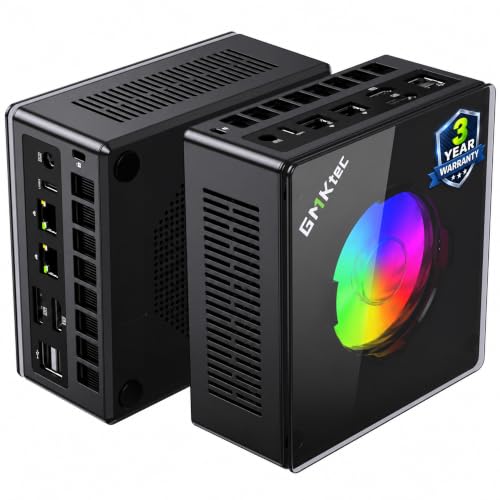
GMKtec Ryzen 9 8945HS Mini PC
Best for: eGPU setups and multi-display workflows
- Processor
- AMD Ryzen 9 8945HS
- Installed RAM
- 32GB
- Storage Capacity
- 1TB
- Memory Type
- DDR5 5600MHz
- Ethernet Ports
- Dual 2.5GbE
- High-Speed Expansion
- OCuLink, USB4
View on Amazon: GMKtec Ryzen 9 8945HS Mini PC Affiliate link
The GMKtec K11 is a compact desktop built around the AMD Ryzen 9 8945HS processor with 32GB of DDR5 RAM and a 1TB SSD. It features an OCuLink port for external GPUs and dual 2.5GbE LAN ports. This setup supports four 4K displays and offers adjustable power modes. It suits users who need strong multitasking, gaming potential via eGPU, and high-speed networking in a small form factor.
Pros
- AMD Ryzen 9 8945HS CPU with up to 5.4 GHz boost
- 32GB DDR5 RAM at 5600 MT/s for high bandwidth
- OCuLink port supports high-bandwidth external GPU connections
- Dual 2.5GbE LAN ports for flexible network setups
- Supports four simultaneous 4K displays via HDMI 2.1 and DP 2.1
Cons
- No internal dedicated graphics; relies on integrated AMD Radeon 780M
- Quiet mode caps performance at 35W TDP
- Weight is 12.6 ounces, which is heavier than many ultra-compact peers
Good fit if
- You want to connect an external GPU via OCuLink for gaming
- You need dual 2.5GbE ports for routing or server tasks
- You require four simultaneous 4K display outputs
Skip if
- You need a built-in discrete graphics card for high-end gaming
- You require silent operation under heavy sustained loads
- You prefer a lighter device under 10 ounces
Verdict: GMKtec K11 Ryzen 9 8945HS Mini PC delivers strong CPU performance and versatile connectivity for users who plan to use an external GPU or need multiple high-resolution displays. It is a solid choice for power users who value expandability over raw graphical power.
Specifications side by side
| Spec | GMKtec Ryzen 9 8945HS Mini PC |
|---|---|
| Processor | AMD Ryzen 9 8945HS |
| Installed RAM | 32GB |
| Storage Capacity | 1TB |
| Memory Type | DDR5 5600MHz |
| Ethernet Ports | Dual 2.5GbE |
| High-Speed Expansion | OCuLink, USB4 |
| Memory | 32GB RAM |
| Use | Gaming |
| Networking | 2.5G LAN |
| Weight | 12.6 ounces |
| Size | R9 8945HS 32GB DDR5 + 1TB |
| Color | Black(K11) |
| Model | K11 |
Frequently asked questions
Is the GMKtec Ryzen 9 8945HS good for gaming?
This mini PC delivers strong CPU performance suitable for gaming, especially when paired with an external GPU. The Ryzen 9 8945HS processor handles demanding applications efficiently. It is a solid choice for users who prioritize expandability and multi-display workflows over raw graphical power from an integrated chip.
How much RAM does the GMKtec K11 have?
The GMKtec K11 comes equipped with 32GB of DDR5 RAM. This generous memory capacity allows you to run multiple demanding applications simultaneously without slowdowns. It supports intensive multitasking and ensures smooth performance for gaming and content creation tasks that require significant system resources.
What network speed does this mini PC support?
The device features a 2.5G LAN port for networking. This provides faster wired connectivity compared to standard Gigabit Ethernet, which is beneficial for large file transfers or low-latency gaming. It ensures your internet connection remains a bottleneck-free component in your overall system performance.
Can I use this PC with an external graphics card?
Yes, this unit is specifically noted as being ideal for eGPU setups. Its versatile connectivity options support external graphics acceleration, allowing you to boost graphical performance beyond what the integrated hardware provides. This makes it a flexible choice for users needing enhanced visual processing capabilities.
How heavy is the GMKtec K11 mini PC?
The GMKtec K11 weighs 12.6 ounces. Its compact form factor and lightweight design make it easy to place in various home or office environments. The small footprint allows for flexible placement on desks or shelves without taking up excessive space.
What storage capacity is included in the K11 model?
The listing highlights a 1TB PCIe 4.0 SSD for storage. This provides ample space for your operating system, games, and files while ensuring fast data access speeds. The PCIe 4.0 interface contributes to quick boot times and rapid loading of large applications or games.