GMKtec or ACEMAGIC? Mini PCs Compared in 2026
As an Amazon Associate we earn from qualifying purchases. Links on this page are affiliate links.
This GMKtec vs ACEMAGIC mini PC guide compares two distinct AMD-based systems. Both units offer 16GB of RAM and triple display support for multitasking. The main difference lies in their networking and processor generations. The GMKtec G11 features dual 2.5GbE ports and a newer embedded chip. The ACEMAGIC K1 provides a standard gigabit connection and a more traditional mobile processor. You must decide which connectivity and performance profile fits your workflow.
Key differences
| Aspect | GMKtec Mini PC Dual 2.5GbE | ACEMAGIC Ryzen 7330U Mini PC |
|---|---|---|
| Processor | AMD Ryzen Embedded R2514 | AMD Ryzen 3 Pro 7330U |
| Ethernet Ports | Dual 2.5GbE | 1x Gigabit Ethernet |
| Memory Type | Dual-channel DDR4 | LPDDR4 3200MT/s (non-expandable) |
| Storage Expansion | Not listed | Up to 2TB via M.2 slots |
| Operating System | Not listed | Windows 11 Pro |
| Warranty | 1-year limited | 3-year quality assurance |
Which one should you choose?
Choose GMKtec Mini PC Dual 2.5GbE if
- You need dual 2.5GbE ports for a home lab or NAS setup.
- You prefer a processor designed for 24/7 commercial operation.
- You want dual-channel DDR4 memory for better GPU performance.
Choose ACEMAGIC Ryzen 7330U Mini PC if
- You require Windows 11 Pro pre-installed for business compatibility.
- You need the flexibility to upgrade storage up to 2TB.
- You want a longer 3-year warranty for peace of mind.
Verdict: Choose the GMKtec G11 if your work involves networking, virtualization, or requires robust 24/7 reliability. Select the ACEMAGIC K1 if you prioritize a standard office setup with Windows 11 Pro and expandable storage. Both machines handle basic tasks well, but their specialized features cater to different user needs.
GMKtec vs ACEMATIC Mini PC
processor performance
The GMKtec G11 uses the Ryzen Embedded R2514, a processor built for 24/7 commercial use. It features a 1.2GHz Radeon GPU that significantly outperforms entry-level Intel chips in graphics tasks. The ACEMAGIC K1 relies on the Ryzen 3 Pro 7330U, which offers up to 4.3GHz boost speeds. This CPU is designed for efficient office work and general multitasking. While the ACEMAGIC processor has a higher clock speed, the GMKtec chip is engineered for continuous industrial operation. You should choose the GMKtec if you need reliability for servers or digital signage. The ACEMAGIC is better for standard desktop productivity tasks that require quick burst processing.
networking capabilities
Networking is a major differentiator between these two systems. The GMKtec G11 stands out with dual 2.5GbE Ethernet ports. This allows you to set up a high-speed firewall, router, or NAS server with separate networks for different devices. The ACEMAGIC K1 provides only a single Gigabit Ethernet port. While sufficient for basic internet browsing and office work, it lacks the advanced networking options of the GMKtec. If you plan to run virtual machines, host a home lab, or manage complex network security, the GMKtec is the superior choice. For simple single-connection setups, the ACEMAGIC is adequate.
memory configuration
Both mini PCs come with 16GB of RAM, but the architecture differs. The GMKtec G11 supports dual-channel DDR4 memory, which doubles the data pathway between the processor and RAM. This setup helps prevent memory bottlenecks during high-intensity tasks and improves frame rates in graphics-heavy applications. The ACEMAGIC K1 uses 16GB of LPDDR4 memory that is non-expandable. While LPDDR4 offers fast data transfer speeds, it is soldered to the motherboard. The GMKtec offers better performance for multitasking and professional workloads due to its dual-channel configuration, whereas the ACEMAGIC provides a fixed memory solution.
storage options
Storage flexibility varies between the two brands. The ACEMAGIC K1 includes a 256GB M.2 2280 SSD and allows you to add another M.2 NVMe or SATA SSD to expand capacity up to 2TB. This makes it easy to increase your storage space later. The GMKtec G11 data does not specify the included storage capacity or expansion slots. You must check the specific configuration you purchase to know the storage details. If you need a known starting storage size with clear expansion paths, the ACEMAGIC provides more transparency. For the GMKtec, storage details are not fully defined in the general specifications.
wireless connectivity
Both systems include wireless networking and Bluetooth, but with different standards. The GMKtec G11 features WiFi 6E and Bluetooth 5.2. WiFi 6E supports the 6GHz band, which offers faster speeds, lower latency, and less interference in crowded areas. Bluetooth 5.2 provides reliable connections for peripherals. The ACEMAGIC K1 uses WiFi 5 and Bluetooth 4.2. While WiFi 5 is stable for general browsing and streaming, it lacks the advanced speed and range of WiFi 6E. Bluetooth 4.2 is older and may have slower data transfer rates for accessories. The GMKtec offers more modern wireless technology for future-proofing.
Choose the Right Mini PC for You
Users needing high-speed networking or server roles
The GMKtec G11 includes dual 2.5GbE Ethernet ports. This hardware allows you to configure the unit as a dedicated firewall, router, or NAS. The dual ports provide the bandwidth and flexibility required for professional home lab setups, virtualization, and secure network segmentation without needing external adapters.
Office workers wanting plug-and-play simplicity
The ACEMAGIC K1 features a built-in power supply, eliminating the need for a bulky external brick. It comes pre-installed with Windows 11 Pro, ready for immediate use. This integrated design keeps your desktop tidy and reduces cable clutter, making it an ideal choice for simple office environments.
Buyers prioritizing warranty coverage and support
ACEMAGIC provides a three-year quality assurance period for the K1. This longer coverage period offers more protection against manufacturing defects compared to the GMKtec G11, which includes a one-year limited warranty. This extended term provides greater peace of mind for long-term ownership and reduced maintenance concerns.
Users requiring 24/7 commercial reliability
The GMKtec G11 uses the Ryzen Embedded R2514 processor, which is specifically engineered for continuous 24/7 operation. This architecture ensures stability in industrial or commercial settings where downtime is unacceptable. The embedded design prioritizes durability and consistent performance under constant load compared to standard consumer mobile processors.
The products compared

GMKtec Mini PC Dual 2.5GbE
Best for: Networking hubs and multi-display workstations
- Processor
- AMD Ryzen Embedded R2514
- Installed RAM
- 16GB
- Storage Capacity
- 256GB
- Memory Type
- DDR4
- Graphics
- AMD Radeon GPU
- Ethernet Ports
- Dual 2.5GbE
View on Amazon: GMKtec Mini PC Dual 2.5GbE Affiliate link
The GMKtec G11 uses the AMD Ryzen Embedded R2514 processor for continuous 24/7 operation. It includes 16GB of dual-channel DDR4 RAM and dual 2.5GbE Ethernet ports. The system supports three 4K displays via dual HDMI and USB-C. You get Wi-Fi 6E and Bluetooth 5.2 for connectivity. This unit suits users needing robust networking or multi-display setups for professional environments.
Pros
- AMD Ryzen Embedded R2514 processor for 24/7 reliability
- Dual 2.5GbE Ethernet ports for networking flexibility
- 16GB dual-channel DDR4 RAM
- Supports three independent 4K displays
Cons
- Uses DDR4 RAM instead of newer DDR5
- No mention of included SSD storage capacity
- 1-year limited warranty coverage
Good fit if
- You need dual 2.5GbE ports for a home lab or firewall
- You require three simultaneous 4K displays
- You want a system designed for continuous operation
Skip if
- You need DDR5 memory for maximum bandwidth
- You require more than three display outputs
- You want a larger SSD pre-installed
Verdict: GMKtec G11 Mini PC Ryzen R2514 fits users who need dual 2.5GbE ports and three 4K displays for professional or networking tasks.
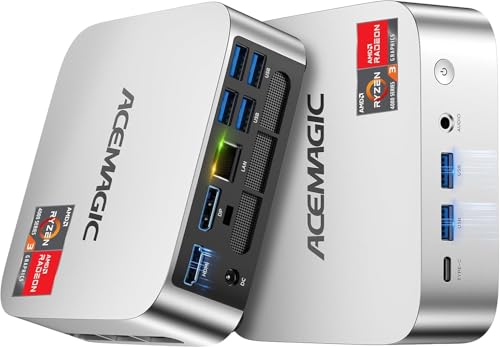
ACEMAGIC Ryzen 7330U Mini PC
Best for: Compact office setups with triple displays
- Processor
- AMD Ryzen 3 Pro 7330U
- Installed RAM
- 16GB
- Storage Capacity
- 256GB
- Memory Type
- LPDDR4 3200MT/s
- Graphics
- AMD Radeon Graphics
- Ethernet Ports
- 1x Gigabit Ethernet
View on Amazon: ACEMAGIC Ryzen 7330U Mini PC Affiliate link
This ACEMAGIC K1 Mini PC uses an AMD Ryzen 3 Pro 7330U processor with 16GB of non-expandable LPDDR4 RAM and a 256GB SSD. It runs Windows 11 Pro and supports triple displays via HDMI, DisplayPort, and USB-C. The compact silver chassis measures 5.04 inches square and includes built-in power. It offers Gigabit Ethernet and WiFi 5 connectivity for reliable office or home use.
Pros
- AMD Ryzen 3 Pro 7330U processor with 4.3GHz boost
- 16GB LPDDR4 3200MT/s RAM for multitasking
- Triple display support with HDMI, DP, and USB-C
- Built-in power supply reduces cable clutter
- Windows 11 Pro pre-installed
Cons
- Memory is non-expandable LPDDR4
- Only includes 256GB storage
- WiFi 5 and Bluetooth 4.2 are older standards
Good fit if
- You need a compact PC for office tasks
- You want triple monitor support for productivity
- You prefer a built-in power supply
Skip if
- You require expandable RAM beyond 16GB
- You need fast WiFi 6 or Bluetooth 5.0
- You want more than 256GB of storage
Verdict: ACEMAGIC K1 Ryzen 7330U Mini PC fits users who need a tidy, compact system for multitasking and multiple screens. It suits those who do not need to upgrade memory later.
Specifications side by side
| Spec | GMKtec Mini PC Dual 2.5GbE | ACEMAGIC Ryzen 7330U Mini PC |
|---|---|---|
| Processor | AMD Ryzen Embedded R2514 | AMD Ryzen 3 Pro 7330U |
| Installed RAM | 16GB | 16GB |
| Storage Capacity | 256GB | 256GB |
| Memory Type | DDR4 | LPDDR4 3200MT/s |
| Graphics | AMD Radeon GPU | AMD Radeon Graphics |
| Ethernet Ports | Dual 2.5GbE | 1x Gigabit Ethernet |
| Operating System | not stated | Windows 11 Pro |
| Storage | 256GB SSD | not stated |
| Use | not stated | Home, Business, Office |
| Networking | WiFi 6E | not stated |
| Dimensions | 3.42 × 3.42 × 1.55 inches | 5.04 × 5.04 × 1.61 inches |
| Weight | 1.65 pounds | 1.1 pounds |
| Size | 16GB+256GB R2514 | Ryzen 7330U+16GB+256GB |
| Color | Black Steel | Ryzen 7330U+16GB+256GB |
| Model | G11 | V1 |
Frequently asked questions
Which mini PC is better for home networking tasks?
The GMKtec G11 is the superior choice for networking. It includes dual 2.5GbE Ethernet ports, allowing you to configure the unit as a dedicated firewall, router, or network-attached storage. This hardware provides the necessary bandwidth and flexibility for professional networking roles that standard single-port units cannot support.
Does the ACEMAGIC K1 allow memory upgrades?
No, the ACEMAGIC K1 does not allow memory upgrades. It comes with 16GB of RAM that is fixed and cannot be increased later. This design suits users who do not need to expand their system's memory capacity over time, prioritizing a compact form factor over future scalability.
How many displays can these mini PCs support?
Both the GMKtec G11 and the ACEMAGIC K1 support triple displays. The GMKtec G11 can drive three 4K monitors, making it suitable for multi-screen workstations. The ACEMAGIC K1 also offers triple display output, providing ample screen real estate for multitasking and office workflows.
What is the weight difference between the two units?
The GMKtec G11 weighs 1.65 pounds, while the ACEMAGIC K1 is lighter at 1.1 pounds. The difference is 0.55 pounds. This makes the ACEMAGIC model slightly more portable, though both remain compact enough for desktop mounting or placement in small spaces without taking up much room.
Is the GMKtec G11 built for commercial use?
Yes, the GMKtec G11 uses the Ryzen Embedded R2514 processor, which is built for 24/7 commercial use. This embedded processor is designed for reliability in continuous operation environments. It is ideal for users who need a stable system for professional or networking tasks that run constantly.
What are the physical dimensions of the ACEMAGIC K1?
The ACEMAGIC K1 measures 5.04 inches in width, 5.04 inches in length, and 1.61 inches in height. It features a silver finish and weighs 1.1 pounds. These dimensions make it a tidy, compact system that fits easily into tight office setups or behind a monitor stand.
Which mini PC has the larger storage capacity?
Both the GMKtec G11 and the ACEMAGIC K1 come with 256GB of SSD storage. Neither unit offers a larger base storage capacity out of the box. You will need to rely on external drives or cloud storage if you require more space than the included 256GB provides.