GMKtec vs Msi Mini PCs: Which Brand Fits You?
As an Amazon Associate we earn from qualifying purchases. Links on this page are affiliate links.
When you compare GMKtec vs msi mini PC options, you find two distinct approaches to small form factor computing. Both brands offer compact systems with 16GB of RAM for smooth multitasking. The main difference lies in their processor choices and target environments. GMKtec focuses on continuous operation with dual networking ports, while MSI prioritizes business features and Thunderbolt connectivity. You need to decide which hardware profile matches your daily workflow.
Key differences
| Aspect | GMKtec Mini PC Dual 2.5GbE | MSI Cubi NUC Mini PC |
|---|---|---|
| Processor | AMD Ryzen Embedded R2514 | Intel Core 3 100U |
| Networking | Dual 2.5GbE ports | 2 x RJ45 ports |
| Expansion | USB-C 10Gbps | 2 x Thunderbolt 4 |
| Operating System | Not listed | Windows 11 Pro |
| Dimensions | 3.42 x 3.42 x 1.55 inches | 5.22 x 5.34 x 1.9 inches |
Which one should you choose?
Choose GMKtec Mini PC Dual 2.5GbE if
- You need dual 2.5GbE ports for a home lab or firewall setup
- You prefer a smaller footprint for tight desk spaces
- You require a processor designed for 24/7 commercial operation
Choose MSI Cubi NUC Mini PC if
- You rely on Thunderbolt 4 for high-speed external storage
- You need Windows 11 Pro included out of the box
- You want a system built with recycled materials and Energy Star compliance
Verdict: Choose the GMKtec G11 if your workflow demands dual networking ports and a compact design for specialized tasks. Pick the MSI Cubi NUC if you need Thunderbolt 4 expansion and a pre-installed business operating system. Both models provide 16GB of RAM, so your choice depends on connectivity and form factor preferences.
GMKtec vs MSI Mini PC Specs
Processor choice
The GMKtec G11 uses the AMD Ryzen Embedded R2514, a processor built for continuous 24/7 operation in commercial or industrial settings. It relies on Zen+ architecture and includes an integrated AMD Radeon GPU. The MSI Cubi NUC features the 13th Gen Intel Core 3 100U. This six-core, eight-thread chip boosts up to 4.7GHz. It targets daily office work and media streaming. The GMKtec design prioritizes sustained loads and embedded reliability. The MSI model focuses on burst performance for standard desktop tasks. Each processor suits different workflow demands.
Networking ports
Both systems offer dual Ethernet ports, but the speeds differ significantly. The GMKtec G11 includes dual 2.5GbE ports. This allows for high-speed data transfer, making it suitable for network-attached storage servers or firewall appliances. The MSI Cubi NUC provides two standard RJ45 ports. These are typical Gigabit Ethernet connections. If you need faster internal network speeds or plan to run a home lab with heavy data traffic, the GMKtec ports provide a clear advantage. Standard office browsing works fine on either.
Display output
The GMKtec G11 supports three independent 4K displays at 60Hz. It achieves this through dual HDMI 2.0 ports and a USB-C port with DisplayPort Alt Mode. The MSI Cubi NUC has two HDMI ports. It does not list a third display output in its specifications. If you need a multi-monitor setup for trading, digital signage, or complex data visualization, the GMKtec offers more flexibility. The MSI setup is sufficient for dual-screen office environments.
Connectivity standards
The MSI Cubi NUC includes two Thunderbolt 4 ports. This provides high-speed expansion for external drives and docks. It also lists WiFi 6 and Bluetooth. The GMKtec G11 features WiFi 6E, which adds the 6GHz band for lower latency. It includes Bluetooth 5.2 and USB-C 10Gbps ports. While the GMKtec offers newer wireless standards, the MSI Thunderbolt 4 ports offer a specific high-bandwidth wired connection option that the GMKtec data does not explicitly confirm.
Operating system
The MSI Cubi NUC comes with Windows 11 Pro pre-installed. This version includes enhanced security features and business management tools. The GMKtec G11 description does not list an included operating system. You must verify if it runs a free version of Windows or requires a separate license. For users who want a ready-to-use business OS with specific professional features out of the box, the MSI provides a clear advantage.
Physical size
The GMKtec G11 measures 3.42 x 3.42 x 1.55 inches. It weighs 1.65 pounds. The MSI Cubi NUC measures 5.22 x 5.34 x 1.97 inches. It weighs 6 pounds. The GMKtec is significantly smaller and lighter. It occupies less desk space and is easier to mount or move. If your priority is minimizing footprint and weight, the GMKtec design is more compact. The MSI unit is larger but still fits in small spaces.
Which Mini PC Fits Your Needs
Network and server enthusiasts
You need dual 2.5GbE ports for advanced networking. This GMKtec model supports firewall software, NAS setups, and virtualization. The Ryzen Embedded R2514 processor handles continuous 24/7 operation reliably. Dual-channel DDR4 RAM ensures stable performance for home lab tasks and containerized applications without bottlenecks.
Office and business users
You require Windows 11 Pro for professional environments. This MSI Cubi NUC features a 13th Gen Intel Core 3 100U processor with high boost speeds. Thunderbolt 4 ports offer fast expansion options. The compact design saves desk space while delivering solid performance for daily office work and media streaming.
Multi-display professionals
You need to connect three independent 4K displays. This GMKtec unit supports triple 4K@60Hz output via dual HDMI and USB-C. The AMD Radeon GPU handles high-intensity visual tasks efficiently. Dual-channel memory supports smooth multitasking across multiple screens, making it ideal for trading, control rooms, or digital signage.
The products compared

GMKtec Mini PC Dual 2.5GbE
Best for: networking hubs and triple 4K displays
- Processor
- AMD Ryzen Embedded R2514
- Installed RAM
- 16GB
- Storage Capacity
- 256GB
- Memory Type
- DDR4
- Graphics
- AMD Radeon GPU
- Ethernet Ports
- Dual 2.5GbE
View on Amazon: GMKtec Mini PC Dual 2.5GbE Affiliate link
The GMKtec G11 uses the AMD Ryzen Embedded R2514 processor with 16GB of dual-channel DDR4 RAM. It features dual 2.5GbE Ethernet ports for networking tasks and supports three 4K displays via dual HDMI and USB-C. This compact unit weighs 1.65 pounds and includes Wi-Fi 6E. It suits users needing reliable 24/7 operation and strong integrated graphics performance for professional or home lab environments.
Pros
- AMD Ryzen Embedded R2514 processor for continuous operation
- Dual 2.5GbE Ethernet ports for networking flexibility
- 16GB dual-channel DDR4 RAM for multitasking
- Supports three 4K displays simultaneously
- Wi-Fi 6E and Bluetooth 5.2 connectivity
Cons
- Uses DDR4 RAM instead of newer DDR5
- Only includes a 1-year limited warranty
- Base model lacks a dedicated SSD in this configuration
Good fit if
- You need dual 2.5GbE ports for a home lab or NAS
- You require support for three independent 4K monitors
- You want a compact PC for 24/7 commercial use
Skip if
- You need DDR5 memory for maximum bandwidth
- You require a warranty longer than one year
- You prefer a pre-configured SSD storage solution
Verdict: GMKtec G11 Mini PC Ryzen R2514 is a specialized tool for network enthusiasts and multi-display users who value dual 2.5GbE ports and triple monitor support over modern memory standards.
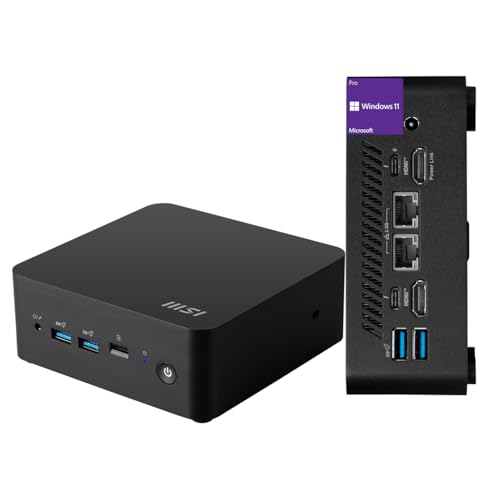
MSI Cubi NUC Mini PC
Best for: Office work and dual Ethernet networking
- Processor
- Intel Core 3 100U
- Installed RAM
- 16GB
- Storage Capacity
- 256GB
- Ethernet Ports
- 2 x RJ45
- High-Speed Expansion
- Thunderbolt 4
- Operating System
- Windows 11 Pro
View on Amazon: MSI Cubi NUC Mini PC Affiliate link
The MSI Cubi NUC is a compact desktop powered by a 13th Gen Intel Core 3 100U processor. It includes 16GB of RAM and a 256GB SSD for daily tasks. The unit features two RJ45 ports and Thunderbolt 4 connectivity. It runs Windows 11 Pro. This model suits users needing reliable office performance in a small footprint.
Pros
- Intel Core 3 100U processor with 6 cores
- 16GB high-bandwidth RAM for multitasking
- Two RJ45 Ethernet ports for stable networking
- Thunderbolt 4 ports for high-speed expansion
Cons
- 256GB SSD storage is limited for large files
- No dedicated graphics card for heavy rendering
- Windows 11 Pro license included in base model
Good fit if
- You need dual Ethernet ports for home labs
- You require Thunderbolt 4 for fast data transfer
- You want Windows 11 Pro for business features
Skip if
- You need more than 256GB of built-in storage
- You require dedicated graphics for gaming
- You prefer AMD processors over Intel
Verdict: MSI Cubi NUC Core 3 Mini PC offers solid daily performance with dual Ethernet ports. It fits users who need reliable office computing and Thunderbolt 4 connectivity.
Specifications side by side
| Spec | GMKtec Mini PC Dual 2.5GbE | MSI Cubi NUC Mini PC |
|---|---|---|
| Processor | AMD Ryzen Embedded R2514 | Intel Core 3 100U |
| Installed RAM | 16GB | 16GB |
| Storage Capacity | 256GB | 256GB |
| Memory Type | DDR4 | not stated |
| Graphics | AMD Radeon GPU | not stated |
| Ethernet Ports | Dual 2.5GbE | 2 x RJ45 |
| High-Speed Expansion | not stated | Thunderbolt 4 |
| Operating System | not stated | Windows 11 Pro |
| Memory | not stated | 16GB RAM |
| Storage | 256GB SSD | 256GB SSD |
| Networking | WiFi 6E | not stated |
| Dimensions | 3.42 × 3.42 × 1.55 inches | 5.34 × 5.22 × 1.9 inches |
| Weight | 1.65 pounds | 6 pounds |
| Size | 16GB+256GB R2514 | 16GB RAM | 256GB SSD |
| Color | Black Steel | Black |
| Model | G11 | MSI Cubi Mini |
Frequently asked questions
Which Mini PC is better for office work?
The MSI Cubi NUC is the better choice for office environments. It features a Core 3 processor and dual Ethernet ports for stable networking. The system includes 16GB of RAM and a 256GB SSD for smooth multitasking. Its Thunderbolt 4 connectivity supports high-speed data transfer. This makes it ideal for daily business tasks and reliable connectivity.
Does GMKtec support multiple displays?
Yes, the GMKtec G11 supports triple 4K displays. This makes it excellent for users who need extensive screen real estate. The system is designed for multi-display setups rather than general office use. You get dedicated ports for connecting three monitors simultaneously. This capability suits creative professionals or data analysts who require large visual workspaces.
What is the difference in processor types?
GMKtec uses a Ryzen Embedded processor built for continuous operation. This chip is designed for commercial or industrial settings requiring 24/7 reliability. MSI uses a Core 3 processor aimed at daily consumer tasks. The Ryzen chip prioritizes long-term stability in demanding environments. The Intel chip focuses on standard office performance and everyday computing needs for typical users.
Which brand offers better networking capabilities?
GMKtec offers specialized networking features with dual 2.5GbE ports. This allows for advanced network configurations like firewall setups or NAS integration. MSI also provides dual Ethernet ports for solid office networking. However, GMKtec targets enthusiasts who need higher bandwidth or specific network protocols. Both brands support reliable connectivity, but GMKtec caters to more technical network requirements.
How do the sizes compare between brands?
The GMKtec G11 is significantly smaller than the MSI Cubi NUC. The GMKtec measures 3.42 inches on each side and weighs 1.65 pounds. The MSI model is larger, measuring 5.34 inches in length and weighing 6 pounds. The GMKtec design is more compact and portable. The MSI unit is bulkier but still fits standard desktop spaces comfortably.
Is GMKtec suitable for server tasks?
Yes, the GMKtec G11 is suitable for server tasks. Its Ryzen Embedded processor supports continuous 24/7 operation reliably. The dual 2.5GbE ports enable robust network management for server roles. You can run virtualization or NAS setups effectively. The system is built for commercial environments that require uptime. This makes it a strong option for lightweight server or hub applications.
Does MSI support Thunderbolt 4?
Yes, the MSI Cubi NUC supports Thunderbolt 4 connectivity. This feature allows for high-speed data transfer and peripheral connections. It enhances the system for office use and professional workflows. You can connect fast external drives or docks easily. This connectivity option is not mentioned for the GMKtec model, making it a key differentiator for MSI users.