KAMRUI Ryzen 4300U Mini PC Review: Specs, Pros and Cons
As an Amazon Associate we earn from qualifying purchases. Links on this page are affiliate links.
This kamrui pinova p1 mini PC review covers a compact desktop built for steady daily tasks. It uses an AMD Ryzen 4300U processor with four cores and up to 3.7GHz boost speed. The system includes 16GB of DDR4 RAM and a 256GB M.2 SSD. This combination handles office work and light creative projects without lag. The small form factor fits easily on any desk. You get reliable performance for multitasking. The specs focus on practicality rather than high-end gaming. It is a solid choice for users who need a dependable machine for everyday computing needs.
What stands out
- AMD Ryzen 4300U processor with 2.7GHz base and 3.7GHz boost clock
- 16GB DDR4 RAM with support for dual-channel upgrades up to 64GB
- Triple 4K output via HDMI 2.0, DisplayPort 1.4, and USB-C
- Dual M.2 slots for flexible storage expansion up to 4TB
Who it fits
Good fit for
This mini PC suits home office workers who need a quiet, reliable machine for spreadsheets, web browsing, and video calls. It is also good for digital signage or light media centers thanks to its triple display support and gigabit ethernet. Users who want to expand storage later will appreciate the dual M.2 slots. If you need a small computer that runs stably for long periods, this setup offers the necessary ports and processing power for daily productivity tasks.
Who should skip it
You should look elsewhere if you need high-end gaming or heavy 3D rendering. The integrated AMD Radeon graphics are not designed for demanding titles. This device lacks Thunderbolt support, so you cannot connect high-speed external docks. It also does not include a dedicated discrete GPU. If you require maximum graphical performance or the latest connectivity standards, this model will not meet your needs. It is strictly for general computing and light media use.
Verdict: The KAMRUI Ryzen 4300U Mini PC offers solid everyday performance with flexible storage and display options. It is a practical choice for office work and light media tasks.
Key specs explained for this unit
Processor: AMD Ryzen 4300U
This four-core chip runs at a base of 2.7GHz and boosts to 3.7GHz. It outperforms entry-level N-series chips and older i3 models in multi-thread tasks. You will notice smoother performance when handling office suites, light video editing, or basic 3D rendering. This makes it a solid choice for daily productivity and creative work without needing a high-end desktop replacement.
Memory: 16GB DDR4
The system comes with 16GB of DDR4 RAM, supporting dual-channel speeds up to 3200MHz. You can upgrade this to a maximum of 64GB by installing two 32GB modules. This capacity allows you to run multiple applications simultaneously without significant slowdowns. It ensures comfortable multitasking for web browsing, document editing, and streaming, which is essential for a responsive small form factor experience.
Storage: 256GB M.2 SSD
The included 256GB M.2 SSD provides fast boot times and quick application loading. It uses PCIe 3.0 NVMe technology for efficient data transfer. The unit features two M.2 slots, allowing you to expand storage up to 4TB by adding SATA or NVMe drives. This flexibility supports media libraries, NAS backups, and extensive file storage needs for users who require more space than the base model offers.
Graphics: AMD Radeon
The integrated AMD Radeon GPU operates at 1.4GHz and delivers significantly better graphics performance than standard UHD iGPUs. It supports triple 4K displays via HDMI, DisplayPort, and USB-C. This setup is ideal for multi-monitor productivity setups or smooth media streaming. It handles light gaming and visual tasks more effectively than basic integrated graphics found in budget mini PCs, enhancing your visual workflow.
Design and build specs
The KAMRUI Pinova P1 measures 5.04 inches in width, 5.04 inches in length, and 2.05 inches in height. It is black. These dimensions create a compact square footprint. You can place it behind a monitor or slide it into a tight shelf without taking up much desk space. The listing notes a low-noise cooling system. This design choice helps keep the unit quiet during long work sessions.
According to the listing, the exterior is built for steady operation. It supports round-the-clock running, which makes it suitable for use as a home server or digital signage display. The build includes a full array of ports on the chassis. You get six USB 3.2 ports, a USB-C port, HDMI 2.0, DisplayPort 1.4, a Gigabit Ethernet jack, and a 3.5mm audio output. This layout means you likely will not need extra dongles for standard peripherals.
The unit also features dual-band Wi-Fi 5 and several wake functions. These include Auto Power-On, RTC Wake, and Wake-on-LAN. These features allow the PC to start automatically or respond to network signals. This makes the design practical for unattended tasks like media storage or backup operations. The physical construction prioritizes connectivity and stability over flashy aesthetics.
Setup and everyday use
Setting up the KAMRUI Pinova P1 is straightforward because it includes a rich array of ports. You do not need extra dongles for most connections. The rear panel features two HDMI 2.0 outputs, one DisplayPort 1.4, and a USB-C port that supports DisplayPort Alt Mode. This configuration allows you to connect three screens simultaneously at 4K resolution. The built-in AMD Radeon graphics handle this multi-display setup with better performance than standard UHD integrated graphics. For connectivity, a Gigabit Ethernet port provides a stable wired link, while dual-band Wi-Fi 5 supports speeds up to 1750Mbps. This wireless capability ensures reliable performance for video calls and streaming. The unit also includes six USB 3.2 ports and a 3.5mm audio jack, covering peripheral needs without cluttering your desk. In daily use, the Ryzen 4300U processor manages multitasking, office applications, and light creative work like basic 3D rendering smoothly. The 16GB of DDR4 RAM supports efficient switching between tasks. Storage starts at 256GB but offers two M.2 slots for expansion up to 4TB, which is useful for media libraries or NAS backups. The system is designed for 24/7 operation, featuring a low-noise cooling system that maintains steady temperatures during heavy loads. Practical wake functions like Auto Power-On and Wake-on-LAN make it suitable for digital signage or home server duties. You can rely on its stability for continuous running without overheating concerns.
Before you buy this mini PC
You need a display, keyboard, and mouse to use this unit. It supports triple 4K screens via HDMI, DisplayPort, and USB-C. Ensure your monitors match these outputs. The device runs on dual-band Wi-Fi 5. If you require Wi-Fi 6, this model may not suit you. It lacks Bluetooth in the provided data, so you might need a dongle for wireless peripherals. The 256GB SSD fills up quickly. You should plan for external storage or use the second M.2 slot if your variant includes it. This mini PC fits well among compact options for office work. It is less powerful than newer i5-HX variants. Choose this if you prioritize steady performance over raw speed. Keep it in a well-ventilated area to maintain low-noise cooling efficiency during long sessions.
Check before you buy
- Confirm your monitor ports match HDMI 2.0 or DisplayPort 1.4
- Check if your variant includes a second M.2 storage slot
- Verify you need Wi-Fi 5 or if Wi-Fi 6 is required
- Ensure you have a keyboard and mouse ready for setup
The product at a glance
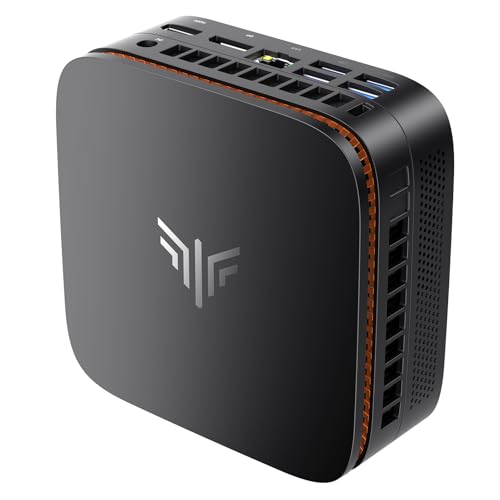
KAMRUI Ryzen 4300U Mini PC
Best for: Triple 4K display setups and expandable storage
- Processor
- AMD Ryzen 4300U
- Installed RAM
- 16GB
- Storage Capacity
- 256GB
- Memory Type
- DDR4
- Graphics
- AMD Radeon GPU
- Ethernet Ports
- Gigabit Ethernet
View on Amazon: KAMRUI Ryzen 4300U Mini PC Affiliate link
The KAMRUI Pinova P1 Mini PC uses an AMD Ryzen 4300U processor with 16GB of DDR4 RAM and a 256GB SSD. It supports triple 4K displays and dual M.2 storage slots for expansion. This unit handles multitasking and light creative work. It includes Gigabit Ethernet and dual-band Wi-Fi 5. It suits users needing a compact, expandable workstation for office or home server tasks.
Pros
- AMD Ryzen 4300U processor with 4 cores
- Triple 4K display output via HDMI, DP, and USB-C
- Dual M.2 slots for storage expansion up to 4TB
- Rich I/O including six USB 3.2 ports and Gigabit Ethernet
Cons
- Wi-Fi 5 limits wireless speeds compared to Wi-Fi 6
- 256GB base storage fills quickly for media libraries
- No mention of Bluetooth connectivity in specifications
Good fit if
- You need multiple 4K monitors for productivity
- You want to expand storage with additional SSDs
- You require Gigabit Ethernet for stable network connections
Skip if
- You need Wi-Fi 6 or higher for faster wireless
- You require Bluetooth for wireless peripherals
- You need more than 256GB of storage without upgrades
Verdict: KAMRUI Pinova P1 Ryzen 4300U Mini PC fits users who need triple 4K displays and expandable storage for office or server tasks. It lacks modern Wi-Fi 6 and Bluetooth, limiting wireless flexibility.
Specifications side by side
| Spec | KAMRUI Ryzen 4300U Mini PC |
|---|---|
| Processor | AMD Ryzen 4300U |
| Installed RAM | 16GB |
| Storage Capacity | 256GB |
| Memory Type | DDR4 |
| Graphics | AMD Radeon GPU |
| Ethernet Ports | Gigabit Ethernet |
| Memory | 16GB RAM |
| Storage | 256GB SSD |
| Use | Home, Business, Office |
| Dimensions | 5.04 × 5.04 × 2.05 inches |
| Weight | 1.1 pounds |
| Size | 16GB+1TB |
| Color | Black |
| Model | P1 |
Frequently asked questions
Can this mini PC drive three monitors at 4K resolution?
Yes, the KAMRUI Pinova P1 supports triple 4K displays. It achieves this through two HDMI 2.0 ports, one DisplayPort 1.4, and a USB-C port with DisplayPort Alt Mode. This setup is ideal for office multitasking or server monitoring where multiple high-resolution screens are necessary.
What is the exact physical size of the KAMRUI Pinova P1?
The unit measures 5.04 inches in width, 5.04 inches in length, and 2.05 inches in height. These dimensions create a compact square footprint. You can easily place it behind a monitor or slide it into tight spaces on a desk without taking up much room.
Does this device include Wi-Fi 6 for faster wireless connections?
No, the KAMRUI Pinova P1 runs on dual-band Wi-Fi 5. It lacks modern Wi-Fi 6 support, which limits wireless flexibility compared to newer models. If you require the latest wireless standards, this feature may not meet your specific networking needs.
How much storage and memory does the base model have?
The system includes 16GB of DDR4 RAM and a 256GB M.2 SSD. This configuration handles steady daily tasks and office suites well. The storage is expandable, allowing you to add more capacity if you need to store larger files or run additional applications.
Is the KAMRUI Pinova P1 suitable for light gaming?
It is not designed for heavy gaming. The AMD Ryzen 4300U processor provides four cores with up to 3.7GHz boost speed. While it outperforms entry-level chips in multi-thread tasks, it lacks the dedicated graphics power needed for modern games. It is best for office work.
What operating system comes pre-installed on this mini PC?
The provided specifications do not list a pre-installed operating system. You typically need to install Windows or Linux yourself. Ensure you have the necessary installation media or license keys before setting up the device for the first time.
Does the USB-C port support data transfer or only video?
The USB-C port supports DisplayPort Alt Mode for video output. The review does not specify data transfer speeds or power delivery capabilities for this specific port. You should rely on the other USB ports for standard data connections if the USB-C port is used for displays.
Can I upgrade the RAM in this mini PC later?
The data indicates the unit comes with 16GB of RAM but does not specify if it is soldered or upgradeable. Many mini PCs in this class have soldered memory. You should verify the service manual or contact the manufacturer to confirm if the RAM can be expanded after purchase.