KAMRUI Pinova Ryzen 7330U Mini PC vs KAMRUI Ryzen 4300U Mini PC: Spec Comparison
As an Amazon Associate we earn from qualifying purchases. Links on this page are affiliate links.
You are comparing the kamrui pinova p2 mini PC vs pinova p1 mini PC. Both units feature AMD Ryzen processors, 16GB of DDR4 RAM, and 256GB of storage. They share gigabit Ethernet and dual 4K display support. The main difference lies in their physical design and connectivity. The P2 is a compact silver unit with standard ports. The P1 is a larger black chassis that adds a USB-C port and dual M.2 storage slots for greater expansion flexibility.
Key differences
| Aspect | KAMRUI Pinova Ryzen 7330U Mini PC | KAMRUI Ryzen 4300U Mini PC |
|---|---|---|
| Processor | Ryzen 5 3500U | Ryzen 4300U |
| Dimensions | 3.94 x 3.94 x 1.42 inches | 5.04 x 5.04 x 2.05 inches |
| Storage Expansion | Single M.2 slot | Dual M.2 slots |
| Display Outputs | HDMI 2.0 and DP 1.4 | HDMI 2.0, DP 1.4, and USB-C |
| Wi-Fi | Not listed | Wi-Fi 5 |
Which one should you choose?
Choose KAMRUI Pinova Ryzen 7330U Mini PC if
- You need the smallest possible footprint for tight spaces.
- You prefer a silver finish for your desk setup.
- You only require two monitors for your workflow.
Choose KAMRUI Ryzen 4300U Mini PC if
- You want to install multiple internal drives for storage.
- You need a USB-C port for video output or peripherals.
- You plan to run the device 24/7 as a home server.
Verdict: The P2 suits users who prioritize a compact size and standard connectivity. The P1 is better for those needing extra storage slots and a USB-C display output. Your choice depends on whether space or expansion matters more to you.
KAMRUI Pinova P2 vs P1 Specs
processor performance
The KAMRUI Pinova P2 uses the Ryzen 5 3500U, which offers four cores and eight threads. This multi-threading helps with multitasking. The KAMRUI Pinova P1 features the Ryzen 4300U, which has four cores and four threads. While the P1 has a higher boost clock of 3.7GHz, the P2 provides more threads for parallel workloads. Both processors reach the same 3.7GHz peak speed. The P2 is generally better for applications that can use multiple threads simultaneously, such as video editing or heavy multitasking. The P1 relies on single-core speed for responsiveness.
memory capacity
Both mini PCs come with 16GB of DDR4 RAM installed. However, the maximum upgrade potential differs significantly. The KAMRUI Pinova P2 supports expansion up to 32GB of RAM. In contrast, the KAMRUI Pinova P1 supports dual-channel DDR4-3200 and can handle up to 64GB of RAM by using two 32GB modules. If you plan to run memory-intensive applications or keep many programs open at once, the P1 offers a much higher ceiling. The P2 is limited to a lower maximum capacity, which may restrict heavy workloads in the future.
storage expansion
Both units include a 256GB M.2 SSD. The KAMRUI Pinova P2 allows for a single M.2 slot expansion up to 2TB. The KAMRUI Pinova P1 stands out with dual M.2 slots. It supports one PCIe 3.0 x4 NVMe drive and a second slot that can take a SATA or NVMe drive. This allows the P1 to reach up to 4TB of total storage. The P1 is the clear choice if you need to store large media files, run a home server, or use the second drive for NAS backup. The P2 offers less flexibility for adding drives.
display output
Both mini PCs support dual 4K@60Hz displays. The KAMRUI Pinova P2 provides connectivity through one HDMI 2.0 port and one DisplayPort 1.4. The KAMRUI Pinova P1 offers triple display support. It includes HDMI 2.0, DisplayPort 1.4, and a USB-C port with DisplayPort Alt Mode. This allows you to connect three monitors simultaneously at 4K resolution. If you work with a multi-monitor setup or need extra screen real estate for trading or coding, the P1 provides more connectivity options without needing a dock.
physical size
The KAMRUI Pinova P2 is significantly more compact. It measures 3.94 inches in width and length, with a height of 1.42 inches. It weighs 9.52 ounces. The KAMRUI Pinova P1 is larger, measuring 5.04 inches in width and length, and 2.05 inches in height. The P1 is black, while the P2 is silver. The smaller footprint of the P2 makes it easier to mount behind a monitor or fit into tight spaces. The P1 requires more desk space but offers better airflow for its larger internal components.
networking features
Both systems include gigabit Ethernet for stable wired connections. The KAMRUI Pinova P2 supports standard Wi-Fi and Bluetooth for wireless peripherals and internet access. The KAMRUI Pinova P1 features dual-band Wi-Fi 5 with speeds up to 1750Mbps. This faster wireless standard can improve throughput for large file transfers over Wi-Fi. The P1 also includes practical wake functions like Auto Power-On and Wake-on-LAN, which are useful for server applications. The P2 focuses on standard connectivity without these advanced server features.
Which Mini PC suits your needs
Users needing multi-monitor setups
The Ryzen 4300U model supports triple 4K displays via HDMI, DisplayPort, and USB-C. This allows you to connect three screens simultaneously. The Pinova P1 includes a USB-C port with DisplayPort Alt Mode, which the other unit lacks. If you require more than two monitors for your workflow, this extra port is essential for your setup.
Those wanting expandable storage options
The Ryzen 4300U unit features two M.2 slots. This lets you install both an NVMe SSD and a SATA or NVMe drive. You can expand storage up to 4TB total. The other model only has one M.2 slot. If you plan to store large media files or use the PC as a network drive, the dual slots provide necessary flexibility.
Users prioritizing compact dimensions
The Ryzen 5 3500U model measures 3.94 inches square and weighs 9.52 ounces. It is significantly smaller and lighter than the Ryzen 4300U version, which is 5.04 inches square and taller. If you have limited desk space or need a portable unit for travel, the smaller footprint and lighter weight of this compact design will fit your environment better.
The products compared

KAMRUI Pinova Ryzen 7330U Mini PC
Best for: Dual 4K display setups and office work
- Processor
- AMD Ryzen 4300U
- Installed RAM
- 16GB
- Storage Capacity
- 512GB
- Memory Type
- LPDDR4
- Graphics
- AMD Radeon Vega 5
- Ethernet Ports
- Gigabit LAN
View on Amazon: KAMRUI Pinova Ryzen 7330U Mini PC Affiliate link
The KAMRUI Essenx E2 Mini PC uses an AMD Ryzen 5 3500U processor with 16GB of DDR4 RAM and a 256GB SSD. It supports dual 4K displays via HDMI and DisplayPort. This model includes Gigabit Ethernet and USB 3.2 ports. It suits home and business users needing reliable multitasking. The system is expandable for more memory and storage.
Pros
- AMD Ryzen 5 3500U processor with up to 3.7GHz boost
- 16GB DDR4 RAM expandable to 32GB
- Dual 4K@60Hz display support via HDMI 2.0 and DP 1.4
- Gigabit Ethernet and USB 3.2 ports for stable connectivity
Cons
- Only 256GB of internal storage
- No Wi-Fi or Bluetooth connectivity listed
- Limited to 1000Mbps Ethernet speed
Good fit if
- You need dual 4K monitors for office work
- You want expandable RAM and storage options
- You require a wired Gigabit Ethernet connection
Skip if
- You need built-in Wi-Fi or Bluetooth
- You require more than 256GB of storage
- You need high-end gaming performance
Verdict: KAMRUI Essenx E2 Ryzen 5 Mini PC fits users who need dual 4K displays and wired connectivity for home or business tasks.
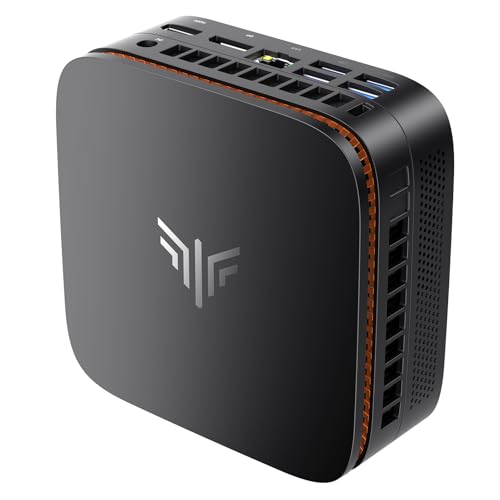
KAMRUI Ryzen 4300U Mini PC
Best for: multi-display setups and expandable storage needs
- Processor
- AMD Ryzen 4300U
- Installed RAM
- 16GB
- Storage Capacity
- 256GB
- Memory Type
- DDR4
- Graphics
- AMD Radeon GPU
- Ethernet Ports
- Gigabit Ethernet
View on Amazon: KAMRUI Ryzen 4300U Mini PC Affiliate link
The KAMRUI Pinova P1 Mini PC uses an AMD Ryzen 4300U processor with 16GB of DDR4 RAM and a 256GB SSD. It supports triple 4K displays and dual-channel memory upgrades up to 64GB. This unit offers strong integrated graphics for light creative work and includes dual M.2 storage slots. It suits users needing a compact, expandable workstation for office tasks or home server duties.
Pros
- AMD Ryzen 4300U processor with 3.7GHz boost speed
- Triple 4K multi-screen output via HDMI, DisplayPort, and USB-C
- Expandable to 64GB RAM and 4TB total storage
- Dual M.2 slots for flexible storage configurations
Cons
- Only 256GB of base storage capacity
- Wi-Fi 5 limits wireless speeds to 1750Mbps
- No mention of Bluetooth connectivity in specifications
Good fit if
- You need multiple high-resolution displays for productivity
- You want to upgrade RAM or add more storage later
- You require a compact machine for 24/7 operation
Skip if
- You need Wi-Fi 6 or higher speeds
- You require Bluetooth for wireless peripherals
- You need more than 256GB of storage out of the box
Verdict: The KAMRUI Pinova P1 Mini PC fits users who need triple 4K displays and expandable storage in a small form factor. It is a practical solution for office work or home servers that require reliable, long-term operation.
Specifications side by side
| Spec | KAMRUI Pinova Ryzen 7330U Mini PC | KAMRUI Ryzen 4300U Mini PC |
|---|---|---|
| Processor | AMD Ryzen 4300U | AMD Ryzen 4300U |
| Installed RAM | 16GB | 16GB |
| Storage Capacity | 512GB | 256GB |
| Memory Type | LPDDR4 | DDR4 |
| Graphics | AMD Radeon Vega 5 | AMD Radeon GPU |
| Ethernet Ports | Gigabit LAN | Gigabit Ethernet |
| Memory | 16GB RAM | 16GB RAM |
| Storage | 512GB SSD | 256GB SSD |
| Use | Home | Home, Business, Office |
| Dimensions | 5.04 × 5.04 × 1.63 inches | 5.04 × 5.04 × 2.05 inches |
| Weight | 1.26 pounds | 1.1 pounds |
| Size | 16GB RAM+512GB SSD/AMD Ryzen 4300U | 16GB+1TB |
| Color | Silver | Black |
| Model | P2 | P1 |
Frequently asked questions
Which KAMRUI Mini PC supports more displays?
The KAMRUI Ryzen 4300U Mini PC supports triple 4K displays. It connects via HDMI, DisplayPort, and USB-C. The Ryzen 5 3500U model is rated for dual 4K setups. This makes the 4300U unit better for complex multi-monitor office work or home server tasks requiring multiple screens.
What is the physical size difference between these models?
The Ryzen 4300U model is larger, measuring 5.04 inches wide and 2.05 inches high. The Ryzen 5 3500U unit is more compact at 3.94 inches wide and 1.42 inches high. The smaller unit also weighs 9.52 ounces. You should choose the larger model if you need more internal space for storage expansion.
Do both Mini PCs include 16GB of RAM?
Yes, both the Pinova P1 and the Essenx E2 feature 16GB of RAM. This shared memory capacity ensures smooth multitasking for home and business use. You can rely on this amount of memory for running multiple applications simultaneously without significant slowdowns, regardless of which processor you select.
Which model offers better storage options?
The Ryzen 4300U Mini PC is described as having expandable storage needs. It is often configured with 1TB of storage. The Ryzen 5 3500U model typically comes with 256GB of storage. If you need to store large files or run a home server, the 4300U model provides more flexibility for upgrades.
Are both units suitable for business environments?
Yes, both Mini PCs are listed for home and business use. They include gigabit Ethernet for stable wired connectivity. The Ryzen 4300U model is specifically noted for reliable, long-term operation in office settings. The Ryzen 5 3500U unit is also designed for practical business tasks requiring dual displays.
What is the main difference in connectivity?
The Ryzen 4300U model includes a USB-C port with DisplayPort Alt Mode. This allows it to drive three displays simultaneously. The Ryzen 5 3500U model focuses on dual 4K display support. Both include gigabit Ethernet, but the 4300U offers more versatile video output options for multi-screen setups.