KINGDEL Industrial PC or KINGDEL Fanless Core i5 Mini PC? Which KINGDEL Model to Buy
As an Amazon Associate we earn from qualifying purchases. Links on this page are affiliate links.
When evaluating the kingdel fanless core i5 mini PC vs industrial PC, you are looking at two distinct approaches to small form factor computing. Both units share a fanless design and metal chassis, ensuring silent operation and durability for demanding environments. The primary difference lies in their internal hardware. One model prioritizes connectivity with dual network ports, while the other focuses on processing power with a newer generation CPU and faster memory standards. Your choice depends on whether you need raw speed or specific industrial interfaces.
Key differences
| Aspect | KINGDEL Fanless Celeron Industrial Mini PC | KINGDEL Fanless Core i5 Mini PC |
|---|---|---|
| Processor | Celeron 1007U/1037U Dual Core | Core i5 8th Gen. Quad Core |
| Memory Type | DDR3L | DDR4 |
| Storage Capacity | 128GB mSATA SSD | 256GB NVMe SSD |
| Networking | 2x NICs | Not listed |
| Serial Ports | 4x COM RS232 | 2x COM RS232 |
Which one should you choose?
Choose KINGDEL Fanless Celeron Industrial Mini PC if
- You require dual Ethernet connections for network redundancy or specialized industrial protocols.
- You need four serial COM ports for legacy hardware integration.
- Your workload involves light office tasks or digital signage where maximum processing power is not critical.
Choose KINGDEL Fanless Core i5 Mini PC if
- You need higher computational performance for multitasking or data processing.
- You want faster system responsiveness due to DDR4 memory and NVMe storage.
- You plan to expand storage by adding a 2.5-inch SATA drive inside the chassis.
Verdict: Choose the Celeron model if your project relies heavily on specific industrial connectivity like dual NICs and multiple serial ports. Select the Core i5 model if your priority is modern processing speed, faster memory, and larger storage capacity. Both units offer reliable fanless operation, so your decision rests on performance versus connectivity needs.
Processor and Memory Comparison
processor performance
The KINGDEL Fanless Core i5 Mini PC uses an 8th Gen Core i5 with four cores and a 6 MB cache. It reaches 3.4GHz under turbo boost. The KINGDEL Fanless Celeron Industrial Mini PC relies on a dual-core Celeron 1007U/1037U with only 2 MB cache. The Celeron maxes out at 1GHz. The i5 offers significantly higher clock speeds and more cores for multitasking. The Celeron is sufficient for basic tasks but lacks the raw power for heavy workloads. The i5 handles complex applications much better.
memory type
Both units include 8GB of RAM, but the type differs. The Core i5 model uses DDR4 memory, which is faster and more efficient. The Celeron model uses older DDR3L RAM. DDR4 provides better bandwidth and lower power consumption. This makes a difference in system responsiveness during intensive operations. If you need faster data processing, the DDR4 in the i5 model is superior. The Celeron’s DDR3L is adequate for light duties but lags in speed.
storage capacity
Storage options vary between the two models. The Core i5 PC comes with a 256GB NVMe SSD. The Celeron Industrial PC has a 128GB mSATA SSD. NVMe drives generally offer faster read and write speeds than mSATA. The i5 model also provides double the storage space. This allows for more files and applications without running out of room. The larger capacity and faster interface make the i5 model more practical for data-heavy tasks.
networking ports
Networking capabilities differ notably. The Celeron Industrial PC includes two NICs (Ethernet ports). This is ideal for dual-network setups or network monitoring. The Core i5 model does not list a second Ethernet port in its key specs. If you need to connect to two separate networks simultaneously, the Celeron model has a clear advantage. For single-network use, both provide standard connectivity. The dual NICs add versatility for industrial or lab environments.
graphics capability
Graphics performance is another key difference. The Core i5 PC features UHD Graphics 620, supporting 4K resolution at 24Hz. It also allows dual monitor support via HD and VGA ports. The Celeron model uses integrated HD Graphics with a max frequency of 1GHz. It supports HD and VGA outputs but lacks 4K capabilities. For video playback or multi-monitor setups, the i5’s graphics are much stronger. The Celeron is limited to lower resolutions.
Which KINGDEL Model Fits Your Needs
Users needing high performance for multitasking
The Core i5 8th Gen processor offers four cores and a 3.4GHz turbo frequency. This provides significantly faster processing speeds than the dual-core Celeron. The DDR4 RAM and UHD Graphics 620 also handle complex tasks and 4K video playback more efficiently for demanding workflows.
Industrial setups requiring multiple serial ports
This model includes four COM RS232 ports, which is ideal for connecting legacy industrial equipment. It also features two network interface cards for stable network connections. The dual-core Celeron is sufficient for basic control tasks, while the extra serial connectivity supports specialized hardware requirements.
Buyers wanting expandable storage and memory
This unit allows you to add an extra DDR4 RAM stick and a 2.5-inch SATA SSD or HDD internally. This flexibility lets you upgrade capacity later. The Celeron model lacks these expansion slots, locking you into the initial 8GB RAM and 128GB SSD configuration permanently.
The products compared
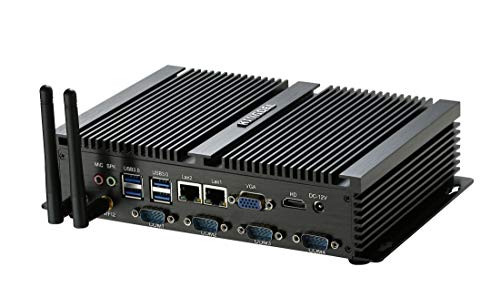
KINGDEL Fanless Celeron Industrial Mini PC
Best for: Industrial setups needing serial ports and silence
- Processor
- Celeron 1007U/1037U Dual Core
- Installed RAM
- 8GB
- Storage Capacity
- 128GB SSD
- Memory Type
- DDR3L
- Graphics
- Integrated HD Graphics
- Ethernet Ports
- 2xNICs
View on Amazon: KINGDEL Fanless Celeron Industrial Mini PC Affiliate link
This KINGDEL mini PC is a fanless industrial computer built around a Celeron 1007U/1037U dual-core processor. It includes 8GB of DDR3L RAM and a 128GB mSATA SSD for storage. The metal case houses two NICs, four COM RS232 ports, and standard USB and video outputs. You get a compact, silent machine designed for business or industrial environments that need reliable, low-power computing without moving parts.
Pros
- Fanless metal case for silent operation
- Dual-core Celeron 1007U/1037U processor
- 8GB DDR3L RAM included
- Two Ethernet NICs for network flexibility
- Four COM RS232 ports for serial devices
Cons
- 128GB SSD offers limited storage space
- DDR3L RAM is an older memory standard
- Integrated HD Graphics lacks gaming power
Good fit if
- You need a silent, fanless computer for industrial use
- You require multiple serial COM ports for legacy equipment
- You want a dual Ethernet port setup for networking
Skip if
- You need high-end graphics for gaming or video editing
- You require large storage capacity beyond 128GB
- You prefer modern DDR4 or DDR5 memory speeds
Verdict: KINGDEL Fanless Celeron Industrial Mini PC is a solid choice for users who need a silent, rugged computer with serial ports for industrial tasks. It fits well in environments where noise and dust are concerns, but it is not suitable for performance-heavy workloads.
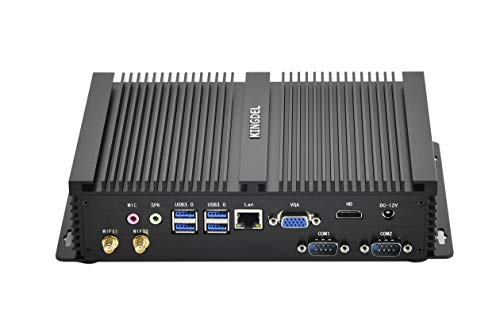
KINGDEL Fanless Core i5 Mini PC
Best for: Industrial tasks needing serial ports and silence
- Processor
- Core i5 8th Gen.
- Installed RAM
- 8GB
- Storage Capacity
- 256GB
- Memory Type
- DDR4
- Graphics
- UHD Graphics 620
- Use
- Industrial
View on Amazon: KINGDEL Fanless Core i5 Mini PC Affiliate link
This KINGDEL model uses a fanless design with an 8th Gen Core i5 processor and 8GB of DDR4 RAM. It includes a 256GB NVMe SSD and supports dual monitors via HD and VGA ports. The all-metal case and silent operation make it suitable for industrial tasks. You get two COM RS232 ports for specialized connectivity. It fits well in tight spaces due to its compact dimensions.
Pros
- Fanless cooling for silent operation
- 8th Gen Core i5 processor with 3.4GHz turbo
- Dual monitor support via HD and VGA
- Two COM RS232 ports for industrial use
- Expandable storage with 2.5-inch SATA drive bay
Cons
- Base CPU frequency is only 1.6GHz
- No mention of Bluetooth connectivity
- Only 8GB RAM in this configuration
Good fit if
- You need silent operation in a small space
- You require serial COM ports for equipment
- You want an all-metal industrial build
Skip if
- You need high-frequency gaming performance
- You require built-in Bluetooth
- You need more than 8GB RAM pre-installed
Verdict: KINGDEL Fanless Core i5 Industrial Mini PC offers reliable industrial features like COM ports and silent cooling. It suits users who need durable, quiet computing for specific hardware interfaces.
Specifications side by side
| Spec | KINGDEL Fanless Celeron Industrial Mini PC | KINGDEL Fanless Core i5 Mini PC |
|---|---|---|
| Processor | Celeron 1007U/1037U Dual Core | Core i5 8th Gen. |
| Installed RAM | 8GB | 8GB |
| Storage Capacity | 128GB SSD | 256GB |
| Memory Type | DDR3L | DDR4 |
| Graphics | Integrated HD Graphics | UHD Graphics 620 |
| Ethernet Ports | 2xNICs | not stated |
| Memory | 8GB RAM | 8GB RAM |
| Storage | 128GB SSD | 256GB SSD |
| Use | Industrial | Industrial |
| Cooling | not stated | Fanless |
| Dimensions | 8.35 × 5.91 × 2.01 inches | 9.2 × 5.9 × 2 inches |
| Weight | 3.04 pounds | 3.2 pounds |
| Size | 8GB RAM+128GB SSD | 8GB RAM + 256GB SSD |
| Color | Black | Black |
| Model | NC1037U | NC3000 |
Frequently asked questions
Which KINGDEL model is best for industrial automation?
Both models support industrial tasks, but the KINGDEL Fanless Core i5 Mini PC offers stronger processing power for complex automation scripts. The KINGDEL Fanless Celeron Industrial Mini PC is better suited for simpler, low-power monitoring tasks. Choose the i5 version if your automation requires higher throughput and multitasking capabilities.
Does the KINGDEL Celeron model have serial ports?
Yes, the KINGDEL Fanless Celeron Industrial Mini PC is designed with serial ports. This feature makes it ideal for connecting to legacy industrial equipment that relies on COM interfaces. You can use it in environments where noise and dust are concerns, ensuring reliable communication with peripheral hardware.
How much storage does the KINGDEL Core i5 mini PC have?
The KINGDEL Fanless Core i5 Mini PC comes with 256GB of SSD storage. This provides ample space for your operating system and industrial applications. The solid-state drive ensures fast data access and improved reliability compared to traditional hard drives, which is critical for continuous operation in industrial settings.
Is the KINGDEL Celeron mini PC silent?
Yes, the KINGDEL Fanless Celeron Industrial Mini PC operates silently. It uses a fanless design to dissipate heat, eliminating noise from moving parts. This makes it suitable for quiet environments or noise-sensitive industrial setups where acoustic disturbance must be minimized while maintaining consistent performance for light tasks.
What are the dimensions of the KINGDEL NC1037U?
The KINGDEL Fanless Celeron Industrial Mini PC (NC1037U) measures 8.35 inches in length, 5.91 inches in width, and 2.01 inches in height. Its compact form factor allows for easy mounting in tight spaces. The unit weighs 3.04 pounds, making it lightweight yet durable for industrial installation.
Can the KINGDEL Core i5 handle multitasking?
Yes, the KINGDEL Fanless Core i5 Mini PC is capable of handling multitasking. It features an 8th Gen Core i5 processor with four cores and 8GB of RAM. This configuration allows you to run multiple industrial applications simultaneously without significant performance degradation, ensuring smooth operation for demanding workflows.
Which model is heavier, the Celeron or Core i5?
The KINGDEL Fanless Core i5 Mini PC is slightly heavier at 3.2 pounds. The KINGDEL Fanless Celeron Industrial Mini PC weighs 3.04 pounds. The difference is minimal, but the Core i5 model may feel more substantial due to its larger chassis and potentially more robust internal components for higher performance.