Lenovo ThinkCentre M70q Tiny i5-12500T Review: Who It Fits and Who Should Skip It
As an Amazon Associate we earn from qualifying purchases. Links on this page are affiliate links.
This lenovo thinkcentre m70q tiny i5 12500t review looks at a compact business desktop designed for efficiency. It features an Intel Core i5-12500T processor with 6 cores and 12 threads, paired with 16GB of DDR4 RAM. The system includes a 512GB PCIe SSD for fast storage access. Measuring just 7.2 inches wide and 1.36 inches high, it fits in tight spaces. You get Windows 11 Professional pre-installed, along with essential connectivity options like WiFi 6 and multiple USB ports. This setup prioritizes reliable performance in a small form factor.
What stands out
- Intel Core i5-12500T processor with up to 4.40 GHz Turbo speed
- 16GB DDR4 RAM for smooth multitasking
- 512GB PCIe SSD for quick boot and load times
- Support for dual monitors via HDMI and DisplayPort
- Toolless access to memory and storage for easy upgrades
Who it fits
Good fit for
This mini PC suits office workers who need a reliable machine for spreadsheets, web browsing, and video calls. The dual monitor support helps those who benefit from extra screen space. Its small size allows you to mount it behind a display or place it discreetly on a desk. If you require a quiet, efficient computer for daily tasks without bulky hardware, this model delivers the necessary performance. The included keyboard and mouse also make it ready to use out of the box.
Who should skip it
You should look elsewhere if you need a gaming rig or heavy video editing capability. The integrated Intel UHD Graphics 770 is not designed for demanding 3D games or professional creative workloads. Additionally, this unit lacks internal speakers, so you will need external audio devices. If you require more than 16GB of RAM for specialized applications, note that this configuration is fixed at 16GB. Users needing extensive rear USB ports might also find the selection limited for their peripheral needs.
Verdict: The Lenovo ThinkCentre M70q Tiny offers solid business performance in a tiny footprint. It is a practical choice for standard office tasks and dual-monitor setups.
Key specs explained for this unit
Processor: Intel Core i5-12500T
This 12th Gen CPU has six cores and twelve threads. The 'T' suffix indicates a lower power design, which helps keep the small chassis cool and quiet. You get a base speed of 2.00 GHz and a turbo boost up to 4.40 GHz. This setup handles multitasking well for office work, web browsing, and document editing without draining too much power or generating excessive heat.
Installed RAM: 16GB DDR4
Twelve gigabytes of DDR4 memory allows you to run multiple applications simultaneously without lag. You can keep many browser tabs open while working in spreadsheets or video conferencing tools. This amount of RAM is standard for business use, ensuring smooth performance for productivity tasks. It is also upgradeable, so you can add more memory later if your workflow becomes more demanding.
Storage Capacity: 512GB
The 512GB PCIe solid state drive provides fast boot times and quick application loading. You have enough space for your operating system, essential software, and a moderate amount of files. The PCIe interface is faster than older SATA drives, making file transfers smoother. This capacity is suitable for most users who do not store large media libraries directly on the mini PC.
Graphics: Intel UHD Graphics 770
This integrated graphics solution handles display output and basic visual tasks. It supports up to two independent monitors via HDMI and DisplayPort. You can use it for dual-screen productivity setups, video playback, and light photo editing. It is not designed for heavy 3D gaming or professional video rendering, but it is sufficient for standard business desktop needs and clear visual output.
Design and build overview
According to the listing, the Lenovo ThinkCentre M70q Tiny measures 7.2 inches wide, 1.36 inches high, and 7.05 inches long. This compact footprint is roughly the size of a paperback book. You can place it horizontally on a desk or vertically on a shelf. The chassis features a Raven Black finish that fits standard office environments. The small dimensions allow you to mount it behind a monitor or under a desk using optional kits, saving valuable workspace in tight areas.
The build prioritizes accessibility for business users. You get toolless access to the 16GB DDR4 memory module and the 512GB PCIe solid state drive. This design choice means you can upgrade or replace components without needing special tools, simplifying maintenance for IT staff or power users. The internal layout supports these upgrades while keeping the exterior sleek and uncluttered.
Physical controls are minimal, focusing on connectivity rather than complex buttons. The front panel includes two USB 3.2 Gen 2 ports, one USB-C port, and an audio jack. Rear ports handle the bulk of connections, including HDMI, DisplayPort, and Ethernet. This layout keeps frequently used cables accessible while hiding less used connections. The design ensures the unit remains stable and secure, supported by a cable lock slot to prevent theft in shared offices.
Setup and daily use guide
Setting up this mini PC is straightforward. The listing includes a USB keyboard and mouse, so you can begin working immediately. You connect the power cable and plug in peripherals. The front panel offers convenient access with two USB 3.2 Gen 2 ports. One supports fast charging, which is useful for phones. A USB-C port is also available on the front. For displays, you use the rear HDMI and DisplayPort outputs. This allows you to drive two independent monitors. Note that there are no built-in speakers. You must use headphones or external audio devices. The 3.5mm combo jack on the front handles audio input and output. Connectivity is handled by WiFi 6 and Bluetooth 5.1. This ensures stable wireless networking and easy pairing with peripherals. The rear panel provides additional USB ports and an Ethernet jack for wired connections. Security features like ThinkShield and a cable lock slot add protection. The system runs Windows 11 Professional, which is standard for business environments. Upgrading is simple due to toolless access to the RAM and SSD. You can expand memory or storage without needing special tools. The compact design lets you mount it behind a monitor or place it on a shelf. This flexibility fits various workspace layouts efficiently.
Before You Buy This Mini PC
You already have the core hardware, but consider your peripheral needs carefully. This unit lacks built-in speakers, so you must provide your own audio solution via headphones or external speakers. Verify that your monitors support HDMI or DisplayPort inputs, as the system supports up to two independent displays. Since the package includes a USB keyboard and mouse, you do not need to purchase input devices separately. However, check your existing cables to ensure compatibility with the front USB-C and rear USB 3.2 ports. Regularly update the Windows 11 Professional operating system to maintain security, leveraging the integrated ThinkShield solutions. This model fits well among other 1 small form factor computers for office tasks. It suits users who prioritize a quiet, low-power environment over high-end gaming or heavy video editing. Keep the ventilation clear to maintain the efficient thermal performance of the i5-12500T processor.
Check before you buy
- Verify your monitors use HDMI or DisplayPort for dual-screen support.
- Purchase external speakers or headphones since no internal audio is included.
- Ensure you have space for the included USB keyboard and mouse.
- Check that your workspace allows for proper ventilation around the chassis.
The product at a glance
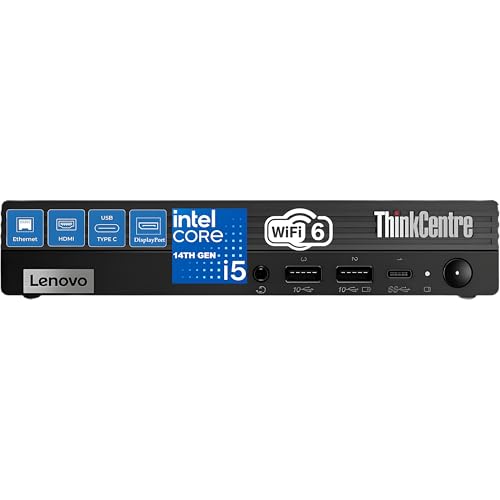
Lenovo ThinkCentre Tiny Intel Core i5 Desktop
Best for: compact dual-monitor business workstations
- Processor
- Intel Core i5-12500T
- Installed RAM
- 16GB
- Storage Capacity
- 512GB
- Memory Type
- DDR4
- Graphics
- Intel UHD Graphics 770
- Ethernet Ports
- 1x RJ-45
View on Amazon: Lenovo ThinkCentre Tiny Intel Core i5 Desktop Affiliate link
This compact business desktop pairs an Intel Core i5-12500T processor with 16GB of DDR4 memory and a 512GB solid-state drive. You get dual-monitor output via DisplayPort and HDMI, alongside Wi-Fi 6 and Windows 11 Pro. It fits enterprise office setups where you need a compact footprint, toolless maintenance, and multi-port connectivity for dual-display productivity without taking up desk space.
Pros
- Intel Core i5-12500T processor with 6 cores and vPro enterprise support
- Toolless chassis access to the DDR4 memory and PCIe SSD
- Seven total USB ports including one front USB-C port
- Dual display connectivity via dedicated HDMI and DisplayPort outputs
Cons
- No integrated internal speakers
- Restricted to two independent displays
- Relies on integrated Intel UHD Graphics 770 instead of discrete graphics
Good fit if
- You need a compact enterprise desktop with vPro and Windows 11 Pro.
- You run a two-monitor desk setup using DisplayPort and HDMI.
- You want quick toolless access for memory and storage upgrades.
Skip if
- You need built-in speakers for audio output.
- You plan to run three or more independent monitors.
- You require a dedicated graphics card for heavy 3D workloads.
Verdict: Lenovo ThinkCentre Tiny Core i5 Mini PC fits business users who need a space-saving workstation with enterprise management features and dual-display capability. Its six-core processor and toolless chassis handle daily office productivity efficiently.
Specifications side by side
| Spec | Lenovo ThinkCentre Tiny Intel Core i5 Desktop |
|---|---|
| Processor | Intel Core i5-12500T |
| Installed RAM | 16GB |
| Storage Capacity | 512GB |
| Memory Type | DDR4 |
| Graphics | Intel UHD Graphics 770 |
| Ethernet Ports | 1x RJ-45 |
| Operating System | Windows 11 Pro |
| Storage | 512GB SSD |
| Use | Office |
| Networking | WiFi 6 |
| Dimensions | 7.05 × 7.2 × 1.36 inches |
| Size | 16GB DDR5 RAM, 1TB PCIe SSD |
| Model | M70q |
Frequently asked questions
Is the Lenovo ThinkCentre M70q Tiny good for office work?
Yes, it is a practical choice for business users who value compact size and upgradability. It fits those who need reliable processing power for standard workloads. The Intel Core i5-12500T processor provides sufficient speed for daily tasks without generating excessive heat or noise in the small chassis.
How much storage does the M70q Tiny have?
The system includes a 512GB PCIe SSD for fast storage. This solid-state drive ensures quick boot times and rapid file access. The compact design integrates this storage directly, offering a balance of capacity and speed suitable for typical business applications and document management without requiring bulky external drives.
What are the physical dimensions of this mini PC?
The Lenovo ThinkCentre M70q measures 7.2 inches wide, 1.36 inches high, and 7.05 inches long. This compact footprint is roughly the size of a paperback book. You can place it horizontally on a desk or vertically to save space. The small size makes it easy to mount behind a monitor.
Does the M70q Tiny support dual monitors?
The system supports multiple displays, though you must verify your monitors support HDMI or DisplayPort inputs. The listing notes that the unit lacks built-in speakers, so you must provide your own audio solution via headphones or external speakers. Check your peripheral needs carefully before finalizing your setup for a multi-screen workflow.
Is this computer suitable for heavy multimedia editing?
It is not the ideal choice for heavy multimedia features. The verdict states it fits users who value reliable processing power for standard workloads over advanced media capabilities. While the i5-12500T handles basic tasks well, it lacks the dedicated resources often required for intensive video editing or high-end graphic design projects.
Can I upgrade the RAM in this model?
The listing highlights upgradability as a key benefit for business users. It comes with 16GB of DDR4 RAM, which supports efficient multitasking. You can expand the memory to handle more complex applications or keep more browser tabs open. This flexibility allows the system to adapt to your growing performance needs over time.
What connectivity options are available on the front?
The front panel offers convenient access with two USB 3.2 ports. These ports allow you to quickly connect peripherals like flash drives or mice. The design prioritizes ease of use for daily interactions. You can connect essential devices without reaching behind the unit, streamlining your workflow during busy workdays.
Who should skip this mini PC?
Users who prioritize multimedia features or built-in speakers should skip this model. It is designed for business efficiency rather than entertainment. You must provide your own audio solution. If you need a system with integrated high-fidelity sound or advanced graphics capabilities, this compact business desktop may not meet your specific requirements.