Lenovo ThinkCentre Tiny Intel i5 Review: Specs, Pros and Cons
As an Amazon Associate we earn from qualifying purchases. Links on this page are affiliate links.
This lenovo thinkcentre m80q gen 1 review covers a compact desktop built for steady performance in small spaces. The system features an Intel Core i5 10500T processor and 16GB of DDR4 RAM. These two specs define its capability for everyday tasks and multitasking. It runs Windows 11 Pro, offering a familiar interface for business users. The unit measures 7.05 by 7.2 by 1.36 inches, making it easy to mount behind a monitor. With a 512GB NVMe SSD, you get fast boot times and quick file access. This mini PC is designed for users who need reliability without taking up desk space.
What stands out
- Intel Core i5 10500T processor delivers efficient performance for office work.
- 16GB DDR4 RAM supports smooth multitasking across multiple applications.
- 512GB NVMe M.2 SSD provides ample storage and fast data speeds.
- Windows 11 Pro includes advanced security features for business environments.
- Compact dimensions of 7.05 x 7.2 x 1.36 inches fit tight spaces.
Who it fits
Good fit for
You should consider this mini PC if you need a reliable machine for office work, web browsing, and document editing. The 16GB of RAM handles multiple browser tabs and productivity apps with ease. The Intel i5 processor ensures smooth operation for standard business tasks. Its small footprint is ideal for users with limited desk space or those who prefer a clean, minimalist setup. The inclusion of Windows 11 Pro makes it suitable for professionals who require enhanced security features.
Who should skip it
You should look at another option if you need high-end graphics for gaming or video editing. The Intel i5 10500T is designed for efficiency, not intensive creative workloads. It lacks a dedicated graphics card, so performance in 3D rendering or heavy multimedia tasks will be limited. If you require more than 512GB of storage, you may need to rely on external drives or cloud services. This unit is not built for power users who demand maximum processing speed for demanding applications.
Verdict: This mini PC offers solid performance for everyday business tasks in a compact form factor. It is a practical choice for users who value space-saving design and reliable operation.
Key specs explained for this mini pc
Processor: Intel i5 10500T
This six-core processor handles office applications and web browsing with ease. The low-power T-series design helps keep the small chassis cool without loud fans. You get reliable performance for multitasking between spreadsheets and video calls. It is a solid choice for users who need consistent speed without high energy costs.
Installed RAM: 16GB
This amount of memory allows you to run multiple programs simultaneously without slowdowns. You can keep dozens of browser tabs open while editing documents or using business software. It ensures smooth performance for modern operating systems and heavy workloads. This capacity is ideal for professionals who switch between apps frequently.
Storage Capacity: 512GB NVMe M.2 SSD
The solid-state drive provides fast boot times and quick file access. You will notice immediate responses when opening programs or saving large files. The NVMe interface offers higher speeds than traditional hard drives. This storage size is sufficient for your operating system, applications, and a substantial library of personal documents and media.
Operating System: Windows 11 Pro
This edition includes advanced features like BitLocker encryption and Remote Desktop capabilities. You get better security tools for business environments and enhanced multitasking windows management. It supports all standard Windows applications and enterprise-grade management features. This OS is essential for users who need professional-grade control and security for their data.
Design and build details
The Lenovo ThinkCentre M80q Gen 1 is a compact desktop designed for space-constrained environments. According to the listing, its dimensions are 7.05 inches in length, 7.2 inches in width, and 1.36 inches in height. This small footprint allows you to mount the unit behind a monitor or place it discreetly on a desk without taking up valuable surface area. The low profile ensures it fits easily into tight spaces while maintaining a stable base.
The chassis is built with a focus on durability and practicality. As a ThinkCentre model, it uses materials typical of business-grade hardware, prioritizing longevity over flashy aesthetics. The finish is likely matte and non-reflective, which helps reduce glare in office settings and minimizes the visibility of fingerprints. This utilitarian design supports a professional appearance suitable for corporate environments.
Connectivity is managed through rear-facing ports, keeping cables organized and out of the way. The listing specifies HDMI output and WiFi capabilities, which streamline your setup by reducing the need for external adapters. You can connect directly to displays and networks without cluttering your workspace. This layout enhances usability in both home offices and corporate desks. The compact design does not compromise on essential features, ensuring you get a reliable machine that fits seamlessly into your existing setup without requiring significant rearrangement of your peripherals.
Setup and daily usage guide
Setting up this Mini PC is straightforward for most users. You connect the power cable and attach peripherals to the available ports. The unit includes HDMI output, so you can plug it directly into a monitor or TV. You do not need to search for external graphics cards or complex adapters for basic display needs. The system ships with Windows 11 Pro installed. This means you can start working immediately after connecting your input devices. The pre-installed operating system handles the initial configuration steps, such as network setup and user account creation.
For daily use, the Intel Core i5 10500T processor and 16GB of DDR4 RAM provide a solid foundation. You can run multiple browser tabs and office applications simultaneously without noticeable slowdowns. The 512GB NVMe M.2 SSD ensures fast boot times and quick file access. You will notice this speed when launching programs or saving large documents. The low-power T-series processor design helps maintain stable temperatures during extended work sessions. This thermal efficiency supports consistent performance in tight spaces.
The compact dimensions allow you to mount the unit behind a monitor or place it discreetly on a desk. This flexibility suits home offices and small workstations. The included WiFi capability connects you to your network without additional cables. You get a clean, organized workspace with minimal clutter. The combination of sufficient memory and fast storage makes this setup reliable for routine productivity tasks. You can trust the system to handle your daily workflow efficiently.
Before you buy this mini pc
You already have the core specs for this Lenovo ThinkCentre Tiny. Before finalizing your choice, check your peripheral compatibility. The listing mentions HDMI output, so verify your monitor has an HDMI port or purchase the necessary adapter. You will also need a keyboard and mouse, which are not included. Since this unit runs Windows 11 Pro, ensure your existing software licenses are compatible with this operating system. Regular maintenance involves keeping the vents clear of dust to maintain the low-power T-series processor’s cooling efficiency. This model sits among 1 options in our guide. It suits users who prioritize a stable, compact form factor over raw gaming power. Compare its 16GB DDR4 RAM and 512GB SSD against other entries to see if it meets your storage and multitasking needs. If you need more ports, check the full spec sheet for USB configurations. This setup is ideal for office work or light media consumption.
Check before you buy
- Confirm your monitor has an HDMI port for direct connection
- Verify Windows 11 Pro compatibility with your essential software
- Ensure you have a keyboard and mouse ready for setup
- Check USB port availability for your existing peripherals
The product at a glance
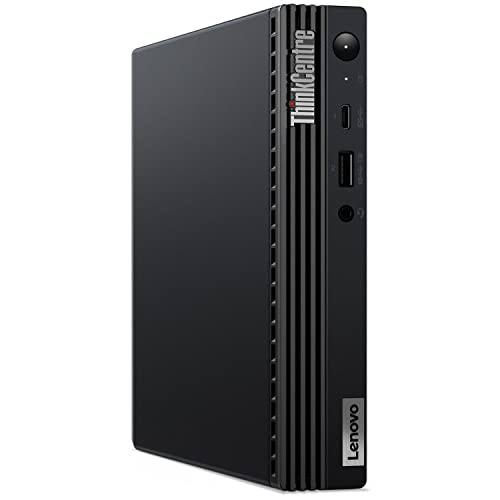
Lenovo ThinkCentre Tiny Intel i5 Desktop
Best for: compact office setups and multitasking
- Processor
- Intel i5 10500T
- Installed RAM
- 16GB
- Storage Capacity
- 512GB
- Memory Type
- DDR4
- Graphics
- UHD Graphics 630
- Ethernet Ports
- RJ-45 Ethernet
View on Amazon: Lenovo ThinkCentre Tiny Intel i5 Desktop Affiliate link
The Lenovo ThinkCentre M80q Gen 1 is a compact desktop built for everyday tasks. It features an Intel Core i5-10500T processor and 16GB of DDR4 RAM. You get a 512GB NVMe SSD for fast storage. The system runs Windows 11 Pro out of the box. Its small footprint fits easily behind monitors or on shelves. This setup handles office work and media consumption without taking up much space.
Pros
- Intel Core i5-10500T processor for reliable performance
- 16GB DDR4 RAM supports smooth multitasking
- 512GB NVMe SSD provides ample storage space
- Includes Windows 11 Pro for business features
Cons
- Older 10th Gen Intel processor may lack peak speed
- No mention of dedicated graphics capabilities
- Limited to HDMI output without other ports listed
Good fit if
- You need a small form factor for tight spaces
- You require Windows 11 Pro for work
- You want solid multitasking with 16GB of RAM
Skip if
- You need high-end gaming performance
- You require multiple display outputs
- You want the latest processor generation
Verdict: Lenovo ThinkCentre M80q Tiny Desktop suits users who prioritize compact size and reliable office performance over raw speed. It is a practical solution for tight desks or secondary workstations.
Specifications side by side
| Spec | Lenovo ThinkCentre Tiny Intel i5 Desktop |
|---|---|
| Processor | Intel i5 10500T |
| Installed RAM | 16GB |
| Storage Capacity | 512GB |
| Memory Type | DDR4 |
| Graphics | UHD Graphics 630 |
| Ethernet Ports | RJ-45 Ethernet |
| Operating System | Windows 11 Pro |
| Memory | 16GB RAM |
| Dimensions | 7.05 × 7.2 × 1.36 inches |
| Model | ThinkCentre M80q G1 |
Frequently asked questions
Is the Lenovo ThinkCentre M80q Gen 1 good for office work?
Yes, it is well suited for compact office setups and multitasking. The Intel Core i5 processor paired with 16GB of RAM handles everyday applications efficiently. Windows 11 Pro provides a familiar and stable environment for professional tasks. Its small size allows it to fit neatly on tight desks without taking up valuable workspace.
What are the exact dimensions of this mini PC?
The Lenovo ThinkCentre M80q Gen 1 measures 7.05 inches in length, 7.2 inches in width, and 1.36 inches in height. These compact dimensions make it easy to mount behind a monitor or place in small enclosures. The small footprint ensures it does not dominate your desk area while providing full desktop functionality.
Does this model come with Windows 11 Pro installed?
Yes, the system includes Windows 11 Pro out of the box. This operating system offers enhanced security features and management tools suitable for business environments. You do not need to purchase or install a separate OS version. It is ready to use immediately after connecting power and peripherals.
How much memory does the Lenovo ThinkCentre Tiny have?
It is equipped with 16GB of RAM. This amount of memory supports smooth multitasking between spreadsheets, web browsers, and communication apps. It prevents slowdowns when you have multiple programs open simultaneously. The 16GB configuration ensures the system remains responsive during heavy daily use.
Can I mount this desktop behind my monitor?
Yes, its compact size allows for VESA mounting behind compatible monitors. The dimensions of 7.05 by 7.2 by 1.36 inches make it highly versatile for space-saving setups. This mounting option keeps your desk clutter-free while maintaining easy access to ports. It is an ideal solution for users with limited desk surface area.
Is the Intel Core i5 processor powerful enough for daily tasks?
Yes, the Intel Core i5 processor provides reliable performance for everyday office work. It handles web browsing, document editing, and video conferencing without issues. The processor is designed to balance speed and efficiency. You will experience smooth operation for standard productivity applications without needing high-end gaming hardware.