Lenovo vs ACEMAGIC Mini PCs: Which Brand Fits You?
As an Amazon Associate we earn from qualifying purchases. Links on this page are affiliate links.
This guide compares the lenovo vs ACEMAGIC mini PC options for your workspace. Both systems run Windows 11 Pro and include 16GB of RAM for multitasking. The Lenovo ThinkCentre M720Q uses an Intel Core i5 processor with a larger 500GB NVMe drive. The ACEMAGIC K1 features an AMD Ryzen 3 Pro 7330U and a much smaller chassis. You will see how these hardware choices affect performance and portability in the following sections.
Key differences
| Aspect | Lenovo ThinkCentre Mini PC Intel i5 | ACEMAGIC Ryzen 7330U Mini PC |
|---|---|---|
| Processor | Intel Core i5-8400T | AMD Ryzen 3 Pro 7330U |
| Memory Type | DDR4 | LPDDR4 3200MT/s |
| Storage Capacity | 500GB NVMe | 256GB M.2 SSD |
| Form Factor | 15 x 4 x 19 inches | 5.04 x 1.61 x 5.04 inches |
| Wireless Connectivity | 5G WiFi + BT | WiFi 5 + Bluetooth 4.2 |
Which one should you choose?
Choose Lenovo ThinkCentre Mini PC Intel i5 if
- You need more storage space for files and applications without immediate expansion.
- You prefer a traditional desktop form factor that mounts behind a monitor.
- You require faster wireless connectivity standards for streaming and downloads.
Choose ACEMAGIC Ryzen 7330U Mini PC if
- You want a highly portable device that fits easily in a bag.
- You prioritize a newer processor architecture for efficient multitasking.
- You need multiple display outputs including HDMI, DP, and Type-C.
Verdict: The Lenovo ThinkCentre M720Q is the better choice if you need more built-in storage and a larger chassis for stationary office use. The ACEMAGIC K1 suits users who value extreme portability and a modern AMD processor in a tiny footprint. Select the model that best matches your space constraints and performance needs.
Lenovo vs ACEMAGIC Mini PC Specs
Processor performance
The Lenovo ThinkCentre M720Q features an Intel Core i5-8400T processor, which is an 8th-generation hexa-core chip. This provides six physical cores for multitasking. The ACEMAGIC K1 uses an AMD Ryzen 3 Pro 7330U with four cores and eight threads. It boosts up to 4.3GHz. The Lenovo chip offers more core count, which helps with heavy multi-threaded workloads. The AMD chip relies on higher clock speeds and newer architecture efficiency. Both are suitable for office tasks, but the Intel option has more cores.
Storage capacity
Storage is a clear differentiator between these two mini PCs. The Lenovo ThinkCentre M720Q comes with a 500GB NVMe drive. This gives you more space for files and applications right out of the box. The ACEMAGIC K1 includes a smaller 256GB SSD. While the ACEMAGIC unit allows you to add more storage later via an M.2 slot, the Lenovo starts with double the capacity. If you need immediate space for large files, the Lenovo drive is the better choice without extra steps.
Memory type
Both systems include 16GB of RAM, which is sufficient for general productivity. However, the type of memory differs. The Lenovo ThinkCentre M720Q uses standard DDR4 RAM. This type is typically easier to upgrade if you need more memory in the future. The ACEMAGIC K1 uses LPDDR4 3200MT/s memory. This is soldered directly to the motherboard, meaning you cannot expand it. While LPDDR4 can be faster, the non-upgradeable nature of the ACEMAGIC memory is a limitation for long-term use.
Physical size
Size matters for desk space. The ACEMAGIC K1 is extremely compact, measuring just 5.04 by 5.04 by 1.61 inches. It weighs only 1.1 pounds, making it very portable. You can mount it easily behind a monitor. The Lenovo ThinkCentre M720Q is significantly larger. Its dimensions are listed as 15 by 4 by 19 inches, with a weight of 2.91 pounds. This is a traditional micro-PC size. If you want a tiny footprint that disappears, the ACEMAGIC is the winner.
Connectivity options
Port selection varies between the brands. The ACEMAGIC K1 offers six USB 3.2 Type-A ports and one USB 3.2 Type-C port with 10Gbps data transfer and DisplayPort support. It also includes HDMI 2.0 and DisplayPort 1.4 for triple display setups. The Lenovo M720Q data does not specify the exact number or type of USB ports. It does mention WiFi and Bluetooth connectivity. Based on the detailed specs, the ACEMAGIC provides more visible ports and higher-speed USB-C capabilities.
Graphics capability
Integrated graphics affect video playback and light creative work. The ACEMAGIC K1 uses AMD Radeon Graphics with 5 cores running at 1400MHz. This supports 4K UHD playback and triple displays. The Lenovo ThinkCentre M720Q uses Intel UHD Graphics 630, which is standard for the i5-8400T. While both handle basic tasks and 4K video, the AMD Radeon graphics in the ACEMAGIC unit generally offer better performance for multimedia. The specific core count and clock speed of the AMD GPU give it a slight edge.
Which Mini PC Fits Your Needs
Users needing large storage for files
The Lenovo ThinkCentre M720Q includes a 500GB NVMe drive. This offers more space than the ACEMAGIC K1's 256GB SSD. You get extra room for documents, photos, and applications without needing external drives. The larger capacity helps keep your workspace organized and reduces the need to manage file storage carefully.
Buyers wanting compact and portable design
The ACEMAGIC K1 measures just 5x5x1.6 inches and weighs 1.1 pounds. This small footprint fits easily in bags or mounts behind monitors. The Lenovo M720Q is significantly larger and heavier. If you travel frequently or have limited desk space, the ACEMAGIC K1 provides a much more portable and discreet computing solution for your daily tasks.
Those requiring multiple display outputs
The ACEMAGIC K1 supports triple displays via HDMI, USB-C, and DisplayPort. This allows you to connect three monitors simultaneously for expanded productivity. The Lenovo M720Q data does not list specific multi-monitor capabilities. If you need a larger workspace with three screens, the ACEMAGIC K1 offers the connectivity options required for that setup.
People preferring hexa-core processing power
The Lenovo M720Q features an Intel Core i5-8400T with six physical cores. This provides strong multitasking performance for business applications. The ACEMAGIC K1 uses a four-core AMD Ryzen 3 Pro 7330U. If your workflow involves running many programs at once, the Lenovo's higher core count offers a tangible advantage in handling complex tasks efficiently.
The products compared
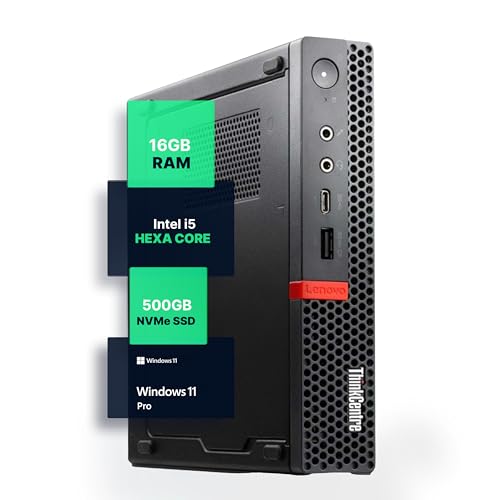
Lenovo ThinkCentre Mini PC Intel i5
Best for: standard office and home tasks
- Processor
- Intel i5-8400T
- Installed RAM
- 16GB
- Storage Capacity
- 500GB NVMe
- Memory Type
- DDR4
- Operating System
- Windows 11 Pro
- Use
- Home, Office
View on Amazon: Lenovo ThinkCentre Mini PC Intel i5 Affiliate link
The Lenovo M720Q is a compact Windows 11 Pro mini PC built for office or home use. It features an Intel Core i5-8400T processor, 16GB of DDR4 RAM, and a 500GB NVMe SSD. This configuration supports smooth multitasking and fast load times. The unit measures 15 by 4 by 19 inches and weighs 2.91 pounds. It includes 5G WiFi and Bluetooth for wireless connectivity. This model suits users who need reliable performance in a small footprint.
Pros
- Intel Core i5-8400T hexa-core processor
- 16GB DDR4 RAM for multitasking
- 500GB NVMe SSD storage
- Windows 11 Pro pre-installed
- Compact 15x4x19 inch footprint
Cons
- Uses 8th generation Intel processor
- No mention of Thunderbolt support
- Larger volume than modern micro PCs
Good fit if
- You need a reliable office PC
- You want Windows 11 Pro
- You prefer a compact desktop
Skip if
- You require the latest CPU generation
- You need high-end gaming performance
- You want the smallest possible form factor
Verdict: Lenovo M720Q i5 Mini PC fits users who prioritize stable business performance and a proven i5 processor over cutting-edge speed. It is a solid choice for standard office tasks and home computing.
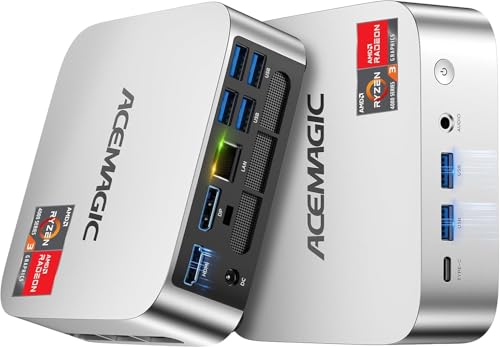
ACEMAGIC Ryzen 7330U Mini PC
Best for: office multitasking and triple displays
- Processor
- AMD Ryzen 3 Pro 7330U
- Installed RAM
- 16GB
- Storage Capacity
- 256GB
- Memory Type
- LPDDR4 3200MT/s
- Graphics
- AMD Radeon Graphics
- Ethernet Ports
- 1x Gigabit Ethernet
View on Amazon: ACEMAGIC Ryzen 7330U Mini PC Affiliate link
The ACEMAGIC K1 uses an AMD Ryzen 3 Pro 7330U processor with 16GB of LPDDR4 RAM and a 256GB SSD. It runs Windows 11 Pro and supports triple displays via HDMI, DisplayPort, and USB-C. The compact silver chassis measures 5.04 x 5.04 x 1.61 inches. This unit suits users needing reliable office performance and expandable storage for everyday tasks.
Pros
- AMD Ryzen 3 Pro 7330U processor with up to 4.3GHz boost
- 16GB LPDDR4 3200MT/s RAM for multitasking
- Windows 11 Pro pre-installed
- Supports triple displays with HDMI, DP, and USB-C
- Expandable storage via M.2 NVMe or SATA slots
Cons
- Memory is non-expandable LPDDR4
- Includes only WiFi 5 and Bluetooth 4.2
- Base storage capacity is 256GB
Good fit if
- You need a compact PC for office work
- You want to connect multiple monitors
- You prefer Windows 11 Pro
Skip if
- You require high-end gaming performance
- You need WiFi 6 or newer
- You want to upgrade RAM later
Verdict: The ACEMAGIC K1 Ryzen 3 Pro 7330U Mini PC is a practical option for users who need a small, capable machine for office tasks and multi-monitor setups. It fits buyers who value expandable storage and a compact footprint over wireless connectivity upgrades.
Specifications side by side
| Spec | Lenovo ThinkCentre Mini PC Intel i5 | ACEMAGIC Ryzen 7330U Mini PC |
|---|---|---|
| Processor | Intel i5-8400T | AMD Ryzen 3 Pro 7330U |
| Installed RAM | 16GB | 16GB |
| Storage Capacity | 500GB NVMe | 256GB |
| Memory Type | DDR4 | LPDDR4 3200MT/s |
| Graphics | not stated | AMD Radeon Graphics |
| Ethernet Ports | not stated | 1x Gigabit Ethernet |
| Operating System | Windows 11 Pro | Windows 11 Pro |
| Memory | 16GB RAM | not stated |
| Storage | 500GB SSD | not stated |
| Use | Home, Office | Home, Business, Office |
| Dimensions | 19 × 15 × 4 inches | 5.04 × 5.04 × 1.61 inches |
| Weight | 2.91 pounds | 1.1 pounds |
| Size | 1140 cubic inches | Ryzen 7330U+16GB+256GB |
| Color | Black | Ryzen 7330U+16GB+256GB |
| Model | M720Q | V1 |
Frequently asked questions
Which mini PC is better for office multitasking?
The ACEMAGIC K1 is a practical choice for office multitasking and triple displays. It features a Ryzen 3 Pro 7330U processor and 16GB of RAM. This setup handles multiple windows and applications smoothly. The Lenovo ThinkCentre M720Q also offers 16GB of RAM but uses an Intel Core i5, which prioritizes stable business performance over cutting-edge speed.
Do both brands include Windows 11 Pro?
Yes, both the Lenovo ThinkCentre M720Q and the ACEMAGIC K1 come with Windows 11 Pro. This operating system provides enhanced security features and business tools. You get a familiar interface with professional-grade capabilities. This ensures you can run enterprise applications and manage user accounts effectively on either device without needing additional software licenses.
Which system has more internal storage?
The Lenovo ThinkCentre M720Q includes a 500GB SSD. This offers more space than the ACEMAGIC K1's 256GB SSD. You get extra room for documents, photos, and applications. The larger drive reduces the need for external storage solutions. This makes the Lenovo option better for users who store large files locally on the machine itself.
Which mini PC is more compact?
The ACEMAGIC K1 is significantly more compact. It measures 5.04 inches by 5.04 inches and weighs just 1.1 pounds. The Lenovo ThinkCentre M720Q is much larger, measuring 19 inches by 15 inches by 4 inches and weighing 2.91 pounds. If you need a small footprint for tight desk spaces, the ACEMAGIC model fits better.
Is the Lenovo ThinkCentre suitable for home use?
Yes, the Lenovo ThinkCentre M720Q is suitable for home computing. It is a solid choice for standard office tasks and home use. The Intel Core i5 processor provides stable performance for everyday activities. You can use it for web browsing, document editing, and media consumption without experiencing lag or instability during typical daily workflows.
Which brand is better for multi-monitor setups?
The ACEMAGIC K1 is highlighted as a practical option for users needing triple displays. Its Ryzen 3 Pro 7330U processor supports multi-monitor configurations effectively. This makes it ideal for workflows requiring multiple screens for productivity. The Lenovo ThinkCentre M720Q focuses more on stable business performance and standard tasks rather than specific multi-display capabilities.