Lenovo vs Glorlin Mini PCs: Which Brand Fits You?
As an Amazon Associate we earn from qualifying purchases. Links on this page are affiliate links.
When you compare the lenovo vs glorlin mini PC options, you find two compact desktops for home and office use. Both offer 16GB of RAM and pre-installed Windows 11 Pro. The main difference lies in the processor architecture and connectivity. Lenovo uses an Intel Core i5 with standard WiFi, while Glorlin selects an AMD Ryzen 5 paired with WiFi 6 and triple 4K display support. You need to weigh these hardware choices against your specific workflow needs.
Key differences
| Aspect | Lenovo ThinkCentre Mini PC Intel i5 | Glorlin Ryzen 5 3501U Mini PC |
|---|---|---|
| Processor | Intel Core i5-8400T | AMD Ryzen 5 3501U |
| Storage | 500GB NVMe | 512GB SSD |
| Networking | WiFi + Bluetooth | WiFi 6 + Bluetooth 5.3 |
| Display Output | Not listed | Three 4K monitors (1x Type-C, 2x HDMI) |
Which one should you choose?
Choose Lenovo ThinkCentre Mini PC Intel i5 if
- You prefer the established reliability and business focus of the Lenovo ThinkCentre brand.
- Your primary tasks involve standard office productivity and web browsing on a single screen.
Choose Glorlin Ryzen 5 3501U Mini PC if
- You need to connect three separate 4K monitors for expanded multitasking workflows.
- You want the latest WiFi 6 and Bluetooth 5.3 standards for faster, more stable wireless connections.
Verdict: The Lenovo ThinkCentre M720Q is a solid choice for users who value brand heritage and stable, single-display office performance. The Glorlin GT101 offers more modern connectivity and multi-monitor capabilities for those who need flexible display setups. Your decision should hinge on whether you require triple 4K support or prefer the Intel-based system.
Lenovo vs Glorlin Mini PC Comparison
Processor performance
The Lenovo ThinkCentre M720Q features an Intel Core i5-8400T processor. This is an 8th generation hexa-core chip designed for reliable multitasking and business productivity. It offers steady performance for everyday office tasks. The Glorlin Mini PC uses an AMD Ryzen 5 3501U. This quad-core processor runs between 2.1 GHz and 3.7 GHz with a 15W to 25W TDP. While the Lenovo has more cores, the Glorlin chip is built on a more recent architecture. Both handle web browsing and document editing well. The choice depends on whether you prefer Intel's multi-core stability or AMD's modern efficiency. Both are suitable for light to medium workloads.
Memory and storage
Both systems come equipped with 16GB of DDR4 RAM. This allows you to run multiple applications and browser tabs without significant slowdowns. For storage, the Lenovo ThinkCentre M720Q includes a 500GB NVMe M.2 drive. The Glorlin Mini PC offers a slightly larger 512GB SSD. Both use fast solid-state storage, which ensures quick boot times and responsive file access. The Glorlin model also notes that its RAM is expandable up to 32GB, providing a path for future upgrades. The Lenovo variations show options for higher capacities as well. For most users, the base storage and memory in both units are sufficient for home and office needs.
Networking and connectivity
Connectivity is a key differentiator between these two mini PCs. The Glorlin model supports WiFi 6 and Bluetooth 5.3. WiFi 6 provides faster and more stable wireless connections, especially in crowded networks. It also includes modern ports like USB 3.2 Type-C with DisplayPort and Power Delivery. The Lenovo ThinkCentre M720Q lists a WiFi and Bluetooth adapter but does not specify the generation. It supports Windows 11 Pro connectivity standards. If you rely on the latest wireless speeds and modern port versatility, the Glorlin offers superior technical specifications. For basic wired and wireless connections, both devices will function adequately.
Display compatibility
Visual output capabilities differ notably between the two brands. The Glorlin Mini PC explicitly supports three monitors simultaneously. It features two HDMI ports and one Type-C port, all capable of 4K Ultra HD resolution at 60Hz. This makes it ideal for multi-monitor workflows or extended desktops. The Lenovo ThinkCentre M720Q description does not specify the number of supported displays or specific port types for video output. It mentions a compact design suitable for minimal workstations, implying standard single or dual monitor setups. If you need to drive multiple high-resolution screens, the Glorlin provides clear, documented advantages in display flexibility.
Operating system
Both mini PCs arrive with Windows 11 Pro pre-installed. This operating system offers advanced security features and management tools suitable for both home and business environments. You get immediate access to the full Windows ecosystem without needing to perform a fresh installation. The Lenovo ThinkCentre M720Q is marketed as a ThinkCentre device, which often implies stricter enterprise compatibility standards. The Glorlin Mini PC also lists Windows 11 Pro, ensuring you have the same software foundation. There is no functional difference in the OS version itself. Both systems are ready to use out of the box with professional-grade software capabilities.
Choose Your Ideal Mini PC Profile
Users needing reliable business multitasking
The Lenovo ThinkCentre M720Q features an Intel Core i5-8400T hexa-core processor. This chip delivers steady performance for office productivity and multitasking. You get 16GB of DDR4 RAM and a 500GB NVMe drive for fast load times. Windows 11 Pro ensures professional security features. This setup supports dependable daily computing in a compact footprint.
Users requiring modern wireless connectivity
The Glorlin Mini PC includes WiFi 6 and Bluetooth 5.3 for faster, more stable connections. It supports three 4K displays via HDMI and Type-C ports. This multi-monitor capability expands your workspace significantly. The AMD Ryzen 5 3501U handles media streaming and web browsing efficiently. Modern ports provide better peripheral support for current devices.
Users wanting expandable storage and RAM
Glorlin offers 16GB of DDR4 RAM that is expandable up to 32GB. It comes with a 512GB SSD for ample storage. This configuration allows you to run multiple programs and large files smoothly. The extra RAM headroom supports heavier multitasking scenarios. You can upgrade memory later without replacing the entire system for increased capacity.
The products compared
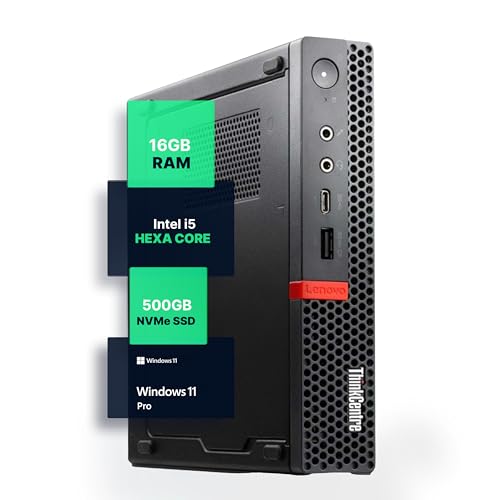
Lenovo ThinkCentre Mini PC Intel i5
Best for: office work and general home use
- Processor
- Intel i5-8400T
- Installed RAM
- 16GB
- Storage Capacity
- 500GB NVMe
- Memory Type
- DDR4
- Operating System
- Windows 11 Pro
- Use
- Home, Office
View on Amazon: Lenovo ThinkCentre Mini PC Intel i5 Affiliate link
The Lenovo M720Q is a compact desktop built for steady daily work. It uses an Intel Core i5-8400T processor and includes 16GB of DDR4 RAM. You get 500GB of NVMe storage and Windows 11 Pro pre-installed. This setup handles multitasking and office apps without lag. It fits well on small desks or behind monitors.
Pros
- Intel Core i5-8400T hexa-core processor
- 16GB DDR4 RAM for smooth multitasking
- 500GB NVMe M.2 SSD for fast load times
- Windows 11 Pro operating system
- Compact micro form factor design
Cons
- Older 8th generation Intel processor
- No dedicated graphics card
- Limited to 5G WiFi connectivity
Good fit if
- You need a reliable machine for office tasks
- You want Windows 11 Pro included
- You have limited desk space
Skip if
- You require high-end gaming performance
- You need the latest CPU generations
- You want dedicated graphics for video editing
Verdict: Lenovo M720Q i5 Mini PC is a solid choice for users who prioritize stable performance and a compact footprint for everyday computing tasks.

Glorlin Ryzen 5 3501U Mini PC
Best for: Multi-monitor home office setups
- Processor
- AMD Ryzen 5 3501U
- Installed RAM
- 16GB
- Storage Capacity
- 512GB
- Memory Type
- DDR4
- Operating System
- OS 11 Pro
- Use
- Home, Office
View on Amazon: Glorlin Ryzen 5 3501U Mini PC Affiliate link
The Glorlin GT101 uses an AMD Ryzen 5 3501U processor with 16GB of DDR4 RAM and a 512GB SSD. It runs Windows 11 Pro and supports three 4K displays via HDMI and USB-C. This compact desktop includes WiFi 6 and Bluetooth 5.3 for stable connections. It suits home office users who need multitasking power without taking up much desk space.
Pros
- AMD Ryzen 5 3501U processor with up to 3.7 GHz boost
- 16GB DDR4 RAM expandable to 32GB
- 512GB SSD for fast boot times
- Supports three 4K monitors simultaneously
- Pre-installed Windows 11 Pro
Cons
- Ryzen 5 3501U is an older APU compared to modern alternatives
- Limited to 15W-25W TDP for sustained heavy loads
- Only one USB-C port supports display output
Good fit if
- You need a quiet, compact PC for daily office tasks
- You want to connect multiple 4K monitors for extra workspace
- You prefer Windows 11 Pro out of the box
Skip if
- You require high-end gaming performance
- You need the latest generation CPU for maximum speed
- You prefer a single-port USB-C display connection
Verdict: Glorlin GT101 Ryzen 5 Mini PC is a capable small form factor system for users who value multitasking and multi-monitor setups over raw processing power.
Specifications side by side
| Spec | Lenovo ThinkCentre Mini PC Intel i5 | Glorlin Ryzen 5 3501U Mini PC |
|---|---|---|
| Processor | Intel i5-8400T | AMD Ryzen 5 3501U |
| Installed RAM | 16GB | 16GB |
| Storage Capacity | 500GB NVMe | 512GB |
| Memory Type | DDR4 | DDR4 |
| Operating System | Windows 11 Pro | OS 11 Pro |
| Memory | 16GB RAM | 16GB RAM |
| Storage | 500GB SSD | 512GB SSD |
| Use | Home, Office | Home, Office |
| Networking | not stated | WiFi 6 |
| Dimensions | 19 × 15 × 4 inches | not stated |
| Weight | 2.91 pounds | not stated |
| Size | 1140 cubic inches | not stated |
| Color | Black | R5 3501U+16GB+512GB |
| Model | M720Q | GT101 |
Frequently asked questions
Which mini PC is better for office work?
The Lenovo ThinkCentre M720Q is the better choice for general office tasks. It features an Intel Core i5 processor and 16GB of RAM. This combination ensures stable performance for everyday computing needs. The device runs Windows 11 Pro, providing a familiar business environment. Its compact design fits easily on a desk without taking up excessive space.
Does the Glorlin Mini PC support multiple monitors?
Yes, the Glorlin GT101 is designed for multi-monitor home office setups. It uses a Ryzen 5 3501U processor to handle multitasking efficiently. You get 16GB of RAM and a 512GB SSD for smooth operation. The system includes WiFi 6 for reliable wireless connectivity. This makes it suitable for users who need to manage several screens simultaneously.
What is the storage difference between these two models?
The Lenovo ThinkCentre offers 500GB of SSD storage. The Glorlin GT101 provides slightly more capacity with a 512GB SSD. Both systems include 16GB of RAM to support multitasking. The storage difference is minimal, so you can choose based on other features. Both drives are sufficient for storing documents, applications, and media files.
Which brand offers a more compact form factor?
The Lenovo ThinkCentre M720Q has a defined physical footprint. It measures 15 inches in width and 4 inches in height. The device weighs 2.91 pounds, making it portable and easy to place. The Glorlin GT101 is also a small form factor system. However, specific dimensions for the Glorlin model are not provided in the available data. You should check the Glorlin specs for exact size details.
Is Windows 11 Pro included on both machines?
The Lenovo ThinkCentre M720Q comes with Windows 11 Pro pre-installed. This version includes advanced features for business and productivity. The Glorlin GT101 data does not explicitly state the operating system. However, it is marketed for home and office use. You should verify the OS version with the seller for the Glorlin unit before purchase.
Which processor is faster for daily tasks?
The Lenovo ThinkCentre uses an Intel Core i5 processor. This chip is designed for reliable multitasking and business productivity. The Glorlin GT101 uses a Ryzen 5 3501U. Both processors handle everyday office tasks well. The Intel i5 may offer better stability for heavy workloads. The Ryzen 5 is capable for general use and multi-monitor setups.
Do both mini PCs have WiFi connectivity?
The Glorlin GT101 explicitly includes WiFi 6 for fast wireless networking. The Lenovo ThinkCentre M720Q data does not specify its connectivity options. You should assume it has standard wireless capabilities. However, the exact WiFi standard is not listed in the provided specifications. Check the Lenovo product page for detailed network information if you rely on wireless connections.