Lenovo vs GMKtec: Mini PCs Compared by Specs
As an Amazon Associate we earn from qualifying purchases. Links on this page are affiliate links.
When comparing a lenovo vs GMKtec mini PC, you are looking at two distinct approaches to compact computing. Both devices offer 16GB of RAM and support multiple displays, making them capable for daily tasks. The main difference lies in their core architecture and connectivity. The Lenovo ThinkCentre M720Q focuses on business stability with Windows 11 Pro and standard office features. In contrast, the GMKtec G11 targets networking and industrial use, featuring dual 2.5GbE ports and a newer AMD Ryzen Embedded processor. This guide breaks down how these specs affect your workflow.
Key differences
| Aspect | Lenovo ThinkCentre Mini PC Intel i5 | GMKtec Mini PC Dual 2.5GbE |
|---|---|---|
| Processor | Intel Core i5-8400T | AMD Ryzen Embedded R2514 |
| Operating System | Windows 11 Pro | Not listed |
| Networking | 5G WiFi + BT | Dual 2.5GbE + WiFi 6E |
| Storage | 500GB NVMe | Not listed |
| Dimensions | 15 x 4 x 19 inches | 3.42 x 1.55 x 3.42 inches |
Which one should you choose?
Choose Lenovo ThinkCentre Mini PC Intel i5 if
- You need a pre-installed Windows 11 Pro license for immediate business use.
- You prefer a larger chassis that fits standard VESA mounts or desk setups.
- You require 500GB of NVMe storage for files and applications.
Choose GMKtec Mini PC Dual 2.5GbE if
- You are building a home lab, NAS, or firewall with dual 2.5GbE ports.
- You want a significantly smaller footprint for discreet placement.
- You need WiFi 6E for faster wireless speeds and lower latency.
Verdict: Choose the Lenovo ThinkCentre M720Q if you want a ready-to-use office machine with Windows 11 Pro and ample storage. Pick the GMKtec G11 if you are a technical user who needs advanced networking ports and a compact design for specialized projects. Your choice depends on whether you prioritize business readiness or hardware flexibility.
Lenovo vs GMKtec: Spec Comparison
processor performance
The Lenovo ThinkCentre M720Q uses an Intel Core i5-8400T processor, which is an 8th generation hexa-core chip. This provides reliable power for everyday multitasking, web browsing, and business productivity. In contrast, the GMKtec G11 features the AMD Ryzen Embedded R2514. This processor is based on Zen+ architecture and is designed for continuous 24/7 operation in commercial or industrial environments. The GMKtec claims up to 30% better overall performance than similar Intel N150 and 4300U chips. While the Lenovo i5 is a standard consumer CPU, the GMKtec R2514 targets professional workloads with higher sustained throughput.
networking capabilities
Connectivity options differ significantly between these two mini PCs. The Lenovo M720Q includes a standard WiFi and Bluetooth adapter for convenient wireless connectivity, suitable for home and office use. The GMKtec G11 offers Dual 2.5GbE Ethernet ports, allowing it to function as a high-speed networking hub, firewall, or NAS server. It also includes WiFi 6E and Bluetooth 5.2, providing faster speeds and lower latency on the 6GHz band. The GMKtec supports USB-C 10Gbps ports for fast data transfer, whereas the Lenovo relies on standard wireless connections. The dual wired ports on the GMKtec give it a clear advantage for network-intensive tasks.
display support
Both systems support multiple displays, but the implementation varies. The GMKtec G11 supports up to three independent 4K@60Hz displays using dual HDMI 2.0 ports and a USB-C DisplayPort Alt Mode. This setup is ideal for trading, digital signage, or control rooms without needing adapters. The Lenovo M720Q description mentions versatile mounting and placement but does not specify the exact number of display outputs or resolution support in the provided data. Without specific details on the Lenovo's video outputs, the GMKtec's explicit triple 4K support offers a more defined advantage for multi-monitor setups.
memory architecture
Both mini PCs come equipped with 16GB of DDR4 RAM. The GMKtec G11 utilizes dual-channel memory configuration (2x8GB), which doubles the data pathway between the RAM and the processor compared to single-channel systems. This architecture helps prevent memory bottlenecks, resulting in smoother 4K video playback and faster application responsiveness. The Lenovo M720Q lists 16GB of DDR4 RAM but does not specify if it is configured in dual-channel mode. Dual-channel memory typically offers better performance for integrated graphics and multitasking, giving the GMKtec a technical edge in memory bandwidth.
operating system
The Lenovo ThinkCentre M720Q comes pre-installed with Windows 11 Pro. This operating system offers advanced features and security, making it suitable for both business and home use. The GMKtec G11 specifications do not list a pre-installed operating system in the provided data. Users purchasing the GMKtec may need to install their own OS, such as Windows or a Linux distribution, depending on their needs. The inclusion of Windows 11 Pro on the Lenovo provides immediate usability and professional features out of the box, which is a significant convenience for many users.
Which Mini PC Fits Your Needs
Users needing Windows 11 Pro
The Lenovo ThinkCentre M720Q comes with Windows 11 Pro pre-installed. This operating system provides advanced security features and management tools essential for business environments. If you require a familiar, licensed OS for office productivity without extra setup, this configuration saves time and ensures immediate compatibility with professional software.
Users needing dual 2.5GbE ports
The GMKtec G11 stands out with dual 2.5GbE Ethernet ports. This hardware allows you to create a high-speed network hub, firewall, or NAS server. If your workflow involves virtualization, home labs, or dedicated network isolation, these extra ports provide the connectivity backbone that standard single-port PCs cannot offer.
Users prioritizing compact size
The GMKtec G11 measures 3.42 inches on each side and weighs just 1.65 pounds. This tiny footprint makes it easier to mount behind monitors or tuck into tight spaces. If you value minimal desk clutter and portability, its small physical dimensions offer a cleaner setup compared to larger micro-form factors.
The products compared
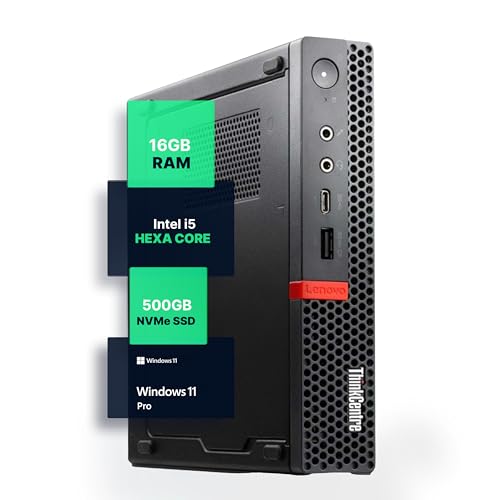
Lenovo ThinkCentre Mini PC Intel i5
Best for: Space-conscious home office setups
- Processor
- Intel i5-8400T
- Installed RAM
- 16GB
- Storage Capacity
- 500GB NVMe
- Memory Type
- DDR4
- Operating System
- Windows 11 Pro
- Use
- Home, Office
View on Amazon: Lenovo ThinkCentre Mini PC Intel i5 Affiliate link
The Lenovo M720Q is a compact desktop powered by an Intel Core i5-8400T processor and 16GB of DDR4 RAM. It includes 500GB of NVMe storage and runs Windows 11 Pro. This system fits well on desks with limited space. You get reliable performance for office tasks and web browsing. The low power usage supports quiet operation in professional environments.
Pros
- Intel Core i5-8400T hexa-core processor
- 16GB DDR4 RAM for multitasking
- 500GB NVMe M.2 SSD
- Pre-installed Windows 11 Pro
- Compact micro form factor
Cons
- Older 8th generation Intel processor
- Limited to 5G WiFi connectivity
- Base storage capacity is modest
Good fit if
- You need a quiet office PC
- You require Windows 11 Pro
- You have limited desk space
Skip if
- You need the latest CPU performance
- You require high-end gaming specs
- You want more than 500GB storage
Verdict: Lenovo M720Q i5 Mini PC suits home office users who prioritize stability and space savings over raw speed. It delivers dependable daily computing for standard productivity tasks.

GMKtec Mini PC Dual 2.5GbE
Best for: networking hubs and multi-display workstations
- Processor
- AMD Ryzen Embedded R2514
- Installed RAM
- 16GB
- Storage Capacity
- 256GB
- Memory Type
- DDR4
- Graphics
- AMD Radeon GPU
- Ethernet Ports
- Dual 2.5GbE
View on Amazon: GMKtec Mini PC Dual 2.5GbE Affiliate link
The GMKtec G11 is a compact mini PC powered by the AMD Ryzen Embedded R2514 processor. It includes 16GB of dual-channel DDR4 RAM and features dual 2.5GbE Ethernet ports. This setup supports three 4K displays and includes Wi-Fi 6E. It is designed for continuous operation, making it suitable for networking hubs, NAS servers, or professional multitasking environments where reliability and connectivity are priorities.
Pros
- AMD Ryzen Embedded R2514 processor for 24/7 operation
- Dual 2.5GbE Ethernet ports for networking flexibility
- 16GB dual-channel DDR4 RAM
- Supports up to three 4K displays
- Wi-Fi 6E and Bluetooth 5.2 connectivity
Cons
- Uses DDR4 memory instead of newer DDR5
- Only includes a 1-year limited warranty
- No mention of included operating system or storage capacity in base config
Good fit if
- You need a dedicated firewall or router appliance
- You require multiple 4K displays for control rooms
- You want dual 2.5GbE ports for home lab projects
Skip if
- You require DDR5 memory for maximum bandwidth
- You need a longer warranty than one year
- You want a pre-installed Windows OS without checking variations
Verdict: The GMKtec G11 Mini PC fits users who need robust networking features like dual 2.5GbE ports and reliable 24/7 operation for home labs or digital signage.
Specifications side by side
| Spec | Lenovo ThinkCentre Mini PC Intel i5 | GMKtec Mini PC Dual 2.5GbE |
|---|---|---|
| Processor | Intel i5-8400T | AMD Ryzen Embedded R2514 |
| Installed RAM | 16GB | 16GB |
| Storage Capacity | 500GB NVMe | 256GB |
| Memory Type | DDR4 | DDR4 |
| Graphics | not stated | AMD Radeon GPU |
| Ethernet Ports | not stated | Dual 2.5GbE |
| Operating System | Windows 11 Pro | not stated |
| Memory | 16GB RAM | not stated |
| Storage | 500GB SSD | 256GB SSD |
| Use | Home, Office | not stated |
| Networking | not stated | WiFi 6E |
| Dimensions | 19 × 15 × 4 inches | 3.42 × 3.42 × 1.55 inches |
| Weight | 2.91 pounds | 1.65 pounds |
| Size | 1140 cubic inches | 16GB+256GB R2514 |
| Color | Black | Black Steel |
| Model | M720Q | G11 |
Frequently asked questions
Which mini PC is better for a small home office?
The Lenovo ThinkCentre M720Q is the better choice for space-conscious home offices. It is designed to suit users who prioritize stability and space savings over raw speed. The device delivers dependable daily computing for standard productivity tasks without taking up much desk area.
Does the GMKtec G11 support multiple displays?
Yes, the GMKtec G11 supports multiple displays. It is specifically built for multi-display workstations and digital signage applications. This feature allows you to connect several monitors, making it suitable for complex visual setups or professional presentation environments where screen real estate is essential.
What operating system comes with the Lenovo ThinkCentre?
The Lenovo ThinkCentre M720Q comes with Windows 11 Pro pre-installed. This operating system provides advanced security features and management tools. It is essential for business environments or users who require a familiar, licensed OS for office work and secure daily computing tasks.
How small is the GMKtec G11 compared to the Lenovo?
The GMKtec G11 is significantly more compact than the Lenovo ThinkCentre. The GMKtec measures 3.42 inches in width and height, with a height of 1.55 inches. In contrast, the Lenovo M720Q is much larger, measuring 15 inches wide and 19 inches long.
Does the GMKtec G11 have dual Ethernet ports?
Yes, the GMKtec G11 features dual 2.5GbE ports. This robust networking hardware fits users who need reliable 24/7 operation for home labs or networking hubs. It allows for faster data transfer speeds and improved connectivity options compared to standard single-port mini PCs.
What is the weight difference between the two devices?
The Lenovo ThinkCentre M720Q weighs 2.91 pounds, while the GMKtec G11 weighs 1.65 pounds. The GMKtec is lighter due to its smaller chassis and compact design. This makes the GMKtec easier to mount or move, whereas the Lenovo is built for stable desk placement.
Is the Lenovo ThinkCentre suitable for home use?
Yes, the Lenovo ThinkCentre M720Q is suitable for home use. It is rated for both home and office environments. The device offers dependable daily computing for standard productivity tasks, making it a reliable option for users who need a stable machine for general household duties.