Lenovo or HiGOLE? Mini PCs Compared in 2026
As an Amazon Associate we earn from qualifying purchases. Links on this page are affiliate links.
This comparison covers the lenovo vs HiGOLE mini PC options for your desktop needs. Both devices run Windows 11 Pro and offer compact designs suitable for office or home environments. The Lenovo ThinkCentre M720Q provides a traditional small form factor with stronger processing power. In contrast, the HiGOLE unit is a fanless stick PC focused on silent operation and portability. You will choose based on whether you prioritize raw performance or a space-saving, quiet design.
Key differences
| Aspect | Lenovo ThinkCentre Mini PC Intel i5 | HiGOLE Fanless Celeron PC Stick |
|---|---|---|
| Processor | Intel Core i5-8400T | Intel Celeron J4105 |
| Memory | 16GB DDR4 | 8GB LPDDR4 |
| Storage | 500GB NVMe | 128GB eMMC |
| Form Factor | Micro Tower | Stick PC |
| Cooling | Standard | Fanless |
Which one should you choose?
Choose Lenovo ThinkCentre Mini PC Intel i5 if
- You need faster multitasking and more storage for professional work.
- You prefer a traditional mini PC that mounts behind a monitor.
- You require 16GB of RAM for heavy applications.
Choose HiGOLE Fanless Celeron PC Stick if
- You want a completely silent computer with no moving parts.
- You need the smallest possible footprint for a TV or display.
- Your tasks involve basic office work and media playback.
Verdict: The Lenovo ThinkCentre M720Q is the better choice for users who need reliable performance and ample storage for daily productivity. The HiGOLE stick PC suits those who prioritize a silent, ultra-compact device for light duties. Your decision depends on whether you value processing power or minimal physical size.
Lenovo vs HiGOLE Mini PC Comparison
Processor performance
The Lenovo ThinkCentre M720Q uses an Intel Core i5-8400T processor. This is an 8th Gen hexa-core chip designed for reliable multitasking and business productivity. The HiGOLE Fanless PC Stick relies on an Intel Celeron J4105. This processor runs between 2GHz and 2.7GHz and is built for low-power tasks. The i5-8400T offers significantly more processing power for demanding workloads. The Celeron is sufficient for basic web browsing and document editing but lacks the core count for heavy applications. You will notice a clear speed difference in complex tasks.
Memory capacity
Memory determines how many programs you can run at once. The Lenovo ThinkCentre M720Q comes with 16GB of DDR4 RAM. This allows for smooth switching between multiple browser tabs and office applications. The HiGOLE Fanless PC Stick includes 8GB of LPDDR4 RAM. While adequate for light use, it may slow down if you open many programs simultaneously. The larger memory pool in the Lenovo provides better responsiveness for power users. The HiGOLE configuration is suitable only for single-task workflows.
Storage options
Storage holds your files and operating system. The Lenovo ThinkCentre M720Q features a 500GB NVMe M.2 SSD. NVMe drives offer fast load times and quick file transfers. The HiGOLE Fanless PC Stick provides 128GB of eMMC storage. eMMC is slower than NVMe SSDs and offers less space. The Lenovo gives you four times the storage capacity. This extra room is useful for storing large files, videos, or software libraries. The HiGOLE storage is limited to essential documents and basic apps.
Form factor
Physical size affects where you can place the device. The Lenovo ThinkCentre M720Q is a micro desktop with a compact footprint. It is designed to sit on a desk or mount behind a monitor. The HiGOLE Fanless PC Stick is a stick PC that plugs directly into an HDMI port. It is extremely portable and requires no separate stand. The Lenovo offers a traditional desktop experience with more internal space. The HiGOLE is ideal for temporary setups or digital signage where space is extremely tight.
Cooling design
Cooling impacts noise levels and long-term stability. The Lenovo ThinkCentre M720Q uses a standard internal fan system. It provides active cooling for the i5 processor during sustained workloads. The HiGOLE Fanless PC Stick uses a completely fanless design. It relies on heat dissipation through its metal casing to stay cool. This results in zero noise operation, which is perfect for quiet offices. However, the fanless design may limit sustained performance under heavy loads. The Lenovo handles heat better through active airflow.
Connectivity
Ports determine what you can connect to the device. The Lenovo ThinkCentre M720Q includes 5G WiFi and Bluetooth support. It also offers a variety of wired connections typical for micro desktops. The HiGOLE Fanless PC Stick features USB-C, two USB 3.0 ports, HDMI 2.0, and a Gigabit LAN port. It also supports 4K output at 60Hz. The HiGOLE offers more direct video output options for monitors. The Lenovo provides more robust wireless connectivity options for modern networks.
Which mini PC fits your needs
Users needing strong multitasking performance
The Lenovo ThinkCentre M720Q features an Intel Core i5-8400T hexa-core processor. This chip delivers reliable power for business productivity and smooth multitasking. With 16GB of DDR4 RAM and a 500GB NVMe SSD, you get fast load times and ample storage for files and applications, ensuring responsive performance for demanding office tasks.
Users wanting a silent, compact stick PC
The HiGOLE Fanless PC Stick uses an Intel Celeron J4105 processor in a fanless design. This ensures zero noise and stable operation for quiet environments. Its stick form factor is highly portable and space-saving. It supports 4K HDMI output and includes WiFi 5, making it ideal for simple desktop setups or digital signage.
Users requiring more RAM and storage
The Lenovo ThinkCentre M720Q comes with 16GB of DDR4 RAM and a 500GB NVMe SSD. This configuration provides significantly more memory and faster storage capacity compared to entry-level options. The larger internal storage allows you to keep more files and applications locally, while the extra RAM supports smoother operation when running multiple programs simultaneously.
The products compared
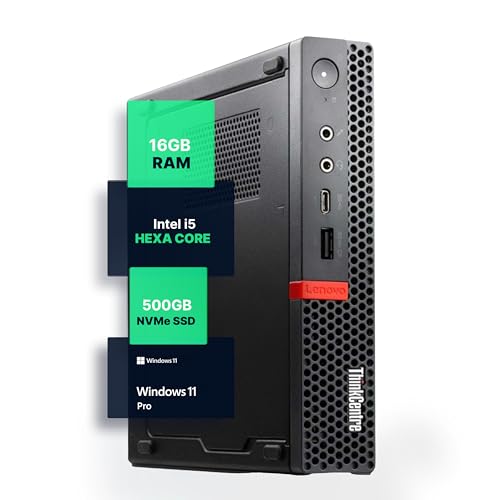
Lenovo ThinkCentre Mini PC Intel i5
Best for: Office multitasking and business productivity
- Processor
- Intel i5-8400T
- Installed RAM
- 16GB
- Storage Capacity
- 500GB NVMe
- Memory Type
- DDR4
- Operating System
- Windows 11 Pro
- Use
- Home, Office
View on Amazon: Lenovo ThinkCentre Mini PC Intel i5 Affiliate link
The Lenovo M720Q is a compact micro PC powered by an Intel Core i5-8400T processor. It includes 16GB of DDR4 RAM and a 500GB NVMe SSD for fast storage. Windows 11 Pro is pre-installed for business and home use. Wireless connectivity is handled by 5G WiFi and Bluetooth. This unit offers a space-saving design suitable for desks with limited room.
Pros
- Intel Core i5-8400T hexa-core processor
- 16GB DDR4 RAM for multitasking
- 500GB NVMe M.2 SSD storage
- Pre-installed Windows 11 Pro
- 5G WiFi and Bluetooth connectivity
Cons
- Large physical dimensions compared to stick PCs
- Heavier build at 2.91 pounds
- 8th Gen processor is not the latest generation
Good fit if
- You need Windows 11 Pro for business tasks
- You want 16GB of RAM for smooth multitasking
- You prefer a compact desktop over a stick form factor
Skip if
- You require the absolute smallest footprint available
- You need the latest generation Intel processor
- You prefer a fanless design for silent operation
Verdict: Lenovo M720Q i5 Mini PC is a solid choice for users who need reliable Windows 11 Pro performance and ample RAM in a compact desktop form factor.

HiGOLE Fanless Celeron PC Stick
Best for: light office tasks and digital signage
- Processor
- Celeron J4105
- Installed RAM
- 8GB
- Storage Capacity
- 128GB
- Memory Type
- LPDDR4
- Graphics
- UHD 600
- Ethernet Ports
- 1x Gigabit LAN
View on Amazon: HiGOLE Fanless Celeron PC Stick Affiliate link
This HiGOLE stick PC uses a Celeron J4105 processor with 8GB of LPDDR4 RAM and 128GB of eMMC storage. It runs Windows 11 Pro and supports Linux. The fanless design ensures quiet operation. You get HDMI 2.0 for 4K output, Gigabit LAN, and Wi-Fi 5. It weighs 1.5 pounds. This compact stick suits basic office tasks or digital signage needs.
Pros
- Fanless cooling for silent operation
- Windows 11 Pro included
- 4K HDMI 2.0 output
- Gigabit Ethernet and Wi-Fi 5
Cons
- eMMC storage is slower than SSDs
- RAM is soldered and non-upgradeable
- Limited to 128GB storage capacity
Good fit if
- You need a silent, space-saving display driver
- You require Windows 11 Pro for business apps
- You want a lightweight device for VESA mounting
Skip if
- You need high-performance gaming or video editing
- You want to upgrade RAM or storage later
- You require Thunderbolt or USB 4 connectivity
Verdict: HiGOLE Fanless Stick PC Celeron J4105 fits users who need a quiet, compact Windows 11 Pro device for light office work or digital signage. It is not suitable for demanding tasks or future hardware upgrades.
Specifications side by side
| Spec | Lenovo ThinkCentre Mini PC Intel i5 | HiGOLE Fanless Celeron PC Stick |
|---|---|---|
| Processor | Intel i5-8400T | Celeron J4105 |
| Installed RAM | 16GB | 8GB |
| Storage Capacity | 500GB NVMe | 128GB |
| Memory Type | DDR4 | LPDDR4 |
| Graphics | not stated | UHD 600 |
| Ethernet Ports | not stated | 1x Gigabit LAN |
| Operating System | Windows 11 Pro | Windows 11 Pro |
| Memory | 16GB RAM | 8GB RAM |
| Storage | 500GB SSD | not stated |
| Use | Home, Office | Business, Office, IoT |
| Networking | not stated | Gigabit Ethernet |
| Form Factor | not stated | Stick PC |
| Connectivity | not stated | WiFi 5 |
| Dimensions | 19 × 15 × 4 inches | not stated |
| Weight | 2.91 pounds | 1.5 pounds |
| Size | 1140 cubic inches | Mini |
| Color | Black | J4105-8+128 |
| Model | M720Q | J4105-8+128 |
Frequently asked questions
Which mini PC is better for heavy office multitasking?
The Lenovo ThinkCentre M720Q is the better choice for heavy multitasking. It features an Intel Core i5 processor and 16GB of RAM. This setup handles demanding business applications smoothly. The HiGOLE option uses a Celeron chip with only 8GB of RAM, which limits its ability to manage multiple complex tasks at once.
Does either device support Windows 11 Pro?
Yes, both devices support Windows 11 Pro. The Lenovo ThinkCentre M720Q runs this operating system natively for business features. The HiGOLE Fanless Stick PC also includes Windows 11 Pro. This ensures you get the same core software environment regardless of which compact form factor you prefer for your desktop setup.
How much storage does each mini PC offer?
The Lenovo ThinkCentre M720Q includes a 500GB SSD for storage. This provides ample space for your operating system, applications, and files. The HiGOLE Fanless Stick PC is not specified with internal storage capacity in the provided data. You should check the specific model details for that unit if storage space is a primary concern.
Is the HiGOLE PC suitable for digital signage?
Yes, the HiGOLE Fanless Stick PC is suitable for digital signage. It is designed for light office tasks and IoT applications. Its fanless design ensures quiet operation, which is ideal for public displays. The compact stick form factor allows it to mount directly behind a monitor, saving desk space while running Windows 11 Pro.
Which mini PC has a larger physical footprint?
The Lenovo ThinkCentre M720Q has a larger physical footprint. It measures 19 inches in length, 15 inches in width, and 4 inches in height. The HiGOLE Fanless Stick PC is significantly smaller, described as a mini stick device. It weighs only 1.5 pounds compared to the Lenovo unit, which weighs 2.91 pounds.
Can I upgrade the RAM on the HiGOLE stick?
The HiGOLE Fanless Stick PC comes with 8GB of RAM. However, the provided data does not specify if this memory is upgradeable. It is generally noted as not suitable for future hardware upgrades. If you require more than 8GB of RAM, the Lenovo ThinkCentre M720Q offers 16GB out of the box.
What type of network connection does the HiGOLE PC use?
The HiGOLE Fanless Stick PC uses Gigabit Ethernet for wired networking. It also supports WiFi 5 for wireless connectivity. This combination provides reliable internet access for office work or digital signage. The Lenovo ThinkCentre M720Q is not specified with network details in the provided data, so you should verify its connectivity options separately.