Lenovo or KAMRUI? Mini PCs Compared in 2026
As an Amazon Associate we earn from qualifying purchases. Links on this page are affiliate links.
This lenovo vs KAMRUI mini PC comparison looks at two compact desktops for office and home use. Both machines offer 16GB of RAM and solid storage options in a small form factor. The main difference lies in their processors and age. You get a Lenovo ThinkCentre with an older Intel Core i5 and Windows 11 Pro, or a KAMRUI E3B with a newer AMD Ryzen 5 and modern connectivity. Each system targets slightly different needs regarding performance and features.
Key differences
| Aspect | Lenovo ThinkCentre Mini PC Intel i5 | KAMRUI Ryzen 5 7530U Mini PC |
|---|---|---|
| Processor | Intel Core i5-8400T | AMD Ryzen 5 7530U |
| Memory Type | DDR4 | LPDDR4X |
| Storage Capacity | 500GB NVMe | 512GB SSD |
| Operating System | Windows 11 Pro | Not listed |
| Wireless Networking | WiFi 5 + BT | WiFi 6 + BT 5.2 |
Which one should you choose?
Choose Lenovo ThinkCentre Mini PC Intel i5 if
- You need Windows 11 Pro for business security features.
- You prefer a system with a known enterprise-grade brand history.
- You want DDR4 memory which may be easier to upgrade later.
Choose KAMRUI Ryzen 5 7530U Mini PC if
- You want a newer processor architecture for better single-thread performance.
- You need faster WiFi 6 connectivity and Bluetooth 5.2.
- You require a full-function USB-C port for display and data output.
Verdict: The Lenovo ThinkCentre M720Q suits users who prioritize the Windows 11 Pro license and established business support. The KAMRUI E3B is the better choice if you want newer hardware specs, faster wireless standards, and modern connectivity ports. Your decision depends on whether you value the operating system edition or the underlying component generation.
Lenovo vs KAMRUI Mini PC Specs
processor performance
The Lenovo ThinkCentre M720Q uses an Intel Core i5-8400T, an 8th-generation hexa-core processor. This older chip is designed for low power consumption, making it suitable for basic office tasks. In contrast, the KAMRUI E3B features the AMD Ryzen 5 7530U. This is a newer Zen 3 architecture chip with a higher boost clock of up to 4.5GHz. The KAMRUI processor offers significantly better single-thread performance, which improves responsiveness for web browsing and document editing. For modern multitasking, the KAMRUI CPU provides a clear advantage in speed and efficiency over the Lenovo's older silicon.
memory type
Both systems come equipped with 16GB of RAM, which is sufficient for everyday productivity and light multitasking. However, the technology differs between the two. The Lenovo ThinkCentre M720Q utilizes standard DDR4 memory, which is widely compatible and generally upgradeable in many mini PC designs. The KAMRUI E3B uses LPDDR4X memory. While this type of RAM is more power-efficient, the KAMRUI specifications explicitly state it is non-upgradeable. If you require the ability to expand your memory later, the Lenovo's DDR4 configuration offers more flexibility. For fixed configurations, both provide equal capacity.
storage capacity
Storage options vary slightly between the two units. The Lenovo ThinkCentre M720Q is configured with a 500GB NVMe M.2 SSD. This provides fast load times for your operating system and applications. The KAMRUI E3B offers a 512GB SSD, which is a marginally larger capacity. More importantly, the KAMRUI includes two M.2 slots, allowing for significant storage expansion up to 2TB per slot. The Lenovo data does not specify additional expansion slots beyond the initial drive. For users who need to store large files or media libraries, the KAMRUI provides more immediate space and future upgrade potential.
wireless connectivity
Networking capabilities differ noticeably between these two mini PCs. The KAMRUI E3B is equipped with WiFi 6, which supports speeds up to 2402 Mbps on the 5GHz band. This newer standard reduces latency and handles network congestion better than previous generations. It also includes Bluetooth 5.2 for efficient peripheral connections. The Lenovo ThinkCentre M720Q lists a WiFi and Bluetooth adapter but does not specify the generation. Given the older processor, it likely uses an earlier WiFi standard. For faster wireless downloads and more stable connections in crowded environments, the KAMRUI's modern networking hardware is superior.
operating system
The software environment is a key differentiator for professional users. The Lenovo ThinkCentre M720Q comes pre-installed with Windows 11 Pro. This edition includes advanced security features, domain joining capabilities, and remote desktop hosting, which are essential for business environments. The KAMRUI E3B specifications do not list a pre-installed operating system. You would need to purchase and install a license separately if you require Windows. For users who want a ready-to-work business machine with professional features out of the box, the Lenovo provides a significant advantage with its included OS.
Which Mini PC fits your needs best
Office users needing Windows 11 Pro
The Lenovo ThinkCentre M720Q comes with Windows 11 Pro pre-installed. This operating system offers advanced security and management features for business environments. You get a familiar interface with enterprise-grade tools. The compact design saves desk space while providing reliable performance for daily office tasks and document editing.
Buyers wanting faster modern connectivity
The KAMRUI E3B includes WiFi 6 for faster speeds and lower latency compared to older standards. It also features Bluetooth 5.2 for efficient data transmission. The full-function USB-C port supports 10Gbps data transfer and display output. These modern connection options ensure stable performance for streaming and peripheral use.
Users needing triple monitor support
The KAMRUI E3B supports three 4K displays simultaneously via HDMI 2.0, DisplayPort 1.4b, and USB-C. This capability is ideal for multitasking with multiple windows open. The AMD Radeon RX Vega 7 GPU handles the graphics load efficiently. You gain significant productivity benefits from a expanded visual workspace.
The products compared
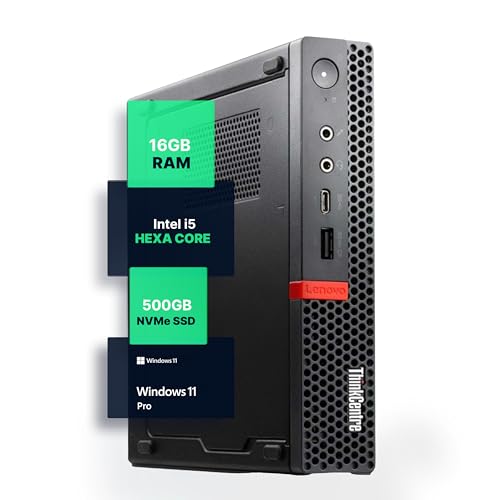
Lenovo ThinkCentre Mini PC Intel i5
Best for: small office workspaces and basic computing
- Processor
- Intel i5-8400T
- Installed RAM
- 16GB
- Storage Capacity
- 500GB NVMe
- Memory Type
- DDR4
- Operating System
- Windows 11 Pro
- Use
- Home, Office
View on Amazon: Lenovo ThinkCentre Mini PC Intel i5 Affiliate link
The Lenovo M720Q is a compact desktop built for home or office use. It features an Intel Core i5 processor, 16GB of DDR4 RAM, and a 500GB NVMe SSD. This configuration supports smooth multitasking and fast load times. It runs Windows 11 Pro and includes built-in WiFi and Bluetooth. The small form factor fits well on desks with limited space.
Pros
- Intel Core i5 processor for reliable performance
- 16GB DDR4 RAM for responsive multitasking
- 500GB NVMe SSD for fast storage access
- Pre-installed Windows 11 Pro operating system
- Compact design saves desk space
Cons
- Older 8th generation Intel processor
- No dedicated graphics card listed
- Limited to basic home and office tasks
Good fit if
- You need a reliable PC for everyday office work
- You want a compact system for a small desk
- You require Windows 11 Pro for business features
Skip if
- You need high-end gaming performance
- You require heavy video editing capabilities
- You want the latest generation processor
Verdict: Lenovo M720Q Mini PC offers solid specs for standard productivity tasks. It is a practical option for users who prioritize a small footprint and stable performance for office applications.

KAMRUI Ryzen 5 7530U Mini PC
Best for: Office tasks and multi-monitor setups
- Processor
- AMD Ryzen 5 7530U
- Installed RAM
- 16GB
- Storage Capacity
- 512GB
- Memory Type
- LPDDR4X
- Graphics
- AMD Radeon RX Vega 7
- Ethernet Ports
- 1x Ethernet
View on Amazon: KAMRUI Ryzen 5 7530U Mini PC Affiliate link
The KAMRUI E3B uses an AMD Ryzen 5 7530U processor with 16GB of LPDDR4X memory and a 512GB SSD. It features WiFi 6 and a full-function Type-C port for 4K display output. This compact unit supports triple 4K screens and offers expandable storage via two M.2 slots. It suits users who need solid single-thread performance for daily tasks and reliable wireless connectivity in a small form factor.
Pros
- AMD Ryzen 5 7530U processor with 6 cores and 12 threads
- 16GB LPDDR4X memory for smooth multitasking
- Full-function Type-C port with 10Gbps data transfer and 4K/60Hz output
- WiFi 6 for faster speeds and reduced latency
- Two M.2 SSD slots for future storage expansion
Cons
- 16GB of LPDDR4X memory is non-upgradeable
- Integrated AMD Radeon RX Vega 7 graphics limits heavy gaming
- Second M.2 slot supports SATA only, not NVMe
Good fit if
- You need a compact PC with strong single-thread performance for office work
- You require multiple 4K displays for productivity or monitoring
- You want expandable storage options beyond the base 512GB SSD
Skip if
- You require upgradeable RAM for long-term hardware flexibility
- You plan to run demanding 3D games or video editing software
- You need NVMe support in both M.2 storage slots
Verdict: The KAMRUI E3B Ryzen 5 Mini PC is a capable office machine for users who prioritize connectivity and expandable storage over raw graphical power. It fits well in environments where multiple monitors and fast wireless connections are essential.
Specifications side by side
| Spec | Lenovo ThinkCentre Mini PC Intel i5 | KAMRUI Ryzen 5 7530U Mini PC |
|---|---|---|
| Processor | Intel i5-8400T | AMD Ryzen 5 7530U |
| Installed RAM | 16GB | 16GB |
| Storage Capacity | 500GB NVMe | 512GB |
| Memory Type | DDR4 | LPDDR4X |
| Graphics | not stated | AMD Radeon RX Vega 7 |
| Ethernet Ports | not stated | 1x Ethernet |
| Operating System | Windows 11 Pro | not stated |
| Memory | 16GB RAM | not stated |
| Storage | 500GB SSD | 512GB SSD |
| Use | Home, Office | Gaming |
| Networking | not stated | WiFi 6 |
| Dimensions | 19 × 15 × 4 inches | not stated |
| Weight | 2.91 pounds | 3.04 pounds |
| Size | 1140 cubic inches | AMD R7 5825U 16GB+512GB |
| Color | Black | Black |
| Model | M720Q | E3B |
Frequently asked questions
Which mini PC has the best processor for office work?
The KAMRUI E3B uses the AMD Ryzen 5 7530U. This chip is newer and generally faster for multitasking than the Lenovo’s older Intel Core i5-8400T. If you need quick performance for spreadsheets and web browsing, the KAMRUI option is the stronger choice. The Lenovo model focuses more on stability for basic tasks.
Does the Lenovo ThinkCentre Mini PC come with Windows 11?
Yes, the Lenovo ThinkCentre M720Q includes Windows 11 Pro. This operating system provides advanced security features and management tools suitable for business environments. It offers a familiar interface for users who need enterprise-grade capabilities. The KAMRUI model does not list its operating system in the provided data, so you should verify that separately.
How much RAM do these mini PCs have?
Both systems include 16GB of RAM. This amount allows for smooth multitasking between multiple applications and browser tabs. You can switch between office suites and video calls without significant slowdowns. The shared memory capacity ensures that both the Lenovo ThinkCentre and the KAMRUI E3B handle standard productivity workloads efficiently.
Which mini PC is better for multiple monitors?
The KAMRUI E3B is highlighted as suitable for multi-monitor setups. Its connectivity options support environments where displaying content across several screens is essential. While the Lenovo ThinkCentre is compact and stable, the KAMRUI design specifically addresses the needs of users who require expanded visual workspace for their office tasks.
What is the storage difference between Lenovo and KAMRUI?
The Lenovo ThinkCentre M720Q features a 500GB SSD. The KAMRUI E3B offers a 512GB SSD. The KAMRUI provides slightly more space for your files and applications. Both solid-state drives ensure fast boot times and quick file access. The difference is small, so choose based on other features like the processor or operating system.
Are these mini PCs good for small home offices?
Yes, both are ideal for small spaces. The Lenovo ThinkCentre M720Q is praised for its small footprint and stable performance. The KAMRUI E3B is also compact and fits well in tight areas. Both machines deliver reliable computing power without taking up much desk space, making them practical choices for home or office environments.