Lenovo vs MINISFORUM Mini PCs: Which Brand Fits You?
As an Amazon Associate we earn from qualifying purchases. Links on this page are affiliate links.
When comparing a lenovo vs MINISFORUM mini PC, you are looking at two very different approaches to small form factor computing. Both brands offer compact systems designed for desktop use, but they target distinct user needs. The Lenovo ThinkCentre M720Q focuses on reliable, space-saving office performance with a proven Intel Core i5 processor. In contrast, the MINISFORUM UM870 Slim prioritizes raw power and modern connectivity, featuring a high-end AMD Ryzen 7 chip and DDR5 memory. Your choice depends on whether you need stable business efficiency or high-performance multitasking.
Key differences
| Aspect | Lenovo ThinkCentre Mini PC Intel i5 | MINISFORUM Slim Ryzen 7 Mini PC |
|---|---|---|
| Processor | Intel Core i5-8400T | AMD Ryzen 7 8745H |
| Memory Type | DDR4 | DDR5 |
| Installed RAM | 16GB | 32GB |
| Storage | 500GB NVMe | 1TB PCIe 4.0 SSD |
| Networking | 5G WiFi + BT | Wi-Fi 6E + 2.5G LAN |
| Graphics | not listed | AMD Radeon 780M |
Which one should you choose?
Choose Lenovo ThinkCentre Mini PC Intel i5 if
- You need a dependable system for standard office tasks and web browsing.
- You prefer the stability and security features of Windows 11 Pro on a mature platform.
- You want a compact, quiet machine that fits easily into a minimal workspace.
Choose MINISFORUM Slim Ryzen 7 Mini PC if
- You require high performance for multitasking, heavy computing, or light creative work.
- You want faster data transfer speeds with USB4.0 and Wi-Fi 6E connectivity.
- You need more RAM and storage for demanding applications or future upgrades.
Verdict: The Lenovo ThinkCentre M720Q is the practical choice for users who value reliability and space efficiency in a business or home office setting. The MINISFORUM UM870 Slim is better suited for those who need modern, high-speed components for demanding workloads. Choose Lenovo for steady, everyday productivity, and MINISFORUM for raw power and advanced connectivity.
Lenovo vs MINISFORUM Mini PC Specs
processor performance
The Lenovo ThinkCentre M720Q uses an Intel Core i5-8400T processor. This is an older eighth-generation chip designed for efficiency. It provides steady performance for basic office tasks and web browsing. In contrast, the MINISFORUM UM870 Slim features a modern AMD Ryzen 7 8745H. This eight-core, sixteen-thread CPU runs at higher speeds with a larger cache. It is built for heavy multitasking and demanding applications. The MINISFORUM chip offers significantly more processing power and modern architecture. You will notice faster load times and smoother operation with complex files on the MINISFORUM model.
memory capacity
Memory speed and capacity differ greatly between these two systems. The Lenovo ThinkCentre M720Q comes with 16GB of DDR4 RAM. This is sufficient for standard productivity work and media consumption. The MINISFORUM UM870 Slim includes 32GB of faster DDR5 RAM. DDR5 offers higher bandwidth, which helps with data-intensive tasks. Additionally, the MINISFORUM system supports expansion up to 96GB. The Lenovo model does not list expansion options in the provided data. If you run many applications simultaneously, the MINISFORUM’s larger and faster memory pool provides a clear advantage.
storage space
Storage capacity is another key difference. The Lenovo ThinkCentre M720Q is configured with a 500GB NVMe SSD. This drive handles the operating system and essential files well. However, it may fill up quickly if you store large media libraries. The MINISFORUM UM870 Slim includes a 1TB PCIe 4.0 SSD. This gives you double the space for documents, photos, and videos. The MINISFORUM drive also uses the newer PCIe 4.0 standard, which can offer faster read and write speeds. For users who need more room for data, the MINISFORUM model is the better choice.
graphics capability
Integrated graphics performance varies significantly between these brands. The Lenovo ThinkCentre M720Q relies on basic Intel UHD graphics. This is adequate for video playback and simple visual tasks. It is not designed for gaming or video editing. The MINISFORUM UM870 Slim features AMD Radeon 780M graphics. This integrated GPU is based on the modern RDNA3 architecture. It delivers performance close to entry-level discrete graphics cards. You can handle light gaming and video editing on the MINISFORUM. The Lenovo system is limited to standard desktop duties. The MINISFORUM offers superior visual processing power.
connectivity options
Both systems offer wireless connectivity, but the standards differ. The Lenovo ThinkCentre M720Q includes standard WiFi and Bluetooth. This covers basic internet and peripheral connections. The MINISFORUM UM870 Slim features WiFi 6E and Bluetooth 5.3. These newer standards provide faster speeds and better stability. The MINISFORUM also includes a USB4 port with 40 Gbps transfer speeds. This allows for high-speed data transfer and external display support. The Lenovo model lacks USB4 in the provided data. For users who need fast wired connections or modern wireless standards, the MINISFORUM is superior.
Choose the right mini PC for you
Office workers needing basic tasks
The Lenovo ThinkCentre M720Q offers an Intel Core i5-8400T processor paired with 16GB of DDR4 RAM. This configuration handles everyday multitasking and web browsing efficiently. You get Windows 11 Pro for standard business security features. The compact size fits well on crowded desks. It is a solid choice for users who prioritize reliability and space savings over raw speed.
Users needing high performance and speed
The MINISFORUM UM870 Slim uses a powerful AMD Ryzen 7 8745H processor with 32GB of fast DDR5 RAM. This combination ensures smooth handling of heavy computing tasks and complex multitasking. You also get a spacious 1TB PCIe 4.0 SSD for rapid file access. The extra memory and newer architecture provide a significant performance boost for demanding workloads compared to entry-level systems.
Creators requiring strong graphics capability
This model includes AMD Radeon 780M graphics, which delivers performance close to a GTX 1650 discrete card. It supports triple displays with 8K output via HDMI and USB4. This makes it ideal for video editing or creative work. The robust integrated graphics handle visual tasks smoothly. You gain versatile display options and strong processing power in one compact, silver chassis.
The products compared
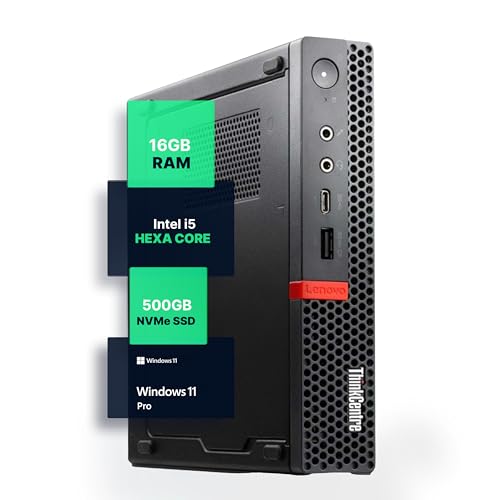
Lenovo ThinkCentre Mini PC Intel i5
Best for: Office workstations needing Windows 11 Pro
- Processor
- Intel i5-8400T
- Installed RAM
- 16GB
- Storage Capacity
- 500GB NVMe
- Memory Type
- DDR4
- Operating System
- Windows 11 Pro
- Use
- Home, Office
View on Amazon: Lenovo ThinkCentre Mini PC Intel i5 Affiliate link
The Lenovo M720Q is a compact desktop built around an Intel Core i5-8400T processor. It includes 16GB of DDR4 RAM and a 500GB NVMe SSD for responsive multitasking and storage. The unit runs Windows 11 Pro and features 5G WiFi and Bluetooth connectivity. Its small footprint makes it suitable for space-conscious home or office setups.
Pros
- Intel Core i5-8400T hexa-core processor
- 16GB DDR4 RAM for smooth multitasking
- 500GB NVMe SSD for fast load times
- Pre-installed Windows 11 Pro
- Compact micro form factor design
Cons
- Older 8th generation Intel processor
- Larger physical dimensions than modern micro PCs
- No mention of Thunderbolt connectivity
Good fit if
- You need a reliable office machine with Windows 11 Pro
- You prefer a larger micro chassis for easier maintenance
- You require 16GB of RAM for business productivity
Skip if
- You want the latest generation CPU performance
- You need the smallest possible footprint available
- You require Thunderbolt 4 or USB4 support
Verdict: Lenovo M720Q Mini PC offers stable performance for office tasks but lacks the compact size and modern connectivity of newer competitors like the MINISFORUM UM870 Slim.

MINISFORUM Slim Ryzen 7 Mini PC
Best for: Multi-display productivity and heavy multitasking
- Processor
- AMD Ryzen 7 8745H
- Installed RAM
- 32GB
- Storage Capacity
- 1TB SSD
- Memory Type
- DDR5
- Graphics
- AMD Radeon 780M
- Ethernet Ports
- 1x 2.5Gbps LAN
View on Amazon: MINISFORUM Slim Ryzen 7 Mini PC Affiliate link
The MINISFORUM UM870 Slim is a compact desktop powered by an AMD Ryzen 7 8745H processor with 8 cores and 16 threads. It includes 32GB of DDR5 RAM and a 1TB PCIe 4.0 SSD. The system features AMD Radeon 780M graphics, which handles multitasking and light creative work. It supports triple displays via HDMI, USB4, and DisplayPort. This model suits users needing strong performance in a small form factor.
Pros
- AMD Ryzen 7 8745H processor with up to 4.9GHz boost
- 32GB DDR5 RAM expandable to 96GB
- 1TB M.2 2280 PCIe 4.0 SSD with dual slot expansion
- Triple display support including 8K via HDMI 2.1 and USB4
- 2.5Gbps LAN and Wi-Fi 6E connectivity
Cons
- Integrated AMD Radeon 780M graphics lack dedicated VRAM
- No mention of included Windows license or pre-installed OS
- Weighs 2.73 pounds, slightly heavier than some aluminum competitors
Good fit if
- You need high RAM capacity for virtualization or heavy multitasking
- You require multiple high-resolution displays for productivity
- You want fast wired networking with 2.5Gbps LAN
Skip if
- You require a dedicated graphics card for gaming or 3D rendering
- You prefer a pre-installed Windows Pro license included
- You need a lighter device for frequent travel
Verdict: MINISFORUM UM870 Slim Ryzen 7 Mini PC is a capable workstation for users who prioritize RAM capacity and multi-display setups over discrete graphics performance.
Specifications side by side
| Spec | Lenovo ThinkCentre Mini PC Intel i5 | MINISFORUM Slim Ryzen 7 Mini PC |
|---|---|---|
| Processor | Intel i5-8400T | AMD Ryzen 7 8745H |
| Installed RAM | 16GB | 32GB |
| Storage Capacity | 500GB NVMe | 1TB SSD |
| Memory Type | DDR4 | DDR5 |
| Graphics | not stated | AMD Radeon 780M |
| Ethernet Ports | not stated | 1x 2.5Gbps LAN |
| High-Speed Expansion | not stated | USB4 |
| Operating System | Windows 11 Pro | not stated |
| Memory | 16GB RAM | 32GB RAM |
| Storage | 500GB SSD | 1TB SSD |
| Use | Home, Office | not stated |
| Networking | not stated | 2.5G LAN, WiFi 6E |
| Dimensions | 19 × 15 × 4 inches | not stated |
| Weight | 2.91 pounds | 2.73 pounds |
| Size | 1140 cubic inches | UM870 Slim 32+1T |
| Color | Black | Silver |
| Model | M720Q | DeskMini |
Frequently asked questions
Which Mini PC is better for heavy multitasking?
The MINISFORUM UM870 Slim is the stronger choice for demanding workloads. It includes 32GB of RAM and a Ryzen 7 processor. This setup handles multiple applications and heavy data processing with ease. The Lenovo ThinkCentre M720Q offers only 16GB of RAM, which is sufficient for basic office tasks but less ideal for intensive multitasking.
Do I need Windows 11 Pro for my Mini PC?
You need Windows 11 Pro if you require advanced business features like domain joining or BitLocker encryption. The Lenovo ThinkCentre M720Q comes with this operating system pre-installed. The MINISFORUM UM870 Slim focuses on hardware performance for productivity and gaming rather than specific enterprise OS features, making it better for general power users.
Which brand offers better connectivity for modern setups?
MINISFORUM provides more modern connectivity options for current hardware standards. The UM870 Slim features WiFi 6E and a 2.5G LAN port for faster network speeds. The Lenovo M720Q uses older specifications that may not support the latest high-speed networking requirements. If you rely on fast data transfers, the MINISFORUM model is the superior option.
Is the Lenovo ThinkCentre Mini PC too large for my desk?
The Lenovo ThinkCentre M720Q is relatively bulky compared to newer slim designs. It measures 15 inches wide and weighs 2.91 pounds. This size is suitable for traditional desktop setups but less ideal for tight spaces. The MINISFORUM UM870 Slim is designed as a compact workstation, offering a smaller footprint that fits better in modern, space-constrained environments.
Which Mini PC has more storage capacity?
The MINISFORUM UM870 Slim offers significantly more storage space. It comes equipped with a 1TB SSD, providing ample room for large files and applications. The Lenovo ThinkCentre M720Q includes a 500GB SSD, which is adequate for standard office documents but may fill up quickly for users with large media libraries or extensive project files.
Can I use these Mini PCs for home office work?
Both brands are suitable for home office environments, but they serve different needs. The Lenovo ThinkCentre M720Q is designed specifically for home and office use with stable performance for daily tasks. The MINISFORUM UM870 Slim is also capable for home use, particularly if you need higher RAM for running multiple programs or connecting to multiple monitors simultaneously.