Memory Explained: What It Means for Mini PCs
As an Amazon Associate we earn from qualifying purchases. Links on this page are affiliate links.
Understanding Mini PC Memory Specs
Memory is the temporary workspace for your computer. It holds data that the processor needs right now. When you open a browser tab or edit a document, that information sits in the memory until you save it or shut down. This is why it is called volatile storage. If the power cuts, the data disappears. This is different from your hard drive or solid-state drive, which keeps files safe even when the computer is off.
For Mini PCs, the amount of memory matters a lot. These small boxes often use low-power chips that share resources. You might see listings with 2GB, 4GB, 8GB, 16GB, or 32GB of RAM. The number tells you how much data can be active at once. More memory allows you to run more apps without slowing down. It also helps with multitasking. If you have many windows open, the computer does not need to constantly swap data to the slower storage drive.
The 2GB and 4GB options are very limited. They work only for basic tasks like word processing or checking email. They struggle with modern web pages. The 8GB level is the practical minimum for most users. It handles standard office work and light media consumption smoothly. The 16GB tier offers comfortable performance for heavier workloads. You can run virtual machines or edit photos without lag. The 32GB option is for professional users who need maximum headroom.
When you look for memory explained, focus on the total capacity. Check if the memory is soldered or upgradeable. Many Mini PCs have fixed memory. If you buy a 4GB model, you cannot add more later. This makes choosing the right spec at purchase critical. Always pick a size that meets your future needs, not just what you need today. This ensures your small computer remains useful for years.
Memory Sizes Compared
2GB RAM
This capacity is reserved for specialized industrial or thin client roles. It limits the system to basic functions like running a single operating system instance with minimal background processes. You cannot multitask effectively. The CONTEC DTx fanless unit uses this low amount because it is designed for silent, dedicated tasks in controlled environments. It is not suitable for general home or office use. You will experience severe slowdowns if you try to open multiple applications. This spec is a trade-off for low power consumption and compact, rugged hardware rather than user productivity.
4GB RAM
This is the absolute minimum for a modern Windows 11 business PC. It handles light tasks like web browsing and basic document editing. However, you will feel limitations quickly. Opening multiple browser tabs or running background updates will consume most of this space. The Lenovo ThinkCentre M625q fits this category. It is adequate for dedicated kiosks or single-purpose terminals. For a standard user, this amount creates a bottleneck. You must close applications frequently to maintain performance. It is a budget option that sacrifices smooth multitasking for a lower entry price point and compact form factor.
8GB RAM
This is the standard baseline for comfortable daily computing. It allows you to run Windows, a web browser with several tabs, and office applications simultaneously without major lag. The Lenovo ThinkCentre M720Q and Dell OptiPlex 3070 Micro use this amount. It suits home users and small office workers who need reliability for routine tasks. You can multitask efficiently, though very heavy workloads may still cause slight pauses. It offers a good balance between performance and cost. This is the most common choice for general-purpose mini PCs. You get enough workspace for most everyday activities without paying for excess capacity you do not need.
16GB RAM
This capacity provides a significant performance boost for multitasking and demanding applications. It allows you to run many browser tabs, large spreadsheets, and creative software simultaneously. The Apple Mac mini M6 and HP EliteDesk 800 G4 Mini both offer this amount. Unified memory in the Mac model enhances AI tasks and video editing. In Windows systems, it prevents slowdowns during heavy workloads. You can keep many applications open in the background without affecting the active window. This is the recommended spec for professionals who switch between programs frequently. It future-proofs your purchase for several years of evolving software demands.
32GB RAM
This high capacity is for power users who run virtual machines, compile code, or edit 4K video. It ensures the system never runs out of workspace, even under extreme load. You can open dozens of tabs and heavy applications without any impact on speed. While no specific product in this ranked list features this exact amount, it is the top tier for performance. It is ideal for developers and creative professionals. The trade-off is higher cost and potentially higher power usage. You only need this much if your specific workflow demands it. For most users, 16GB is sufficient, but 32GB provides absolute headroom for the most demanding technical tasks.
Is More RAM Worth The Cost
Who needs it
You should prioritize higher memory capacities if your workflow involves heavy multitasking or demanding applications. Eight gigabytes is the practical minimum for comfortable daily use, allowing you to run a web browser with multiple tabs alongside office software without significant slowdowns. If you engage in light photo editing or stream video while working, sixteen gigabytes provides the necessary headroom to keep the system responsive. Thirty-two gigabytes is ideal for developers, data analysts, or users who run virtual machines and complex simulations. These tasks require substantial temporary storage to process large datasets efficiently. Insufficient memory forces the processor to swap data to the slower storage drive, causing noticeable lag and reducing productivity. Choosing the right amount ensures smooth performance and extends the useful life of your mini PC by preventing bottlenecks during intensive operations.
Who can skip it
You can ignore high memory specifications if your usage is strictly limited to basic web browsing, email, and simple document viewing. Two or four gigabytes may suffice for thin client roles or dedicated digital signage displays where only one application runs at a time. In these scenarios, the processor speed and storage type matter more than raw memory capacity. You should prioritize a faster SSD or a more powerful CPU core count instead of upgrading RAM. Also, consider the form factor and connectivity options if portability or specific ports are your main concerns. For users who only need a dedicated media box or a lightweight terminal, spending resources on extra memory offers no tangible benefit. Focus your budget on other hardware components that directly impact the specific tasks you perform daily rather than increasing capacity you will never utilize.
Mini PC Memory Terms
RAM
Random Access Memory is temporary storage for active data. It allows the processor to access information quickly. More RAM lets you run more apps at once without slowing down.
DDR4
A common type of memory standard used in many mini PCs. It offers a good balance of speed and power efficiency. Most modern small form factor computers rely on this technology.
Dual Channel
A memory configuration using two sticks to double the data path width. This improves speed for tasks like video editing. You typically need two matching modules to activate this mode.
SODIMM
Small Outline Dual In-line Memory Module. These are the smaller memory sticks used in laptops and mini PCs. They are distinct from the larger DIMMs found in standard desktop towers.
Unbuffered
Memory without a buffer chip between the modules and the processor. This reduces latency and cost. Most consumer mini PCs use unbuffered RAM for direct, fast communication with the CPU.
ECC
Error Correction Code memory detects and fixes data corruption. It is vital for servers and workstations. Most mini PCs for home use do not include ECC due to higher costs.
Quick picks
| # | Product | Best for | Price |
|---|---|---|---|
| 1 | Apple Mac mini M6 Desktop | Compact macOS AI workstations | Check price of Apple Mac mini M6 Desktop on Amazon |
| 2 | Lenovo ThinkCentre Core i5 Mini PC | Small office workspaces needing Windows 11 Pro | Check price of Lenovo ThinkCentre Core i5 Mini PC on Amazon |
| 3 | Lenovo ThinkCentre Tiny AMD Dual-Core Mini PC | light business tasks and web browsing | Check price of Lenovo ThinkCentre Tiny AMD Dual-Core Mini PC on Amazon |
| 4 | CONTEC DTx Fanless Industrial Thin Client | Industrial dual-LAN thin client setups | Check price of CONTEC DTx Fanless Industrial Thin Client on Amazon |
| 5 | HP EliteDesk Mini Core i5 PC | Multitasking in a compact business environment | Check price of HP EliteDesk Mini Core i5 PC on Amazon |
| 6 | Dell OptiPlex Micro Intel i5 PC | compact office workstations | Check price of Dell OptiPlex Micro Intel i5 PC on Amazon |
Our 6 picks

Apple Mac mini M6 Desktop
Best for: Compact macOS AI workstations
- Memory
- 16GB RAM (what this guide is about)
- Processor
- M6
- Installed RAM
- 16GB
- Storage Capacity
- 512GB
- Memory Type
- Unified Memory
- Graphics
- 12-core GPU
View on Amazon: Apple Mac mini M6 Desktop Affiliate link
This Apple Mac mini packs an M6 chip into a five-by-five-inch chassis. It includes 16GB of unified memory and a 512GB SSD. The system supports up to three external displays and features Wi-Fi 7 and Bluetooth 6. It runs macOS and is designed for demanding AI workflows. You get fast storage access and efficient performance in a compact form factor.
Pros
- Apple M6 chip with Dual 16-core Neural Engine
- 16GB unified memory for fast data access
- Three Thunderbolt 4 ports for high-speed expansion
- Supports up to three external displays
Cons
- Only 16GB of RAM, limiting heavy multitasking
- No internal optical drive or SD card slot
- Requires separate purchase of keyboard and mouse
Good fit if
- You need a compact desktop for AI tasks
- You prefer macOS and Apple Silicon efficiency
- You want Thunderbolt 4 connectivity for peripherals
Skip if
- You require Windows 11 Pro for specific software
- You need more than 16GB of RAM
- You want a pre-configured system with peripherals included
Verdict: Apple M6 Mac mini 16GB is a compact powerhouse for macOS users needing strong AI performance. It suits those who value speed and portability over expandability.

Lenovo ThinkCentre Core i5 Mini PC
Best for: Small office workspaces needing Windows 11 Pro
- Memory
- 8GB RAM (what this guide is about)
- Processor
- Intel i5-8400T
- Installed RAM
- 8GB
- Storage Capacity
- 250GB NVMe
- Memory Type
- DDR4
- Operating System
- Windows 11 Pro
View on Amazon: Lenovo ThinkCentre Core i5 Mini PC Affiliate link
This Lenovo ThinkCentre M720Q is a compact desktop running Windows 11 Pro. It features an Intel Core i5-8400T hexa-core processor and 8GB of DDR4 RAM. The system includes 250GB of NVMe storage for fast load times. It supports 5G WiFi and Bluetooth for wireless connectivity. This unit suits users needing reliable performance in a small form factor for home or office tasks.
Pros
- Intel Core i5-8400T hexa-core processor
- 8GB DDR4 RAM for multitasking
- 250GB NVMe M.2 storage
- Pre-installed Windows 11 Pro
- Compact 2.5-inch height design
Cons
- Limited to 250GB storage capacity
- Base model includes only 8GB RAM
- No mention of included monitor or peripherals
Good fit if
- You need a small footprint for a cluttered desk
- You require Windows 11 Pro for business features
- You want fast NVMe storage speeds
Skip if
- You need more than 8GB of RAM for heavy workloads
- You require a larger storage capacity than 250GB
- You prefer a pre-built system with a monitor included
Verdict: Lenovo M720Q Mini PC i5 8GB provides solid hexa-core performance and fast storage in a tiny chassis. It fits well for users who prioritize compact size and Windows 11 Pro over high RAM capacity.

Lenovo ThinkCentre Tiny AMD Dual-Core Mini PC
Best for: light business tasks and web browsing
- Memory
- 4GB RAM (what this guide is about)
- Processor
- AMD A9-9420e
- Installed RAM
- 4GB
- Storage Capacity
- 500GB HDD
- Graphics
- AMD Radeon R5
- Ethernet Ports
- 1 x RJ-45
View on Amazon: Lenovo ThinkCentre Tiny AMD Dual-Core Mini PC Affiliate link
This Lenovo ThinkCentre M625q Tiny Business Desktop features an AMD A9-9420e dual-core processor and 4GB of RAM. It runs Windows 11 Pro and includes a 500GB HDD. The compact design measures 7.2 by 7.05 by 1.44 inches. It suits users who need basic multitasking capabilities for standard office applications and web browsing without requiring high performance.
Pros
- 4GB high-bandwidth RAM supports multiple browser tabs
- Windows 11 Pro optimizes app layouts
- 500GB HDD provides data storage
- AMD Radeon R5 Graphics included
Cons
- 4GB RAM limits heavy multitasking
- HDD is slower than SSDs
- Dual-core processor handles basic tasks only
Good fit if
- You need a budget-friendly office PC
- You run light business applications
- You prefer Windows 11 Pro
Skip if
- You require high-performance gaming
- You need fast SSD storage
- You run memory-intensive software
Verdict: Lenovo M625q 4GB RAM Mini PC fits users needing basic business computing with Windows 11 Pro. It handles light tasks well but lacks power for demanding workloads.

CONTEC DTx Fanless Industrial Thin Client
Best for: Industrial dual-LAN thin client setups
- Memory
- 2GB RAM (what this guide is about)
- Processor
- Intel Atom D510 Dual Core 1.66GHz
- Installed RAM
- 2GB
- Memory Type
- DDR3
- Graphics
- Intel HD Graphics
- Ethernet Ports
- Dual Gigabit LAN
View on Amazon: CONTEC DTx Fanless Industrial Thin Client Affiliate link
This CONTEC DTx unit is an industrial thin client designed for durability. It features a fanless metal chassis and a dual-core Intel Atom D510 processor running at 1.66GHz. The system includes 2GB of DDR3 RAM and dual Gigabit LAN ports. It suits users who need a reliable, quiet machine for specific industrial tasks rather than general computing.
Pros
- Fanless metal chassis for silent operation
- Dual Gigabit LAN ports
- Intel Atom D510 dual-core processor
- Industrial thin client design
Cons
- Only 2GB of DDR3 RAM
- Intel Atom D510 is low performance
- Large 15-inch footprint
Good fit if
- You need dual Gigabit LAN connectivity
- You require a fanless industrial unit
- You are deploying thin clients
Skip if
- You need modern multitasking performance
- You want a compact desktop form factor
- You require high-speed DDR4 memory
Verdict: CONTEC DTx Industrial Fanless PC 2GB RAM is a specialized industrial tool. It fits environments needing dual LAN and silent operation, but not general users.

HP EliteDesk Mini Core i5 PC
Best for: Multitasking in a compact business environment
- Memory
- 16GB RAM (what this guide is about)
- Processor
- Intel Core i5-8500T
- Installed RAM
- 16GB
- Storage Capacity
- 256GB
- Memory Type
- DDR4
- Operating System
- Windows 11 Pro
View on Amazon: HP EliteDesk Mini Core i5 PC Affiliate link
The HP EliteDesk 800 G4 Mini is a compact business PC with a hexa-core Intel Core i5-8500T processor. It includes 16GB of DDR4 RAM, which allows for smooth multitasking and efficient handling of multiple applications. The 256GB NVMe SSD provides fast storage access. This Windows 11 Pro system fits neatly on or under your desk, making it a practical choice for users who need reliable performance in a small footprint.
Pros
- Hexa-core Intel Core i5-8500T processor for reliable multitasking
- 16GB DDR4 RAM supports efficient workflow and app switching
- 256GB NVMe SSD ensures quick startup and data access
- Windows 11 Pro offers professional-grade tools and security
Cons
- 256GB storage capacity is limited for large media libraries
- Renewed condition may show minor cosmetic wear
- Base model lacks high-end graphics capabilities for gaming
Good fit if
- You need ample RAM for heavy multitasking
- You require a compact form factor for tight spaces
- You want a business-class OS with enhanced security
Skip if
- You need maximum storage for large files
- You prefer brand-new hardware with zero wear
- You require high-performance graphics for gaming
Verdict: The HP EliteDesk 800 G4 Mini 16GB RAM is a solid choice for professionals who prioritize multitasking efficiency and a compact design over raw graphical power or extensive storage.
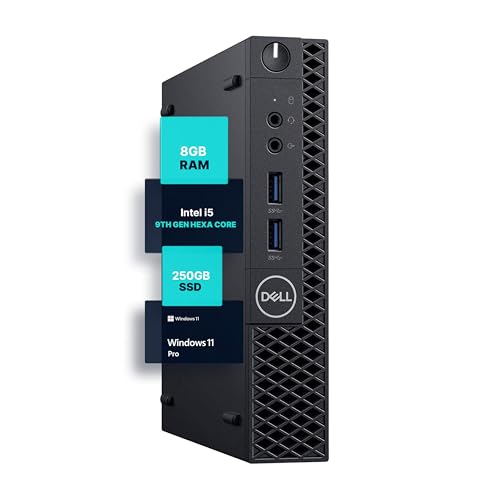
Dell OptiPlex Micro Intel i5 PC
Best for: compact office workstations
- Memory
- 8GB RAM (what this guide is about)
- Processor
- Intel Core i5-9500
- Installed RAM
- 8GB
- Storage Capacity
- 250GB
- Memory Type
- DDR4
- Operating System
- Windows 11 Pro
View on Amazon: Dell OptiPlex Micro Intel i5 PC Affiliate link
This Dell OptiPlex 3070 Micro mini PC uses an Intel Core i5-9500 hexa-core processor paired with 8GB of DDR4 RAM. It includes a 250GB SSD and runs Windows 11 Pro. The compact design fits tight spaces while offering reliable performance for office tasks. You get built-in WiFi and Bluetooth for easy connectivity. It is a solid option for users who need a dedicated workstation without taking up desk space.
Pros
- Intel Core i5-9500 hexa-core processor for multitasking
- 8GB DDR4 RAM for responsive performance
- 250GB SSD for fast load times
- Windows 11 Pro pre-installed
- Compact micro form factor saves space
Cons
- 8GB RAM limits heavy multitasking
- 250GB storage fills up quickly
- No mention of expandable RAM slots
Good fit if
- You need a compact desktop for office work
- You want Windows 11 Pro for business features
- You have limited desk space
Skip if
- You require more than 8GB of RAM
- You need large storage capacity
- You want a high-end gaming machine
Verdict: Dell OptiPlex 3070 Micro i5-9500 fits users who need a small, capable office PC. It handles daily tasks well but lacks the memory for heavy loads.
Specifications side by side
| Spec | Apple Mac mini M6 Desktop | Lenovo ThinkCentre Core i5 Mini PC | Lenovo ThinkCentre Tiny AMD Dual-Core Mini PC | CONTEC DTx Fanless Industrial Thin Client | HP EliteDesk Mini Core i5 PC | Dell OptiPlex Micro Intel i5 PC |
|---|---|---|---|---|---|---|
| Processor | M6 | Intel i5-8400T | AMD A9-9420e | Intel Atom D510 Dual Core 1.66GHz | Intel Core i5-8500T | Intel Core i5-9500 |
| Installed RAM | 16GB | 8GB | 4GB | 2GB | 16GB | 8GB |
| Storage Capacity | 512GB | 250GB NVMe | 500GB HDD | not stated | 256GB | 250GB |
| Memory Type | Unified Memory | DDR4 | not stated | DDR3 | DDR4 | DDR4 |
| Graphics | 12-core GPU | not stated | AMD Radeon R5 | Intel HD Graphics | not stated | not stated |
| Ethernet Ports | 2.5Gb Ethernet | not stated | 1 x RJ-45 | Dual Gigabit LAN | not stated | not stated |
| High-Speed Expansion | Thunderbolt 4 | not stated | not stated | not stated | not stated | not stated |
| Operating System | macOS | Windows 11 Pro | Windows 11 Pro | not stated | Windows 11 Pro | Windows 11 Pro |
| Memory | 16GB RAM | 8GB RAM | 4GB RAM | 2GB RAM | 16GB RAM | 8GB RAM |
| Storage | 512GB SSD | not stated | not stated | not stated | 256GB SSD | not stated |
| Use | not stated | Home, Office | Business | Industrial | Business | not stated |
| Cooling | not stated | not stated | not stated | Fanless | not stated | not stated |
| Form Factor | not stated | not stated | not stated | Thin Client | not stated | not stated |
| Dimensions | 5 × 5 × 1.97 inches | 19 × 13.5 × 2.5 inches | 7.2 × 7.05 × 1.44 inches | 15 × 11.2 × 8.27 inches | 7 × 7 × 1.25 inches | 12.1 × 13.3 × 4 inches |
| Weight | 1.48 pounds | 2.91 pounds | 2.9 pounds | 6.06 pounds | 2.93 pounds | not stated |
| Size | 16GB Unified Memory | 512GB SSD Storage | 401.25 cubic inches | not stated | 2 Gb | not stated | 621.62 cubic inches |
| Color | Silver | Black | Black | Black | Black | Black |
| Model | MHQL4LL/A | M720Q | ThinkCentre M625q | BX-956-DC6000 | 800G4 | 3070 5070 7070 |
Frequently asked questions
Does 16GB RAM handle AI tasks well?
Yes. The Apple Mac mini M6 uses 16GB of unified memory to deliver strong AI performance. This capacity allows the system to manage complex machine learning workloads efficiently. It suits users who need speed and portability without sacrificing processing power for modern AI applications.
Is 8GB RAM enough for office work?
It is practical for daily use. The Lenovo ThinkCentre Core i5 Mini PC includes 8GB RAM to support Windows 11 Pro. This setup handles office software and web browsing comfortably. It fits users who prioritize compact size and solid hexa-core performance over high RAM capacity.
Can I run multiple apps with 4GB RAM?
Multitasking is limited with this amount. The Lenovo ThinkCentre Tiny AMD Mini PC has 4GB RAM, which supports light business tasks and web browsing. It lacks the power for demanding workloads. You should avoid heavy multitasking to maintain system stability and responsiveness.
Why do industrial PCs use only 2GB RAM?
Specialized environments require minimal resources. The CONTEC DTx Fanless Industrial Thin Client uses 2GB RAM to run basic functions with minimal background processes. This capacity is reserved for industrial dual-LAN setups. It ensures silent operation and reliability in controlled environments rather than general computing.
Does 16GB RAM improve business multitasking?
It enhances efficiency significantly. The HP EliteDesk Mini Core i5 PC features 16GB RAM to support professional multitasking. This capacity allows you to run multiple business applications simultaneously. It prioritizes multitasking efficiency and compact design over raw graphical power or extensive storage space.
Is 8GB RAM suitable for heavy loads?
No, it is not ideal. The Dell OptiPlex Micro Intel i5 PC has 8GB RAM, which handles daily tasks well. However, it lacks the memory for heavy loads. You should consider higher capacities if your workflow involves data-intensive applications or extensive virtualization requirements.