What Is Networking? A Guide for Mini PCs Buyers (2026)
As an Amazon Associate we earn from qualifying purchases. Links on this page are affiliate links.
Understanding Mini PC Networking Specs
Networking explained is the key to a smooth home or office setup. Mini PCs connect to your internet via two main paths: wired and wireless. Understanding these specs helps you choose the right device for your space. You want reliable speed and low latency for work, streaming, or gaming.
Wired connections use Ethernet ports. Most mini PCs include a Gigabit Ethernet port. This standard offers speeds up to one gigabit per second. It is stable and reliable. If you need faster data transfer, look for a 2.5G LAN port. This port supports speeds up to 2.5 gigabits per second. It is ideal for large file transfers or home servers. Check your router as well. Your router must support 2.5G to benefit from this port.
Wireless connections rely on Wi-Fi standards. Wi-Fi 6 is the current common standard. It offers better performance in crowded areas. It handles multiple devices simultaneously without slowing down. If you have a newer router, Wi-Fi 6E is available. This standard uses the 6 GHz band. It provides more channels and less interference. This results in faster speeds and lower latency. Ensure your router also supports Wi-Fi 6E to see these gains.
Why does this matter for you? Mini PCs often sit in tight spaces. They may be placed away from routers. A strong wireless connection ensures you do not lose signal. A wired connection provides the most stability. Many users prefer wired for desktop replacements. Others rely on Wi-Fi for flexibility. Check the specs before buying. Ensure the mini PC matches your home network capabilities. Mismatched specs can lead to bottlenecked performance. Always verify your router supports the same standard as your new mini PC. This ensures you get the full speed and reliability you expect from your hardware.
Comparing Networking Specs
WiFi 6
WiFi 6 improves connection stability in crowded areas. It handles multiple devices better than older standards. You get consistent speeds for streaming and browsing. This spec suits users with standard home networks. It avoids the complexity of newer bands. The Dell Optiplex Micro Core i7 Desktop uses this standard. It offers reliable performance for office tasks. You do not need the latest hardware for this level of connectivity. It is a practical choice for most general users. The trade-off is slightly lower peak speeds compared to newer options. You still get strong signal reliability. This makes it a solid baseline for your setup.
2.5G LAN
2.5G LAN provides faster wired speeds than standard ports. It supports higher bandwidth for large file transfers. You benefit from reduced congestion on your local network. This spec suits users with fast internet plans. It also helps with local server tasks. The Glorlin Ryzen 7 8745HS Mini PC includes this port. It allows for efficient data movement between devices. You get a significant boost over Gigabit limits. The trade-off is the need for compatible routers. You must ensure your network infrastructure supports this speed. It is ideal for heavy data workflows. You will notice faster sync times for backups. This makes it a valuable upgrade for power users.
WiFi 6E
WiFi 6E adds the 6GHz band to your options. It offers more channels and less interference. You experience clearer signals in dense environments. This spec suits users with high traffic areas. It provides lower latency for gaming or video calls. The Origimagic Ryzen 7 6800H Gaming Mini PC features this. It ensures stable connections for demanding applications. You get dedicated space for your data. The trade-off is the need for 6GHz capable routers. You may not see full benefits everywhere. It is best for modern, well-equipped networks. You gain speed and reliability when supported. This makes it a strong choice for future-proofing.
Gigabit Ethernet
Gigabit Ethernet is the standard wired connection speed. It provides up to 1 Gbps throughput. You get reliable and consistent wired performance. This spec suits users who prioritize stability over speed. It is widely supported by all routers. The Beelink SER3 Ryzen 3 Mini PC uses this port. It ensures a solid link for daily tasks. You avoid wireless interference entirely. The trade-off is the lower ceiling compared to 2.5G. You may hit limits with very fast internet. It is sufficient for most home and office needs. You get a dependable connection for streaming and work. This remains a practical and cost-effective standard for many.
Is This Mini PC Worth It
Who needs it
You should prioritize this device if you rely on high-speed wired connections for data-heavy tasks. The inclusion of a 2.5G LAN port allows for significantly faster transfer rates compared to standard Gigabit Ethernet. This matters if you frequently move large files between your Mini PC and a local server or NAS. It also benefits users who stream 4K content locally or engage in competitive gaming where latency is critical. The combination of WiFi 6 and WiFi 6E ensures your wireless connections remain stable and fast, even in busy households with many devices. If your home network supports these newer standards, you will notice improved throughput and reduced interference. This setup is ideal for power users who demand maximum performance from their local network infrastructure. It future-proofs your connection against increasing bandwidth demands in modern smart homes and offices.
Who can skip it
You can ignore these advanced networking specs if your internet plan caps at 100 Mbps or less. Standard Gigabit Ethernet is sufficient for most casual users who browse the web, check email, and stream video on a single screen. The extra cost or complexity of 2.5G LAN and WiFi 6E offers little benefit if your router does not support these speeds. In such cases, prioritize processor performance, RAM capacity, or storage size instead. These components impact daily responsiveness more than network speed for light usage. If you only use the Mini PC for basic productivity tasks, a standard Gigabit connection handles everything you need. You save resources by focusing on core computing power rather than niche networking features. Your current router likely limits the benefit of advanced ports anyway. Stick to simpler models that meet your basic connectivity needs without unnecessary extras.
Networking Glossary
Wi-Fi 6
A wireless standard that boosts speed and handles multiple devices better than older versions. It reduces lag in busy homes with many connected gadgets.
Ethernet Port
A physical jack for plugging in a network cable. It provides a stable, direct connection to your router, which is essential for reliable data transfer.
2.5G LAN
A network port that supports speeds up to 2.5 times faster than standard Gigabit Ethernet. This helps when moving large files across your local network.
Bandwidth
The maximum amount of data your connection can carry at once. Higher bandwidth allows you to stream video and download files without waiting for buffers.
Latency
The delay before data transfer begins after an instruction is given. Low latency is critical for real-time tasks like video calls or online gaming.
SSID
The name you assign to your local wireless network. It helps you identify and connect to the correct signal among many available networks in your area.
MIMO
Multiple Input, Multiple Output. This technology uses multiple antennas to send and receive more data simultaneously, improving overall wireless performance and range for your mini PC.
Quick picks
| # | Product | Best for | Price |
|---|---|---|---|
| 1 | Dell Optiplex Micro Core i7 Desktop | Standard office networking and VESA mounting | Check price of Dell Optiplex Micro Core i7 Desktop on Amazon |
| 2 | Glorlin Ryzen 7 8745HS Mini PC | Dual wired networking and fast storage | Check price of Glorlin Ryzen 7 8745HS Mini PC on Amazon |
| 3 | Origimagic Ryzen 7 6800H Gaming Mini PC | dual Gigabit ports and WiFi 6E | Check price of Origimagic Ryzen 7 6800H Gaming Mini PC on Amazon |
| 4 | Beelink SER3 Ryzen 3 Mini PC | Basic office tasks with dual monitors | Check price of Beelink SER3 Ryzen 3 Mini PC on Amazon |
| 5 | ACEMAGIC Core i9 Mini PC | Heavy multitasking and 2.5G LAN users | Check price of ACEMAGIC Core i9 Mini PC on Amazon |
| 6 | Dell OptiPlex Micro WiFi 6E Mini PC | Light users needing WiFi 6E in a small space | Check price of Dell OptiPlex Micro WiFi 6E Mini PC on Amazon |
Our 6 picks

Dell Optiplex Micro Core i7 Desktop
Best for: Standard office networking and VESA mounting
- Networking
- WiFi 6 (what this guide is about)
- Processor
- Intel Core i7-13700T
- Installed RAM
- 16GB
- Storage Capacity
- 512GB SSD
- Memory Type
- DDR4-3200
- Ethernet Ports
- Gigabit Ethernet
View on Amazon: Dell Optiplex Micro Core i7 Desktop Affiliate link
The Dell Optiplex 7010 Micro uses an Intel Core i7-13700T processor with 16 cores and 24 threads. It includes 16GB of DDR4 RAM and a 512GB SSD. Networking relies on Intel WiFi 6 and a Gigabit Ethernet port. This compact Micro Form Factor unit mounts easily to displays or desks. It suits users needing reliable wired and wireless connections for standard office tasks.
Pros
- Intel WiFi 6 AX211 2x2 connectivity
- Gigabit Ethernet RJ45 port
- Intel Core i7-13700T 16-core processor
- VESA mountable Micro Form Factor design
Cons
- Gigabit Ethernet limits speeds below 2.5G LAN standards
- WiFi 6 lacks the lower 6GHz band of WiFi 6E
- HDMI 1.4b output restricts high-resolution display support
Good fit if
- You need stable Gigabit Ethernet for office networking
- You require WiFi 6 for reliable wireless connections
- You want a compact PC for VESA mounting
Skip if
- You need 2.5G LAN for faster wired transfers
- You require WiFi 6E for the 6GHz band
- You need modern HDMI 2.1 for 4K at high refresh rates
Verdict: Dell Optiplex 7010 Micro i7-13700T fits users who prioritize standard Gigabit Ethernet and WiFi 6 reliability over newer 2.5G or 6GHz networking standards. It is a solid choice for desktop replacements where compact mounting is essential.

Glorlin Ryzen 7 8745HS Mini PC
Best for: Dual wired networking and fast storage
- Networking
- WiFi 6, 2.5G LAN (what this guide is about)
- Processor
- AMD Ryzen 7 8745HS
- Installed RAM
- 16GB
- Storage Capacity
- 1TB
- Memory Type
- DDR5
- Graphics
- Radeon 780M
View on Amazon: Glorlin Ryzen 7 8745HS Mini PC Affiliate link
The Glorlin GT105 pairs an 8-core Ryzen 7 8745HS with dual 2.5 Gigabit Ethernet ports and WiFi 6. This setup delivers high bandwidth for wired connections and solid wireless performance. It includes 16GB of DDR5 RAM and a 1TB PCIe 4.0 SSD. You get fast data transfer speeds and reliable networking. It suits users who need robust connectivity and multitasking power in a compact form factor.
Pros
- Dual 2.5 Gigabit Ethernet ports for high-speed wired networking
- WiFi 6 connectivity for stable wireless internet
- 16GB DDR5 RAM supports smooth multitasking
- 1TB PCIe 4.0 SSD enables rapid file transfers
Cons
- Single-channel DDR5 RAM limits memory bandwidth compared to dual-channel setups
- WiFi 6 is slower than the WiFi 6E found on competing models
- No mention of Thunderbolt support for the USB 4.0 ports
Good fit if
- You need dual wired network connections for a home lab
- You require high-speed data transfer for large files
- You want strong multitasking performance for business tasks
Skip if
- You need the latest WiFi 6E for maximum wireless speed
- You prefer dual-channel RAM for peak memory performance
- You require Thunderbolt 4 expansion capabilities
Verdict: Glorlin GT105 Ryzen 7 8745HS Mini PC fits users who prioritize dual wired ports and fast storage over the latest wireless standards. It is a practical choice for networking-heavy workflows.

Origimagic Ryzen 7 6800H Gaming Mini PC
Best for: dual Gigabit ports and WiFi 6E
- Networking
- WiFi 6E (what this guide is about)
- Processor
- AMD Ryzen 7 6800H
- Installed RAM
- 24GB
- Storage Capacity
- 512GB
- Memory Type
- LPDDR5X 4800MT/s
- Graphics
- AMD Radeon 680M
View on Amazon: Origimagic Ryzen 7 6800H Gaming Mini PC Affiliate link
The Origimagic N4 Neo uses a Ryzen 7 6800H processor with 24GB of fast LPDDR5X memory. It stands out with dual Gigabit Ethernet ports and WiFi 6E for stable networking. The AMD Radeon 680M graphics handle 4K displays well. This setup suits users who need reliable wired connections for home labs or office work without sacrificing wireless speed.
Pros
- Dual Gigabit Ethernet ports for flexible networking
- WiFi 6E with Bluetooth 5.3 connectivity
- 24GB LPDDR5X RAM at 4800MT/s
- Ryzen 7 6800H with 8 cores and 16 threads
Cons
- Only one Gigabit LAN port for primary internet
- 512GB PCIe 3.0 SSD limits storage capacity
- No mention of Thunderbolt support
Good fit if
- You need dual wired connections for routing
- You want fast wireless speeds with WiFi 6E
- You require 24GB of RAM for multitasking
Skip if
- You need 2.5G Ethernet ports
- You require more than 512GB of built-in storage
- You prefer Intel processors over AMD
Verdict: The Origimagic N4 Neo Ryzen 7 Mini PC fits users who need dual Gigabit ports and WiFi 6E for stable networking tasks.

Beelink SER3 Ryzen 3 Mini PC
Best for: Basic office tasks with dual monitors
- Networking
- Gigabit Ethernet (what this guide is about)
- Processor
- AMD Ryzen 3 3200U
- Installed RAM
- 8GB
- Storage Capacity
- 256GB
- Memory Type
- DDR4 2400MT/s
- Graphics
- Radeon Vega 3
View on Amazon: Beelink SER3 Ryzen 3 Mini PC Affiliate link
The Beelink SER3 uses an AMD Ryzen 3 3200U processor with Radeon Vega 3 graphics. It includes 8GB of DDR4 RAM and a 256GB SSD. Networking relies on Gigabit Ethernet and WiFi 5. This unit supports dual 4K displays and offers upgradeable storage via SATA and M.2 slots. It suits users needing basic office tasks and simple media playback on a compact desktop.
Pros
- Gigabit Ethernet port for wired connectivity
- Dual HDMI 2.0 ports for 4K@60Hz displays
- Upgradeable RAM up to 32GB DDR4
- Supports 2.5-inch SATA HDD expansion
Cons
- WiFi 5 is slower than modern standards
- Ryzen 3 3200U lacks performance for heavy workloads
- Only two cores limit multitasking efficiency
Good fit if
- You need a wired Gigabit Ethernet connection
- You require dual monitor support for office work
- You want upgradeable storage options
Skip if
- You require WiFi 6 or faster speeds
- You need high-performance gaming capabilities
- You demand multi-core processing power
Verdict: Beelink SER3 Ryzen 3 Mini PC fits light office users who prioritize wired networking and dual displays over wireless speed. It is not suitable for demanding applications or modern wireless standards.
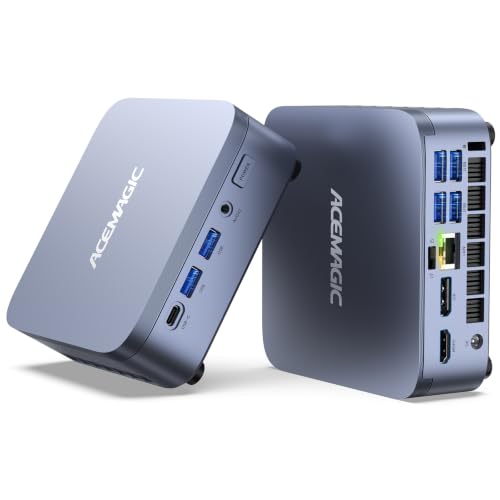
ACEMAGIC Core i9 Mini PC
Best for: Heavy multitasking and 2.5G LAN users
- Networking
- 2.5G LAN, WiFi 6E (what this guide is about)
- Processor
- Intel Core i9-13900HX
- Installed RAM
- 32GB
- Storage Capacity
- 1TB
- Memory Type
- DDR4
- Ethernet Ports
- 2.5GbE LAN
View on Amazon: ACEMAGIC Core i9 Mini PC Affiliate link
The ACEMAGIC M5 packs an Intel Core i9-13900HX processor with 24 cores into a compact chassis. It includes 32GB of DDR4 RAM and a 1TB PCIe 4.0 SSD. Networking features include WiFi 6E and a 2.5GbE LAN port. This setup handles heavy multitasking and content creation. It suits users who need high performance and fast wired internet in a small form factor.
Pros
- Intel Core i9-13900HX with 24 cores and 32 threads
- 2.5GbE LAN port for fast wired networking
- WiFi 6E connectivity for high-speed wireless
- 32GB DDR4 RAM for smooth multitasking
- 1TB PCIe 4.0 NVMe SSD for rapid storage access
Cons
- Uses DDR4 RAM instead of newer DDR5
- Only one USB4 port for high-speed expansion
- Dual-fan cooling may generate noise under load
Good fit if
- You need 2.5G LAN for fast local network transfers
- You require WiFi 6E for stable wireless connections
- You run demanding software that uses many cores
Skip if
- You need DDR5 memory for maximum bandwidth
- You prefer silent operation without fan noise
- You only need basic web browsing capabilities
Verdict: ACEMAGIC M5 i9-13900HX 32GB 1TB delivers serious processing power and modern networking for professionals. It fits users who prioritize raw compute speed and fast wired internet over quiet operation.

Dell OptiPlex Micro WiFi 6E Mini PC
Best for: Light users needing WiFi 6E in a small space
- Networking
- WiFi 6E (what this guide is about)
- Processor
- Intel Core i5-9500T
- Installed RAM
- 8GB
- Storage Capacity
- 256GB
- Operating System
- Windows 11 Pro
- Memory
- 8GB RAM
View on Amazon: Dell OptiPlex Micro WiFi 6E Mini PC Affiliate link
The Dell OptiPlex 7070 Micro is a compact desktop featuring an Intel Core i5-9500T processor and 8GB of RAM. It includes 256GB of NVMe storage and runs Windows 11 Pro. This model supports WiFi 6E, providing reliable wireless connectivity for modern networks. Its small footprint makes it suitable for tight spaces. You will find it practical for basic office tasks or light home use where strong Wi-Fi performance matters.
Pros
- WiFi 6E support for faster wireless connections
- Intel Core i5-9500T processor for steady performance
- Windows 11 Pro operating system included
- Compact Mini form factor measuring 7 x 7 x 1.5 inches
Cons
- Only 8GB of installed RAM limits multitasking
- 256GB storage capacity is small for large files
- Uses an older 9th generation Intel processor
Good fit if
- You need reliable WiFi 6E connectivity in a small space
- You require Windows 11 Pro for business features
- You have light computing needs like web browsing and documents
Skip if
- You need more than 8GB of RAM for heavy workloads
- You want faster 13th or 14th generation Intel processing power
- You require more than 256GB of internal storage
Verdict: Dell OptiPlex 7070 Micro Mini PC offers solid WiFi 6E performance in a tiny chassis. It fits users who prioritize wireless speed and a small footprint over raw processing power or large storage.
Specifications side by side
| Spec | Dell Optiplex Micro Core i7 Desktop | Glorlin Ryzen 7 8745HS Mini PC | Origimagic Ryzen 7 6800H Gaming Mini PC | Beelink SER3 Ryzen 3 Mini PC | ACEMAGIC Core i9 Mini PC | Dell OptiPlex Micro WiFi 6E Mini PC |
|---|---|---|---|---|---|---|
| Processor | Intel Core i7-13700T | AMD Ryzen 7 8745HS | AMD Ryzen 7 6800H | AMD Ryzen 3 3200U | Intel Core i9-13900HX | Intel Core i5-9500T |
| Installed RAM | 16GB | 16GB | 24GB | 8GB | 32GB | 8GB |
| Storage Capacity | 512GB SSD | 1TB | 512GB | 256GB | 1TB | 256GB |
| Memory Type | DDR4-3200 | DDR5 | LPDDR5X 4800MT/s | DDR4 2400MT/s | DDR4 | not stated |
| Graphics | not stated | Radeon 780M | AMD Radeon 680M | Radeon Vega 3 | not stated | not stated |
| Ethernet Ports | Gigabit Ethernet | Dual 2.5GLAN | 1 Gigabit LAN | Gigabit Ethernet | 2.5GbE LAN | not stated |
| High-Speed Expansion | not stated | USB 4.0 | not stated | not stated | USB4 | not stated |
| Operating System | Windows 11 Pro | Mainstream OS 11 Pro | 11 Pro | not stated | Windows 11 Pro | Windows 11 Pro |
| Memory | 16GB RAM | not stated | not stated | 8GB RAM | 32GB RAM | 8GB RAM |
| Storage | 512GB SSD | 1TB SSD | not stated | 256GB SSD | 1TB SSD | 256GB SSD |
| Use | not stated | Office | Gaming | Home, Office | not stated | not stated |
| Networking | WiFi 6 | WiFi 6, 2.5G LAN | WiFi 6E | Gigabit Ethernet | 2.5G LAN, WiFi 6E | WiFi 6E |
| Connectivity | not stated | not stated | not stated | WiFi 5 | not stated | not stated |
| Dimensions | 7.17 × 7.01 × 1.42 inches | not stated | not stated | 4.96 × 4.44 × 1.65 inches | not stated | 7 × 7 × 1.5 inches |
| Weight | 2.41 pounds | not stated | not stated | not stated | not stated | 6 pounds |
| Size | Intel i7 | 16GB | 512GB | R7 8745HS+16GB+1TB | 6800H 24+512GB | SER3 3200U 8+256GB | Intel Core i9 13900HX 32+1TB | Mini |
| Color | Black | Black | black | not stated | AI 9 365 32GB+1TB | Black |
| Model | Optiplex 7010 Micro | GT105 | N4 Neo | SEI | M5 | Optiplex 7070 |
Frequently asked questions
Does a 2.5G LAN port make a real difference?
Yes, it doubles the potential wired speed compared to standard Gigabit Ethernet. This matters for large file transfers or local network backups. Models like the Glorlin GT105 and ACEMAGIC M5 include this feature. You get faster throughput for data-heavy workflows without needing Wi-Fi.
What is the benefit of WiFi 6E over WiFi 6?
WiFi 6E adds the 6GHz band, which is less crowded than 2.4GHz and 5GHz. This reduces interference and latency. The Dell OptiPlex 7070 and ACEMAGIC M5 use this standard. It provides a clearer signal path for streaming or video calls in busy wireless environments.
Can I connect two Ethernet cables to one mini PC?
Some models offer dual wired ports for flexibility. The Origimagic N4 Neo provides dual Gigabit ports. The Glorlin GT105 also supports dual wired networking. This allows you to separate network traffic or connect to two different routers for redundancy or specialized setups.
Is WiFi 5 still good enough for basic office work?
It works for light tasks but lacks modern efficiency. The Beelink SER3 uses WiFi 5 alongside Gigabit Ethernet. It suits basic browsing and email. However, it handles multiple devices poorly compared to WiFi 6. You may notice slower speeds in crowded wireless areas.
Which mini PC is best for stable wired connections?
Choose a model with dedicated Ethernet ports. The Dell Optiplex 7010 Micro offers reliable Gigabit Ethernet and WiFi 6. The Beelink SER3 prioritizes wired networking over wireless speed. These options ensure consistent latency for office applications and desktop replacements where stability is key.
Do I need WiFi 6E for gaming mini PCs?
It helps reduce lag in wireless setups. The Origimagic N4 Neo combines WiFi 6E with a Ryzen 7 processor. This supports stable connections for gaming. While not strictly required, the extra band clarity improves performance. You get better responsiveness for online multiplayer titles.