Operating System in Mini PCs: What It Is and Is It Worth It?
As an Amazon Associate we earn from qualifying purchases. Links on this page are affiliate links.
Operating System Explained For Mini PCs
When you browse listings for small form factor computers, you will often see two specific operating system options: Windows 10 Pro and Windows 11 Pro. This spec tells you which software environment the machine uses to run applications and manage hardware resources. Understanding this difference helps you choose the right device for your workflow.
The operating system is the core software layer that sits between your hardware and the applications you use daily. It handles tasks like memory management, file storage, and device communication. For Mini PCs, having a pre-installed professional-grade OS means you get features tailored for business and power users, rather than the simplified Home editions found in many consumer laptops.
Windows 10 Pro and Windows 11 Pro share many foundational capabilities, but they differ in interface design and security protocols. Windows 11 introduces a updated start menu, centered taskbar, and stricter hardware security requirements, including mandatory TPM 2.0 support. Windows 10 remains stable and familiar, with a layout many users prefer for productivity. Both versions include BitLocker drive encryption, Remote Desktop hosting, and Group Policy management, which are essential for securing data and managing devices in professional settings.
Buyers of Mini PCs care about this spec because these compact machines are often used for workstations, digital signage, or remote office setups. The Pro license ensures compatibility with enterprise software and allows for easier integration into corporate networks. It also provides longer support cycles compared to Home editions.
When reviewing listings, look for the exact version mentioned. If a listing simply says "Windows" without specifying Pro or Home, assume it may be the Home version unless stated otherwise. This operating system explained guide helps you verify that the Mini PC you are considering includes the professional tools you need for serious tasks. Always check the specific OS label to ensure it matches your software requirements and security standards.
Windows 10 Pro vs Windows 11 Pro
Windows 10 Pro
Windows 10 Pro remains a stable choice for users who prioritize proven reliability over new features. This operating system supports older hardware architectures, making it suitable for legacy business environments. You benefit from a familiar interface that requires less learning time. Products like the HP EliteDesk 800 G2 Mini or Lenovo ThinkCentre M92p Tiny often include this version. It suits users who do not need the latest security frameworks or AI capabilities. The trade-off is that Microsoft has ended mainstream support. You may face compatibility issues with newer software that demands Windows 11. However, for basic office tasks and dual-monitor setups, it remains a practical and cost-effective solution for small form factor computers.
Windows 11 Pro
Windows 11 Pro offers modern security features and a redesigned interface focused on productivity. It requires newer hardware, including specific TPM modules, which ensures better protection against threats. This OS suits users who want the latest multitasking tools and improved window management. The Lenovo ThinkCentre M720Q and HP ProDesk 600 G4 Mini are examples of devices running this system. You gain access to future software updates and enhanced performance for modern applications. The trade-off is higher hardware requirements and a steeper learning curve for those accustomed to Windows 10. It is ideal for office environments where security and up-to-date functionality are priorities. This version ensures your mini PC remains relevant for years to come.
Is Windows 10 Or 11 Right
Who needs it
You need Windows 11 Pro if your workflow relies on modern security standards and newer hardware features. This version supports DirectStorage for faster game loading and Auto HDR for better visuals. It also includes better multi-tasking tools like Snap Layouts, which help you organize multiple windows efficiently. If you plan to use this mini PC for several years, Windows 11 ensures you receive current security updates and compatibility with future software releases. The Pro edition adds essential business features like BitLocker encryption and Remote Desktop, which protect your data and allow remote access. Choose Windows 11 if you want the latest interface and long-term support for emerging technologies. It is the better choice for users who value cutting-edge functionality and robust security protocols in their daily computing tasks.
Who can skip it
You can skip Windows 11 Pro if you only need basic web browsing, email, and document editing. Windows 10 Pro remains a stable and reliable option for these simple tasks. It uses fewer system resources, which leaves more power for your core applications. This is ideal if you are running older software that might not fully support newer Windows versions. You should prioritize CPU speed and RAM amount over the operating system version. A faster processor and more memory will improve your experience more than the latest OS interface. Also, consider whether you need specific legacy applications that run better on Windows 10. If your needs are straightforward, sticking with the older, proven OS is a practical choice that avoids unnecessary complexity while still providing professional-grade features for everyday use.
OS Glossary For Mini PCs
Operating System
The core software that manages hardware resources and allows you to run applications. It acts as the bridge between your physical components and the programs you use daily.
Windows 10 Pro
A stable, mature version of Microsoft Windows. It is ideal for users who prioritize reliability and legacy hardware support over the newest interface features or modern security standards.
Windows 11 Pro
A modern OS version with enhanced security and multitasking tools. It supports newer hardware features like DirectStorage and Auto HDR, making it suitable for current workflows and gaming.
DirectStorage
A technology that allows data to move directly from storage to the GPU. This reduces loading times significantly, benefiting games and applications that require rapid asset access.
Auto HDR
A feature that automatically enhances the visual quality of standard dynamic range games. It adds contrast and color depth to improve the viewing experience without manual adjustment.
Snap Layouts
A multitasking feature that helps you organize windows efficiently on screen. It allows you to quickly arrange multiple applications side by side for better productivity and workflow management.
Legacy Hardware
Older computer components or systems that may not support modern software standards. Windows 10 Pro is often preferred here because it maintains compatibility with these older architectures.
Security Standards
Protocols and features designed to protect data and system integrity. Newer OS versions often include updated security measures to defend against modern threats and ensure safe operation.
Quick picks
| # | Product | Best for | Price |
|---|---|---|---|
| 1 | Lenovo ThinkCentre Mini PC Intel i5 | Users needing Windows 11 Pro in a small form factor | Check price of Lenovo ThinkCentre Mini PC Intel i5 on Amazon |
| 2 | HP EliteDesk Mini Core i5 240GB SSD | basic office work and dual monitors | Check price of HP EliteDesk Mini Core i5 240GB SSD on Amazon |
| 3 | HP ProDesk Mini PC with 16GB RAM | Office multitasking in a small space | Check price of HP ProDesk Mini PC with 16GB RAM on Amazon |
| 4 | Lenovo ThinkCentre Tiny Core i5 Desktop | Windows 10 Pro business use | Check price of Lenovo ThinkCentre Tiny Core i5 Desktop on Amazon |
| 5 | HP EliteDesk Desktop Mini i5 16GB RAM | office work requiring Windows 10 Pro and peripherals | Check price of HP EliteDesk Desktop Mini i5 16GB RAM on Amazon |
| 6 | Kinupute i5-4200U Fanless Industrial Mini PC | Industrial or rugged networking environments | Check price of Kinupute i5-4200U Fanless Industrial Mini PC on Amazon |
Our 6 picks
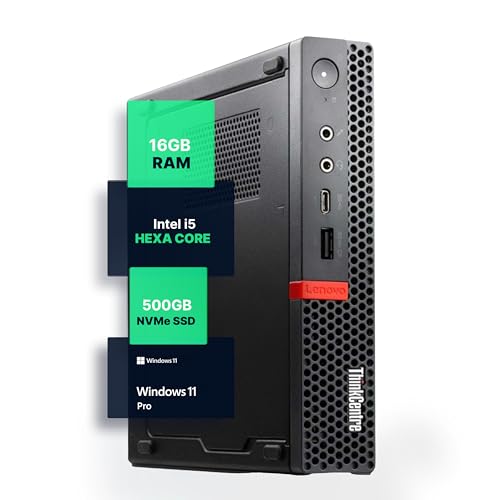
Lenovo ThinkCentre Mini PC Intel i5
Best for: Users needing Windows 11 Pro in a small form factor
- Operating System
- Windows 11 Pro (what this guide is about)
- Processor
- Intel i5-8400T
- Installed RAM
- 16GB
- Storage Capacity
- 500GB NVMe
- Memory Type
- DDR4
- Use
- Home, Office
View on Amazon: Lenovo ThinkCentre Mini PC Intel i5 Affiliate link
This Lenovo ThinkCentre M720Q Mini PC runs Windows 11 Pro on an Intel Core i5-8400T processor. It includes 16GB of DDR4 RAM and a 500GB NVMe SSD for fast storage. The compact design saves desk space while offering reliable performance for office tasks. You get built-in WiFi and Bluetooth for easy connectivity. It is a solid choice for users who need a pre-installed professional operating system in a small form factor.
Pros
- Pre-installed Windows 11 Pro operating system
- Intel Core i5-8400T hexa-core processor
- 16GB DDR4 RAM for multitasking
- 500GB NVMe SSD for fast load times
- Compact 1140 cubic inch footprint
Cons
- Older 8th generation Intel processor
- Only 500GB storage capacity
- No mention of included peripherals
Good fit if
- You need Windows 11 Pro pre-installed
- You want a compact office PC
- You require 16GB of RAM
Skip if
- You need the latest processor generation
- You require more than 500GB storage
- You want a larger desktop tower
Verdict: Lenovo M720Q Mini PC is a practical option for users who specifically need Windows 11 Pro and a compact footprint. It suits office environments where space is limited and reliable multitasking is required.
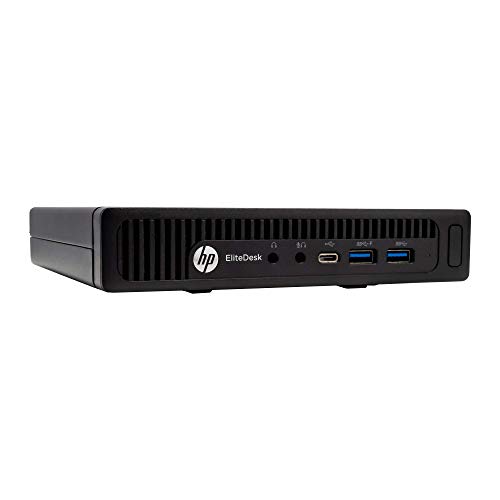
HP EliteDesk Mini Core i5 240GB SSD
Best for: basic office work and dual monitors
- Operating System
- Windows 10 Pro (what this guide is about)
- Processor
- Intel Core i5-6500T
- Installed RAM
- 8GB
- Storage Capacity
- 240GB
- Memory Type
- DDR4
- Use
- Business
View on Amazon: HP EliteDesk Mini Core i5 240GB SSD Affiliate link
This HP EliteDesk 800 G2 Mini runs Windows 10 Pro on an Intel Core i5-6500T processor. It includes 8GB of DDR4 RAM and a 240GB SSD. The system supports dual monitors via VGA and DisplayPort. Its compact dimensions make it easy to mount behind a display. You get a reliable business-class machine for office tasks and basic computing.
Pros
- Windows 10 Pro 64-Bit
- Intel Core i5-6500T Quad Core
- 8GB DDR4 RAM
- Dual monitor support
Cons
- Older 6th generation Intel processor
- Only 8GB of RAM
- Limited 240GB storage capacity
Good fit if
- You need Windows 10 Pro
- You want a small form factor
- You require dual monitor output
Skip if
- You need Windows 11
- You require high-end gaming
- You need large storage
Verdict: HP EliteDesk 800 G2 Mini suits users who need Windows 10 Pro and dual displays in a compact space.

HP ProDesk Mini PC with 16GB RAM
Best for: Office multitasking in a small space
- Operating System
- Windows 11 Pro (what this guide is about)
- Processor
- Intel Core i5 Hexa Core
- Installed RAM
- 16GB
- Storage Capacity
- 250GB
- Memory Type
- DDR4
View on Amazon: HP ProDesk Mini PC with 16GB RAM Affiliate link
This HP ProDesk 600 G4 Mini PC runs Windows 11 Pro and features an Intel Core i5 Hexa Core processor. It includes 16GB of DDR4 RAM and a 250GB SSD. The compact chassis fits neatly on or under your desk. It is renewed to perform like new, though it may show minor cosmetic wear. This setup offers reliable multitasking for professional tasks.
Pros
- Windows 11 Pro operating system
- Intel Core i5 Hexa Core processor
- 16GB DDR4 RAM installed
- Compact space-saving mini chassis
Cons
- 250GB SSD storage capacity is limited
- Renewed condition may have cosmetic wear
- No mention of built-in Wi-Fi or Bluetooth
Good fit if
- You need Windows 11 Pro for work
- You require 16GB RAM for multitasking
- You want a small desktop footprint
Skip if
- You need maximum storage space
- You require brand new hardware
- You need wireless connectivity out of the box
Verdict: HP ProDesk 600 G4 Mini PC provides solid performance with 16GB RAM and Windows 11 Pro for office tasks. It suits users who prioritize a compact form factor and professional OS over high storage or pristine cosmetic condition.
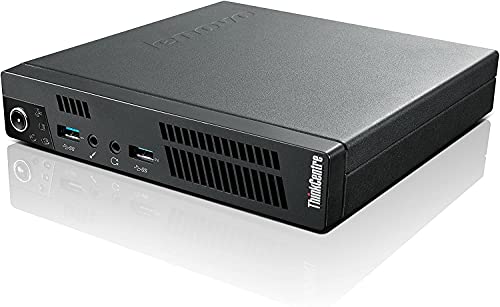
Lenovo ThinkCentre Tiny Core i5 Desktop
Best for: Windows 10 Pro business use
- Operating System
- Windows 10 Pro (what this guide is about)
- Processor
- Intel Core i5-3470T
- Installed RAM
- 8GB
- Storage Capacity
- 500GB
- Graphics
- Intel HD Graphics
- Memory
- 8GB RAM
View on Amazon: Lenovo ThinkCentre Tiny Core i5 Desktop Affiliate link
The Lenovo ThinkCentre M92p Tiny runs Windows 10 Pro on an Intel Core i5-3470T processor. It includes 8GB of RAM and 500GB of storage. This model supports Windows 10 but does not support Windows 11 upgrades. You get a compact business desktop with integrated Intel HD Graphics. It suits users who need reliable performance on the current supported OS version.
Pros
- Runs Windows 10 Pro 64-bit
- Intel Core i5-3470T processor
- 8GB installed RAM
- 500GB storage capacity
Cons
- Does not support Windows 11 upgrade
- Uses older Intel HD Graphics
- Limited to Windows 10 support
Good fit if
- You need Windows 10 Pro
- You want a compact business PC
- You do not require Windows 11
Skip if
- You need Windows 11 compatibility
- You want the latest OS features
- You require modern graphics performance
Verdict: Lenovo ThinkCentre M92p Tiny i5-3470T fits users who need a compact business desktop running Windows 10 Pro. It is a practical option for those who do not need Windows 11 support.
HP EliteDesk Desktop Mini i5 16GB RAM
Best for: office work requiring Windows 10 Pro and peripherals
- Operating System
- Windows 11 Pro (what this guide is about)
- Processor
- Intel Quad-Core i5-6500T
- Installed RAM
- 16GB
- Storage Capacity
- 240GB SSD
- Memory Type
- DDR4
- Ethernet Ports
- 1x RJ-45
View on Amazon: HP EliteDesk Desktop Mini i5 16GB RAM Affiliate link
This HP EliteDesk 800 G2 is a compact business desktop running Windows 10 Pro. It features an Intel Core i5-6500T processor, 16GB of DDR4 RAM, and a 240GB SSD. The system includes a USB keyboard and mouse. Its small footprint makes it suitable for office environments. You get a reliable machine for standard productivity tasks. The included accessories mean you can start working immediately.
Pros
- Intel Core i5-6500T processor up to 3.1GHz
- 16GB DDR4 RAM supports up to 32GB expansion
- Includes USB keyboard and mouse
- Windows 10 Pro operating system
Cons
- Only 240GB SSD storage capacity
- No mention of Windows 11 Pro upgrade path
- Lacks modern connectivity like USB-C on rear ports
Good fit if
- You need a ready-to-use office computer with peripherals
- You prefer Windows 10 Pro stability
- You require 16GB of RAM for multitasking
Skip if
- You require Windows 11 Pro out of the box
- You need more than 240GB of storage
- You want a modern processor generation
Verdict: HP EliteDesk 800 G2 Mini PC offers a complete setup with keyboard and mouse for business users who need Windows 10 Pro. It suits those who value included accessories and 16GB of RAM over newer hardware generations.

Kinupute i5-4200U Fanless Industrial Mini PC
Best for: Industrial or rugged networking environments
- Operating System
- Windows 10 Pro (what this guide is about)
- Processor
- Intel Core i5-4200U
- Installed RAM
- 16GB
- Storage Capacity
- 512GB
- Ethernet Ports
- 2x Gigabit LAN
- Cooling
- Fanless
View on Amazon: Kinupute i5-4200U Fanless Industrial Mini PC Affiliate link
This Kinupute industrial mini PC runs Windows 10 Pro on an Intel Core i5-4200U processor with 16GB of RAM. It features a fanless design for silent, dust-free operation in harsh environments. The system includes dual Gigabit LAN ports and two COM RS232 interfaces, making it suitable for specialized networking or industrial control tasks. It supports dual monitors via HDMI and VGA.
Pros
- Fanless design ensures zero noise and dust resistance
- Dual Gigabit LAN ports support 4G modules or pfSense
- Includes two COM RS232 ports for industrial equipment
- 16GB RAM and 512GB SSD provide ample storage
Cons
- Intel Core i5-4200U is a fourth-generation processor
- Runs Windows 10 Pro, not the newer Windows 11
- No mention of Bluetooth connectivity in specifications
Good fit if
- You need a fanless PC for dusty or harsh environments
- You require dual Gigabit Ethernet ports for networking
- You need COM RS232 ports for industrial peripherals
Skip if
- You require the latest Windows 11 operating system
- You need high-performance gaming or video editing
- You prefer a modern Intel processor generation
Verdict: Kinupute Fanless Industrial Mini PC i5-4200U fits users who need rugged, silent operation with dual LAN and serial ports. It suits industrial or specialized networking setups rather than general home use.
Specifications side by side
| Spec | Lenovo ThinkCentre Mini PC Intel i5 | HP EliteDesk Mini Core i5 240GB SSD | HP ProDesk Mini PC with 16GB RAM | Lenovo ThinkCentre Tiny Core i5 Desktop | HP EliteDesk Desktop Mini i5 16GB RAM | Kinupute i5-4200U Fanless Industrial Mini PC |
|---|---|---|---|---|---|---|
| Processor | Intel i5-8400T | Intel Core i5-6500T | Intel Core i5 Hexa Core | Intel Core i5-3470T | Intel Quad-Core i5-6500T | Intel Core i5-4200U |
| Installed RAM | 16GB | 8GB | 16GB | 8GB | 16GB | 16GB |
| Storage Capacity | 500GB NVMe | 240GB | 250GB | 500GB | 240GB SSD | 512GB |
| Memory Type | DDR4 | DDR4 | DDR4 | not stated | DDR4 | not stated |
| Graphics | not stated | not stated | not stated | Intel HD Graphics | not stated | not stated |
| Ethernet Ports | not stated | not stated | not stated | not stated | 1x RJ-45 | 2x Gigabit LAN |
| Operating System | Windows 11 Pro | Windows 10 Professional 64-Bit | Windows 11 Pro | Windows 10 Pro | Windows 10 Pro 64-bit | Windows 10 Pro |
| Memory | 16GB RAM | not stated | 16GB RAM | 8GB RAM | 16GB RAM | not stated |
| Storage | 500GB SSD | 240GB SSD | not stated | not stated | 240GB SSD | not stated |
| Use | Home, Office | Business | not stated | Business | Business | not stated |
| Cooling | not stated | not stated | not stated | not stated | not stated | Fanless |
| Dimensions | 19 × 15 × 4 inches | 7 × 6.9 × 1.3 inches | not stated | 7 × 1.4 × 7.2 inches | 7.2 × 7.2 × 1.9 inches | 8.4 × 5.5 × 2.1 inches |
| Weight | 2.91 pounds | 3.42 pounds | not stated | 1.6 ounces | 6 pounds | not stated |
| Size | 1140 cubic inches | 8GB+240GB | not stated | Laptop | 16 GB DDR4 RAM, 240 GB SSD | i5-4200U |
| Color | Black | BLACK | not stated | Black | Core I5 6500T/240G SSD | 16G RAM+512G SSD |
| Model | M720Q | 16GB RAM | 800G4 | BYNUC1 | 16GB RAM | MKG600 |
Frequently asked questions
Can I upgrade Windows 10 Pro to Windows 11 Pro on a mini PC?
You can usually upgrade if your hardware meets Microsoft’s requirements. Mini PCs with Intel Core i5 processors and 16GB of RAM, like the Lenovo ThinkCentre M720Q, are designed for Windows 11 Pro. Older models, such as the HP EliteDesk 800 G2, ship with Windows 10 Pro and may not support the newer OS without hardware changes.
Is Windows 10 Pro still safe for business use in 2026?
Yes, Windows 10 Pro remains a stable and secure choice for business environments. Many mini PCs, including the HP EliteDesk 800 G2 and Lenovo ThinkCentre M92p, ship with this OS. It offers proven reliability and familiar tools for office tasks. However, support timelines differ from Windows 11, so check your specific model’s lifecycle.
Do mini PCs come with the operating system pre-installed?
Most mini PCs listed here come with the operating system pre-installed. For example, the Lenovo ThinkCentre M720Q includes Windows 11 Pro, while the HP EliteDesk 800 G2 includes Windows 10 Pro. This saves you the time of manual installation and ensures driver compatibility out of the box for your specific hardware configuration.
What is the difference between Windows 10 Pro and Windows 11 Pro for office work?
Windows 11 Pro offers modern multitasking tools like Snap Layouts and improved security features. It is ideal for newer hardware like the HP ProDesk 600 G4. Windows 10 Pro provides a stable, mature environment suitable for legacy systems. Choose based on whether you need the latest interface or proven stability for existing workflows.
Can I use a mini PC with Windows 10 Pro for industrial applications?
Yes, Windows 10 Pro is suitable for industrial and rugged networking environments. The Kinupute MKG600 Mini PC runs Windows 10 Pro and features fanless cooling and dual LAN ports. This combination ensures silent operation and reliable connectivity in specialized settings where stability and specific hardware interfaces are more important than the latest consumer features.
Does the operating system affect the mini PC's physical size?
No, the operating system does not change the physical dimensions of the device. The Lenovo ThinkCentre M720Q measures 15 by 4 by 19 inches regardless of its Windows 11 Pro installation. Similarly, the HP EliteDesk 800 G2 maintains its 7 by 1.3 by 7 inches footprint with Windows 10 Pro. The OS is software only.