Processor in Mini PCs: What It Is and Is It Worth It?
As an Amazon Associate we earn from qualifying purchases. Links on this page are affiliate links.
Mini PC Processor Explained
The processor is the brain of your mini PC. It handles all calculations and runs your software. In small form factor computers, chip choice defines performance limits. You must understand the labels to pick the right unit.
Intel N-series chips like the N5100, N100, N150, and N95 are common in entry-level boxes. These are Celeron-class processors. They use low power. They handle web browsing, video playback, and office tasks well. They do not support heavy gaming or video editing. If you need silent operation and low heat, these are suitable.
AMD Ryzen processors offer higher performance. The Ryzen 3 is a budget option for basic multitasking. The Ryzen 5 sits in the mid-range. It handles demanding workloads and light gaming. The Ryzen 7 is for power users. It manages complex tasks and multiple monitors easily. The Ryzen 9 is the top tier for extreme performance.
Intel Core i5 and i7 chips are standard desktop replacements. They provide strong single-core and multi-core speeds. They are ideal for professional work. You can run virtual machines or compile code without lag.
Ryzen Embedded chips are designed for industrial or commercial use. They offer long-term stability and availability. They are less common for home users but vital for digital signage or kiosks.
When shopping, look at the model number. Higher numbers usually mean newer architectures and better speed. Cores and threads matter too. More cores allow better multitasking. Clock speed indicates how fast each core works.
Why does this matter? A weak processor slows everything down. A strong one keeps your system responsive. Match the chip to your actual needs. Do not pay for power you do not use. The processor explained here helps you avoid buying a box that is too slow for your work or too fast for your simple tasks. Choose wisely based on the specs listed.
Processor Choices for Mini PCs
Intel N5100
The Intel N5100 is a quad-core entry-level chip designed for basic tasks. It offers sufficient power for web browsing, document editing, and media playback. You will find this processor in budget-friendly units that prioritize low power consumption. It lacks the raw speed for heavy multitasking or modern gaming. This option suits users who need a silent, cool-running machine for light duties. It is a practical choice for digital signage or simple home office setups where efficiency matters more than performance.
Intel Celeron
Intel Celeron processors represent the most affordable tier of computing power. These chips typically feature two or four cores with modest clock speeds. They handle essential functions like email, video calls, and light office work without issue. However, they may struggle with multiple heavy applications running simultaneously. You should consider this option if your budget is tight and your needs are minimal. It is ideal for students or seniors who only require basic internet access and simple software tools. Performance is adequate for very light usage but not for demanding workflows.
Ryzen 5
The Ryzen 5 series delivers strong multi-core performance suitable for most users. It handles office multitasking and triple 4K display setups with ease. You will appreciate the balance between speed and power efficiency. This processor is ideal for users who need solid single-thread performance for everyday tasks. It supports robust connectivity and stable operation in compact cases. The KAMRUI E3B Ryzen 5 Mini PC exemplifies this category. It fits users who need reliable performance for office work and light multitasking without paying for high-end specs.
Ryzen 7
Ryzen 7 chips provide high multi-core performance for demanding workloads. They are excellent for office multitasking and light gaming tasks. You get ample processing power for running multiple virtual machines or editing photos. The AMD Ryzen 7 7730U offers strong performance in a compact form factor. This option suits users who need speed for creative work or complex data processing. It handles gaming better than lower-tier chips while remaining energy efficient. The KAMRUI E3B Ryzen 7 Mini PC is a prime example. It fits users who need strong multi-core performance and ample storage in a compact design.
Intel Core i5
Intel Core i5 processors offer reliable performance for business and home use. They are well-suited for office work and business productivity tasks. You get stable performance with Windows 11 Pro and moderate multitasking capabilities. The Lenovo M720Q i5 Mini PC demonstrates this balance. It fits users who prioritize stability and business features over cutting-edge hardware. This chip handles spreadsheets, presentations, and video conferencing smoothly. It is a practical choice for environments where reliability is key. You will find it in units designed for long-term, consistent operation in professional settings.
Is Upgrading Your CPU Worth It
Who needs it
You should prioritize a strong processor if you run demanding software. The Intel Core i7 and Ryzen 9 chips handle heavy multitasking and complex calculations with ease. These high-end options are essential for video editing, 3D rendering, or running virtual machines. If your workflow involves compiling code or managing large datasets, the extra cores and threads make a significant difference in speed. Similarly, the Ryzen 7 and Core i5 provide a balanced performance tier. They are ideal for users who need more power than basic browsing but do not require top-tier specs. The Intel N100 and N150 are also worth noting for specific use cases. They offer modern efficiency for light tasks while keeping heat and noise low. Choosing the right chip ensures your mini PC remains responsive under load without unnecessary bottlenecks.
Who can skip it
You can ignore high-end processor specs if your needs are simple. Basic web browsing, email, and document editing do not require powerful chips. The Intel Celeron, N5100, and N95 are sufficient for these everyday tasks. Spending extra on a Ryzen 9 or Core i7 would be wasted money in this scenario. Instead, focus on other components that affect your daily experience. Prioritize having enough RAM for smooth multitasking. A fast SSD will improve boot times and application loading speeds more noticeably than a faster CPU for light workloads. Consider the connectivity options and build quality of the unit. If you only use the mini PC for media playback or light office work, entry-level processors are the most practical choice. Do not overpay for performance you will never use.
Mini PC Processor Glossary
Processor
The central chip that executes instructions. It determines how fast your computer runs applications and handles multitasking tasks efficiently.
Cores
Individual processing units within the chip. More cores allow the system to handle multiple tasks simultaneously without slowing down.
Threads
Virtual processing paths managed by the CPU. Hyperthreading doubles the number of threads per core for improved multitasking performance.
Clock Speed
The frequency at which the processor executes instructions, measured in gigahertz. Higher speeds generally mean faster single-task performance.
TDP
Thermal Design Power, indicating heat output and power consumption. Lower TDP values are crucial for compact, fanless mini PC designs.
Integrated Graphics
GPU capabilities built directly into the processor chip. This allows for video playback and light gaming without needing a separate graphics card.
Cache
Small, fast memory located on the processor chip. It stores frequently used data to reduce access time and boost overall speed.
Quick picks
| # | Product | Best for | Price |
|---|---|---|---|
| 1 | KAMRUI Ryzen 5 7530U Mini PC | office multitasking and triple 4K display setups | Check price of KAMRUI Ryzen 5 7530U Mini PC on Amazon |
| 2 | KAMRUI Ryzen 7 7730U Mini PC | Office multitasking and light gaming | Check price of KAMRUI Ryzen 7 7730U Mini PC on Amazon |
| 3 | Lenovo ThinkCentre Mini PC Intel i5 | Office work and business productivity | Check price of Lenovo ThinkCentre Mini PC Intel i5 on Amazon |
| 4 | GMKtec Mini PC Dual 2.5GbE | commercial networking and multi-display workstations | Check price of GMKtec Mini PC Dual 2.5GbE on Amazon |
| 5 | Beelink Mini S Intel N100 Mini PC | office work and dual monitor setups | Check price of Beelink Mini S Intel N100 Mini PC on Amazon |
| 6 | GMKtec Ryzen 3 Dual LAN Mini PC | Office multitasking and triple display setups | Check price of GMKtec Ryzen 3 Dual LAN Mini PC on Amazon |
Our 6 picks

KAMRUI Ryzen 5 7530U Mini PC
Best for: office multitasking and triple 4K display setups
- Processor
- Ryzen 5 (what this guide is about)
- Installed RAM
- 16GB
- Storage Capacity
- 512GB
- Memory Type
- LPDDR4X
- Graphics
- AMD Radeon RX Vega 7
- Ethernet Ports
- 1x Ethernet
View on Amazon: KAMRUI Ryzen 5 7530U Mini PC Affiliate link
The KAMRUI E3B uses an AMD Ryzen 5 7530U processor with six cores and twelve threads. It includes 16GB of LPDDR4X memory and a 512GB SSD. The chip offers strong single-thread performance for web browsing and document editing. You get WiFi 6, a full-function Type-C port, and support for three 4K displays. This setup suits users who need reliable multitasking in a compact form factor.
Pros
- Ryzen 5 7530U processor with 6 cores and 12 threads
- 16GB LPDDR4X memory for smooth multitasking
- Full-function Type-C port with 10Gbps data transfer
- Supports three 4K displays via DP, HDMI, and Type-C
- WiFi 6 for faster wireless speeds and lower latency
Cons
- Memory is non-upgradeable LPDDR4X
- One M.2 SSD slot is SATA-only
- Weight is 3.04 pounds
Good fit if
- You need strong single-thread performance for office tasks
- You want to connect three 4K monitors simultaneously
- You prefer WiFi 6 for stable wireless connections
Skip if
- You require upgradable system memory
- You need dual NVMe SSD slots
- You want a processor with more than six cores
Verdict: The KAMRUI E3B Ryzen 5 Mini PC fits users who need solid single-thread performance and multi-monitor support. It is a practical option for office work and light multitasking.

KAMRUI Ryzen 7 7730U Mini PC
Best for: Office multitasking and light gaming
- Processor
- Ryzen 7 (what this guide is about)
- Installed RAM
- 16GB
- Storage Capacity
- 1TB
- Memory Type
- LPDDR4X
- Graphics
- AMD Radeon Graphics
- Ethernet Ports
- 10/100/1000Mbps RJ45
View on Amazon: KAMRUI Ryzen 7 7730U Mini PC Affiliate link
This KAMRUI E3B mini PC uses an AMD Ryzen 7 7730U processor with 8 cores and 16 threads. It includes 16GB of LPDDR4X RAM and a 1TB SSD for fast storage. The system supports triple 4K displays and features Wi-Fi 6. You get solid performance for office tasks and light gaming in a compact 5.05-inch chassis.
Pros
- AMD Ryzen 7 7730U with 8 cores and 16 threads
- 16GB LPDDR4X RAM and 1TB M.2 SSD
- Triple display support via HDMI, DisplayPort, and USB-C
- Wi-Fi 6 and Bluetooth 5.2 connectivity
Cons
- Ethernet port limited to 10/100/1000Mbps speeds
- Uses LPDDR4X memory which is not user-upgradeable
- No mention of Thunderbolt support for external docks
Good fit if
- You need strong multi-core performance for office work
- You want ample 1TB storage for large files
- You require triple screen output for productivity
Skip if
- You need 2.5GbE wired network speeds
- You want to upgrade RAM later
- You prefer Thunderbolt connectivity for peripherals
Verdict: KAMRUI E3B Ryzen 7 Mini PC fits users who need strong multi-core performance and ample storage in a compact form factor. It is ideal for office multitasking and light gaming tasks.
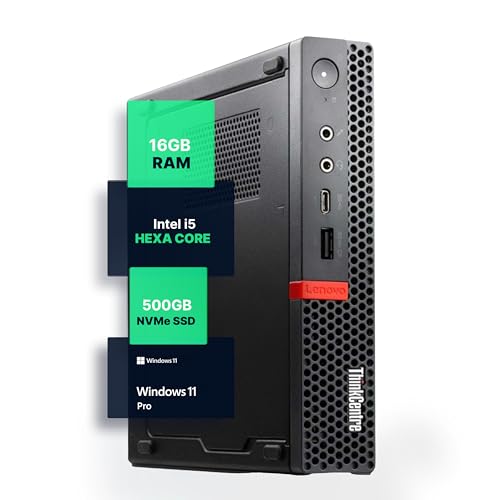
Lenovo ThinkCentre Mini PC Intel i5
Best for: Office work and business productivity
- Processor
- Intel Core i5 (what this guide is about)
- Installed RAM
- 16GB
- Storage Capacity
- 500GB NVMe
- Memory Type
- DDR4
- Operating System
- Windows 11 Pro
- Use
- Home, Office
View on Amazon: Lenovo ThinkCentre Mini PC Intel i5 Affiliate link
The Lenovo M720Q is a compact desktop powered by an Intel Core i5-8400T processor. It includes 16GB of DDR4 RAM and a 500GB NVMe SSD for responsive multitasking. Windows 11 Pro is pre-installed for business or home use. This unit offers reliable performance in a small form factor. It suits users who need dependable computing power without taking up much desk space.
Pros
- Intel Core i5-8400T hexa-core processor
- 16GB DDR4 RAM for smooth multitasking
- 500GB NVMe SSD for fast load times
- Windows 11 Pro pre-installed
Cons
- Uses older 8th generation Intel processor
- No dedicated graphics card listed
- Limited to 5G WiFi connectivity
Good fit if
- You need Windows 11 Pro for business tasks
- You want a compact desktop with 16GB RAM
- You prefer Intel processors for office work
Skip if
- You require the latest generation CPU
- You need high-end gaming performance
- You want more than 500GB of storage
Verdict: The Lenovo M720Q i5 Mini PC is a solid choice for office environments needing stable performance. It fits users who prioritize Windows 11 Pro and moderate multitasking over cutting-edge hardware.

GMKtec Mini PC Dual 2.5GbE
Best for: commercial networking and multi-display workstations
- Processor
- Ryzen Embedded (what this guide is about)
- Installed RAM
- 16GB
- Storage Capacity
- 256GB
- Memory Type
- DDR4
- Graphics
- AMD Radeon GPU
- Ethernet Ports
- Dual 2.5GbE
View on Amazon: GMKtec Mini PC Dual 2.5GbE Affiliate link
The GMKtec G11 uses the Ryzen Embedded R2514 processor for continuous 24/7 operation. It includes 16GB of dual-channel DDR4 RAM and dual 2.5GbE Ethernet ports. The AMD Radeon GPU supports three 4K displays. This unit measures 3.42 by 1.55 by 3.42 inches. It suits commercial, industrial, or professional environments requiring stable performance and networking flexibility.
Pros
- Ryzen Embedded R2514 processor for 24/7 reliability
- Dual 2.5GbE Ethernet ports for networking flexibility
- 16GB dual-channel DDR4 RAM eliminates bottlenecks
- Supports three independent 4K displays
- WiFi 6E and Bluetooth 5.2 connectivity
Cons
- DDR4 memory is slower than DDR5 in other models
- 1-year limited warranty is shorter than industry standard
- Heavier build at 1.65 pounds
Good fit if
- You need dual 2.5GbE ports for a home lab or NAS
- You require three 4K displays for control rooms or trading
- You need a PC for continuous 24/7 commercial operation
Skip if
- You prioritize the fastest DDR5 memory speeds
- You need a longer warranty than one year
- You prefer a lighter, more compact form factor
Verdict: The GMKtec G11 Ryzen Embedded Mini PC fits users who need dual 2.5GbE ports and triple 4K display support for commercial or industrial tasks.

Beelink Mini S Intel N100 Mini PC
Best for: office work and dual monitor setups
- Processor
- Intel N100 (what this guide is about)
- Installed RAM
- 16GB
- Storage Capacity
- 512GB
- Memory Type
- DDR4 3200MHz
- Graphics
- Intel UHD Graphics
- Ethernet Ports
- 2.5G LAN
View on Amazon: Beelink Mini S Intel N100 Mini PC Affiliate link
This Beelink Mini S12 PRO uses the Intel N100 processor for efficient daily computing. It includes 16GB of DDR4 RAM and a 512GB NVMe SSD for fast storage. The system supports dual 4K displays via HDMI. It features Wi-Fi 6 and a 2.5G Ethernet port for stable connectivity. This compact unit suits users who need reliable performance for office work and media playback in a small footprint.
Pros
- Intel N100 processor with up to 3.4GHz speed
- 16GB DDR4 3200MHz memory for smooth multitasking
- 512GB M.2 NVMe SSD for rapid file access
- Dual HDMI ports for simultaneous 4K display output
- 2.5G Ethernet and Wi-Fi 6 for fast networking
Cons
- Only four cores for heavy multitasking workloads
- DDR4 memory instead of newer DDR5 standard
- Integrated graphics limit serious gaming performance
Good fit if
- You need a quiet PC for home office tasks
- You require dual monitor support for productivity
- You want fast storage for quick system boot times
Skip if
- You need high-end gaming performance
- You require professional video editing capabilities
- You want the latest DDR5 memory technology
Verdict: Beelink Mini S12 PRO Intel N100 delivers solid efficiency for everyday computing tasks. It fits users who prioritize connectivity and storage speed over raw processing power for light office or media use.

GMKtec Ryzen 3 Dual LAN Mini PC
Best for: Office multitasking and triple display setups
- Processor
- Ryzen 3 (what this guide is about)
- Installed RAM
- 16GB
- Storage Capacity
- 512GB PCIe SSD
- Memory Type
- DDR4
- Graphics
- AMD Radeon Graphics
- Ethernet Ports
- Dual 2.5G RJ45
View on Amazon: GMKtec Ryzen 3 Dual LAN Mini PC Affiliate link
This GMKtec mini PC uses an AMD Ryzen 3 5400U processor with 8 threads and a 4.0GHz turbo boost. It includes 16GB of DDR4 RAM and a 512GB PCIe SSD. The system supports triple 4K displays and features dual 2.5G Ethernet ports. It suits users who need reliable office performance and multi-monitor setups without requiring high-end gaming power.
Pros
- AMD Ryzen 3 5400U processor with 4.0GHz turbo boost
- 16GB DDR4 RAM expandable to 128GB
- Triple 4K display support including 8K via USB4
- Dual 2.5G Ethernet ports for fast networking
Cons
- Ryzen 3 processor offers less power than Ryzen 5 or 7 options
- DDR4 RAM is older technology compared to DDR5 in newer models
- 512GB SSD capacity is smaller than 1TB options available elsewhere
Good fit if
- You need a compact system for office multitasking and spreadsheets
- You require three simultaneous displays for productivity
- You want dual 2.5G Ethernet for network stability
Skip if
- You need the highest possible CPU performance for heavy workloads
- You prefer the latest DDR5 memory technology
- You require more than 512GB of internal storage
Verdict: The GMKtec NUCBOX M2 Pro Ryzen 3 Mini PC fits users who prioritize multi-monitor connectivity and stable networking over raw processing speed. It is a practical choice for office environments where triple displays and dual LAN ports are essential.
Specifications side by side
| Spec | KAMRUI Ryzen 5 7530U Mini PC | KAMRUI Ryzen 7 7730U Mini PC | Lenovo ThinkCentre Mini PC Intel i5 | GMKtec Mini PC Dual 2.5GbE | Beelink Mini S Intel N100 Mini PC | GMKtec Ryzen 3 Dual LAN Mini PC |
|---|---|---|---|---|---|---|
| Processor | AMD Ryzen 5 7530U | AMD Ryzen 7 7730U | Intel i5-8400T | AMD Ryzen Embedded R2514 | Intel Alder Lake-N100 | AMD Ryzen 3 5400U |
| Installed RAM | 16GB | 16GB | 16GB | 16GB | 16GB | 16GB |
| Storage Capacity | 512GB | 1TB | 500GB NVMe | 256GB | 512GB | 512GB PCIe SSD |
| Memory Type | LPDDR4X | LPDDR4X | DDR4 | DDR4 | DDR4 3200MHz | DDR4 |
| Graphics | AMD Radeon RX Vega 7 | AMD Radeon Graphics | not stated | AMD Radeon GPU | Intel UHD Graphics | AMD Radeon Graphics |
| Ethernet Ports | 1x Ethernet | 10/100/1000Mbps RJ45 | not stated | Dual 2.5GbE | 2.5G LAN | Dual 2.5G RJ45 |
| High-Speed Expansion | not stated | not stated | not stated | not stated | not stated | USB4 |
| Operating System | not stated | not stated | Windows 11 Pro | not stated | not stated | not stated |
| Memory | not stated | 16GB RAM | 16GB RAM | not stated | 16GB RAM | 16GB RAM |
| Storage | 512GB SSD | not stated | 500GB SSD | 256GB SSD | not stated | 512GB SSD |
| Use | Gaming | Home, Business, Office, Gaming | Home, Office | not stated | not stated | Business, Office, Gaming |
| Networking | WiFi 6 | WiFi 6 | not stated | WiFi 6E | WiFi 6, 2.5G LAN | WiFi 6E |
| Weight | 3.04 pounds | 1.25 pounds | 2.91 pounds | 1.65 pounds | not stated | 1.1 pounds |
| Dimensions | not stated | 5.05 × 5.05 × 1.9 inches | 19 × 15 × 4 inches | 3.42 × 3.42 × 1.55 inches | not stated | 10 × 2 × 2.7 inches |
| Size | AMD R7 5825U 16GB+512GB | 16GB+1TB/AMD Ryzen 7 7730U | 1140 cubic inches | 16GB+256GB R2514 | MINI S12 PRO N100/16G+512G | R3 5400U Black 16GB DDR4 + 512GB |
| Color | Black | Black | Black | Black Steel | not stated | Black(M5S) |
| Model | E3B | E3B | M720Q | G11 | MINIS | M5S |
Frequently asked questions
What is the difference between a Ryzen 5 and a Ryzen 7 in mini PCs?
The Ryzen 7 offers stronger multi-core performance compared to the Ryzen 5. This makes it better for light gaming and heavy multitasking. The Ryzen 5 focuses on solid single-thread performance, which suits office work and triple 4K display setups. You should choose the Ryzen 7 if you need ample storage and higher processing power for demanding tasks.
Is the Intel N100 good for office work?
Yes, the Intel N100 is excellent for everyday computing tasks. It delivers solid efficiency for light office use and media playback. This chip prioritizes connectivity and storage speed over raw processing power. It is ideal for users who need dual monitor support and stable performance without needing high-end hardware capabilities.
Which processor is best for commercial networking tasks?
The Ryzen Embedded processor is designed for commercial and industrial tasks. It supports dual 2.5GbE ports and triple 4K display output. This makes it suitable for multi-display workstations and networking environments. If you need robust connectivity for business applications, this embedded option provides the necessary stability and port variety.
How does the Intel Core i5 fit into office environments?
The Intel Core i5 provides stable performance for business productivity. It is a solid choice for users who prioritize Windows 11 Pro and moderate multitasking. This processor is not focused on cutting-edge hardware but rather on reliability. It fits well in office settings where consistent operation is more important than maximum speed.
Can a Ryzen 3 mini PC handle triple displays?
Yes, Ryzen 3 mini PCs can support triple display setups. This processor is practical for office environments where multi-monitor connectivity is essential. It prioritizes stable networking and display output over raw processing speed. If you need dual LAN ports and multiple screens for your workflow, this chip meets those specific requirements.
What are the key specs to look for in a Ryzen 7 mini PC?
Look for strong multi-core performance and ample storage in a compact form. The Ryzen 7 handles light gaming and office multitasking with ease. Check for 16GB RAM and high-capacity SSDs like 1TB. These specs ensure the system runs smoothly during complex calculations and simultaneous application usage without slowing down.