Protectli Vault 4-Port 2.5G Fanless Mini PC or Protectli Vault 2-Port Fanless Mini PC? Which Protectli Model to Buy
As an Amazon Associate we earn from qualifying purchases. Links on this page are affiliate links.
You are comparing the protectli vault fw4c vs vault fw2b to decide which fanless mini pc fits your network. Both units offer silent operation and US-based support for firewall tasks. They share the same compact chassis dimensions and 4GB of DDR3 memory. The main difference lies in networking capacity. The FW4C provides four 2.5G ports, while the FW2B offers two Gigabit ports. You must choose based on your required port count and speed.
Key differences
| Aspect | Protectli Vault 4-Port 2.5G Fanless Mini PC | Protectli Vault 2-Port Fanless Mini PC |
|---|---|---|
| Processor | Intel J3710 Quad Core | Intel Dual Core Celeron |
| Ethernet Ports | 4x 2.5 Gigabit | 2x Gigabit |
| USB Ports | 2x USB 3.0 | 4x USB 2.0, 2x USB 3.0 |
| Storage Type | SSD | mSATA SSD |
Which one should you choose?
Choose Protectli Vault 4-Port 2.5G Fanless Mini PC if
- You need four high-speed 2.5G network connections
- You prefer a quad-core processor for heavier routing tasks
- You want the newer model designation
Choose Protectli Vault 2-Port Fanless Mini PC if
- You only require two network interfaces
- You need more USB 2.0 ports for legacy devices
- You are on a tighter budget for the base unit
Verdict: The FW4C suits users needing more bandwidth and additional LAN ports for complex setups. The FW2B is sufficient for simpler networks with only two required connections. Both provide reliable, silent firewall performance in the same small form factor.
Protectli FW4C vs FW2B Specs
Processor performance
The Protectli Vault FW4C uses an Intel J3710 Pentium Quad Core processor. It runs at 1.6 GHz and can burst up to 2.6 GHz. This provides four threads for handling multiple tasks. The Protectli Vault FW2B relies on an Intel Dual Core Celeron chip. It also starts at 1.6 GHz but tops out at 2.48 GHz. It only offers two threads. The quad-core design in the FW4C allows for better multitasking when running firewall rules and virtual machines. The dual-core unit in the FW2B is sufficient for basic routing but may struggle with heavier loads.
Networking ports
Network connectivity is the primary difference between these two models. The FW4C features four Intel 2.5 Gigabit Ethernet ports. This gives you ample room for multiple WAN connections or high-speed LAN segments. The FW2B includes only two Intel Gigabit Ethernet ports. It also lacks the 2.5G speed upgrade found in the newer model. If you need to handle traffic over 1 Gbps on a single interface, the FW4C is necessary. The FW2B is limited to standard Gigabit speeds on its two available ports.
USB connectivity
You will find more USB options on the FW2B. It provides four USB 2.0 ports and two USB 3.0 ports. This totals six USB connections for peripherals or external storage. The FW4C offers only two USB 3.0 ports. It lacks the USB 2.0 ports found on the older model. If you need to connect multiple legacy devices or USB dongles, the FW2B offers greater flexibility. The FW4C restricts you to fewer connections, which may limit peripheral expansion in your setup.
Memory and storage
Both units come with 4GB of DDR3 memory and 32GB of storage. The FW2B uses DDR3L RAM, which is a low-voltage variant. The FW4C uses standard DDR3. Both include a 32GB SSD for the operating system and logs. The FW2B specifies an mSATA form factor for its drive. The FW4C does not specify the SSD form factor in the provided data. Since the capacity and speed are similar, you get identical base storage performance from both machines for typical firewall logging needs.
Physical dimensions
The chassis size is identical for both mini PCs. Each unit measures 4.56 inches in width, 4.25 inches in length, and 1.69 inches in height. They share the same black color and fanless design. This means they will fit into the same rack spaces or wall mounts. You do not need to change your mounting hardware or case layout when switching between them. The footprint remains constant, allowing for easy replacement or side-by-side deployment in your network closet.
Which Protectli Model Fits Your Network
Users needing four high-speed network ports
The FW4C includes four Intel 2.5 Gigabit Ethernet ports. This setup handles higher throughput for modern internet connections. You get more flexibility for complex routing or multiple WAN links. The Intel J3710 processor supports AES-NI for secure encryption tasks. This model suits those who prioritize network capacity and speed.
Users with simple two-port network needs
The FW2B offers two Intel Gigabit Ethernet ports. This is sufficient for standard home or small office firewalls. It includes four USB 2.0 ports and two USB 3.0 ports for peripherals. The Intel Dual Core Celeron processor handles basic routing efficiently. Choose this if you do not need extra network interfaces.
Users wanting newer processor performance
The FW4C features the Intel J3710 Pentium Quad Core. It bursts up to 2.6 GHz for better responsiveness. The FW2B uses an older Dual Core Celeron with a 2.48 GHz turbo. If you plan to run more services or handle heavier loads, the quad-core architecture provides a clear performance advantage for your firewall tasks.
The products compared
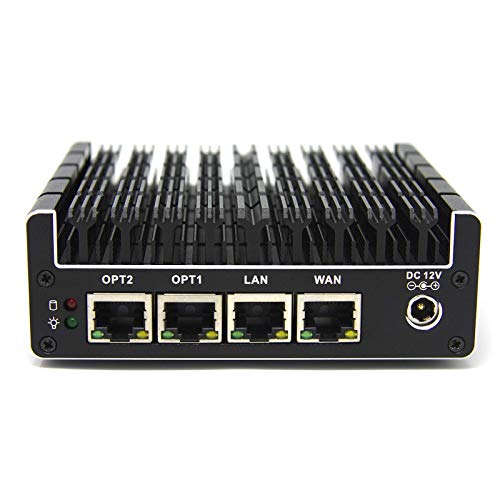
Protectli Vault 4-Port 2.5G Fanless Mini PC
Best for: multi-gigabit open-source network firewalls
- Processor
- Intel J3710
- Installed RAM
- 4GB
- Storage Capacity
- 32GB
- Memory Type
- DDR3
- Ethernet Ports
- 4x 2.5 Gigabit Ethernet
- Operating System
- No OS pre-installed
View on Amazon: Protectli Vault 4-Port 2.5G Fanless Mini PC Affiliate link
This fanless mini PC serves as a dedicated network firewall appliance. It features an Intel Pentium J3710 quad-core processor, four 2.5 Gigabit Ethernet ports, 4GB of DDR3 RAM, and 32GB of SSD storage. You get silent passive cooling and Intel AES-NI hardware support. It suits you if you need multi-gigabit routing for open-source firewall systems like pfSense or OPNsense.
Pros
- Four 2.5 Gigabit Ethernet network ports
- Intel AES-NI hardware support
- Silent fanless hardware design
- Dual HDMI display outputs and two USB 3.0 ports
Cons
- 32GB internal SSD storage limit
- 4GB DDR3 system memory capacity
Good fit if
- You require four 2.5G network interfaces for firewall routing.
- You run open-source firewall platforms like OPNsense or pfSense.
Skip if
- You need more than 32GB of onboard storage.
- You require modern DDR4 or DDR5 system memory.
Verdict: Protectli Vault 4-Port 2.5G Fanless Mini PC delivers four 2.5 Gigabit Ethernet ports and silent passive cooling for home network administrators building custom open-source firewalls.

Protectli Vault 2-Port Fanless Mini PC
Best for: two-port firewall setups
- Processor
- Intel Dual Core Celeron
- Installed RAM
- 4GB
- Storage Capacity
- 32GB
- Memory Type
- DDR3L
- Ethernet Ports
- 2x Intel Gigabit Ethernet
- Use
- Firewall
View on Amazon: Protectli Vault 2-Port Fanless Mini PC Affiliate link
The Protectli Vault FW2B is a compact, fanless firewall appliance. It features an Intel Dual Core Celeron processor running at 1.6GHz with turbo up to 2.48GHz. You get 4GB of DDR3L RAM and a 32GB mSATA SSD. The unit includes two Intel Gigabit Ethernet ports for network connectivity. It supports AES-NI hardware encryption. This model is designed for users needing a silent, secure network gateway with open-source firewall compatibility.
Pros
- Fanless design ensures silent operation
- Two Intel Gigabit Ethernet ports
- AES-NI hardware encryption support
- Compact dimensions of 4.56 x 4.25 x 1.69 inches
Cons
- Only 4GB of installed RAM
- Small 32GB mSATA storage capacity
- No operating system pre-installed
Good fit if
- You need a dedicated two-port firewall appliance
- You prefer silent, fanless hardware
- You plan to install pfSense or OPNsense
Skip if
- You require four Ethernet ports
- You need more than 4GB of RAM
- You want a pre-installed operating system
Verdict: Protectli Vault FW2B Fanless Mini PC is a suitable choice for users who only need two network interfaces and prioritize silent operation over raw processing power.
Specifications side by side
| Spec | Protectli Vault 4-Port 2.5G Fanless Mini PC | Protectli Vault 2-Port Fanless Mini PC |
|---|---|---|
| Processor | Intel J3710 | Intel Dual Core Celeron |
| Installed RAM | 4GB | 4GB |
| Storage Capacity | 32GB | 32GB |
| Memory Type | DDR3 | DDR3L |
| Ethernet Ports | 4x 2.5 Gigabit Ethernet | 2x Intel Gigabit Ethernet |
| Operating System | No OS pre-installed | not stated |
| Memory | 4GB RAM | 4GB RAM |
| Storage | 32GB SSD | 32GB SSD |
| Use | Firewall | Firewall |
| Networking | 2.5G LAN | not stated |
| Dimensions | 4.25 × 4.56 × 1.69 inches | 4.25 × 4.56 × 1.69 inches |
| Size | 4GB RAM, 32GB SSD | 4GB RAM, 32GB SSD |
| Color | black | Black |
| Model | Vault | J3060 |
Frequently asked questions
Does the Protectli Vault FW4C support 2.5G internet speeds?
Yes, the Protectli Vault FW4C supports 2.5G internet speeds. It features four Intel 2.5 Gigabit Ethernet ports. This allows you to handle higher throughput for modern internet connections. The four ports provide more flexibility for complex routing or multiple WAN links. This setup is ideal for users who prioritize network port density.
What is the main difference between the FW4C and FW2B?
The main difference is the number of network ports. The FW4C includes four 2.5G LAN ports. The FW2B provides only two network interfaces. Both units share the same compact chassis dimensions and silent operation. You should choose the FW4C if you need extra ports for your firewall setup.
Is the Protectli Vault FW2B suitable for a home firewall?
Yes, the Protectli Vault FW2B is suitable for a home firewall. It is designed for users who only need two network interfaces. The unit prioritizes silent operation over raw processing power. It includes 4GB of RAM and a 32GB SSD. This makes it a practical choice for basic firewall tasks without excessive noise.
Do both Protectli models have the same physical size?
Yes, both Protectli models have the same physical size. Each unit measures 4.56 inches in width, 1.69 inches in height, and 4.25 inches in length. They share identical compact chassis dimensions. This consistent size allows for flexible mounting options in tight spaces while maintaining a low profile for your network setup.
Which Protectli model is better for multiple WAN links?
The Protectli Vault FW4C is better for multiple WAN links. It features four Intel 2.5 Gigabit Ethernet ports. This configuration offers greater flexibility for complex routing scenarios. You can connect multiple internet sources easily. The FW2B only has two ports, which limits your ability to manage multiple wide area network connections simultaneously.
Does the FW4C come with a fan for cooling?
No, the FW4C does not come with a fan. It is a fanless mini PC designed for silent operation. The unit relies on passive cooling through its chassis. This ensures quiet performance, which is ideal for home or office environments. You get reliable operation without the noise associated with traditional fans.
What kind of memory do these Protectli models use?
Both Protectli models use 4GB of DDR3 memory. This amount of RAM is sufficient for standard firewall tasks. The memory supports the operating system and network processing needs. While not high-end, it provides stable performance for routing and security functions. You do not need to upgrade the memory for basic usage.