What Is Storage? A Guide for Mini PCs Buyers (2026)
As an Amazon Associate we earn from qualifying purchases. Links on this page are affiliate links.
Storage Explained for Mini PC Buyers
Storage is where your files live. It holds your operating system, apps, photos, and documents. When you buy a Mini PC, the storage capacity determines how much data you can keep on the device. You will see labels like 240GB SSD or 1TB SSD in product listings. These numbers tell you the total space available.
Most modern Mini PCs use Solid State Drives, or SSDs. Unlike older hard drives, SSDs have no moving parts. This makes them faster and more durable. You will notice this speed difference when you boot up your computer or open large files. The storage type matters just as much as the size. All the models we review use SSDs, so you do not need to worry about slow mechanical drives.
The numbers on the box can be confusing. Manufacturers often list 240GB, 256GB, 480GB, 500GB, 512GB, or 1TB. These figures are not exactly the same in practice. Your computer’s operating system reserves some space for itself. It also uses a different method to calculate gigabytes. A drive labeled 240GB might show up as slightly less in your system. A 1TB drive will always give you the most room.
Why does this matter to you? If you only browse the web and write documents, a smaller drive like 240GB or 256GB is enough. You can always use cloud services for extra files. If you edit videos or store many photos, look for 512GB or 1TB. A 500GB or 480GB option sits in the middle. It is a good balance for most users. Understanding storage explained helps you pick the right size. Do not guess. Check the exact gigabyte count in the specs. This simple step ensures your Mini PC can handle your daily tasks without running out of space.
Storage Options Compared for You
240GB SSD
This capacity is the entry-level tier for Mini PCs. It holds the operating system and a few essential applications with limited room for large files. You might fit a few hundred photos or a small music library, but video editing or extensive document archives will fill this drive quickly. The HP EliteDesk 800 G2 Mini with 240GB SSD illustrates this balance. It suits users who prioritize RAM or processor speed over storage volume. If you rely on cloud storage for your media, this base level may suffice. However, you will need to manage your local files carefully to avoid running out of space.
256GB SSD
Slightly larger than the 240GB option, this capacity offers a modest increase in usable space. It remains best for light users who do not store large media files locally. The HP EliteDesk 800 G4 Mini with 256GB SSD shows that business users often prioritize compact multitasking and RAM over maximum storage. You can run standard office suites and web browsers comfortably. However, installing multiple heavy applications or keeping a local backup of your phone will consume space rapidly. This size is practical if you stream most of your content and use external drives for archiving older data.
480GB SSD
This option provides a solid middle ground for general productivity. It allows for a comfortable operating system installation, several professional applications, and a reasonable amount of personal files. The Beelink Mini S12 with 480GB SSD serves as a compact example for users who value screen real estate and basic productivity. You can store a significant photo library and several months of work documents without immediate concern. It is a practical choice for home offices and dual-display setups. While not expansive, it reduces the need for frequent external backups compared to smaller drives, offering a balanced experience for most daily tasks.
500GB SSD
Half a terabyte offers ample room for media enthusiasts and power users. You can install numerous games, keep high-resolution video projects, and maintain a large local photo archive. This capacity reduces the anxiety of managing disk space for heavy workloads. It suits users who want to keep their most important files on the device for quick access. The trade-off is often a higher price point compared to smaller capacities. However, for those who edit video or manage large databases locally, this size provides a comfortable buffer. It ensures you can work offline without constantly monitoring free space on your drive.
512GB SSD
This is a common standard for modern Mini PCs, offering a clean 0.5TB of space. It balances performance and capacity well. The Apple Mac mini M6 with 512GB SSD delivers efficient AI performance in a tiny package, ideal for macOS users who value compact design. You get enough room for professional creative apps, a large media library, and system updates. It is a versatile choice for most buyers. You can store years of documents and high-quality media without needing external storage for everyday tasks. This capacity supports multitasking and heavy application use, making it a reliable baseline for serious work and entertainment.
1TB SSD
One terabyte is the high-capacity tier for Mini PCs. It allows you to store vast amounts of data, including 4K video files, extensive game libraries, and full system backups. The Lenovo ThinkCentre M720Q with 1TB SSD suits users who prioritize storage capacity and memory over cutting-edge processor speed. It is a practical solution for office work and media management where local storage is preferred. You rarely need to delete files or use cloud services for space. This option is best for professionals who work with large datasets or creators who need fast, local access to massive files. It future-proofs your device for growing data needs.
Who Needs More Storage
Who needs it
You need larger storage if you keep many files locally. Mini PCs with 240GB or 512GB drives fill up fast. A 1TB SSD gives you room for large video projects, high-resolution photos, and extensive game libraries. If you edit 4K video or store thousands of songs, smaller drives will limit your work. You will constantly manage space, deleting old files to make room for new ones. This is frustrating and inefficient. A 500GB or 1TB drive lets you work without constant cleanup. You can install multiple heavy applications and still have space for your documents. If you rely on your Mini PC for creative work or heavy data handling, do not compromise on capacity. Prioritize the 1TB option. It provides the breathing room you need for a smooth experience. Avoid the 240GB or 256GB models if you plan to store significant media. They are too small for serious users. Choose the drive that matches your file volume.
Who can skip it
You can skip larger storage if you use cloud services. Many users store photos and documents online. If you stream most media, you do not need a huge local drive. A 240GB or 256GB SSD is enough for the operating system and basic apps. You only need local space for essential programs. If you buy a Mini PC for web browsing or office tasks, smaller storage is fine. You save space on the device. You also avoid cluttering your desktop with unnecessary files. Focus on RAM and processor speed instead. These specs affect performance more than storage size for light users. You can always add external drives later if needed. Do not pay for extra capacity you will not use. Keep your Mini PC simple. Use it for light tasks. Let the cloud handle your large files. This approach keeps your system fast and responsive. You do not need a 1TB drive for basic use.
Storage Glossary Terms
SSD
Solid State Drive. Uses flash memory with no moving parts. It loads files faster than old hard drives and runs cooler in small cases.
HDD
Hard Disk Drive. Uses spinning magnetic platters. It offers more space for less money but is slower and more fragile than an SSD.
NVMe
Non-Volatile Memory Express. A fast interface for SSDs. It connects directly to the motherboard for quicker data transfer than older SATA connections.
SATA
Serial Advanced Technology Attachment. A standard connection for older SSDs and HDDs. It is reliable but slower than NVMe for large file transfers.
Capacity
The total amount of data a drive holds. Measured in gigabytes or terabytes. It determines how many apps and files fit on your Mini PC.
M.2
A small form factor for SSDs. It plugs directly into the motherboard slot. It saves space and is common in compact Mini PC designs.
Read Speed
How fast the drive retrieves data. Higher numbers mean apps launch quicker and files open faster. Look for speeds above 500MB/s for good performance.
Quick picks
| # | Product | Best for | Price |
|---|---|---|---|
| 1 | Apple Mac mini M6 Desktop | Compact macOS AI workstations | Check price of Apple Mac mini M6 Desktop on Amazon |
| 2 | Lenovo ThinkCentre Intel i5 32GB Mini PC | Storage-heavy office tasks | Check price of Lenovo ThinkCentre Intel i5 32GB Mini PC on Amazon |
| 3 | Beelink Mini S12 Intel N95 Mini PC | Dual 4K display setups and desk space saving | Check price of Beelink Mini S12 Intel N95 Mini PC on Amazon |
| 4 | HP EliteDesk Desktop Mini i5 16GB RAM | Business users needing 16GB RAM | Check price of HP EliteDesk Desktop Mini i5 16GB RAM on Amazon |
| 5 | Dell Optiplex Micro Core i7 Desktop | multitasking and office productivity | Check price of Dell Optiplex Micro Core i7 Desktop on Amazon |
| 6 | HP EliteDesk Mini Core i5 PC | compact business multitasking | Check price of HP EliteDesk Mini Core i5 PC on Amazon |
Our 6 picks

Apple Mac mini M6 Desktop
Best for: Compact macOS AI workstations
- Storage
- 512GB SSD (what this guide is about)
- Processor
- M6
- Installed RAM
- 16GB
- Storage Capacity
- 512GB
- Memory Type
- Unified Memory
- Graphics
- 12-core GPU
View on Amazon: Apple Mac mini M6 Desktop Affiliate link
This Apple Mac mini packs an M6 chip into a 5x5-inch chassis. It includes 16GB of unified memory and a 512GB SSD. The device features Thunderbolt 4 ports and 2.5Gb Ethernet. You get macOS preinstalled. This setup suits users who need strong local AI performance and a compact footprint for their desktop needs.
Pros
- Apple M6 chip with Dual 16-core Neural Engine
- 16GB unified memory with 170GB/s bandwidth
- 512GB SSD storage capacity
- Three Thunderbolt 4 ports for high-speed expansion
- 2.5Gb Ethernet port for fast wired networking
Cons
- Only 16GB of unified memory limits heavy multitasking
- No internal storage expansion slots available
- Requires separate purchase of monitor and peripherals
Good fit if
- You need a compact desktop with strong AI processing power
- You prefer macOS over Windows for your workflow
- You want a small form factor that fits under a monitor
Skip if
- You require Windows 11 Pro for specific business software
- You need more than 16GB of RAM for heavy workloads
- You prefer Intel or AMD processors for compatibility reasons
Verdict: Apple Mac mini M6 512GB SSD delivers efficient AI performance in a tiny package. It is ideal for users who value macOS and compact design over expandable storage or Windows compatibility.
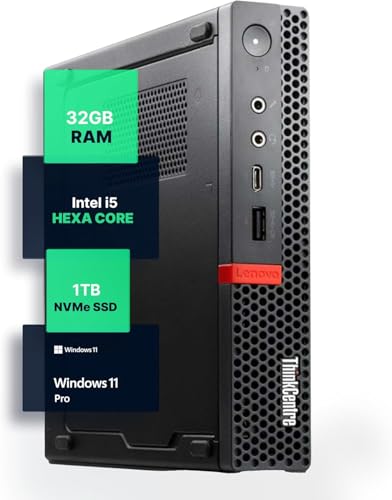
Lenovo ThinkCentre Intel i5 32GB Mini PC
Best for: Storage-heavy office tasks
- Storage
- 1TB SSD (what this guide is about)
- Processor
- Intel i5-8400T
- Installed RAM
- 32GB
- Storage Capacity
- 1TB NVMe
- Memory Type
- DDR4
- Operating System
- Windows 11 Pro
View on Amazon: Lenovo ThinkCentre Intel i5 32GB Mini PC Affiliate link
This Lenovo Mini PC combines a high-capacity 1TB NVMe SSD with 32GB of DDR4 RAM. It uses an Intel Core i5 processor to handle multitasking and file storage efficiently. The compact form factor fits small desks, while Windows 11 Pro provides a familiar interface. You get ample space for documents and applications without needing external drives.
Pros
- 1TB NVMe SSD for large file storage
- 32GB DDR4 RAM for smooth multitasking
- Intel Core i5 processor for reliable performance
- Windows 11 Pro pre-installed
- Compact micro form factor design
Cons
- Older 8th Gen Intel processor
- No dedicated graphics card
- Limited to integrated graphics performance
Good fit if
- You need large local storage for files
- You run multiple applications simultaneously
- You prefer Windows 11 Pro
Skip if
- You require high-end gaming graphics
- You need the latest processor generation
- You want a larger desktop tower
Verdict: Lenovo M720Q 32GB RAM 1TB SSD suits users who prioritize storage capacity and memory over cutting-edge processor speed. It is a practical solution for office work and media management.

Beelink Mini S12 Intel N95 Mini PC
Best for: Dual 4K display setups and desk space saving
- Storage
- 480GB SSD (what this guide is about)
- Processor
- Intel N95
- Installed RAM
- 8GB
- Storage Capacity
- 480GB
- Memory Type
- DDR4
- Ethernet Ports
- 1x 1000M LAN
View on Amazon: Beelink Mini S12 Intel N95 Mini PC Affiliate link
The Beelink Mini S12 uses an Intel N95 processor with 8GB of DDR4 RAM and a 480GB SSD. Its compact 115 x 102 x 41mm frame fits behind monitors. You get dual 4K HDMI outputs and Wi-Fi 5. This setup handles office tasks and media streaming without taking up desk space.
Pros
- Intel N95 4-core processor up to 3.4GHz
- 480GB SSD storage capacity
- Dual 4K HDMI 2.0 display outputs
- VESA mount bracket included for space saving
Cons
- Wi-Fi 5 (802.11ac) instead of newer Wi-Fi 6
- 1000M LAN port lacks 2.5G speed
- Bluetooth 4.2 is an older standard
Good fit if
- You need a small PC for office work or web browsing
- You want to mount the computer behind a monitor
- You require dual 4K display support
Skip if
- You require high-end gaming performance
- You need Wi-Fi 6 or Bluetooth 5.0
- You want a 2.5G Ethernet connection
Verdict: The Beelink Mini S12 N95 8GB 480GB SSD is a compact option for users who prioritize screen real estate and basic productivity over cutting-edge wireless standards.
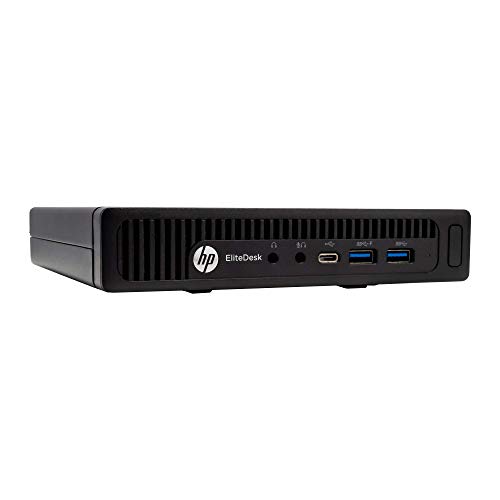
HP EliteDesk Desktop Mini i5 16GB RAM
Best for: Business users needing 16GB RAM
- Storage
- 240GB SSD (what this guide is about)
- Processor
- Intel Quad-Core i5-6500T
- Installed RAM
- 16GB
- Storage Capacity
- 240GB SSD
- Memory Type
- DDR4
- Ethernet Ports
- 1x RJ-45
View on Amazon: HP EliteDesk Desktop Mini i5 16GB RAM Affiliate link
This HP EliteDesk 800 G2 Mini delivers 16GB of DDR4 RAM and a 240GB SSD. The Intel Core i5-6500T processor provides reliable performance for business tasks. It runs Windows 11 Pro. The compact form factor fits easily on a desk. You get included USB keyboard and mouse. This setup suits users who need a complete, ready-to-use system for office work or basic computing.
Pros
- 16GB DDR4 RAM supports multitasking
- 240GB SSD offers fast storage
- Intel Core i5-6500T processor
- Includes USB keyboard and mouse
- Windows 11 Pro operating system
Cons
- 240GB SSD is smaller than competitors
- Only one display port available
- Lacks modern connectivity options
Good fit if
- You need a complete office setup
- You want 16GB of RAM
- You prefer Windows 11 Pro
Skip if
- You need large storage space
- You require multiple monitor support
- You want the latest processor
Verdict: HP EliteDesk 800 G2 Mini is a solid choice for business users needing 16GB RAM and a ready-to-use keyboard and mouse. It fits those who prioritize RAM over storage capacity.

Dell Optiplex Micro Core i7 Desktop
Best for: multitasking and office productivity
- Storage
- 512GB SSD (what this guide is about)
- Processor
- Intel Core i7-13700T
- Installed RAM
- 16GB
- Storage Capacity
- 512GB SSD
- Memory Type
- DDR4-3200
- Ethernet Ports
- Gigabit Ethernet
View on Amazon: Dell Optiplex Micro Core i7 Desktop Affiliate link
This Dell Optiplex 7010 Micro uses a 13th Gen Intel Core i7-13700T processor with 16 cores. It includes 16GB of DDR4-3200 RAM and a 512GB PCIe SSD. The system runs Windows 11 Pro and supports dual monitors via DisplayPort and HDMI. It connects through WiFi 6 and Bluetooth. The compact Micro form factor fits tight spaces. It suits users needing strong multi-threaded performance for office tasks or light creative work.
Pros
- 16-core Intel Core i7-13700T processor
- 512GB PCIe SSD storage
- 16GB DDR4-3200 RAM
- WiFi 6 connectivity
Cons
- HDMI 1.4b limits high-resolution display output
- Uses older DDR4 memory instead of DDR5
- Certified Refurbished condition
Good fit if
- You need high core counts for multitasking
- You require a compact Micro form factor
- You want Windows 11 Pro pre-installed
Skip if
- You require the latest DDR5 memory speed
- You need HDMI 2.1 for 4K 120Hz displays
- You prefer a brand-new unit over refurbished
Verdict: Dell Optiplex 7010 Micro i7-13700T delivers strong processing power in a small footprint. It fits buyers who prioritize CPU performance and storage capacity over the newest memory standards. The refurbished status offers value for budget-conscious professionals.

HP EliteDesk Mini Core i5 PC
Best for: compact business multitasking
- Storage
- 256GB SSD (what this guide is about)
- Processor
- Intel Core i5-8500T
- Installed RAM
- 16GB
- Storage Capacity
- 256GB
- Memory Type
- DDR4
- Operating System
- Windows 11 Pro
View on Amazon: HP EliteDesk Mini Core i5 PC Affiliate link
This HP EliteDesk 800 G4 Mini is a compact business computer featuring an Intel Core i5-8500T hexa-core processor and 16GB of DDR4 RAM. It includes a 256GB NVMe SSD for storage and runs Windows 11 Pro. The unit measures 7 by 7 by 1.25 inches and weighs 2.93 pounds. It suits users who need reliable multitasking in a small footprint.
Pros
- Intel Core i5-8500T hexa-core processor up to 3.5GHz
- 16GB DDR4 RAM for smooth multitasking
- 256GB NVMe SSD for fast storage
- Windows 11 Pro operating system
Cons
- 256GB storage is smaller than the 1TB option on this list
- Renewed condition may show minor cosmetic wear
- Older 8th Gen Intel processor compared to 13th Gen options
Good fit if
- You need a compact business PC with 16GB of RAM
- You require Windows 11 Pro for professional tools
- You want a small form factor that fits under a desk
Skip if
- You need more than 256GB of internal storage
- You prefer a brand-new unit without cosmetic wear
- You want the latest 13th Gen Intel processors
Verdict: HP EliteDesk 800 G4 Mini PC offers solid performance for business users who prioritize RAM and compact size over maximum storage capacity or the newest processor generation.
Specifications side by side
| Spec | Apple Mac mini M6 Desktop | Lenovo ThinkCentre Intel i5 32GB Mini PC | Beelink Mini S12 Intel N95 Mini PC | HP EliteDesk Desktop Mini i5 16GB RAM | Dell Optiplex Micro Core i7 Desktop | HP EliteDesk Mini Core i5 PC |
|---|---|---|---|---|---|---|
| Processor | M6 | Intel i5-8400T | Intel N95 | Intel Quad-Core i5-6500T | Intel Core i7-13700T | Intel Core i5-8500T |
| Installed RAM | 16GB | 32GB | 8GB | 16GB | 16GB | 16GB |
| Storage Capacity | 512GB | 1TB NVMe | 480GB | 240GB SSD | 512GB SSD | 256GB |
| Memory Type | Unified Memory | DDR4 | DDR4 | DDR4 | DDR4-3200 | DDR4 |
| Graphics | 12-core GPU | not stated | not stated | not stated | not stated | not stated |
| Ethernet Ports | 2.5Gb Ethernet | not stated | 1x 1000M LAN | 1x RJ-45 | Gigabit Ethernet | not stated |
| High-Speed Expansion | Thunderbolt 4 | not stated | not stated | not stated | not stated | not stated |
| Operating System | macOS | Windows 11 Pro | Win11 Home | Windows 10 Pro 64-bit | Windows 11 Pro | Windows 11 Pro |
| Memory | 16GB RAM | 32GB RAM | 8GB RAM | 16GB RAM | 16GB RAM | 16GB RAM |
| Storage | 512GB SSD | 1TB SSD | 480GB SSD | 240GB SSD | 512GB SSD | 256GB SSD |
| Use | not stated | Home, Office | Home | Business | not stated | Business |
| Networking | not stated | not stated | Gigabit Ethernet | not stated | WiFi 6 | not stated |
| Connectivity | not stated | not stated | WiFi 5 | not stated | not stated | not stated |
| Dimensions | 5 × 5 × 1.97 inches | 19 × 13.5 × 2.5 inches | not stated | 7.2 × 7.2 × 1.9 inches | 7.17 × 7.01 × 1.42 inches | 7 × 7 × 1.25 inches |
| Weight | 1.48 pounds | not stated | not stated | 6 pounds | 2.41 pounds | 2.93 pounds |
| Size | 16GB Unified Memory | 512GB SSD Storage | 328.125 cubic inches | MINI S12 8G/480G/N95 | 16 GB DDR4 RAM, 240 GB SSD | Intel i7 | 16GB | 512GB | not stated |
| Color | Silver | Black | Blue | Core I5 6500T/240G SSD | Black | Black |
| Model | MHQL4LL/A | M720Q | Beelink | 16GB RAM | Optiplex 7010 Micro | 800G4 |
Frequently asked questions
Does a 512GB SSD fit macOS and apps?
Yes, a 512GB SSD provides ample space for macOS and daily applications. The Apple Mac mini M6 uses this capacity to deliver efficient AI performance in a compact design. You get enough room for the operating system, essential software, and a moderate amount of personal files without needing external drives.
Is 1TB storage enough for office work?
A 1TB SSD is ideal for storage-heavy office tasks. The Lenovo ThinkCentre i5 model offers this capacity alongside 32GB RAM. This setup suits users who prioritize large storage and memory over cutting-edge processor speed. You can manage extensive media libraries and office documents comfortably on this drive.
Can a 480GB SSD handle dual monitors?
Yes, a 480GB SSD supports dual 4K display setups while saving desk space. The Beelink Mini S12 N95 includes this drive size. It is a compact option for users who prioritize screen real estate and basic productivity. You can run dual monitors and keep essential files locally without issue.
What is the benefit of 240GB SSD storage?
A 240GB SSD is the entry-level tier for Mini PCs. It holds the operating system and a few essential applications. The HP EliteDesk G2 Mini uses this capacity for business users needing 16GB RAM. It fits those who prioritize memory over storage capacity, leaving limited room for large files.
Does 512GB storage support multitasking well?
Yes, 512GB storage supports strong multitasking and office productivity. The Dell Optiplex 7010 Micro i7 pairs this SSD with 16GB RAM. It delivers strong processing power in a small footprint. You get enough space for Windows 11 Pro, applications, and data while maintaining high performance for daily business tasks.
Is 256GB enough for business use?
A 256GB SSD is suitable for compact business multitasking. The HP EliteDesk 800 G4 Mini offers this storage with 16GB RAM. It provides solid performance for business users who prioritize RAM and compact size. You can run Windows 11 and essential business apps, though maximum storage capacity is limited.